
Executive Summary
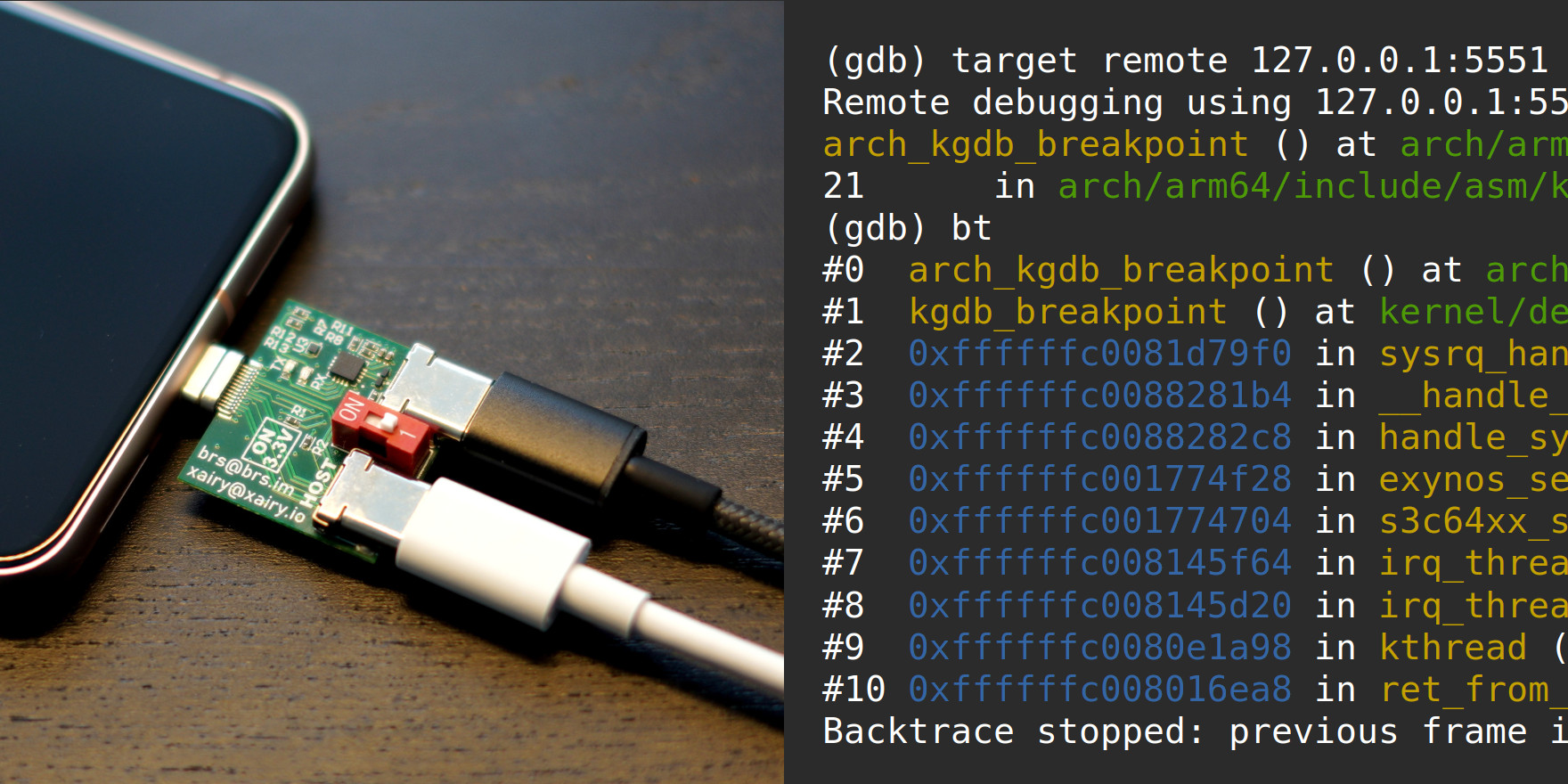
Debugging a running Linux kernel on a physical device is qualitatively different from debugging inside a virtual machine. Hypervisors expose built-in GDB stub interfaces; physical hardware does not. KGDB — the in-kernel GDB server — fills that gap, but wiring it up on a modern Android device like the Google Pixel 8 requires solving a chain of non-obvious problems: obtaining a serial UART connection via the USB Type-C SBU pins, building a custom kernel with the correct kleaf feature flags, suppressing two independent hardware watchdogs, and patching the Exynos TTY driver so that serial break sequences actually reach KGDB at runtime. Security researcher Andrey Konovalov documents the complete end-to-end process — from flashing a custom kernel with KGDB support to attaching GEF and issuing slub-dump and buddy-dump commands against live kernel state.
Beyond the mechanical setup, the article covers quality-of-life improvements that transform KGDB from a bare-minimum stub into a practical research tool: multiplexing the serial port with agent-proxy so kernel logs and the GDB remote protocol share a single cable, exposing ARM64 system registers (TTBR0_EL1, TCR_EL1, VBAR_EL1, and others) through a custom GDB target description so GEF can reconstruct page tables, and replacing the default stepi with a custom macro that temporarily masks interrupts to prevent the debugger from inadvertently stepping into pending IRQ handlers. The post distills months of hardware-debugging iteration into a reproducible procedure for anyone doing Linux or Android kernel security research on Pixel hardware.
Introduction
GDB Servers and KGDB
Debugging a Linux kernel with GDB requires two components: a GDB client running on the host machine and a GDB server embedded in or connected to the target. Virtual machine hypervisors implement the server side internally, making kernel debugging straightforward in VM environments. On physical hardware the situation is different: KGDB is a Linux kernel subsystem that implements a GDB server connected directly to the kernel through a serial interface. An Ethernet-based alternative (kgdboe) exists as an out-of-tree module but was not explored in this article.
Serial Connection to Pixel
Two approaches exist for obtaining a serial console on a Pixel device. The gadget-based approach uses the USB serial gadget driver over a standard USB cable; it requires no special hardware but completely occupies the device’s USB port, making it incompatible with ADB and with setups that need to present a malicious USB device to the target simultaneously. The UART-based approach accesses the serial UART through the USB Type-C connector’s SBU (Sideband Use) pins. It requires a specialized hardware adapter but leaves the normal USB data path free.
Required Hardware
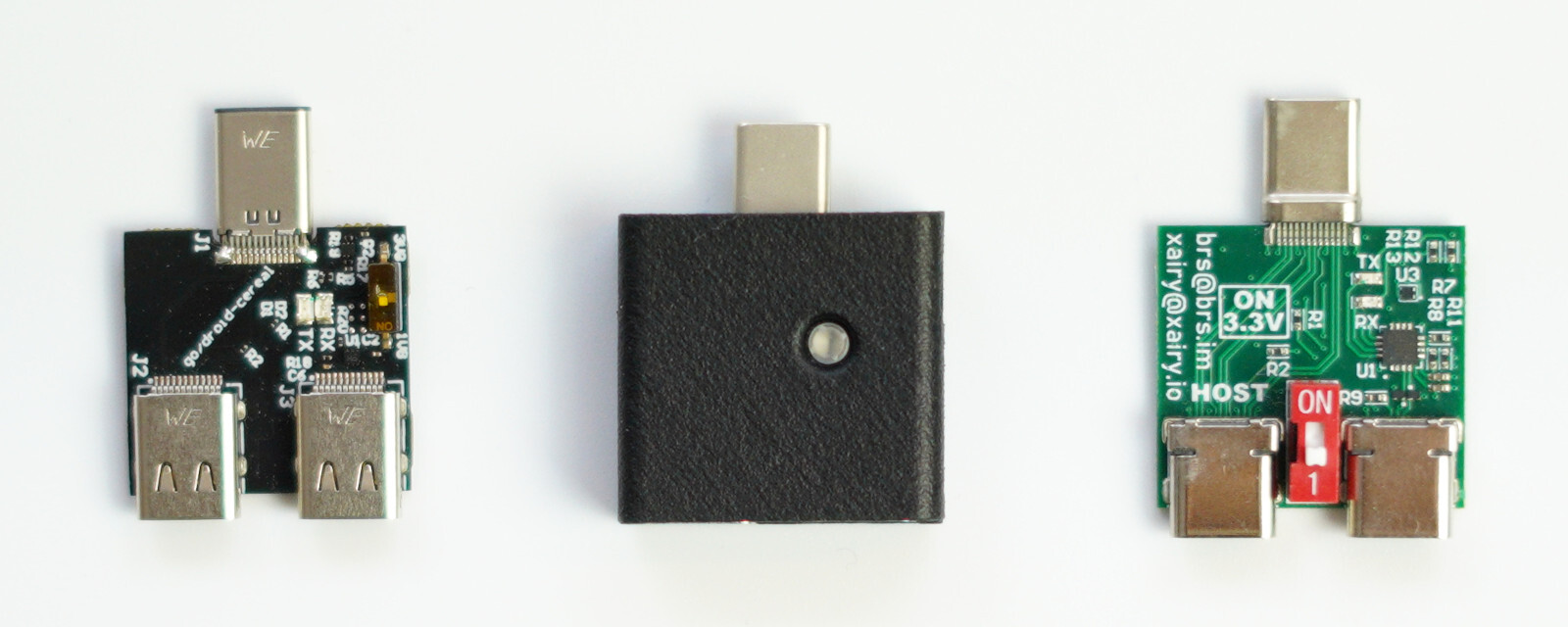
The UART-based approach requires a USB-Cereal adapter — a small board that exposes the Pixel’s UART pins over USB. Three variants are documented:
- Google’s open-source USB-Cereal: PCB design files are public, but fabricating the board involves navigating an FT232R chip shortage, a component-pad misalignment in the published design, and roughly a 50 % board failure rate caused by finicky USB Type-C connector soldering.
- 0xDA’s USB-Cereal (Crowd Supply): Commercially available, but some production runs use CP2102N chips which do not support sending serial break sequences to trigger KGDB entry unless specially wired per the datasheet.
- Custom fork: Developed by the author together with Sergey Korablin; not open-source and not for sale at the time of writing.
The original Google design with FT232R chips is the recommended choice when break-sequence support is needed, since FT232R reliably sends the required serial break signal.
Obtaining the Kernel Log and Building a Custom Kernel
Obtaining the Kernel Log via USB-Cereal
Complete prerequisites for streaming the kernel log from a Pixel 8 (codename shusky) running Android 15 or 16:
1. Enable USB debugging: Go to Settings → About phone, tap Build number seven times, then enable USB debugging under Settings → System → Developer options.
2. Optionally add a udev rule so the Pixel is accessible without root. Save the following to /etc/udev/rules.d/51-android.rules, then run sudo udevadm control --reload-rules:
SUBSYSTEM=="usb", ATTR{idVendor}=="18d1", MODE="0666", GROUP="plugdev"3. Install ADB and Fastboot from the SDK Platform-Tools page rather than a Linux package manager (distro packages are frequently outdated). Test connectivity with adb devices and authorize the device when prompted.
4. Enable OEM unlocking under Settings → System → Developer options → OEM unlocking (the device will wipe). Then unlock the bootloader and enable UART:
adb reboot bootloader
fastboot flashing unlock
# Choose "Unlock the bootloader" on device
fastboot oem uart enable
5. Connect USB-Cereal set to 1.8V mode (newer Pixels run at 1.8V; older devices use 3.3V). Insert LEDs-up and verify /dev/ttyUSB0 appears. Install and launch minicom:
sudo apt install minicom
sudo minicom -D /dev/ttyUSB0
Pixels use a baud rate of 115200. Reboot the device with fastboot reboot to see the kernel log stream. Exit minicom with Ctrl+a, x, Enter.
Building and Flashing a Custom Kernel
These steps were tested with Android 15 and retested with Android 16. Note that Google stopped publishing device tree files for Pixels in AOSP starting with Android 16, but building and flashing still works on the hardware.
1. Fetch the kernel source. The sync takes roughly one hour and requires approximately 80 GB of disk space:
sudo apt install repo
mkdir shusky-kernel && cd shusky-kernel
repo init -u https://android.googlesource.com/kernel/manifest \
	-b android-gs-shusky-6.1-android16
repo sync -c --no-tags
2. Optionally modify aosp/lib/stackdepot.c to add a custom log message, so you can confirm the custom kernel is actually running after flashing.
3. Build the kernel. --kernel_package=@//aosp builds from AOSP sources, --config=pixel_debug_common forces a full rebuild and enables debug features, and --lto=none disables Link Time Optimization to reduce build time. Output lands in out/shusky/dist/; budget around 100 GB for the build tree:
parameters="--kernel_package=@//aosp" ./build_shusky.sh \
	--config=pixel_debug_common --lto=none
4. Flash the custom kernel:
adb reboot bootloader
fastboot -w
fastboot oem disable-verification
fastboot flash boot out/shusky/dist/boot.img
fastboot flash dtbo out/shusky/dist/dtbo.img
fastboot flash vendor_kernel_boot out/shusky/dist/vendor_kernel_boot.img
fastboot reboot fastboot
fastboot flash vendor_dlkm out/shusky/dist/vendor_dlkm.img
fastboot flash system_dlkm out/shusky/dist/system_dlkm.img
fastboot reboot
Confirm the custom kernel loaded in the minicom log, and verify in an adb shell that uname -r shows a -dirty suffix.
Setting Up KGDB
Building the Kernel with KGDB Support
The Android build system exposes a --kgdb flag in build_shusky.sh, but using it as-is triggers build errors because the default implementation disables CONFIG_WATCHDOG while other components in the Pixel BSP still expect watchdog options to be present. The fix is to modify build/kernel/kleaf/impl/kgdb.bzl to remove the watchdog-disable line and add the missing HW console and serial KGDB console configs:
diff --git a/kleaf/impl/kgdb.bzl b/kleaf/impl/kgdb.bzl
index ec8dfd56..ac42f78d 100644
--- a/kleaf/impl/kgdb.bzl
+++ b/kleaf/impl/kgdb.bzl
@@ -83,12 +83,9 @@ def _get_scripts_config_args(ctx):
         configs = [
             _config.enable("GDB_SCRIPTS"),
             _config.enable("KGDB"),
-            _config.enable("KGDB_KDB"),
-            _config.disable("RANDOMIZE_BASE"),
-            _config.disable("STRICT_KERNEL_RWX"),
             _config.enable("VT"),
-            _config.disable("VT_CONSOLE"),
-            _config.disable("WATCHDOG"),
+            _config.enable("HW_CONSOLE"),
+            _config.enable("CONFIG_KGDB_SERIAL_CONSOLE"),
             _config.enable_if("KGDB_LOW_LEVEL_TRAP", condition = "X86"),
         ]
Build with the --kgdb flag:
parameters="--kernel_package=@//aosp" ./build_shusky.sh \
	--config=pixel_debug_common --kgdb --lto=none
The build produces GDB helper scripts at bazel-bin/private/devices/google/shusky/kernel/gdb_scripts.
Adjusting the Kernel Command Line
To identify the UART device node, compare kernel logs with and without fastboot oem uart enable. With UART enabled the early console parameters change from console=null to:
earlycon=exynos4210,mmio32,0x10870000 earlycon=exynos4210,0x10870000 console=ttySAC0,115200n8This reveals that the serial device is /dev/ttySAC0. Set the KGDB command-line parameters and disable KASLR:
fastboot oem cmdline set "kgdboc=ttySAC0,115200 nokaslr"The nokaslr parameter appears in the kernel log as an unknown option, but it still disables KASLR during early boot.
Breaking into KGDB
Breaking into KGDB via ADB
The standard SysRq-based KGDB entry path — writing g to /proc/sysrq-trigger — is blocked by two access-control layers by default: SELinux denies write access in the enforcing policy, and DAC prevents unprivileged processes from chmoding the file. Both are bypassed via kernel patches.
Disable SELinux enforcement by always returning false from the enforcing check:
// In security/selinux/include/security.h
static inline bool enforcing_enabled(struct selinux_state *state)
{
	return false;  // Was: READ_ONCE(state->enforcing)
}
Remove the ownership check from inode_owner_or_capable() by immediately returning true:
// In fs/inode.c
bool inode_owner_or_capable(struct user_namespace *mnt_userns,
                            struct inode *inode)
{
	return true;  // Added before capability checks
	// ... rest of function
}
After flashing the patched kernel, make /proc/sysrq-trigger world-writable and trigger a KGDB break:
chmod 0222 /proc/sysrq-trigger
echo g > /proc/sysrq-trigger
The kernel prints sysrq: DEBUG followed by KGDB: Entering KGDB and the device freezes. The hardware watchdog will reboot the device after approximately 20 seconds if GDB does not connect promptly.
Breaking into KGDB via Serial
Sending a SysRq-G sequence directly over the serial port is more convenient when the USB port needs to remain available. This requires an FT232R-based USB-Cereal and a driver patch: the exynos_tty driver only enters interrupt mode — which is necessary to recognize incoming break signals — when at least one userspace process has the port open. Without an active user, the driver operates in polling mode and silently drops break sequences. The fix forces the driver to open the UART internally at boot:
// In drivers/tty/serial/exynos_tty.c
static void try_force_uart_startup(struct work_struct *work);
static DECLARE_DELAYED_WORK(uart_startup_work, try_force_uart_startup);

static void try_force_uart_startup(struct work_struct *work)
{
	struct file *uart_file = filp_open("/dev/ttySAC0", O_RDWR | O_NONBLOCK, 0);

	if (IS_ERR(uart_file)) {
		pr_err("xairy: filp_open failed: %ld, retrying later\n", PTR_ERR(uart_file));
		schedule_delayed_work(&uart_startup_work, 5 * HZ);
		return;
	}

	filp_close(uart_file, NULL);
	pr_err("xairy: uart startup forced, breaks should now work\n");
}

static void schedule_force_uart_startup(void)
{
	schedule_delayed_work(&uart_startup_work, 5 * HZ);
}

// Called from exynos_serial_console_setup():
schedule_force_uart_startup();
Also add sysrq_always_enabled to the kernel command line:
fastboot oem cmdline set "kgdboc=ttySAC0,115200 nokaslr sysrq_always_enabled"With these changes, pressing Ctrl+a, f, g in minicom sends the SysRq-G break and the kernel prints KGDB: Entering KGDB.
Attaching GDB
Attaching GDB via Serial Device Directly
Once the kernel is waiting in the KGDB loop, exit minicom and connect GDB directly to the serial device:
gdb-multiarch -q out/shusky/dist/vmlinux
(gdb) set serial baud 115200
(gdb) target remote /dev/ttyUSB0
GDB responds with Remote debugging using /dev/ttyUSB0 and warns about missing source files, which is expected. The main limitation is that the kernel log is no longer visible while GDB holds the port, and Ctrl+c in GDB does not reliably deliver a serial break.
Attaching GDB via agent-proxy
agent-proxy is a utility from the Linux kernel project that splits one serial connection into two independent TCP streams: one for the raw kernel log and one for the GDB remote protocol. This allows simultaneous log viewing and debugging, and properly routes Ctrl+c as a serial break.
# Download and build agent-proxy
git clone https://git.kernel.org/pub/scm/utils/kernel/kgdb/agent-proxy.git/
cd agent-proxy && make

# Run agent-proxy splitting /dev/ttyUSB0 into two TCP ports
./agent-proxy 5550^5551 0 /dev/ttyUSB0,115200

# In another terminal, view kernel log
nc 127.0.0.1 5550

# In another terminal, break into KGDB
echo g > /proc/sysrq-trigger

# Connect GDB
gdb-multiarch -q out/shusky/dist/vmlinux
(gdb) target remote 127.0.0.1:5551
Occasionally the target remote command fails on the first attempt and needs to be rerun.
Dealing with Watchdogs
EHLD Watchdog
Continuing execution from a KGDB breakpoint triggers the EHLD (Early Hardlockup Detection) watchdog, implemented in private/google-modules/soc/gs/drivers/soc/google/debug/exynos-ehld.c. It fires when a CPU is observed halted for too long and produces a crash log mentioning exynos_ehld_hardlockup_handler and “Watchdog detected hard HANG on cpu 0 by EHLD.” Disable it via the kernel command line:
fastboot oem cmdline set "... ehld.noehld=1"APC Watchdog
A second watchdog — the APC (Application Processor Core) watchdog in private/google-modules/soc/gs/drivers/watchdog/s3c2410_wdt.c — resets the bootloader after approximately 10–20 seconds at a breakpoint. The bootloader reset message reads [PRE] reset message: APC Watchdog. Disable it in soft-noboot mode so it logs but does not reset:
fastboot oem cmdline set "... s3c2410_wdt.soft_noboot=1"The combined command line with both watchdogs disabled:
fastboot oem cmdline set \
	"kgdboc=ttySAC0,115200 nokaslr sysrq_always_enabled \
	 ehld.noehld=1 s3c2410_wdt.soft_noboot=1"
Final Tests and Fixes
Fixing Backtraces (PAC)
Stack traces shown by GDB contain corrupted values like 0xb9bdcd40088281b4. The cause is ARM64 Pointer Authentication (PAC): the hardware signs return addresses embedded in stack frames, and GDB sees the signed values rather than the real addresses. Disable PAC via the kernel command line:
fastboot oem cmdline set "... arm64.nopauth"The final complete command line incorporating all fixes:
fastboot oem cmdline set \
	"kgdboc=ttySAC0,115200 nokaslr sysrq_always_enabled \
	 ehld.noehld=1 s3c2410_wdt.soft_noboot=1 arm64.nopauth"
Loading Module Symbols
When breaking via the serial path, GDB lacks symbol information for the exynos_tty module. Use the Linux kernel GDB helper scripts to list loaded modules and load the corresponding .ko:
(gdb) source bazel-bin/private/devices/google/shusky/kernel/gdb_scripts/vmlinux-gdb.py
(gdb) lx-lsmod
...
0xffffffc001773000 exynos_tty             81920  1 exynos_drm
...
(gdb) add-symbol-file out/shusky/dist/exynos_tty.ko 0xffffffc001773000
On newer Python versions the GDB scripts may crash due to a missing raw-string prefix in a regex. Fix it in scripts/gdb/linux/symbols.py:
# Change from: ".*/{0}\.ko(?:.debug)?$"
# Change to:   r".*/{0}\.ko(?:.debug)?$"
Testing Breakpoints
Normal breakpoints work correctly. Conditional breakpoints function when the condition is frequently satisfied, but crash GDB with rarely-satisfied conditions after extended debugging sessions. Akashi Takahiro’s kernel patches reduce the crash frequency but do not eliminate it entirely. Example of a working conditional breakpoint:
(gdb) b *kmalloc_trace if $x2 > 0x100Fixing Single-Step (stepi)
The default stepi command often steps into pending interrupt handlers rather than the next instruction, because ARM64 processors deliver pending IRQs when the debugger resumes execution. The workaround is a custom GDB macro that masks interrupts before stepping and restores them afterward, accounting for instructions that modify the DAIF mask themselves:
define my-si
	set $instr = *(int *)$pc
	set $opsr = $cpsr
	set $cpsr = $cpsr | 0x80

	stepi

	# If interrupt was enabled before stepi, restore the I flag.
	if !($opsr & 0x80)
		# msr daifset, <val>
		if (($instr & 0xfffff0ff) == 0xd50340df)
			if !($instr & 0x200)
				set $cpsr = $cpsr & ~0x80
			end
		else
			# msr daif, <reg>
			if (($instr & 0xffffffe0) == 0xd51b4220)
				eval "set $val = $x%d", $instr & 0x1f
				if !($val & 0x80)
					set $cpsr = $cpsr & ~0x80
				end
			else
				set $cpsr = $cpsr & ~0x80
			end
		end
	end
end
Use my-si in place of si for reliable single-step behavior.
Fixing GEF
GEF (GDB Enhanced Features) crashes immediately on KGDB connection with a MemoryError: Cannot access memory at address .... Two structural limitations of KGDB cause this: it does not export ARM64 system registers (TTBR0_EL1, TCR_EL1, VBAR_EL1, etc.) that GEF needs to reconstruct the virtual memory map, and it provides no direct physical memory access.
Exposing system registers: Extend arch/arm64/include/asm/kgdb.h to add seven custom registers:
#define _XAIRY_REGS		7
#define DBG_MAX_REG_NUM		(_GP_REGS + _FP_REGS + _EXTRA_REGS + _XAIRY_REGS)
#define NUMREGBYTES	((_GP_REGS * 8) + (_FP_REGS * 16) + \
			(_EXTRA_REGS * 4) + (_XAIRY_REGS * 8))
Extend dbg_reg_def[] in arch/arm64/kernel/kgdb.c and update dbg_get_reg() to read the actual system registers at break time:
struct dbg_reg_def_t dbg_reg_def[DBG_MAX_REG_NUM] = {
	// ... existing regs ...
	{ "v31", 16, -1 },
	{ "fpsr", 4, -1 },
	{ "fpcr", 4, -1 },
	// Custom registers:
	{ "TTBR0_EL1", 8, -1 },
	{ "TTBR1_EL1", 8, -1 },
	{ "TCR_EL1", 8, -1 },
	{ "SCTLR_EL1", 8, -1 },
	{ "ID_AA64MMFR1_EL1", 8, -1 },
	{ "ID_AA64MMFR2_EL1", 8, -1 },
	{ "VBAR_EL1", 8, -1 },
};
Create a custom GDB target description xairy.xml that advertises the additional registers:
<?xml version="1.0"?>
<target version="1.0" xmlns:xi="http://www.w3.org/2001/XInclude">
  <architecture>aarch64</architecture>
  <xi:include href="aarch64-core.xml"/>
  <xi:include href="aarch64-fpu.xml"/>
  <feature name="com.xairy.kgdb.custom">
    <reg name="TTBR0_EL1" bitsize="64" type="uint64"/>
    <reg name="TTBR1_EL1" bitsize="64" type="uint64"/>
    <reg name="TCR_EL1" bitsize="64" type="uint64"/>
    <reg name="SCTLR_EL1" bitsize="64" type="uint64"/>
    <reg name="ID_AA64MMFR1_EL1" bitsize="64" type="uint64"/>
    <reg name="ID_AA64MMFR2_EL1" bitsize="64" type="uint64"/>
    <reg name="VBAR_EL1" bitsize="64" type="uint64"/>
  </feature>
</target>
Physical memory access: Linux maintains a physmap — a direct linear mapping of all physical memory within the kernel virtual address space. GEF can use this to translate physical addresses to virtual ones and read them through normal memory access. GEF maintainer bata24 implemented physmap-aware memory access in GEF.
GEF session setup:
gef> set tdesc filename xairy.xml
gef> gef config gef.kgdb_force True
gef> gef config gef.kgdb_system_registers True
gef> target remote ...
gef> slub-dump kmalloc-1k -vv --cpu 8 -n
gef> buddy-dump --MIGRATE_PCPTYPES 4 -M -o 0 -z Normal -m 0 --cpu 8 -n
Note: these features require GEF at or before commit 1b72f3c4b97; a more recent refactor has not yet been tested against KGDB.
Key Takeaways
- KGDB is the standard in-kernel GDB server for physical hardware; on Pixel 8 it communicates through a serial UART, requiring a USB-Cereal adapter with FT232R chips (not CP2102N) for reliable break-sequence support.
- The Android kleaf build system requires patching (
kgdb.bzl) to enable KGDB without breaking the Pixel BSP watchdog configuration. - Two independent hardware watchdogs (EHLD and APC) reset the device during debugging sessions; disable them with
ehld.noehld=1ands3c2410_wdt.soft_noboot=1. - ARM64 Pointer Authentication corrupts GDB backtraces; disable PAC globally with
arm64.nopauthon the kernel command line. - The Exynos TTY driver must be patched to open the UART port at boot (forcing interrupt mode) so serial break sequences are recognized and can trigger KGDB entry.
- agent-proxy multiplexes a single serial port into two TCP streams, enabling simultaneous kernel log viewing and GDB debugging with proper
Ctrl+cbreak support. - GEF requires a custom GDB target description (XML) exposing ARM64 system registers, plus physmap-aware memory access, to function over KGDB without crashing.
Defensive Recommendations
- Protect UART physical access: The USB-Cereal attack surface is purely physical; enforce physical security controls and monitor for unauthorized Type-C breakout cables on Pixel devices used in sensitive environments.
- Keep OEM unlock disabled in production: Unlocking the bootloader is a prerequisite for flashing custom kernels; enforce MDM or Android Work Profile policies that block OEM unlock on managed devices.
- Never ship debug kernels to end users: Builds with
CONFIG_KGDBenabled, SELinux patched to always returnfalse, or KASLR disabled represent serious security regressions and must stay inside internal lab environments. - Monitor kernel command-line flags in device-integrity attestation: Parameters like
nokaslr,kgdboc=,ehld.noehld=1, andarm64.nopauthare indicators of a device prepared for kernel debugging and should trigger alerts. - Treat PAC as a probabilistic mitigation, not a hard boundary: The
arm64.nopauthboot parameter disables PAC globally, demonstrating it is not an unconditional security guarantee on this hardware. - Include GDB helper scripts in kernel build-quality checks: The raw-string regex bug in
scripts/gdb/linux/symbols.pyshows that upstream tooling can silently break on newer Python interpreters; add GDB script validation to your CI. - Lock toolchain versions in lab environments: Both GEF and agent-proxy have narrow compatibility windows against specific kernel and GDB versions; pin versions alongside the kernel to maintain a reproducible debugging environment.
Conclusion
Getting KGDB working on a Pixel 8 is a multi-layered effort that touches the hardware adapter layer, the Android build system, the kernel driver, the bootloader command line, and the GDB toolchain simultaneously. The end result — a GDB session with full symbol resolution, working breakpoints, interrupt-safe stepping, and GEF’s memory inspection commands running against live kernel state on a physical Android device — is a powerful platform for both vulnerability research and kernel exploit development on modern ARM64 hardware.
Original text: “Debugging the Pixel 8 kernel via KGDB” by Andrey Konovalov at xairy.io.