Original text by APT attack Red Team
GhostWolf Lab’s article explores the weaponization of the old SYLK spreadsheet format as a stealthy macro delivery container. SYLK was created in the 1980s for text-based spreadsheet exchange, but modern Microsoft Office still maps .slk files to Excel. The key risk is not a new vulnerability, but inherited trust: SYLK files may avoid some protections normally associated with Office documents, and they are rarely treated as dangerous by mail clients, browsers, or security gateways. The article shows that while VBA macros cannot be embedded in SYLK, Excel 4.0/XLM macros can be manually encoded into the file structure and triggered through auto-open behavior after the user enables content. It also warns that Excel detects SYLK by file content, so a malicious SYLK document may be disguised with a .csv extension. The post highlights cross-platform concerns, weak antivirus coverage, and an AMSI blind spot because many macro-scanning paths focus on VBA rather than XLM. The defensive takeaway is to treat .slk and suspicious “CSV” files as executable-risk documents, monitor legacy macro behavior, block risky extensions, and improve detection for XLM-based abuse.
Abstract
In the ongoing arms race between attackers and defenders, the latest attack techniques are always closely monitored, while the oldest legitimate functions often become perfect hiding places. The SYLK file format is a recent example of this pattern.
SYLK was created in the 1980s, designed to allow for the reliable exchange of spreadsheet data between different applications using only displayable ANSI characters. Its file extension .slk is still mapped to Excel by default in Microsoft Office, covering versions 2010, 2013, 2016, and later. Previously, security researcher Matt Nelson demonstrated a method combining DDE (Dynamic Data Exchange) attacks with SYLK, and this method has been used in several real malware samples.
This article further reveals a more serious dimension of abuse: SYLK can directly carry Excel 4.0/XLM macros, a capability that is almost entirely unrecognized and undetected in the current security ecosystem. With VBA macros already under heavy surveillance, the resurgence of XLM macros in .slk containers provides attackers with a new, low-risk, high-success-rate channel.
SYLK Privileges
Before delving into any attack surface analysis, it’s crucial to understand SYLK’s unique position within the network defense system—it doesn’t gain privileges through vulnerabilities, but rather through “default trust.”
Protected View Sandbox Exemption
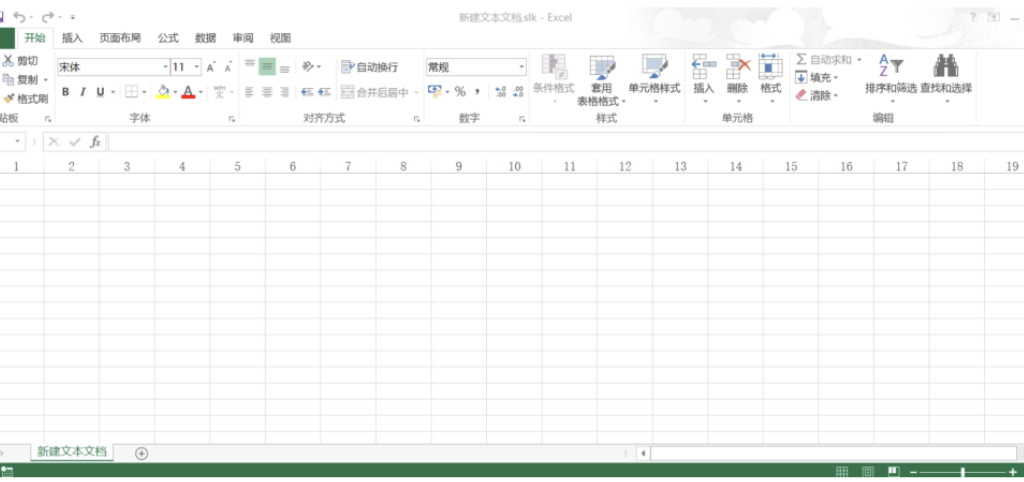
When files are downloaded from the internet or untrusted sources, Windows attaches a “Mark of the Web” (MotW) tag. For regular Office files, this triggers the Protected View sandbox, preventing macro execution and displaying prominent security warnings. However, the SYLK file format is not subject to this sandbox. When a user double-clicks to open a malicious .slk file, they will not see the Protected View barrier.
Email and Browser Gateway Passports
In a typical attack chain, .slk files are almost never intercepted during transmission:
MS Outlook’s blocked attachment list: Does not include .slk.
OWA (Outlook Web Access)’s default blocked extension list: Also does not include .slk.
Chrome’s Safe Browser file type blacklist: Does not mark .slk as a dangerous file type.
This means that a weaponized .slk file can appear in the target user’s inbox with a very high delivery rate via email attachment or cloud storage link.
Embedding XLM Macros
VBA cannot embed SYLK, but Excel 4.0/XLM macros can be natively embedded by manually constructing record rows. Excel’s “Save As” function actively strips macro code, but manually written .slk files bypass this stripping process, and Excel directly executes the embedded macro instructions during parsing.
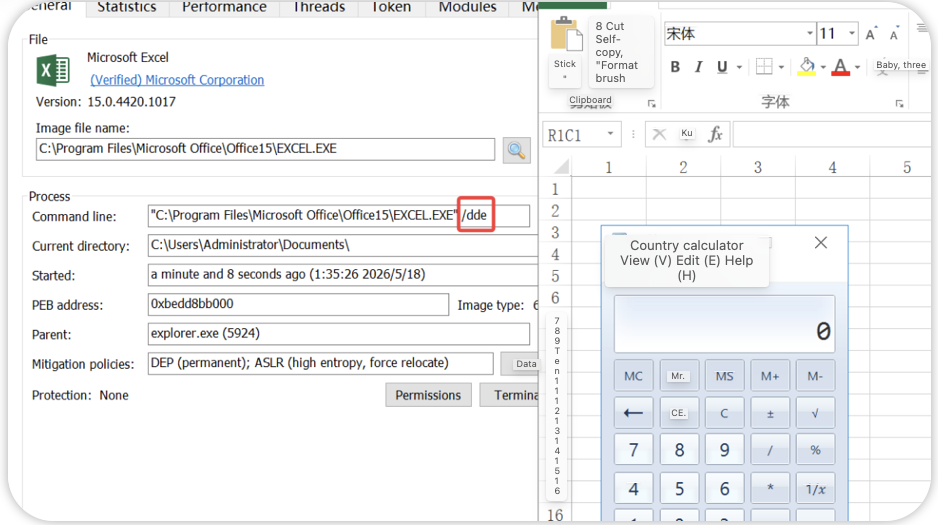
Enter the following in Notepad, save it as poc.slk, double-click to open, and the calculator will pop up after enabling the content:
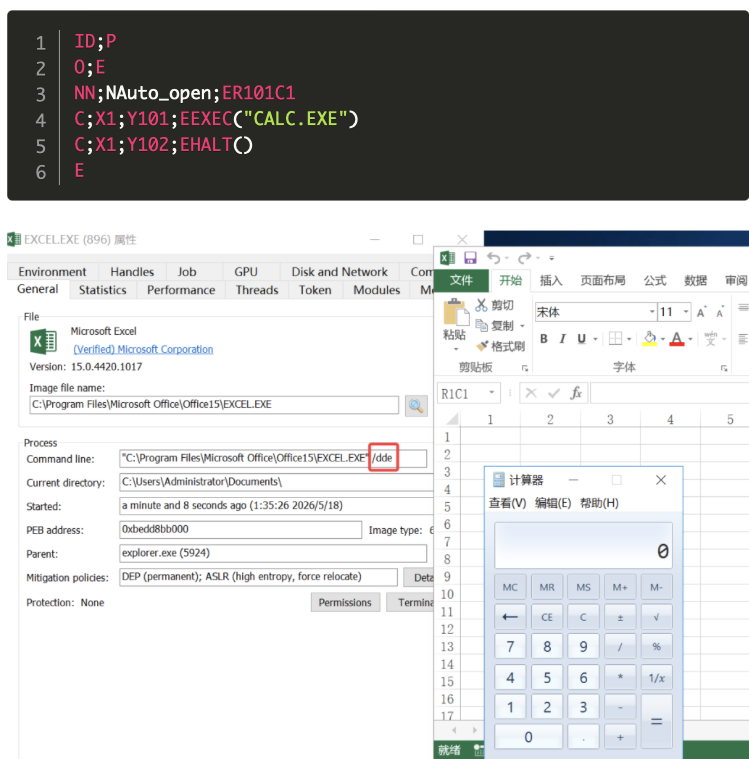
Line-by-line analysis:
Row Record Meaning
1 ID;P Declares the file type as SYLK. ID identifies the file format, and P indicates that this is a production SYLK file.
2 O;E
O Record sets global options. The E sub-record indicates “This document contains macros,” equivalent to the “Enable Macros” flag in an Excel workbook.
3 NN;NAuto_open;ER101C1
NN Defines a named range. Names the cell in row 101, column 1 (R101C1) as Auto_open—an automatic execution event trigger for XLM macros (equivalent to Auto_Open in VBA).
4 C;X1;Y101;EEXEC(“CALC.EXE”)
C Defines the cell content. X1;Y101 positions the cell in column 1, row 101; the E record defines the expression value of this cell as the XLM macro function EXEC(“CALC.EXE”).
5
C;X1;Y102;EHALT()
Same as above, executes HALT() in cell 102 of column 1, terminating macro execution.
6
E End-of-file character.
Key Constraint:
Each line in a SYLK file must not exceed 260 characters; otherwise, Excel will refuse to parse the line.
Auto_open is a language-dependent trigger name. In the Dutch version, it must be written as Auto_openen, and in German, it is Auto_öffnen. Cross-language attacks require adaptation to localized names.
Of course, EXEC() and HALT() are only the tip of the iceberg when it comes to XLM macros. In this course, we will learn how to inject shellcode using SYLK:
Dynamically downloading and executing remote payloads (URLDownloadToFile + EXEC)
Injecting shellcode into other processes (by calling Windows APIs)
Complete file system operations (writing, deleting, encoding/decoding)
Anti-analysis and anti-sandbox detection (detecting mouse movement, recent file list, etc. via GET.WORKSPACE)
SYLK, as a transport container for XLM macros, directly inherits all the above attack capabilities. It can be said that a weaponized .slk file is equivalent to a lightweight malicious document carrying complete backdoor logic, and almost every step in its attack chain enjoys defense exemptions.
Attack Surface Expansion
Disguised as CSV
An extremely dangerous characteristic of SYLK files is that Excel recognizes the SYLK format based on the file content rather than the extension. The specific rule is as follows: If a file begins with ID;P, even if the extension is .csv (comma-separated values), Excel will recognize it as a SYLK file and display a dialog box to the user: “This file is in SYLK format, but the extension is CSV. Do you want to open it in SYLK format?”
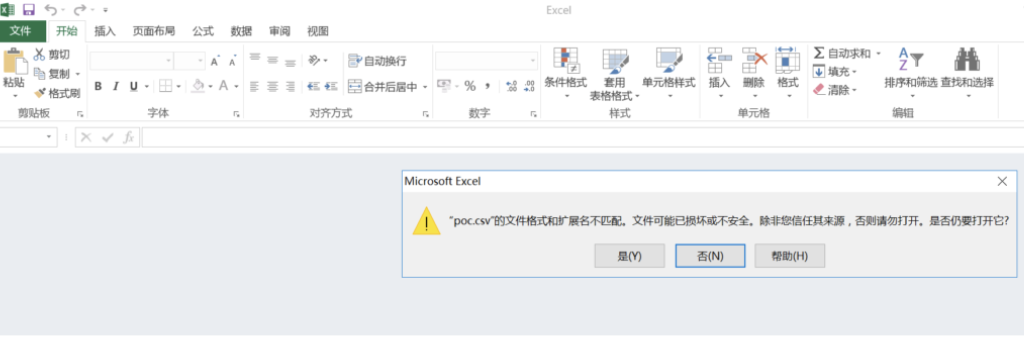
If the user clicks “Yes,” the file will be parsed in SYLK format, and the embedded XLM macros will be activated. An attacker can therefore:
Create a malicious file starting with ID;P.
Set its extension to .csv, disguising it as a seemingly harmless table such as “Customer List” or “Transaction Records.”
Exploit the user’s low vigilance towards CSV files (generally assuming CSV is plain text and unlikely to contain macros), combined with misleading text in the dialog box, to achieve macro execution.
Cross-platform coverage: Microsoft Office for Mac also natively supports SYLK format and XLM macros. The .slk extension maps to the Mac version of Excel by default, and the Auto_open trigger works perfectly in the Mac environment.
More seriously, Microsoft Office for Mac 2011 contains a publicly disclosed but never patched vulnerability: when opening a SYLK file containing macros, no security warnings are displayed, and the macros execute silently. Since this version has ended its lifecycle support, this vulnerability is a permanent zero-day vulnerability. Despite the declining user base of Office 2011, researchers still occasionally find Mac users running this outdated version, creating a persistent and unpatched attack path.
Avoidance: Theoretically, SYLK files are entirely based on ANSI text, with a simple structure, and security products should be able to scan them efficiently. However, actual tests show that most mainstream antivirus software lags significantly behind in detecting malicious .slk files using signatures and heuristic rules. Possible reasons include:
The wild sample size of .slk files is relatively small, failing to attract sufficient attention.
The syntax of XLM macros is completely different from VBA, rendering VBA-based detection engines ineffective.
SYLK files can be highly obfuscated (through redundant records, comments, whitespace padding, etc.), further reducing the effectiveness of heuristic engines.
The Anti-Malware Scanning Interface (AMSI) is a crucial built-in defense layer in Windows, providing antivirus software with visibility into dynamic content such as scripts, macros, and PowerShell. However, AMSI is completely ineffective in SYLK attack scenarios—this is because AMSI’s macro scanning engine only interacts with VBA (Visual Basic for Applications) and cannot understand the syntax and execution context of Excel 4.0/XLM macros.
When a malicious macro is executed via XLM instructions in a SYLK file, AMSI sees no suspicious activity whatsoever. This constitutes a complete AMSI blind spot attack chain, from file transfer to code execution.
Conclusion: The abuse of the SYLK file format is not a zero-day vulnerability, but rather an exploitation of “historical trust.” It only requires an old, poorly scrutinized file format, plus a macro execution engine systematically ignored by existing security tools.
Our course also covers 100+ other file formats that can be exploited.