
Original text by Alisa Belousova
Microsoft’s Copilot+ PCs introduce a new class of AI-powered features in Windows. One of the most controversial among them is Recall — a system designed to remember everything you do on your computer and make it searchable.
At first glance, Recall looks like a productivity breakthrough. But from a security perspective, it creates a new category of sensitive data that could become extremely valuable to attackers. Tools like TotalRecall demonstrate how easily this information can be extracted.
What Is Windows Recall?
Microsoft Recall
Recall is a Copilot+ feature that continuously records the user’s screen activity and builds a searchable timeline of past actions.
Instead of relying on traditional application history, Recall periodically captures snapshots of the screen, processes them using AI, and stores structured information about what appeared on the display.
This allows users to search for things like:
- documents they opened earlier
- websites they visited
- messages they read
- images or charts that appeared on screen
For example, a user could search for:
“the PDF about Kerberos I saw yesterday”
Recall will display the exact moment in time when that document appeared on the screen.
The feature relies heavily on the Neural Processing Unit (NPU) available in Copilot+ devices to process screen data locally.
Microsoft states that all Recall data is stored locally on the device, not in the cloud.
However, this design creates a large local archive of sensitive information.
How Windows Recall Stores Its Data
Under the hood, Recall maintains a structured local database containing the extracted information from screen snapshots.
The system uses a SQLite-based database combined with vector embeddings for semantic search.
In simplified form, the storage pipeline looks like this:
Screen Snapshot
        ↓
AI Processing (OCR + object detection)
        ↓
Text + metadata extraction
        ↓
Vector embedding generation
        ↓
Stored in SQLite database
The stored data includes:
- OCR text extracted from screenshots
- application names and window titles
- timestamps
- contextual metadata
- semantic embeddings used for AI search
The vector embeddings allow Recall to perform semantic search, meaning the system can locate information even if the user’s search query doesn’t exactly match the original text.
For example:
Search query:
"document about kerberos authentication"

Recall may return:
"Active Directory Kerberos Ticket Granting Ticket overview"
This works because both texts share similar vector representations.
Where the Recall Database Is Located
Recall data is stored locally within the user profile directory.
Typical locations include:
C:\Users\<username>\AppData\Local\Microsoft\Recall\Inside this directory Windows stores several components:
- SQLite databases containing extracted text and metadata
- screenshot artifacts
- vector embedding data
- indexing files used for fast semantic search
Because this database contains processed representations of everything shown on screen, it effectively becomes a timeline of user activity.
Examples of data that may appear inside the Recall dataset:
- passwords briefly visible on screen
- terminal commands
- internal dashboards
- email messages
- corporate documents
- chat conversations
- API keys and tokens
Even if the original screenshots are filtered or deleted, the extracted OCR text and embeddings may still remain.
TotalRecall: Extracting Recall Data
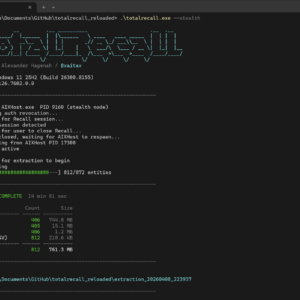
The TotalRecall project demonstrates how Recall data can be accessed and analyzed directly.
TotalRecall is a research tool designed to extract and visualize the contents of the Recall database.
Instead of using the Windows Recall interface, it directly parses the underlying data structures.
The tool allows researchers to retrieve:
- OCR text extracted from screenshots
- application activity history
- timestamps of user interactions
- contextual information about windows and processes
- semantic search data
In practice, this means the tool can reconstruct a timeline of everything the user saw on their screen.
Examples of information that can be recovered include:
- visited websites
- terminal commands
- documents viewed earlier
- chat messages
- internal systems accessed in a browser
From a digital forensics perspective, this is extremely powerful.
From a security perspective, it is potentially dangerous.
Security Implications
The combination of Windows Recall + tools like TotalRecall raises several important security questions.
Recall effectively creates a continuous log of user activity.
If an attacker gains access to the system, they could retrieve:
- sensitive documents
- authentication tokens
- internal dashboards
- corporate communications
- developer secrets
Even short-lived information that was only visible on screen for a few seconds could be captured.
This creates a new type of attack surface:
Compromised endpoint
        ↓
Access Recall database
        ↓
Extract historical screen data
        ↓
Harvest credentials and sensitive information
Unlike traditional credential harvesting techniques, Recall allows attackers to look back in time.
Instead of waiting for secrets to appear, they can search through the user’s entire activity history.
Conclusion
Windows Recall represents a fascinating step toward AI-assisted computing. The ability to search your entire desktop history could significantly improve productivity.
However, it also creates a massive repository of sensitive information on every Copilot+ device.
The TotalRecall project highlights how this data can be extracted and analyzed outside of Microsoft’s intended interface.
For security professionals, this means Recall must now be considered part of the endpoint threat model.
Organizations adopting Copilot+ systems should carefully evaluate:
- whether Recall should be enabled at all
- how its data is protected
- how endpoint security tools monitor access to Recall databases
Because in practice, Recall is not just a memory feature.