
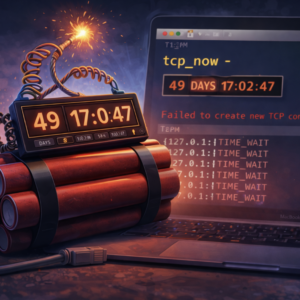
The article describes the discovery of a subtle but critical flaw in the macOS TCP networking stack caused by a timer overflow in Apple’s XNU kernel. Engineers investigating unexplained networking failures found that Macs running continuously for 49 days, 17 hours, 2 minutes, and 47 seconds begin to malfunction: new TCP connections stop working even though existing ones remain active and the system appears healthy. The root cause is an internal TCP timestamp counter called tcp_now, implemented as a 32-bit unsigned integer that tracks milliseconds since boot. When the counter reaches its maximum value (4,294,967,295 ms), it overflows and freezes due to a logic bug in the kernel’s monotonicity check. As a result, TIME_WAIT TCP connections are never garbage-collected. Over time these stale connections accumulate, eventually exhausting the system’s ephemeral TCP ports, preventing new connections from being created. The bug primarily affects long-running systems such as servers or monitoring nodes. Until Apple releases a fix, the only reliable mitigation is periodically rebooting the machine before the 49.7-day threshold.
Preface
Every Mac has a hidden expiration date. After exactly 49 days, 17 hours, 2 minutes, and 47 seconds of continuous uptime, a 32-bit unsigned integer overflow in Apple’s XNU kernel freezes the internal TCP timestamp clock. Once frozen, TIME_WAIT connections never expire, ephemeral ports slowly exhaust, and eventually no new TCP connections can be established at all. ICMP (ping) keeps working. Everything else dies. The only fix most people know is a reboot. We discovered this bug on our iMessage service monitoring fleet, reproduced it live on two machines, and traced the root cause to a single comparison in the XNU kernel source. This is the full story.
Background: The Concepts You Need
Before diving into the bug, here is a quick primer on the building blocks. If you already know what TIME_WAIT, MSL, and integer overflow mean, skip ahead to the discovery.
What Is TIME_WAIT?
When a TCP connection closes, it does not disappear immediately. The side that initiates the close enters a state called TIME_WAIT. In this state, the connection is functionally dead — no data flows — but the operating system keeps it around for a short period.
Why? Two reasons:
- Late packets. The internet does not guarantee packet ordering. A packet from the old connection could still be bouncing through routers. If the OS immediately reused the same source port and destination for a new connection, that stale packet could be misinterpreted as belonging to the new connection, corrupting data.
- Reliable close. TCP’s four-way close handshake ends with a final ACK from the active closer. If that ACK gets lost, the other side will retransmit its FIN. The TIME_WAIT state keeps the connection alive long enough to handle that retransmission.
The duration of TIME_WAIT is defined as 2 × MSL (Maximum Segment Lifetime). Once it expires, the OS reclaims the connection’s resources — including the ephemeral port it occupied.
What Is MSL?
MSL (Maximum Segment Lifetime) is the longest time a TCP segment is expected to survive in the network before being discarded. RFC 793, the original TCP specification from 1981, set MSL at 2 minutes, making TIME_WAIT = 4 minutes.
In practice, modern operating systems use much shorter values:
| Operating System | MSL | TIME_WAIT duration (2×MSL) |
|---|---|---|
| Linux | 30 seconds | 60 seconds |
| macOS / XNU | 15 seconds | 30 seconds |
| Windows | 120 seconds (default) | 240 seconds |
On macOS, a closed TCP connection sits in TIME_WAIT for just 30 seconds before being cleaned up. That is fast — unless the cleanup mechanism itself breaks.
What Is a 32-Bit Unsigned Integer Wraparound?
A uint32_t in C can hold values from 0 to 4,294,967,295 (2³² − 1). When you try to store a value larger than that maximum, the number wraps around back to zero — like an odometer rolling over from 999,999 to 000,000.
This is not a crash or an error. It is defined behavior for unsigned integers in C. The danger is when code assumes the counter only goes up and does not account for the wraparound.
Famous examples of this class of bug:
- Windows 95/98’s 49.7-day crash — The kernel’s 32-bit millisecond tick counter overflowed, and internal components did not handle the wraparound, causing the system to hang.
- The Year 2038 Problem (Y2K38) — Unix systems that store time as a signed 32-bit integer (seconds since 1970) will overflow on January 19, 2038.
- GPS Week Number Rollover — GPS uses a 10-bit week counter that overflows every 1,024 weeks (~19.7 years), causing some receivers to report incorrect dates.
- Pac-Man’s kill screen at level 256 — An 8-bit integer overflow made the game unwinnable past level 255.
The bug we found in macOS belongs to this exact family. The XNU kernel stores its TCP timestamp as a uint32_t counting milliseconds since boot. 2³² milliseconds = 49 days, 17 hours, 2 minutes, and 47.296 seconds. After that, the counter wraps back to zero. What happens next is the subject of this post.
The Discovery: A Ticking Clock We Didn’t Know About
At Photon, we run a fleet of Mac machines to monitor our iMessage service health. Multiple iMessage services run on these machines, and a central controller continuously sends ping/pong messages to measure round-trip latency. These machines run 24/7 and are only rebooted when absolutely necessary.
On March 30, 2026 — exactly 49.7 days after the last round of reboots — several machines in the fleet silently stopped establishing new TCP connections. Pings still worked. Existing connections stayed alive. But anything that needed a new TCP socket simply failed. The pattern was unmistakable: the XNU kernel’s TCP timestamp counter had wrapped, and a monotonicity guard prevented it from updating past the overflow. The internal TCP clock froze. TIME_WAIT connections stopped expiring. Ephemeral ports began piling up with no way to reclaim them. The only recovery was a reboot — which just restarted the 49.7-day countdown.
After rebooting the affected machines to restore service, we checked the rest of the fleet and noticed that a few more machines were approaching the same threshold — they would hit 49.7 days of uptime on April 1.
We decided to run a live experiment.
The boot times of two machines (Machine A and Machine B):

Both had been running for 49 days and 16 hours. The precise overflow timestamps:

We had just over half an hour to set up the experiment. Enough.
Experiment Design: Manufacturing TCP Connections Across the Overflow Window
The hypothesis was simple: if the 49.7-day overflow truly breaks TIME_WAIT garbage collection, then creating a burst of short-lived TCP connections before and after the overflow should produce a clear behavioral difference:
- Before overflow: TIME_WAIT connections expire normally after ~30 seconds
- After overflow: TIME_WAIT connections stick around forever
We wrote a test script with three phases:
- Monitoring phase (overflow − 35 min to overflow − 5 min): Record TIME_WAIT count every 10 seconds. No active connection creation.
- Blast phase (overflow − 5 min to overflow + 5 min): Every 2 seconds, initiate ~15 short TCP connections to public endpoints (
8.8.8.8:443,1.1.1.1:443, etc.) — TLS handshake then immediate close. - Observation phase: Stop creating connections. Continue monitoring TIME_WAIT counts.
The script was deployed to both machines at 07:58 and started simultaneously.
Results
Before Overflow: Normal TIME_WAIT Recycling
During the monitoring phase, both machines showed completely healthy TIME_WAIT behavior:
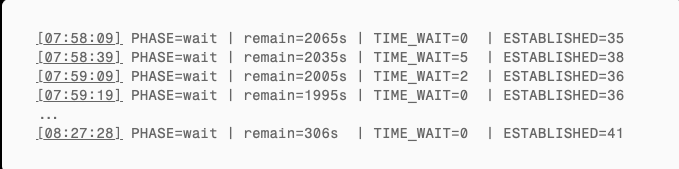
The system’s own background connections produced a handful of TIME_WAIT entries (0–13) that expired within seconds. This is normal behavior.
Blast Phase: Dynamic Equilibrium Before Overflow
At 08:27:38, the script began creating connections. Within 30 seconds, TIME_WAIT climbed from 0 to ~200 and then plateaued:
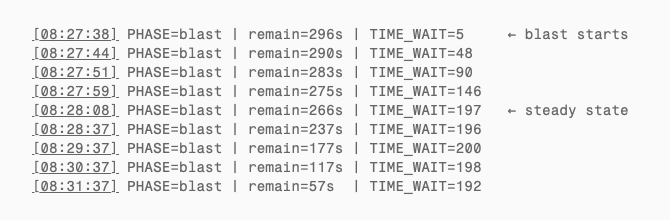
The script created ~15 connections every 2 seconds (~450/min), but each TIME_WAIT only lived 30 seconds before being reclaimed. After ~30 seconds the system reached dynamic equilibrium: TIME_WAIT steady at ~200 (theoretical: 7.5/sec × 30s = 225; slightly lower due to some failed connections). Creation and recycling in perfect balance. This is the healthy pre-overflow state.
The Overflow Moment
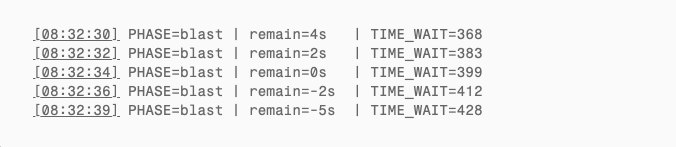
The script estimated the overflow countdown using wall-clock time (date +%s), but the kernel’s microuptime() is a monotonic clock. Over 49.7 days, the two diverge by tens of seconds. From the full log, TIME_WAIT actually began its monotonic climb around remain≈28s (~08:32:06) — that is when recycling truly stopped. Connections kept being created at the same rate, but not a single one was reclaimed.
After Overflow: TIME_WAIT Only Goes Up
Machine A’s script stopped ~50 seconds after overflow. Machine B continued for 5 more minutes. Both machines’ monitoring ran until manually terminated.
Machine B’s critical data (script stopped creating connections at 08:37:55):
| Time | Since script stop | TIME_WAIT | Note |
|---|---|---|---|
| 08:37:55 | 0s | 2,828 | Script ends |
| 08:39:19 | +84s | 2,837 | Should be zero — actually increased |
| 08:40:46 | +171s | 2,852 | Nearly 3 min later, still growing |
This is the decisive evidence. macOS TIME_WAIT timeout is 2 × MSL = 30 seconds. 84 seconds after the script stopped, all 2,828 TIME_WAIT connections should have expired to zero. Instead, not a single one was reclaimed — the count actually increased slightly as the system’s own normal connections also began piling up.
Machine A (script already stopped, checked manually at 08:50):
| Checkpoint | TIME_WAIT |
|---|---|
| Pre-overflow (08:27) | 0 |
| At overflow (08:32:34) | 399 |
| Overflow + 50s (08:33:23) | 723 |
| Overflow + 18 min (08:50:24) | 871 |
Monotonically increasing. No recovery.
Side-by-Side: Before vs. After
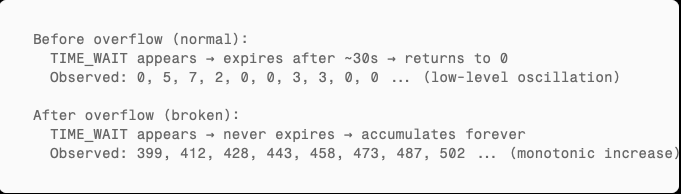
Root Cause: 32-Bit Overflow of tcp_now in the XNU Kernel
Now for the part that explains exactly why this happens, line by line in Apple’s kernel source code.
Bug Classification
This is a 32-bit unsigned integer timer wraparound bug in the TCP subsystem, specifically a TCP timestamp counter overflow. The counter in question, tcp_now, is the kernel’s internal TCP clock. When it stops ticking, every timer in the TCP stack that depends on it stops working.
tcp_now: A Counter Destined to Overflow
In the XNU kernel (Apple’s open-source project apple-oss-distributions/xnu), tcp_now is defined in bsd/netinet/tcp_var.h:

A 32-bit unsigned integer, incremented at millisecond granularity, tracking time since boot. Every time the TCP subsystem needs a current timestamp, it calls calculate_tcp_clock() (based on XNU kernel source analysis):
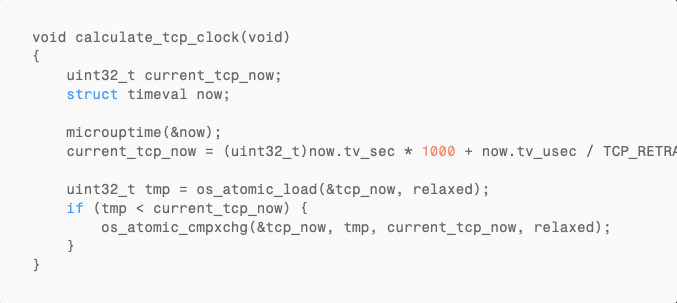
The critical line: (uint32_t)now.tv_sec * 1000. After the system has been running for 4,294,967 seconds (~49.7 days), this multiplication exceeds uint32_t‘s maximum value of 4,294,967,295. The cast to uint32_t causes unsigned integer wraparound — the value jumps from near the maximum back down to near zero.
Why tcp_now Freezes After Overflow
The bug lives in this guard:

The intent is straightforward: “tcp_now must only move forward.” Under normal operation, this works perfectly. But at the moment of overflow:

tmp (the old value, near the maximum) is greater than current_tcp_now (the new value, wrapped near zero). The cmpxchg never executes. tcp_now is locked at its pre-overflow value and never updates again.
The kernel’s TCP clock has stopped.
How TIME_WAIT Expiry Checks Fail
When a TCP connection enters TIME_WAIT, the kernel records an absolute expiration time. In bsd/netinet/tcp_timer.c, the function add_to_time_wait_locked() does this:
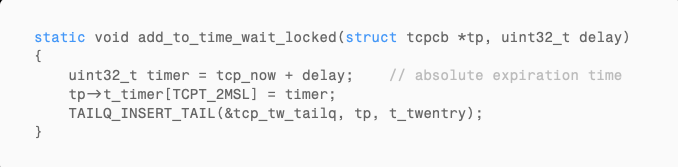
Here, delay = 2 * TCPTV_MSL = 2 * 15000 = 30000 milliseconds.
The kernel’s garbage collector tcp_gc() periodically scans the TIME_WAIT queue:
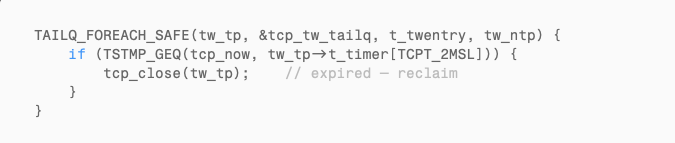
TSTMP_GEQ is defined in bsd/netinet/tcp_seq.h:

This is a standard signed modular arithmetic comparison, designed to handle sequence number wraparound. Normally (with tcp_now advancing), when tcp_now >= timer it returns true and the connection gets cleaned up.
But with tcp_now frozen:
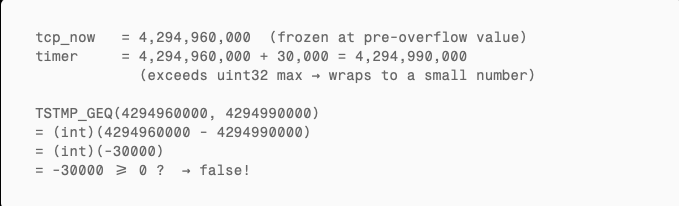
Always false. The connection never gets reclaimed.
The Complete Causal Chain
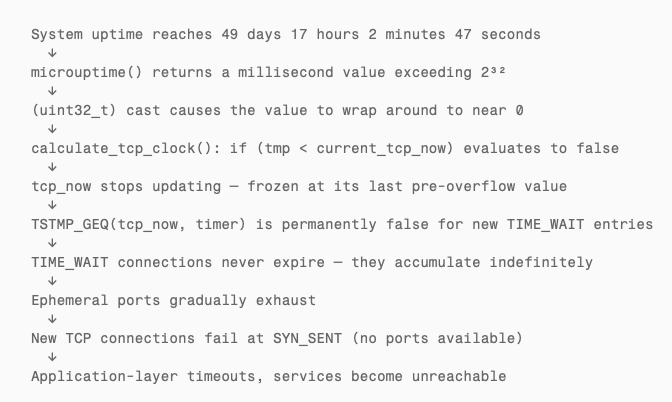
The Cascade: From Frozen Clock to Total TCP Failure
What makes this bug especially dangerous is that it does not fail loudly. There is no kernel panic, no error log, no crash report. The system looks perfectly healthy — until TCP stops working.
Here is the progression:
- Minutes after overflow: TIME_WAIT connections stop expiring. If your workload creates few short-lived connections, you might not notice for hours.
- Hours after overflow: TIME_WAIT accumulates into the thousands. Ephemeral ports (typically 16,384 ports in the range 49152–65535 on macOS) start running out.
- Port exhaustion: New outbound connections cannot bind to a local port. They enter SYN_SENT and fail. Existing long-lived connections (ESTABLISHED) continue working because they already have ports.
- System load spikes: The kernel spends increasing CPU time scanning a massive TIME_WAIT queue that never shrinks. Applications retry failed connections, creating more load.
- TCP is effectively dead. Only ICMP (ping) still works because it does not use TCP ports or the TCP timer subsystem.
The only recovery is a reboot — which resets tcp_now to zero and restarts the 49.7-day countdown.
Corroborating Evidence
RFC 7323 and Timestamp Wraparound
RFC 7323 (TCP Extensions for High Performance), Section 5.4 (Timestamp Clock), notes that a 32-bit timestamp at 1ms granularity has its sign bit wrap after approximately 24.8 days (2³¹ ms). Section 5.5 (Outdated Timestamps) requires PAWS implementations to invalidate cached timestamps after connections idle for more than 24 days.
Our observed overflow period is 49.7 days — the full unsigned wraparound (2³² ms), exactly twice the RFC’s sign-bit wraparound period. The RFC discusses wraparound of the remote TCP timestamp option in transit, not the local kernel’s own timer variable — the latter is an XNU implementation defect.
Consistent Symptom Reports in the Community
Multiple reports on Apple’s community forums and open-source projects describe symptoms that match this bug precisely:
- Apple Community #250867747: macOS Catalina — “New TCP connections can not establish.” New connections enter SYN_SENT then immediately close. Existing connections unaffected. Only a reboot fixes it.
- Apple Community #252991075: “Mac Pro TCP/IP stops working.” TCP completely fails, but ping (ICMP) works normally.
- Podman issue #12495: “podman machine network connectivity stalls after some uptime” on macOS 12. The VM running on macOS shows outbound TCP failure with ICMP still functional, occurring after running for multiple weeks.
The common pattern: TCP fails but ICMP works, only a reboot fixes it, happens after weeks of uptime. This matches the predicted symptoms of tcp_now overflow exactly. ICMP does not use the TCP timer subsystem and is unaffected.
Impact Assessment: Who Is Affected?
Any macOS system that meets both conditions:
- Continuous uptime exceeding 49 days 17 hours without a reboot
- Any TCP network activity (essentially every networked Mac)
Most consumer Macs reboot within 49 days due to system updates, so typical users rarely trigger this. But these scenarios are high-risk:
- Long-running server fleets (like our iMessage monitoring setup)
- macOS CI/CD build servers (Jenkins, GitHub Actions self-hosted runners)
- Mac Pro workstations (long-running renders, compiles, or simulations)
- Colocated Macs (remotely managed, rarely rebooted)
- Mac mini clusters used as build farms or test infrastructure
Reproduction Guide
Want to verify this bug on your own macOS machine? Four steps.
Step 1: Calculate Your Overflow Time

Step 2: Monitor TIME_WAIT Before and After Overflow
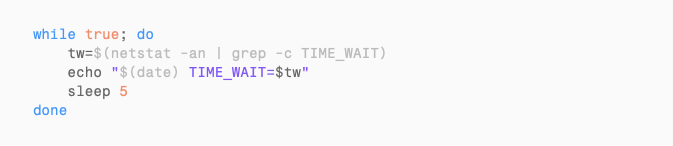
Step 3: Generate Connections During the Overflow Window

Step 4: Observe
Stop generating connections and wait 2 minutes. If the TIME_WAIT count does not drop, the bug has been reproduced.
9.5 Hours Later: Watching the System Die
We did not reboot after the overflow. Instead, we let both machines continue running to observe the natural progression of the bug.
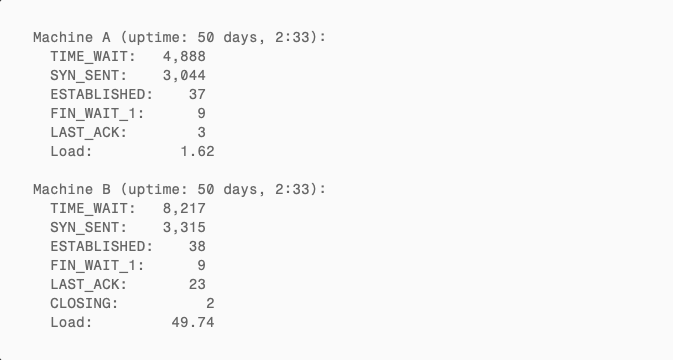
System State at Overflow + 9.5 Hours (18:02 PDT)
TIME_WAIT Accumulation Curve
| Time | Since overflow | Machine A TIME_WAIT | Machine B TIME_WAIT |
|---|---|---|---|
| 08:32 | 0 min | 399 | 801 |
| 08:37 | +5 min | ~723 (script stopped) | 2,828 |
| 08:50 | +18 min | 871 | 2,939 |
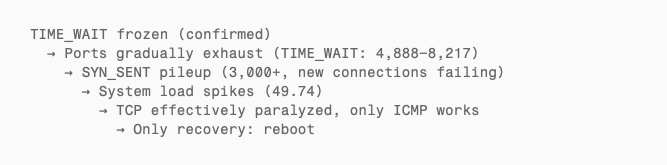
| 18:02 | +9.5 hours | 4,888 | 8,217 |
Not a single TIME_WAIT connection was ever reclaimed. Only up, never down.
SYN_SENT Pileup: New Connections Failing
9.5 hours post-overflow, both machines had accumulated 3,000+ SYN_SENT connections — the classic signal of TCP port exhaustion:
- Outbound connections stuck at the first step of the three-way handshake, unable to acquire a port
- Ephemeral ports consumed by undying TIME_WAIT entries
- Only 37–38 ESTABLISHED connections remaining — existing long-lived connections still worked, but creating new ones was nearly impossible
- Machine B’s load average spiked to 49.74 as the kernel burned CPU scanning the ever-growing TIME_WAIT queue
This matches the predicted progression exactly:
Conclusion
One 32-bit integer. One seemingly harmless if (tmp < current_tcp_now) guard. 49.7 days of patience. That is all it takes to build a time bomb.
This class of bug is insidious because it evades every layer of defense. It will not be caught in development testing — who runs a test for 50 days? It will not be flagged in code review — the logic looks perfectly reasonable. It can even be misdiagnosed in production as a network issue or hardware failure. Only when you happen to be staring at a machine that has been running for 49 days, and you happen to know that 2³² milliseconds equals 49.7 days, does the puzzle come together.
We reproduced this on multiple servers in our fleet. The evidence is conclusive: before the overflow, TIME_WAIT expires normally (0–13 entries); after the overflow, TIME_WAIT never reclaims (accumulating to thousands). tcp_now froze. The kernel’s TCP clock stopped. Everything else looked fine — until the ports ran out.
If you manage long-running macOS machines, remember this number: 49 days, 17 hours, 2 minutes, 47 seconds.
We are actively working on a fix that is better than rebooting — a targeted workaround that addresses the frozen tcp_now without requiring a full system restart. Until then, schedule your reboots before the clock runs out.