
The article explains how NTLM relay attacks can be used to gain unauthorized access in Active Directory environments when certain security protections are not enforced. The author demonstrates a practical attack scenario where an attacker captures NTLM authentication from a Windows system and relays it to another service such as LDAP running on a domain controller. By using tools like ntlmrelayx from the Impacket framework, the attacker can forward the authentication request to a target server and perform actions as the authenticated account.
In the presented lab setup, the attacker forces a victim machine to authenticate to the attacker’s host using coercion techniques such as PetitPotam. The captured authentication is then relayed to the domain controller over LDAPS. Because Active Directory allows domain users to create a limited number of computer accounts by default, the attacker can add a new machine account and configure delegation rights. With these privileges, the attacker can impersonate a high-privileged user and request Kerberos service tickets to access another system.
The article concludes with mitigation recommendations, emphasizing that enabling LDAP signing and LDAP channel binding prevents such relay attacks because the domain controller rejects relayed authentication attempts.
NTLM-Relaying is a common attack vector in internal networks. In this blog post, we will show that even in 2026, there are still many scenarios where NTLM-Relaying can be successfully performed, and we will provide some insights into how to mitigate these risks.
Disclaimer: This post is for educational and defensive security purposes only. Never use the information and techniques shown here for anything illegal or on systems where you don’t have explicit permission. Doing so could break the law and get you into serious trouble.
Introduction
NTLM relay attacks have been a well-known threat in Windows environments for decades. Despite Microsoft’s efforts to deprecate the protocol1, we still use NTLM-Relaying for lateral movement in our penetration tests and red team engagements.
This blog post is based on a talk we gave at the second Security Ninjas Austria2 meetup and summarizes the content of that presentation.
LM vs NTLM vs Net-NTLM vs NTLMv1 vs NTLMv2
In this blog post, the term NTLM is used a lot. Most people link this term to the NT hash we all like to dump from the LSASS process or SAM database. However, this post is about the NTLM protocol (NTLMv1 and NTLMv2), and how attackers can abuse it. In a later blog post, we will give a primer about the different hash types of Windows environments and why everything is called NTLM.
What is NTLM Authentication?
NTLM is a challenge-response authentication protocol: instead of sending a password over the network, a client proves knowledge of the password by responding to a random challenge from the server. The client encrypts the challenge using the hash of its password and sends it to the server. The server forwards the response to the Domain Controller for verification. If it can decrypt it, the authentication is successful.
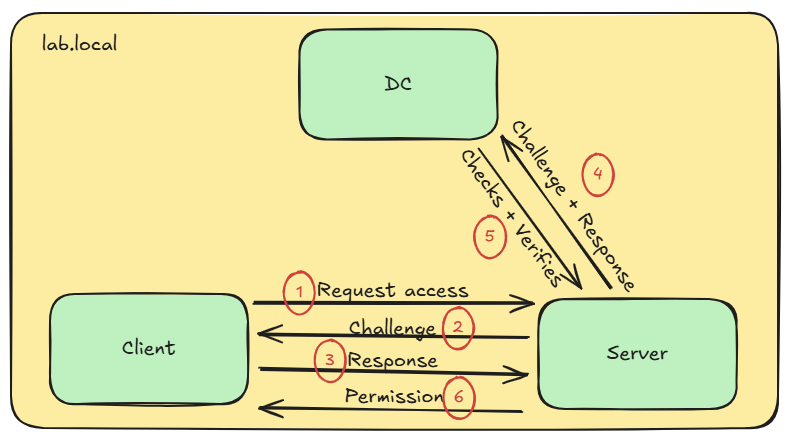
There are two common versions of the NTLM protocol: The outdated version 1 and the current version 2. Theoretically, there is also a version between those two, but we will not discuss it in this post. So how did the NTLM protocol evolve over time, and what is the difference between these versions?
NTLMv1
The initial version of the NTLM protocol (also sometimes called Net-NTLM) was released in 1993 and is based on the DES algorithm. As previously stated, the protocol uses a challenge and response mechanism. The response generation can be illustrated as follows:
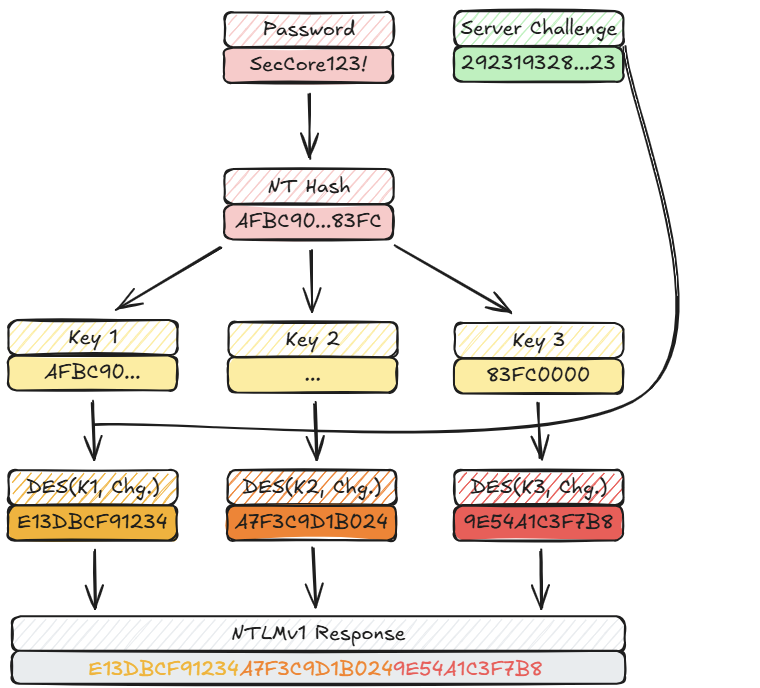
As can be seen, the initial version of the NTLM protocol uses no salt to generate the output of the DES encryption. This means that it is prone to bruteforce or rainbow table attacks, if the server challenge can be spoofed. During a penetration test this can easily be achieved using tools like Responder3:
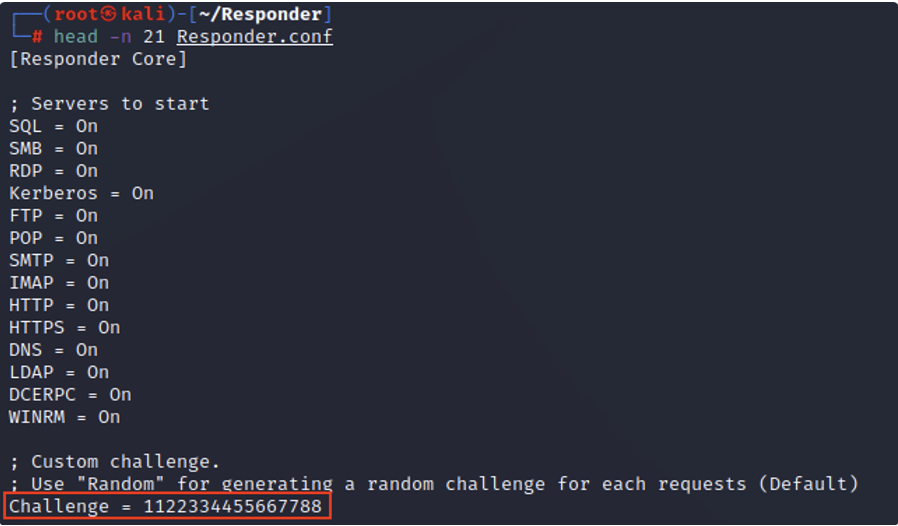
Predefining the server challenge changes the previous sketch to the following:
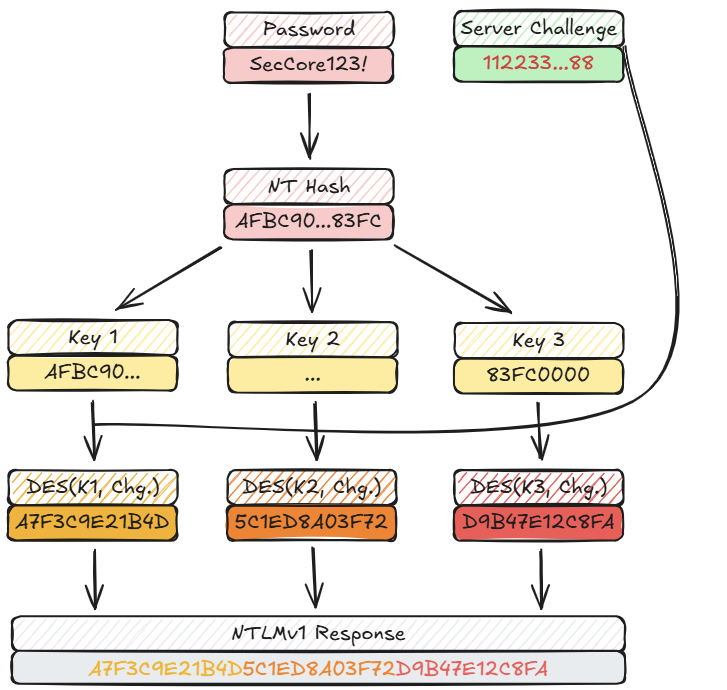
With this setup, NTLMv1 hashes can easily be cracked using online services or on an offline device using rainbow tables4. Also, as can be seen in the images above, if a Net-NTLM hash (either version 1 or version 2) is cracked, it reveals the NT hash of the captured account, not the plain text password. These hashes can be used in Pass-the-Hash attacks. So, what changed in the current version of the NTLM protocol?
NTLMv2
A few years after the initial release, the updated (and current) version of the protocol was released. In this release, the DES encryption got replaced with HMAC-MD5, called the NT One Way Function v25 (NTOWF v2):
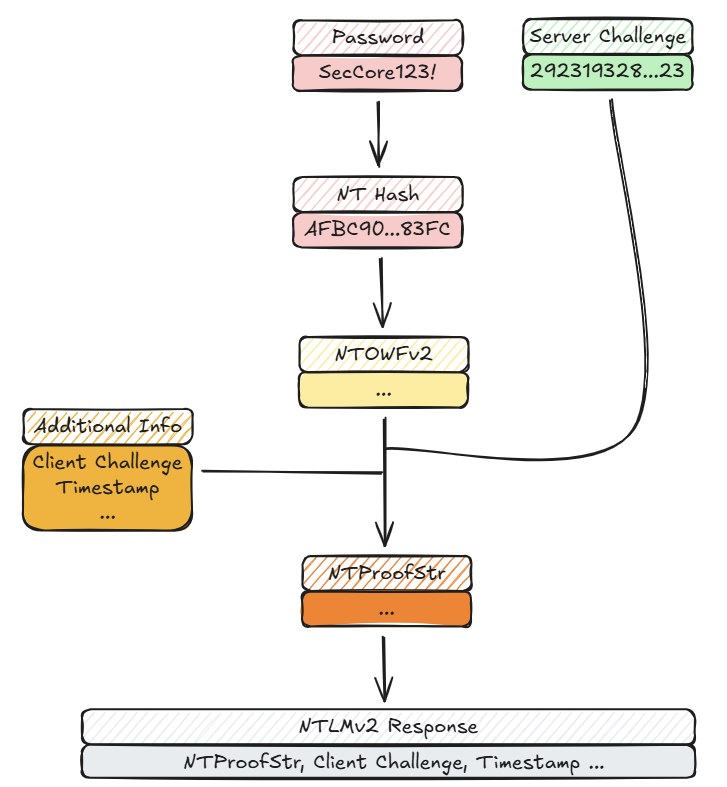
The HMAC output of the NTOWFv2 is then used to generate another HMAC (NTProofStr). This time, additional metadata is included during the encryption, which acts as a salt. Because of that, NTLMv2 hashes cannot be cracked using rainbow tables.
LM Compatibility Level
A registry entry called the LM Compatibility Level6 controls which NTLM version the underlying system supports:
| Value | Client NTLMv1 | Client NTLMv2 | Server NTLMv1 | Server NTLMv2 |
|---|---|---|---|---|
| 0 | Enabled | Disabled | Enabled | Enabled |
| 1 | Enabled | Disabled | Enabled | Enabled |
| 2 | Enabled | Disabled | Enabled | Enabled |
| 3 | Disabled | Disabled | Enabled | Enabled |
| 4 | Disabled | Enabled | Enabled | Enabled |
| 5 | Disabled | Enabled | Disabled | Enabled |
Since Windows Vista, the value of 3 is the default setting for Windows operating systems. Because the Domain Controllers validate the NTLM challenge and response packages, they are the ones deciding if NTLMv1 is accepted or not. With this in mind, an LM Compatibility Level of 5 on domain controllers is hardly ever seen. Besides cracking the NTLM messages, there is a much easier method in exploiting the protocol: Relaying the messages.
What is NTLM Relay?
In an NTLM-Relay attack, an attacker positions themselves between the client and a legitimate server. This can be achieved through various techniques, that we will discuss later.
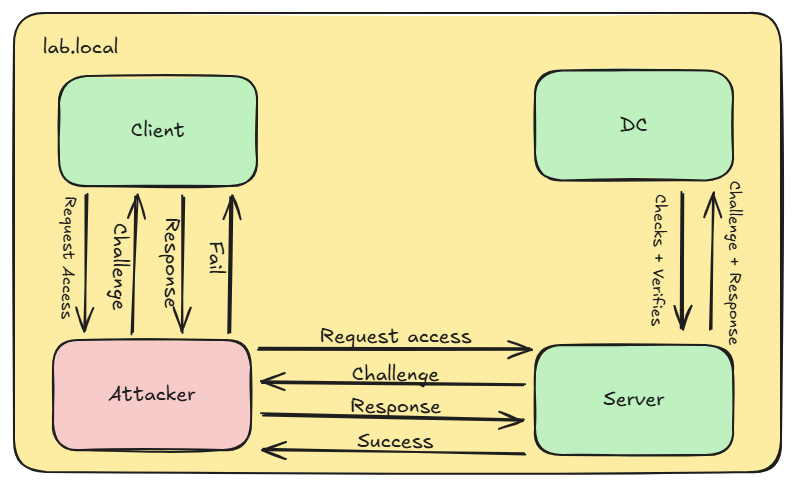
The attacker can now capture authentication attempts from the client and relay them to another server. This works, because NTLM does not bind the authentication to a specific server. The attacker can choose any server and protocol that accepts NTLM authentication and relay the captured credentials there. Common target protocols are SMB, LDAP, MSSQL and HTTP, which we’ll come back to later.
Triggering NTLM Authentication
In order to achieve this, an attacker first needs to get NTLM authentications from clients. There are many ways to trigger or capture such authentications, including classic ones:
LLMNR and NetBIOS Name Service (NBNS) Poisoning
LLMNR and NBNS are legacy name resolution protocols that work with broadcast/multicast requests. An attacker can listen for these requests and answer them without any authentication, thus impersonating the target server. More information about this can be found in our SecCore Essential about network protocols.
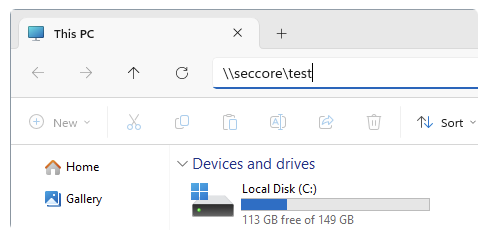
When a non-existent system gets queried, for example through the Windows Explorer, the system underneath is broadcasting the computername within the network, which an attacker can exploit with tools like Responder3:

IPv6 Spoofing (MITM6)
Modern Windows systems prefer IPv6 over the older IPv4 protocol. This means that, whenever a Windows system boots, it will check if a IPv6-DHCP server is registered in the network. On most internal networks, IPv6 is not used and hence no IPv6-DHCP server can be found. More about different attack scenarios on the IPv6 protocol can also be read in our SecCore Essential about network protocols. A missing IPv6-DHCP server can be exploited with tools like MITM67 to assign an IPv6 address to systems requesting one:
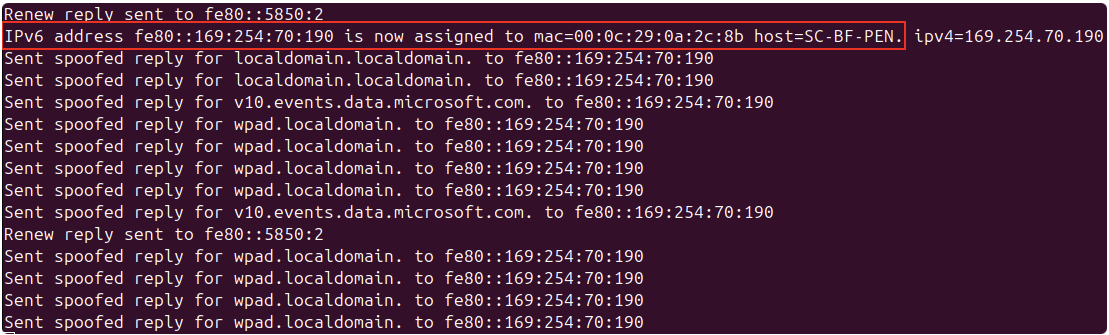
Since an attacker-controlled system is now registered as the DHCP server, the victim system can be spoofed to leak NTLM authentication requests.
Other Standard Methods
There are various other methods to trigger NTLM authentication. For example one common way is to abuse different RPC endpoints with tools like Coercer8. Another method involves manipulating DNS entries of the environment. By default, any user is allowed to set new DNS entries in the Windows Active Directory. This can be achieved with tools like PowerMad9, Dnstool.py10 or Windows default tooling:
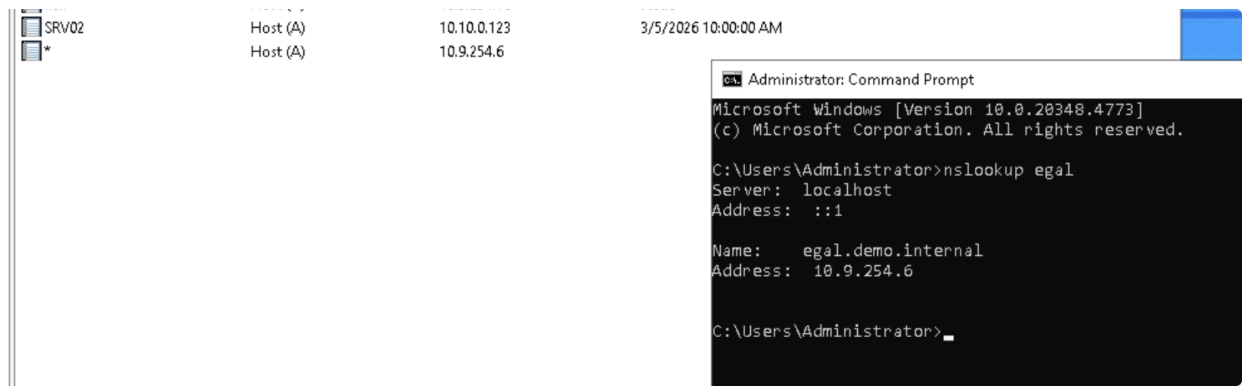
Note on the image above: Setting a Wildcard DNS entry is discouraged and was only done for demo purposes.
Where to Relay to?
As previously stated, the incoming NTLM authentication requests can be relayed to multiple different targets, including multiple different protocols. These include the following:
Server Message Block (SMB)
The Server Message Block protocol is a network file sharing protocol primarily used by networked Microsoft Windows systems. SMB is mainly used to read and write files, it is however also possible to execute commands via this protocol, given sufficient access rights.
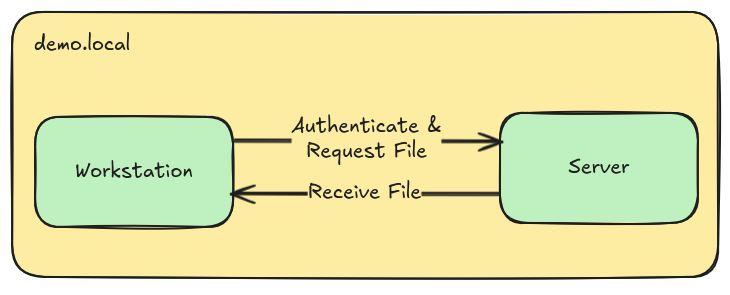
By relaying NTLM authentication requests to an SMB server, an SMB connection can be established with the access rights of the victim user account. This can lead to a full system compromise in the worst case. More about common attack vectors of the SMB protocol can be found in the SMB Security SecCore Essential.
Lightweight Directory Access Protocol (LDAP)
Through LDAP, it is possible to access, query and manage information stored in distributed directories. Although the protocol is open and vendor-neutral, it is a core component of any Active Directory (AD) environment.
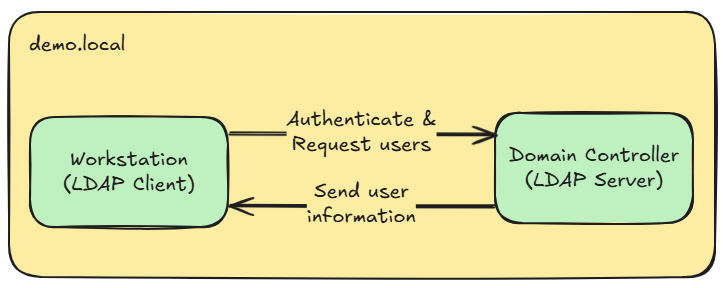
When relaying to an LDAP server, which is commonly a Domain Controller, an interactive LDAP session is opened with the permissions of the relayed user account. This can be exploited to read out Active Directory users or computers, add ourselves to specific domain groups or the worst case read out LAPS or gMSA passwords to laterally move through the network.
HTTP(S)
Of course also web applications can authenticate users using the NTLM authentication protocol, introducing a form of Single Sign-On. However, relaying incoming authentication requests to Active Directory Certificate Services may lead to a full domain compromise when vulnerabilities such as ESC811 are exploited. But also on-premise Microsoft Exchange or Sharepoint websites can be browsed through a relayed session. During our red team engagementswe also found many internal and custom web applications, which were authenticating users through the NTLM protocol. This inspired us to create a tool called WebRelayX, which can be used to access any web applications that support the NTLM protocol.
Our Tool: WebRelayX
https://github.com/SecCoreGmbH/WebRelayX
WebRelayX is a tool we developed to easily relay captured NTLM authentication requests to web applications. It is based on the popular Impacket library and supports both HTTP and HTTPS targets. This makes it useful to still relay NTLM authentication requests in environments where SMB and LDAP signing is common.
How it Works
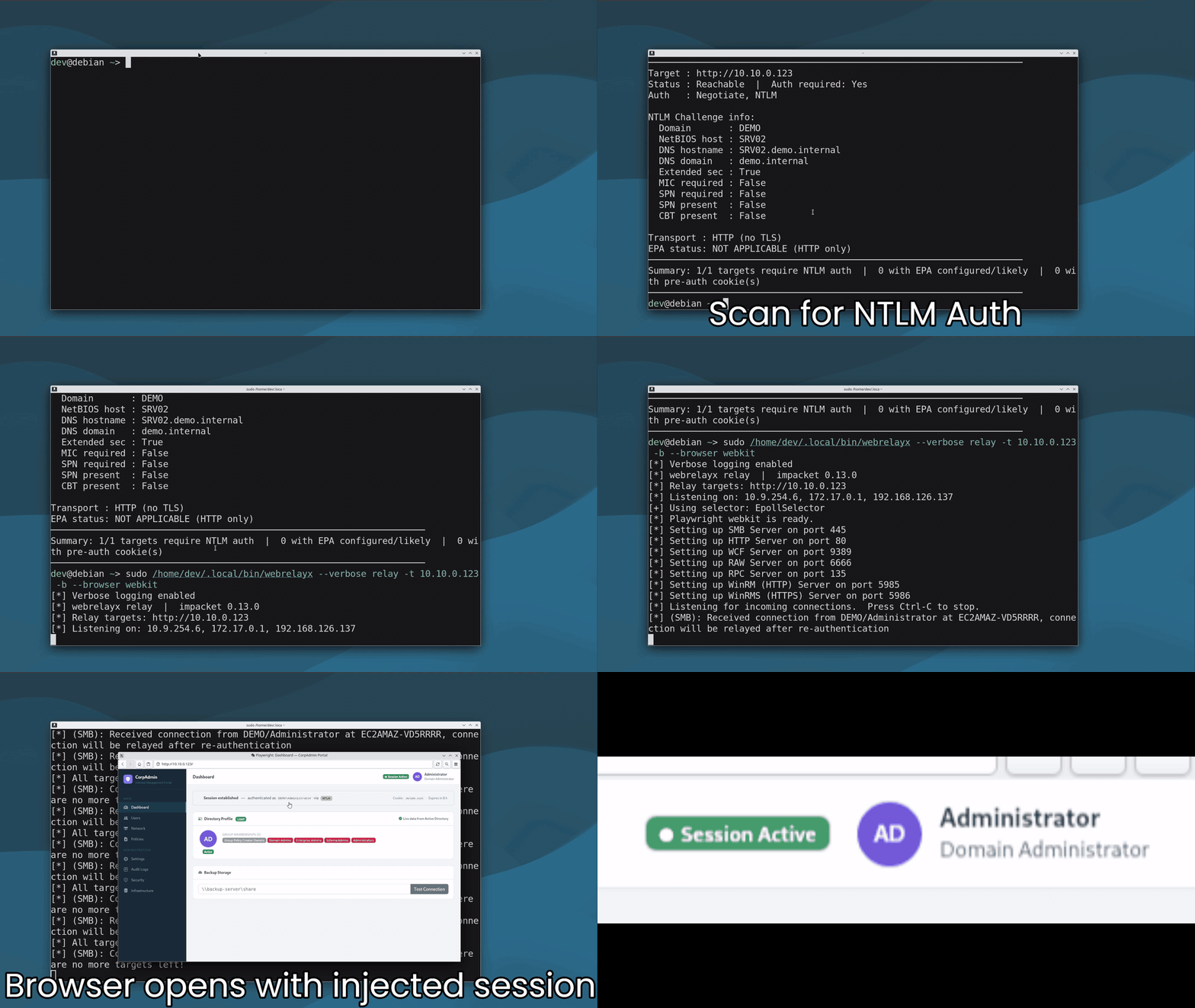
WebRelayX works by using Impacket’s ntlmrelayx.servers module to capture incoming NTLM authentication requests. It then relays these requests to a specified target web application and captures any cookies that are set before or after the authentication. If an authentication is successful (any http status code other than 401), the cookies are injected into a request and it is checked if the server accepts the session cookies. If yes, the cookies are stored in a cookies.jsonl file.
If the option -b is set, WebRelayX automatically opens a browser using playwright and injects the captured cookies into it. Afterwards a new interactive browser window will spawn. This action can be seen here:
Other Use Cases
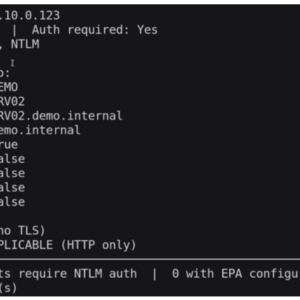
WebRelayX can also be used to scan a target for information and authentication mechanisms using the scan submodule:
webrelayx scan -t <target>This outputs the following information:
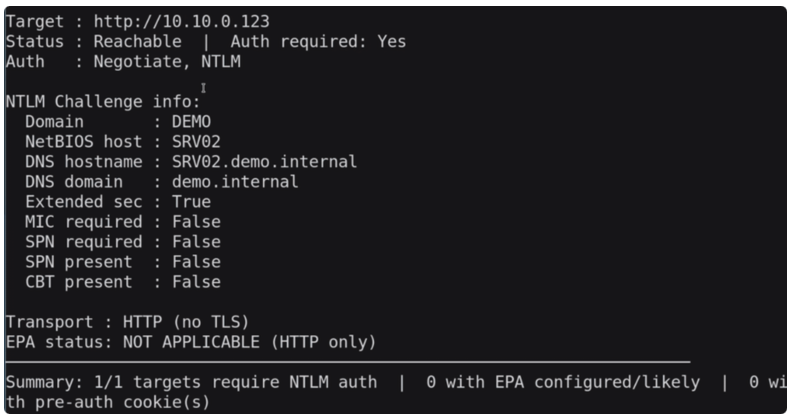
Also, it is possible to launch a browser with session cookies injected from the cookies.jsonl file using the launch subcommand.
You can find all use cases and options of WebRelayX in the GitHub repository.
Mitigations
Depending on the attacked protocol, there need to be different mitigations in place. For example, to protect against relay attacks against the SMB protocol, SMB signing needs to be enabled. Similar to that, LDAP signing and channel binding need to be configured to protect against attacks on the LDAP protocol. Against cracking of the NTLM protocol messages, in order to obtain the NT hash, the obsolete NTLMv1 protocol should be disabled entirely in the network. As the last mitigation, HTTPS and Extended Protection for Authentication12 (EPA) should be enabled on all web applications. This needs to be supported for both clients and server components of an application.
Below, a table can be found of different sources and targets and which can be relayed depending on their configuration:
| Target → Source ↓ | SMB (No Signing) | SMB (Signing required) | LDAP (No Signing) | LDAP (Signing required) | LDAPS (No Channel Binding) | LDAPS (Channel Binding required) | HTTP (No EPA) | HTTPS (No EPA) | HTTPS (EPA required) |
|---|---|---|---|---|---|---|---|---|---|
| SMB (Client Signing: off) | ✓ | ✗ | ✓ | ✗ | ✓ | ✗ | ✓ | ✓ | ✗ |
| SMB (Client Signing: on) | ! | ✗ | ! | ✗ | ! | ✗ | ✓ | ! | ✗ |
| HTTP | ✓ | ✗ | ✓ | ✗ | ✓ | ✗ | ✓ | ✓ | ✗ |
✗ = relay blocked ✓ = relay possible ! = requires MIC bypass (CVE-2019-1040 / patch-dependent)
https://www.meetup.com/security-ninjas-austria/events/313310858
https://github.com/lgandx/Responder
https://research.google/resources/datasets/?dataset_types=other&search=Net-NTLMv1&
https://github.com/dirkjanm/mitm6
https://github.com/p0dalirius/Coercer
https://github.com/Kevin-Robertson/Powermad
https://github.com/dirkjanm/krbrelayx/blob/master/dnstool.py