
Original text by Jonathan Johnson
The article explores a technique for hooking COM methods inside Windows Subsystem for Linux (WSL) by leveraging C++ Runtime Type Information (RTTI). The research begins with the author’s attempt to instrument and log activity within WSL components that interact with Windows through COM interfaces. Instead of relying on traditional API-level hooks, the author investigates how WSL internally exposes COM objects and how their virtual method tables are organized in memory.
Using reverse engineering tools, the study analyzes the structure of COM objects and demonstrates how RTTI metadata can be used to identify class layouts and method offsets. By parsing RTTI structures embedded in compiled binaries, the author reconstructs the hierarchy of COM classes and locates specific virtual functions responsible for WSL behavior. This approach allows hooks to be placed directly on methods of interest without needing explicit symbols.
The article provides a proof-of-concept implementation showing how to intercept COM calls by modifying entries in the virtual function table after locating them through RTTI analysis. This method enables dynamic instrumentation of WSL components for logging or research purposes. Overall, the work demonstrates how RTTI can be used as a powerful reverse-engineering technique to identify internal class structures and implement reliable hooks within complex C++ software systems.
Introduction
Recently I ran across a situation where I needed to get telemetry on the COM method CreateLxProcess’s invocation. One of the main ways to do this is by leveraging API hooking, which is pretty trivial when there are symbols. However, without symbols this becomes more difficult. In this blog I want to dive into why I was looking into this COM method and how I was able to use Run-Time Type Information (RTTI) to help me hook this COM method when the server didn’t have symbols.
Background
In January Daniel Mayer released the blog — One WSL BOF to Rule Them All, which went over how one could use the WSL COM method CreateLxProcess to execute WSL commands without launching wsl.exe directly. This was the first I had seen where someone was using WSL without relying on wsl.exe, which has significant implications, as an attacker can easily execute Linux processes through this method. Seeing this, I was curious — are there ways to get telemetry for this type of activity? The answer wasn’t as promising as one would hope. There wasn’t a kernel callback (like WSL1 supports), an ETW provider that supplied reliable or sufficient information, or any other telemetry source (that I am aware of). The callback piece makes sense because WSL2 relies on Hyper-V as its foundation, whereas WSL1 uses a Pico Provider which utilizes pico processes. I won’t dive into the WSL1 architecture too much here, but if you’re interested in this, I’d recommend –
Pavel Yosifovich’s blog— How does Windows Subsystem for Linux (Version 1) actually work?
Alex Ionescu’s 2016 BlackHat talk — The Linux Kernel Hidden Inside Windows 10.
Like I mentioned earlier, WSL2 runs entirely in Hyper-V which is a “black box” in terms of internals, code flow, etc. The important things to know are that WSL leverages COM to communicate commands from a client (typically wsl.exe) to the server wslservice.exe. Once wslservice.exe receives the request, it packages the parameters and sends them to the Linux VM over a HvSocket. Luckily, Microsoft has documented some of this implementation here.
I was hoping there would be a reliable ETW provider that would surface WSL2 data, but there wasn’t. I did find that there were two TraceLogging providers Microsoft.Windows.Subsystem.Lxss and Microsoft.Windows.Lxss.Manager, but neither held events that reliably tracked WSL2 activity. This led me to resort to API hooking, which isn’t a superpopular choice these days. But desperate times call for desperate measures.
API Hooking
Both WSL1 and WSL2 leverage COM under the hood to execute behaviors, and when Microsoft migrated from WSL1 to WSL2 they kept the same COM class and CLSID (subject to versioning). I assume this was done so they wouldn’t have to recreate the WSL flow from scratch. What really changed was the underlying layer handling execution — lxcore.sys/lxss.sys for WSL1, or Hyper-V for WSL2. It also meant they didn’t have to maintain another COM class (because Windows has enough of them).
This makes API hooking simpler too, because there aren’t multiple methods to hook. When the client wants to create a process (as Daniel Mayer shows in his BOF), it calls CreateLxProcess on the ILxssUserSession COM interface. COM marshals this call to wslservice.exe, which already holds a pointer to the appropriate backend instance for the distribution. From there it dispatches to LxssInstance::CreateLxProcess for WSL1 or WslCoreInstance::CreateLxProcess for WSL2. This means hooking ILxssUserSession::CreateLxProcess catches both WSL1 and WSL2 calls.
This seems easy, right? Just hook up Detours or a custom hooking solution to ILxssUserSession::CreateLxProcess and be done! Unfortunately, the COM server (wslservice.exe) doesn’t ship with symbols, so we need another way to locate the function at runtime.
Note: Despite that challenge, hooking within the COM server is the most reliable approach, because we don’t have to worry about custom programs communicating over this COM interface, and we get access to all of the parameters and client information in one place.
After some digging, I came across Run-Time Type Information (RTTI). RTTI is a C++ feature that exposes type metadata at runtime, allowing you to identify an object’s actual type even when you only have a base class pointer. This exists because C++ supports polymorphism — a base pointer can refer to any derived type, and sometimes you need to know which one at runtime. At first, I didn’t think this would apply to COM objects since RTTI is strictly a C++ feature. Then I realized that because wslservice.exe is compiled with MSVC (which enables RTTI by default), the RTTI structures are baked into the binary right alongside the COM vtables. That means I could use RTTI to locate an interface’s vtable at runtime without needing symbols. RTTI essentially answers the question: “I have this base pointer what is the actual object behind it?”
By scanning the binary for RTTI metadata, I can follow the chain from a type descriptor string to a Complete Object Locator and land directly on the vtable. Since CreateLxProcess lives at a fixed offset in the ILxssUserSessionvtable regardless of whether the backend is WSL1 or WSL2, RTTI gives my hook a reliable way to find and patch the target method across binary updates, assuming they don’t change the interface by renaming the class or rearranging the method’s offset in the vtable.
I want to note some similarities between C++ and COM that helped me understand this approach, and might help others:
- COM classes (CoClasses) are similar to C++ concrete classes — they are what you instantiate, and a single concrete class can implement multiple interfaces.
- COM interfaces are similar to C++ abstract classes that have only pure virtual methods and no data members.
None of this is absolute. COM is not C++, but thinking about it this way helped me understand RTTI better when developing the POC.
Enough walls of text! Let’s dive into what this practically looks like. I will show a manual walk through, then how it looks in the code.
Note: These walkthroughs were done on a 64-bit system.
Manual Walkthrough
RTTI relies on a couple of structures — one of which is _RTTITypeDescriptor :
struct _RTTITypeDescriptor {
    PVOID pVFTable;             // +0x00  pointer to type_info vftable
    PVOID spare;                // +0x08  always NULL
    char name[];                // +0x10  mangled class name (e.g. ".?AVAnimal@@")
};
At offset 0x10 is the mangled class name prefixed with AV. In IDA we can find the LxssUserSession class (the class that implements ILxssUserSession) by searching for .?AVLxssUserSession@@:
.data:00000001405C3910 ; class LxssUserSession `RTTI Type Descriptor'
.data:00000001405C3910 ___R0_AVLxssUserSession___8 DCQ ___7type_info__6B_
.data:00000001405C3918                 DCQ 0
.data:00000001405C3920 aAvlxssusersess_0 DCB ".?AVLxssUserSession@@",0
The TypeDescriptor starts at the base of the structure (-0x10 bytes from the string) at 0x1405C3910. The _RTTICompleteObjectLocator stores references as relative virtual addresses (RVAs) rather than absolute addresses, so we need to calculate the RVA by subtracting the ImageBase (0x140000000) from 0x1405C3910, giving us 0x5C3910. We can then search the binary for this value to find the COL’s pTypeDescriptor field:
struct _RTTICompleteObjectLocator {
    DWORD signature;            // +0x00  0 = 32-bit, 1 = 64-bit (RVA-based)
    DWORD offset;               // +0x04  vftable offset in class (0 = primary)
    DWORD cdOffset;
    DWORD pTypeDescriptor;      // +0x0C  RVA to _RTTITypeDescriptor
    DWORD pClassDescriptor;
    DWORD pSelf;                // +0x14  RVA to this structure (self-reference)
};
To get to this structure we need to search for this RVA via Search -> Sequence of Bytes… in IDA. This will return 4 results:
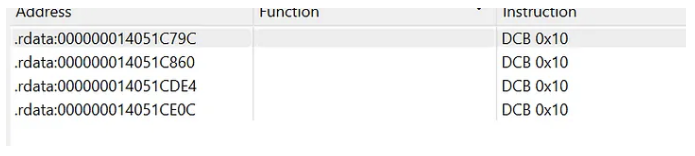
Each result sits inside an _RTTICompleteObjectLocator structure, and the key field to look at is the offset at +0x04. This gives the vftable’s byte offset within the class, where an offset of 0 means it’s the primary vtable. SinceLxssUserSession implements multiple interfaces, there are multiple COLs pointing to the same TypeDescriptor. We want the one with offset = 0, which corresponds to the primary ILxssUserSession interface — the one containing CreateLxProcess. If you were targeting a secondary interface that the class supports, you would look for the COL with a non-zero offset instead (0x8 for the 2nd interface, 0x10 for 3rd interface, etc). In this case, the primary COL is at 0x14051C790.

.rdata:000000014051C790 stru_14051C790  DCD 1                   ; signature
.rdata:000000014051C790                                         ; DATA XREF: .rdata:000000014041E438↑o
.rdata:000000014051C794                 DCD 0                   ; offset
.rdata:000000014051C798                 DCD 0                   ; cdOffset
.rdata:000000014051C79C                 DCD 0x5C3910            ; pTypeDescriptor
.rdata:000000014051C7A0                 DCD 0x51C7B8            ; pClassDescriptor
.rdata:000000014051C7A4                 DCD 0x51C790            ; pSelf
Note: It was a little difficult to validate that ILxssUserSession was the primary interface without symbols, especially because the public IDL defines 23 custom methods (26 total including 3 inherited from IUnknown), but the vtable in wslservice.exe holds 27 entries — one extra slot not in the public IDL. I also had to validate that vtable slot 16 (0-indexed) held the CreateLxProcess method by reversing and following the code flow
The address of the Complete Object Locator (COL) sits right before the vtable, which means we can take the COL structure now (0x14051C790), cross reference it (0x14041E438) and then add 8 bytes (0x14041E440) and we are at the ILxssUserSession vtable and the CreateLxProcess method is at slot 16 (0-indexed) (14th method in the IDL then add 3 because of QueryInterface, AddRef, Release).
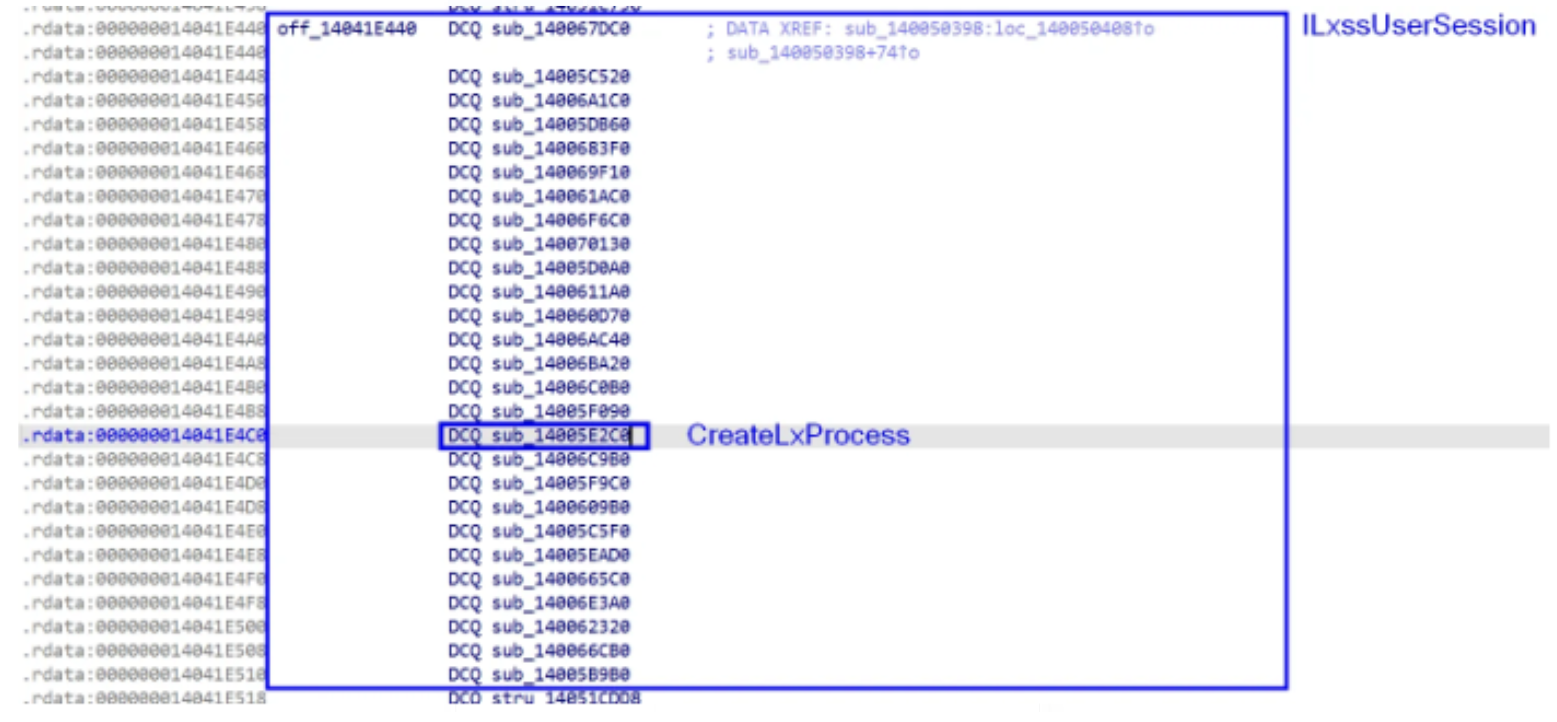
The vtable entry at 0x14041E4C0 (slot 16) points to sub_14005E2C0, which is where we hook to intercept CreateLxProcess.
The following code automates this same three-level scan (TypeDescriptor → COL → vtable), as well as hooking the CreateLxProcess function.
RandomPOCs/WSLHook at main · jonny-jhnson/RandomPOCs
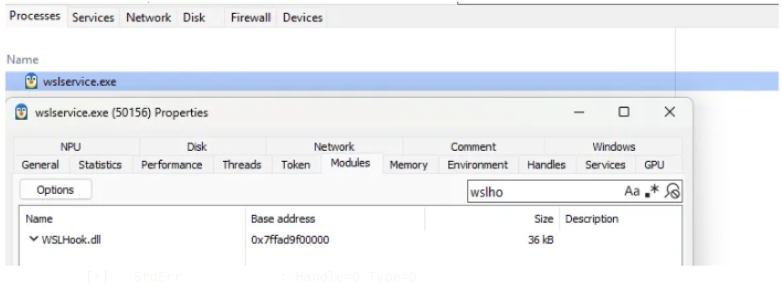
This is only the hooking and logging logic, so if you want to replicate this you need to find a way to load WslHook.dll within wslservice.exe. I leverage SystemInformer for easy testing.
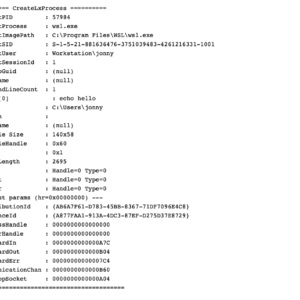
Running a simple test like wsl echo hello will log like:
PS >  wsl echo hello
hello
[*] ========== CreateLxProcess ==========
[*] ClientPID : 57984
[*] ClientProcess : wsl.exe
[*] ClientImagePath : C:\Program Files\WSL\wsl.exe
[*] ClientSID : S-1-5-21-881636476-3751039483-4261216331-1001
[*] ClientUser : Workstation\jonny
[*] ClientSessionId : 1
[*] DistroGuid : (null)
[*] Filename : (null)
[*] CommandLineCount : 1
[*] Arg[0] : echo hello
[*] CWD : C:\Users\jonny
[*] NtPath :
[*] Username : (null)
[*] Console Size : 140x58
[*] ConsoleHandle : 0x60
[*] Flags : 0x1
[*] NtEnvLength : 2695
[*] StdIn : Handle=0 Type=0
[*] StdOut : Handle=0 Type=0
[*] StdErr : Handle=0 Type=0
[*] --- out params (hr=0x00000000) ---
[*] DistributionId : {AB6A7F61-D783-45BB-8367-71DF7096E4C8}
[*] InstanceId : {A877FAA1-913A-4DC3-87EF-D275D37E8729}
[*] ProcessHandle : 0000000000000000
[*] ServerHandle : 0000000000000000
[*] StandardIn : 0000000000000A7C
[*] StandardOut : 0000000000000B04
[*] StandardErr : 00000000000007C4
[*] CommunicationChan : 0000000000000B60
[*] InteropSocket : 0000000000000A04
[*] ==========================================Note: Because this is a POC I opted to leverage OutputDebugStringW to print the logging. This can be seen via WinDbg Preview or DebugView. If this was more production code, I would have opted to use Event Tracing for Windows (ETW).
I ran this across WSL1 and WSL2 instances and the hook worked well for both, which was expected since both underlying functions rely on the CreateLxProcess method in the ILxssUserSession vtable.
Conclusion
I know others have, but I have never had to hook a function without symbols. This led me to having to figure out a good and reliable way to do this, which led me to RTTI. Learning about RTTI, other C++ concepts, and diving deeper into COM is always fun. I hope others enjoyed this or found this useful! If you have any questions, comments, or corrections please feel free to reach out!