
Original text by Mateusz Lewczak
Part 1: Investigating Undocumented Interfaces
The four-part research series explores the reverse engineering of the Windows AFD.sys (Ancillary Function Driver) to understand how networking operations work beneath the Winsock API. AFD.sys is a kernel driver that acts as a bridge between user-mode socket APIs and the lower networking stack, translating socket operations into kernel I/O request packets (IRPs) processed by TCP/IP drivers.
The author demonstrates how to interact with this driver directly using Native API calls such as NtCreateFile and NtDeviceIoControlFile, bypassing the Winsock layer entirely. The research begins by reverse engineering undocumented IOCTL interfaces and building a minimal socket by sending handcrafted requests to the \Device\Afd device. Next, the study reconstructs the structures used for bind and connect operations, enabling a manual TCP three-way handshake without using any high-level networking libraries.
Later parts analyze how TCP packets are sent and received by reverse engineering IOCTL handlers and internal structures such as AFD_SENDRECV_INFO and WSABUF. The work also investigates Fast-I/O paths and flag behavior controlling packet transmission and reception.
Overall, the series provides a deep technical understanding of how Windows networking works internally and demonstrates how researchers can build raw TCP clients that communicate directly with the kernel networking subsystem without relying on Winsock.
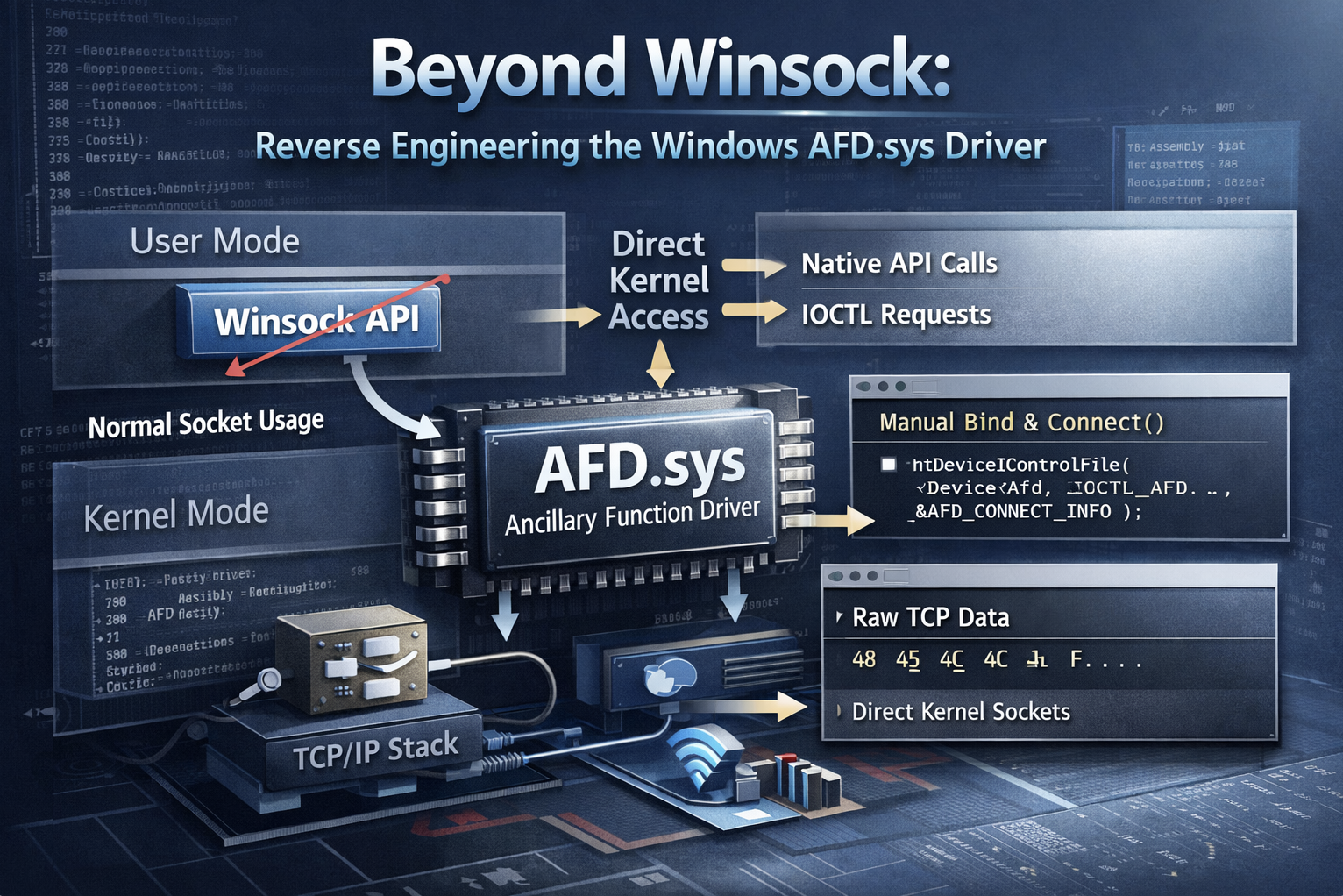
A quick look at how I used WinDbg and NtCreateFile to craft a raw TCP socket via AFD.sys on Windows 11, completely skipping Winsock.
Introduction
This is the first post in a series about my deep-dive into the AFD.sys driver on Windows 11. The idea is that both this write-up and the library that comes out of it will be a one-stop doc set – and a launchpad – for poking at other drivers that don’t ship with an official spec.
On Windows, the go-to (and easiest) way to do network stuff is Winsock. It gives you a bunch of high-level calls for TCP/UDP and raw sockets over IPv4/IPv6. Under the hood Winsock rides on mswsock.dll, which is lower-level, but most apps never need to touch that because Winsock already covers 99 % of everyday networking needs.
In this first part we’re focusing purely on creating the socket itself. Step #1 is to open a TCP socket to any host on the LAN using nothing but I/O requests aimed at \Device\Afd. Instead of the usual Winsock calls (or anything in mswsock.dll) we’re going to slam everything through NtDeviceIoControlFile, hand-crafting the IRPs (I/O Request Packets) the AFD driver expects. That’ll show us, in real life, how to build the call sequence, buffer layouts, and flags you need to spin up a TCP session.
The actual data exchange over that socket – the whole TCP conversation – will come in later posts.
Right now I’ve already collected all the data to pull off the TCP three-way handshake. Took me a few evenings to get there, so I’m just jotting down what I did so far. I’ll keep adding the rest as I go – at least that’s the plan!
What is AFD.sys?
The AFD.sys – or Ancillary Function Driver – is a small but absolutely basic Windows kernel driver. It sits in C:Windows32drivers and starts up with the system, because it’s the one that translates the Winsock calls of your applications (send, recv, connect…) into lower-layer intelligible IRP (I/O request packet), which tcpip.sys and co. are already taking over. If it were missing, the browser, Spotify or remote desktop wouldn’t see the network – all TCP/UDP traffic would simply stop.
Rationale
The first reason for talking directly to AFD.sys instead of going through Winsock is to dodge the hooks used by some protection systems – like anti-cheat or anti-malware (though the latter usually rely on NDIS filters in kernel mode). A lot of these protections work by intercepting and modifying calls to functions exported by Ws2_32.lib – usually by injecting their own DLLs or patching stuff directly in process memory. But if you’re not using Winsock, those hooks have nothing to latch onto, which makes their job way harder from a technical standpoint.
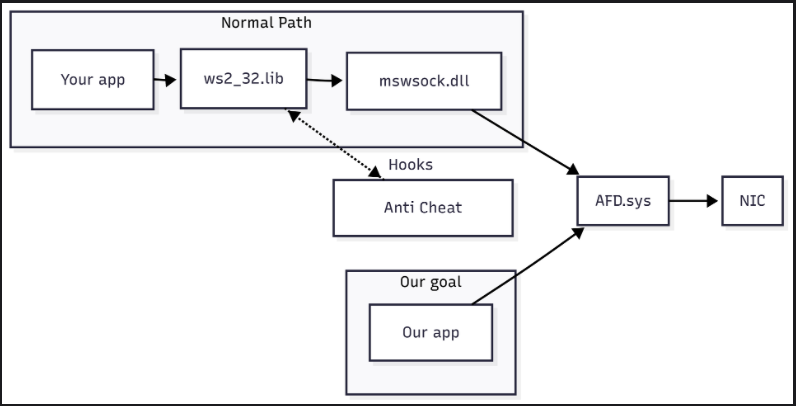
The second reason – and honestly the one that matters most to me – is the educational value. Working directly with AFD.sys gives you a deep look under the hood of how Windows handles networking. That kind of insight just isn’t possible when you stick to high-level APIs.
The goal of this whole project is to build a library for talking directly to the AFD.sys driver on Windows 11, completely skipping the Winsock layer. The core will be written in C/C++ and will include all the low-level logic for building and sending IRPs. On top of that, I’m planning to add clean, easy-to-use bindings for Python – great for quick prototyping or scripting – and also for Rust.
Dumb Copy&Paste
The very first thing we have to nail down is a socket the driver will actually accept, so we can start talking on the wire. While combing the internet I ran into a PoC for CVE-2024-38193 (killvxk). That was the first real bit of code that spat out a socket for me:
NTSTATUS AfdCreate(PHANDLE Handle, ULONG EndpointFlags)
{
    UNICODE_STRING DevName;
    RtlInitUnicodeString(&DevName, L"\\Device\\Afd\\Endpoint");
    const wchar_t* transportName = L"\\Device\\Tcp";

    BYTE bExtendedAttributes[] = {...};

    OBJECT_ATTRIBUTES Object;
    Object = { 0 };
    Object.ObjectName = &DevName;
    Object.Length = 48;
    Object.Attributes = 0x40;

    IO_STATUS_BLOCK IoStatusBlock;

    return NtCreateFile(Handle, 0xC0140000, &Object, &IoStatusBlock, 0, 0, 3, FILE_OPEN_IF, 0x20, &bExtendedAttributes, sizeof(bExtendedAttributes));
}
Right away I learned that what AFD calls a “socket” is really just a HANDLE. With the rest of that PoC I could bind the socket, but I still couldn’t connect. So the hunt continued – was my _EXTENDED_ATTRIBUTES struct busted? Or was the problem somewhere else?
Next stop: a thread on the UnKoWnCheaTs blog (unknowncheats.me ICoded post). It’s basically only code, no explanation, so I copied the snippet and tried to run it like this:
int main() {
	HANDLE socket;
	NTSTATUS status = AfdCreate(&socket, AF_INET, SOCK_STREAM, IPPROTO_TCP);
	if (!NT_SUCCESS(status)) {
		std::cout << "[-] Could not create socket: " << std::hex << status << std::endl;
		return 1;
	}
	std::cout << "[+] Socket created!" << std::endl;

	sockaddr_in server = { AF_INET, htons(27015), {inet_addr("127.0.0.1")}, {0} };
	status = AfdBind(socket, &server);
	if (!NT_SUCCESS(status)) {
		std::cout << "[-] Could not bind: " << std::hex << status << std::endl;
		return 1;
	}
	std::cout << "[+] Socket bound!" << std::endl;

	status = AfdDoConnect(socket, &server);
	if (!NT_SUCCESS(status)) {
		std::cout << "[-] Could not connect: " << std::hex << status << std::endl;
		return 1;
	}
	std::cout << "[+] Connected!" << std::endl;
}
That time the socket came to life again, but bind flat-out failed. So I went spelunking for reversed structure definitions in publicly available code. I ran into plenty of candidates – ReactOS (ReactOS Project), Dr. Memory’s AFD bits (DynamoRIO / Dr. Memory), even an old issue thread (Dr. Memory – GH issue#376). None of them truly pieced the puzzle together, so I was still stuck at bind.
Why’s it blowing up? A few theories:
- Different Windows builds and
AFD.sysversions might expect slightly different structures. - Flags in the CVE-2024-38193 PoC are tuned for exploitation, not for my vanilla use case – so they’re probably wrong here.
- Insert literally any other reason…
Kernel Debugging Time
At this point I realized that blindly copy-pasting other people’s code wasn’t going to cut it – I needed to do a few experiments with WinDbg. So I spun up a Windows 11 VM and started grabbing calls that hit AFD.sys. The plan:
- Find some code that makes legit requests to
AFD.sys. - Capture the I/O-request buffers that code sends.
- Re-create those buffers on my host and see if the driver is happy.
- Reverse-engineer the structs so we actually know what each field is and which values make sense.
Side note: I’m skipping the whole “turn on kernel debugging, set up the connection” dance. Microsoft’s docs and half the internet explain that step-by-step.
What’s the fastest way to make a process fire off valid AFD.sys requests? Write a dead-simple TCP client with Winsock:
#define WIN32_LEAN_AND_MEAN
#include <windows.h>
#include <winsock2.h>
#include <ws2tcpip.h>
#include <iostream>
#pragma comment(lib,"Ws2_32.lib")

int main() {
    std::cout << "PID: " << GetCurrentProcessId() << "\nPress <Enter> to continue..." << std::endl;
    std::cin.get();

    WSADATA wsa;
    if (WSAStartup(MAKEWORD(2, 2), &wsa)) return 1;

    SOCKET s = socket(AF_INET, SOCK_STREAM, IPPROTO_TCP);
    if (s == INVALID_SOCKET) return 1;

    sockaddr_in addr{};
    addr.sin_family = AF_INET;
    addr.sin_port = htons(80);
    InetPtonA(AF_INET, "192.168.1.1", &addr.sin_addr);

    if (connect(s, reinterpret_cast<sockaddr*>(&addr), sizeof(addr)) == SOCKET_ERROR) {
        std::cerr << "connect error: " << WSAGetLastError() << '\n';
    } else {
        std::cout << "Connected\n";
    }

    closesocket(s);
    WSACleanup();
    return 0;
}
We know the very first thing Winsock does is create a socket by opening a HANDLE to \Device\Afd. So our next task is to break on nt!NtCreateFile. You might wonder why I print the PID and then pause – if I simply slapped a breakpoint on NtCreateFile, I’d hit every call system-wide, which is useless. I only want the calls from thisprocess.
Now what’s left is to run this program and set the appropriate breakpoint – of course NtCreateFile isn’t just used for driver communication, so you’ll have to click around a few times until you find something like NtCreateFile("Device). It’s probably possible to do this as an automation in WinDbg, but I don’t know how – skill issue.
A więc pokolei zaczynamy działać w WinDbg:
- Set a process-specific breakpoint on
nt!NtCreateFile:
.foreach /pS 1 (ep { !process 0 0 afd_re.exe }) { bp /p ${ep} nt!NtCreateFile }2. Dump the 3rd arg (Microsoft) (register r8 on x64 / Microsoft ABI (Microsoft)) as an _OBJECT_ATTRIBUTES.:
10: kd> dt nt!_OBJECT_ATTRIBUTES @r8
Breakpoint 2 hit
+0x000 Length           : 0x30
+0x008 RootDirectory    : (null)
+0x010 ObjectName       : 0x00000018`06f1f5b0 _UNICODE_STRING "\Device\Afd\Endpoint"
+0x018 Attributes       : 0x42
+0x020 SecurityDescriptor : (null)
+0x028 SecurityQualityOfService : (null)
3. If ObjectName shows \Device\Afd..., bingo. Otherwise go and wait for the next hit.
4. The last two NtCreateFile args live on the stack. Through trial and error I found they sit at rsp+0x50:.
4: kd> dq @rsp+50 L2
fffffc04`df00f438  00000018`06f1f5c0 00000000`00000039
5. What we can see here is the address of the EXTENDED_ATTRIUTES buffer (i.e. the extra data we pass to the file/driver when creating the HANDLE) and its size. It is consecutively 0x1806f1f5c0 and 0x39.
6. What is important! The address of this buffer is the address of the memory page in the context of the user process that triggered this system call – we are currently in kernel-space. So before we can start reading it, we still need to switch to that process.
.process /r /p @$proc7. Read those 0x39 bytes:
4: kd> db 1806f1f5c0 L39
00000018`06f1f5c0  00 00 00 00 00 0f 1e 00-41 66 64 4f 70 65 6e 50  ........AfdOpenP
00000018`06f1f5d0  61 63 6b 65 74 58 58 00-00 00 00 00 00 00 00 00  acketXX.........
00000018`06f1f5e0  02 00 00 00 01 00 00 00-06 00 00 00 00 00 00 00  ................
00000018`06f1f5f0  18 ba 5a 4a 33 01 00 00-64                       ..ZJ3...d
8. What have we learned so far? And what is useful to us?
- the Winsock (or rather
mswsock.dll) opens a handle to the\Device\Afd\Endpointdriver. - the expected structure is
0x39bytes in length.
9.. We are left to convert this set of bytes into code in C++:
NTSTATUS AfdCreate(PHANDLE handle) {
 UNICODE_STRING devName;
 RtlInitUnicodeString(&devName, L"\\Device\\Afd\\Endpoint");

 BYTE bExtendedAttributes[] = {
     0x00, 0x00, 0x00, 0x00, 0x00, 0x0F, 0x1e, 0x00,
     0x41, 0x66, 0x64, 0x4F, 0x70, 0x65, 0x6E, 0x50,
     0x61, 0x63, 0x6B, 0x65, 0x74, 0x58, 0x58, 0x00,
     0x00, 0x00, 0x00, 0x00, 0x00, 0x00, 0x00, 0x00,
     0x02, 0x00, 0x00, 0x00, 0x01, 0x00, 0x00, 0x00,
     0x06, 0x00, 0x00, 0x00, 0x00, 0x00, 0x00, 0x00,
     0x18, 0xba, 0x5a, 0x4a, 0x33, 0x01, 0x00, 0x00,
     0x64
 };

 OBJECT_ATTRIBUTES Object;
 Object = { 0 };
 Object.ObjectName = &devName;
 Object.Length = 48;
 Object.Attributes = 0x40;

 IO_STATUS_BLOCK IoStatusBlock;
 return NtCreateFile(handle, GENERIC_READ | GENERIC_WRITE | SYNCHRONIZE, &Object, &IoStatusBlock, 0, 0, FILE_SHARE_READ | FILE_SHARE_WRITE, FILE_OPEN_IF, 0x20, &bExtendedAttributes, sizeof(bExtendedAttributes));
}
Analyzing retrieved data
After executing this code, we get information that our HANDLE (i.e. socket in practice) has been successfully created. Now gathering data from publicly available code, we can reconstruct the contents of our workingly named AFD_OPEN_PACKET_EA structure.
I used the previously mentioned sources and (DeDf) to recreate the structure. Let’s first try to label specific portions of bytes for ourselves, and then we will create a struct from this:
BYTE bExtendedAttributes[] = {
    0x00, 0x00, 0x00, 0x00, // NextEntryOffset - 4 bytes
    0x00,                   // Flags           - 1 byte
    0x0F,                   // EaNameLength    - 1 byte
    0x1e, 0x00,             // EaValueLength   - 2 bytes
    // START AfdOpenPacketXX 0xf bytes of name + leading zero
    0x41, 0x66, 0x64, 0x4F, 0x70, 0x65, 0x6E, 0x50,
    0x61, 0x63, 0x6B, 0x65, 0x74, 0x58, 0x58, 0x00,
    // END AfdOpenPacketXX
    0x00, 0x00, 0x00, 0x00, // EndpointFlags = 0
    0x00, 0x00, 0x00, 0x00, // GroupID = 0
    0x02, 0x00, 0x00, 0x00, // AddressFamily = AF_INET
    0x01, 0x00, 0x00, 0x00, // SocketType = SOCK_STREAM
    0x06, 0x00, 0x00, 0x00, // Protocol = IPPROTO_TCP
    0x00, 0x00, 0x00, 0x00, // SizeOfTransportName

    // unknown 9 bytes
    0x18, 0xba, 0x5a, 0x4a, 0x33, 0x01, 0x00, 0x00, 0x64
};
So what do we have? What do we know?
NextEntryOffset– this is the offset where the next entry forEXTENDED_ATTRIBUTESis located. Possibly a typical field for I/O, in our case none so we have zeros.Flags– these are some flags for ourEXTENDED_ATTRIBUTEstructure, in this case it is zero. Unknown at this point.EaNameLength– the length of the name of ourEXTENDED_ATTRIBUTE, which in this case is 15 bytes.EaValueLength– a size expressed in bytes representing the size of some internal structure. This structure will beEndpointFlagsto the end, along with unknown bytes.EndpointFlags– more flags, but probably already relating to our sockets. Following (killvxk) we can use the enum available there. After reproducing the identical steps, but for UDP communication and the field value is0x11. Which would meanAFD_ENDPOINT_FLAG_CONNECTIONLESS | AFD_ENDPOINT_FLAG_MESSAGEMODE.
// 4 bytes
enum __bitmask AFD_ENDPOINT_FLAGS {
 AFD_ENDPOINT_FLAG_CONNECTIONLESS = 0x000000000001,
 AFD_ENDPOINT_FLAG_MESSAGEMODE    = 0x000000000010,
 AFD_ENDPOINT_FLAG_RAW            = 0x000000001000,
 AFD_ENDPOINT_FLAG_MULTIPOINT     = 0x000000010000,
 AFD_ENDPOINT_FLAG_CROOT          = 0x000001000000,
 AFD_ENDPOINT_FLAG_DROOT          = 0x000010000000,
 AFD_ENDPOINT_FLAG_IGNORETDI      = 0x001000000000,
 AFD_ENDPOINT_FLAG_RIOSOCKET      = 0x010000000000,
};
6. GroupID – the identifier of the socket group (Microsoft), looks like some legacy of the old fiches.
7. AddressFamily, SocketType, Protocol – these are standard fields describing our address family, socket type and protocol used.
8. SizeOfTransportName – in some instances of sockets creation I have seen authors refer to DeviceAfd in addition to referring to DeviceTcp and similar drivers. The length of this string should be specified here, whereas during debugging, not once did I see this field actually filled in.
9. unknown 9 bytes – this is nowhere to be found, I have not come across it anywhere before. By trial and error I figured out that the last two bytes are optional. Without any problem AFD.sys will accept such a buffer as well. And even more interestingly, they can take any value, this is also a valid EXTENDED_ATTRIBUTE.
BYTE bExtendedAttributes[] = {
 [SAME VALUES]
 // unknown 9 bytes, but only 7 provided
 0xff, 0xff, 0xff, 0xff, 0xff, 0xff, 0xff
};
Staying with our unknown bytes, below I have examples for a few more calls of our code:
c8 27 ff 09 16 02 00 00 64
98 b8 85 4a a3 02 00 00 64
In this case, a static analysis of mswsock.dll would need to be carried out to better understand what they might be.
Reverseing mswsock.dll
I used Binary Ninja (free, v5.0.7) to do the reverse engineering. I started by finding a function that uses NtCreateFile, I found 5 functions in total and one of them is SockSocket:
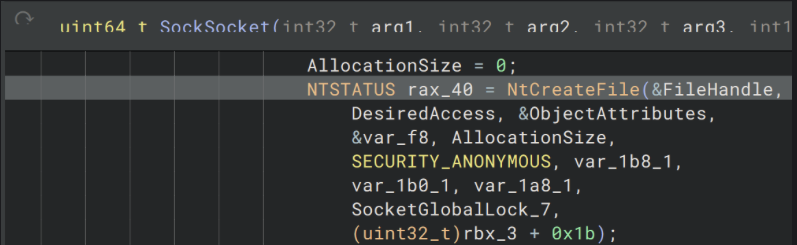
At this point we know that the penultimate argument of the NtCreateFile call is our AFD_OPEN_PACKET_EAstructure, and the last argument is the length of that structure. So it’s worth naming them now. And additionally create a custom structure in Binary Ninja, then the analyser will interpret the operation on our structure correctly.
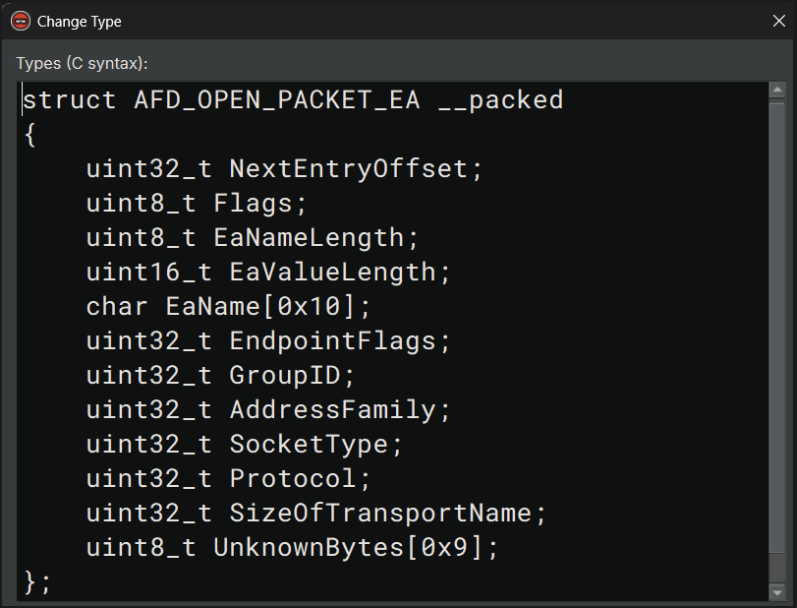
With this, Binary Ninja generated us this Pseudo C code, which looks promising:
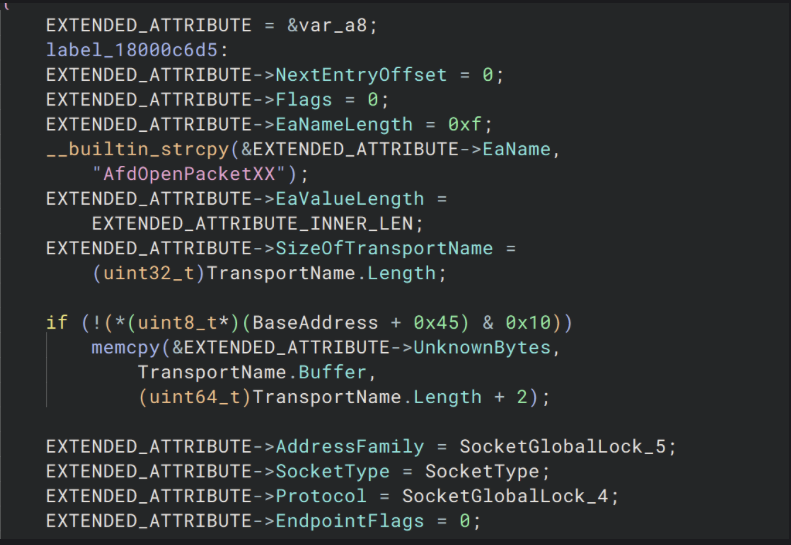
I also messed around with other variables that can be inferred from the context of the code such as TransportName etc. It remained to check where the SockSocket function refers to our unknown bytes. To my surprise there is only one place. The mswsock.dll library only operates on them when it copies TransportNameand in no other place. So either actually these bytes don’t matter much and are just added random values when not using TransportName or another function operates on them.
What do our sources say about this? Unfortunately I don’t see any information on this, and it looks like at least seven of those odd five bytes are required for AFD.sys to accept a request from us to create a new sockets. I did, however, find information about what happens when we specify a TransportName and when we don’t specify it (diversenok). But this unfortunately does not answer our question. So this is something new that we discovered during our research! On the positive side, this leaves us room for further exploration. I think we can leave it for now and possibly come back to it later when it is needed. After all we correctly managed to create a TCP socket.
What is TDI?
It’s worth going one level down from AFD.sys for a moment, because underneath lies its true interface to the TCP/IP stack – the Transport Driver Interface (TDI) as TDI will appear in many places in later parts of our series. TDI is the “upper edge” of the transport layer in the Windows kernel – an abstraction that, back in the days of NT 3.51, unified communication with various protocols (TCP/IP, NetBIOS, AppleTalk). From a kernel-mode point of view, there are two entities:
- Transport Provider – the driver of the protocol itself, e.g.
\Device\Tcp. - TDI Client – anyone who sends IRPs to it with codes
TDI_SEND,TDI_RECEIVE,TDI_CONNECT, etc.
The AFD acts as an intermediary-client: it receives our IOCTLs from user space and then ‘builds’ the corresponding IRPs (TdiBuildSend, TdiBuildReceive macros) and passes them to the transport driver. For example, if we had specified TransportName in our EXTENDED_ATTRIBUTES we would have had to communicate with AFD.sys given the TDI structures. Instead of SOCKADDR it would be TransportAddress.
Next steps
In the next part of this series we will focus on trying to set up a TCP handshake with localhost on port 80. For this we will use AfdBind and AfdConnect, functions provided by AFD.sys available as an I/O request.
Final code
Below you can find the full code that creates a socket without using any networking library.
#include <stdint.h>
#include <Windows.h>
#include <winternl.h>
#include <iostream>
#pragma comment(lib, "ntdll.lib")

enum AFD_ENDPOINT_FLAGS : uint32_t {
    AFD_ENDPOINT_FLAG_CONNECTIONLESS  = 0x000000000001,
    AFD_ENDPOINT_FLAG_MESSAGEMODE     = 0x000000000010,
    AFD_ENDPOINT_FLAG_RAW             = 0x000000001000,
    AFD_ENDPOINT_FLAG_MULTIPOINT      = 0x000000010000,
    AFD_ENDPOINT_FLAG_CROOT           = 0x000001000000,
    AFD_ENDPOINT_FLAG_DROOT           = 0x000010000000,
    AFD_ENDPOINT_FLAG_IGNORETDI       = 0x001000000000,
    AFD_ENDPOINT_FLAG_RIOSOCKET       = 0x010000000000,
};

struct AFD_OPEN_PACKET_EA {
    uint32_t nextEntryOffset;
    uint8_t  flags;
    uint8_t  eaNameLength;
    uint16_t eaValueLength;
    char     eaName[0x10];
    uint32_t endpointFlags;
    uint32_t groupID;
    uint32_t addressFamily;
    uint32_t socketType;
    uint32_t protocol;
    uint32_t sizeOfTransportName;
    uint8_t  unknownBytes[0x9];
};

NTSTATUS createAfdSocket(PHANDLE socket) {
    const char* eaName = "AfdOpenPacketXX";
    UNICODE_STRING devName;
    RtlInitUnicodeString(&devName, L"\\Device\\Afd\\Endpoint");

    OBJECT_ATTRIBUTES object;
    object = { 0 };
    object.ObjectName = &devName;
    object.Length = 48;
    object.Attributes = 0x40;

    AFD_OPEN_PACKET_EA afdOpenPacketEA;
    afdOpenPacketEA.nextEntryOffset  = 0x00;
    afdOpenPacketEA.flags            = 0x00;
    afdOpenPacketEA.eaNameLength     = 0x0F;
    afdOpenPacketEA.eaValueLength    = 0x1e;
    afdOpenPacketEA.endpointFlags    = 0x00;
    afdOpenPacketEA.groupID          = 0x00;
    afdOpenPacketEA.addressFamily    = AF_INET;
    afdOpenPacketEA.socketType       = SOCK_STREAM;
    afdOpenPacketEA.protocol         = IPPROTO_TCP;
    afdOpenPacketEA.sizeOfTransportName = 0x00;
    memset(afdOpenPacketEA.eaName, 0x00, 0x10);
    memcpy(afdOpenPacketEA.eaName, eaName, 0x10);
    memset(afdOpenPacketEA.unknownBytes, 0xFF, 0x9);

    IO_STATUS_BLOCK IoStatusBlock;
    return NtCreateFile(socket, GENERIC_READ | GENERIC_WRITE | SYNCHRONIZE, &object,
                        &IoStatusBlock, 0, 0, FILE_SHARE_READ | FILE_SHARE_WRITE, FILE_OPEN_IF,
                        FILE_SYNCHRONOUS_IO_NONALERT, &afdOpenPacketEA, sizeof(afdOpenPacketEA));
}

int main() {
    HANDLE socket;
    NTSTATUS status = createAfdSocket(&socket);
    if (!NT_SUCCESS(status)) {
        std::cout << "[-] Could not create socket: " << std::hex << status << std::endl;
        return 1;
    }
    std::cout << "[+] Socket created!" << std::endl;

	return 0;
}
Part 2: TCP handshake
A walk-through of the bind + connect IOCTLs: capturing AFD.sys IRPs with WinDbg, reverse-engineering the buffers for IPv4/IPv6, and completing a manual TCP three-way handshake on Windows 11—still zero Winsock involved.
Plan for today
This is the second part in a series of posts concerning AFD.sys. If you have not seen the previous one you can find it here. Familiarity with the first part will be key to understanding the content of this post, I will not duplicate the kernel debugging steps, but will immediately show here the contents of the buffers directed to NtDeviceIoControlFile. In this part we will look at the bind and connect operations. Although normally when we use Winsock we don’t need to perform the bind, underneath mswsock.dll actually performs this bind for us, so it will be crucial for us to understand how we can establish a TCP handshake.
IOCTL for bind command
So let’s start with the bind operation. In the previous part I focused mainly on TCP, this time we will perform some operations for TCP, UDP with IPv4 and IPv6. So that we can better understand what we are dealing with and what is what. However, as before, for the reconstruction of the structures, I will rely on what can be found on the Internet (killvxk), (unknowncheats.me ICoded post), (ReactOS Project), (DynamoRIO / Dr. Memory), (Dr. Memory – GH issue#376), (DeDf).
This time I will use such code using Winsock, it might be worthwhile in the future to port these programs directly to mswsock.dll, but the problem is that they are documented (we have signatures of the available functions), but examples of actual use are missing.
#define WIN32_LEAN_AND_MEAN
#include <windows.h>
#include <winsock2.h>
#include <ws2tcpip.h>
#include <iostream>
#pragma comment(lib,"Ws2_32.lib")

void createTCPv4() {
    SOCKET s = socket(AF_INET, SOCK_STREAM, IPPROTO_TCP);
    if (s == INVALID_SOCKET) { std::cerr << WSAGetLastError() << '\n'; return; }

    sockaddr_in bindAddr{};
    bindAddr.sin_family = AF_INET;
    bindAddr.sin_port = htons(27015);
    bindAddr.sin_addr.s_addr = htonl(INADDR_LOOPBACK);
    if (bind(s, reinterpret_cast<sockaddr*>(&bindAddr), sizeof(bindAddr)) == SOCKET_ERROR) {
        std::cerr << "bind: " << WSAGetLastError() << '\n'; closesocket(s); return;
    }

    closesocket(s);
}

void createUDPv4() {/*SAME FOR UDPv4*/}
void createTCPv6() {/*SAME FOR TCPv6*/}
void createUDPv6() {/*SAME FOR UDPv6*/}

int main() {
    std::cout << "PID: " << GetCurrentProcessId() << "\nPress <Enter> to continue..." << std::endl;
    std::cin.get();

    WSADATA wsa;
    if (WSAStartup(MAKEWORD(2, 2), &wsa)) return 1;

    createTCPv4();
    createUDPv4();
    createTCPv6();
    createUDPv6();

    WSACleanup();
    return 0;
}
Before we start collecting data, it is worth mentioning here that socket operations within AFD.sys are performed using the NtDeviceIoControlFile (missing reference). Among other things, the IoControlCode parameter is passed there, with which the operations (this is a simplification, there is much more information behind it) that we want to perform are identified. The driver then performs a dispatch based on the value of this parameter. So, in addition to the data itself being passed to AFD.sys, we need to collect this control code.
Exactly the same as for debugging NtCreateFile, here we also set the corresponding breakpoint, but on adf!AdfBind:
.foreach /pS 1 (ep { !process 0 0 afd_re.exe }) { bp /p ${ep} afd!AfdBind}Now we need to read the information passed to the driver, i.e. the I/O request packet, known as IRP(missing reference), for this we can use the following command in WinDbg:
4: kd> !irp @rcx 1
Irp is active with 4 stacks 4 is current (= 0xffffa70db3ef9718)
 No Mdl: No System Buffer: Thread ffffa70db39f2080:  Irp stack trace.
Flags = 00060000
ThreadListEntry.Flink = ffffa70db39f25c0
[...]
>[IRP_MJ_DEVICE_CONTROL(e), N/A(0)]
            5  0 ffffa70dac138d40 ffffa70db718fd20 00000000-00000000
	       \Driver\AFD
			Args: 00000010 00000014 0x12003 75118ff2d0
Already from this information we can learn quite a lot about the arguments of this call (TCPv4 variant):
00000010– output buffer length – is also important, if we do not send a large enough buffer thenAFD.syswill return an error,00000014– input buffer length,0x12003– control code a.k.a.IoControlCode,75118ff2d0– input buffer address in source process a.k.a.Type3InputBuffer. The subsequent steps for reading the buffer are exactly the same as in theNtCreateFilecases.
Let’s focus for a moment on the IoControlCode, its value is 0x12003, it would be nice if we had some way to build these values depending on the function we need. And here a very good source for us could be (diversenok). The data we obtained actually matches what we were able to get:
...
#define AFD_BIND                        0
...
#define FSCTL_AFD_BASE  FILE_DEVICE_NETWORK
#define _AFD_CONTROL_CODE(Request, Method) (FSCTL_AFD_BASE << 12 | (Request) << 2 | (Method))
...
#define IOCTL_AFD_BIND                        _AFD_CONTROL_CODE(AFD_BIND, METHOD_NEITHER) // 0x12003
So you we confidently use these definitions to build our tool. Or at least for now, because you never know.
Collected data
During the data collection, I considered a total of eight cases. All in order to best be able to distinguish specific pieces of data and their roles in the overall bind process. The first table shows the implicit bind that mswsock performs at connect if we have not previously performed a bind. The second one with explicit bind, where I chose 127.0.0.1 as the source address for variants with IPv4 and ::1 for variants with IPv6. In both cases I additionally selected the port 27015.
Implicit bind()
| Variant | Input buffer (hex) | Input length (hex) |
|---|---|---|
| TCP v4 | 02 00 00 00 02 00 00 00 00 00 00 00 FF FF FF FFFF FF FF FF | 0x14 |
| UDP v4 | 02 00 00 00 02 00 00 00 00 00 00 00 F3 03 00 0000 00 00 00 | 0x14 |
| TCP v6 | 02 00 00 00 17 00 00 00 00 00 00 00 00 00 00 0000 00 00 00 00 00 00 00 00 00 00 00 00 00 00 00 | 0x20 |
| UDP v6 | (identical to TCP v6) | 0x20 |
Explicit bind(loopback, 27015)
| Variant | Input buffer (hex) | Input length (hex) |
|---|---|---|
| TCP v4 | 00 00 00 00 02 00 69 87 7F 00 00 01 00 00 00 0000 00 00 00 | 0x14 |
| UDP v4 | (identical to TCP v4) | 0x14 |
| TCP v6 | 00 00 00 00 17 00 69 87 00 00 00 00 00 00 00 0000 00 00 00 00 00 00 00 00 00 00 01 00 00 00 00 | 0x20 |
| UDP v6 | (identical to TCP v6) | 0x20 |
Analyzing retrieved data
TCPv4 and UDPv4
Let’s focus for now on all the TCP protocol variants and try to deduce what the field is based on what we see on the collected sources. The explicit bind for IPv4 can tell us the most at this point. Let’s change this to an array in C++ first:
unsigned char input[] = {
    0x00, 0x00, 0x00, 0x00, // Some flags
    0x02, 0x00,             // Address Family, AF_INET == 0x0002
    0x69, 0x87,             // Source port (big-endian) 27015 == 0x6987
    0x7F, 0x00, 0x00, 0x01, // Source addres 127.0.0.1 == 0x7f000001
    // unknown 8 bytes
    0x00, 0x00, 0x00, 0x00, 0x00, 0x00, 0x00, 0x00
};
The fields for ADDRESS_FAMILY, SOURCE_PORT and SOURCE_ADDRESS seem pretty clear, we have specified our data and have a direct mapping of it in the buffer. For further confirmation of ADDRESS_FAMILY we can look at TCPv6, where in place of 0x0002 we have 0x0017, which is AF_INET6. Moving on, what might the flags be?
Looking at the definitions of the structures in (diversenok), we can see that there they are properly defined and again correspond to what we can observe. The value 0x0000 indicates the normal use of the address (explicit bind). 0x0002, on the other hand, I assume is supposed to indicate that AFD.sys – or further components involved in communication – should infer from which available address they are to establish a connection.
#define AFD_NORMALADDRUSE    0
#define AFD_REUSEADDRESS     1
#define AFD_WILDCARDADDRESS  2
#define AFD_EXCLUSIVEADDRUSE 3
With this information, we can partially deduce that we’re dealing with a SOCKADDR structure that stores AddressFamily, Port, and Address. A more meaningful definition might be the SOCKADDR_IN structure:
typedef struct sockaddr_in {

#if(_WIN32_WINNT < 0x0600)
    short   sin_family;
#else //(_WIN32_WINNT < 0x0600)
    ADDRESS_FAMILY sin_family;
#endif //(_WIN32_WINNT < 0x0600)

    USHORT sin_port;
    IN_ADDR sin_addr;
    CHAR sin_zero[8];
} SOCKADDR_IN, *PSOCKADDR_IN;
It also explains to us the meaning of the last eight bytes, this is simply padding. I was able to experimentally confirm that they have no meaning on the AfdBind call, so the final form that our AFD_BIND structure can take can look like the following (similar to (diversenok)):
struct AFD_BIND_SOCKET {
    uint32_t flags;
    SOCKADDR address;
}
To be sure, I have forced a fixed number of bits for flags here (we will have to be aware of structure packing in memory). This structure will look identical for UDPv4 as for TCPv4.
TCPv6 and UDPv6
To analyse AfdBind for IPv6 we will find it useful to know that an address in IPv6 is 128 bits long, so let’s break up our buffer as an array in C++:
unsigned char input[] = {
    0x00, 0x00, 0x00, 0x00 // flags
    0x17, 0x00             // AF_INET6
    0x69, 0x87             // 27015
    0x00, 0x00, 0x00, 0x00 // unknown 4 bytes
    // ::1
    0x00, 0x00, 0x00, 0x00, 0x00, 0x00, 0x00, 0x00, 0x00, 0x00, 0x00, 0x00, 0x00, 0x00, 0x00, 0x01
    0x00, 0x00, 0x00, 0x00 // unknown 4 bytes
};
Basically, here we can already stop and partially deduce that our structure for IPv6 will simply use the SOCKADDR_IN6 structure, which is the equivalent of SOCKADDR but for IPv6:
struct AFD_BIND_SOCKET6 {
    uint32_t flags;
    SOCKADDR_IN6 address;
}
Why so? Because the structure SOCKADDR_IN6 further defines sin6_flowinfo and sin6_scope_id between which our address is located, and this actually corresponds to what we see.
IOCTL for connect command
As with bind, it is useful to create code that generates valid calls to AfdConnect, in which case we can skip the explicit bind and do connect straight away. This time, for an obvious reason, we will only focus on TCP.
#define WIN32_LEAN_AND_MEAN
#include <windows.h>
#include <winsock2.h>
#include <ws2tcpip.h>
#include <iostream>
#pragma comment(lib,"Ws2_32.lib")

void createTCPv4() {
    SOCKET s = socket(AF_INET, SOCK_STREAM, IPPROTO_TCP);
    if (s == INVALID_SOCKET) { std::cerr << WSAGetLastError() << '\n'; return; }

    sockaddr_in dst{};
    dst.sin_family = AF_INET;
    dst.sin_port = htons(80);
    InetPtonA(AF_INET, "192.168.1.1", &dst.sin_addr);

    if (connect(s, reinterpret_cast<sockaddr*>(&dst), sizeof(dst)) == SOCKET_ERROR) {
        std::cerr << "connect: " << WSAGetLastError() << '\n';
        closesocket(s); return;
    }

    closesocket(s);
}

void createTCPv6() {/*SAME FOR TCPv6*/}

int main() {
    std::cout << "PID: " << GetCurrentProcessId() << "\nPress <Enter> to continue..." << std::endl;
    std::cin.get();

    WSADATA wsa;
    if (WSAStartup(MAKEWORD(2, 2), &wsa)) return 1;

    createTCPv4();
    createTCPv6();

    WSACleanup();
    return 0;
}
This is simple code to simply establish a connection to 192.168.1.1 on port 80 for IPv4 and ::1 on port 80 for IPv6.
Analyzing retrieved data
We will skip the data collection stage here, as it is identical to that of bind, and go straight to presentation and analysis. It is worth starting with the fact that the IoControlCode for AfdConnect is 0x12007, which again corresponds to what we have in (diversenok). Below are the collected buffers:
| Variant | Input buffer (hex) | Input length (hex) |
|---|---|---|
| TCP v4 | 00 00 00 00 00 00 00 00 00 00 00 00 00 00 00 00f0 19 b5 c8 5c 02 00 00 02 00 00 50 c0 a8 01 0100 00 00 00 00 00 00 00 | 0x28 |
| TCP v6 | 00 00 00 00 00 00 00 00 00 00 00 00 00 00 00 00a0 ed b5 c8 5c 02 00 00 17 00 00 50 00 00 00 0000 00 00 00 00 00 00 00 00 00 00 00 00 00 00 0100 00 00 00 | 0x34 |
In both cases, the matter seems quite simple when represented as an array in C++:
// IPv4
unsigned char inputv4[] = {
    0x00,0x00,0x00,0x00,0x00,0x00,0x00,0x00,
    0x00,0x00,0x00,0x00,0x00,0x00,0x00,0x00,
    0xf0,0x19,0xb5,0xc8,0x5c,0x02,0x00,0x00,
    // SOCKADDR
    0x02,0x00,                               // AF_INET
    0x00,0x50,                               // 80
    0xc0,0xa8,0x01,0x01,                     // 127.0.0.1
    0x00,0x00,0x00,0x00,0x00,0x00,0x00,0x00  // sin_zero
};

// IPv6
unsigned char inputv6[] = {
    0x00,0x00,0x00,0x00,0x00,0x00,0x00,0x00,
    0x00,0x00,0x00,0x00,0x00,0x00,0x00,0x00,
    0xa0,0xed,0xb5,0xc8,0x5c,0x02,0x00,0x00,
    // SOCKADDR_IN6
    0x17,0x00,                               // AF_INET
    0x00,0x50,                               // 80
    0x00,0x00,0x00,0x00,                     // sin6_flowinfo
    // ::1
    0x00,0x00,0x00,0x00,0x00,0x00,0x00,0x00,0x00,0x00,0x00,0x00,0x00,0x00,0x00,0x01,
    0x00,0x00,0x00,0x00                      // sin6_scope_id
}
The presence of SOCKADDR_IN6 seems quite reasonable and simple to deduce from the contents of this buffer. The first three fields of our structure remain a mystery. Based on what is in (diversenok) the first three fields are:
BOOLEAN SanActiveHANDLE RootEndpointHANDLE ConnectEndpoint
We know nothing more, we can guess by the names. It is possible that SAN refers to Storage Area Network (missing reference), and the other two HANDLE could indicate that AFD.sys allows us to communicate directly with specific sockets, maybe within a process, maybe across multiple processes? Definitely a topic for further analysis. Interestingly, although in this case we have specified a value for ConnectEndpoint, if we specify only zeros there, AFD.sys will also accept such a buffer and perform the correct handshake.
We will certainly come back to this, it will be worth considering for malicious use!
Next steps
In next parts we will lean into sending and receiving data from our socket using the TCP protocol. While sending seems fairly straightforward, we will probably have to dig deeper.
Final code
Below you can find the full code that creates a socket without using any networking library. This definitely requires additional helpers to allow us to convert IP and port to the appropriate fields in SOCKADDR, but without using functions from Winsock.
#include <stdint.h>
#include <Windows.h>
#include <winternl.h>
#include <iostream>
#include "afd_defs.h"
#include "afd_ioctl.h"
#pragma comment(lib, "ntdll.lib")

NTSTATUS createAfdSocket(PHANDLE socket) {...}

#define AFD_NORMALADDRUSE    0
#define AFD_REUSEADDRESS     1
#define AFD_WILDCARDADDRESS  2
#define AFD_EXCLUSIVEADDRUSE 3

struct AFD_BIND_SOCKET {
    uint32_t flags;
    SOCKADDR address;
};

NTSTATUS bindAfdSocket(HANDLE socket) {
    AFD_BIND_SOCKET afdBindSocket    = { 0 };
    afdBindSocket.flags              = AFD_NORMALADDRUSE;
    afdBindSocket.address.sa_family  = AF_INET;
    // PORT == 27015
    afdBindSocket.address.sa_data[0] = 0x69;
    afdBindSocket.address.sa_data[1] = 0x87;
    // ADDRESS == 127.0.0.1
    afdBindSocket.address.sa_data[2] = 0x7F;
    afdBindSocket.address.sa_data[3] = 0x00;
    afdBindSocket.address.sa_data[4] = 0x00;
    afdBindSocket.address.sa_data[5] = 0x01;

    uint8_t outputBuffer[0x10];

    IO_STATUS_BLOCK ioStatus;
    NTSTATUS status = NtDeviceIoControlFile(socket, NULL, NULL, NULL, &ioStatus, IOCTL_AFD_BIND,
                                            &afdBindSocket, sizeof(AFD_BIND_SOCKET),
                                            outputBuffer, 0x00000010);
    if (status == STATUS_PENDING) {
        WaitForSingleObject(socket, INFINITE);
        status = ioStatus.Status;
    }
    return status;
}

struct AFD_CONNECT_SOCKET {
    uint64_t sanActive;
    uint64_t rootEndpoint;
    uint64_t connectEndpoint;
    SOCKADDR address;
};

NTSTATUS connectAfdSocket(HANDLE socket) {
    AFD_CONNECT_SOCKET afdConnectSocket = { 0 };
    afdConnectSocket.sanActive       = 0x00;
    afdConnectSocket.rootEndpoint    = 0x00;
    afdConnectSocket.connectEndpoint = 0x00;
    afdConnectSocket.address.sa_family = AF_INET;
    // PORT == 80
    afdConnectSocket.address.sa_data[0] = 0x00;
    afdConnectSocket.address.sa_data[1] = 0x50;
    // ADDRESS == 127.0.0.1
    afdConnectSocket.address.sa_data[2] = 0x7F;
    afdConnectSocket.address.sa_data[3] = 0x00;
    afdConnectSocket.address.sa_data[4] = 0x00;
    afdConnectSocket.address.sa_data[5] = 0x01;

    IO_STATUS_BLOCK ioStatus;
    NTSTATUS status = NtDeviceIoControlFile(socket, NULL, NULL, NULL, &ioStatus, IOCTL_AFD_CONNECT,
                                            &afdConnectSocket, sizeof(AFD_CONNECT_SOCKET),
                                            NULL, NULL);
    if (status == STATUS_PENDING) {
        WaitForSingleObject(socket, INFINITE);
        status = ioStatus.Status;
    }
    return status;
}

int main() {
    HANDLE socket;
    NTSTATUS status = createAfdSocket(&socket);
    if (!NT_SUCCESS(status)) {
        std::cout << "[-] Could not create socket: " << std::hex << status << std::endl;
        return 1;
    }
    std::cout << "[+] Socket created!" << std::endl;

    status = bindAfdSocket(socket);
    if (!NT_SUCCESS(status)) {
        std::cout << "[-] Could not bind: " << std::hex << status << std::endl;
        return 1;
    }
    std::cout << "[+] Socket bound!" << std::endl;

    status = connectAfdSocket(socket);
    if (!NT_SUCCESS(status)) {
        std::cout << "[-] Could not connect: " << std::hex << status << std::endl;
        return 1;
    }
    std::cout << "[+] Connected!" << std::endl;

	return 0;
}
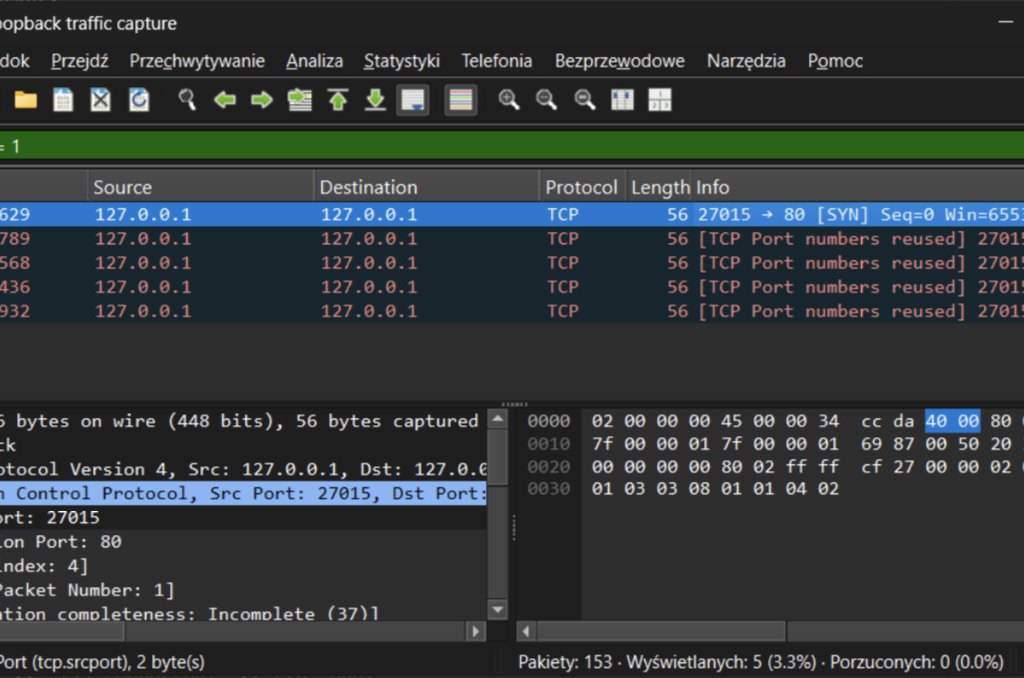
After executing this code, we can see that we are actually trying to set up a handshake from port 27015 to port 80on localhost:
Part 3: Sending TCP packets
A deep-dive into the IOCTL_AFD_SEND Fast-I/O path: snaring AfdFastIoDeviceControl hits in WinDbg, reverse-engineering the AFD_SEND_INFO / WSABUF chain, and blasting raw TCP payloads straight from user space on Windows 11—still no Winsock, just pure AFD.sys magic.
ntroduction
With a word of introduction, this post is the third in a series of articles in which we take a closer look at the AFD.sys driver. So far we have managed to create a socket and perform a three-way handshake using only I/O request packets to AFD.sys with the omission of Winsock and mswsock.dll. Now it was time to send and receive the packet.
As tradition dictates, here is our code from Winsock for our reference:
void createTCPv4() {
    const size_t PAYLOAD = 8;

    SOCKET s = socket(AF_INET, SOCK_STREAM, IPPROTO_TCP);
    if (s == INVALID_SOCKET) { std::cerr << "socket: " << WSAGetLastError() << '\n'; return; }

    sockaddr_in dst{};
    dst.sin_family = AF_INET;
    dst.sin_port = htons(80);
    InetPtonA(AF_INET, "192.168.1.1", &dst.sin_addr);

    if (connect(s, reinterpret_cast<sockaddr*>(&dst), sizeof(dst)) == SOCKET_ERROR) {
        std::cerr << "connect: " << WSAGetLastError() << '\n';
        closesocket(s); return;
    }

    std::string big(PAYLOAD, 'A');

    size_t sent = 0;
    while (sent < big.size()) {
        int n = send(s, big.data() + sent, static_cast<int>(big.size() - sent), 0);
        if (n == SOCKET_ERROR) {
            std::cerr << "send: " << WSAGetLastError() << '\n';
            break;
        }
        sent += n;
    }

    closesocket(s);
}
After how easy it was to intercept the communiqué between our example program from Winsock and AFD.sys I thought send and recv would be equally easy, but I was wrong. Setting the breakpoints to afd!AfdSend and afd!AfdReceive did nothing. The previously adopted method was not effective, in this case.
Starting with send, I thought at that point that maybe just maybe AfdSend is not the function that is actually called to send TCP packets. I started searching by available symbols and the phrase Send, I then hit nearly 96 different entries in the export table…
How do drivers differentiate between requests?
Unlike a normal program, where the start function is main (simplification), in Windows drivers such a function is DriverEntry. This is the place where the DRIVER_OBJECT is created, which is a structure describing the device being made available, you will find there such information as:
- The name of the device, which will be visible, e.g.
\Device\Afd. - Function setting, when the driver is initialised/deinitialised.
- Setting of the disptach function that is called when an
IRPcomes in.
In order for the driver to distinguish between specific codes there is such a thing as a dispatch function. This is a function that decodes the IoControlCode and passes the data and control to the next function responsible for handling that particular request. For example, below we have the pseudo C code (Binary Ninja) from the AfdDispatchDeviceControl function:
uint64_t AfdDispatchDeviceControl(int64_t arg1, IRP* arg2) {
    void* Overlay = *(uint64_t*)((char*)arg2->Tail + 0x40);

    if (NetioNrtIsTrackerDevice()) {
        int32_t rax_6 = NetioNrtDispatch(arg1, arg2);
        *(uint32_t*)((char*)arg2->IoStatus. + 0) = rax_6;
        IofCompleteRequest(arg2, 0);
        return (uint64_t)rax_6;
    }

    int32_t r8 = *(uint32_t*)((char*)Overlay + 0x18);
    uint64_t rax_3 = (uint64_t)(r8 >> 2) & 0x3ff;

    if (rax_3 < 0x4a && *(uint32_t*)((rax_3 << 2) + &AfdIoctlTable) == r8) {
        *(uint8_t*)((char*)Overlay + 1) = rax_3;

        if ((&AfdIrpCallDispatch)[rax_3])
            return _guard_dispatch_icall();
    }

    if ((*(int64_t*)((char*)g_rgFastWppLevelEnabledFlags + 0xe)) & 0x10)
        WPP_SF_D(0xb, &WPP_750cd5b025b73ac1a6ce4c47647b8469_Traceguids, r8);

    *(uint32_t*)((char*)arg2->IoStatus. + 0) = 0xc0000010;
    IofCompleteRequest(arg2, AfdPriorityBoost);
    return 0xc0000010;
}
There are a number of ways on how to perform such a dispatch, one is simply to create a series of expressions with if or switch/case and based on the resulting IoControlCode value, the specific function responsible for performing the operation is called.
The second way (used in AFD.sys) is to create a call table (see AfdIrpCallDispatch). Instead of complex conditional expressions, the driver creates an array of (pointers to) functions for itself and, depending on the decoded function, the corresponding call is executed. A fragment of this code can be found in lines 14 to 19 in the snippet above.
We can go further and see what the content of this AfdIrpCallDispatch table looks like:
1c0059410  void* AfdIrpCallDispatch = AfdBind
1c0059418  void* data_1c0059418 = AfdConnect
1c0059420  void* data_1c0059420 = AfdStartListen
1c0059428  void* data_1c0059428 = AfdWaitForListen
1c0059430  void* data_1c0059430 = AfdAccept
1c0059438  void* data_1c0059438 = AfdReceive
1c0059440  void* data_1c0059440 = AfdReceiveDatagram
1c0059448  void* data_1c0059448 = AfdSend
1c0059450  void* data_1c0059450 = AfdSendDatagram
1c0059458  void* data_1c0059458 = AfdPoll
1c0059460  void* data_1c0059460 = AfdDispatchImmediateIrp
1c0059468  void* data_1c0059468 = AfdGetAddress
1c0059470  void* data_1c0059470 = AfdDispatchImmediateIrp
1c0059478  void* data_1c0059478 = AfdDispatchImmediateIrp
...
We see there, for example, that operation 0 will be AfdBind, operation 1 will be AfdConnect, and we also find there that operation 7 will be AfdSend. And these offsets are actually reflected in how we build the IoControlCode to communicate with AFD.sys. Our control code is encoded with information about what operation we want to perform:
...
#define AFD_BIND                        0
#define AFD_CONNECT                     1
...
#define FSCTL_AFD_BASE  FILE_DEVICE_NETWORK
#define _AFD_CONTROL_CODE(Request, Method) (FSCTL_AFD_BASE << 12 | (Request) << 2 | (Method))
...
#define IOCTL_AFD_BIND                        _AFD_CONTROL_CODE(AFD_BIND, METHOD_NEITHER)    // 0x12003
#define IOCTL_AFD_CONNECT                     _AFD_CONTROL_CODE(AFD_CONNECT, METHOD_NEITHER) // 0x12007
Intercepting AfdDispatchDeviceControl
So instead of creating a breakpoint on afd!AfdSend let’s try setting one for our afd!AfdDispatchDeviceControlfunction. What I want to do at this point is simply check what IoControlCode values are sent to our driver and see if one of them will be IOCTL_AFD_SEND (0x1201F). To do this we will use the JavaScript below, which is supposed to read the IoControlCode value at each hit:
"use strict";

function GetIoctl(irpAddr){
    // Get _IRP object
    const irp = host.createTypedObject(irpAddr, "nt", "_IRP");
    // Get _IO_STACK_LOCATION address
    const stackPtr = irp.Tail.Overlay.CurrentStackLocation;
    // Get _IO_STACK_LOCATION object
    const isl = stackPtr.dereference();

    const code = isl.Parameters.DeviceIoControl.IoControlCode;
    return code;
}
Now we need to load our script and set the appropriate breakpoint, which will write us the returned value and not stop each time:
10: kd> .scriptrun D:\afddispatch.js;
JavaScript script successfully loaded from 'D:\afddispatch.js'
JavaScript script 'D:\afddispatch.js' has no main function to invoke!

14: kd> .foreach /pS 1 (ep { !process 0 0 afd_re.exe }) { bm /p ${ep} afd!AfdDispatchDeviceControl "dx Debugger.State.Scripts.afddispatch.Contents.GetIoctl(@rdx);gc;" }
 17: fffff800`515b2db0 @!"afd!AfdDispatchDeviceControl"

14: kd> g
Debugger.State.Scripts.afddispatch.Contents.GetIoctl(@rdx) : 0x120bf  // IOCTL_AFD_TRANSPORT_IOCTL
Debugger.State.Scripts.afddispatch.Contents.GetIoctl(@rdx) : 0x12003  // IOCTL_AFD_BIND
Debugger.State.Scripts.afddispatch.Contents.GetIoctl(@rdx) : 0x12007  // IOCTL_AFD_CONNECT
Already from the obtained IoControlCode we can see that we only have AfdBind and AfdConnect, but where is our AfdSend? After many hours of reversing AFD.sys and mswsock.dll and searching the Internet for information I came across something called Fast I/O.
What is Fast I/O?
I will use the book Windows® Internals Part 2 – 6th edition (especially Chapter 11) (Allievi et al.) as one source of information here. As we can read on page 375, Fast I/O is Windows’ mechanism for performing fast operations, bypassing all the anguish involved in generating I/O request packets. Our driver first checks if something can be handled as Fast I/O, if so it goes to another dispatch function that will handle the request. Although in the book itself the author refers to a File system driver, as we will see this does not apply only to file handling. One of the requirements to be able to handle Fast I/O is that our request must be synchronous, and our send function from Winsock is, after all, waiting until it receives the result – I don’t know if this is the good determinant, mswsock.dllmay handle it differently, but it’s always something. Importantly, requests that can be handled as Fast I/O do not go to the traditional dispatch function.
Looking for send
We have some suspicion that AFD.sys supports send as Fast I/O, so let’s start looking for confirmation in the code. Like traditional dispatch, fast dispatch is also set in DriverEntry:
NTSTATUS DriverEntry(DRIVER_OBJECT* arg1) {
...
    rdi_3 = __memfill_u64(&arg1->MajorFunction, AfdDispatch, 0x1c);
    arg1->MajorFunction[0xe] = AfdDispatchDeviceControl;
    arg1->MajorFunction[0xf] = AfdWskDispatchInternalDeviceControl;
    arg1->MajorFunction[0x17] = AfdEtwDispatch;
    arg1->FastIoDispatch = &AfdFastIoDispatch;
    arg1->DriverUnload = AfdUnload;
    void* AfdDeviceObject_1 = AfdDeviceObject;
...
}
And so right next to AfdDispatchDeviceControl we have the AfdFastIoDispatch function, it is worth taking a closer look at it. Our AfdFastIoDispatch object is an array:
1c0065000  AfdFastIoDispatch:
1c0065000  e0 00 00 00 00 00 00 00 00 00 00 00 00 00 00 00  ................
1c0065010  void* data_1c0065010 = AfdFastIoRead
1c0065018  void* data_1c0065018 = AfdFastIoWrite
1c0065020  00 00 00 00 00 00 00 00 00 00 00 00 00 00 00 00  ................
1c0065030  00 00 00 00 00 00 00 00 00 00 00 00 00 00 00 00  ................
1c0065040  void* data_1c0065040 = AfdSanFastUnlockAll
1c0065048                          00 00 00 00 00 00 00 00          ........
1c0065050  void* data_1c0065050 = AfdFastIoDeviceControl
In our array we can see the entry AfdFastIoDeviceControl, which is a dispatch function, but for Fast I/O. Why not throw a breakpoint in there and collect the IoControlCode. Except that they won’t have to delve into the _IRPstructure, the operation code is passed as one of the arguments of the PFAST_IO_DEVICE_CONTROL call:
typedef
BOOLEAN
(*PFAST_IO_DEVICE_CONTROL) (
    IN struct _FILE_OBJECT *FileObject,
    IN BOOLEAN Wait,
    IN PVOID InputBuffer OPTIONAL,
    IN ULONG InputBufferLength,
    OUT PVOID OutputBuffer OPTIONAL,
    IN ULONG OutputBufferLength,
    IN ULONG IoControlCode,
    OUT PIO_STATUS_BLOCK IoStatus,
    IN struct _DEVICE_OBJECT *DeviceObject
    );
So all we need to do is read the seventh argument (@rdi) of the call, we do this by setting such a breakpoint:
6: kd> .foreach /pS 1 (ep { !process 0 0 afd_re.exe }) { bm /p ${ep} afd!AfdFastIoDeviceControl ".printf \"IoControlCode=%p\\n\", @rdi;gc;" }
  2: fffff800`515c4c20 @!"afd!AfdFastIoDeviceControl"
Couldn't resolve error at 'SessionId: afd!AfdFastIoDeviceControl ".printf \"IoControlCode=%p\\n\", @rdi;gc;" '

6: kd> g
IoControlCode=000000000001207b // IOCTL_AFD_TRANSMIT_FILE
IoControlCode=000000000001207b // IOCTL_AFD_TRANSMIT_FILE
IoControlCode=0000000000012047 // IOCTL_AFD_SET_CONTEXT
IoControlCode=00000000000120bf // IOCTL_AFD_TRANSPORT_IOCTL
IoControlCode=0000000000012047 // IOCTL_AFD_SET_CONTEXT
IoControlCode=0000000000012003 // IOCTL_AFD_BIND
IoControlCode=0000000000012047 // IOCTL_AFD_SET_CONTEXT
IoControlCode=0000000000012007 // IOCTL_AFD_CONNECT
IoControlCode=0000000000012047 // IOCTL_AFD_SET_CONTEXT
IoControlCode=000000000001201f // IOCTL_AFD_SEND
Ok, there we have it! Our send is treated as Fast I/O, let’s try to look at the AFD.sys code and find what function is called when the driver receives 0x1201f:
1c0034be0   int64_t AfdFastIoDeviceControl(struct _FILE_OBJECT* FileObject,
1c0034be0      BOOLEAN Wait, PVOID InputBuffer, ULONG InputBufferLength,
1c0034be0      PVOID OutputBuffer, ULONG OutputBufferLength, ULONG IoControlCode,
1c0034be0      PIO_STATUS_BLOCK IoStatus, struct _DEVICE_OBJECT* DeviceObject) {
    ...
1c0034c9b                        if (IoControlCode == 0x1201f)
1c0034c9b                            goto label_1c0034d7d;
    ...
1c0034d7d                            label_1c0034d7d:
1c0034d7d                            __builtin_memset(&s_2, 0, 0x14);
1c0034d8d                            int128_t s_3;
1c0034d8d                            __builtin_memset(&s_3, 0, 0x48);
    ...
1c00350f7                            rbx = (uint64_t)AfdFastConnectionSend(FsContext,
1c00350f7                                &s_2, rax_30, IoStatus);
1c00350fa                            goto label_1c003646b;
    ...
1c0034be0    }
The code of the entire AfdFastIoDeviceControl is quite extensive, so I have only shown the parts related to our 0x1201f. We can find there that if IoControlCode == 0x1201f, then execute jmp to 0x1c0034d7d. This is where the initialisation of all necessary memory areas, variables etc. starts. And a piece further on we have a call to the AfdFastConnectionSend function. This could be our function responsible for sending the data. Of course, to confirm this we should now set a breakpoint there:
6: kd> .foreach /pS 1 (ep { !process 0 0 afd_re.exe }) { bm /p ${ep} afd!AfdFastConnectionSend }
  4: fffff800`515aac90 @!"afd!AfdFastConnectionSend"
Couldn't resolve error at 'SessionId: afd!AfdFastConnectionSend '

6: kd> g

Breakpoint 4 hit
afd!AfdFastConnectionSend:
fffff800`515aac90 4053            push    rbx
Hit! We found our function responsible for sending data via TCP! Now it is time to analyse the input buffer. Here, as usual, our invaluable sources (killvxk), (unknowncheats.me ICoded post), (ReactOS Project), (DynamoRIO / Dr. Memory), (DeDf), (diversenok) will help us.
Analyzing retrieved data AfdFastConnectionSend
From our signature for PFAST_IO_DEVICE_CONTROL, we know that to the dispatch, InputBuffer and InputBufferLength are passed as arguments to the third and fourth arguments, respectively. We are not sure that they are passed to AfdFastConnectionSend at the same positions, but we can safely assume that they are also passed directly as arguments. So what we’ll be looking for is by the values of the address registers from user-space (canonical lower half) and some (relatively) small buffer length value.
12: kd> r
rax=0000000000000002 rbx=000000c9532ff128 rcx=ffffbd8bfa8dda80
rdx=ffffce0958bcef70 rsi=0000000000000001 rdi=0000000000000000
rip=fffff800515aac90 rsp=ffffce0958bcee88 rbp=ffffce0958bcf4e0
 r8=0000000000000008  r9=ffffce0958bcf1c8 r10=fffff800bbc17c70
r11=ffff88f9d7c00000 r12=ffffbd8bfa8dda80 r13=0000000000000000
r14=0000000000000018 r15=000000000000afd1
iopl=0         nv up ei pl zr na po nc
cs=0010  ss=0018  ds=002b  es=002b  fs=0053  gs=002b             efl=00040246
afd!AfdFastConnectionSend:
fffff800`515aac90 4053            push    rbx
Here we see that the rbx register stores something that may resemble an address in user-space, while r14 looks like the size of our buffer. So let’s read their value:
12: kd> db 000000c9532ff128 L18
000000c9`532ff128  08 f2 2f 53 c9 00 00 00-01 00 00 00 00 00 00 00  ../S............
000000c9`532ff138  00 00 00 00 00 00 00 00                          ........
Again we have something that resembles an address and some size, let’s try to read (note on the dumpy it is little-endian) 0x000000c9532ff208:
12: kd> db 000000c9532ff208 L18
000000c9`532ff208  08 00 00 00 00 00 00 00-e0 f2 2f 53 c9 00 00 00  ........../S....
000000c9`532ff218  00 00 00 00 00 00 00 00                          ........
Once again, we see some size (0x08), which corresponds to the AAAAAAAA payload we sent. Let’s try another dereference and check to see what it is at 0x000000c9532ff2e0:
12: kd> db 0x000000c9532ff2e0 L8
12: kd> db 0x000000c9532ff2e0 L8
000000c9`532ff2e0  41 41 41 41 41 41 41 41                          AAAAAAAA
We’ve got it! There is our payload! But the question is how are the buffers constructed? The answer to that will be found in (diversenok):
// ref: https://learn.microsoft.com/en-us/windows/win32/api/ws2def/ns-ws2def-wsabuf
typedef struct _WSABUF {
  ULONG len;
  CHAR  *buf;
} WSABUF, *LPWSABUF;

typedef struct _AFD_SEND_INFO {
    _Field_size_(BufferCount) LPWSABUF BufferArray;
    ULONG BufferCount;
    ULONG AfdFlags;
    ULONG TdiFlags; // TDI_RECEIVE_*
} AFD_SEND_INFO, *PAFD_SEND_INFO;
Breaking this down step by step, we first have a _AFD_SEND_INFO structure containing a pointer to an array of buffers and the number of these buffers. In each buffer, on the other hand, we have its length and a pointer to the data. A fairly good analogy for this might be the standard use of argv in the main function. There, too, we are dealing with an array for pointers to the buffers of our arguments passed to the program.
A keen eye can spot a certain inconsistency. After all, we know that the InputBuffer from Winsock is 0x18 bytes and our _AFD_SEND_INFO structure is 0x20 bytes. I have experimentally verified that, in principle, TdiFlags is optional. Presumably if we had indicated TransportDevice (e.g. DeviceTcp) when creating the socket we would have had to indicate this. This leaves the conundrum of what values can AfdFlags take?
According to what we have in (diversenok) this could be:
#define AFD_NO_FAST_IO 0x0001
#define AFD_OVERLAPPED 0x0002
The AFD_NO_FAST_IO seems to be the most interesting from the perspective of our work so far. In fact when we set AfdFlags to 0x0001 then AFD.sys goes through a classic dispatch and the breakpoint on AfdSend is triggered:
12: kd> .foreach /pS 1 (ep { !process 0 0 afd-networking.exe }) { bm /p ${ep} afd!AfdSend }
  6: fffff800`515a18c0 @!"afd!AfdSend"
Couldn't resolve error at 'SessionId: afd!AfdSend '
12: kd> g
Breakpoint 6 hit
afd!AfdSend:
fffff800`515a18c0 4c8bdc          mov     r11,rsp
So, that’s cool, we can control how this particular request will be dispatched. It’s worth saving this for a later reserach on where and how this is done. What about TCPv6? Generally it looks the same, there are no big differences in sending packets. Socket created, connection established, interface to send is the same.
The question now would be how many buffers can it send, how big can they be? Does the total number of bytes count? Let’s find out!
Playing with buffers
So let’s perhaps start by trying to send 10 megabytes using WinSock and see if it breaks it up somehow, to get a general idea of what we’re dealing with. By default, I set my breakpoint to afd!AfdFastIoDeviceControl and write out the IoControlCode to see if, for example, Winsock is splitting this data packet into multiple requests:
14: kd> .foreach /pS 1 (ep { !process 0 0 afd_re.exe }) { bm /p ${ep} afd!AfdFastIoDeviceControl ".printf \"IoControlCode=%p\\n\", @rdi;gc;" }
 10: fffff800`515c4c20 @!"afd!AfdFastIoDeviceControl"
Couldn't resolve error at 'SessionId: afd!AfdFastIoDeviceControl ".printf \"IoControlCode=%p\\n\", @rdi;gc;" '
14: kd> g
IoControlCode=000000000001207b
IoControlCode=000000000001207b
IoControlCode=0000000000012047
IoControlCode=00000000000120bf
IoControlCode=0000000000012047
IoControlCode=0000000000012003
IoControlCode=0000000000012047
IoControlCode=0000000000012007
IoControlCode=0000000000012047
IoControlCode=000000000001201f
Despite our loop to make sure all the data was sent this Winsock managed to send 10 Megabytes at a time:
while (sent < big.size()) {
    int n = send(s, big.data() + sent, static_cast<int>(big.size() - sent), 0);
    std::cerr << "sent portion: " << n << '\n';
    if (n == SOCKET_ERROR) {
        std::cerr << "send: " << WSAGetLastError() << '\n';
        break;
    }
    sent += n;
}
And what does the buffer that is passed to AfdFastConnectionSend look like?
8: kd> .foreach /pS 1 (ep { !process 0 0 afd_re.exe }) { bm /p ${ep} afd!AfdFastConnectionSend }
 12: fffff800`515aac90 @!"afd!AfdFastConnectionSend"
Couldn't resolve error at 'SessionId: afd!AfdFastConnectionSend '
8: kd> g
Breakpoint 12 hit
afd!AfdFastConnectionSend:
fffff800`515aac90 4053            push    rbx
8: kd> r
rax=0000000000000002 rbx=000000ce1a6ff328 rcx=ffffbd8bfa8dac00
rdx=ffffce0956db6f70 rsi=0000000000000001 rdi=0000000000000000
rip=fffff800515aac90 rsp=ffffce0956db6e88 rbp=ffffce0956db74e0
 r8=0000000006400000  r9=ffffce0956db71c8 r10=fffff800bbc17c70
r11=ffff88f9d7c00000 r12=ffffbd8bfa8dac00 r13=0000000000000000
r14=0000000000000018 r15=000000000000afd1
iopl=0         nv up ei pl zr na po nc
cs=0010  ss=0018  ds=002b  es=002b  fs=0053  gs=002b             efl=00040246
afd!AfdFastConnectionSend:
fffff800`515aac90 4053            push    rbx
8: kd> dq 000000ce1a6ff328 L3
000000ce`1a6ff328  000000ce`1a6ff408 00000000`00000001
000000ce`1a6ff338  00000000`00000000
8: kd> dq 000000ce`1a6ff408 L2
000000ce`1a6ff408  00000000`06400000 00000242`e3249080
Everything flies in one big buffer – the same for 1 Gigabyte. So I am curious how realistically AFD.sys interprets these buffers. Maybe n buffers will be sent as n packets? This is already verified without using Winsock:
NTSTATUS sendAfdPacketTCP(HANDLE socket) {
    const int BUF_NUM = 16;
    const int BUF_SIZE = 16;
    AFD_BUFF* payload = new AFD_BUFF[BUF_NUM];
    for (int i = 0; i < BUF_NUM; i++) {
        payload[i].buf = (uint8_t*)malloc(BUF_SIZE);
        memset(payload[i].buf, 0x42, BUF_SIZE);
        payload[i].len = BUF_SIZE;
    }

    AFD_SEND_PACKET* afdSendPacket = new AFD_SEND_PACKET;
    afdSendPacket->BufferArray = payload;
    afdSendPacket->BufferCount = BUF_NUM;
    afdSendPacket->AfdFlags = AFD_NO_FAST_IO;

    IO_STATUS_BLOCK ioStatus;
    NTSTATUS status = NtDeviceIoControlFile(socket, NULL, NULL, NULL, &ioStatus, IOCTL_AFD_SEND,
                                            afdSendPacket, sizeof(AFD_SEND_PACKET),
                                            NULL, NULL);
    if (status == STATUS_PENDING) {
        WaitForSingleObject(socket, INFINITE);
        status = ioStatus.Status;
    }
    return status;
}
As it turns out this changes nothing, it flies as one packet. For obvious reasons per the TCP specification the packet would be split once it exceeded 0xFFFF bytes, but the number of buffers has no bearing on this. I checked experimentally and AFD.sys will also accept 1024*1024 buffers of 1024 bytes each. An important limitation, of course, remains our hardware.
Next steps
Although I originally intended to discuss both send and receive in this part, this article is long enough that it is in the next step that we will deal with receiving TCP packets.
Final code
Below you can find the full code for the current state of our knowledge:
#include <stdint.h>
#include <Windows.h>
#include <winternl.h>
#include <iostream>
#include "afd_defs.h"
#include "afd_ioctl.h"
#pragma comment(lib, "ntdll.lib")

NTSTATUS createAfdSocket(PHANDLE socket) {...}
NTSTATUS bindAfdSocket(HANDLE socket) {...}
NTSTATUS connectAfdSocket(HANDLE socket) {...}

// AFDFLAGS
#define AFD_NO_FAST_IO 0x0001
#define AFD_OVERLAPPED 0x0002

struct AFD_BUFF {
    uint64_t len;
    uint8_t* buf;
};

struct AFD_SEND_PACKET {
    AFD_BUFF* buffersArray;
    uint64_t  buffersCount;
    uint64_t  afdFlags;
    uint64_t  tdiFlags; // optional
};

NTSTATUS sendAfdPacketTCP(HANDLE socket) {
    const int BUF_NUM  =  1;
    const int BUF_SIZE = 16;
    AFD_BUFF* payload = new AFD_BUFF[BUF_NUM];
    for (int i = 0; i < BUF_NUM; i++) {
        payload[i].buf = (uint8_t*)malloc(BUF_SIZE);
        memset(payload[i].buf, 0x42, BUF_SIZE);
        payload[i].len = BUF_SIZE;
    }

    AFD_SEND_PACKET* afdSendPacket  = new AFD_SEND_PACKET;
    afdSendPacket->buffersArray     = payload;
    afdSendPacket->buffersCount     = BUF_NUM;
    afdSendPacket->afdFlags         = 0;

    IO_STATUS_BLOCK ioStatus;
    NTSTATUS status = NtDeviceIoControlFile(socket, NULL, NULL, NULL, &ioStatus, IOCTL_AFD_SEND,
                                            afdSendPacket, sizeof(AFD_SEND_PACKET),
                                            NULL, NULL);
    if (status == STATUS_PENDING) {
        WaitForSingleObject(socket, INFINITE);
        status = ioStatus.Status;
    }
    return status;
}

int main() {
    HANDLE socket;
    NTSTATUS status = createAfdSocket(&socket);
    if (!NT_SUCCESS(status)) {
        std::cout << "[-] Could not create socket: " << std::hex << status << std::endl;
        return 1;
    }
    std::cout << "[+] Socket created!" << std::endl;

    status = bindAfdSocket(socket);
    if (!NT_SUCCESS(status)) {
        std::cout << "[-] Could not bind: " << std::hex << status << std::endl;
        return 1;
    }
    std::cout << "[+] Socket bound!" << std::endl;

    status = connectAfdSocket(socket);
    if (!NT_SUCCESS(status)) {
        std::cout << "[-] Could not connect: " << std::hex << status << std::endl;
        return 1;
    }
    std::cout << "[+] Connected!" << std::endl;

    status = sendAfdPacketTCP(socket);
    if (!NT_SUCCESS(status)) {
        std::cout << "[-] Could not send TCP packet: " << std::hex << status << std::endl;
        return 1;
    }
    std::cout << "[+] Sent!" << std::endl;

	return 0;
}
Part 4: Receiving TCP packets
A hands-on foray into the IOCTL_AFD_RECEIVE Fast-I/O path: stalking AfdFastConnectionReceive in WinDbg, decoding the AFD_SENDRECV_INFO / WSABUF triad, flipping TDI flags for peek-and-poke tricks, and slurping raw TCP responses straight out of AFD.sys—zero Winsock, pure kernel-level packet sorcery.
Introduction
Ok, the time has come, we can finally receive some data in our sockets. If you haven’t seen the previous batches, I encourage you to check them out, so far we’ve managed to create a socket and send TCP packets. We still have a long way to go to fully understand how networking works by communicating directly with the AFD.sys driver, but there will be time for that yet. No need to procrastinate, let’s go!
Looking for recv
As before, recv is handled as Fast I/O (unless we set the flags differently). A good reference for this will be IOCTL_AFD_RECEIVE going into our AfdFastIoDeviceControl function. By default, as before, our reference will be this code using Winsock:
void createTCPv4() {
    const size_t PAYLOAD = 1024;
    SOCKET s = socket(AF_INET, SOCK_STREAM, IPPROTO_TCP);
    if (s == INVALID_SOCKET) { std::cerr << "socket: " << WSAGetLastError() << '\n'; return; }

    sockaddr_in dst{};
    dst.sin_family = AF_INET;
    dst.sin_port = htons(80);
    InetPtonA(AF_INET, "192.168.1.1", &dst.sin_addr);

    if (connect(s, reinterpret_cast<sockaddr*>(&dst), sizeof(dst)) == SOCKET_ERROR) {
        std::cerr << "connect: " << WSAGetLastError() << '\n';
        closesocket(s); return;
    }

    std::string big(PAYLOAD, 'A');

    size_t sent = 0;
    while (sent < big.size()) {
        int n = send(s, big.data() + sent, static_cast<int>(big.size() - sent), 0);
        if (n == SOCKET_ERROR) {
            break;
        }
        sent += n;
    }

    char buf[4096];
    int n = 0;
    size_t received = 0;
    std::string response;

    while ((n = recv(s, buf, static_cast<int>(sizeof(buf)), 0)) > 0) {
        response.append(buf, n);
        received += n;
    }

    if (n == SOCKET_ERROR) {
        std::cerr << "recv: " << WSAGetLastError() << '\n';
    }

    std::cout << "Received " << received << " bytes\n";
    std::cout << "----- RESPONSE BEGIN -----\n"
        << response << '\n'
        << "----- RESPONSE END -----\n";

    closesocket(s);
}
As we connect to the HTTP server and send garbage we get a Bad request in response – a clear case. To confirm that we are indeed recv hitting the driver as Fast I/O we will use a command like this in WinDbg:
14: kd> .foreach /pS 1 (ep { !process 0 0 afd_re.exe }) { bm /p ${ep} afd!AfdFastIoDeviceControl ".printf \"IoControlCode=%p\\n\", @rdi;gc;" }
  0: fffff801`6d9d4c20 @!"afd!AfdFastIoDeviceControl"
Couldn't resolve error at 'SessionId: afd!AfdFastIoDeviceControl ".printf \"IoControlCode=%p\\n\", @rdi;gc;" '
14: kd> g
IoControlCode=000000000001207b // IOCTL_AFD_GET_INFORMATION
IoControlCode=000000000001207b // IOCTL_AFD_GET_INFORMATION
IoControlCode=0000000000012047 // IOCTL_AFD_SET_CONTEXT
IoControlCode=00000000000120bf // IOCTL_AFD_TRANSPORT_IOCTL
IoControlCode=0000000000012047 // IOCTL_AFD_SET_CONTEXT
IoControlCode=0000000000012003 // IOCTL_AFD_BIND
IoControlCode=0000000000012047 // IOCTL_AFD_SET_CONTEXT
IoControlCode=0000000000012007 // IOCTL_AFD_CONNECT
IoControlCode=0000000000012047 // IOCTL_AFD_SET_CONTEXT
IoControlCode=000000000001201f // IOCTL_AFD_SEND
IoControlCode=0000000000012017 // IOCTL_AFD_RECEIVE
IoControlCode=0000000000012017 // IOCTL_AFD_RECEIVE
As we can see our request IOCTL_AFD_RECEIVE appears twice. We can explain this by the fact that in our code, the recv function is executed in a loop. In practice, we retrieve the response in packets of 4096 bytes until we have received the entire TCP response. The first time we received the entire HTTP response and presumably AFD.sysreturned information about how many bytes we actually received. And the second call with which we wanted to retrieve the rest returned us zero bytes, so no more requests were sent – a simple matter.
It’s time to find a direct function that is responsible for handling this request, as in AfdFastConnectionSend. Let’s check this statically using Binary Ninja:
1c0034be0    int64_t AfdFastIoDeviceControl(struct _FILE_OBJECT* FileObject,
1c0034be0      BOOLEAN Wait, PVOID InputBuffer, ULONG InputBufferLength,
1c0034be0      PVOID OutputBuffer, ULONG OutputBufferLength, ULONG IoControlCode,
1c0034be0      PIO_STATUS_BLOCK IoStatus, struct _DEVICE_OBJECT* DeviceObject) {
...
1c00354a6                    rbx = (uint64_t)AfdFastConnectionReceive(FsContext, &s,
1c00354a6                        rax_51, IoStatus);
...
1c0034be0    }
This time in the code we don’t find a condition that directly checks if IoControlCode == 0x12017, what’s more, before calling our target function we also have a number of checks that for now we don’t know what they do. Let’s take a breakpoint on this function:
12: kd> .foreach /pS 1 (ep { !process 0 0 afd_re.exe }) { bm /p ${ep} afd!AfdFastConnectionReceive ".printf \"HIT!\\n\";gc;" }
  4: fffff801`6d9d3280 @!"afd!AfdFastConnectionReceive"
Couldn't resolve error at 'SessionId: afd!AfdFastConnectionReceive ".printf \"HIT!\\n\";gc;" '
12: kd> g
HIT!
We only have one hit despite the fact that two IOCTL_AFD_RECEIVE requests went, this could mean that these check functions before calling AfdFastConnectionReceive check if, for example, the internal response buffer for the socket is empty.
We now turn to examining what our input buffer looks like for this request. Here, as usual, our invaluable sources (killvxk), (unknowncheats.me ICoded post), (ReactOS Project), (DynamoRIO / Dr. Memory), (DeDf), (diversenok) will help us.
10: kd> .foreach /pS 1 (ep { !process 0 0 afd_re.exe }) { bm /p ${ep} afd!AfdFastConnectionReceive }
  6: fffff801`6d9d3280 @!"afd!AfdFastConnectionReceive"
Couldn't resolve error at 'SessionId: afd!AfdFastConnectionReceive '
10: kd> g
Breakpoint 6 hit
afd!AfdFastConnectionReceive:
fffff801`6d9d3280 4c894c2420      mov     qword ptr [rsp+20h],r9
4: kd> r
rax=0000000000000002 rbx=00000001ac3ae028 rcx=ffff8b05eaffb340
rdx=fffff58d13a4ef10 rsi=0000000000000001 rdi=0000000000000000
rip=fffff8016d9d3280 rsp=fffff58d13a4ee88 rbp=fffff58d13a4f4e0
 r8=0000000000001000  r9=fffff58d13a4f1c8 r10=fffff801d8817c70
r11=ffffb1fcd3800000 r12=ffff8b05eaffb340 r13=0000000000000000
r14=0000000000000018 r15=000000000000afd1
iopl=0         nv up ei pl zr na po nc
cs=0010  ss=0018  ds=002b  es=002b  fs=0053  gs=002b             efl=00040246
afd!AfdFastConnectionReceive:
fffff801`6d9d3280 4c894c2420      mov     qword ptr [rsp+20h],r9 ss:0018:fffff58d`13a4eea8=0000000000000003
4: kd> dq 00000001ac3ae028 L3
00000001`ac3ae028  00000001`ac3ae108 00000000`00000001
00000001`ac3ae038  00000000`00000020
4: kd> dq 00000001`ac3ae108 L2
00000001`ac3ae108  00000000`00001000 00000001`ac3ae260
4: kd> dq 00000001`ac3ae260 L10
00000001`ac3ae260  cccccccc`cccccccc cccccccc`cccccccc
00000001`ac3ae270  cccccccc`cccccccc cccccccc`cccccccc
00000001`ac3ae280  cccccccc`cccccccc cccccccc`cccccccc
00000001`ac3ae290  cccccccc`cccccccc cccccccc`cccccccc
00000001`ac3ae2a0  cccccccc`cccccccc cccccccc`cccccccc
00000001`ac3ae2b0  cccccccc`cccccccc cccccccc`cccccccc
00000001`ac3ae2c0  cccccccc`cccccccc cccccccc`cccccccc
00000001`ac3ae2d0  cccccccc`cccccccc cccccccc`cccccccc
We can see that essentially the structure of the input buffer is identical to the one we use to send packets (see part 3). With a slight difference, in our structure we have AfdFlags, which are flags describing our buffer. When they are set to 0x00 as in the case of sending then AFD.sys treats them as send buffer.
Analyzing retrieved data AfdFastConnectionReceive
Earlier we were guided by (diversenok) to guess what values the flags can take and nowhere there was a value 0x20. We can instead look at (unknowncheats.me ICoded post), there we find such definitions:
#define TDI_RECEIVE_BROADCAST				0x4
#define TDI_RECEIVE_MULTICAST				0x8
#define TDI_RECEIVE_PARTIAL					0x10
#define TDI_RECEIVE_NORMAL					0x20
#define TDI_RECEIVE_EXPEDITED				0x40
#define TDI_RECEIVE_PEEK					0x80
#define TDI_RECEIVE_NO_RESPONSE_EXP			0x100
#define TDI_RECEIVE_COPY_LOOKAHEAD			0x200
#define TDI_RECEIVE_ENTIRE_MESSAGE			0x400
#define TDI_RECEIVE_AT_DISPATCH_LEVEL		0x800
#define TDI_RECEIVE_CONTROL_INFO			0x1000
#define TDI_RECEIVE_FORCE_INDICATION		0x2000
#define TDI_RECEIVE_NO_PUSH					0x4000
That is, 0x20 would imply a normal reception of data from the driver. But there is a detail, according to (unknowncheats.me ICoded post), these flags apply to the TdiFlags field:
NTSTATUS AfdRecv(HANDLE SocketHandle, PVOID Buffer, ULONG_PTR BufferLength, PULONG_PTR pBytes)
{
	NTSTATUS Status;
	IO_STATUS_BLOCK IoStatus;
	AFD_SENDRECV_INFO RecvInfo;
	HANDLE Event;
	AFD_WSABUF AfdBuffer;

	Status = NtCreateEvent(&Event, EVENT_ALL_ACCESS, NULL, NotificationEvent, FALSE);
	if (NT_SUCCESS(Status))
	{
        ///
		AfdBuffer.len = (ULONG)BufferLength;

		RecvInfo.BufferArray = &AfdBuffer;
		RecvInfo.BufferCount = 1;
		RecvInfo.TdiFlags = TDI_RECEIVE_NORMAL;
		RecvInfo.AfdFlags = 0;
        ///
	}
	return Status;
}
Which in our case is not quite true. The buffer sent to AFD.sys is 0x18 in size, i.e. it has three fields of 0x8 bytes. And this third field (in our case AfdFlags) is just set to 0x20. I have experimentally checked and our version is the one that works. Of course, I am not saying that the (unknowncheats.me ICoded post) version does not work, it just does not apply in our case.
With all this in mind, let us create a working proof-of-concept using everything we already have:
#include <stdint.h>
#include <Windows.h>
#include <winternl.h>
#include <iostream>
#include "afd_defs.h"
#include "afd_ioctl.h"
#pragma comment(lib, "ntdll.lib")

NTSTATUS createAfdSocket(PHANDLE socket) {/**/}
NTSTATUS bindAfdSocket(HANDLE socket) {/**/}
NTSTATUS connectAfdSocket(HANDLE socket) {/**/}
NTSTATUS sendAfdPacketTCP(HANDLE socket) {/**/}

NTSTATUS receiveAfdPacketTCP(HANDLE socket) {
    const int BUF_NUM = 1;
    const int BUF_SIZE = 1000;
    AFD_BUFF* payload = new AFD_BUFF[BUF_NUM];
    for (int i = 0; i < BUF_NUM; i++) {
        payload[i].buf = (uint8_t*)malloc(BUF_SIZE);
        memset(payload[i].buf, 0x00, BUF_SIZE);
        payload[i].len = BUF_SIZE;
    }

    AFD_SEND_PACKET* afdSendPacket = new AFD_SEND_PACKET;
    afdSendPacket->buffersArray = payload;
    afdSendPacket->buffersCount = BUF_NUM;
    afdSendPacket->afdFlags = 0x20; // RECEIVE_NORMAL

    IO_STATUS_BLOCK ioStatus;
    NTSTATUS status = NtDeviceIoControlFile(socket, NULL, NULL, NULL, &ioStatus, IOCTL_AFD_RECEIVE,
                                            afdSendPacket, sizeof(AFD_SEND_PACKET),
                                            nullptr, 0);
    if (status == STATUS_PENDING) {
        WaitForSingleObject(socket, INFINITE);
        status = ioStatus.Status;
    }

    std::cout << "[+] SERVER RESPONSE: " << std::endl;
    std::cout << payload[0].buf << std::endl;

    return status;
}

int main() {
    HANDLE socket;
    // 1. Create socket
    // 2. Bind socket
    // 3. Connect to remote host
    // 4. Send 1000x'A'

    status = receiveAfdPacketTCP(socket);
    if (!NT_SUCCESS(status)) {
        std::cout << "[-] Could not receive TCP packet: " << std::hex << status << std::endl;
        return 1;
    }
    std::cout << "[+] Received!" << std::endl;

    return 0;
}
What we do. We allocate our buffers to store the received response somewhere, set AfdFlags to 0x20 (normal reception), and then send the request to AFD.sys. What more do you need?
Well, it would be useful to somehow find out how much of this data we have received. At first, I thought that maybe AFD.sys would modify the buffer structure and change its size. However, this did not happen. The answer was much simpler. The IO_STATUS_BLOCK structure has an Information field:
// ref: https://learn.microsoft.com/en-us/windows-hardware/drivers/ddi/wdm/ns-wdm-_io_status_block
typedef struct _IO_STATUS_BLOCK {
  union {
    NTSTATUS Status;
    PVOID    Pointer;
  };
  ULONG_PTR Information;
} IO_STATUS_BLOCK, *PIO_STATUS_BLOCK;
And it is in the Information field that we get a return on how many bytes have been read, but we do not know how many are actually left to read. To check this we would now have to send another request to AFD.sys and check if Informtaion is equal to 0x0. Then only then would we know if this is all there is.
Other receive flags
This question may be best answered by documentation from Microsoft. All the flags are very nicely described there. Although some of them are explained in terminology familiar to driver developers. I tried to reproduce some of them in Winsock and ‘make up’ my own explanation:
// Receive normal packets
afdSendPacket->afdFlags = TDI_RECEIVE_NORMAL;
// Receive normal packet, but don't clear AFD.sys input queue
afdSendPacket->afdFlags = TDI_RECEIVE_NORMAL | TDI_RECEIVE_PEEK;
// Receive normal packet, but wait for all data, equivalent of MSG_WAITALL in Winsock
afdSendPacket->afdFlags = TDI_RECEIVE_NORMAL | TDI_RECEIVE_NO_PUSH;
// Receive packets with tcp.flags.urg == 1
afdSendPacket->afdFlags = TDI_RECEIVE_EXPEDITED;
// Receive packets with tcp.flags.urg == 1, but don't clear AFD.sys input queue
afdSendPacket->afdFlags = TDI_RECEIVE_EXPEDITED | TDI_RECEIVE_PEEK;
// Receive packets with tcp.flags.urg == 1, but wait for all data, equivalent of MSG_WAITALL in Winsock
afdSendPacket->afdFlags = TDI_RECEIVE_EXPEDITED | TDI_RECEIVE_NO_PUSH;
Some of our flags relate to UDP and we will certainly look at this when the opportunity arises.
Next steps
At this point, we already have the necessary functionality to be able to create a simple TCP client. In the next batches we will look more at socket operations. How to change its parameters, how to close a connection, how to close a socket, how to handle other types of TCP messages.
Final code
Essentially, the content of the final code is no different from what you can find in the proof-of-concept above. Of course, the code for IPv6 will look identical.