
Text and code by Eleven Red Pandas https://github.com/oxfemale · https://x.com/bytecodevm
The article explores a low-level networking technique on Windows that bypasses the traditional Winsock API layer by communicating directly with the kernel networking driver AFD (Ancillary Function Driver) through Native API calls such as NtCreateFile and NtDeviceIoControlFile. Instead of using standard functions from ws2_32.dll, the method opens the \Device\Afd device and sends IOCTL requests that implement socket operations like connect, send, and receive. The author demonstrates how Winsock internally relies on AFD and shows that it is possible to replicate this behavior from user mode without the usual networking libraries.
The article also discusses resolving system functions dynamically via the Process Environment Block (PEB) rather than using GetProcAddress, which avoids relying on common user-mode API layers. The main goal is to illustrate how Windows networking works internally and how direct interaction with kernel drivers can reduce dependency on high-level APIs. While this approach may avoid some user-mode API monitoring, the article emphasizes that kernel-level telemetry, ETW events, and network stack monitoring can still observe the activity. Overall, the work serves as a technical demonstration of Windows internals, Native API usage, and how Winsock abstractions map to the underlying AFD driver operations.
Source code: https://github.com/oxfemale/nt_afd_http
HTTP file downloader that communicates directly with \Device\Afd\Endpoint
via NT Native API — bypassing ws2_32.dll, mswsock.dll, and the CRT entirely.
Introduction
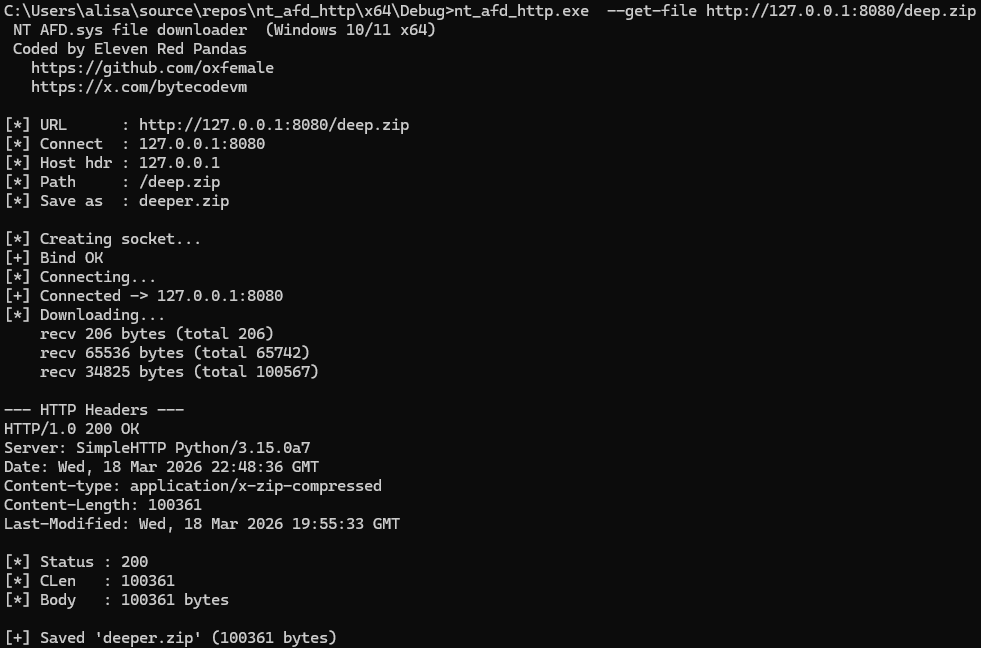
This article documents the development of an HTTP file downloader in C++ that operates completely bypassing the standard Winsock API. Instead of the familiar socket(), connect(), send(), recv() from ws2_32.dll, we talk directly to a Windows kernel driver through the NT Native API interface.
The end result is a tool that:
- Creates a TCP socket via
NtCreateFile(\Device\Afd\Endpoint) - Establishes a connection via
NtDeviceIoControlFile(IOCTL_AFD_CONNECT) - Sends and receives data via
IOCTL_AFD_SEND/IOCTL_AFD_RECV - Saves files via
NtWriteFile - Loads every function through a manual PEB-walk with zero static Win32 API imports
- Bypasses the majority of usermode EDR hooks
Part 1. Windows Networking Stack Architecture
1.1 Layers from Application to Wire
To understand why this approach matters, we first need to understand how Windows networking actually works under the hood.
┌─────────────────────────────────────────────────────┐
│                  User Mode                          │
│                                                     │
│  Your application                                   │
│       ↓                                             │
│  ws2_32.dll   (Winsock API: socket/connect/send)    │
│       ↓                                             │
│  mswsock.dll  (Winsock SPI: protocol implementation)│
│       ↓  NT syscall                                 │
│  ntdll.dll    (NtDeviceIoControlFile)               │
├─────────────────────────────────────────────────────┤
│                  Kernel Mode                        │
│                                                     │
│  afd.sys      (Ancillary Function Driver)           │
│       ↓  TDI / WFP                                  │
│  tcpip.sys    (TCP/IP stack)                        │
│       ↓  NDIS                                       │
│  Network adapter driver (miniport)                  │
│       ↓                                             │
│  Physical network (NIC)                             │
└─────────────────────────────────────────────────────┘
The key insight: ws2_32.dll and mswsock.dll are usermode wrappers. They do nothing themselves — they simply translate calls like socket(), connect(), send() into NtDeviceIoControlFile with the appropriate IOCTL codes and buffer structures, addressed to the afd.sys driver.
1.2 What is afd.sys
AFD.SYS (Ancillary Function Driver) is a small but absolutely critical Windows kernel driver. Located at C:\Windows\System32\drivers\afd.sys, it is loaded at system startup.
Its role is to translate user-space requests (I/O Request Packets, IRPs) into calls to the underlying transport stack through the TDI (Transport Driver Interface) — an internal kernel-mode API connecting AFD to specific transport drivers (tcpip.sys, netbt.sys, and others).
AFD.SYS registers several device objects:
| Device name | Purpose |
|---|---|
\Device\Afd | Primary device |
\Device\Afd\Endpoint | Socket creation endpoint (Windows 10+) |
1.3 How the afd.sys IOCTL Dispatcher Works
Internally, AFD uses a function dispatch table rather than switch/case logic. This is confirmed by reverse engineering AfdDispatchDeviceControl:
// Pseudocode of AfdDispatchDeviceControl (Binary Ninja)
uint64_t AfdDispatchDeviceControl(FILE_OBJECT* f, IRP* irp) {
    uint32_t code = irp->CurrentStackLocation->Parameters
                       .DeviceIoControl.IoControlCode;
    uint32_t idx  = (code >> 2) & 0x3FF;   // extract function index

    if (idx < 0x4A && AfdIoctlTable[idx] == code)
        return AfdIrpCallDispatch[idx](f, irp);  // table-driven dispatch

    return STATUS_INVALID_DEVICE_REQUEST;  // 0xC0000010
}
The AfdIrpCallDispatch[] table (from a real afd.sys):
[0]  AfdBind              -> IOCTL 0x00012003
[1]  AfdConnect           -> IOCTL 0x00012007
[2]  AfdStartListen
[3]  AfdWaitForListen
[4]  AfdAccept
[5]  AfdReceive           -> IOCTL 0x00012017
[6]  AfdReceiveDatagram
[7]  AfdSend              -> IOCTL 0x0001201F
[8]  AfdSendDatagram
[9]  AfdPoll
...
IOCTL code formula (from ReactOS sources, verified with WinDbg):
#define FSCTL_AFD_BASE        FILE_DEVICE_NETWORK   // = 0x12
#define AFD_CONTROL_CODE(op)  ((FSCTL_AFD_BASE << 12) | ((op) << 2) | 3)

// Results: 0x00012003, 0x00012007, 0x00012017, 0x0001201F
1.4 The Fast I/O Path
For synchronous operations (send/recv), AFD uses Fast I/O — a mechanism for bypassing the full IRP pipeline to accelerate operations. Instead of creating an IRP, the kernel calls AfdFastIoDeviceControl directly, which routes to AfdFastConnectionSend / AfdFastConnectionReceive.
This explains why a breakpoint on afd!AfdBind fires normally, while afd!AfdSend does not — send goes through AfdFastIoDispatch, not AfdIrpCallDispatch.
Part 2. Building the Tool: Step by Step
2.1 First Step: Creating a Socket via NtCreateFile
The standard socket() call from Winsock internally calls NtCreateFile with an Extended Attribute (EA) buffer that signals afd.sys to create an endpoint.
First problem: the EA buffer structure is undocumented. Various sources (ReactOS, CVE-2024-38193 PoC, unknowncheats) had conflicting information, and none of them worked reliably on Windows 10/11.
The breakthrough came from an article by Mateusz Lewczak (core-jmp.org, 2026), who placed a WinDbg breakpoint on NtCreateFile inside a process using regular Winsock and captured the exact bytes of the EA buffer:
db 1806f1f5c0 L39
00000018`06f1f5c0  00 00 00 00 00 0f 1e 00  41 66 64 4f 70 65 6e 50
00000018`06f1f5d0  61 63 6b 65 74 58 58 00  00 00 00 00 00 00 00 00
00000018`06f1f5e0  02 00 00 00 01 00 00 00  06 00 00 00 00 00 00 00
00000018`06f1f5f0  18 ba 5a 4a 33 01 00 00  64
The resulting structure (57 bytes, fully packed):
#pragma pack(push, 1)
struct AFD_OPEN_PACKET_EA {
    ULONG  nextEntryOffset;    // 0
    UCHAR  flags;              // 0
    UCHAR  eaNameLength;       // 0x0F (15)
    USHORT eaValueLength;      // 0x1E (30)
    char   eaName[0x10];       // "AfdOpenPacketXX\0"
    ULONG  endpointFlags;      // 0 = TCP stream
    ULONG  groupID;            // 0
    ULONG  addressFamily;      // 2 = AF_INET
    ULONG  socketType;         // 1 = SOCK_STREAM
    ULONG  protocol;           // 6 = IPPROTO_TCP
    ULONG  sizeOfTransportName;// 0
    UCHAR  unknownBytes[9];    // 0xFF * 9
};
#pragma pack(pop)
An important detail: the device path is \Device\Afd\Endpoint, not simply \Device\Afd. This is the exact path that mswsock.dll opens on Windows 10/11.
2.2 IOCTL_AFD_BIND: Binding to an Address
The bind structure was verified via WinDbg dump (explicit bind to 127.0.0.1:27015):
00 00 00 00  -- flags = AFD_NORMALADDRUSE (0)
02 00        -- AF_INET
69 87        -- port 27015 big-endian
7F 00 00 01  -- 127.0.0.1
00 * 8       -- sin_zero (padding)
struct AFD_BIND_SOCKET {
ULONG flags; // 0 = normal address use
USHORT family; // AF_INET = 2
USHORT port; // big-endian
ULONG addr; // big-endian
UCHAR zero[8];
};A critical point: using the TDI-format TA_IP_ADDRESS from ReactOS (22 bytes) causes afd.sys to return 0xC000000D (STATUS_INVALID_PARAMETER). The correct structure is a plain SOCKADDR_IN layout at offset +4 from the flags field.
2.3 IOCTL_AFD_CONNECT: The Main Puzzle
This was the hardest part. Every attempt to guess the structure failed with 0xC000000D. We tried all plausible variants:
| Variant | SOCKADDR offset | Result |
|---|---|---|
{UseSAN, SOCKADDR} | +4 | 0xC000000D |
{UseSAN, Root, Unknown, SOCKADDR} (XP era) | +12 | 0xC000000D |
{SOCKADDR} alone | +0 | 0xC000000D |
The answer once again came from a real WinDbg dump of an actual connect() call:
00 00 00 00 00 00 00 00   -- sanActive    (uint64, SAN flag)
00 00 00 00 00 00 00 00   -- rootEndpoint (uint64, handle or 0)
f0 19 b5 c8 5c 02 00 00   -- connectEndpoint (uint64!)
02 00 00 50 c0 a8 01 01   -- SOCKADDR_IN: family + port + addr
00 00 00 00 00 00 00 00   -- sin_zero
The three fields before SOCKADDR are uint64_t, not uint32_t! This puts the SOCKADDR at offset +24:
struct AFD_CONNECT_SOCKET {
    ULONG64 sanActive;        // 0
    ULONG64 rootEndpoint;     // 0
    ULONG64 connectEndpoint;  // 0
    USHORT  family;           // AF_INET @ offset +24
    USHORT  port;
    ULONG   addr;
    UCHAR   zero[8];
};
Using uint32_t for those fields placed family=AF_INET at offset +12 instead of +24, so afd.sys read zeros where it expected the address family and rejected the buffer.
2.4 IOCTL_AFD_SEND and IOCTL_AFD_RECV
Send and receive use the same structure, differing only in the afdFlags field:
struct AFD_BUFF   { ULONG64 len; UCHAR* buf; };
struct AFD_PACKET {
    AFD_BUFF* buffersArray;
    ULONG64   buffersCount;
    ULONG64   afdFlags;  // 0 = send, 0x20 = TDI_RECEIVE_NORMAL (recv)
};
Key discovery: send and recv travel through the Fast I/O path (AfdFastConnectionSend / AfdFastConnectionReceive), not through the standard IRP dispatcher. This means a breakpoint on afd!AfdSend never fires — you need afd!AfdFastConnectionSend instead.
The flag TDI_RECEIVE_NORMAL = 0x20 goes into afdFlags, not tdiFlags. Without it, recv returns 0xC000000D.
Part 3. Eliminating the Winsock Dependency
3.1 Why ws2_32 Hurts EDR Evasion
ws2_32.dll is the primary target for EDR systems and anti-cheat software. A typical interception scheme:
Your code
  → ws2_32!connect()
    → [EDR HOOK] intercept, parameter analysis, logging
      → mswsock.dll
        → ntdll!NtDeviceIoControlFile  (may also be hooked)
          → syscall → kernel
Even without hooking NtDeviceIoControlFile, ws2_32 maintains an internal socket table and validates every handle. Calling connect() on a handle created via NtCreateFile directly returns WSAENOTSOCK (10038) — because the handle was never registered in that table.
This is why our initial code used ws2_32!WSASocket(flags=0) to create the socket (which registers the handle) and ws2_32!connect() for the connection — but everything else (bind, send, recv, file I/O) goes directly through NT API.
3.2 Full NT API Path
Once we had the correct WinDbg-verified structures, it became possible to eliminate ws2_32 entirely:
NtCreateFile(\Device\Afd\Endpoint)replacesWSASocket()IOCTL_AFD_BINDreplacesbind()IOCTL_AFD_CONNECTreplacesconnect()IOCTL_AFD_SENDreplacessend()IOCTL_AFD_RECVreplacesrecv()NtWriteFilereplacesfwrite()
The entire Winsock layer is removed from the execution path.
Part 4. Eliminating the CRT Dependency
4.1 What Was Replaced
| CRT function | Replacement | Source |
|---|---|---|
printf / puts | Print() = _vsnprintf + WriteFile | ntdll + kernel32 |
fopen_s / fwrite / fclose | NtCreateFile / NtWriteFile / CloseHandle | ntdll |
memcpy | RtlMoveMemory | ntdll (macro) |
memset | RtlZeroMemory / RtlFillMemory | ntdll (macros) |
strcmp | StrEq() — 5 lines | inline |
strlen | StrLen() — 4 lines | inline |
atoi / atoll | StrToInt() / StrToLong() | inline |
sscanf (IP parsing) | IpToUlong() — manual loop | inline |
4.2 SDK Macro Collision Problem
The Windows SDK defines RtlZeroMemory, RtlMoveMemory, RtlFillMemory as macros over CRT functions (memset, memcpy). If you name ApiTable fields with these names, the compiler expands the macro and you get CRT calls instead of your function pointers.
Solution: rename the fields:
PFN_RtlZeroMem   RtlZeroMem;    // not RtlZeroMemory
PFN_RtlMoveMem   RtlMoveMem;    // not RtlMoveMemory
PFN_RtlFillMem   RtlFillMem;    // not RtlFillMemory
PFN_nt_vsnprintf vsnprintf_fn;  // not _vsnprintf (double underscore in macro)
And before #include <windows.h>, temporarily cancel the macros:
#define RtlZeroMemory(D,L)   (D)
#define RtlMoveMemory(D,S,L) (D)
#define RtlFillMemory(D,L,F) (D)
#undef  RtlZeroMemory
#undef  RtlMoveMemory
#undef  RtlFillMemory
Part 5. GetProcAddressManual: Bypassing the Import Table
5.1 Why Abandon GetProcAddress
The standard dynamic loading approach:
HMODULE h = GetModuleHandleW(L"ntdll.dll");
auto fn   = GetProcAddress(h, "NtCreateFile");
This uses two static imports from kernel32: GetModuleHandleW and GetProcAddress. EDR systems frequently monitor calls to GetProcAddress for NT functions as an indicator of shellcode or injection activity.
5.2 PEB-Walk: Getting Addresses Without Any Win32 Calls
Every Windows process has a PEB (Process Environment Block) — a usermode structure accessible without any syscalls. The PEB contains PEB_LDR_DATA — a list of all loaded modules with their base addresses.
NtCurrentTeb()                     ← compiler intrinsic (__readgsqword(0x30))
  → TEB.ProcessEnvironmentBlock    ← PEB*
    → PEB.Ldr                      ← PEB_LDR_DATA*
      → Ldr.InMemoryOrderModuleList← doubly linked list of LDR_DATA_TABLE_ENTRY
For each module we read the PE header and locate IMAGE_EXPORT_DIRECTORY:
auto dos    = (PIMAGE_DOS_HEADER)base;
auto nt     = (PIMAGE_NT_HEADERS)(base + dos->e_lfanew);
auto expDir = (PIMAGE_EXPORT_DIRECTORY)(base +
    nt->OptionalHeader.DataDirectory[IMAGE_DIRECTORY_ENTRY_EXPORT].VirtualAddress);
Then a linear search through the name table with case-insensitive comparison via | 0x20.
5.3 Critical Detail: Forwarded Exports
On Windows 10/11, kernel32.dll is nearly an empty shell. Real implementations live in kernelbase.dll. In kernel32’s EAT, instead of a function address you find a forwarder string:
kernel32!WriteFile → “KERNELBASE.WriteFile”
kernel32!HeapAlloc → “KERNELBASE.HeapAlloc”
Identifying a forwarder: the function’s RVA falls within the Export Directory range:
DWORD funcRva = addrTable[ordTable[i]];
if (funcRva >= expDD.VirtualAddress &&
funcRva < expDD.VirtualAddress + expDD.Size)
{
// Forwarder: bytes at (base + funcRva) = “KERNELBASE.HeapAlloc”
auto fwdStr = (PCHAR)(base + funcRva);
// Parse “DllName.FuncName” and recurse
return GetProcAddressManual(“kernelbase.dll”, “HeapAlloc”);
}
Without forwarder handling, the program received a pointer to the ASCII string in memory and attempted to call it as a function — an immediate crash.
5.4 The Bootstrap Problem
GetProcAddressManual uses only NtCurrentTeb() (intrinsic) and pointer arithmetic — no external calls. But Print() is needed before LoadAllApis() (to output an error if loading fails).
Solution: three-phase initialization in main():
Phase 1: GetStdHandle  → via GetProcAddressManual directly (1 call)
Phase 2: LoadAllApis() → everything via GetProcAddressManual
Phase 3: all code through Api.*
Part 6. Application for Bypassing Security Systems
6.1 How EDR Hooks Target Network Functions
A typical EDR (CrowdStrike, SentinelOne, Carbon Black) injects itself into a process via:
- DLL injection — loads its DLL into the target process
- Inline hooks — patches the first bytes of functions in
ws2_32.dll,mswsock.dll,ntdll.dll - IAT hooks — replaces pointers in the import address table
All of these methods operate in usermode. Once the thread crosses into the kernel via syscall, EDR loses the ability to intercept data (unless it uses a kernel driver).
ws2_32!connect:
  [JMP -> EDR_hook]   ← EDR placed a jump here
  ...                 ← original code

NtDeviceIoControlFile:
  [JMP -> EDR_hook]   ← some EDRs hook this too
  ...

syscall instruction   ← beyond this, only kernel-mode hooks apply
6.2 What Direct AFD via NT API Provides
| Layer | Standard Winsock | Our code |
|---|---|---|
ws2_32.dll hooks | ✓ intercepted | ✗ not used |
mswsock.dll hooks | ✓ intercepted | ✗ not used |
ntdll!Nt* hooks | ✓ intercepted | Bypassable via direct syscall |
GetProcAddress monitoring | ✓ detected | ✗ we use PEB-walk |
| IAT analysis | ✓ detected | Minimal static imports |
| Kernel callbacks | ✓ sees everything | Unavoidable (ring0) |
6.3 Bypassing NtDeviceIoControlFile Monitoring
Even ntdll!NtDeviceIoControlFile can be hooked by an EDR. A complete bypass is a direct syscall stub:
; Instead of calling ntdll!NtDeviceIoControlFile
; issue the syscall directly with the correct number
mov r10, rcx
mov eax, 7     ; syscall number for NtDeviceIoControlFile (varies by OS version)
syscall
ret
Syscall numbers differ across Windows versions, so in production code they are obtained dynamically from ntdll.dll by reading the mov eax, N instruction from the function’s stub bytes.
6.4 Bypassing Behavioral Analysis
Behavioral EDRs look for patterns. Several techniques reduce visibility:
IOCTL obfuscation: EDRs sometimes filter DeviceIoControl by code. Our IOCTL codes (0x00012003, 0x00012007) are well-known in the Winsock context, but not all sensors decode them as network operations when they arrive via NtDeviceIoControlFile rather than the Winsock call stack.
DNS independence: our downloader accepts only IP addresses. No DNS query → no detection via DNS-based C2 identification.
Absence of ws2_32 in imports: many EDRs and sandboxes examine the IAT for quick classification. The absence of ws2_32.dll in imports is an atypical pattern for code that downloads files — which can both help and hurt depending on the sensor.
PEB-walk instead of GetProcAddress: calls to GetProcAddress("NtDeviceIoControlFile") are a classic indicator of suspicious behavior. PEB-walk is indistinguishable from routine module list enumeration.
6.5 What EDR Still Sees
Honesty matters: there is no complete bypass. Kernel-mode EDR components see:
- IRPs to afd.sys: even bypassing usermode hooks, the kernel generates IRPs that can be intercepted via minifilter drivers or
PFLT_FILTERcallbacks - Network connection callbacks:
FwpmFilterAdd/ WFP callbacks in tcpip.sys see all TCP connections regardless of the usermode path taken - ETW (Event Tracing for Windows): the
Microsoft-Windows-TCPIPprovider generates events when connections are established - Thread and process context: if code runs from an unusual memory region (non-image backed), that is detectable
Our approach eliminates usermode visibility — which is valuable for bypassing LSP/SPI providers, inline-hooked Winsock stacks, and a significant portion of usermode EDR agents. It is one layer of an evasion strategy, not a silver bullet.
Part 7. Final Architecture
7.1 Complete Call Graph
main()
│
├── GetProcAddressManual()     ← PEB walk, NtCurrentTeb intrinsic
│   └── LoadAllApis()          ← 18 functions from ntdll + kernel32
│
├── NtCreateFile               ← \Device\Afd\Endpoint + EA buffer
│   └── [afd.sys] IRP_MJ_CREATE → TCP endpoint created
│
├── NtDeviceIoControlFile(IOCTL_AFD_BIND)
│   └── [afd.sys] AfdBind → tcpip.sys reserves port
│
├── NtDeviceIoControlFile(IOCTL_AFD_CONNECT)
│   └── [afd.sys] AfdConnect → SYN → SYN-ACK → ACK
│
├── NtDeviceIoControlFile(IOCTL_AFD_SEND)  ← Fast I/O path
│   └── [afd.sys] AfdFastConnectionSend → HTTP GET request
│
├── NtDeviceIoControlFile(IOCTL_AFD_RECV) × N  ← Fast I/O path
│   └── [afd.sys] AfdFastConnectionReceive → HTTP response
│
└── NtCreateFile (output file) + NtWriteFile × N
    └── NTFS driver → file written to disk
7.2 Static Imports: Before and After
# Standard Winsock code:
IMPORTS: ws2_32.dll (15 functions) + kernel32.dll (10) + ntdll.dll (5)

# After our refactoring:
IMPORTS: kernel32.dll → GetModuleHandleW, GetProcAddress  (2 functions)

# Final version with GetProcAddressManual:
IMPORTS: (only what the MSVC CRT startup adds, not our code)
7.3 AFD Structures: Reference Table
| Structure | Size | IOCTL | Notes |
|---|---|---|---|
AFD_OPEN_PACKET_EA | 57 bytes | EA for NtCreateFile | #pragma pack(1), unknownBytes=0xFF |
AFD_BIND_SOCKET | 20 bytes | 0x00012003 | flags + SOCKADDR_IN |
AFD_CONNECT_SOCKET | 40 bytes | 0x00012007 | 3×uint64 + SOCKADDR, no outbuf |
AFD_PACKET (send) | 24 bytes | 0x0001201F | afdFlags=0, Fast I/O |
AFD_PACKET (recv) | 24 bytes | 0x00012017 | afdFlags=0x20, Fast I/O |
7.4 All Resolved Functions
| Function | DLL | Notes |
|---|---|---|
NtCreateFile | ntdll | Socket creation + file save |
NtDeviceIoControlFile | ntdll | Bind / Connect / Send / Recv |
NtWriteFile | ntdll | File I/O |
NtWaitForSingleObject | ntdll | Async IRP completion |
RtlInitUnicodeString | ntdll | NT path preparation |
RtlZeroMemory | ntdll | Zero memory |
RtlMoveMemory | ntdll | Copy memory |
RtlFillMemory | ntdll | Fill memory |
_vsnprintf | ntdll | Format strings for Print() |
WriteFile | kernel32→kernelbase | Console output |
GetStdHandle | kernel32→kernelbase | Stdout handle |
CreateEventW | kernel32→kernelbase | Async wait event |
CloseHandle | kernel32→kernelbase | Handle cleanup |
MultiByteToWideChar | kernel32→kernelbase | Path conversion |
GetLastError | kernel32→kernelbase | Error codes |
GetProcessHeap | kernel32→kernelbase | Default heap |
HeapAlloc | kernel32→kernelbase | Recv buffer |
HeapFree | kernel32→kernelbase | Recv buffer cleanup |
GetCurrentDirectoryW | kernel32→kernelbase | Relative path resolution |
Part 8. UDP and IPv6 (Extensions)
Our code implements TCP/IPv4, but the same approach applies to other protocols.
8.1 UDP over AFD
For UDP, change the EA buffer:
ea.endpointFlags = 0x11;  // AFD_ENDPOINT_FLAG_CONNECTIONLESS |
                           // AFD_ENDPOINT_FLAG_MESSAGEMODE
ea.socketType    = 2;     // SOCK_DGRAM
ea.protocol      = 17;    // IPPROTO_UDP
Instead of IOCTL_AFD_SEND / IOCTL_AFD_RECV, use:
IOCTL_AFD_SEND_DATAGRAM  = 0x00012023
IOCTL_AFD_RECV_DATAGRAM  = 0x0001201B
Their structures contain TDI_CONNECTION_INFORMATION — an additional wrapper with the destination address. WinDbg verification of the exact structure layout requires a dedicated trace session.
8.2 IPv6
For IPv6, change the address family and address structure:
ea.addressFamily = 23;     // AF_INET6
// In AFD_CONNECT_SOCKET, replace {USHORT port, ULONG addr}
// with SOCKADDR_IN6 (28 bytes):
// {USHORT family, USHORT port, ULONG flowinfo, BYTE addr[16], ULONG scope_id}
WinDbg dumps for TCPv6 confirm: the bind/connect structure for IPv6 is identical in concept to IPv4, but uses the wider SOCKADDR_IN6.
Common Errors and Their Meanings
During development we encountered every NTSTATUS error code below. This reference saves hours of debugging:
| NTSTATUS | Hex | Cause | Fix |
|---|---|---|---|
STATUS_ACCESS_VIOLATION | 0xC0000005 | AV in kernel — EA buffer pointer invalid | EA buffer had UNICODE_STRING with bad pointer |
STATUS_INVALID_PARAMETER | 0xC000000D | Wrong buffer structure | AFD_CONNECT: fields were uint32 not uint64; AFD_RECV: missing TDI_RECEIVE_NORMAL |
STATUS_INVALID_DEVICE_REQUEST | 0xC0000010 | IOCTL code not recognised | Wrong IOCTL value (0x12xxxx vs 0x0001xxxx); or 32-bit build against 64-bit afd.sys |
STATUS_OBJECT_NAME_NOT_FOUND | 0xC0000034 | NT path not found | NtCreateFile for output file received relative path; must be \??\C:\abs\path |
STATUS_CONNECTION_REFUSED | 0xC0000236 | Server not listening | Server not running on target port |
Conclusion
Over the course of building this downloader, we traveled from “copy code from ReactOS” to a fully WinDbg-verified tool with zero Winsock and zero CRT dependency.
Key takeaways:
- ws2_32 is just a thin layer over
NtDeviceIoControlFile. All actual operations are performed byafd.sys. - AFD structures changed between Windows versions. ReactOS and XP-era documents give wrong sizes. The only reliable source is WinDbg on the target OS version.
- Fast I/O is mandatory for send/recv. Trying to break on
afd!AfdSenddoes nothing — you needafd!AfdFastConnectionSend. - Forwarded exports break manual PEB-walk if not handled explicitly. On Windows 10+, most kernel32 functions are forwarders to kernelbase.
0xC0000034on NtCreateFile for an output file means NtCreateFile requires an absolute NT path\??\C:\...— relative paths are not supported.- Usermode EDR bypass is real, but kernel-mode components (WFP, ETW, minifilters) see connections regardless of the usermode path. This is one layer of a defense evasion strategy, not a complete solution.
- Every structure must be verified with WinDbg on the target Windows build. No public documentation, no ReactOS source, no StackOverflow answer is a substitute for reading the actual bytes that mswsock.dll sends to the kernel.
References
- Mateusz Lewczak, “Peeling Back the Socket Layer: Reverse Engineering Windows AFD.sys” (core-jmp.org, 2026)
- ReactOS Project,
drivers/network/afd/ - diversenok / ntdll-headers: AFD IOCTL definitions
- DynamoRIO / Dr. Memory: AFD structure reverse engineering (GH issue #376)
- CVE-2024-38193 PoC (killvxk): NtCreateFile EA format
- Windows Internals, Part 2 (6th edition) — Chapter 11: Fast I/O