

What the article is about
The article explains how attackers can quietly harvest sensitive Windows credentials and secrets after gaining initial access to a system, while avoiding detection by modern EDR solutions. The goal is to collect credentials for lateral movement without triggering typical security alerts.
The author first describes how Windows stores authentication data. Credentials and security secrets are managed by the Local Security Authority (LSA) inside the lsass.exe process and are associated with the SAM and SECURITY registry hives on disk. These contain user hashes, policy data, cached credentials, and other sensitive information.
Because direct access to these registry hives normally requires SYSTEM privileges, attackers traditionally dump LSASS memory or create registry hive backups. However, these techniques are often detected by EDR tools that monitor suspicious actions.
The research then explains how many EDR solutions rely on kernel callback routines (such as those registered with CmRegisterCallbackEx) to monitor registry access and other sensitive events. These callbacks allow security tools to detect when processes access high-value registry paths like HKLM\SAM or HKLM\SECURITY.
To evade these detections, the author presents a technique that uses Windows native APIs and rarely monitored functions. The method opens protected registry keys using the undocumented NtOpenKeyEx API with the REG_OPTION_BACKUP_RESTORE flag. When combined with the SeBackupPrivilege, this allows an administrator to bypass normal ACL checks and access protected registry data.
Instead of reading registry values with common APIs (which EDR tools often monitor), the technique uses the less common RegQueryMultipleValuesW function to retrieve data. Because this API is rarely used and often not included in EDR detection rules, the data can be read without triggering alerts.
The result is a stealthy credential-harvesting approach that extracts secrets directly from memory without creating hive files on disk and without calling the registry APIs typically associated with credential dumping.
Key takeaway
The article demonstrates that by leveraging overlooked Windows APIs and internal behaviors, attackers can bypass both access controls and common EDR detection mechanisms to quietly extract sensitive credentials from the system.
If you want, I can also explain the most interesting technical part of the article — why RegQueryMultipleValuesWbypasses many EDR detections and how the registry access chain works inside the Windows kernel.
[———————————————————————————————–]
Once you gain a foothold on a Windows host, the next objective is often to compromise additional machines. The fastest way to achieve this is by harvesting credentials and other secrets for reuse. However, nowadays, most known techniques for collecting Windows secrets and credentials are detected and blocked by EDR solutions.
In this blog post, I’ll share a new, simple approach I developed that successfully bypasses almost all EDRs I’ve tested. First, I’ll provide a quick overview of how Windows stores secrets and credentials. Then, I’ll discuss common techniques used today to extract these secrets. After that, I’ll explain how EDRs detect such activities through kernel callbacks routines monitoring. Finally, I’ll reveal the method I discovered to evade EDR detection and how it can enhance red team operations.
Local Security Authority:
The Windows subsystem responsible for managing secrets and credentials is the Local Security Authority (LSA), which runs within the lsass.exe process. The LSA maintains two in-memory databases: the SAM database and the Security (Policy) database, which correspond to the SAM and SECURITY registry hives on disk.
- The SAM database stores four primary object types: Server, Domain, User, Alias, and Group.
- The Security database manages four key objects: Policy, Trusted-Domain, Account, and Secret.
These databases are managed via two RPC interfaces:
- MS-SAMR for SAM database operations.
- MS-LSAD for Security database operations.
While the SAM database contains Windows users, groups, and credentials, it does not provide direct API functions to retrieve plaintext credentials. Similarly, the MS-LSAD protocol allows retrieving LSA secrets, but they remain encrypted without a straightforward API-based decryption method.
To access these secrets and credentials effectively, direct interaction with the SAM and SECURITY registry hives is often necessary.
On-Disk Databases
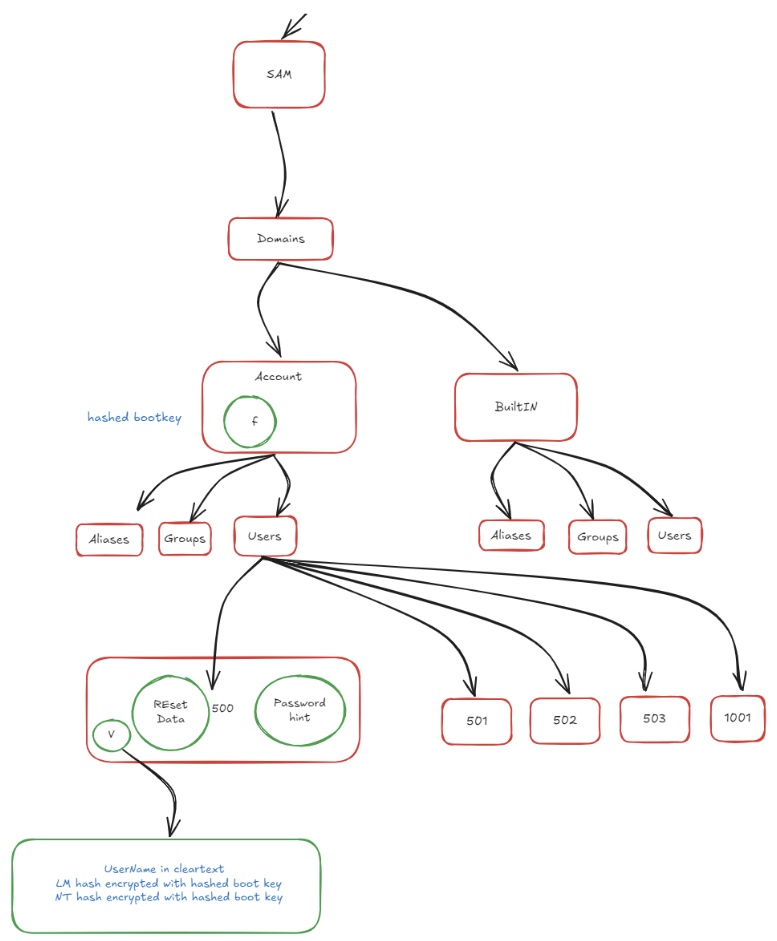
As mentioned previously, both the SAM and Security databases correspond to on-disk registry hives: SAM and SECURITY. These registry hives are protected by special DACLs (Discretionary Access Control Lists) that require SYSTEM privileges to access through standard Windows Registry APIs. However, there are techniques to read values from these hives with Administrator privileges by working with registry hive backups.
- User credentials are stored in the SAM hive (as shown in the image below).
Windows secrets, such as cached domain credentials and machine keys, are stored in the SECURITY hive (as shown in the following image).

Note that these values are stored in encrypted form. simply extracting them from the registry is insufficient. To decrypt them, you must reconstruct the decryption key using additional values from the SYSTEM hive. The decryption process itself is beyond the scope of this post.
Windows lateral movement:
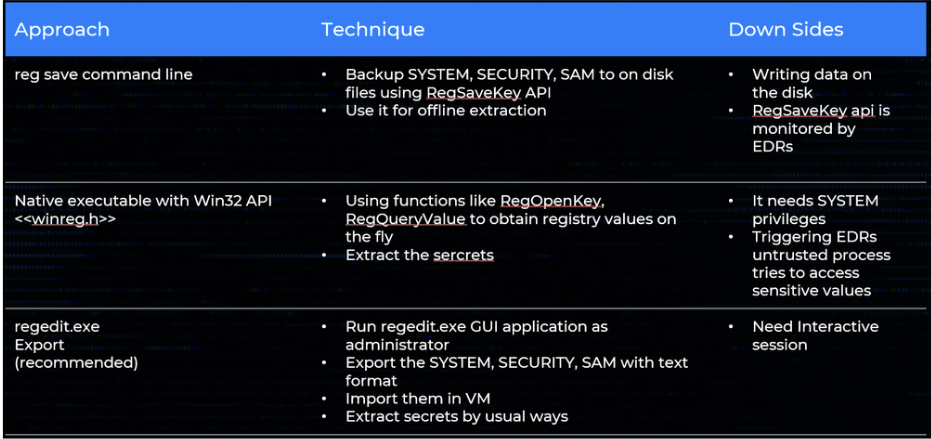
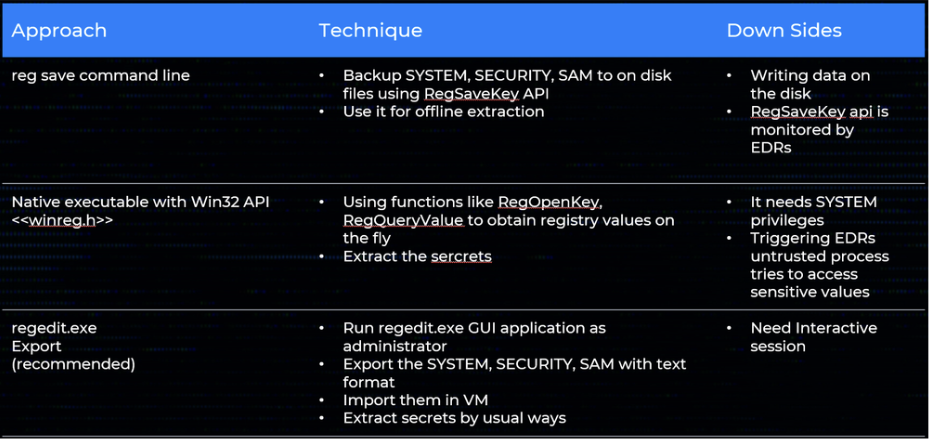
The table below outlines common techniques for collecting Windows credentials, covering both remote and local collection methods. Each approach includes the underlying technique and its associated down sides.
Remote Methods:
Local Methods:
While accessing secrets through LSASS memory is another potential method, this falls outside our current scope. It’s worth noting that LSASS is heavily protected and closely monitored by modern security solutions like EDRs and Windows Defender. Any interaction with LSASS typically triggers immediate defensive responses, making this approach high-risk for operational security.
EDR callback routines:
A key detection mechanism in modern Endpoint Detection & Response (EDR) software is the use of kernel-mode callback routines. The EDR’s driver asks the Windows kernel to notify it whenever certain system events occur process creation or termination, image‐load operations, and registry activity, among others.
For registry monitoring the driver calls CmRegisterCallbackEx, supplying a callback function address. Whenever the registry is accessed, the kernel invokes that function and passes two critical pieces of information. The first is a REG_NOTIFY_CLASS value that describes the operation for example, RegNtPreEnumerateValueKey when a thread is about to enumerate the values under a key. The second is an event-specific data structure that includes context such as the full key or value path and the caller’s access mask.
A typical Windows system generates thousands of registry operations every minute, so indiscriminate monitoring would impose an unacceptable performance penalty. EDR drivers therefore register callbacks only for a carefully chosen subset of keys (for instance, those under HKLM\SAM or HKLM\SECURITY) and filter for the event types that matter most to security, thereby minimizing overhead while still capturing high-value activity.
The silent Harvester:
During many security-assessment projects it is useful to carry a very small, fully native utility that can pull sensitive data out of the registry without leaving the tell-tale artefacts that EDR products look for. My approach relies purely on Windows internals rather than on dedicated “EDR-evasion” tricks.
Reading secrets on the fly without touching disk:
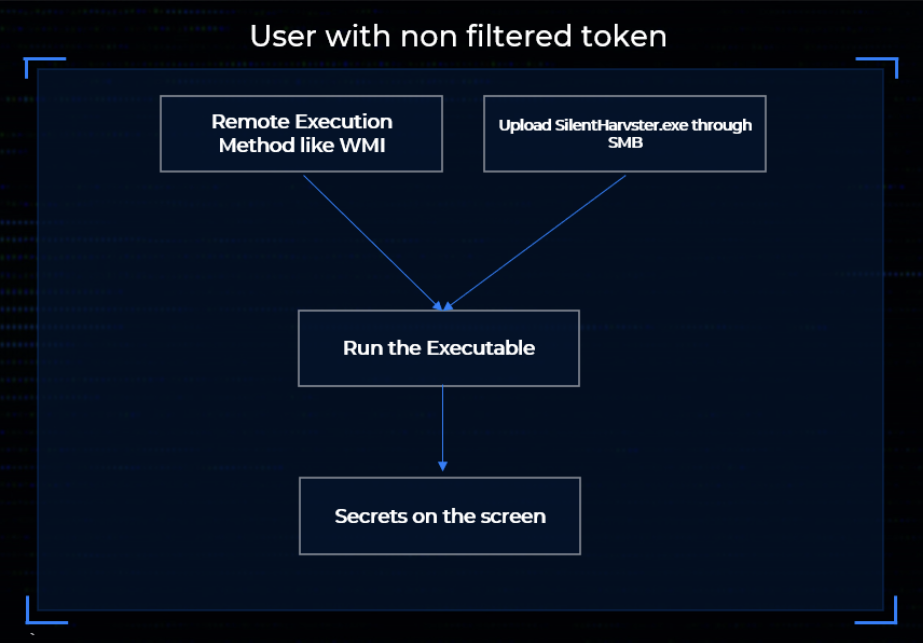
The primary goal is to avoid creating backup copies of the hives on disk and without enabling remote registry. Instead, the tool should run in the security context of a local administrator (not SYSTEM), so that it can be launched remotely through wmiexec or any comparable mechanism. At the time I began this work there was no public utility or write-up showing how to read the protected data in SAM and SECURITY directly while notrunning as SYSTEM. James Forshaw’s NtObjectManager PowerShell module finally pointed me in the right direction: he mounts the registry as a PowerShell drive and then reads keys that would normally require elevated privileges.
Digging through the module revealed that it uses the undocumented native API NtOpenKeyEx
The function is declared as
NTSTATUS NtOpenKeyEx(
  PHANDLE KeyHandle,
  ACCESS_MASK DesiredAccess,
  POBJECT_ATTRIBUTES ObjectAttributes,
  ULONG OpenOptions
);
The magic sits in OpenOptions. Alongside a value of 0 (“no special options”) there are two flags we care about:
REG_OPTION_OPEN_LINK (0x00000008) – follow a symbolic-link key.- REG_OPTION_BACKUP_RESTORE (0x00000004) – request backup/restore semantics.
If REG_OPTION_BACKUP_RESTORE is specified and the caller has enabled SeBackupPrivilegethe kernel bypasses normal ACL checks on even the most sensitive keys.
Note that this APIs used OMNS paths for the registry keys paths rather that WIN32 paths (ex: HKLM\..)
Thus a plain Administrator who enables SeBackupPrivilege can open anything under SAM or SECURITY. Once the handle is in hand, ordinary routines such as NtQueryValueKey or RegQueryValueExW read the data directly from memory no hive files ever touch disk.
Be under the radar:
In the previous stage we solved the access-control problem, an Administrator with SeBackupPrivilege can now open the protected keys, but we have not yet dealt with the other half of the puzzle: detection. Even with ACLs bypassed, most EDR products raise an immediate alert the moment an untrusted process touches sensitive values under SAM and SECURITY, because they watch for common APIs like RegQueryValueExW in combination with high-risk paths.
As we saw before EDR drivers cannot afford to inspect every single registry operation; the volume is simply too high. Instead, they hook or filter a limited set of “interesting” calls. That observation led me to hunt for a Windows API that (a) still lets me read an arbitrary value, but (b) is rare enough that vendors have not added it to their rule sets.
Microsoft describes RegQueryMultipleValuesW as
“retriev[ing] the type and data for a list of value names associated with an open registry key.”
Its prototype is:
LSTATUS RegQueryMultipleValuesW(
    HKEY       hKey,        // handle returned by RegOpenKeyEx/NtOpenKeyEx
    PVALENTW   val_list,    // array describing the values to fetch
    DWORD      num_vals,    // number of elements in val_list
    LPWSTR     lpValueBuf,  // caller-supplied buffer that receives the data
    LPDWORD    ldwTotsize   // in: size of lpValueBuf; out: bytes returned
);
Using the function for one value is trivial:
Create a single VALENTW, set its ve_valuename to the value that you want to read, pass num_vals = 1, and point lpValueBuf to a suitably sized buffer. After the call returns, the value’s data type and length are filled in.
In practice, calling RegQueryMultipleValuesW (even repeatedly against highly sensitive values in SAM or SECURITY) triggered zero alerts on every EDR platform I tested. My working hypothesis is that vendors concentrated on the far more common single-value APIs (RegQueryValueExW, NtQueryValueKey, etc.) and simply never added this rarer interface to their hook lists.
Combining the two pieces of the strategy NtOpenKeyEx with REG_OPTION_BACKUP_RESTOREto obtain the handle, and RegQueryMultipleValuesW to read the data
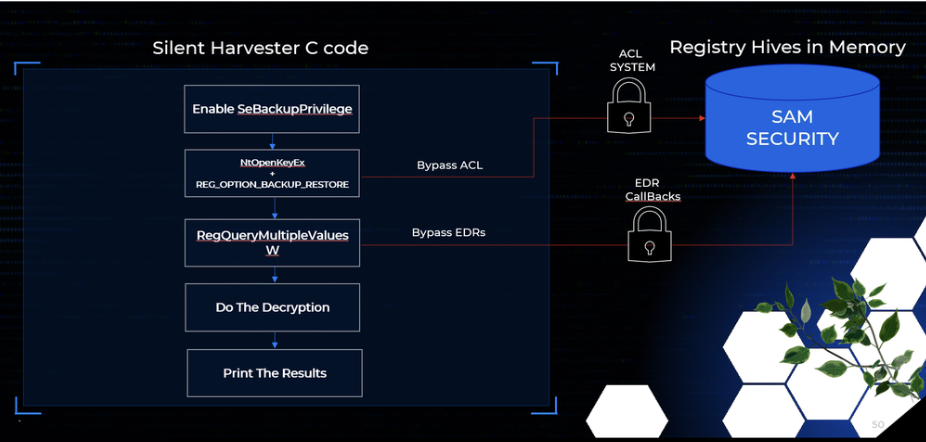
In the end the entire operation occurs in memory; no hive files are created, and no high-frequency “red-flag” APIs are called.
Decrypting the blobs is a separate step and remains outside the scope of this study, but the collection phase is now both silent and portable.
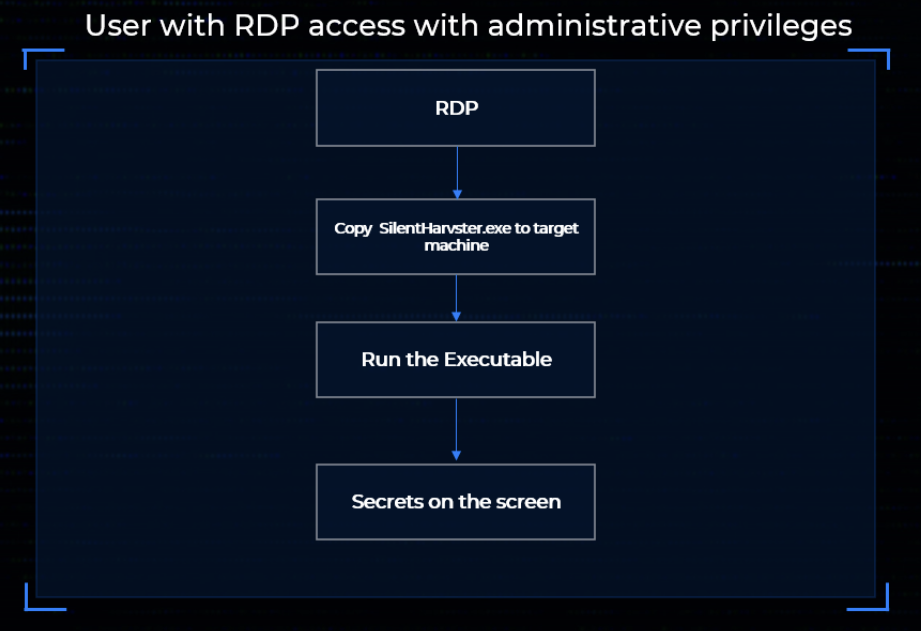
In the figures below you can see how you can use this technique
In conclusion, this exploration shows how Windows’ own internals can be leveraged to bypass both access controls and common EDR detections with minimal code. While it is likely that vendors will eventually add RegQueryMultipleValuesW to their monitoring logic, the broader lesson is that overlooked functionality often provides straightforward paths around defensive assumptions.
References:
https://www.oreilly.com/library/view/windows-security-internals/9781098168834/?ref=sud0ru.ghost.io
https://www.powershellgallery.com/packages/NtObjectManager/1.1.32?ref=sud0ru.ghost.io
https://www.oreilly.com/library/view/evading-edr/9781098168742?ref=sud0ru.ghost.io