
Executive Summary
This article demonstrates a sophisticated privilege escalation technique for Windows environments where an attacker has Remote Code Execution (RCE) on an IIS web application. By exploiting a well-documented Windows behavior where IIS AppPool identities are automatically elevated to machine account privileges when accessing network resources, an attacker can obtain a machine account certificate from Active Directory Certificate Services (AD CS). This technique bypasses traditional Potato exploits and leverages Kerberos S4U2Self to ultimately impersonate a domain administrator on the target system.
The attack chain involves six sequential steps: CSR generation on the attacker machine, submitting the CSR via compromised IIS to AD CS, retrieving the issued machine certificate, creating a PFX certificate bundle, requesting a machine account TGT using Rubeus, and finally using S4U2Self to obtain an administrator CIFS service ticket. This technique is particularly valuable in Active Directory environments where AD CS is deployed, providing a reliable path to domain administrator compromise from application-level code execution.
Outline — The Core Mechanism
The key insight behind this technique is a well-documented Windows behavior: when an IIS AppPool identity accesses a network-level resource, its identity is silently elevated to the underlying machine account of the host. This behavior is by design, and attackers can abuse it to achieve machine account privileges without using traditional Potato exploits.
When an IIS AppPool (running as IIS AppPool\DefaultAppPool) makes a request to a network resource in an Active Directory network—such as the Active Directory Certificate Services (AD CS) RPC endpoint—Windows automatically translates that identity to the machine account of the host where the IIS web server is running. This means when a Certificate Signing Request (CSR) is submitted to the AD CS RPC/web enrollment endpoint from the compromised IIS server, the request will arrive at AD CS as the machine account, and AD CS will happily issue a certificate for it using the default Machine account certificate template.
By combining this identity shift with a certificate request, an attacker can obtain a machine account certificate from AD CS, then use that certificate to get a Ticket-Granting Ticket (TGT) for the machine account. Finally, using the S4U2Self technique, the attacker can impersonate an Administrator on the target host where the IIS application is running, achieving SYSTEM-level privileges without a Potato exploit.
Attack Chain — Six-Step Privilege Escalation
Here is the complete attack chain at a glance:
- Generate a CSR on an attacker-controlled Windows machine
- Submit CSR to AD CS RPC endpoint using ASPX code running on the compromised IIS host (as machine account)
- AD CS issues a certificate for the machine account
- Combine the issued certificate with the private key on the attacker machine to generate a PFX
- Use Rubeus tool to request a machine account TGT using the PFX
- Request an admin user’s CIFS TGS using the machine account TGT and S4U2Self
Step 1: Generate Certificate Signing Request on Attacker Machine
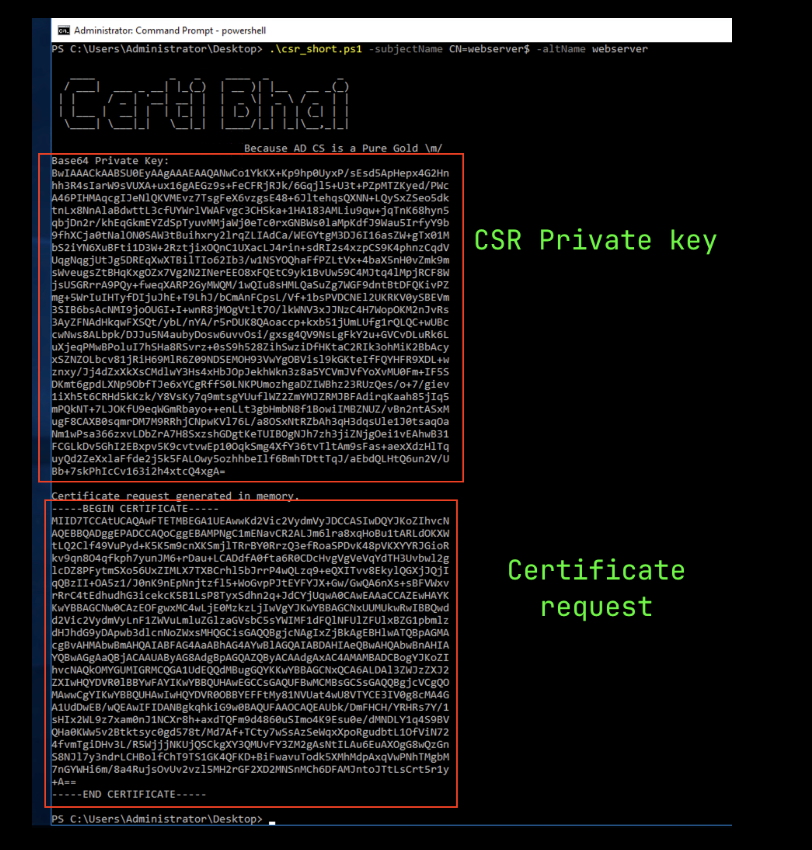
On the attacker machine, run a custom PowerShell script to generate a Certificate Signing Request (CSR) and its associated private key. The script prints both the CSR and the private key as base64-encoded strings directly to the console. This approach avoids writing sensitive keys to disk prematurely.
Execute the PowerShell script on an attacker-controlled Windows machine with administrative privileges:
PS C:\Users\b0x\Desktop> .\csr_short.ps1The script will output the base64-encoded CSR and private key. Save the private key output into a file (e.g., machine_cert.key) on the attacker machine—this will be needed in Step 4 for creating the PFX certificate.
When copying the CSR, exclude the -----BEGIN CERTIFICATE----- and -----END CERTIFICATE----- lines, as the AD CS endpoint expects only the base64 payload.
Step 2: Submit CSR to AD CS RPC Endpoint from Compromised Host
Download the ASPX certificate enrollment code from the Certi-Bhai GitHub repository. Upload this ASPX file to the compromised IIS server and browse it via HTTP or HTTPS. The page presents an interface where you can specify:
- CA Server Name: The AD CS server address (format:
server.domain\ca-name) - Template Name: The machine account certificate template name (typically
Machine) - CSR Text: Paste the base64-encoded CSR generated in Step 1
When the request is submitted from the IIS host to the AD CS RPC endpoint, Windows automatically translates the IIS AppPool identity to the machine account (e.g., WEBSERVER$). AD CS sees a legitimate machine account requesting a certificate using the default Machine template and issues it without further validation.
Step 3: Retrieve the Issued Certificate
When the CSR is submitted via the ASPX code, AD CS returns the issued certificate as a base64-encoded string in the HTTP response. Copy this base64-encoded certificate and paste it into a file on the attacker machine where the private key from Step 1 was saved. Name this file appropriately (e.g., machine_cert.cer), ensuring the base64 content is placed between -----BEGIN CERTIFICATE----- and -----END CERTIFICATE----- markers.
Step 4: Combine Certificate and Private Key to Create PFX
On the attacker machine, use the certutil command to merge the issued certificate and private key into a PFX (PKCS#12) file:
C:\b0x> certutil -MergePFX machine_cert.cer machine_cert.pfxThe command will prompt for a password to protect the PFX file. Choose a strong password and remember it—you will need it in Step 5. The resulting machine_cert.pfx file contains both the machine account certificate and its private key, ready for use in Kerberos authentication.
Step 5: Request Machine Account TGT Using Rubeus
Use the Rubeus tool on the attacker machine to authenticate to the Key Distribution Center (KDC) using the PFX certificate created in Step 4. This will request a Ticket-Granting Ticket (TGT) for the machine account:
C:\b0x> Rubeus.exe asktgt /user:WEBSERVER$ /domain:queen.indishell.lab /certificate:machine_cert.pfx /password:b0x@22 /nowrapReplace WEBSERVER$ with the actual machine account name of the compromised IIS server, queen.indishell.lab with your domain name, and b0x@22 with the PFX password from Step 4. The /nowrap flag outputs the TGT as a continuous base64 string without line breaks, making it easier to copy and use in subsequent commands.
If successful, Rubeus will return a base64-encoded TGT for the machine account. Store this TGT for use in Step 6.
Step 6: Request CIFS TGS and Impersonate Administrator
With the machine account TGT in hand, use Rubeus to perform S4U2Self impersonation, requesting a CIFS (SMB) service ticket while impersonating the domain administrator:
C:\b0x> Rubeus.exe s4u /self /impersonateuser:Administrator /altservice:cifs/WEBSERVER.queen.indishell.lab /nowrap /ptt /ticket:base64_machine_account_TGTReplace base64_machine_account_TGT with the TGT obtained in Step 5. The /ptt flag automatically injects the requested ticket into the current process, making it immediately available for use. If successful, you will receive a CIFS service ticket for Administrator@domain on the target machine.
Verify that the CIFS TGS has been injected using the klist command:
C:\b0x> klistOnce the CIFS TGS is confirmed, you now have full administrative access to the target IIS server. You can use tools like net use to mount SMB shares, or use Impacket’s secretsdump.py to extract NTLM hashes and credentials from the target system.
Key Takeaways
- IIS AppPool Identity Elevation: Windows automatically elevates IIS AppPool identities to machine accounts when accessing network resources—a feature designed for convenience but exploitable by attackers.
- AD CS as an Attack Vector: AD CS is often misconfigured or insufficiently monitored, allowing attackers to obtain machine account certificates without proper scrutiny.
- Certificate-Based Authentication: Machine account certificates can be used for Kerberos authentication (PKINIT), bypassing password-based constraints and enabling S4U2Self impersonation.
- Kerberos S4U2Self Abuse: The S4U2Self extension, designed for service delegation, can be abused to impersonate high-privileged users like domain administrators when the attacker controls a service account.
- Multi-Stage Attack Chain: This attack requires coordination across multiple tools (PowerShell, Rubeus, certutil, impacket) but is entirely post-exploitation—no credential theft or brute force required.
- No Potato Exploit Needed: Unlike traditional privilege escalation techniques in IIS environments, this method does not rely on Potato exploits (PrintSpoofer, RoguePotato, etc.), making it more reliable in patched environments.
- Full Administrative Access: Successful exploitation results in SYSTEM-level access to the target machine, enabling complete system compromise.
Defensive Recommendations for Security Teams
- Harden AD CS Certificate Templates: Review and restrict the default Machine certificate template permissions. Only legitimate system services should be able to request certificates. Enable template-specific restrictions and audit logging.
- Monitor AD CS Certificate Requests: Implement detailed logging and alerting for all certificate requests, especially those from IIS AppPool identities. Alert on any unusual certificate request patterns or template misuse.
- Restrict IIS AppPool Network Access: Configure Windows Firewall and network segmentation to limit IIS AppPool outbound connections. Block unnecessary access to AD CS RPC endpoints unless explicitly required by application logic.
- Implement Credential Guard: Enable Windows Defender Credential Guard to protect Kerberos tickets and credentials from being harvested from memory by post-exploitation tools.
- Deploy Kerberos Armoring (FAST): Enable Kerberos FAST (Flexible Authentication Secure Tunneling) to protect TGT requests and TGS responses against token replay and manipulation attacks.
- Monitor S4U2Self Usage: Enable and monitor Kerberos S4U2Self (service delegation) events in Windows Event Log (Event ID 4781). Alert on unexpected S4U2Self requests from service accounts.
- Secure IIS Web Applications: Conduct thorough code reviews and security testing to prevent Remote Code Execution (RCE) vulnerabilities. Use Web Application Firewalls (WAF) and runtime application self-protection (RASP) to detect and block exploitation attempts.
- Regular Patch Management: Apply security patches promptly to IIS servers, .NET framework, and Windows systems. This attack requires RCE, so patching vulnerabilities reduces the attack surface significantly.
Conclusion
The IIS AppPool privilege escalation technique via AD CS RPC represents a sophisticated attack chain that exploits both Windows design features and misconfigurations in Active Directory Certificate Services. For defenders, this technique highlights the importance of securing not just application code but also the identity and authorization systems that applications depend on. Organizations should immediately audit their AD CS configurations, implement robust logging and monitoring, and restrict certificate template permissions to prevent this attack path. For security researchers and penetration testers, this technique provides a reliable privilege escalation method in Windows Active Directory environments where AD CS is deployed and IIS applications have network access to certificate services.
Original text: “Privilege escalation from IIS AppPool to NT Authority/SYSTEM via AD CS RPC endpoint” by cyb3r.gladiat0r at Start With Linux | Mannu Linux.