


Executive Summary
Hope Walker’s 2021 note taught the clerk’s grammar: dsquery and ldapsearch, AND/NOT, wildcards, users, groups, computers. Three years and a pile of reader mail later, Part 2 is the list of things that grammar gets wrong if you stop there. OR without the right parentheses. Domain Admins that hide a nested group. SPNs that look like Kerberoast candy and are actually a domain controller. A userAccountControl of 512 that does not mean “unprivileged.” Passwords sitting in schema extensions. OUs you cannot grep. Trusts that are objects. Foreign Security Principals that are barcodes.
This draft keeps every original screenshot and command from the PLANETEXPRESS / DOOP-HQ lab, then adds the kitchen-table pictures and the operator bits Walker flagged but did not fully expand: matching-rule-in-chain, bitwise trustAttributes, ldapsearch equivalents, LAPS confidentiality, and what identity-protection products fire on. Read it after Part 1, or read it as the chapter titled “why your filter parsed and still lied.”
Same Clerk, Harder Questions
Walker opens by pointing at the 2021 post and asking you to read it first. The sequel is not a recap. Readers asked why dsquery and ldapsearch, of all the LDAP clients on earth. Her answer is practical, not theological: those were the tools she could type under pressure. dsquery is a Microsoft-signed binary, which still buys you a quieter landing than SharpHound. ldapsearch is often already on the jump box and it will ride a SOCKS proxy. This time she shows fewer tool-specific screenshots on purpose. The object of study is the filter.
The important item to focus on is the LDAP filters themselves.
Hope Walker, SpecterOps (2024)
Most LDAP GUIs, BloodHound custom queries, ldapdomaindump, and PowerView will take a raw filter if you can write one. The lab is still Windows AD. The same strings work against other directories that speak LDAP. The goal this round is a more accurate picture of the environment, and a catalog of the ways a perfectly valid query still lies.
ms-Mcs-AdmPwd. Detection note later: (servicePrincipalName=*) is a named Kerberoast enumeration in several identity products.Combination Filters: OR, and the Parentheses That Betray You
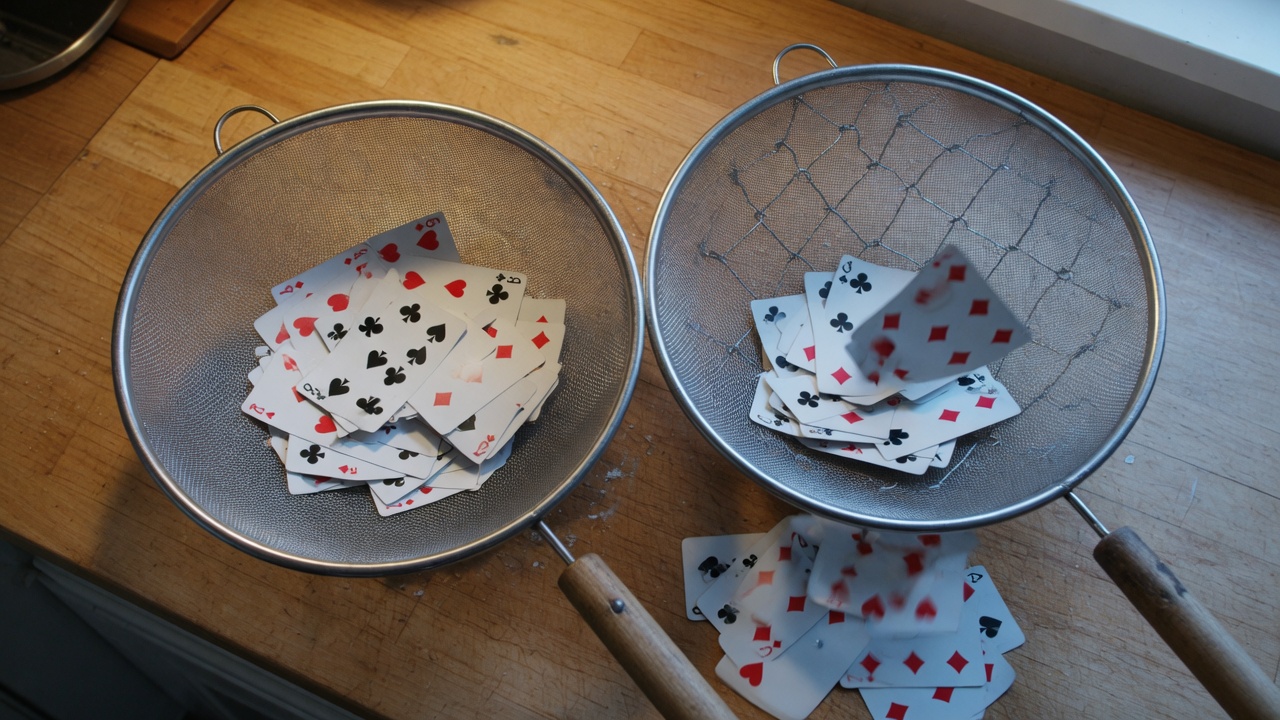
Part 1 covered AND (&) and NOT (!). The missing operator is OR. Prefix OR looks like this:
“(|(attribute1=value1)(attribute1=value2))”The pipe means: keep the object if attribute1 is value1 or value2. You can nest it under AND and NOT. Walker’s worked example is a computer hunt that should mean: Windows 10 or Windows 11 in the name, and HIPAA must not appear in the description.

dsquery * -filter “(&(objectClass=computer)(|(name=*WIN-10*)(name=*WIN-11))(!(description=*HIPAA*)))”Plain language, as Walker writes it: all computer objects that have WIN-10 or WIN-11 in the name but do not have HIPAA in the description. Parentheses are not decoration. If they do not close the way you think they close, the query still runs. It just answers a different question.
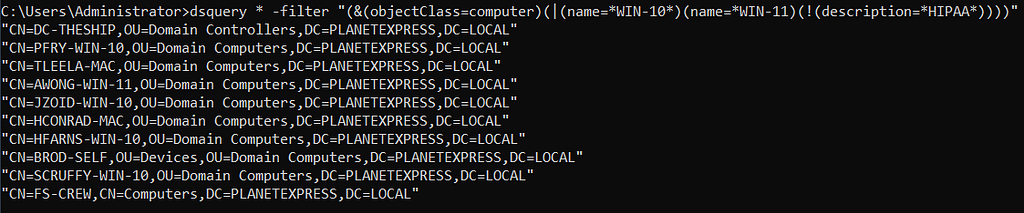
dsquery * -filter “(&(objectClass=computer)(|(name=*WIN-10*)(name=*WIN-11)(!(description=*HIPAA*))))”Move the closing paren of the OR so that the NOT sits inside it, and the sentence becomes: computers that are WIN-10, or WIN-11, or simply not labeled HIPAA. JZOID-WIN-10, which should have been excluded, comes back because it satisfied the WIN-10 clause. Machines with neither WIN-10 nor WIN-11 come back because they failed the HIPAA description. Both populations are wrong for the question you thought you asked.
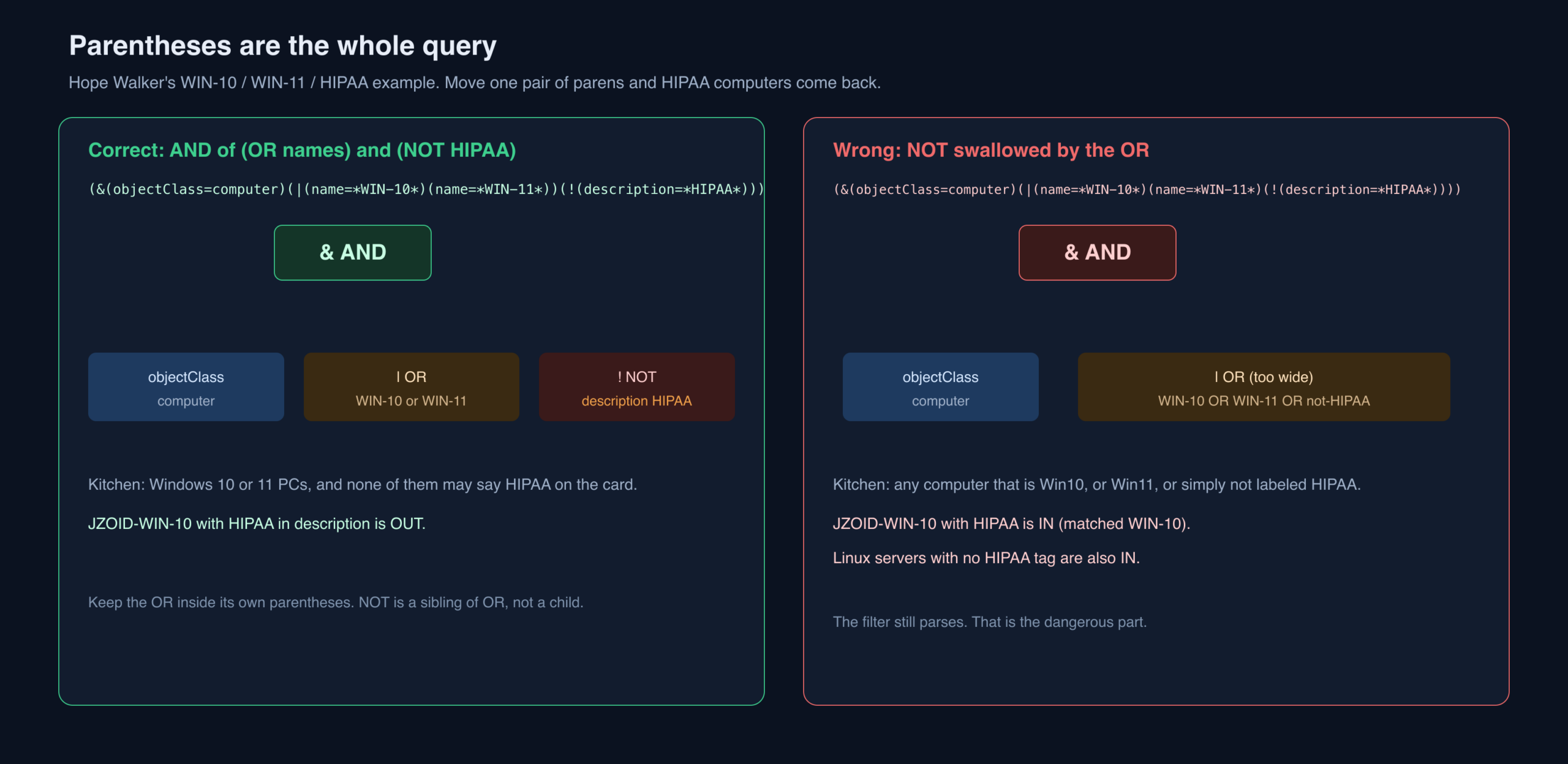
(name=*WIN-11) without a trailing asterisk — reproduced as published. In a real hunt you almost certainly want *WIN-11*. ldapsearch equivalent, quoted for bash: '(&(objectClass=computer)(|(name=*WIN-10*)(name=*WIN-11*))(!(description=*HIPAA*)))'. Pretty-print filters with extra newlines before you paste them. A missing ) is the most expensive typo in this job.Nested Groups: The Club Inside the Club

Nested groups are ordinary IT: one group is a member of another, permissions inherit, nobody remembers why. For an operator they are a lie detector. A filter that asks for users in Domain Admins will not see a group sitting in Domain Admins, and therefore will not see the users inside that group.
Walker first asks for users who are members of Domain Admins:
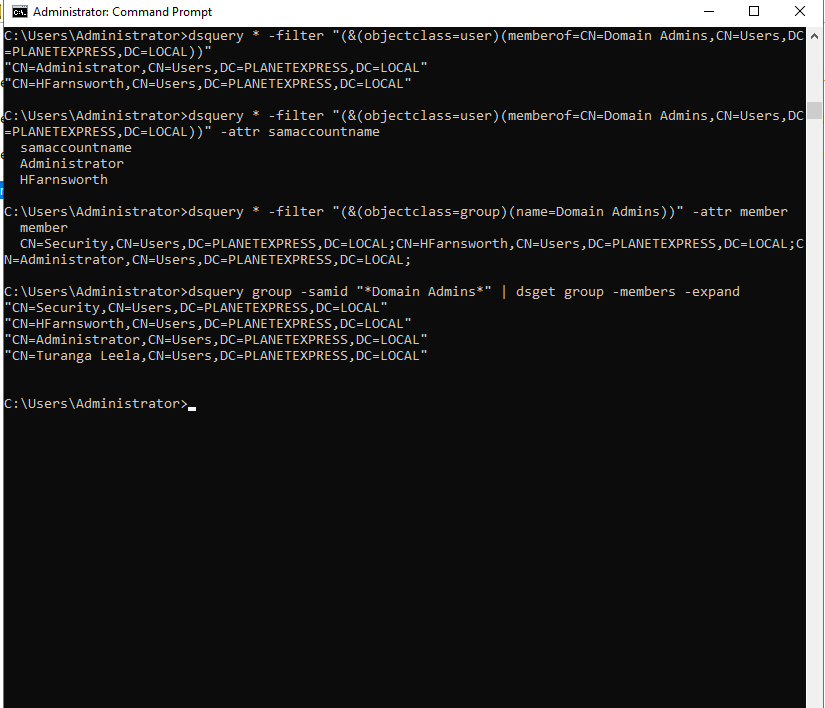
dsquery * -filter “(&(objectClass=user)(memberOf=CN=Domain Admins,CN=Users,DC=PLANETEXPRESS,DC=LOCAL))”The same group in ADUC shows a nested group the LDAP user-filter never mentioned:
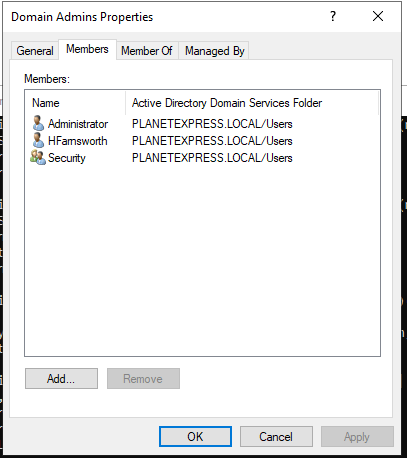
The user filter did not fail. It did exactly what it was told: return users, not groups. Next, ask the group for its member attribute.
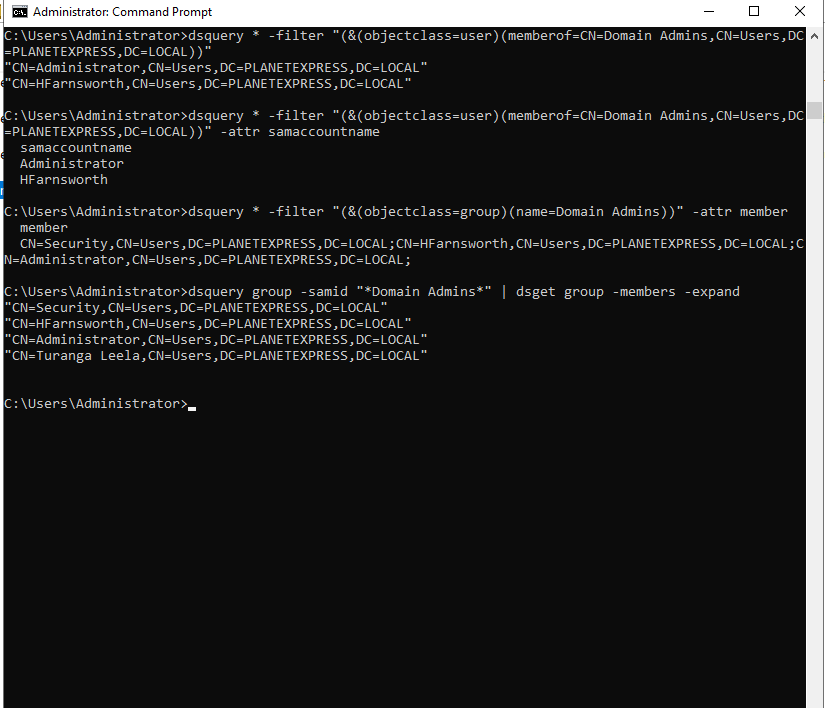
dsquery * -filter “(&(objectClass=group)(name=Domain Admins))” -attr memberThen expand Security:

dsquery * -filter “(&(objectClass=group)(name=Security))” -attr memberA less specific filter is, for once, more honest. Drop the objectClass and ask who has Domain Admins on memberOf. Users and groups both come back.

dsquery * -filter “(memberOf=CN=Domain Admins,CN=Users,DC=PLANETEXPRESS,DC=LOCAL)”dsget is outside LDAP-filter scope, but it is another signed Microsoft binary and it will walk the nest in one pipe. Turanga Leela appears as a nested Domain Admin.
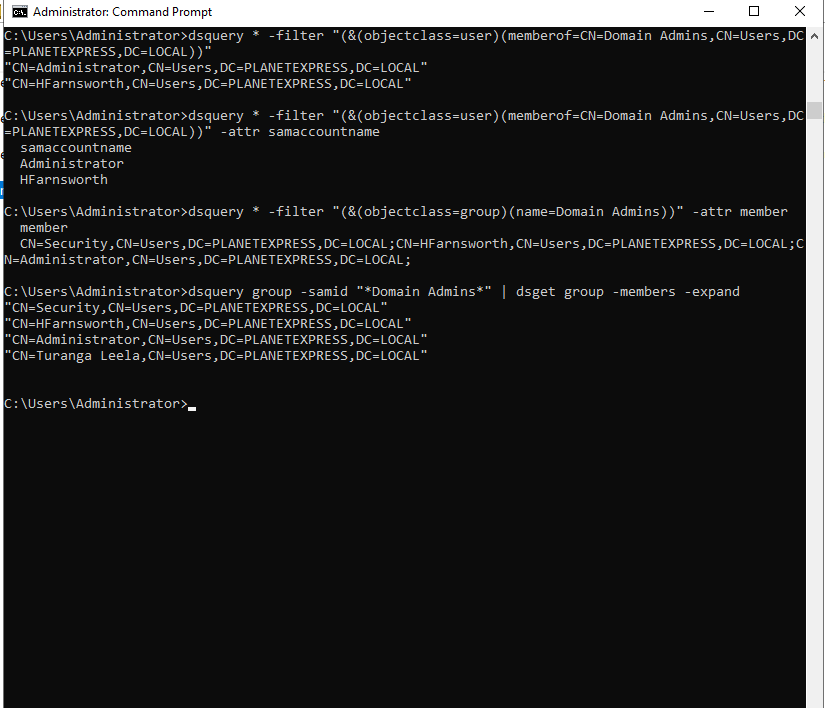
dsquery group -samid “*Domain Admins*” | dsget group -members -expand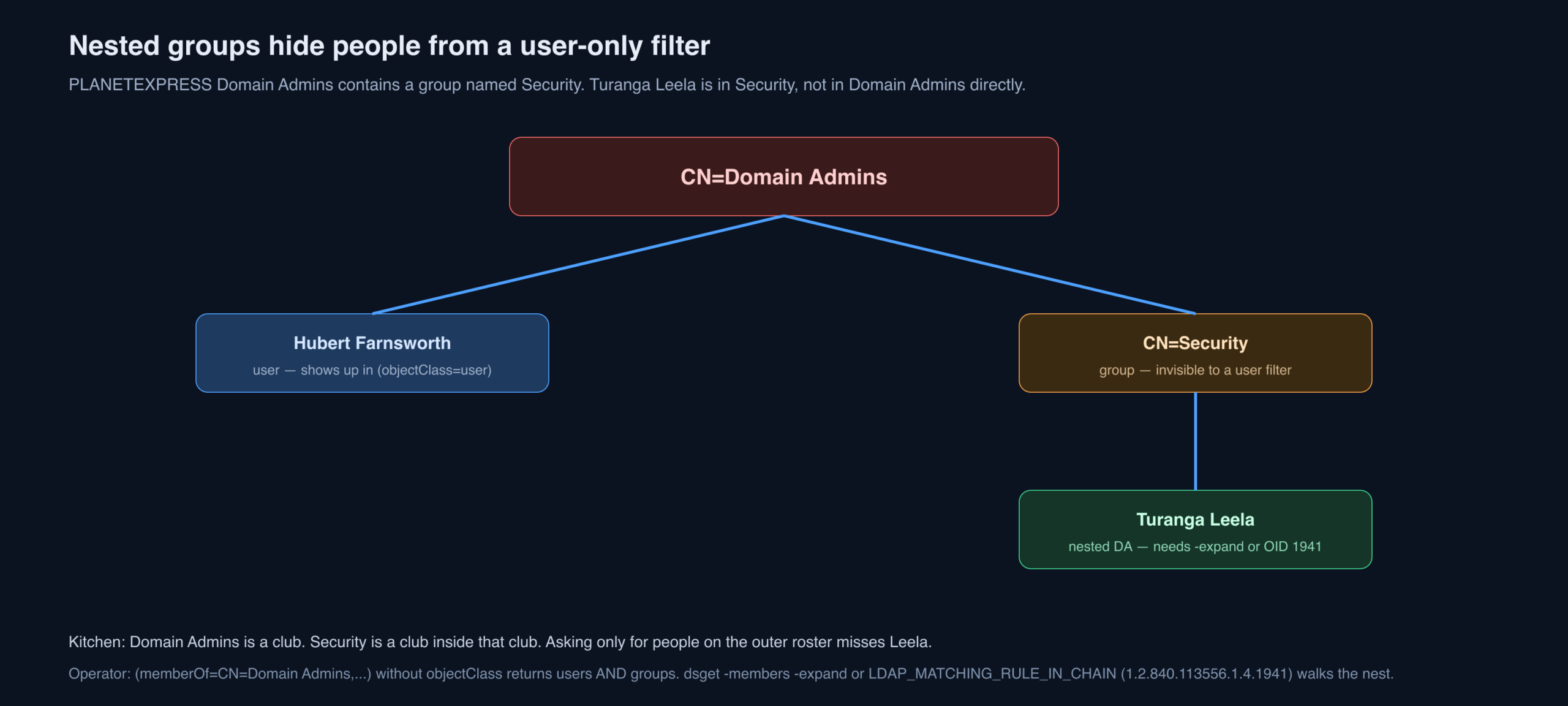
BloodHound draws this in one click. Mapping it by hand is slower and, on a job where BloodHound will not load, still worth the time. Nested groups are an assessment finding, not just a query footnote.
(member:1.2.840.113556.1.4.1941:=CN=Domain Admins,CN=Users,DC=PLANETEXPRESS,DC=LOCAL) returns every object that nests into DA, however deep. Invert it on a user to ask “does this person nest into DA?” Primary group is still invisible: primaryGroupID=512 is Domain Admins by RID, and it does not appear in member / memberOf. Query it separately. AdminCount=1 is a useful overlay (AdminSDHolder) but leftover flags lie; it is a hint, not a membership oracle.Service Principal Names, and Who Is Actually Roastable
Microsoft’s definition, which Walker quotes: an SPN is a unique identifier of a service instance. Kerberos uses it to bind a service to a logon account. The docs are here. Operators hunt SPNs because a user account with one is a Kerberoasting target (T1558.003): request a TGS, crack offline.
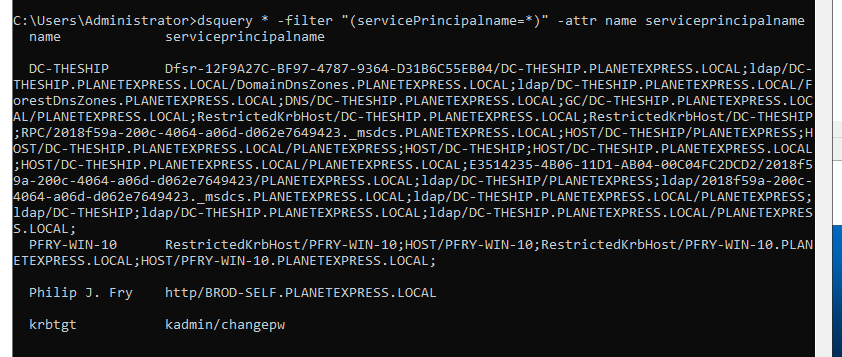
dsquery * -filter “(servicePrincipalName=*)” -attr name servicePrincipalNameWalker puts the detection warning in bold for a reason. Identity products treat this filter as Kerberoast enumeration. The result set in the lab is four objects. The DC computer account has a pile of SPNs and a long random password — not a roast. PFRY-WIN-10 is a computer account, same story. krbtgt is not a roast you take; if that hash is crackable the domain is already over. The remaining hit is a user account, which is the one that might be worth a TGS.
That is not the whole Kerberoast decision. It is a thirty-second query that tells you whether an attack path even exists. Narrow to users when you are done sightseeing.
(&(objectCategory=person)(objectClass=user)(servicePrincipalName=*)(!(userAccountControl:1.2.840.113556.1.4.803:=2))). Then look at pwdLastSet, adminCount, and whether the SPN is a real service or a decoy. Managed service accounts and gMSAs exist to make this hunt boring; if you still see a user named svc_sql with an MSSQL SPN, that is the 2014 finding that never died. ldapsearch through SOCKS is the same filter. Requesting the TGS is a different event (4769) — listing SPNs is 4662 / LDAP analytics.userAccountControl: Stickers, Not Rank
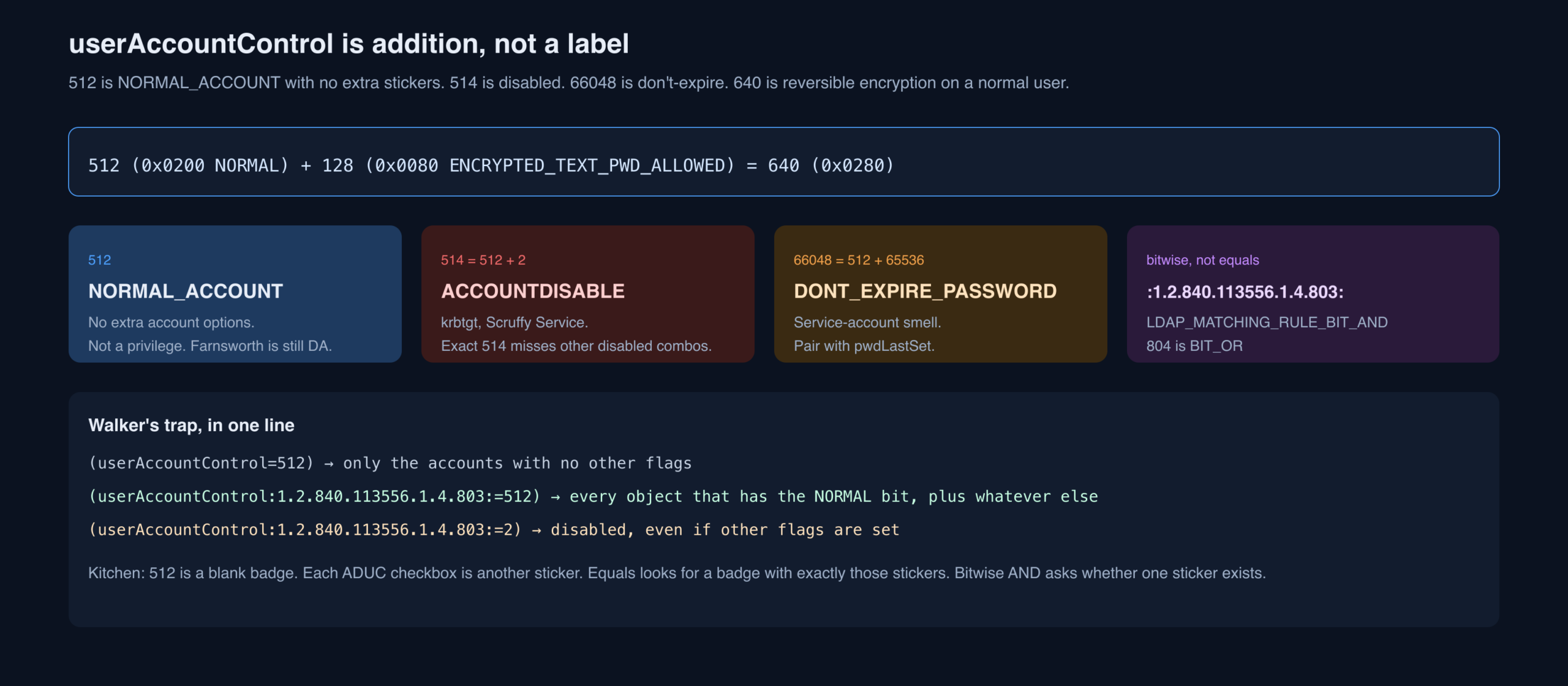
userAccountControl is a number assembled from account options. Walker notes that Microsoft’s own troubleshooting page is incomplete, and points at Jack Stromberg’s flag table as the list people actually use. The lab is small enough to dump the attribute for everyone:
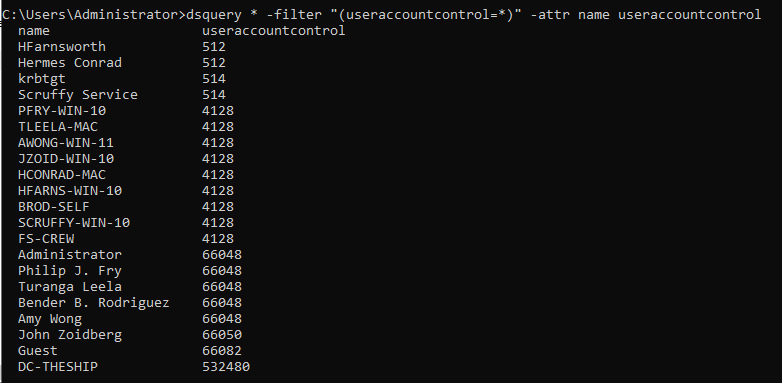
dsquery * -filter “(userAccountControl=*)” -attr name userAccountControl512 is NORMAL_ACCOUNT. It lands on Hubert Farnsworth and Hermes Conrad. Farnsworth is a Domain Admin from earlier queries. 512 does not speak to privilege. It speaks to the Account options checkboxes in ADUC:
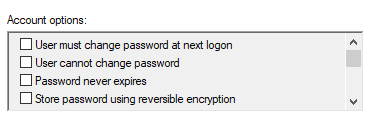
514 is disabled (512 + 2). krbtgt has it; so does Scruffy Service. If Scruffy was a target, you now know the account will not authenticate. You can also exclude disabled accounts — Walker uses exact 514, which is the lab shortcut, not the general solution.
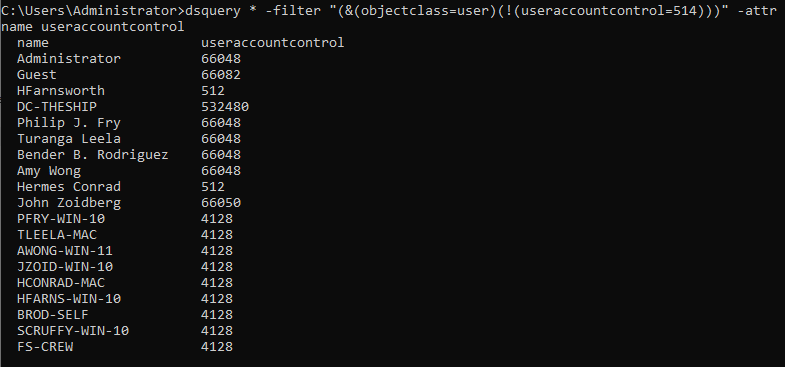
dsquery * -filter “(&(objectClass=user)(!(userAccountControl=514)))” -attr name userAccountControl66048 is a user whose password does not expire (512 + 65536). Pair it with pwdLastSet and you have the classic stale service-account hunt.

dsquery * -filter “(userAccountControl=66048)” -attr name userAccountControl pwdLastSetThe decimal you see is a sum of hex flags. NORMAL_ACCOUNT is 512 / 0x0200. Store password using reversible encryption is 128 / 0x0080. A normal user with only that extra box ticked is 640 / 0x0280. ADUC shows the box like this:
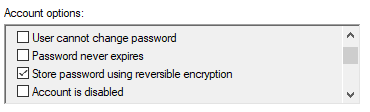
Exact equality is unique for a given combination, which sounds convenient and is a trap. Query 512 and you get only the accounts with no other flags:

dsquery * -filter “(userAccountControl=512)” -attr name userAccountControlThe fix is a matching-rule OID. Walker lists both:
- LDAP_MATCHING_RULE_BIT_AND 1.2.840.113556.1.4.803
- LDAP_MATCHING_RULE_BIT_OR 1.2.840.113556.1.4.804
The grammar is:
<Attribute name>:<BitFilterRule-ID>:=<decimal comparative value>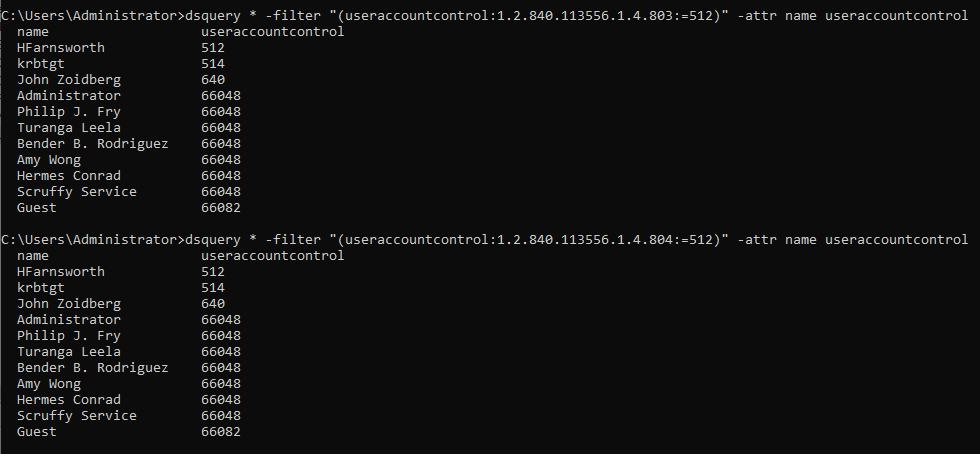
dsquery * -filter “(userAccountControl:1.2.840.113556.1.4.803:=512)” -attr name userAccountControldsquery * -filter “(userAccountControl:1.2.840.113556.1.4.804:=512)” -attr name userAccountControlEither rule happens to work for this particular 512 hunt. Other questions need a specific one. The same trick applies to other hex-packed attributes, including groupType.
!(userAccountControl=514) misses a disabled account that also has DONT_EXPIRE_PASSWORD (514+65536=66050). Use (!(userAccountControl:1.2.840.113556.1.4.803:=2)). Roastable pre-auth off is 4194304. Unconstrained delegation is 524288. Reversible encryption (128) is a finding by itself — the DC can recover the password. Jack Stromberg’s table plus [MS-ADTS] 2.2.16 is the adult reference. Decimal dumps are for screenshots; bitwise filters are for work.Passwords That LDAP Should Not Have
Most shops try not to store passwords in the directory. Software that “integrates with AD” then extends the schema and does it anyway. Walker’s OR filter is a presence hunt across the usual sin bins:
“(|(UserPassword=*)(unicodePwd=*)(UnixUserPassword=*) (msSFU30Password=*)(orclCommonAttribute=*)(defender-tokenData=*)(ms-Mcs-AdmPwd=*))”What each name actually is, from the original list:
- userPassword — must be enabled to exist. UTF-8, write-oriented, used for LDAP Modify password changes. MS-ADTS.
- unicodePwd — OS-facing, stricter encoding. Not a tourist attribute.
- unixUserPassword — UNIX-compatible password.
- msSFU30Password — Services for UNIX, superseded by unixUserPassword.
- orclCommonAttribute — Oracle database password authentication against AD.
- defender-tokenData — One Identity Defender token seed and friends.
- ms-Mcs-AdmPwd — legacy LAPS cleartext on the computer object. Domain Admins read it by default; everyone else should not.
Descriptions still eat passwords too. Hunt description=*pass* the way Part 1 did, and do not skip info, adminDescription, and wWWHomePage.
ms-Mcs-AdmPwd for a non-DA bind is a finding about the ACE, not about LAPS existing. Windows LAPS v2 uses msLAPS-Password / encrypted fields; add those to the OR. unicodePwd will almost never return to a normal bind (system-only). The filter is still worth running: a surprising hit is a misconfiguration. Confidential attributes + LDAPS + a SACL on LAPS attributes is the defensive package.Organizational Units: Floors, Not Tags
OUs are the logical folders of AD. Unlike containers, they take Group Policy. Admins invent the tree; the only OU a new domain is guaranteed is Domain Controllers. OUs nest. Many companies photocopy the org chart into OU names.
List them:

dsquery * -filter “(objectClass=organizationalUnit)”An object’s OU is not a separate attribute. It is baked into the distinguished name. BROD-SELF lives under Domain Computers:

dsquery * -filter “(name=BROD-SELF)” -attr name distinguishedNameFS-CREW does not. It sits in a container, which means no GPO from an OU:

dsquery * -filter “(name=FS-CREW)” -attr name distinguishedNameThat gap is a misconfiguration hunt: object created in the wrong folder, missing the policies everyone else got. Or, offensively, a machine that never received the hardening GPO.
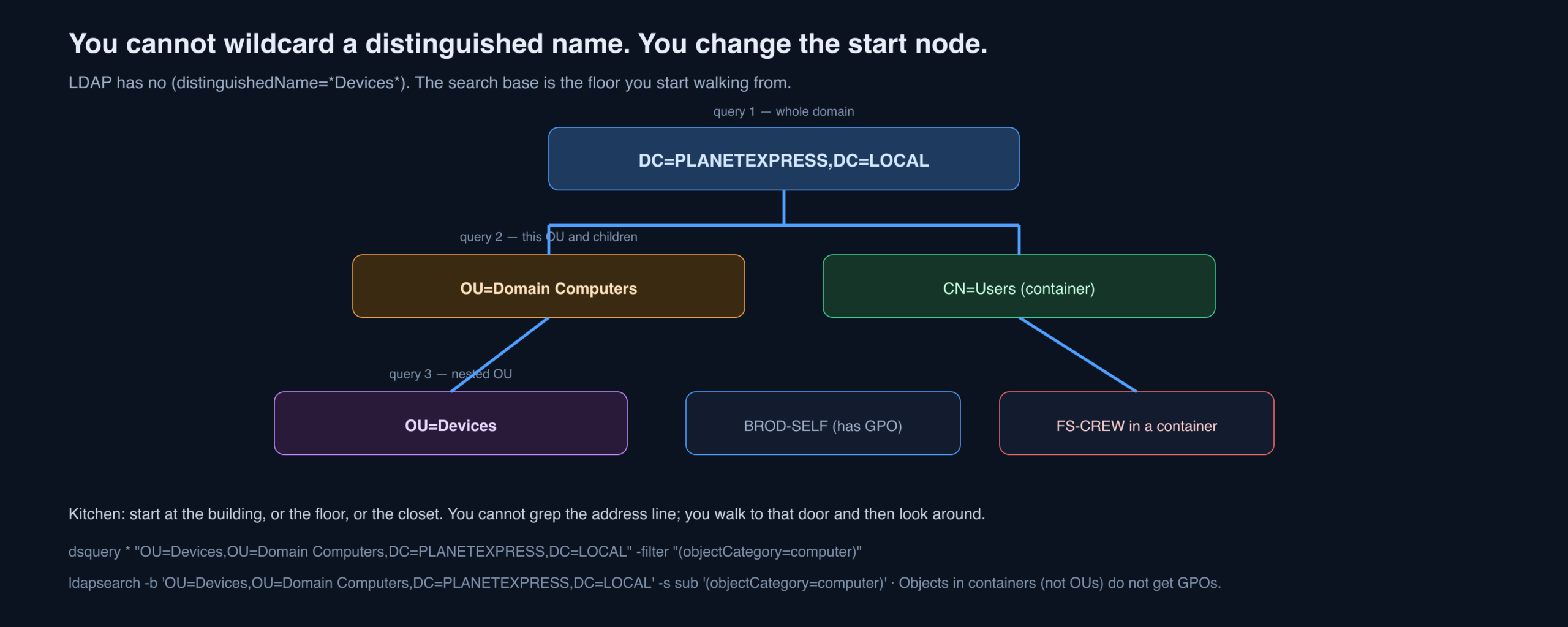
You cannot substring-match a DN with a wildcard and get useful rows. LDAP does not work that way. You change the start node of the search — the floor you walk onto.
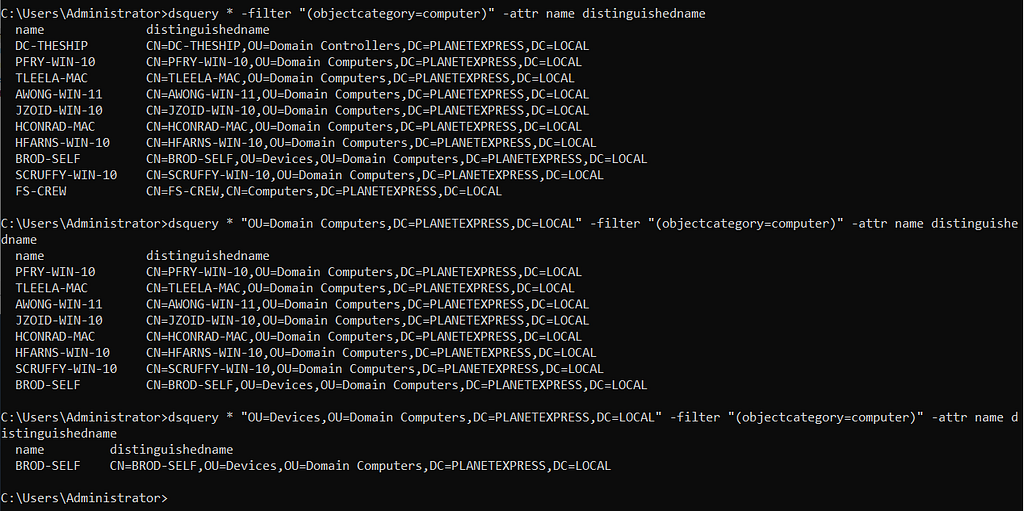
dsquery * -filter “(objectCategory=computer)” -attr name distinguishedNamedsquery * “OU=Domain Computers,DC=PLANETEXPRESS,DC=LOCAL” -filter “(objectCategory=computer)” -attr name distinguishedNamedsquery * “OU=Devices,OU=Domain Computers,DC=PLANETEXPRESS,DC=LOCAL” -filter “(objectCategory=computer)” -attr name distinguishedNameQuery one is the whole domain. Query two starts at Domain Computers. Query three starts at the nested Devices OU. Each start node shrinks the world. To dump everything in an OU, the start node alone is enough:
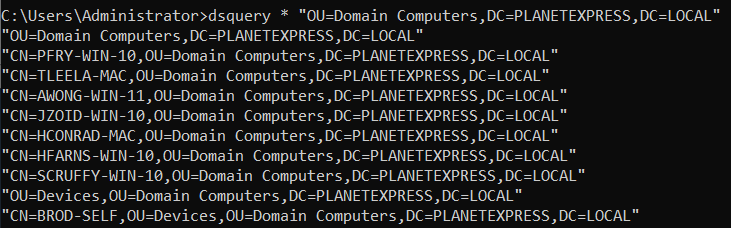
dsquery * “OU=Domain Computers,DC=PLANETEXPRESS,DC=LOCAL”Operationally you list OUs so you can line them up with GPOs, or the other way around. That correlation is the point. The DN is just the address on the door.
-b 'OU=Devices,OU=Domain Computers,DC=PLANETEXPRESS,DC=LOCAL' -s sub (subtree) or -s one (this floor only). gPLink on the OU is the GPO pointer; gPOptions holds inheritance blocking. Computers in CN=Computers are in a container, not an OU — a perennial “we never applied the baseline” finding. T1615 is the GPO read that follows this map.Domain Trusts: Hallways with Settings
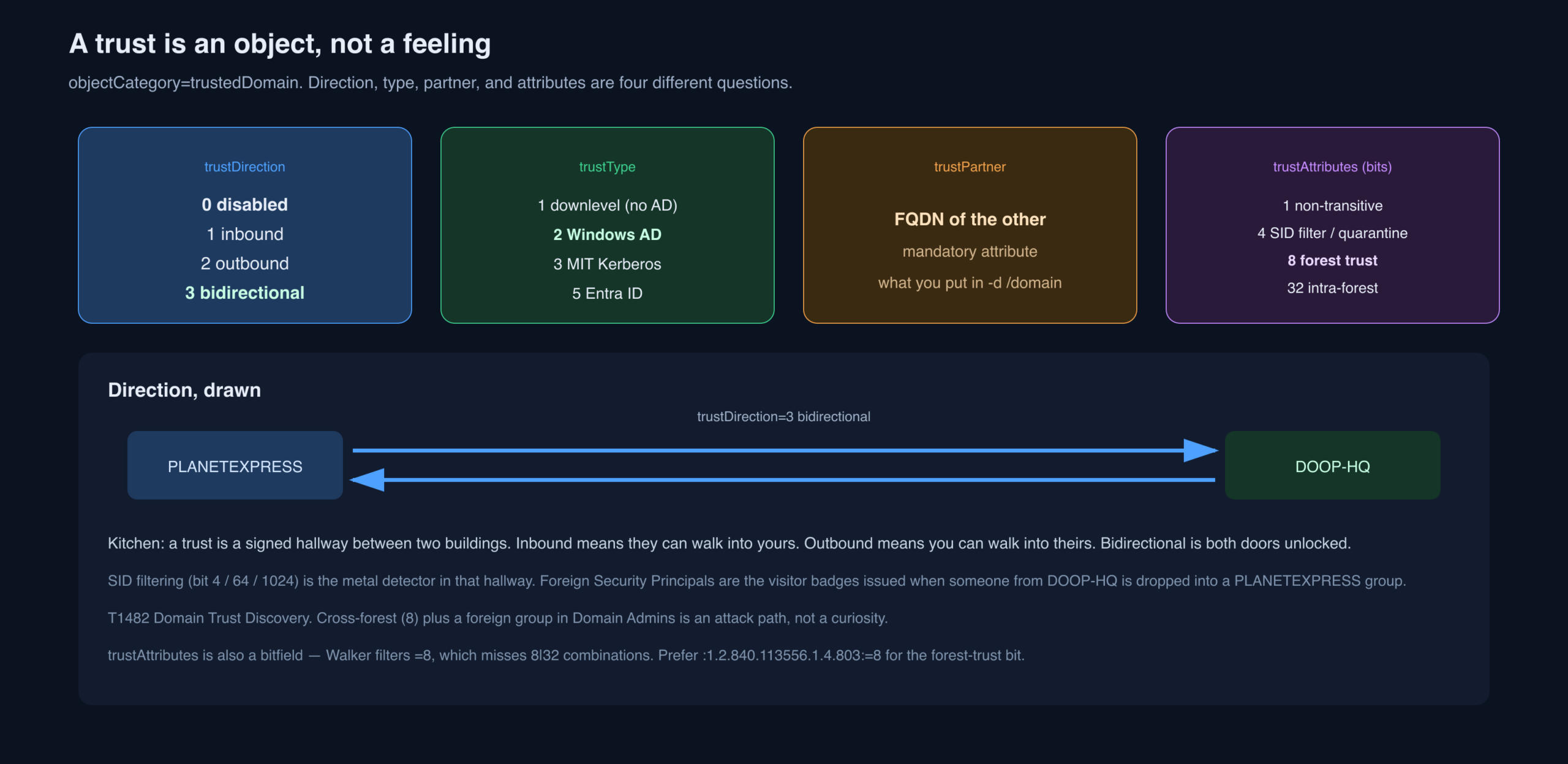
Walker assumes you know what a trust is and points at Microsoft’s forest-trust primer if you do not. The operational fact: a trust is an object of category trustedDomain. Start there.

dsquery * -filter “(objectCategory=trustedDomain)”That list is not enough. Direction is trustDirection. Walker filters 3, bidirectional. MS-ADTS is the long form. The short map:
- 0 — trust relationship is disabled
- 1 — inbound
- 2 — outbound
- 3 — bidirectional

dsquery * -filter “(trustDirection=3)”Type is trustType: what the other side is running. LDAP often still works against non-AD directories, which is why the type matters before you try to cross. Documentation. Short map:
- 1 — Windows domain not running AD
- 2 — Windows domain running AD
- 3 — non-Windows with Kerberos
- 4 — not used
- 5 — Entra ID (formerly Azure AD)

dsquery * -filter “(trustType=2)”Partner is mandatory: the FQDN of the other domain. You need it to query across and to talk to resources over there.

dsquery * -filter “(objectClass=trustedDomain)” -attr name trustPartnerAttributes pack the restrictions: transitivity, SID filtering, forest versus external, delegation. Walker’s example is 8, a forest trust. MS-ADTS trust attributes. Quick reference as published:
- 1 — Trust is not transitive
- 2 — Only Windows 2000 and newer operating systems can use the trust
- 4 — Domain is quarantined and subject to SID filtering
- 8 — Cross forest trust between forests
- 16 — Domain or forest is not part of the organization
- 32 — Trusted domain is in the same forest
- 64 — Trust is treated as an external trust for SID filtering
- 128 — Set when trustType is TRUST_TYPE_MIT, which can use RC4 keys
- 512 — Tickets under this trust are not trusted for delegation
- 1024 — Cross-forest trust to a domain is treated as Privileged Identity Management (PIM) trust for SID filtering
- 2048 — Tickets under this trust are trusted for delegation

dsquery * -filter “(trustAttributes=8)”=8 misses 8|32 and friends. Use (trustAttributes:1.2.840.113556.1.4.803:=8) for “has the forest-trust bit.” TDO password is trustAuthIncoming / trustAuthOutgoing — not a low-priv read. SID history across a filtered trust is the classic extra-SID attack; bit 4/64/1024 tell you whether that attack is even in play. Entra (type 5) is a different beast; do not treat it like an NT trust.Foreign Security Principals: Visitor Badges

A foreign security principal is an object that did not originate here. The cheap hunt is the object class:

dsquery * -filter “(objectClass=foreignSecurityPrincipal)”Walker says ignore the first four; they are standard in every domain (Everyone / Authenticated Users and friends). The interesting rows are stored as SIDs, not names. Opening one still does not tell you who it is:
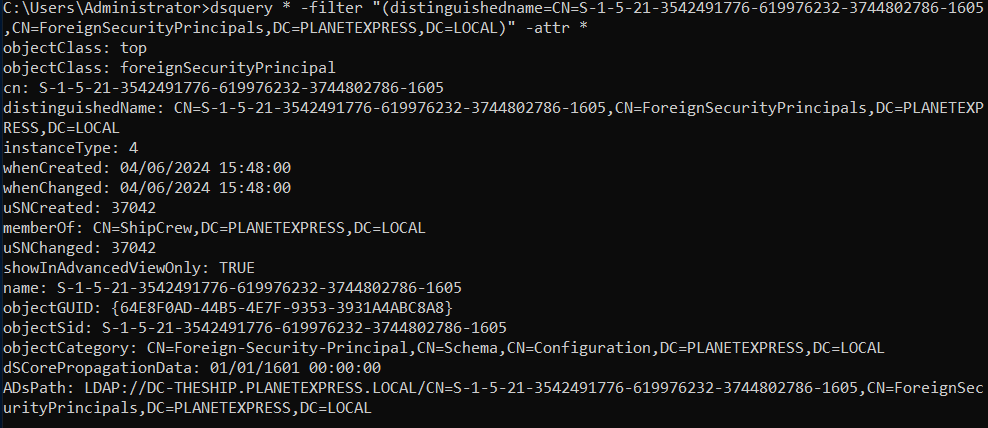
dsquery * -filter “(distinguishedName=CN=S-1–5–21–3542491776–619976232–3744802786–1605,CN=ForeignSecurityPrincipals,DC=PLANETEXPRESS,DC=LOCAL)” -attr *The lab has one other domain. Walk the trust. In dsquery the switch is /domain (Walker’s text; some builds want -d as in Part 1).

dsquery * -filter “(objectSid=S-1–5–21–3542491776–619976232–3744802786–1605)” /domain DOOP-HQ.LOCALOpen the attributes on the far side:
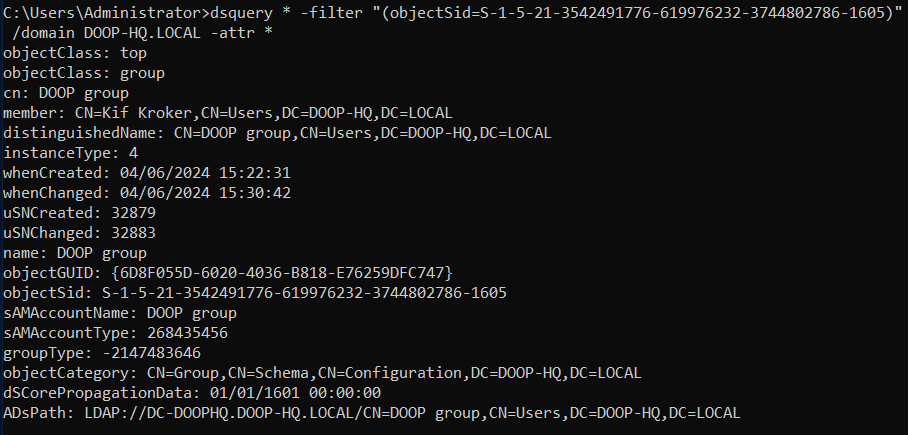
dsquery * -filter “(objectSid=S-1–5–21–3542491776–619976232–3744802786–1605)” /domain DOOP-HQ.LOCAL -attr *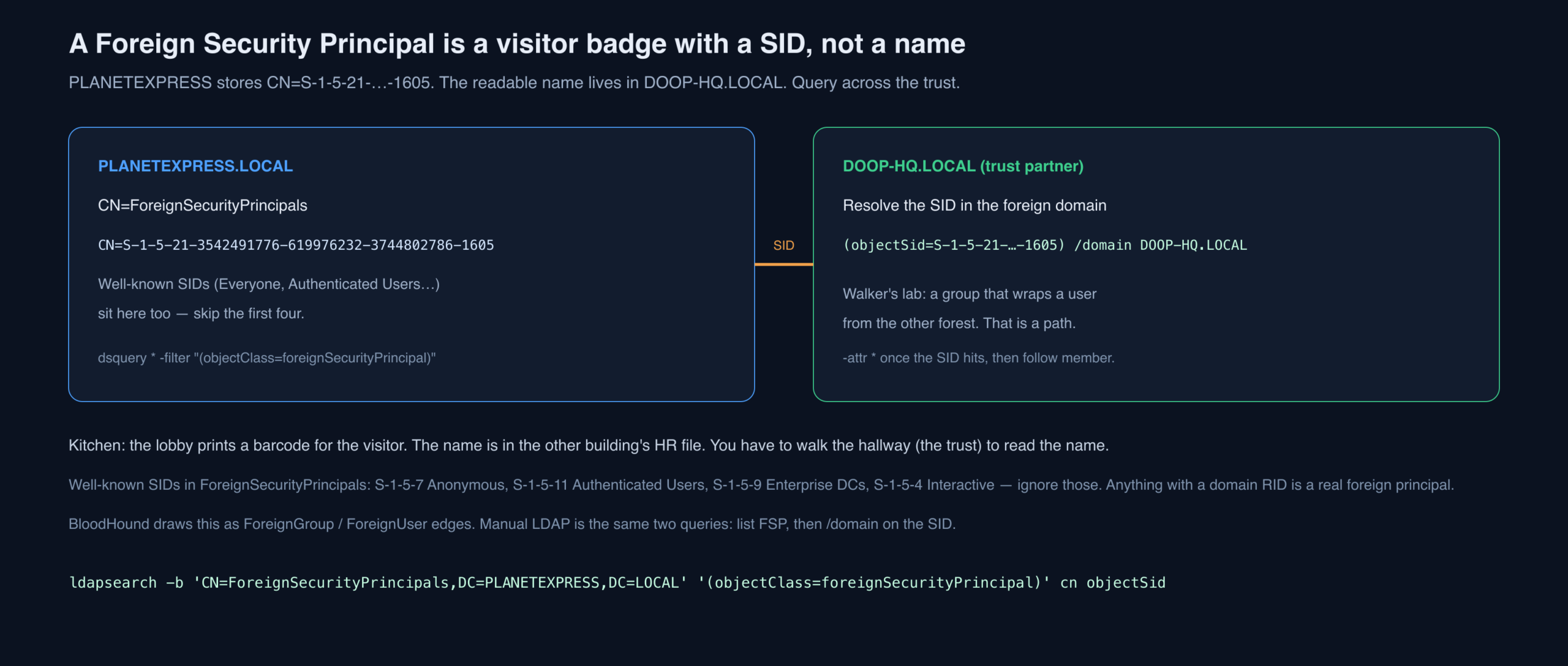
In the lab the far object is a group that references a user from the trusted domain. That is how trust gets used in practice, and it is a path when you want to leave PLANETEXPRESS for DOOP-HQ.
S-1–5–21) are Medium typography. On the wire the SID uses ASCII hyphens.The Filters Part 2 Implies but Does Not Type
Walker ran out of space again. These are the pasteable strings the sections above keep pointing at, in ldapsearch form, because Part 2 is filter-first and ldapsearch still rides SOCKS.
# Nested members of Domain Admins (matching rule in chain)
ldapsearch -LLL -x -H ldap://DC-THESHIP.PLANETEXPRESS.LOCAL -D 'PLANETEXPRESS\\SService' -W \
  -b 'DC=PLANETEXPRESS,DC=LOCAL' \
  '(member:1.2.840.113556.1.4.1941:=CN=Domain Admins,CN=Users,DC=PLANETEXPRESS,DC=LOCAL)' \
  sAMAccountName objectClass distinguishedName

# Kerberoastable users only
  '(&(objectCategory=person)(objectClass=user)(servicePrincipalName=*)(!(userAccountControl:1.2.840.113556.1.4.803:=2)))'

# Disabled, regardless of other UAC flags
  '(userAccountControl:1.2.840.113556.1.4.803:=2)'

# Forest-trust bit, not exact 8
  '(trustAttributes:1.2.840.113556.1.4.803:=8)'

# LAPS v1 + v2 presence
  '(|(ms-Mcs-AdmPwd=*)(msLAPS-Password=*)(msLAPS-EncryptedPassword=*))'

# Primary group Domain Admins (RID 512) — invisible to memberOf
'(primaryGroupID=512)'| Question | Naive filter | Honest filter |
|---|---|---|
| Win10/11, not HIPAA | NOT inside the OR | AND of (OR names) and (NOT HIPAA) |
| Who is DA? | (objectClass=user)(memberOf=DA) | no objectClass, then -expand / OID 1941, plus primaryGroupID |
| Roastable? | (servicePrincipalName=*) | person+user+SPN+not disabled; drop computers and krbtgt |
| Normal accounts | (userAccountControl=512) | BIT_AND 512; BIT_AND 2 to drop disabled |
| Forest trust | (trustAttributes=8) | BIT_AND 8 |
| Objects in an OU | (distinguishedName=*OU=Devices*) | search base = the OU DN |
| Who is this FSP? | attr * locally | /domain the SID on the partner FQDN |
What Defenders See
- (servicePrincipalName=*) — Walker’s own warning. Defender for Identity / similar products label this Kerberoast enumeration.
- Bitwise UAC and matching-rule-in-chain are BloodHound-shaped even from dsquery. A helpdesk account suddenly using OID 1941 is a story.
- trustedDomain + FSP dumps are T1482. Rare from a workstation that never did LDAP before.
- ms-Mcs-AdmPwd=* from a non-DA is either a misconfiguration or an incident.
- dsget -expand is still a signed binary; the parent/child process pair dsquery|dsget is a nicer hunt than ldapsearch, not an invisible one.
- Simple bind on 389 with a password on the command line remains the unforced error from Part 1.
Key Takeaways
- The filter is the product. dsquery and ldapsearch are just two mouths that can say it. Signed binaries and SOCKS are why Walker still uses these two.
- Parentheses change the sentence. A query that parses can still be the wrong question. Print the tree before you trust the rows.
- Nested groups hide people. User-only memberOf is a partial roster. Expand, or use matching-rule-in-chain, and check primaryGroupID.
- SPNs on computers and krbtgt are not roastable in the way that matters. SPNs on users might be. The hunt itself is noisy.
- userAccountControl is a sticker-sum, not a rank. 512 is not “low privilege.” Use bitwise matching rules.
- You cannot wildcard a DN. Change the search base. Containers do not get GPOs.
- Trusts are objects with direction, type, partner, and attribute bits. Foreign SIDs are visitor badges; resolve them on the other side of the hallway.
Defensive Recommendations
- Hunt the Kerberoast LDAP filter Walker published. If identity protection is not alerting on
(servicePrincipalName=*)from new sources, turn that on before you argue about 4769 volume. - Treat nested privileged groups as an architecture problem. Domain Admins should not contain a role group named Security. Flatten tier-0 membership and monitor OID 1941 queries against those DNs.
- Disable reversible encryption and DONT_REQ_PREAUTH. 128 and 4194304 are not mysterious flags. Alert on them as configuration drift.
- LAPS ACLs and schema hygiene. Non-DA reads of
ms-Mcs-AdmPwd/msLAPS-Passwordare incidents. Delete unused SFU / Oracle / Defender token attributes if the software is gone. - OU hygiene. Computers sitting in CN=Computers or other containers are missing GPO. Make that a weekly report, not an assessment surprise.
- SID filtering on external and forest trusts. Bits 4, 64, 1024 exist because extra SIDs are an attack. PIM trusts are not optional decoration.
- Inventory FSPs. Anything in ForeignSecurityPrincipals with a domain RID should have an owner and a ticket. A foreign group in a privileged local group is a path.
- LDAP signing, channel binding, no simple bind on 389. Part 2 still demos cleartext-capable clients. Close the wire, then argue about filters.
Conclusion
Walker ran out of pages twice. The through-line is the same both times: LDAP is a question language, and the question you think you asked is not always the question the DC answered. OR without a closed paren. A Domain Admin nested one group down. A 512 that looks like a peasant and is a Domain Admin. A computer in a container that never saw the hardening GPO. A SID that is a person next door. BloodHound still draws this faster. When it cannot get through the door, the filters in this lab — typed carefully, expanded once, saved off the terminal — are how you stop lying to yourself about the map.
Special thanks in the original go to Adam and Sarah for proofreading. The Medium syndication of this post lives at posts.specterops.io.
Original text: “Manual LDAP Querying: Part 2” by Hope Walker at SpecterOps.