
Executive Summary
A spinning disk is not a black box with a SATA connector on one end and magnetism on the other. It is a small computer that happens to move platters. In May 2026 Ryan Miceli (grimdoomer) published the first of a two-part series on dumping, loading, debugging and patching that computer. The original motive was an Xbox 360 race: he needed a few hundred extra milliseconds between a DMA READ EXT and the drive’s reply. The side quest ate a week of 20-hour days, a JTAG harness, a vendor-command RAM read, and a Thumb hook in overlay module space. Then the race started firing on an unmodified drive and the firmware work was shelved. The notes remain one of the few complete, modern public walks through Western Digital firmware layout, LZHUF tweaks, Samsung nibble obfuscation, and live HDD debugging.
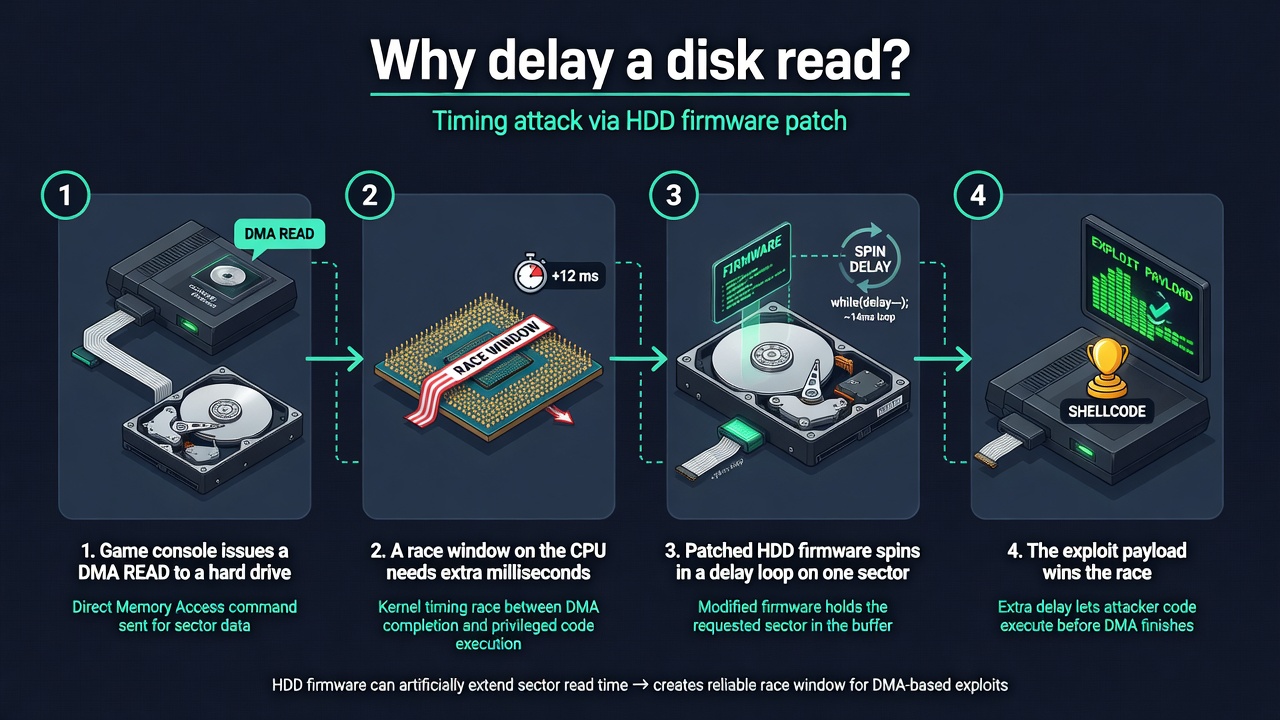
This article follows the post in source order: the four test drives, the six-step plan, the WD image format, the PM871a decoder, the HM020GI endian mystery, three flash paths, SPI-flash recovery, OpenOCD on a MICTOR footprint, SMART WRITE LOG 0xBE vendor commands, a 40-slot request table, overlay 0x11, a 200 ms busy-wait that actually measured ~450 ms, and the control test that ended the quest. Kitchen-table notes explain why a disk delay can win a race. Operator notes map the same facts onto ATT&CK, CWE, and a hunting checklist. Miceli’s C and assembly listings stay byte-for-byte. His IDA/firmware scripts live on github.com/grimdoomer/HDDTools; this article does not re-host a flashing toolkit or a disk-resident implant.
Background: a race against the platter
The Xbox 360 bug Miceli was chasing is a race on a read. The console issues a request, the drive answers, and somewhere in that interval a window opens. If the window is shorter than the drive’s reply, the exploit misses. One obvious lever is the drive itself: patch firmware so that a chosen sector stalls a few hundred milliseconds, then let the rest of the disk behave. He is explicit that this was a first idea, not the idea that shipped. Other tuning later made the race reliable on ordinary HDDs. SSDs still answer too fast. The firmware path was never required, which is why the write-up can be this honest about dead ends.
He had read scattered HDD-firmware posts for years and never found a recipe he could pick up. Embedded reverse engineering is a time sink: a drive MCU is several cores, a custom image format, compression with one constant changed, overlay modules on the platter, and a host OS that BSODs if you pause the disk too long. The sentence that starts the series is the one that keeps people out of this field: do you really know how a hard drive works at microcontroller level? He did not. The race did not care.
If the only thing standing in my way of exploiting this bug was a hard drive then this hard drive was going down.
Ryan Miceli, Background
0xBE is a vendor backdoor, not a memory-corruption CVE. There is no CVE in this post. Do not confuse a lab delay hook with Equation Group-style HDD implants; Miceli cites that history in the conclusion and then open-sources analysis scripts, not a worm.The test subjects
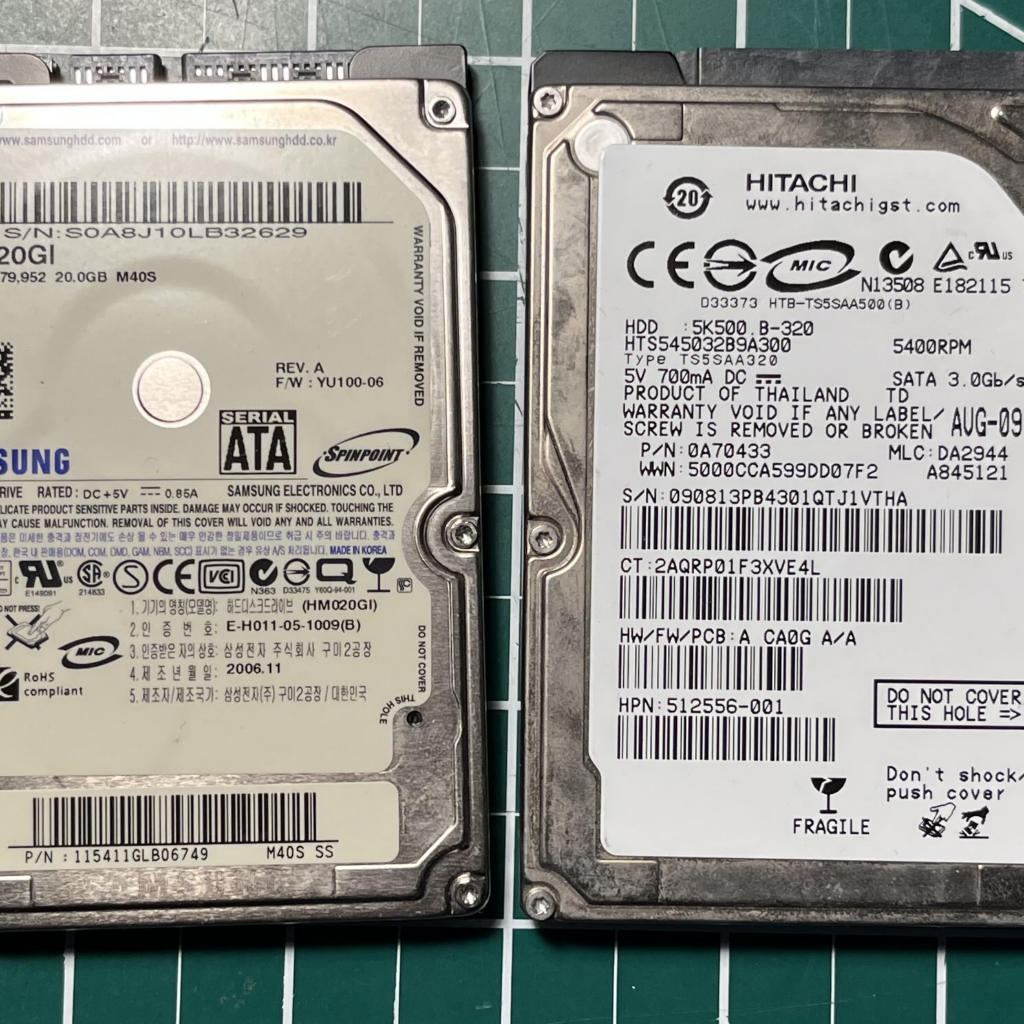
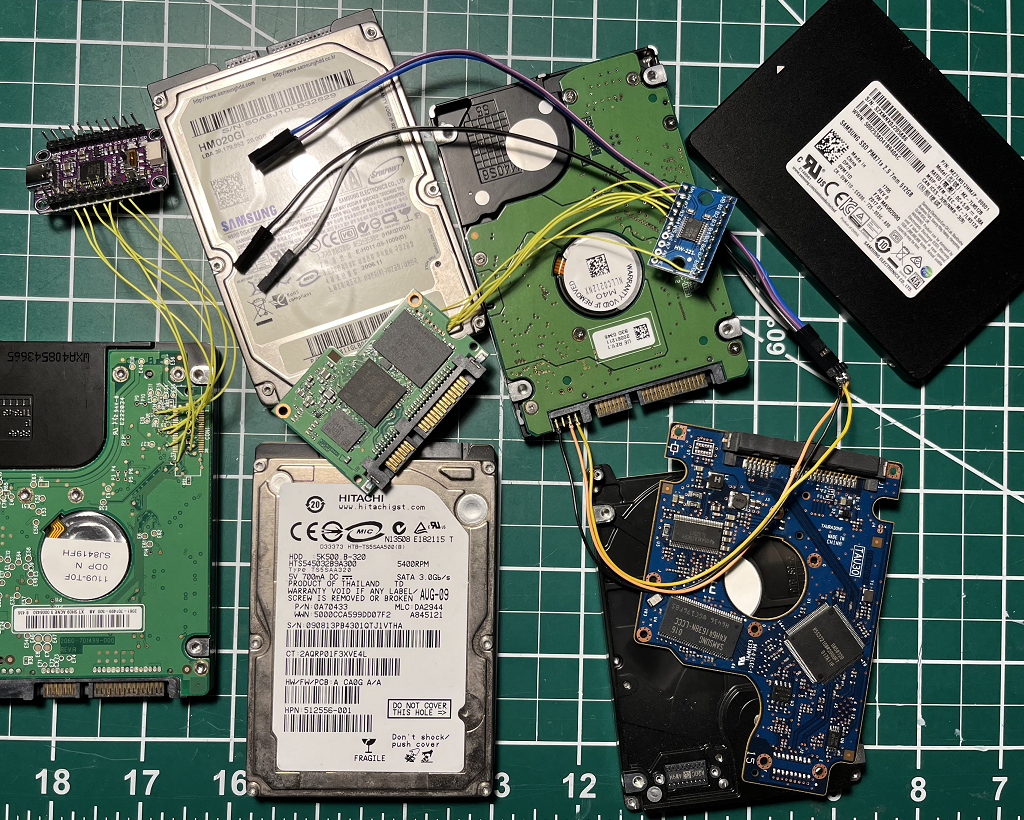
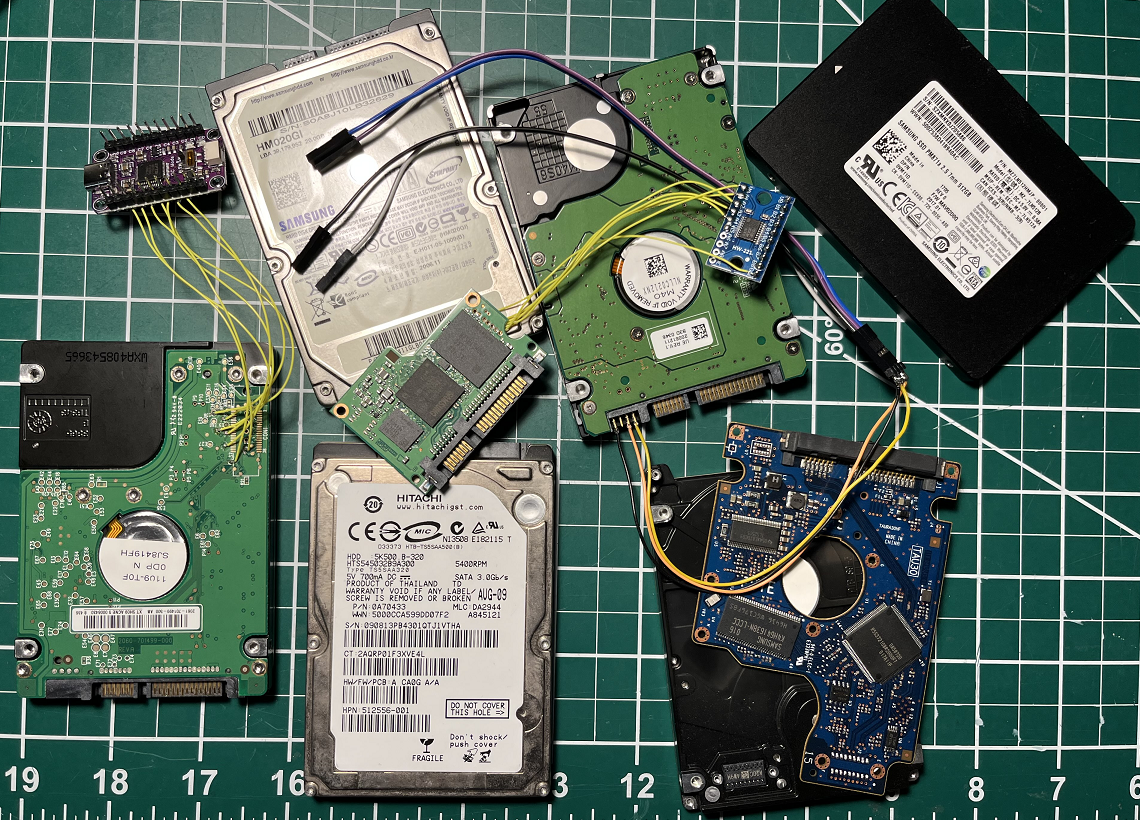
He needed any HDD or SSD he could dump, patch and reflash, with a bias toward Xbox 360-era laptop drives that a softmod user would already own. Western Digital was in the pile because older research had already pointed at vendor commands. Samsung SSDs were in the pile because they were on the desk. Four survivors:
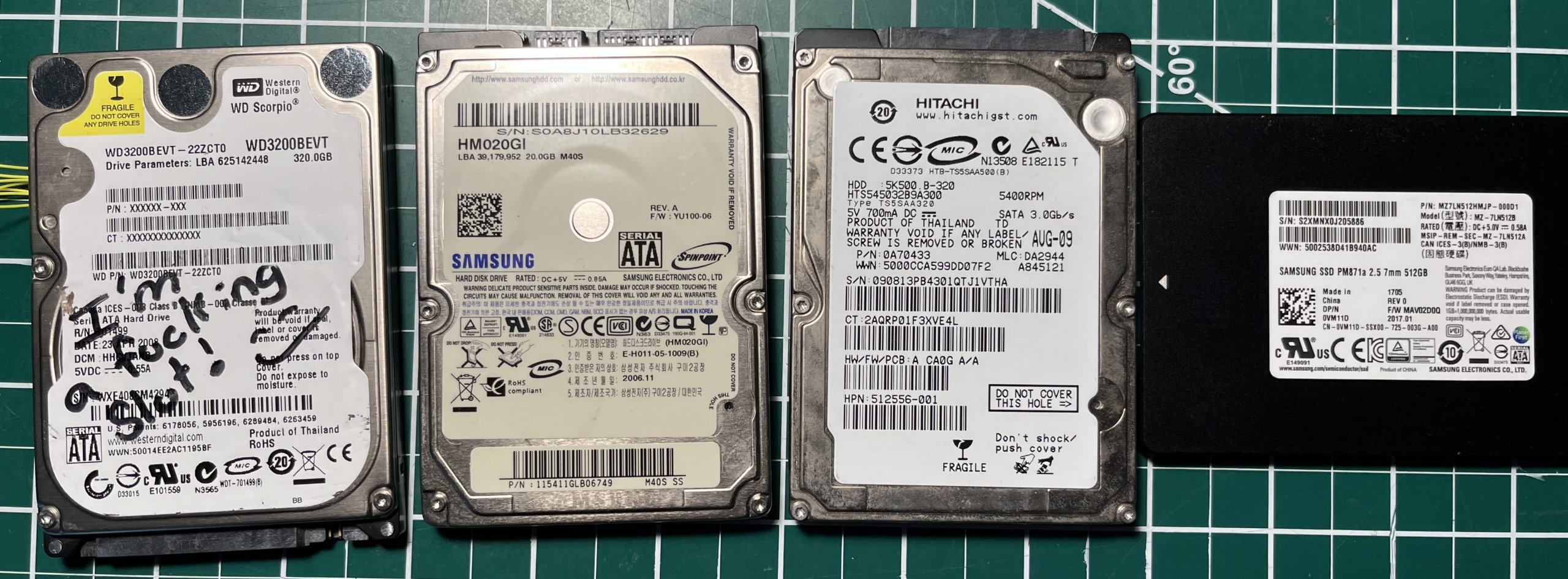
- Samsung HM020GI
- Hitachi HTS545032B9A300
- Western Digital WD3200BEVT
- Samsung PM871a
Spinning up: a six-step plan that mostly disagrees with 15-year-old forum posts
First stop was search: HDD Guru threads, a firmware dump section fed by PC-3000 users, and MalwareTech’s 2015 HDD firmware series. The quote Miceli keeps is the one every disk reverser eventually learns:
Before i started hacking I’d decided to read other people’s research to get a good idea of where to start. Resourceful, right? Well it actually turns out that most of the research I’ve based mine on was either wrong or just doesn’t apply to this hard disk.
MalwareTech, 2015
Fifteen-year-old posts were wrong, or right for a different stepping. They still left pieces: image layouts, overlay talk, vendor command rumors. Those pieces became a plan that is still a decent playbook for any unknown drive.
- Get a firmware image: forum dump, OEM updater, or a self-dump.
- Load it in IDA, defeating compression or obfuscation. No analysis, no patch.
- Find a write path: DOWNLOAD MICROCODE, vendor commands, or a physical programmer. No write path, stop.
- Find the
DMA READ EXThandler, probably behind an ATA command table. - Patch in a few-hundred-millisecond delay on one sector.
- Flash the result and try not to collect paperweights.
Obtaining the drive firmware
PC-3000 is Ace Lab’s professional recovery box. It speaks the same proprietary vendor commands shops use to diagnose dying disks, which is why HDD Guru has a graveyard of dumps taken with it. Miceli found a WD image there. A Twitter reply produced a PC-3000 dump of the Samsung HM020GI. The PM871a firmware came from a Lenovo updater, which is a double win: the payload plus the code that talks to the drive. Hitachi stayed missing. Four drives, three images, enough to start.
Western Digital: a flat section list, 8-bit checksums, and LZHUF with the knobs wrong
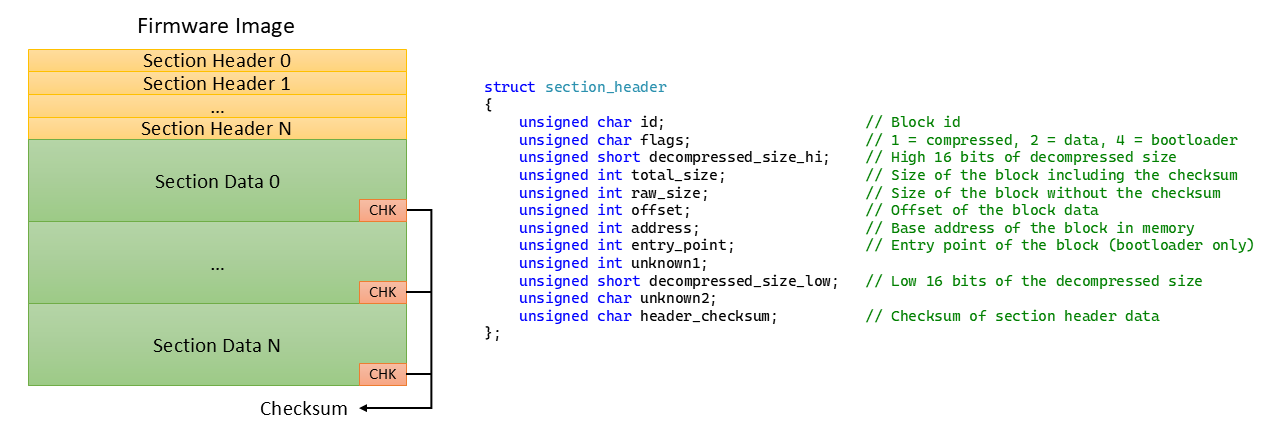
A few minutes in a hex editor plus forum crumbs produced a layout: a list of statically based executable and data sections, headers first, each header and each payload with an 8-bit summation checksum. An IDA loader was enough to prove that every section after the first was compressed. Forum lore said section zero is a loader stub the MCU bootloader uses to inflate the rest. Nobody named the codec.
Off-the-shelf compressors did not name the blob. Loading section zero as ARM did. HDD and SSD controllers are often ARM, often multi-core; this WD part is a single core, which is a gift. The loader loop and the decompressor labelled themselves after a short session.
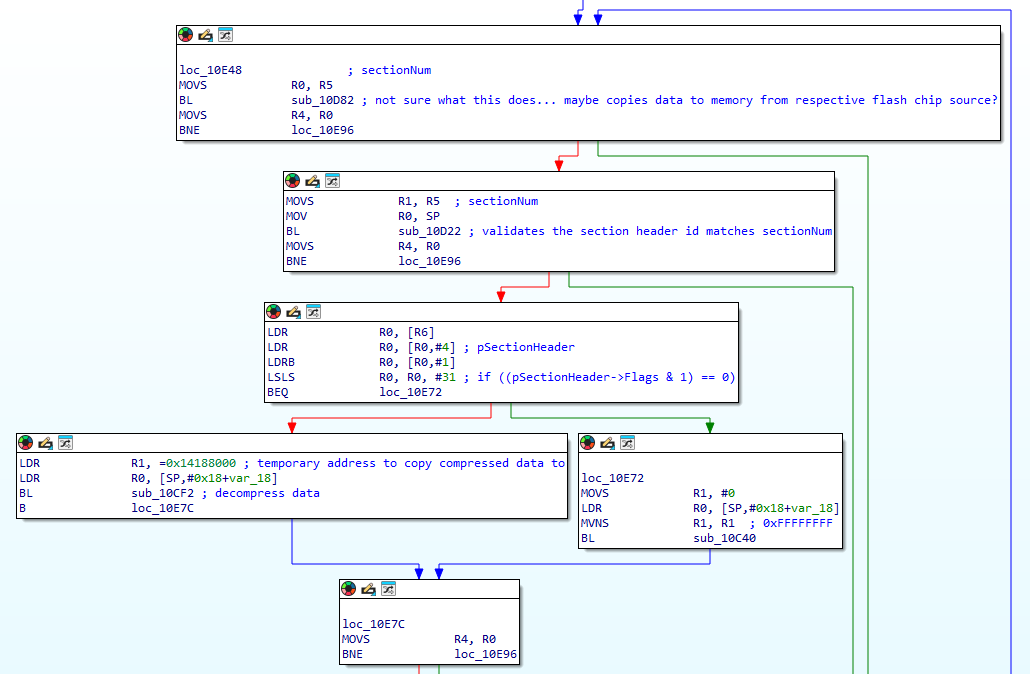
The codec is LZHUF with two deliberate nobs: N moved from 2048 to 4096, and the run-length calculation subtracts THRESHOLD instead of adding it. That is why file(1) and binwalk shrugged. With those two changes reimplemented, the loader mapped every section to its real base and the WD image was ready for analysis.

Samsung PM871a: steal the updater, untwiddle the nibbles, map Cortex-M3
OEM firmware utilities are a research multiplier. They decrypt or deobfuscate, then they speak DOWNLOAD MICROCODE (or the vendor equivalent) for you. Samsung SSD images are usually wrapped. This updater used a high-nibble permutation Miceli pulled out of the binary:
void DecodeFirmware(unsigned char* pBuffer, unsigned int Length)
{
    // Loop through the entire firmware buffer.
    for (unsigned int i = 0; i < Length; i++)
    {
        // Get the hi nibble for the current byte.
        unsigned char nibbleHi = (pBuffer[i] >> 4) & 0xF;

        // Do bit twiddling?
        if ((nibbleHi & 1) != 0)
            nibbleHi >>= 1;
        else
            nibbleHi = 0xF - (nibbleHi >> 1);

        // Mask in the new hi nibble value.
        pBuffer[i] = (pBuffer[i] & 0xF) | (nibbleHi << 4);
    }
}
The same utility covers a couple of dozen Samsung SSD models and a pile of DVD drives, so one RE session scales. The deobfuscated image starts with a 28-byte run that looks signature-shaped. Comparing the 2.5-inch and M.2 builds of the same PM871a version showed that run as the standout difference up front, with only small code/data deltas later. That is a weak tell against RSA or ECDSA over the whole file. It could still be SHA-224, truncated SHA-256, or a MAC on a slice. He parked the question.
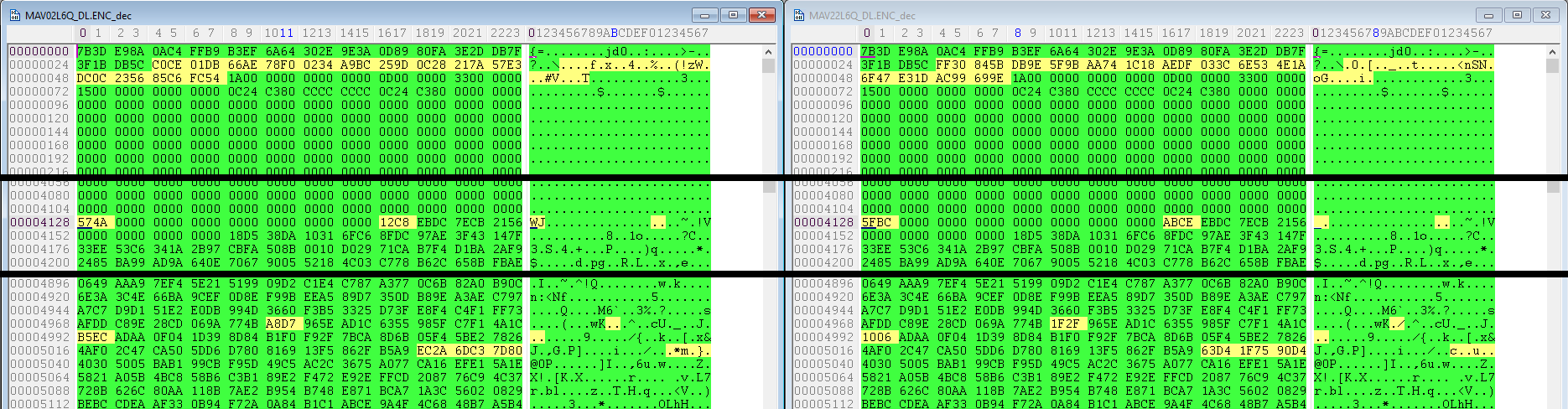
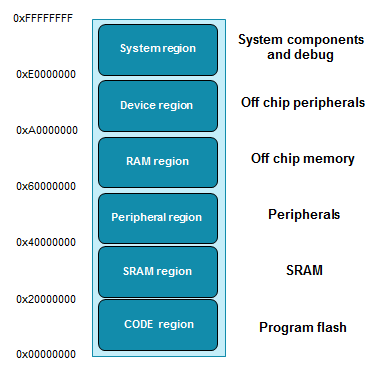
Loaded as a raw binary, the file was obviously multi-base. The first 8 KB looks like metadata. After that, red-circled little-endian addresses sit on the Cortex-M3 map: code in the 0x00000000 flash window, SRAM in 0x20000000, peripherals in 0x40000000. Section offset and size step in 16 KB units. A second IDA loader later, the SSD firmware was mapped too.

Samsung HM020GI: strings, code-shaped bytes, no ISA, and a word-swap
The HM020GI dump has plaintext strings and bytes that look like instructions. They refuse to disassemble as any common architecture. The whole file is word flipped. That combination — readable strings, alien code, swapped 16-bit units — is how a custom ISA or a tiny VM bytecode usually introduces itself. Miceli benched the drive for part 2, where AI gets a turn at black-box ISA identification.

Three ways to put firmware back
From here the post stays on the WD3200BEVT, the drive that ate the most hours. The other three return in part 2. Write paths, in the abstract, are three:
- DOWNLOAD MICROCODE — the ATA command almost every modern drive uses for field updates.
- Vendor backdoors — repair and diagnostics, or the overlay-module path WD preferred instead of full-image updates.
- On-board serial — four pins next to SATA, RS-232, vendor CLI. Parked for part 2.
DOWNLOAD MICROCODE
ATA is the language of registers: command, features, sector count, LBA, and a data phase. DOWNLOAD MICROCODE ships a new image in PIO chunks or DMA, the drive may validate, then it commits to non-volatile storage. Success is a power cycle. Failure is a brick that a shop with vendor tools can sometimes revive and a normal user cannot. OEM “firmware update” EXEs are this command in a wrapper.
Back-door vendor commands and the service area
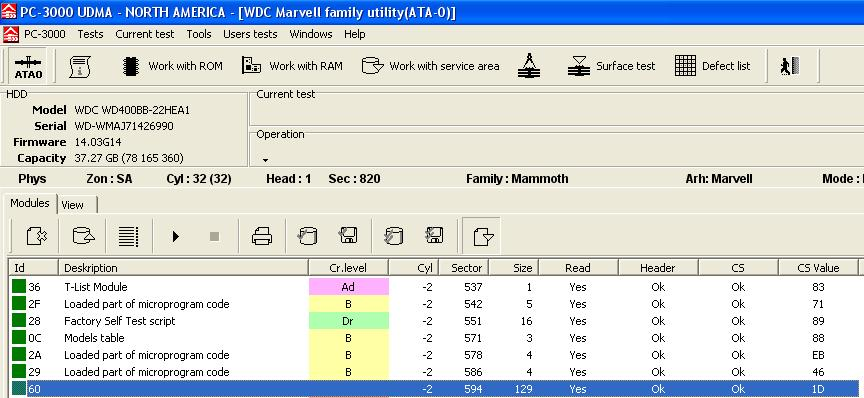
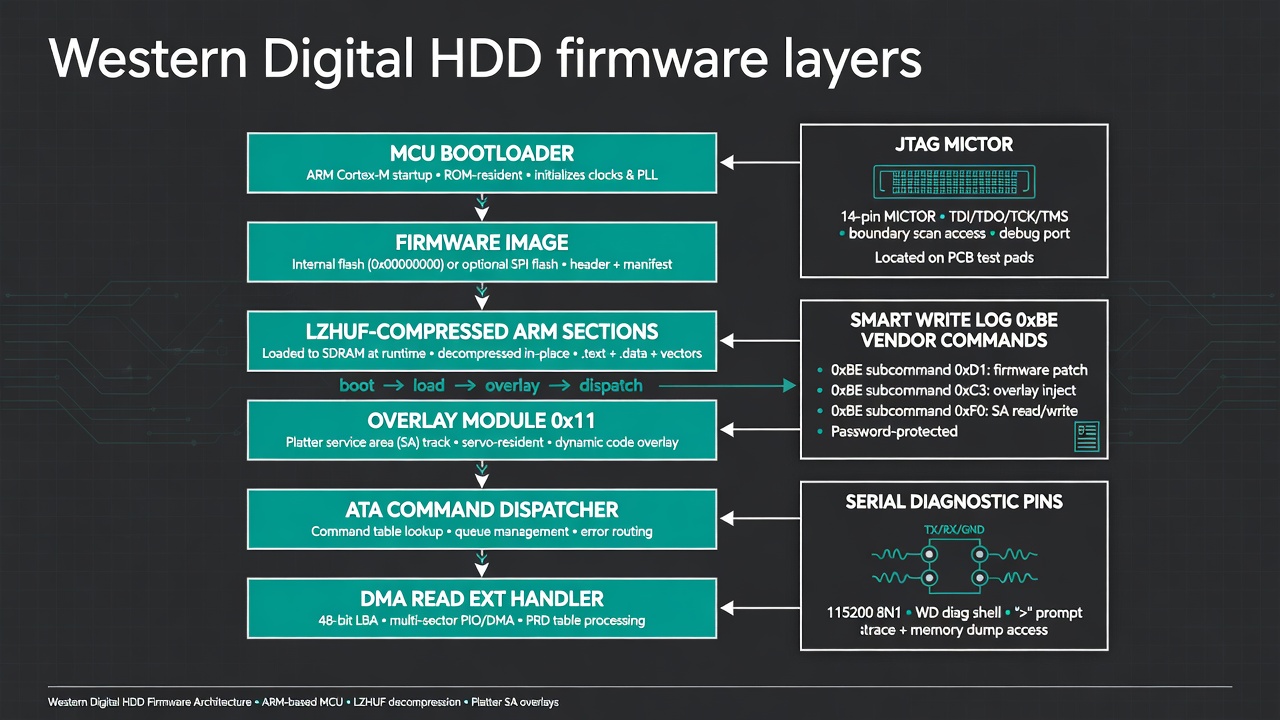
Plenty of WD models never shipped whole-image updates. They wrote new code into overlay modules in the platter service area: a reserved region the host is not supposed to see, holding geometry, SMART, serial data, and extra firmware slices that get mapped in at boot. PC-3000 shows those modules as a list. Dozens of them.
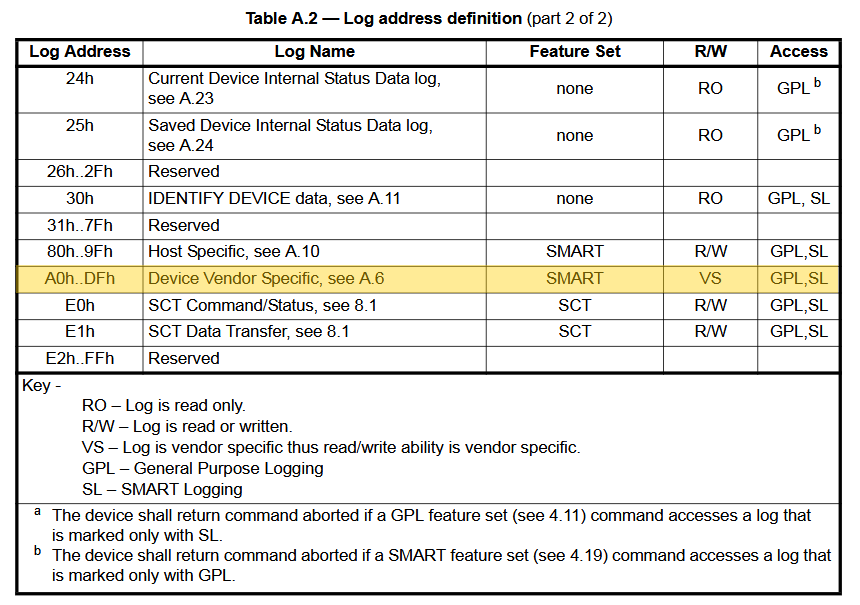
WD’s door into that world is SMART READ/WRITE LOG. The log address is an 8-bit page number. The ATA spec nails down some pages and leaves a vendor range. WD put a backdoor on one of those vendor pages. That is not a bug in SMART; it is a documented hole in the spec that vendors fill with factory tools, and that researchers then find.
Physical serial
The four-pin header beside SATA is RS-232. Commands differ by maker and stepping; some are documented by earlier reversers, some live only in the firmware. Miceli leaves the port for part 2.
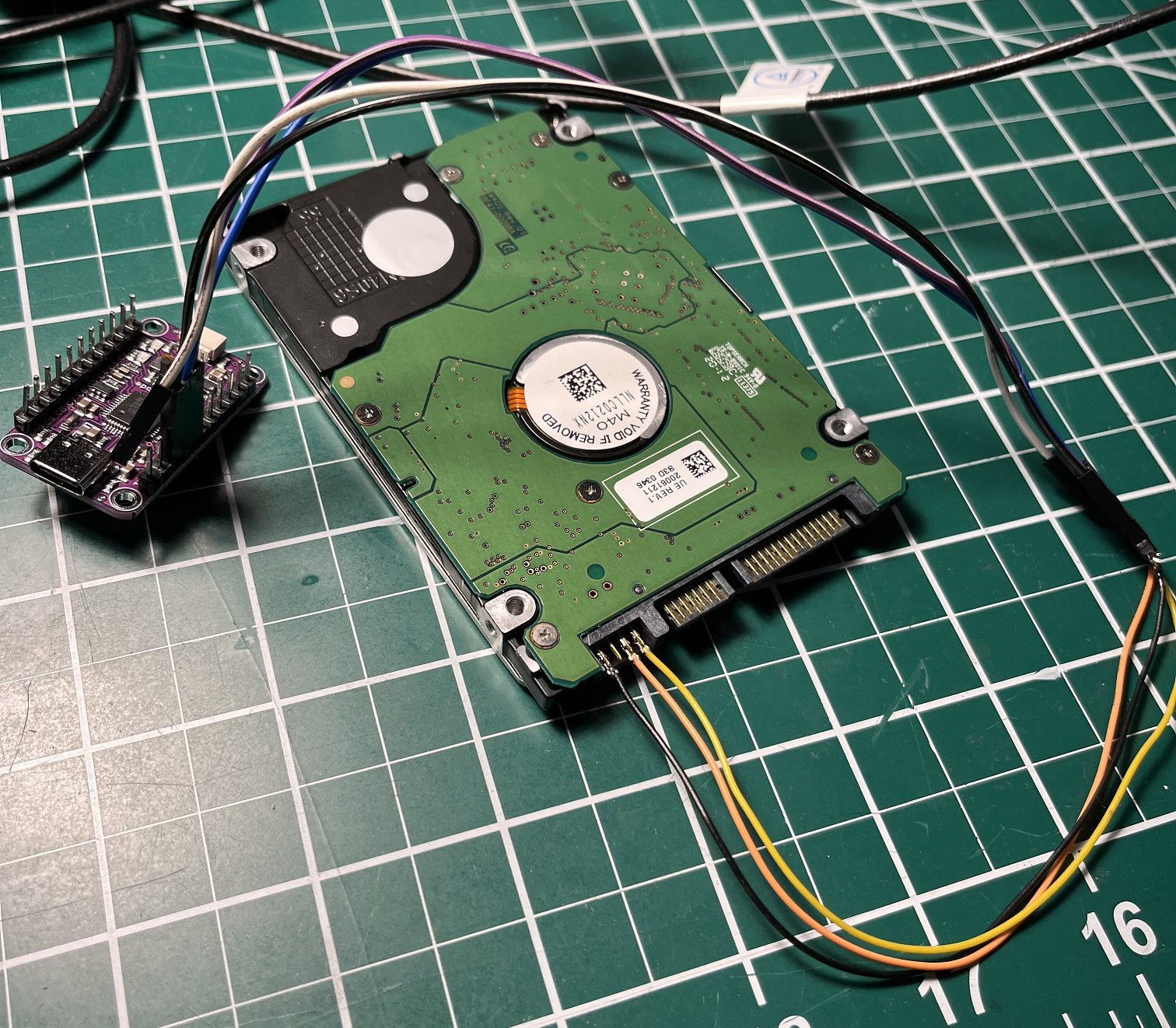
SPI flash as a parachute
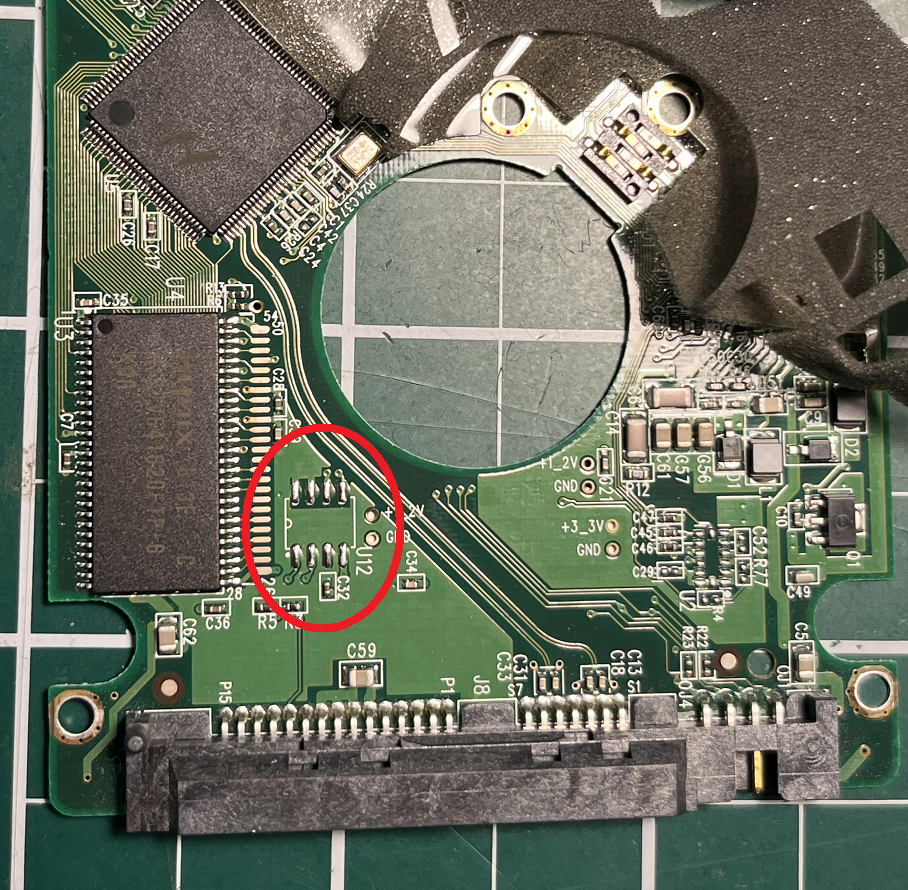
The plan was to push a patched image through vendor commands. The fear was the first five patches. A bad image can kill the same backdoor you need to recover. WD stores primary firmware in internal MCU flash on this model, and on sibling boards in an external SPI chip that overrides internal flash. The WD3200BEVT did not populate that chip. The pads and the strapping resistors were still there. Solder a compatible SPI part, tell the MCU to boot from it, and a clip-on programmer can unbrick the experiment without trusting the backdoor. Chips were on order while analysis started.
Analyzing the firmware: debug a live disk
Finding DMA READ EXT in a stripped, multi-segment ARM image with no strings is not a grep. Miceli’s answer is the one MalwareTech also reached: if the board has JTAG, use it.
You ever debug a hard drive before?
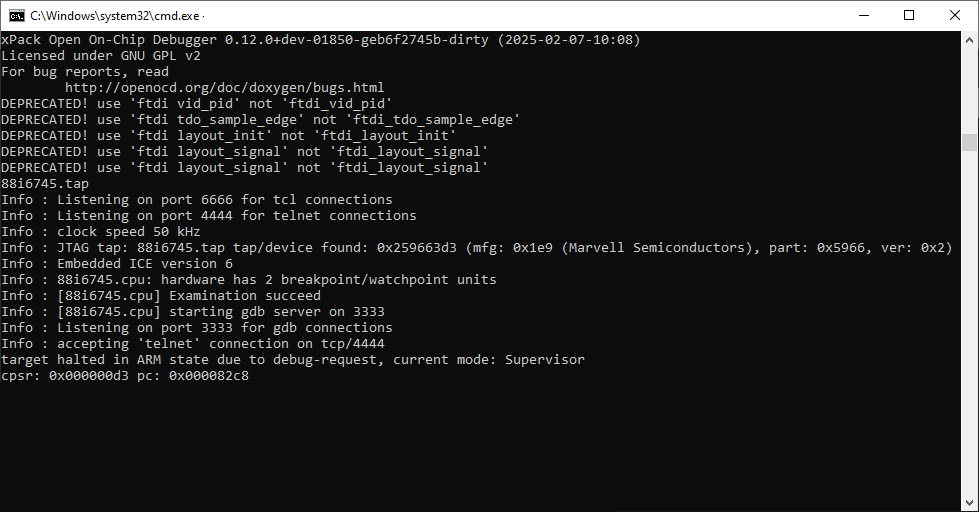
Most of these WD boards expose an unpopulated 38-pin MICTOR. A handful of wires is enough for hardware debug: breakpoints, memory, registers, stepping, while a PC still sends ATA. Yes, a live HDD on JTAG.
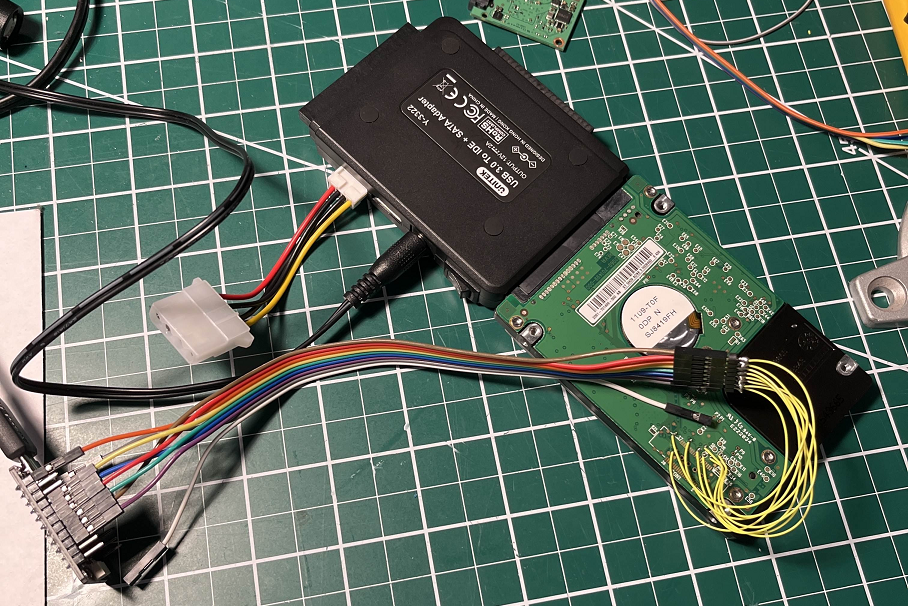
The practical pain is host-side. He had no USB ATA-passthrough dongle, so the disk had to sit on real SATA. If a breakpoint holds the drive past Windows’ timeout, the OS marks the disk gone and every later command fails until reboot. Some Windows builds let volmgr BSOD the box. The MCU itself is moody under debug and sometimes needs a power cycle. First-time OpenOCD on an FT232, tap config loosely from MalwareTech, slightly different MCU, only the first ARM core ever identified. It was enough to break in.
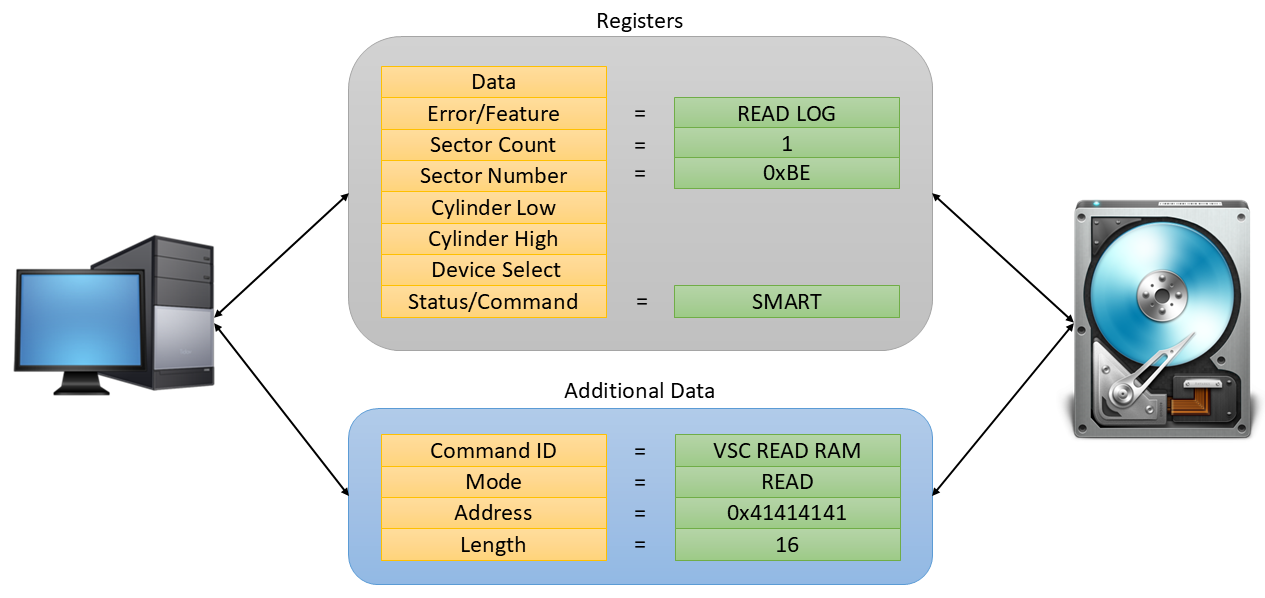
Vendor-specific commands: SMART WRITE LOG, page 0xBE, read RAM
WD VSCs ride SMART READ/WRITE LOG. They read and write firmware, RAM, overlay modules, and other factory toys. The interesting one here is read RAM. Plan: plant a data breakpoint on 0x41414141, issue a RAM read of that address, catch the handler, walk the stack to a common dispatcher, then hunt the read-sector path from there.
On Windows that is IOCTL_ATA_PASS_THROUGH. Fill ATA_PASS_THROUGH_EX so the task file becomes SMART WRITE LOG, log page 0xBE, LBA magic 0x4F/0xC2, drive/head 0xA0, one 512-byte extra sector holding the VSC ID, mode, address and length.
bool SendVSCAccessKey(HANDLE hDrive, BYTE bVscCmd, bool bWriteAccess, DWORD dwAddress = 0, DWORD dwSize = 0)
{
    DWORD BytesRead = 0;
    DWORD BufferSize = sizeof(ATA_PASS_THROUGH_EX) + 512;
    BYTE abPassthroughData[sizeof(ATA_PASS_THROUGH_EX) + 512] = { 0 };
    ATA_PASS_THROUGH_EX* pAtaPassthrough = (ATA_PASS_THROUGH_EX*)abPassthroughData;
    VSC_COMMAND_DATA* pVscCommand = (VSC_COMMAND_DATA*)(pAtaPassthrough + 1);

    // Setup the passthrough data:
    pAtaPassthrough->Length = sizeof(ATA_PASS_THROUGH_EX);
    pAtaPassthrough->AtaFlags = ATA_FLAGS_DATA_OUT;
    pAtaPassthrough->TimeOutValue = 5;
    pAtaPassthrough->DataTransferLength = 512;
    pAtaPassthrough->DataBufferOffset = sizeof(ATA_PASS_THROUGH_EX);

    // Setup port registers for SMART READ LOG command:
    IDEREGS* pRegs = (IDEREGS*)pAtaPassthrough->CurrentTaskFile;
    pRegs->bCommandReg = ATA_OP_SMART;
    pRegs->bFeaturesReg = SMART_WRITE_LOG;
    pRegs->bSectorCountReg = 1;
    pRegs->bSectorNumberReg = 0xBE;     // Special WD log address
    pRegs->bCylLowReg = 0x4F;
    pRegs->bCylHighReg = 0xC2;
    pRegs->bDriveHeadReg = 0xA0;

    // Setup the VSC command data:
    pVscCommand->CommandId = bVscCmd;
    pVscCommand->Mode = bWriteAccess == true ? VSC_MODE_WRITE : VSC_MODE_READ;
    pVscCommand->ReadWriteRam.Address = dwAddress;
    pVscCommand->ReadWriteRam.Length = dwSize;

    // Send the command to the drive.
    if (DeviceIoControl(hDrive, IOCTL_ATA_PASS_THROUGH, pAtaPassthrough, BufferSize,
        pAtaPassthrough, BufferSize, &BytesRead, nullptr) == FALSE)
    {
        wprintf(L"SendVSCAccessKey failed 0x%08x\n", GetLastError());
        return false;
    }

    // Check for any errors.
    OUT_REGS* pOutRegs = (OUT_REGS*)pAtaPassthrough->CurrentTaskFile;
    if ((pOutRegs->bStatusReg & 1) != 0)
    {
        wprintf(L"SendVSCAccessKey failed drive returned 0x%04x\n", WD_ERROR_CODE(pOutRegs));
        return false;
    }

    return true;
}
0xBE plus the 0x4F/0xC2 cylinder pair is the keying that stops a random SMART tool from wandering in. If you are only checking health, you will never notice. If you are a recovery shop — or a researcher — that page is the front door.Into the belly of the beast
The breakpoint fired. The handler loads VSC parameters and performs the memory read. Walking the stack revealed a VSC lookup table with 67 entries, more than expected. GDB output and the handler disassembly:
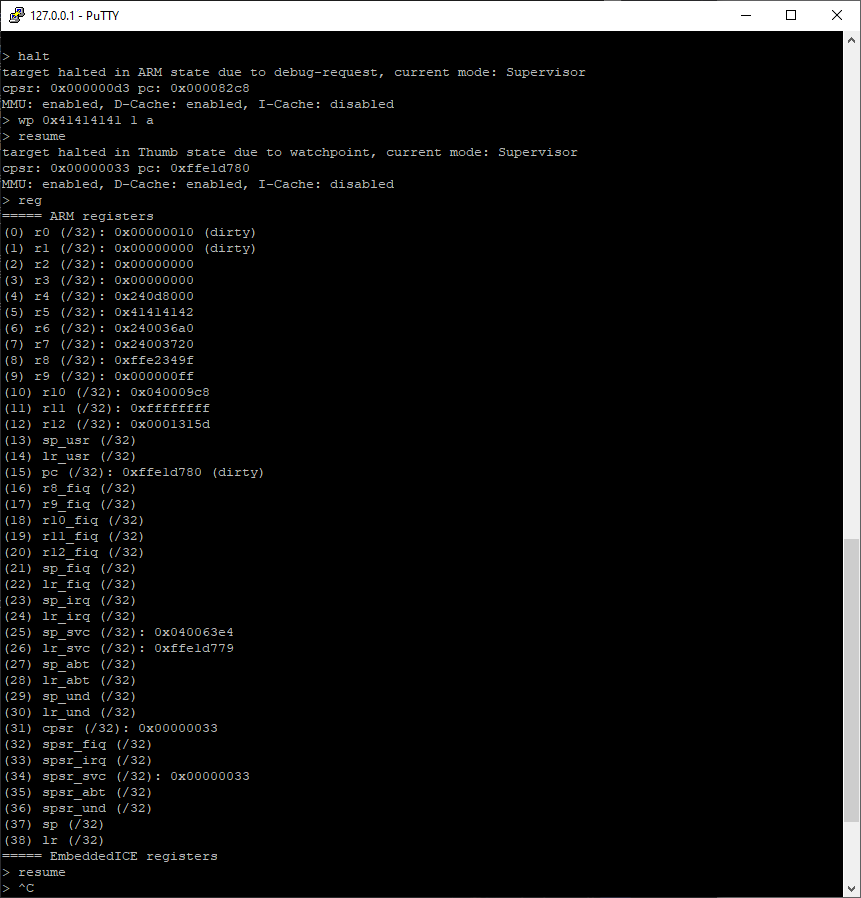
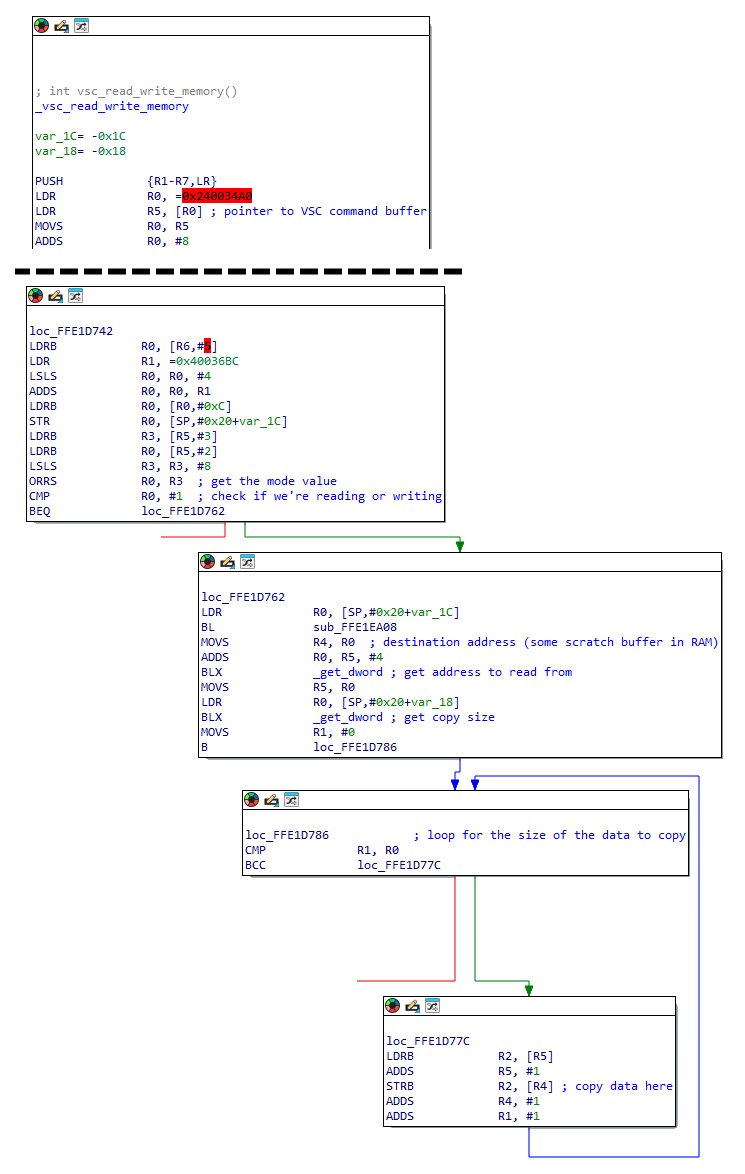
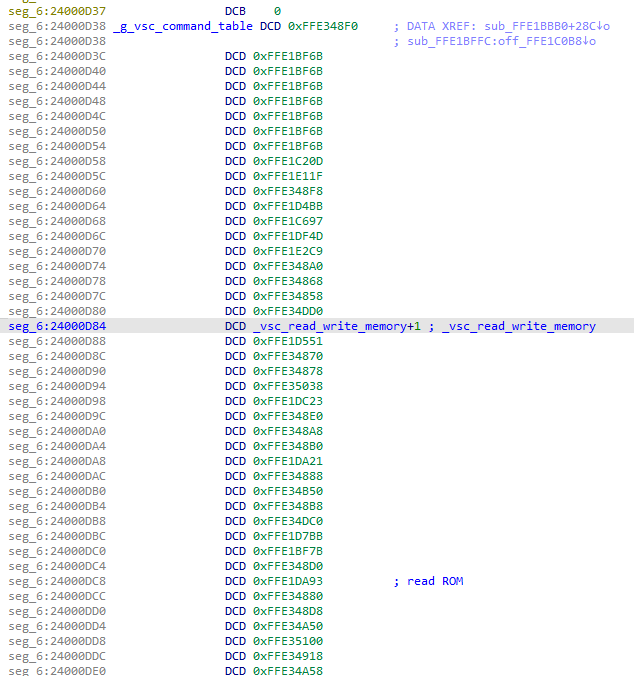
A 1 KB stack dump helped across indirect table calls. Next experiment: breakpoints on the VSC call chain, then a sector-read from the test app. Those breakpoints only fired for SMART READ LOG, SMART WRITE LOG and IDENTIFY. DMA READ EXT lived somewhere else.
Hot addresses in the VSC path turned out to be firmware-wide arrays. One is 40 elements of 16 bytes. A small Python printer made the layout visible: column zero a pointer at opaque extra data, column one a function pointer. Some of those functions sat on the VSC stack. The array is a request queue. A valid function pointer is the handler for that slot.
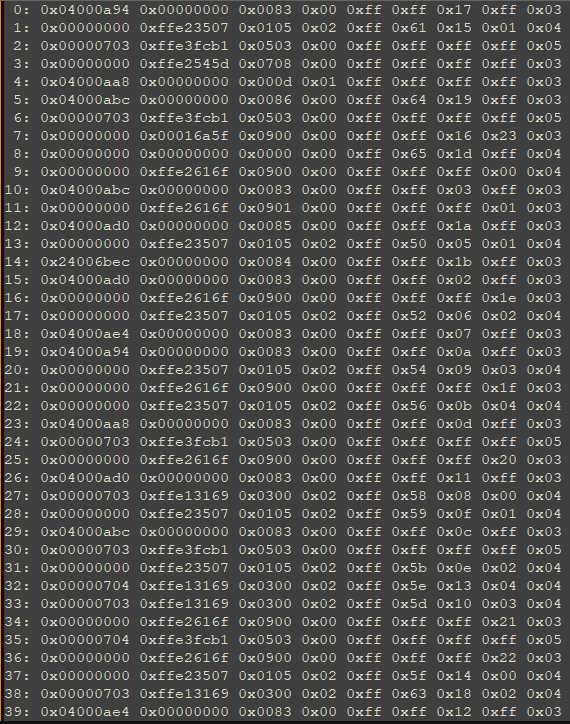
Poisoning the table with about two dozen sector reads made the DMA READ EXT slots obvious. A breakpoint on that function hit. The function was not in any firmware-image mapping. It lived somewhere else.

Where the FSCK is this code?
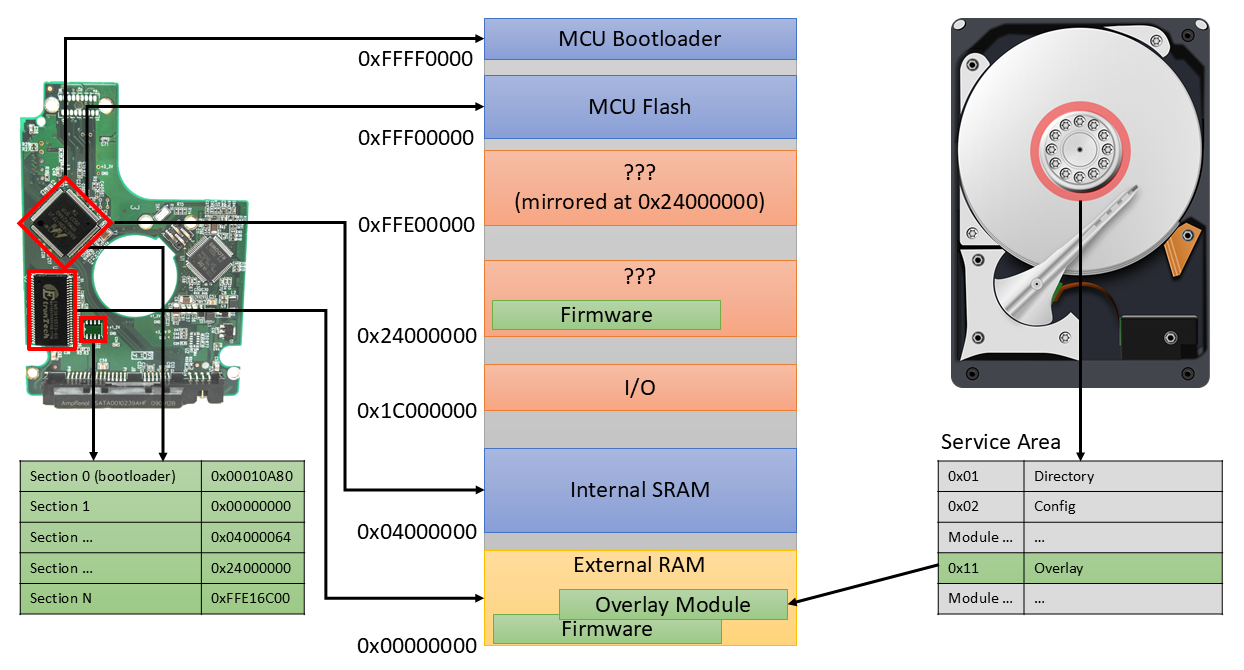
Service-area overlays. Boot path: MCU bootloader copies a bootstrap slice into RAM, bootstrap inflates the rest of the image to listed bases, then later overlay modules with more executable code are mapped in. Miceli dumped the RAM range after a full boot rather than reverse the overlay-read VSC on the clock. Overlay 0x11 is the one that holds this handler. Useful later; not required to write the first hook.
Patching the firmware: a Thumb cave at 0xFFEAB600
Overlay patches are harder to recover than SPI-flash patches. Because VSCs can write RAM, the working plan was: hot-patch in memory until the PoC behaves, persist to platter later. Sector filtering could wait. First prove the Xbox race even wants a delay.
In the dumped overlay, sub_16A5E loops, each pass calling sub_1671C which does the read. SataRequestArray is the 40-slot table. The loop starts at the original request and keeps going while Unk4 != 0xFF — probably a split of large reads, not fully reverse-engineered. The hook sits a few instructions into sub_1671C, easier than crowding the loop body.
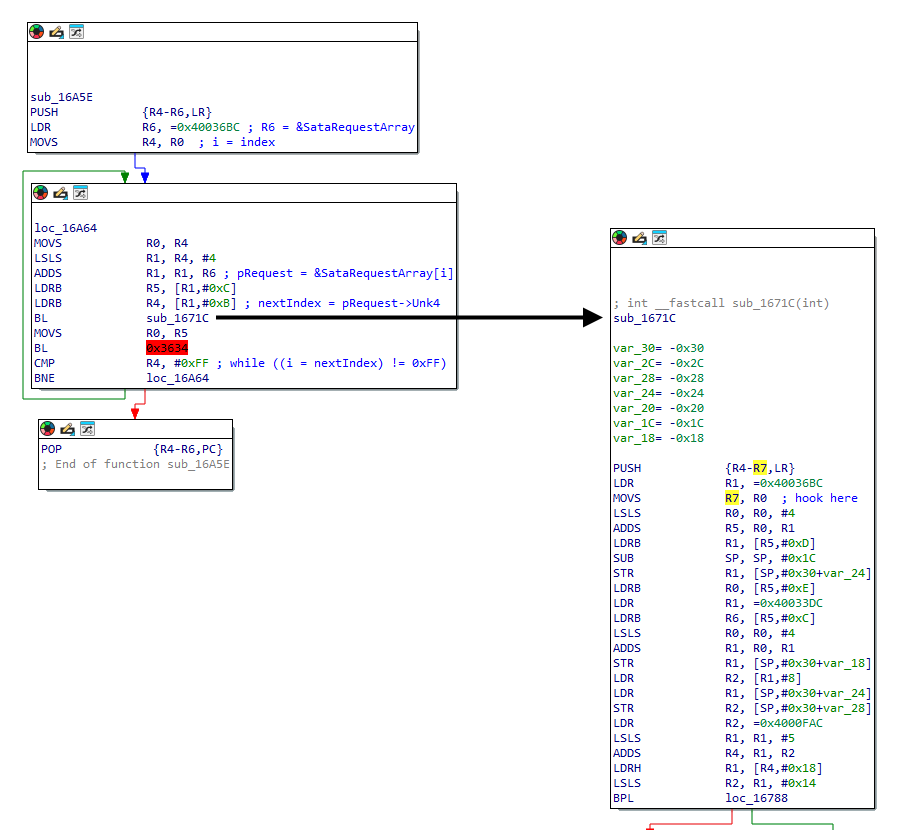
The published assembler drops a code cave at 0xFFEAB600, saves registers, busy-waits, replays the clobbered instructions, and trampolines to 0x0001672E+1 (Thumb). The site at 0x00016720 loads that cave address into r7 and branches. F_CPU is guessed at 10 MHz; MS_DELAY is 200. Miceli calls the math unscientific. The listing is the public PoC from the post, reproduced verbatim. It is a lab delay, not a stealth implant.
.syntax unified

# Timing related variables to control the delay:
.set F_CPU,                 10000000        # CPU frequency
.set MS_DELAY,              200             # 200ms delay

# ============================================================================
# Our code cave
# ============================================================================

    .long 0xFFEAB600
    .long (9f - 0f)
0:
        # Call our hook.
        push    {r0-r7, lr}
        blx     Hook_SataDmaRead
        pop     {r0-r7, lr}

        # Replace instructions we overwrote.
        movs    r7, r0
        lsls    r0, r0, #4
        adds    r5, r0, r1
        ldrb    r1, [r5, #0xD]
        sub     sp, sp, #0x1C
        str     r1, [sp, #0xC]
        ldrb    r0, [r5, #0xE]

        # Trampoline back.
        ldr     lr, =0x0001672E+1
        bx      lr

    Hook_SataDmaRead:

        # Setup delay counter.
        ldr     r3, =(MS_DELAY * F_CPU / 1000)

    Hook_SataDmaRead_loop:

        # Spin until the counter is 0.
        sub     r3, r3, #1
        bne     Hook_SataDmaRead_loop

        bx      lr

        .pool
9:

# ============================================================================
# Hook the sata DMA request handler
# ============================================================================

    .long 0x00016720
    .long (9f - 0f)
0:
        .thumb_func
        ldr     r7, =0xFFEAB600
        bx      r7

        .pool
9:

.long 0xFFFFFFFF
The test app: ten reads of one sector, average the times; poke the patches into RAM; ten more reads. First-pass times on a clean disk are ~0 ms after the first sample (cache). With the hook, the stall is about 450 ms, not 200, and the first delayed sample is still 0 ms (cache again). The rest are delayed. That is enough to take upstairs to the console.
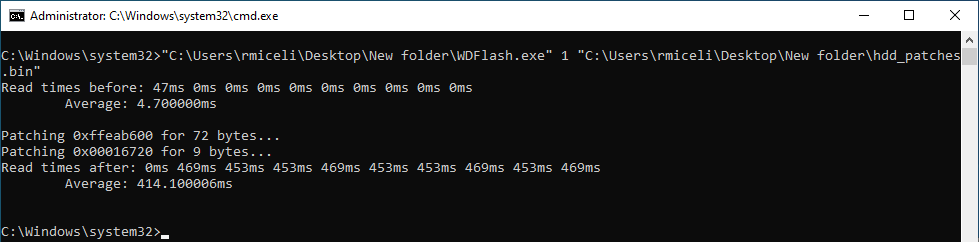
Task failed successfully
The console setup was simple on purpose. An unmodified HDD, powered externally, RAM pre-patched, data-only SATA into an Xbox 360. On boot the console reads a chosen sector while other “hacking” runs in the background (held for a later post). If the read is slow enough, shellcode is supposed to light the ring of light full orange.
A control run came first: boot with no disk patches, confirm the exploit still fails, then boot with patches and confirm it hits. Several iterations. After seven days at 20 hours and nearly 30 hours awake, the control run hit. Power cycles of the console. Power cycles of the disk. Orange, orange, orange, on stock firmware. The side quest was over. Sleep. In the morning, ask why the race had started winning on its own.
Now imagine my surprise after working 20 hours a day for 7 days straight and having been awake for almost 30 hours at the moment of this test, when I booted the console with no HDD modifications and the exploit triggered successfully.
Ryan Miceli, Task Failed Successfully
What he actually concluded
In the days after, the race’s other variables made sense. Every HDD on the bench worked. SSDs still did not, because they answer too fast. He still does not claim to know how a hard drive works. Curiosity remains; motivation to finish overlay persistence does not. Part 2 picks the work back up with AI on black-box ISAs and with Claude talking to the debug session.
Public writing on drive firmware is thin on purpose. Miceli points at Travis Goodspeed and Jeroen “Sprite” Domburg, including Goodspeed’s anti-forensics work, and at the usual fear that detail helps malware authors. His counter is already sitting in the world: HDD malware exists (he names the NSA), and part 2 will argue that AI makes the “keep it obscure” strategy even thinner. Rather than leave the topic in HDD Guru folklore he open-sourced the IDA loaders and firmware scripts and invited other people to document backdoors, fingerprint images, and decompile — with the aside that he would never trust a decompiler on this class of code anyway.
- Scripts: grimdoomer/HDDTools
- MalwareTech 2015 series: Hard Disk Firmware Hacking Part 1
- HDD Guru forums and PC-3000 dump libraries as historical sources, with the MalwareTech caveat that they are often wrong for your stepping
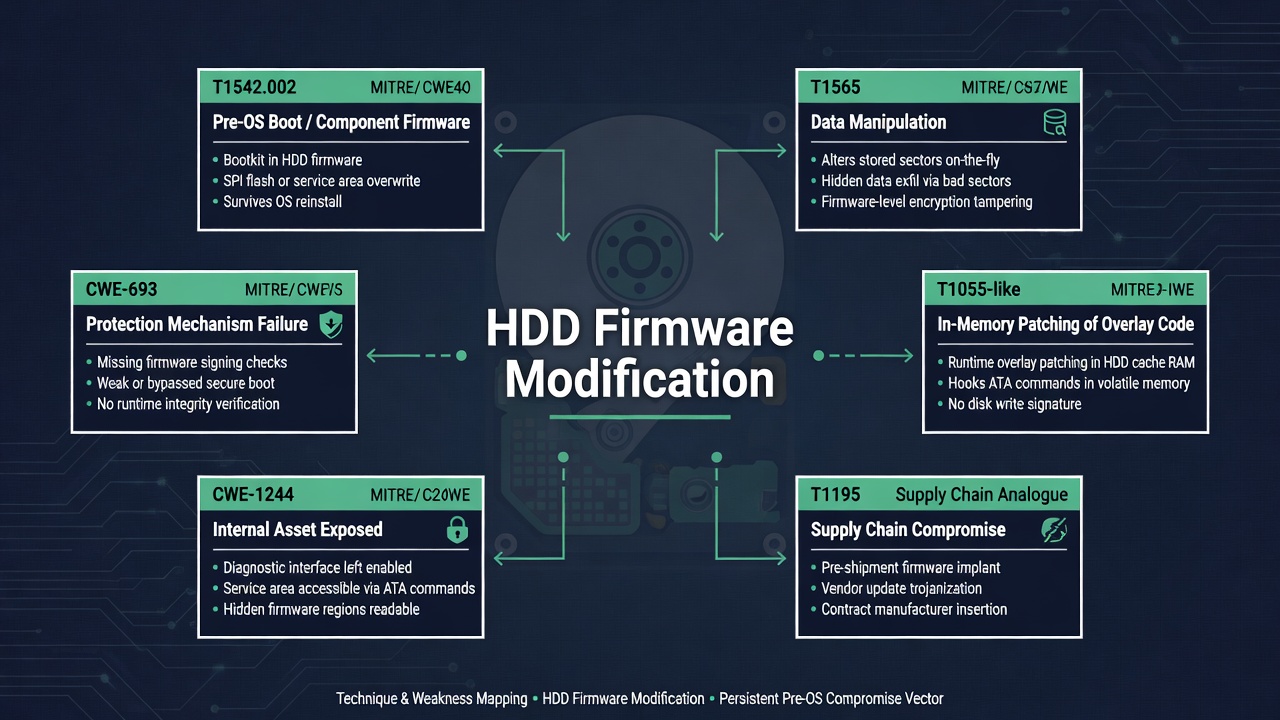
Operator extras: what to hunt and what not to build
| Surface | What Miceli showed | Defender / hunter reading |
|---|---|---|
| WD image format | Section list, 8-bit sums, LZHUF N=4096 | Recompute checksums; expect non-standard LZ |
| PM871a wrapper | High-nibble permute in Lenovo updater | Updater RE beats soldering; 28-byte head is not RSA |
| HM020GI | Word-swap, unknown ISA | Do not force ARM; wait for part 2 |
| SMART log 0xBE | VSC backdoor, 0x4F/0xC2 keying | Monitor ATA passthrough to vendor log pages |
| JTAG MICTOR | Live debug, one core seen | Physical presence; factory test points |
| Request table | 40 × 16-byte slots, fn ptrs | DMA READ EXT handler may live in overlay RAM |
| Overlay 0x11 | Handler outside the SPI image | RAM dump after boot; persist = write module |
| Hook | Cave 0xFFEAB600, ~450 ms stall | Lab PoC; first sample still cached |
A kitchen-table ATA primer
Everything above assumes you already speak a little ATA. Many readers do not, and the post is still readable without it, but the vendor-command trick is easier if the register file is in your head. A SATA disk still thinks in the old IDE task file: a handful of 8-bit registers the host writes, then a command byte that makes the disk do something. DMA READ EXT is the 48-bit-LBA version of “give me these sectors and use DMA.” IDENTIFY DEVICE is “who are you.” SMART READ LOG is “give me health page N.” DOWNLOAD MICROCODE is “here is a new brain, please keep it.”
Passthrough, on Windows, is the operating system agreeing to write that task file for you instead of turning your request into a filesystem read. DeviceIoControl(IOCTL_ATA_PASS_THROUGH) is how recovery tools, vendor updaters and Miceli’s VSC helper all look to the kernel: a blob with flags, a timeout, a 512-byte extra buffer, and the seven task-file bytes. Linux equivalents are SG_IO / SAT (SCSI-ATA Translation) through the block layer. The disk does not care which OS you used; it cares that the registers match a command it implements.
The 0x4F / 0xC2 pair on SMART commands is not WD-specific. The ATA spec uses those cylinder values as a magic key so a confused host cannot punch SMART by accident. WD then put a second key on top: log page 0xBE, plus a 512-byte payload that names a vendor command. Two locks, one of them in the spec, one of them a factory habit. Hunters who only grep for DOWNLOAD MICROCODE will miss the overlay path entirely.
Why a drive has a secret second filesystem
The service area is the part of the platter the user is not invited to. Geometry, serial number, defect lists, SMART counters and overlay modules live there so a dying disk can still be talked to after the user area is hash. Recovery shops treat it as the patient’s chart. Firmware authors treat it as a place to land patches without respinning a mask ROM. Attackers treat it as a place to land patches that survive FORMAT and often survive a casual firmware “update” that only touches the SPI image.
That last sentence is why Equation Group-style HDD implants were nasty, and why Miceli’s overlay 0x11 finding matters even though he never persisted the hook. A RAM poke dies at power loss. A module write lives with the platters. His SPI-flash parachute is the opposite kind of persistence: a lab recovery path that does not depend on the overlay still being willing to speak VSCs after a bad patch. Those are three different non-volatile stories on one PCB: internal MCU flash, optional SPI, platter modules.
JTAG on a disk is ordinary MCU work in an extraordinary package
Nothing about OpenOCD on an FT232 is unique to storage. The unique part is the package: the TAP sits on a board that is also a rotating mass storage device the host kernel thinks it owns. Halt the core, and from Windows’ point of view the disk has fallen off the bus. Continue the core after a long think, and you may have already lost the handle. That is why Miceli’s pain list is almost all host-side. The MCU is a Cortex-class part with a MICTOR that factories used for bring-up. The hostile environment is storport.
MalwareTech’s 2015 notes got him a tap config that almost matched. Almost is the word that burns time: a different MCU, a different IR length, a second core that never appears. He says he never identified more than one ARM core. A silent second core can be running servo firmware, handling the preamp, or sitting in reset. You cannot know from one TAP. The honest write-up leaves that hole open instead of inventing a dual-core story.
Historical extras: this is not the first disk implant, and that is the point
Miceli’s conclusion names the fear that kept HDD firmware writing scarce, then names the fact that made the fear obsolete: HDD malware already shipped in the world, attributed in public reporting to NSA / Equation Group tooling (the Kaspersky Equation papers and later analyses of nls_933w.dll-style modules are the usual citations). This paragraph is historical context, not something measured on the WD3200BEVT. The technical rhyme is real: service area, vendor commands, code that is not in the file you pulled off SPI.
Goodspeed’s anti-forensics work and Sprite’s embedded-storage talks are the other two public poles Miceli points at. Between them and HDD Guru you get a twenty-year scatter of almost-right notes. Part 1’s contribution is a single stepping, photographed, with loaders that run. Part 2’s promised contribution is what happens when an LLM is given the HM020GI blob and a JTAG session. Neither is a call to write a new resident. Both are a call to stop pretending the topic is secret.
Why the Xbox leftover still matters for anyone not hacking a 360
The production Xbox 360 softmod did not ask anyone to reflash a disk. That is the right engineering outcome: if you can win the race in software and timing, you do not add a firmware SKU. The leftover constraint — SSDs answer too fast — is the transferable lesson. Any protocol or exploit that was tuned on platter latency will change character on NAND. Any check that assumed a disk could not reply in X microseconds will fail open on an SSD. Any race that needed X microseconds of slack will fail closed on an SSD.
For console and embedded testers, that means: measure the storage you actually have, do not assume a 5400-rpm laptop disk from 2009. For product security, it means: if your trusted boot story includes “the disk will take long enough for us to hash this,” an SSD or a cached LBA will skip your story. Miceli’s test app already showed cache turning a delayed read into 0 ms on the first sample. Cache is a timing primitive.
Working the six-step plan in practice
The numbered list in “Spinning Up” looks linear. The actual week was not. Dump and load (steps 1–2) were a day of loaders. Write path (step 3) was a design decision — VSCs plus a SPI parachute — more than a finished flasher. Finding DMA READ EXT (step 4) was the real work and required JTAG, a poisoned request table and a RAM dump of an overlay that the IDA loader never saw. The delay patch (step 5) was a RAM poke, so step 6 never happened. That is a successful research failure: every step that was needed for understanding was done; the step that would have created a persistent modified disk was skipped because the original Xbox problem went away.
People copying the outline onto a new family should expect the same shape. The image format will not be the WD section list. The compressor will not be LZHUF-with-N=4096. The backdoor will not be page 0xBE. The handler will probably still live in a place your first loader does not map. Budget time for “this function is not in the file.” Budget hardware for “I just bricked the only TAP I had.” Budget a control test so you notice when the bug moved.
The Samsung PM871a path is the scaling story. One Lenovo utility, one nibble function, two dozen SSD models and a stack of DVD drives. If your job is a lab that will see many SKUs, updater RE is the highest leverage hour you can spend. If your job is one specific Xbox-era WD, JTAG plus VSCs is the path Miceli actually walked. Hitachi remaining undumped is also data: not every drive in the lineup has to yield for the paper to ship.
| Drive | Dump source | Load trick | Status in part 1 |
|---|---|---|---|
| WD3200BEVT | HDD Guru / PC-3000 dump | LZHUF fork + IDA loader | Fully walked: JTAG, VSC, overlay hook |
| Samsung PM871a | Lenovo updater | High-nibble permute, 16 KB sections | Mapped in IDA; flashing via updater implied |
| Samsung HM020GI | PC-3000 via a Twitter contact | Word-swap; ISA unknown | Parked for part 2 / AI |
| Hitachi HTS545032B9A300 | Not found | — | Out of scope for part 1 |
Key Takeaways
- A hard drive is an ARM (or stranger) computer with a SATA mouth. Firmware work is MCU work: loaders, compression forks, overlays, JTAG.
- Forum dumps and OEM updaters beat starting from a blank solder station. They are also often wrong for your exact model.
- WD’s useful door on this family is SMART WRITE LOG page
0xBE, not a memory corruption CVE. There is no CVE in this post. - The sector-read handler for
DMA READ EXTsat in overlay RAM (module 0x11), outside the file the IDA loader mapped. - A Thumb cave and a busy-wait can add hundreds of milliseconds to a read. Cache still eats the first sample. Measured delay was ~450 ms against a 200 ms guess.
- The Xbox 360 race started succeeding without the patch. HDD firmware was never the production primitive; SSDs remaining too fast is the leftover constraint.
- Scripts are public at grimdoomer/HDDTools. Persistent on-platter malware is a different project and is not what this post ships.
Defensive Recommendations
- Physical test points. MICTOR, SPI footprints and serial headers are factory gifts. In a high-assurance supply chain, treat populated debug paths as a finding.
- Vendor log pages. Alert on SMART READ/WRITE LOG to vendor-defined addresses (including 0xBE) from endpoints that are not recovery appliances.
- Firmware inventory. Keep known-good dumps. 8-bit checksums and nibble obfuscation are not signatures. If you cannot attest, you cannot detect a quiet overlay edit.
- Timeouts are a sensor. A disk that regularly trips host SCSI/storport timeouts after an ATA passthrough burst is in a debugger or a bad overlay. That is an IR lead.
- SSD versus HDD timing. Miceli’s Xbox leftover is a general lesson: protocols that assume platter latency break open on NAND, and races that need platter latency die on NAND.
- Do not flash random GitHub images. A failed DOWNLOAD MICROCODE or overlay write is a brick. Recovery is PC-3000-class or a SPI clip you planned before the brick.
- Malware history is real. Equation-style HDD implants existed. The defence is measured firmware, not silence. Use HDDTools-style loaders to inspect, not to build a new resident.
- Lab isolation. JTAG plus SATA plus a timeout-happy Windows kernel belongs on a sacrificial PC. volmgr BSODs are in the post for a reason.
Conclusion
HDD Firmware Hacking Part 1 is a complete bench notebook that happens to end in a punchline. Ryan Miceli wanted a disk that would hesitate on one sector so an Xbox 360 race could breathe. He mapped a WD image, forked LZHUF, untwiddled a Samsung updater, bounced off an unknown ISA, soldered JTAG, spoke SMART page 0xBE, found a 40-slot request table, dumped overlay 0x11, and parked a Thumb cave in unused RAM. The control boot then won the race without any of that. What remains is the rare public picture of how a 2.5-inch drive actually boots, where its extra code lives, and why “just patch the firmware” is a week of work even when you already know assembly.
If you only remember four objects from the post, remember these: the LZHUF stub that makes a WD image look like random until N and THRESHOLD are fixed; the nibble permute that a Lenovo updater already knew; the 40-slot request table that pointed at a function your IDA database did not contain; and the orange ring of light on a disk that had not been patched. Everything else — MICTOR wires, SPI pads, page 0xBE, overlay 0x11, a 450 ms busy wait — is how those four objects were earned.
Part 2 promises AI on the HM020GI and a debugger with Claude on the other end of OpenOCD. Until then the scripts are on GitHub, the figures are above, and the honest last line of the post still stands: he still has no idea how a hard drive works. Neither does most of the industry. That is not a joke. It is the reason a week in IDA on a laptop disk is still worth writing down.
Original text: “HDD Firmware Hacking Part 1” by Ryan Miceli at I Code 4 Coffee (14 May 2026).