


Executive Summary
Active Directory is the phone book, org chart, and lock-box of a Windows company. BloodHound draws the map. PowerView writes the queries for you. Hope Walker’s 2021 SpecterOps field note is about the day those tools will not load: C2 cannot proxy SharpHound, AMSI eats PowerView, and the assessment clock is still running. The fallback is two unfashionable binaries — dsquery.exe on Windows and ldapsearch on Linux or macOS — talking LDAP to a domain controller with whatever credentials you already have.
This piece keeps every command, screenshot, and option from that lab (the Futurama-themed PLANETEXPRESS.LOCAL domain, DC DC-THESHIP, service account SService) and then goes further: how a distinguished name is a street address, why (objectClass=user) returns computers, how userAccountControl is a bitfield, which filters find Kerberoastable and AS-REP-roastable accounts, how to page past the 1,000-object LDAP cap, and what defenders actually see. Read it as a kitchen-table tour of the company directory, or as an operator cookbook when BloodHound is a luxury you do not have.
The Company Phone Book, Without the App

If you have never sat in a Windows domain, picture a warehouse of index cards. Every employee has a card. Every laptop has a card. Every club (Finance, Helpdesk, Domain Admins) has a card that lists who is in it. The warehouse is Active Directory. The filing language is LDAP. A domain controller is the clerk behind the counter.
BloodHound is a tourist map of that warehouse with red paths drawn between the cards that matter. PowerView is a fluent intern who already knows the clerk. Walker’s point, after an assessment where neither intern nor map would fit through the door, is that you can still walk up to the clerk yourself. You need three things: the address of a clerk (a DC), a badge the clerk accepts (a domain account), and a question written in the clerk’s grammar (an LDAP filter).
Pre-Windows 2000 Compatible Access and Authenticated Users ACEs on the domain root still surprise people in 2026. Confidential attributes (ms-Mcs-AdmPwd, some LAPS v2 fields, unixUserPassword) are the exception, not the rule. Enumeration is T1087.002 / T1069.002 / T1018, not a vulnerability by itself.A distinguished name is a street address

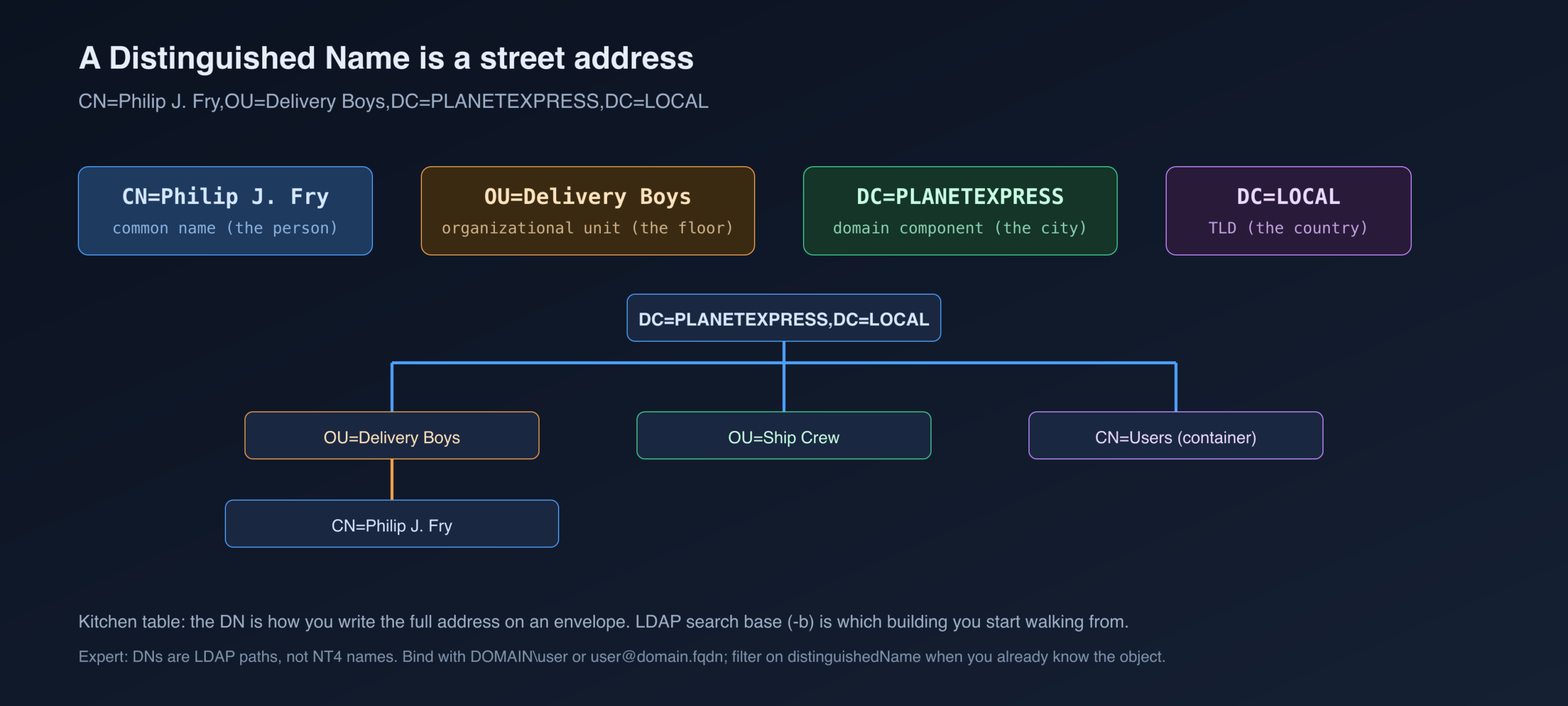
LDAP does not look people up by first name the way a phone app does. It looks them up by a path. CN=Philip J. Fry,OU=Delivery Boys,DC=PLANETEXPRESS,DC=LOCAL reads right-to-left as a mailing address: country LOCAL, city PLANETEXPRESS, floor Delivery Boys, person Philip J. Fry. The -b / search-base argument is which building you start walking from. If you start at the domain root you see everything the clerk will show you. If you start at an OU you only see that floor.
sAMAccountName is the short badge name (pfry, SService, DC-THESHIP$). userPrincipalName is the email-shaped login. DistinguishedName is the full path. Walker’s dsquery user output is a list of those paths and nothing else. That is why the wildcard form with -attr * feels noisy and useful at the same time.
Why a 2021 Trick Still Pays in 2026
Walker wrote this after BloodHound and PowerView refused to run on a live job. That failure mode has not gone away. It has multiplied.
- EDR and AMSI treat SharpHound, BloodHound.py, and PowerView as named threats.
dsquery.exeis a Microsoft RSAT binary.ldapsearchis OpenLDAP. Living-off-the-land still works when the intern is fired. - Proxy pain is the original story: tools would not tunnel. A one-line LDAP bind over 389/636 from a Linux jump box still will.
- Linux attack paths (WSL, C2 on Debian, macOS operator laptops) never had RSAT. ldapsearch is the native tongue.
- Defenders hunt the collector, not the protocol. A paged
(objectClass=user)from a helpdesk account looks like an HR script. A 40 MB SharpHound zip does not. - You cannot debug what you cannot see. PowerView
-vprints the LDAP filter. If you cannot read that filter, you cannot tell whether the tool is lying, paging out, or hitting a referral.
None of this makes BloodHound obsolete. Walker says the opposite in the first sentence. The claim is narrower: when the map is missing, the clerk is still at the desk.
MITRE ATT&CK for this article
| ID | Name | What the query is doing |
|---|---|---|
| T1087.002 | Account Discovery: Domain | Users, UAC, pwdLastSet, SPN, description |
| T1069.002 | Permission Groups: Domain | Groups named *admin*, Domain Admins members, nested memberof |
| T1018 | Remote System Discovery | Computers, operatingSystem, dNSHostName |
| T1482 | Domain Trust Discovery | trustedDomain objects (extension below) |
| T1615 | Group Policy Discovery | groupPolicyContainer (extension below) |
| T1558.003 | Kerberoasting | servicePrincipalName=* on user objects |
| T1558.004 | AS-REP Roasting | DONT_REQ_PREAUTH bit on userAccountControl |
| T1550.002 / T1558 | Use Alternate Authentication Material | Downstream of the recon, not the query itself |
Introduction
Walker opens by conceding the obvious: BloodHound and PowerView are the right tools. They are faster, they remember what you asked, and they hide LDAP’s ugly syntax. A small operator habit is worth stealing immediately — PowerView’s verbose switch prints the filter the cmdlet is about to send. If you ever have to rebuild that filter by hand, you already saw it once.
-vThe job that produced the blog was the other case. The team could not run those tools from the operator host and could not proxy them onto the target. They already had credentials. They still had hours on the clock. So they queried AD the way a Windows admin and a Unix admin already know how: dsquery and ldapsearch.
Let’s be honest, BloodHound and PowerView are objectively better tools for querying, enumerating, and investigating Active Directory (AD).
Hope Walker, SpecterOps (2021)
This article does not cover how to get the first password. Walker assumes you already have a bind identity. The rest is how to ask useful questions with that identity, and how to keep asking while someone else fights the C2 tunnel.
Get-DomainUser -SPN -Verbose is (&(objectCategory=person)(objectClass=user)(servicePrincipalName=*)). If a mature EDR blocks the module, paste the filter into ldapsearch. You lose the object-to-ACL graph. You keep the raw attributes.Tools

When the sane options are gone, two command-line clients remain. Both speak LDAP. Both are boring enough that many EDR products still treat them as IT, not as an attack.
dsquery, the Windows clerk
dsquery is a Microsoft binary. On a lot of workstations you will not find dsquery.exe, but you will find the DLL it links against. Walker’s first screenshot is that DLL sitting in System32 — the point is “this family of code is already on the disk.”
C:\Windows\System32\dsquery.dll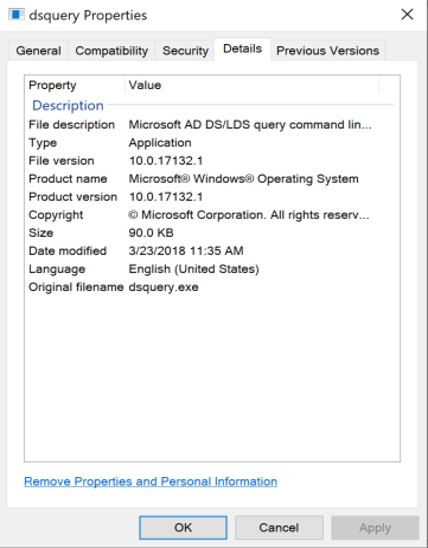
The executable itself may already live on servers:
C:\Windows\System32\dsquery.exedsquery ships in Remote Server Administration Tools (RSAT). Microsoft’s own download page for the older standalone RSAT package is here. From the Windows 10 October 2018 Update onward, RSAT is a Feature on Demand inside the OS. On a modern workstation that can mean: you do not upload a hacker tool, you enable an optional feature, or you copy a signed Microsoft EXE that the SOC has seen a thousand times.
Walker lists two requirements that bite people. There has to be a domain to talk to (AD DS exists somewhere — you are not querying a workgroup laptop). And in the lab she used, the prompt was elevated to NT AUTHORITY\SYSTEM on a domain-joined host. SYSTEM on a domain-joined box can often bind as the machine account. That is a different identity from the stolen user you might have in ldapsearch.
SELF or Domain Computers extra reads. Conversely, a user bind from ldapsearch with -x -D -w is simple bind: the password crosses the wire in the clear on TCP 389 unless you wrap TLS. Prefer -H ldaps://dc:636 or -Y GSSAPI.ldapsearch, the Unix clerk
ldapsearch is native on macOS and most Unix-like systems. If it is missing, the package is ldap-utils on Debian/Ubuntu and the Homebrew formula openldap on macOS. You need a domain account the DC will accept. Walker’s lab is Ubuntu under WSL, binding with a service account’s plaintext password. The man page she points at is ldapsearch(1).
ldap-utilsopenldapThat is the whole kit: one Microsoft admin tool, one OpenLDAP client, and a pair of eyes. Everything else in this article is how you phrase the question.
Structuring Queries
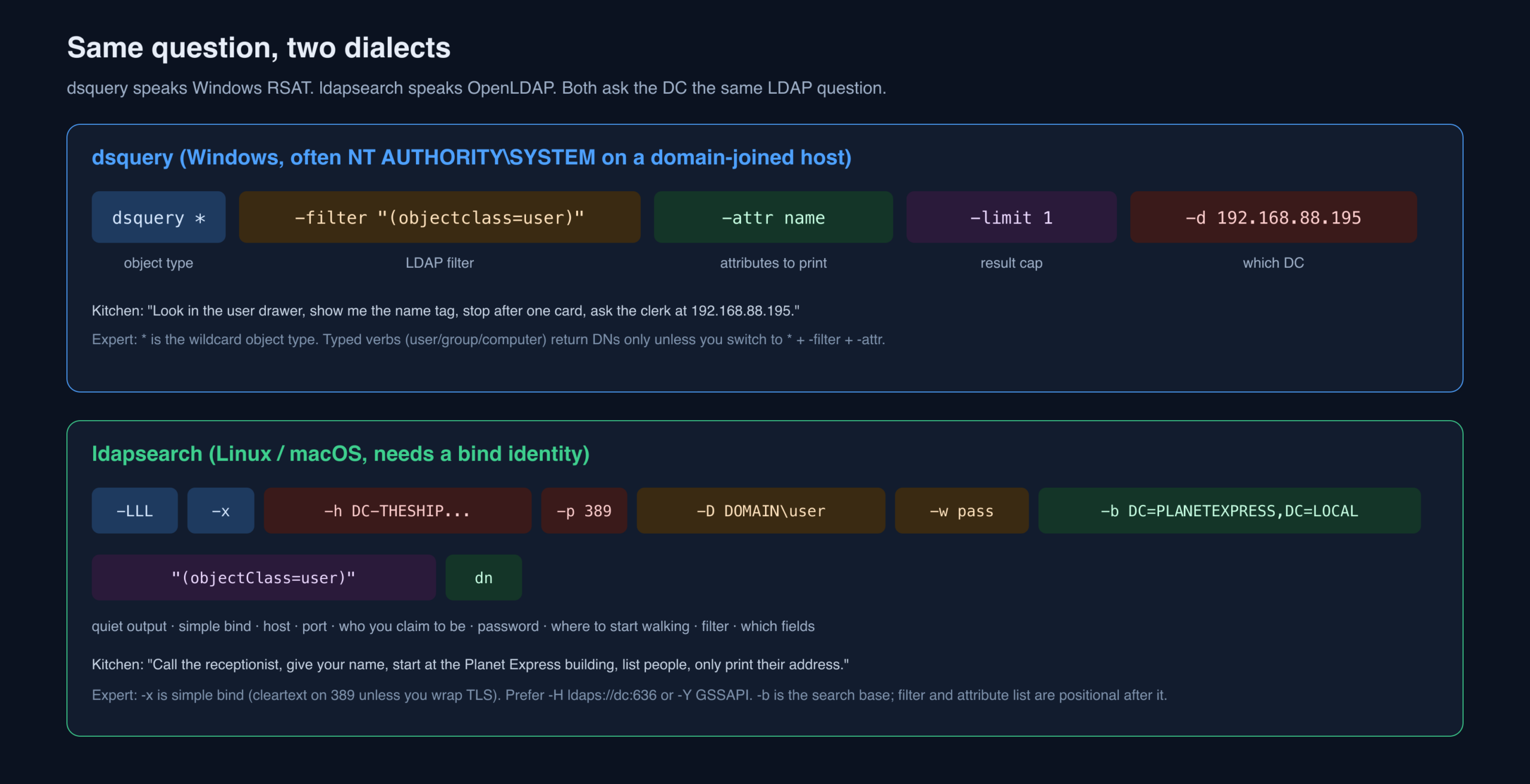
The two tools rhyme. Filters are the same RFC 4515 strings. Attributes have the same LDAP names. Output layout differs: dsquery in wildcard mode prints a block of attr: value lines per object; ldapsearch prints LDIF. Walker is explicit that there are many ways to get the same rows. She documents the way she actually types under pressure, not a complete man-page tour.
Dsquery structure
The skeleton is:
dsquery <object type> <filters> <options>Object type is the first word after the binary. Microsoft documents the set here:
- Computer
- Contact
- Group
- OU
- Site
- Server
- User
- Quota
- Partition
- * (Wildcard)
You can pin the type in that first word, or you can put the type inside a filter on a wildcard search, or you can leave the type open. Typed searches (dsquery user, dsquery group) are short and return distinguished names. Wildcard searches return whichever attributes you asked for. Walker almost always uses * because the typed verbs starve you of fields. That is taste, not law. On day one of a domain either form will move you.
The lab domain is PLANETEXPRESS. First, the typed user verb:
objectclassPLANETEXPRESS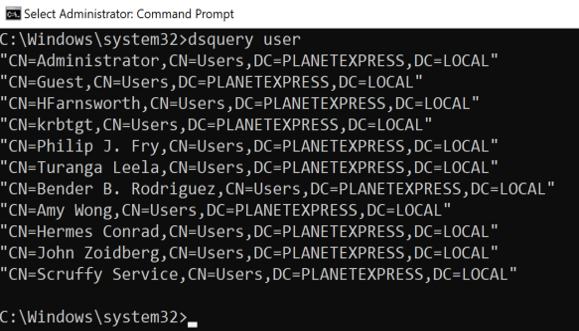
dsquery userEvery user in the domain, as a distinguished name. Fast. Incomplete. You do not see groups, descriptions, or SPNs. Now the wildcard form, capped at one object so the terminal does not explode:
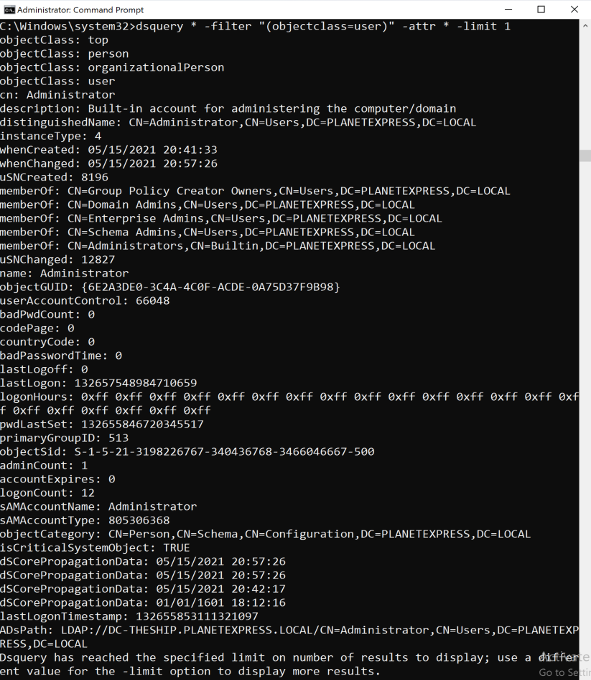
dsquery * -filter “(objectclass=user)” -attr * -limit 1Longer to type, richer to read: group membership, description, name, and a pile of attributes you did not know you needed. The two forms do not return identical populations either — Walker flags that and comes back to it in the Users section (computers are users in the schema).
Capitalization almost never matters in LDAP attribute names or filter keys. If a DC is being precious, dump one object with -attr * and copy the attribute names byte-for-byte. Walker’s dsquery context for the rest of the post is an NT AUTHORITY\SYSTEM prompt on a domain-joined host.
dsquery user is asking for the list of names on the office door. Wildcard -attr * is photocopying someone’s entire HR file. Start with the door. Open a file only when you know whose name is on it.Ldapsearch structure
ldapsearch lets you shuffle flags. Walker locks a consistent order so muscle memory survives a long night:
ldapsearch <format options> <authentication options> <domain options> <query filters> <attribute list>That is a teaching frame, not a formal grammar. The man page remains the authority. The same “all users, print DNs” question, in OpenLDAP:
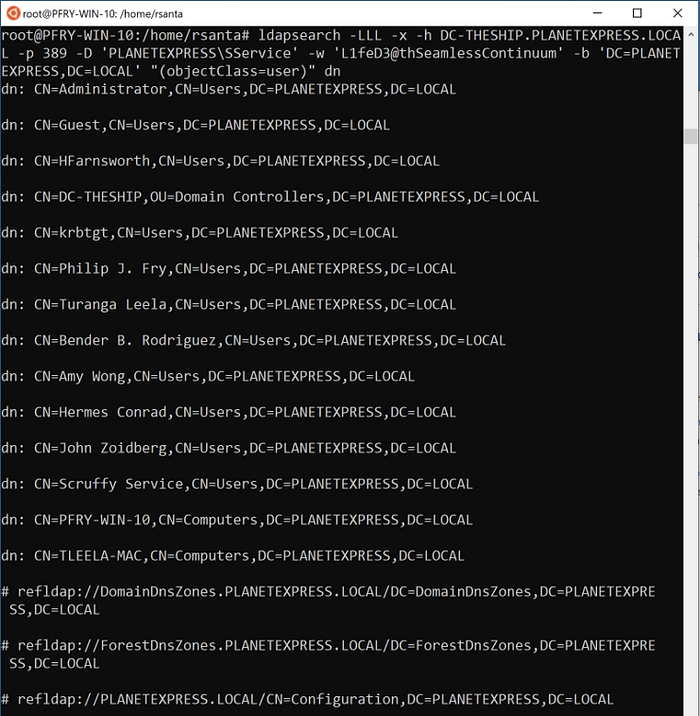
ldapsearch -LLL -x -h DC-THESHIP.PLANETEXPRESS.LOCAL -p 389 -D ‘PLANETEXPRESS\SService’ -w ‘L1feD3@thSeamlessContinuum’ -b ‘DC=PLANETEXPRESS,DC=LOCAL’ “(objectClass=user)” dnUgly, and deliberately so. Walker’s method is: build the prefix once (quiet output, simple bind, host, port, account, password, search base) and then only edit the filter and the attribute list. The identity here is a service account with a known password — a stand-in for a compromised service principal. You always need some kind of bind. It does not always have to be a password; the Options section covers prompts and files.
-x) on port 389 sends the password in cleartext. Packet capture on a span port will eat that lunch. Also: -h is deprecated in modern OpenLDAP in favor of -H ldap://host:389. Walker’s 2021 command still works on the Ubuntu ldap-utils of that era. On current Debian, prefer -H.Building Queries
Compound filters
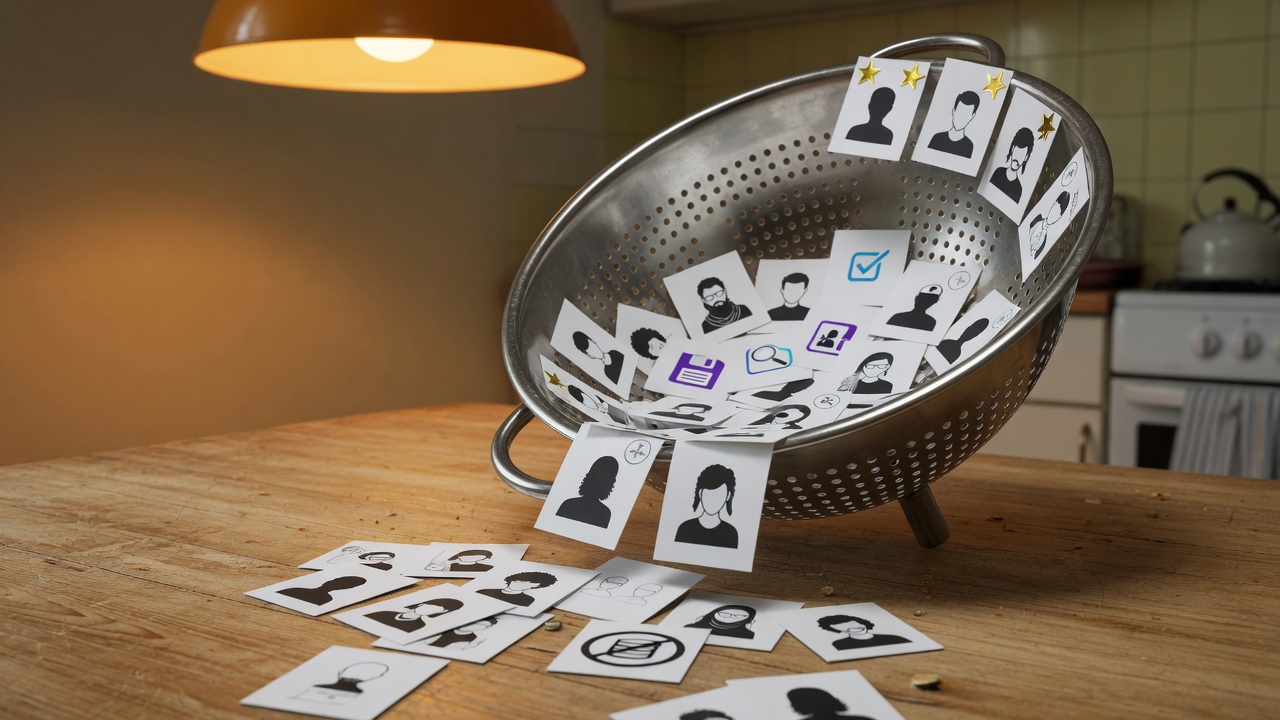
A compound filter is how you stop drowning. One attribute is a curiosity. Two attributes is a target list.
AND looks like this:
“(&(attribute1=value1)(attribute2=value2))”The & is prefix AND: every parenthesized clause must match. NOT is !, and it needs its own parentheses. Exclusion is:
&!“(&(attribute1=value1)(!(attribute2=value2)))”Read it as: objects that have value1 for attribute1 and do not have value2 for attribute2. The same filter string works in dsquery and ldapsearch. The shell is the problem. Bash treats ! as history expansion. Quote the whole filter. Walker could not get a working escape of ! in ldapsearch on WSL — more on that under Users.
value1attribute1value2attribute2!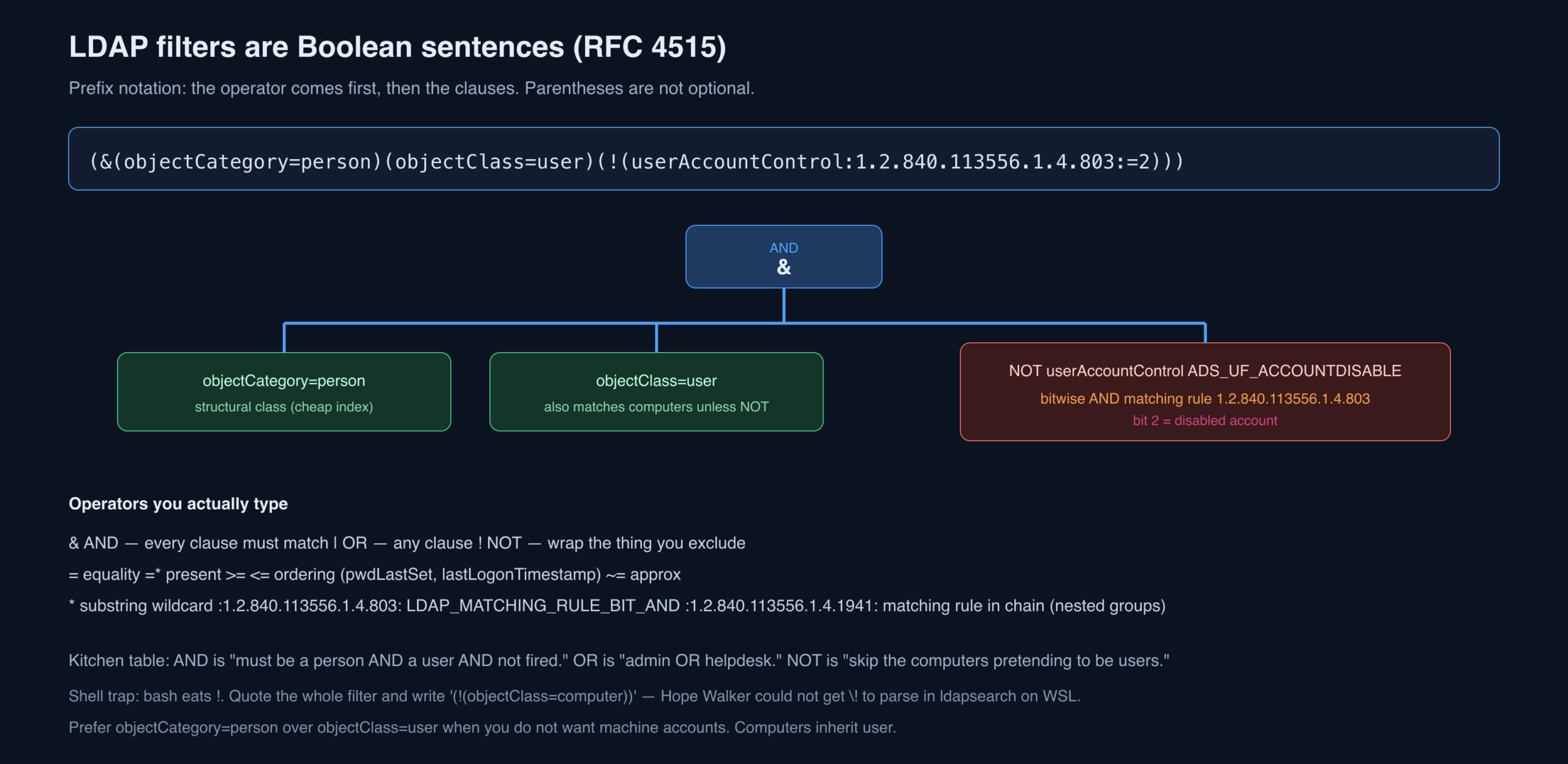
|) is “admin OR helpdesk.” NOT is “skip the computers that are pretending to be users.” Write the operator first, then the clauses, the way a Polish calculator does. Parentheses are part of the sentence, not decoration.(mail=*). Substring is (name=*win*). Ordering is (pwdLastSet<=N). Microsoft adds matching-rule OIDs: 1.2.840.113556.1.4.803 is bitwise AND (UAC flags), 1.2.840.113556.1.4.804 is bitwise OR, 1.2.840.113556.1.4.1941 is matching-rule-in-chain (nested group membership). Those OIDs are the difference between a junior filter and a BloodHound-shaped filter.Wildcard
Walker’s default is a wildcard search. Broad first, then narrower, then exact. Asterisks can wrap a token, prefix it, or suffix it.

Name and sAMAccountName of computers whose name contains win, in dsquery:

dsquery * -filter “(&(objectclass=computer)(name=*win*))” -attr name samaccountname -d 192.168.88.195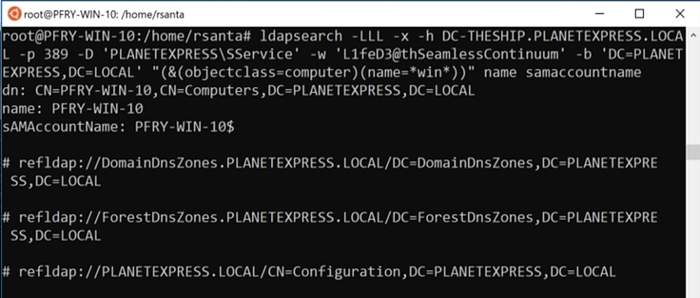
ldapsearch -LLL -x -h DC-THESHIP.PLANETEXPRESS.LOCAL -p 389 -D ‘PLANETEXPRESS\SService’ -w ‘L1feD3@thSeamlessContinuum’ -b ‘DC=PLANETEXPRESS,DC=LOCAL’ “(&(objectclass=computer)(name=*win*))” name samaccountnameIn a real forest you start with the attributes you need to take the next step, not with *. Huge directories plus slow C2 plus -attr * is how you DoS yourself. OPSEC and patience both argue for fewer columns until the shortlist exists. Once you have names, drop the wildcards and ask for the interesting fields.
Wildcards also let you hide your intent from a casual log reader. Instead of searching password or administrator, search *sword* or *minis*.
passwordadministrator*sword**minis*name and sAMAccountName are indexed. description usually is. A leading-wildcard on a non-indexed attribute (*sword* on a custom field) can light up DC CPU. That is a detection story as much as a performance story.Users
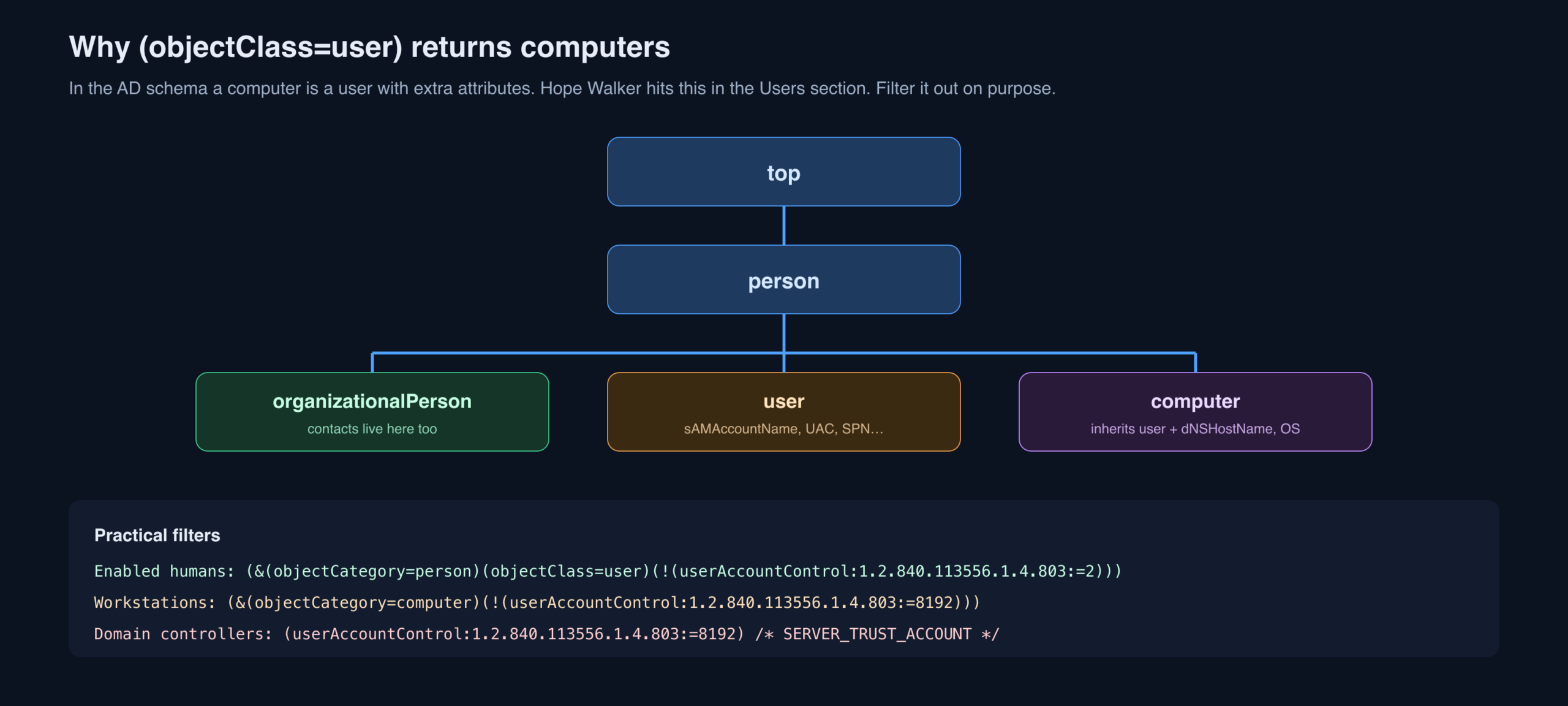
Usernames in a real domain are often HR numbers, not “alice.” Searching by common name then fails, and you hunt by department, description, or group instead. The schema trap: computer objects are users. A filter that says “all users” will cheerfully return laptops unless you exclude them.
Walker’s example: users (not computers) whose name contains W:

dsquery * -filter “(&(objectclass=user)(!(objectclass=computer)(name=*W*)))” -attr name samaccountname -d 192.168.88.195Admins often have a second account with a suffix. Hunt -sa and -da the same way you hunt *admin*.
-sa-da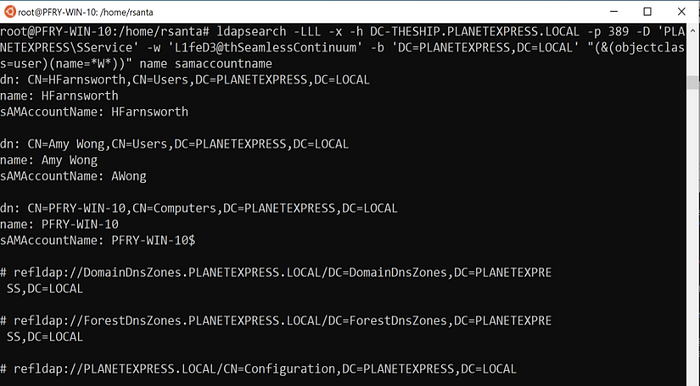
ldapsearch -LLL -x -h DC-THESHIP.PLANETEXPRESS.LOCAL -p 389 -D ‘PLANETEXPRESS\SService’ -w ‘L1feD3@thSeamlessContinuum’ -b ‘DC=PLANETEXPRESS,DC=LOCAL’ “(&(objectclass=user)(name=*W*))” name samaccountnameThat ldapsearch returns a computer alongside the people. Walker tried to escape ! for the NOT clause on a Unix shell and lost: \! and friends produced a bad filter. Quote the filter in single quotes and keep the bang inside LDAP parentheses. If the shell still fights you, put the filter in a file and use ldapsearch’s -f.
\!(&(objectCategory=person)(objectClass=user)) over (objectClass=user). objectCategory is a single-valued, indexed, structural pointer. Enabled humans: (&(objectCategory=person)(objectClass=user)(!(userAccountControl:1.2.840.113556.1.4.803:=2))). Walker’s nested (!(objectclass=computer)(name=*W*)) is also a reminder that NOT applies to one filter; grouping mistakes silently change the population.Groups
Groups are where AD becomes a maze. A well-built domain has tiny permission groups and people nested through layers of role groups. A badly built domain has IT-Admins, IT Admins, Admins-IT, and a nested Server-Operators-Temp that still has RDP on the DCs. You will not know the naming convention on hour one.
Typed dsquery group is a fast name list. Wildcard is how you pull members. Walker runs three queries: groups whose name contains *admin* with the group verb; the same hunt with wildcard attributes; then the members of Domain Admins (one member in this lab).
*admin*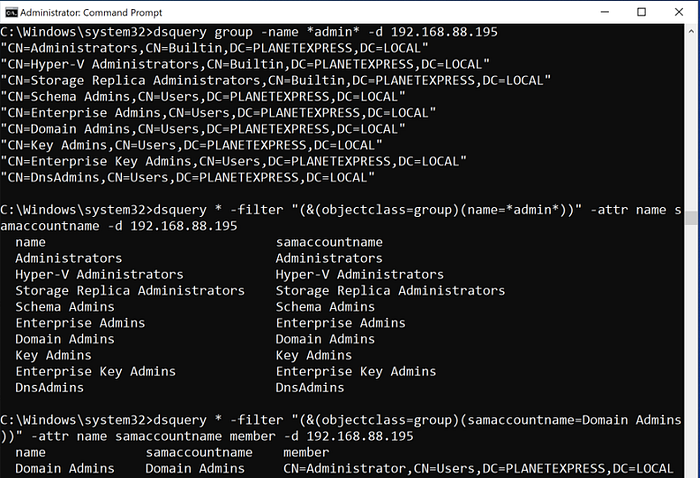
dsquery group -name *admin* -d 192.168.88.195dsquery * -filter “(&(objectclass=group)(name=*admin*))” -attr name samaccountname -d 192.168.88.195dsquery * -filter “(&(objectclass=group)(samaccountname=Domain Admins))” -attr name samaccountname member -d 192.168.88.195ldapsearch for the name hunt:
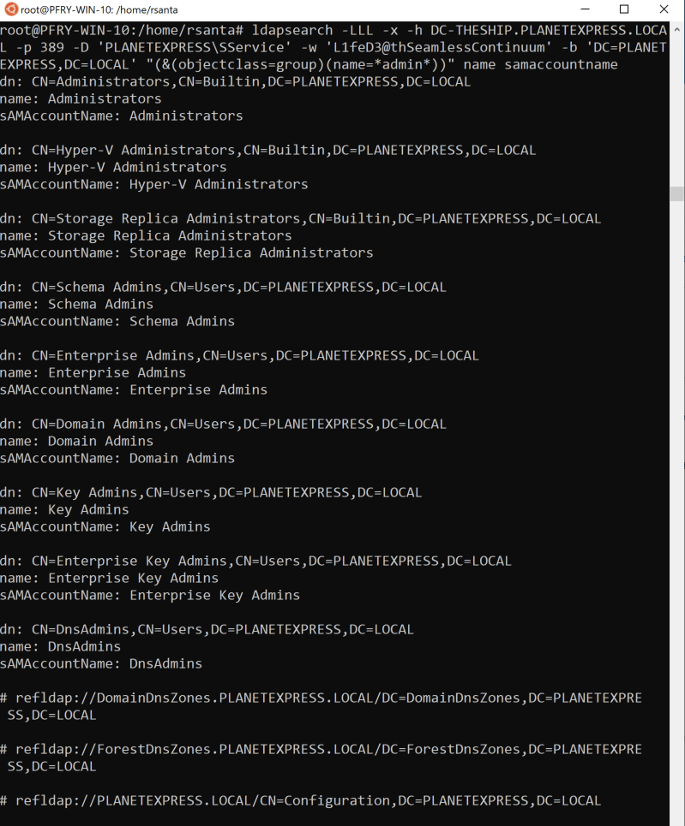
ldapsearch -LLL -x -h DC-THESHIP.PLANETEXPRESS.LOCAL -p 389 -D ‘PLANETEXPRESS\SService’ -w ‘L1feD3@thSeamlessContinuum’ -b ‘DC=PLANETEXPRESS,DC=LOCAL’ “(&(objectclass=group)(name=*admin*))” name samaccountnameStart with few attributes; open them when the list is short. Read description — Walker has watched it expand acronyms that the group name hid. member is the forward link (who is in this group). memberOf is the backlink (which groups this object belongs to). Primary group is not in memberOf; it is primaryGroupID (RID 513 Domain Users, 512 Domain Admins, 516 Domain Controllers).
member read. Matching rule in chain asks “is this user a member, however deep?”: (member:1.2.840.113556.1.4.1941:=CN=Philip J. Fry,OU=Delivery Boys,DC=PLANETEXPRESS,DC=LOCAL) on a group search, or the inverse on a user. BloodHound is this query plus ACLs, plus local group collection. You can still answer “does this user nest into Domain Admins?” with one OID.Computers
Computer hunts usually start with a rumor: a hostname pattern, an OS, a site. That makes them easier than users. Typed dsquery computer has extra switches Walker leaves alone. On wildcard, add operatingsystem to the output or the filter. OS is how you stop attacking Windows 11 24H2 when the file server is still 2012 R2.
operatingsystemBelow: computer objects with DC in the name, on the assumption that domain controllers are labeled like domain controllers. This lab has one. Yours will not.
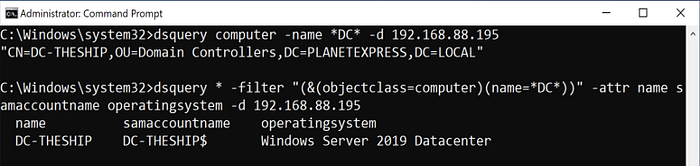
dsquery computer -name *DC* -d 192.168.88.195dsquery * -filter “(&(objectclass=computer)(name=*DC*))” -attr name samaccountname operatingsystem -d 192.168.88.195ldapsearch, same idea, OS in the attribute list:
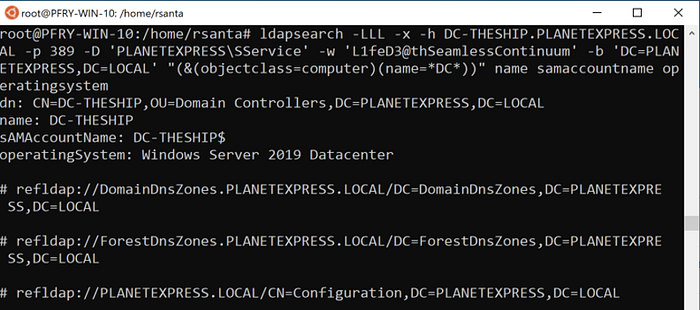
ldapsearch -LLL -x -h DC-THESHIP.PLANETEXPRESS.LOCAL -p 389 -D ‘PLANETEXPRESS\SService’ -w ‘L1feD3@thSeamlessContinuum’ -b ‘DC=PLANETEXPRESS,DC=LOCAL’ “(&(objectclass=computer)(name=*DC*))” name samaccountname operatingsystemPull the full attribute set on a host before you target it. Computer sAMAccountName ends with $. That dollar sign is a shell metacharacter. Quote it or it will eat your command line.
(userAccountControl:1.2.840.113556.1.4.803:=8192) is SERVER_TRUST_ACCOUNT. RODCs set PARTIAL_SECRETS_ACCOUNT (0x1000000). Primary DC-ness is fSMORoleOwner on the domain and schema objects, not the letters “DC” in a hostname. Old OS strings (Windows Server 2008, Windows 7) are still the highest-value computer objects in a lot of forests.Description
Description is where tired admins write the truth. Acronyms get expanded. Ticket numbers land. Sometimes a password lands. Walker treats it as a free-text hunt across object types unless she has a reason to pin one.
Always request the description attribute in the output. A match on a keyword you cannot see is how you waste an hour. Context matters: “password” in “password policy applies” is not a finding; “password: Summer2021!” is.
dsquery for description containing password, then admin:
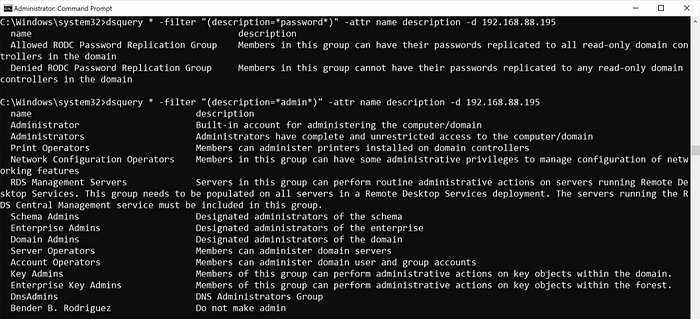
dsquery * -filter “(description=*password*)” -attr name description -d 192.168.88.195dsquery * -filter “(description=*admin*)” -attr name description -d 192.168.88.195The same hunts in ldapsearch:
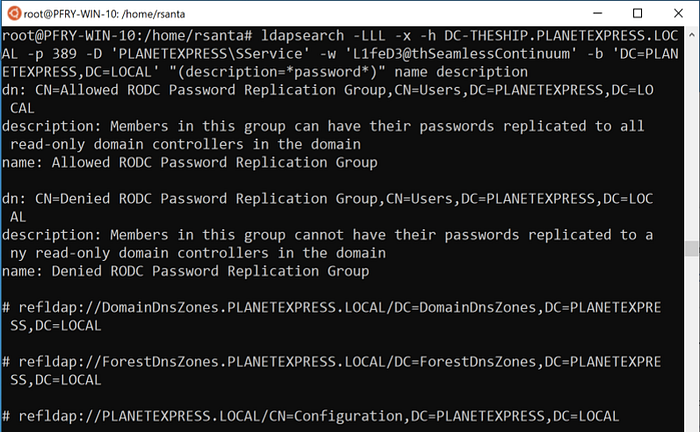
ldapsearch -LLL -x -h DC-THESHIP.PLANETEXPRESS.LOCAL -p 389 -D ‘PLANETEXPRESS\SService’ -w ‘L1feD3@thSeamlessContinuum’ -b ‘DC=PLANETEXPRESS,DC=LOCAL’ “(description=*password*)” name description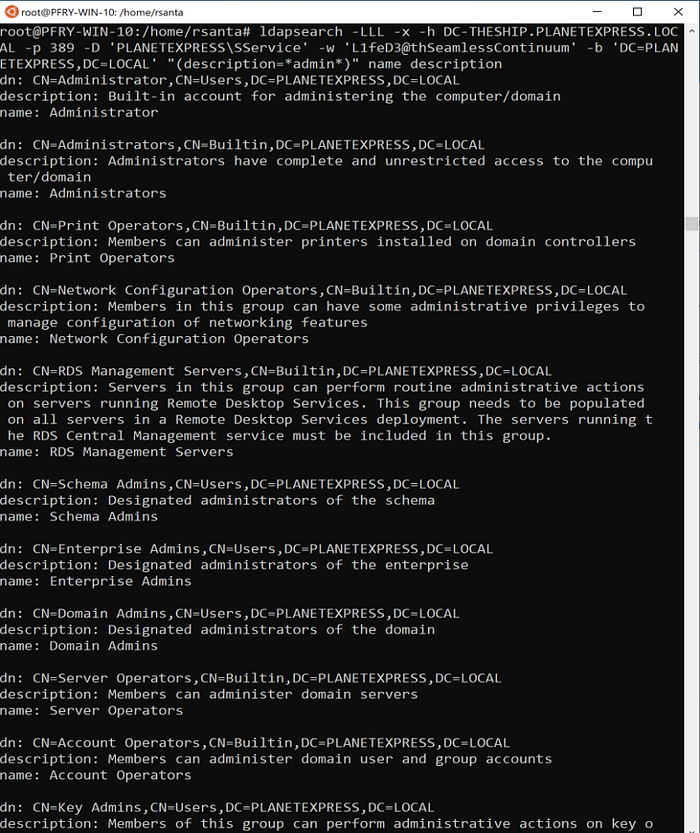
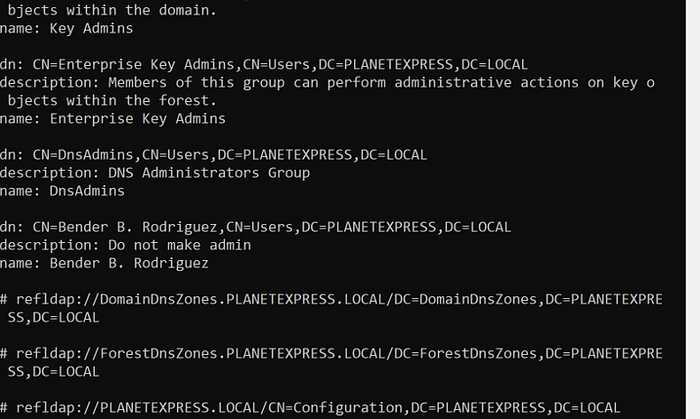
ldapsearch -LLL -x -h DC-THESHIP.PLANETEXPRESS.LOCAL -p 389 -D ‘PLANETEXPRESS\SService’ -w ‘L1feD3@thSeamlessContinuum’ -b ‘DC=PLANETEXPRESS,DC=LOCAL’ “(description=*admin*)” name descriptionOperational catch: if someone handed you only an acronym, the acronym may live in the name and the expansion in the description, or the other way around. Search both. Search info, adminDescription, and wWWHomePage while you are there — those fields collect the same sins.
Password last set
pwdLastSet is how you find accounts nobody has rotated. Service accounts are the usual hit: the password is old because changing it breaks a scheduled task nobody owns. It is also a cheap client finding: if the policy says 90 days and a cloud of users are at 800, you already have a report paragraph.
pwdLastSetLDAP can compare, not only equal. pwdLastSet is stored as Windows FILETIME (100-nanosecond ticks since 1601-01-01 UTC), which is why the number in the lab looks like a phone number having a stroke. A raw < did not fly in Walker’s dsquery; <= did.
=pwdLastSet<<=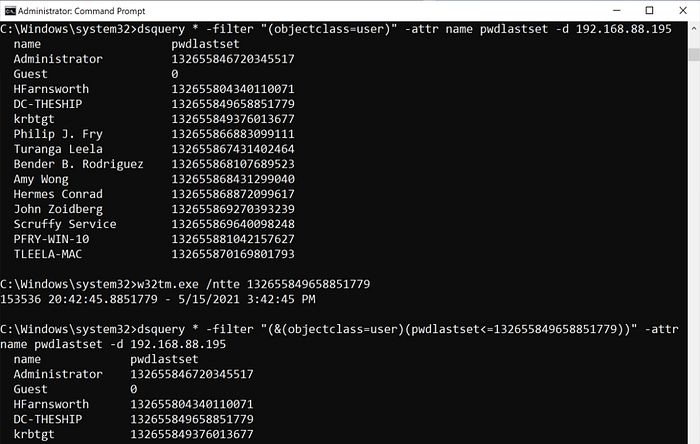
dsquery * -filter “(&(objectclass=user)(pwdlastset<=132655849658851779))” -attr name pwdlastset -d 192.168.88.195ldapsearch wants the same <=:
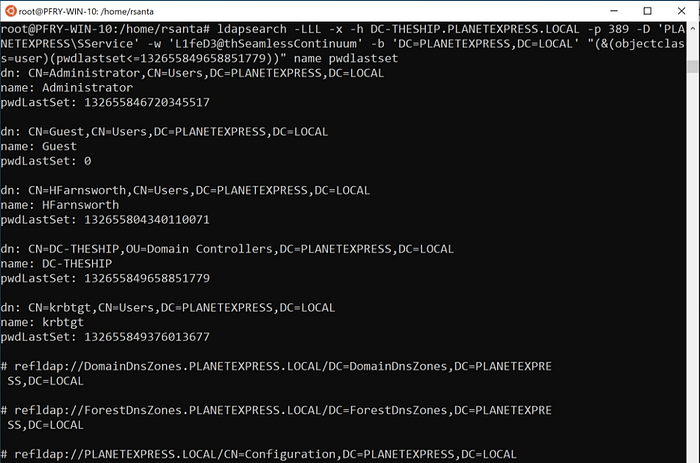
<=ldapsearch -LLL -x -h DC-THESHIP.PLANETEXPRESS.LOCAL -p 389 -D ‘PLANETEXPRESS\SService’ -w ‘L1feD3@thSeamlessContinuum’ -b ‘DC=PLANETEXPRESS,DC=LOCAL’ “(&(objectclass=user)(pwdlastset<=132655849658851779))” name pwdlastsetConvert ticks with any FILETIME calculator, with PowerShell, or with the Windows command Walker shows in the screenshot:
w32tm.exe /ntte <epoch time>Python equivalent, because operators live in Linux now:
from datetime import datetime, timezone

WINDOWS_EPOCH_OFFSET = 11644473600  # seconds between 1601 and 1970

def filetime_to_dt(ft: int):
    """Convert a Windows FILETIME (100-ns ticks since 1601) to UTC."""
    if ft in (0, 9223372036854775807):
        return None  # never set / never expires sentinel
    return datetime.fromtimestamp(ft / 10_000_000 - WINDOWS_EPOCH_OFFSET, tz=timezone.utc)

print(filetime_to_dt(132655849658851779))
svc_sql is a present.pwdLastSet=0 means “must change at next logon” or a newly created account that has never logged on, depending on UAC. The sentinel 9223372036854775807 (2^63-1) appears on some never-expire constructions. lastLogon is not replicated; query every DC. lastLogonTimestamp is replicated but can be ~14 days stale. Do not report last-logon from a single DC as gospel.Member of
memberOf is useful once you already know group names. You can list members from the group side, or you can ask “who is in both of these groups?” Walker’s example is Staff AND ShipCrew. The same pattern is Domain Admins AND Server Operators, or Helpdesk AND a privileged OU group.
memberofdsquery for users in both groups:
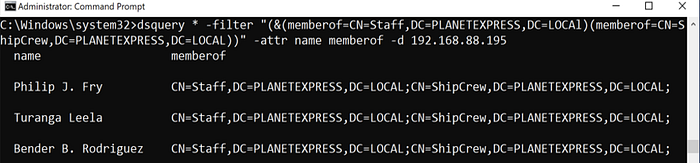
dsquery * -filter “(&(memberof=CN=Staff,DC=PLANETEXPRESS,DC=LOCAl)(memberof=CN=ShipCrew,DC=PLANETEXPRESS,DC=LOCAL))” -attr name memberof -d 192.168.88.195You almost always need the full distinguished name of the group. ldapsearch, same filter:
distinguishedName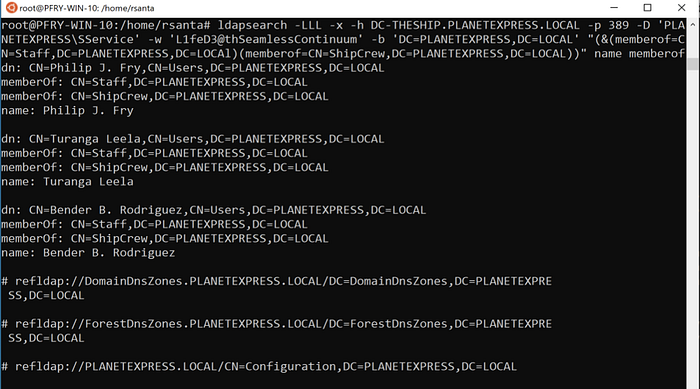
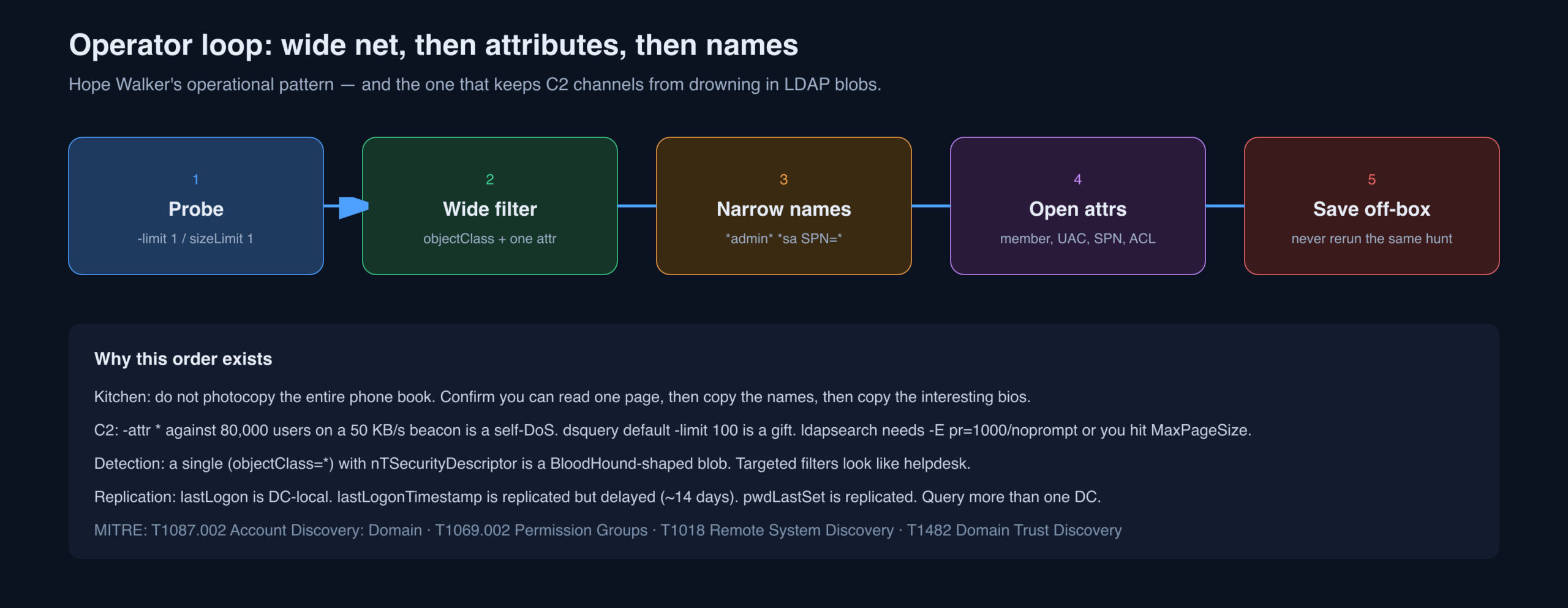
ldapsearch -LLL -x -h DC-THESHIP.PLANETEXPRESS.LOCAL -p 389 -D ‘PLANETEXPRESS\SService’ -w ‘L1feD3@thSeamlessContinuum’ -b ‘DC=PLANETEXPRESS,DC=LOCAL’ “(&(memberof=CN=Staff,DC=PLANETEXPRESS,DC=LOCAl)(memberof=CN=ShipCrew,DC=PLANETEXPRESS,DC=LOCAL))” name memberofSave results outside the terminal. LDAP dumps are large, terminals scroll away, and re-running the same hunt is how you get noticed twice for one fact. Walker ends the original querying section on that note for a reason.
Options
dsquery
Flags Walker actually used, plus the ones she leans on in large domains.
-attrAttribute selector for the wildcard type. -attr * is every field. Named attributes can be listed (Walker says comma-separated; in practice dsquery wants space-separated names, which is what her screenshots show). Operationally she starts with a wide object filter and a thin attribute list, then opens attributes as the shortlist shrinks. On a large domain through a slow C2, that order is the difference between a useful dump and a frozen beacon.
-attr *-dTarget DC, FQDN or IP. In a multi-domain forest, and if the trust and your identity allow it, this is also how you query the next domain over. Not everything replicates. Last-logon in particular is DC-local. Two DCs can tell two stories about the same user. That is not a bug; it is the replication model.
-u -pExplicit username and password for the bind, when you are not running as SYSTEM / the machine.
-limitdsquery defaults to 100 rows. -limit 0 means all. Walker uses -limit 1 as a syntax probe: prove the filter parses before you ask for forty thousand objects.
-limit 1ldapsearch
ldapsearch has enough flags for its own book. This is the subset in the original commands, plus the ones that keep you alive.
-L(L)(L)Each extra L strips more LDIF noise (comments, version, then extra blank lines). Walker uses -LLL because she wants objects, not schema chatter.
-xSimple authentication (user and password) instead of SASL. The lab is a password. Yours might be Kerberos.
-hHost to query. One DC in the lab, so it never changes. In production, rotate.
-pPort. 389 LDAP, 636 LDAPS. Confirm what the DC actually listens on before you debug filters that never arrived.
-DBind DN. Walker uses DOMAIN\user, which AD accepts. A full DN also works. Ignored if you are not doing simple bind.
distinguishedName-w -W -yPassword, three ways. -w is on the command line: terrible for history, necessary through C2 that cannot answer a prompt. -W prompts. -y reads a file. Walker is honest that putting a password on a command line is a bad habit and also, sometimes, the only habit that completes the query.
-w-W-y-bSearch base. Usually the domain DN. Narrow it to an OU when you already know the floor; the clerk walks less, the logs look more like helpdesk, and you transfer fewer bytes.
Operator Cookbook the Original Post Left on the Table
Walker stopped at the queries that unstick an assessment. The rest of a manual LDAP kit is small and worth having in the same note, because the day you need dsquery is the day you will not want to google filter OIDs.
RootDSE: ask the clerk who they are
Before you hunt users, ask the DC to introduce itself. RootDSE is the empty base, objectClass *, and it does not require a bind on many DCs for a subset of attributes.
ldapsearch -LLL -x -H ldap://DC-THESHIP.PLANETEXPRESS.LOCAL -s base -b "" "(objectClass=*)" defaultNamingContext dnsHostName domainFunctionality serverName supportedSASLMechanismsYou want defaultNamingContext (your -b), configurationNamingContext, schemaNamingContext, rootDomainNamingContext, dnsHostName, and supportedSASLMechanisms (does it speak GSSAPI / GSS-SPNEGO?). Forest functional level lives here too. It tells you whether you should even bother hunting for gMSA or Privileged Access Management objects.
Bind without putting a password on the command line
# Kerberos / SASL, no password in argv. Needs a TGT in the cache.
kinit SService@PLANETEXPRESS.LOCAL
ldapsearch -LLL -Y GSSAPI -H ldap://DC-THESHIP.PLANETEXPRESS.LOCAL -b 'DC=PLANETEXPRESS,DC=LOCAL' '(objectClass=domainDNS)' distinguishedName
# LDAPS simple bind. Password still in argv, at least not in cleartext on the wire.
ldapsearch -LLL -x -H ldaps://DC-THESHIP.PLANETEXPRESS.LOCAL:636 -D 'PLANETEXPRESS\\SService' -w 'L1feD3@thSeamlessContinuum' -b 'DC=PLANETEXPRESS,DC=LOCAL' -s base '(objectClass=*)' defaultNamingContextPage past the 1,000-object cap
AD’s default MaxPageSize is 1,000. ldapsearch without paging silently truncates. dsquery’s -limit 0 pages for you. OpenLDAP needs the paged-results control.
ldapsearch -LLL -x -H ldap://DC-THESHIP.PLANETEXPRESS.LOCAL -D 'PLANETEXPRESS\\SService' -W -b 'DC=PLANETEXPRESS,DC=LOCAL' -E pr=1000/noprompt '(&(objectCategory=person)(objectClass=user))' sAMAccountNameuserAccountControl is a bitfield
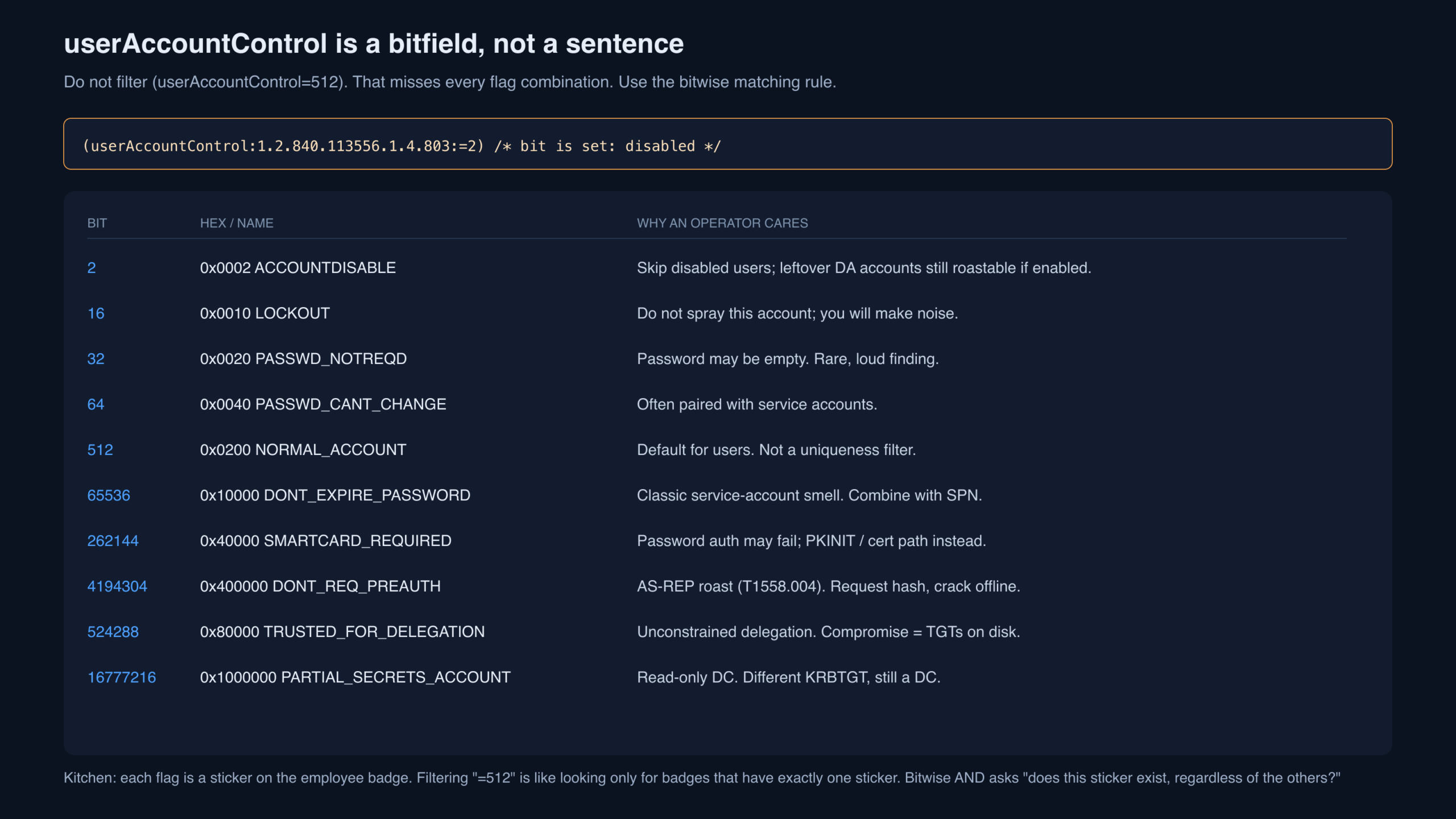
A filter of (userAccountControl=512) only returns accounts whose flags are exactly NORMAL_ACCOUNT. Add DONT_EXPIRE_PASSWORD and the object vanishes from that filter. Bitwise AND is the adult form. One bit that is easy to mix up: TRUSTED_TO_AUTH_FOR_DELEGATION is 0x1000000 (16777216). PARTIAL_SECRETS_ACCOUNT (RODC) is 0x4000000 (67108864). They are not the same sticker.
# Disabled
'(userAccountControl:1.2.840.113556.1.4.803:=2)'

# Password not required
'(userAccountControl:1.2.840.113556.1.4.803:=32)'

# DONT_EXPIRE_PASSWORD
'(userAccountControl:1.2.840.113556.1.4.803:=65536)'

# DONT_REQ_PREAUTH  -> AS-REP roast
'(userAccountControl:1.2.840.113556.1.4.803:=4194304)'

# TRUSTED_FOR_DELEGATION  -> unconstrained
'(userAccountControl:1.2.840.113556.1.4.803:=524288)'

# Domain controllers
'(userAccountControl:1.2.840.113556.1.4.803:=8192)'
Kerberoastable users (T1558.003)
ldapsearch -LLL -x -H ldap://DC-THESHIP.PLANETEXPRESS.LOCAL -D 'PLANETEXPRESS\\SService' -W -b 'DC=PLANETEXPRESS,DC=LOCAL' '(&(objectCategory=person)(objectClass=user)(servicePrincipalName=*)(!(userAccountControl:1.2.840.113556.1.4.803:=2)))' sAMAccountName servicePrincipalName pwdLastSetAny user with an SPN is a Kerberoast candidate. Request the TGS, crack offline. dsquery equivalent:
dsquery * -filter "(&(objectCategory=person)(objectClass=user)(servicePrincipalName=*))" -attr sAMAccountName servicePrincipalName -limit 0AS-REP roastable users (T1558.004)
ldapsearch -LLL -x -H ldap://DC-THESHIP.PLANETEXPRESS.LOCAL -D 'PLANETEXPRESS\\SService' -W -b 'DC=PLANETEXPRESS,DC=LOCAL' '(&(objectCategory=person)(objectClass=user)(userAccountControl:1.2.840.113556.1.4.803:=4194304))' sAMAccountName userAccountControlDelegation, LAPS, adminCount, trusts
# Unconstrained delegation (users or computers)
'(userAccountControl:1.2.840.113556.1.4.803:=524288)'

# Constrained delegation targets
'(msDS-AllowedToDelegateTo=*)'

# Resource-based constrained delegation
'(msDS-AllowedToActOnBehalfOfOtherIdentity=*)'

# Trusted to authenticate for delegation / protocol transition (0x1000000)
'(userAccountControl:1.2.840.113556.1.4.803:=16777216)'
# RODC / partial secrets is a different bit: 0x4000000 = 67108864.

# adminCount=1  (AdminSDHolder-protected, or leftover)
'(adminCount=1)'

# Legacy LAPS password (often confidential; may 0-row on a low-priv bind)
'(ms-Mcs-AdmPwd=*)'

# Domain trusts
'(objectClass=trustedDomain)'
That last cluster is the difference between “I listed users” and “I can see the attack path BloodHound would have drawn.” You still will not see local admin edges, session data, or ACL graphs from ldapsearch alone. You will see the accounts that make those graphs worth collecting later.
PowerView -v to ldapsearch cheat sheet
| PowerView (verbose filter) | Manual LDAP |
|---|---|
| Get-DomainUser | (&(objectCategory=person)(objectClass=user)) |
| Get-DomainUser -SPN | (&(objectCategory=person)(objectClass=user)(servicePrincipalName=*)) |
| Get-DomainUser -PreauthNotRequired | UAC bit 4194304 |
| Get-DomainComputer | (objectCategory=computer) |
| Get-DomainComputer -Unconstrained | computer + UAC bit 524288 |
| Get-DomainGroup -AdminCount | (&(objectClass=group)(adminCount=1)) |
| Get-DomainGroupMember ‘Domain Admins’ | (samAccountName=Domain Admins) + member / matching-rule-in-chain |
| Get-DomainTrust | (objectClass=trustedDomain) |
What This Looks Like to a Defender
Manual LDAP is quieter than SharpHound and louder than a single net user /domain. The detections that fire are volume, scope, and weird attributes, not the string ldapsearch.
- Event 4662 on DCs: directory object access. Useful only if you SACL the interesting objects (AdminSDHolder, Domain Admins, krbtgt, privileged groups). Most forests do not.
- Windows 1644 (expensive LDAP) and Directory Service logging: unindexed filters,
(objectClass=*)with huge attribute sets,nTSecurityDescriptorrequested at forest scale. - Microsoft Defender for Identity / Elastic / Splunk LDAP analytics: a bind from a workstation that has never talked LDAP, followed by a paged dump of all users and computers, is a collector even if the binary is ldapsearch.
- Simple bind on 389: a gift to anyone spanning the DC VLAN. If you must simple-bind, LDAPS.
- Password on the command line: process-creation logs (Sysmon 1, 4688) will store
-w 'L1feD3@thSeamlessContinuum'forever. Use-W,-y, or GSSAPI when you can. - dsquery.exe from a workstation that never had RSAT is itself a signal. The DLL in System32 is not.
Walker’s own OPSEC in the original is implicit: thin attributes, -limit 1 first, save results, do not rerun. That is still the right sequence. The wrong sequence is -attr * plus nTSecurityDescriptor plus no paging against 200,000 users from a DA workstation at 3 a.m.
Key Takeaways
- BloodHound and PowerView are better. dsquery and ldapsearch are what you use when better is not loading.
- A distinguished name is a street address. The search base is which building you enter. The filter is the sieve. The attribute list is which fields you photocopy.
(objectClass=user)returns computers. FilterobjectCategory=personor NOT computer. Walker hit this live; the schema has not changed.- Typed dsquery verbs return DNs. Wildcard
-attrreturns the fields you will actually use. Probe with-limit 1. - Compound filters are RFC 4515 prefix Boolean. Quote them. Unix shells eat
!. - Description, pwdLastSet, and memberOf are the three original “now what” attributes. SPN, UAC bits, and adminCount are the three you should add.
- Save the dump off the terminal. Re-querying is how quiet recon becomes a dashboard.
Defensive Recommendations
- Assume authenticated users can read the phone book. That is the product. Reduce what they can read: remove Authenticated Users from broad ACEs where a role group would do, and stop putting secrets in
description,info, andpreWindows2000CompatibleAccessleftovers. - SACL privileged objects. AdminSDHolder, Domain Admins, Enterprise Admins, Schema Admins, krbtgt, and tier-0 groups should generate 4662 when a non-DA reads them in bulk.
- Hunt collector-shaped LDAP. Paged queries requesting
nTSecurityDescriptor,msDS-AllowedToActOnBehalfOfOtherIdentity, and every user/computer in one bind from a new source host are BloodHound whether the binary is SharpHound or ldapsearch. - Disable simple bind without TLS. LDAP signing and channel binding close a class of relay; LDAPS-only closes the password-in-clear problem Walker’s
-x -p 389demo still has. - Rotate and restrict service accounts. SPNs on users, DONT_EXPIRE_PASSWORD, old pwdLastSet, and passwords in descriptions are the findings this article turns into tickets.
- Pre-auth is not optional. DONT_REQ_PREAUTH is AS-REP roasting. Treat every hit as a misconfiguration, not a mystery flag.
- Delegation is a privileged configuration. Unconstrained delegation on anything that is not a DC is an incident waiting for a printer.
- Teach helpdesk the same filters. If IT can answer “who is in this group?” with ldapsearch, they will stop installing random GUI tools, and you will have a baseline of legitimate LDAP to subtract from.
Conclusion
Walker’s lab is a tiny Futurama domain with one DC and a service account whose password is sitting in the command history. The job that produced it was not tiny. The lesson that survived is not “throw BloodHound away.” It is that AD is still a directory, LDAP is still a question language, and two boring clients will answer those questions when the graph database cannot get through the door. Learn the clerk’s grammar once. Probe one object. Narrow the sieve. Open the attributes. Save the paper. Then go back to BloodHound the moment the tunnel exists — you will already know which names to feed it.
Walker closed by asking for tweets and promising a follow-up after recovering from standing up the lab. The follow-up, for our purposes, is the cookbook above: RootDSE, paging, UAC bits, roastable accounts, delegation, and the detections that make manual LDAP a two-sided game.
Original text: “An Introduction to Manual Active Directory Querying with Dsquery and Ldapsearch” by Hope Walker at SpecterOps.