PPLControlShells (the ppexec console tool) is a native Windows PP/PPL experimentation and control utility (x64)designed to help researchers understand, test, and demonstrate how Protected Process (PP) and Protected Process Light (PPL) behave on modern Windows (10/11 + compatible Server builds).
What makes it especially useful is that it provides a CLI-driven workflow to:
- Create new processes (e.g., shells) with specific PP/PPL protection levels set early in the process lifecycle.
- Query, list, protect, and unprotect processes by PID, so you can observe how protection changes affect access, injection, handle operations, and security product behavior.
- Automate repeatable tests (great for regression testing across Windows builds and EDR versions).
It’s also very explicit about the reality of PP/PPL manipulation: it relies on a vulnerable kernel driver to obtain kernel read/write and change protection attributes—so it’s strictly a lab/VM tool and not something to run on production systems.
Where it fits in Red Team work
Used responsibly in an authorized engagement + isolated test environment, this kind of utility is valuable for validation and research, not “magic stealth”:
- EDR/AV capability validation
- Verify what your defensive stack can and cannot do when interacting with PP/PPL processes (telemetry gaps, blocked operations, stability issues), and document it for the blue team.
- Detection engineering + purple-team demos
- Reproduce “protected shell” behaviors to help defenders build detections around unexpected PP/PPL transitions, suspicious driver/service activity, or unusual protected-process inventories.
- Hardening assessments
- Assess whether endpoints are resilient against known-bad driver exposure and whether controls exist to prevent/alert on the presence or loading of such helpers (application control policies, driver block rules, monitoring).
- Compatibility / reliability testing
- Stress-test how endpoint tools behave when processes have elevated protection attributes (crashes, lockups, blind spots), then feed actionable findings back to engineering.
- Training & education
- A practical way to teach teams what PP vs PPL means, why “PPL” isn’t a generic “anti-malware bypass,” and how Windows protection levels change the rules of process interaction.
Overview
ppexec is a native Windows utility for experimenting with and managing Protected Process (PP) and Protected Process Light (PPL) protections on modern Windows (Windows 10/11 and compatible Server builds). It is intended for defensive research, compatibility testing of security products (AV/EDR), and demonstrations of process protection behaviors.
Important safety notice
This project uses a vulnerable kernel driver (e.g., NeacSafe64) to obtain privileged kernel read/write capabilities required to change process protection attributes. These capabilities are powerful and dangerous and can destabilize or compromise a system. Use ppexec only in isolated, disposable lab environments (VM snapshots). Do not run on production systems.
High-level purpose
- Create processes with PP/PPL protection flags (for example, spawn
powershellorcmdand mark them PPL+Antimalware or PP+WinTcb). - Protect and unprotect arbitrary processes by PID.
- Query a process protection state.
- Install, start, stop and uninstall the helper driver used to perform kernel-level operations.
- Provide CLI-driven workflow for automated testing and research.
Features
- Install, extract and control the bundled helper driver artifacts (INF/SYS).
- Use the driver to discover kernel offsets and modify kernel structures to set protection fields.
- Launch interactive shells (PowerShell / cmd) and apply protection flags to them.
- Create suspended processes, set protection, then resume them (apply protection before untrusted code executes).
- List protected processes and get protection info for a single process.
- Logging used for diagnostics with multiple log levels.
CLI usage
General pattern:
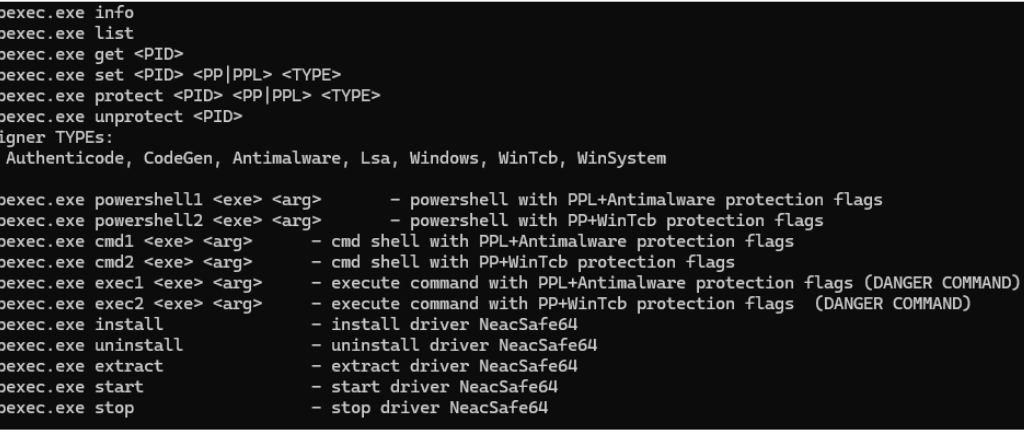
Supported commands:
- `info` — print system/process info and parent process info.
- `list` — list protected processes.
- `get <PID>` — get protection info for a specific process.
- `set <PID> <PP|PPL> <TYPE>` — set protection attributes for given process (low-level).
- `protect <PID> <PP|PPL> <TYPE>` — helper to protect process.
- `unprotect <PID>` — remove protection from a process.
- `powershell1 <exe> <arg>` — spawn PowerShell with PPL + Antimalware flags.
- `powershell2 <exe> <arg>` — spawn PowerShell with PP + WinTcb flags.
- `cmd1 <exe> <arg>` — spawn cmd with PPL + Antimalware.
- `cmd2 <exe> <arg>` — spawn cmd with PP + WinTcb.
- `exec1 <exe> <arg>` — execute a single command with PPL+Antimalware (dangerous).
- `exec2 <exe> <arg>` — execute a single command with PP+WinTcb (dangerous).
- `install` — extract and install the driver (requires admin).
- `uninstall` — stop and remove driver and artifacts.
- `extract` — extract driver INF/SYS from embedded resources.
- `start` — start driver service.
- `stop` — stop driver service.