
Executive Summary
Windows Hello for Business (WHFB) is widely trusted as a phishing-resistant, hardware-bound authentication mechanism: the private key that backs a user’s WHFB credential normally lives in the device’s Trusted Platform Module (TPM) and cannot be exported. This write-up examines a subtler property of the design — not a memory-corruption bug or a broken protocol, but a logical consequence of how WHFB is meant to work. From inside a compromised user session, an attacker can drive the TPM-backed key to sign arbitrary data without ever prompting the user for a PIN, a fingerprint, or any proof of presence, relying instead on cached credential material. That single primitive — “sign whatever I want with the victim’s WHFB key” — unlocks two attack paths.
The first path revives an already-known technique: forging the JWT assertion needed to request a Primary Refresh Token (PRT), then redeeming it from an attacker-controlled device for 90 days of renewable single sign-on. The second is new: repurposing the same WHFB key as a FIDO2 passkey over the WebAuthn protocol. Because a WebAuthn sign-in carries no device state, the resulting tokens lack a device ID claim — which turns out to be exactly what an attacker needs to register a fresh (fake) device, bootstrap a PRT, and plant durable, MFA-satisfying backdoor credentials. For security engineers the takeaway is that “hardware-bound” does not mean “bound to one physical machine’s presence checks,” and that WHFB usage from an unmanaged device is a detectable signal worth hunting for.
Research background
Most Windows Hello research concentrates on the local ceremony — how the credential unlocks the machine in front of you. The more interesting question from an Entra ID perspective is how those same keys authenticate to the cloud. The author has spoken repeatedly on WHFB internals and the many implementation flaws found (and largely fixed) along the way; the technique discussed here is different, because it is not really a “flaw” to be patched — it falls out of the way WHFB is designed to operate.
The single-sign-on angle was first presented in a DEF CON 32 talk with Ceri Coburn, and several of the building blocks below come from that session. The new contribution revisits the problem from the FIDO2 direction: can the RSA private key that backs WHFB be driven directly to perform WebAuthn, effectively turning a WHFB credential into a software passkey? The motivation is that WHFB keys are normally consumed through a device-bound PRT, yet the sign-in also works in a browser with no SSO support or in an incognito window — where it succeeds without passing any device state. That strongly suggests an Entra-joined or Entra-registered device is not actually required to authenticate with WHFB.
The original technique: requesting PRTs with WHFB keys on an endpoint
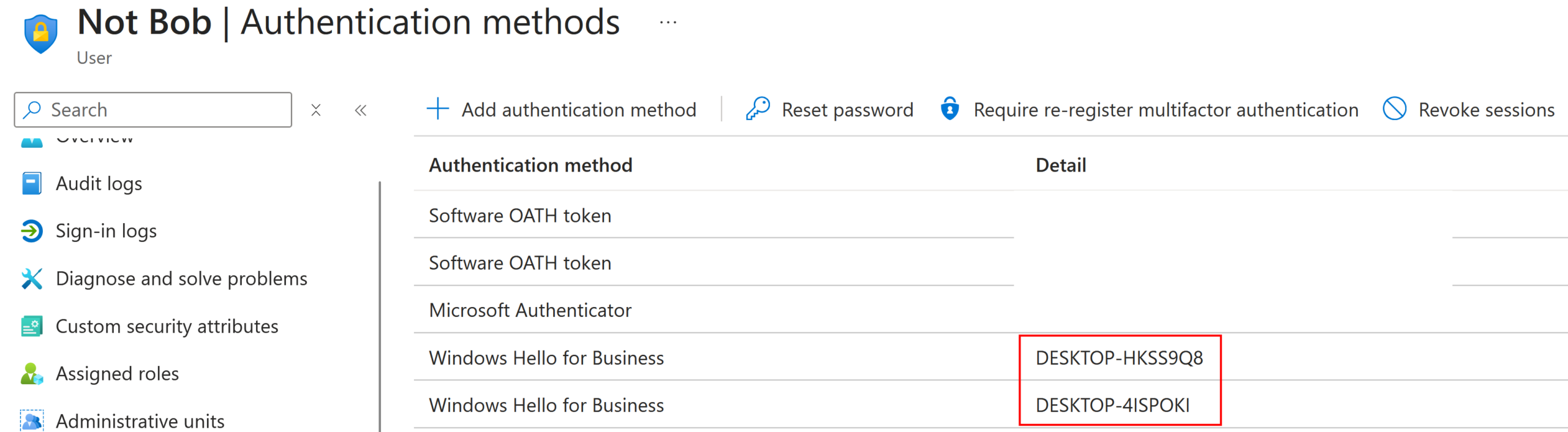
WHFB keys are treated as device-bound for good reason: on most modern Windows hardware the backing key sits in the TPM and cannot be exported or copied. That binding is visible in the enrollment protocol, which provisions the key using tokens that carry the state of the Entra ID device it was created on. The relationship persists afterward, too — both the Entra ID API and the management portals show which device a given WHFB key is tied to.
A natural assumption is that a WHFB key from a specific device can only request a PRT on that same device. That assumption is wrong, and the reason is Remote Desktop. Consider what happens when you connect over RDP to another Entra-joined machine. First the client uses a certificate to authenticate your user for the network-level connection. Then, as in a classic Active Directory RDP session, you would normally supply explicit credentials. With WHFB there is no password to hand over — you want to authenticate with a key instead. Using that key only to log in to the far device would leave the remote session with no SSO material, so opening a browser there would still demand credentials. That is a poor experience.
To solve it, Microsoft made WHFB usable across the RDP connection, in a manner reminiscent of smart-card redirection. The consequence is important: WHFB keys must be usable under different device identities. If you RDP from device A to device B, device B requests a PRT for SSO using the WHFB key that physically lives in device A’s TPM. So although the key is hardware-bound to A, it can still be exercised “on” B, and B receives a valid PRT.
For an attacker this reframes the problem entirely. Given access to a victim’s session plus a second device — real or a fabricated Entra-registered/joined one — and the ability to interact with the WHFB key, you can request a PRT and authenticate as the user. The remaining question is purely how to reach the key.
Restricting the discussion to the common case of a TPM-equipped device, there are effectively three ways to exercise a WHFB key:
- Talking directly to the TPM, provided you already hold the correct key blob.
- Using the Platform Key Storage Provider (KSP) — the NGC interface that mediates TPM access on your behalf.
- Using the Passport Key Storage Provider, which in turn calls the Platform KSP.
The Platform KSP path requires various intermediary PIN codes. These are not the WHFB PIN you type to unlock the session; they are separate PINs decrypted by the TPM, which itself depends on the user’s WHFB PIN. Recovering them is possible — this was originally researched by Benjamin Delpy and implemented in Mimikatz — but it takes at least SYSTEM privileges.
The more interesting target is using the key as a low-privilege user, which is exactly what the RDP client does. That turns out to be reachable through the Ncrypt.dll CNG interface together with the Passport Key Storage provider. Curiously, calling these native functions from something like PowerShell does not trigger any PIN or biometric prompt at all — it succeeds on cached data. Microsoft’s documentation attributes this to a mechanism it calls a ticket; the precise nature of these tickets is left for future research. The practical result is a PowerShell script that calls NCryptOpenKey to load the key associated with the WHFB certificate found in the certificate store, then signs arbitrary data with the hardware-bound key. Because the WHFB key is a user key, no administrator rights are needed to reach it.
Arbitrary signing is the whole game. With it you can hash and sign the locally generated JWT required to request a Primary Refresh Token backed by the WHFB key. In the proof of concept, a PowerShell script runs on the victim host to produce that signed assertion:
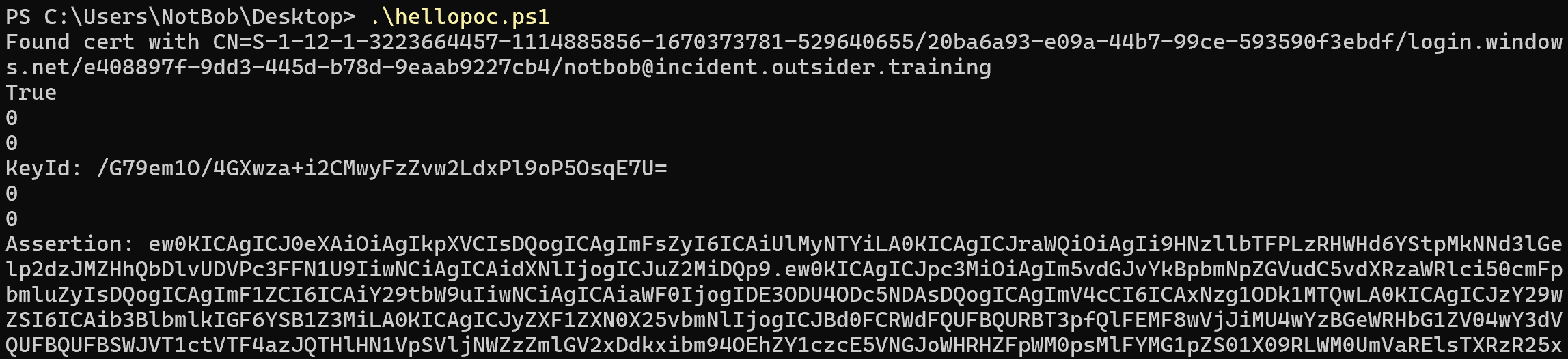
The resulting signed JWT is valid for five minutes. It is handed to the attacker host, where it is exchanged for a PRT that is valid for 90 days and renewable:

The only hard requirement is access to the victim’s session — via an implant or other malware, for instance. Beyond that you need an Entra-joined or Entra-registered device. Registering or joining one normally requires credentials and usually MFA. Long ago it was possible to mint a brand-new device identity from an existing PRT, but that was fixed after being reported to Microsoft; today registering or joining a device requires a token that is not device-bound. In other words, this path still assumes access to at least one account able to perform the registration. The next section removes that assumption.
The new technique: using WHFB for FIDO2 authentication
A Windows Hello key can already be used as a FIDO2/passkey through WebAuthn — that is exactly what the browser offers when you sign in to Entra ID. The goal was to implement that flow in ROADtools, but no existing library implemented the protocol against a plain RSA key; sensible libraries either hand the operation off to real hardware or implement the full stack. Rather than write a WebAuthn library from scratch, the author had Claude produce a minimal WebAuthn implementation for roadlib plus a software passkey implementation for roadtx.
The one piece the model could not derive was the user_handle value that identifies the authenticating user. Normally the identity provider supplies this at FIDO2 registration time, but WHFB enrollment does not follow the WebAuthn registration protocol, so the value has to be generated deterministically. Reversing this was the human contribution: the handle is built by concatenating the static string ON:, the tenant ID in little-endian binary form, and a SHA-256 hash of the user ID in the same binary little-endian format. Both identifiers are trivially available — they can be read from any access token issued to the account or queried from the tenant or the user’s endpoint — so this is not a meaningful obstacle.
WebAuthn authentication amounts to signing a server-issued challenge. That challenge is present in the configuration of the login page: it is a short Entra ID-signed JWT, valid for five minutes and prefixed with O..
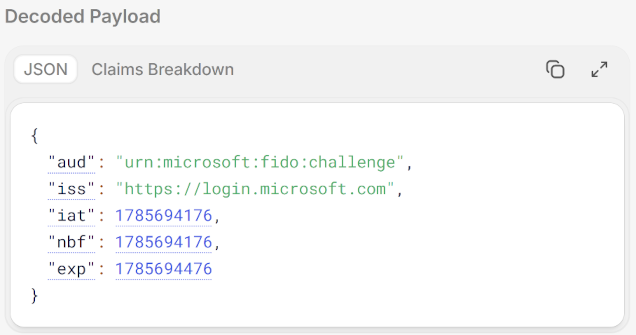
O.. Source: original article.Crucially, the challenge is not bound to a session, a user, or even a tenant. That means it can be fetched on the attacker host and then completed on the victim machine: the WHFB key there produces the full WebAuthn assertion, which is then usable for the next five minutes. Handed the painstakingly built WHFB signing script, the model one-shot a working WebAuthn PowerShell implementation compatible with ROADtools:
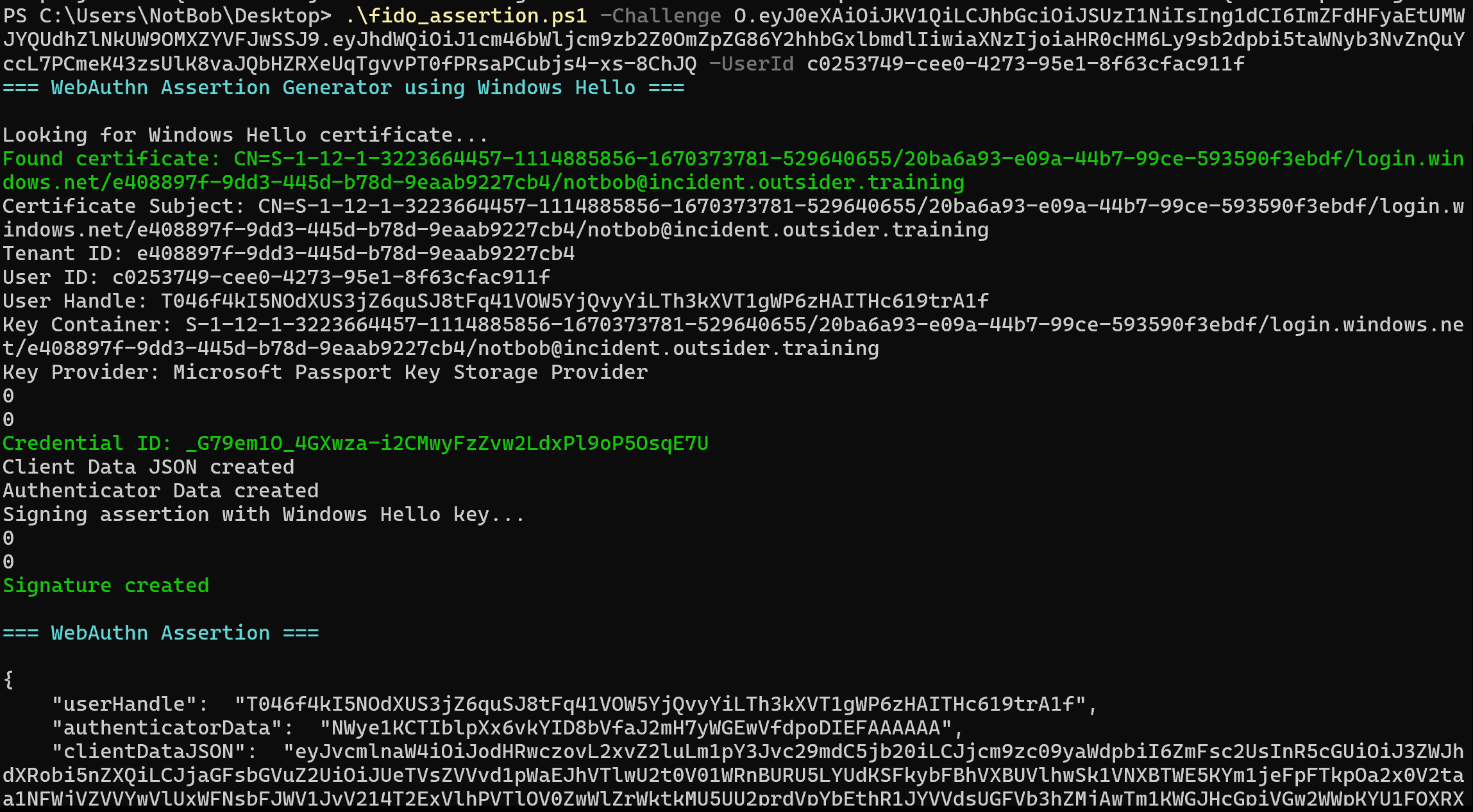
The signed, WHFB-backed WebAuthn assertion can be fed to roadtx fidoauth to obtain tokens or to authenticate in a browser and act as the victim. Because WHFB counts as phishing-resistant, this also satisfies Conditional Access policies that demand phishing-resistant authentication. The example below requests a token, though the same assertion could equally drive an authenticated browsing session as the victim:

roadtx fidoauth to request a token. Source: original article.Inspecting the returned tokens revealed that the device ID claim was absent. That is expected: no device state was passed during sign-in, in contrast to the PRT flow, where a (fake) device signs the request payload.

A missing device ID claim would trip any policy that requires device state — but for persistence it is a gift. Tokens without a device ID claim can be used to register new devices, which then enables a PRT. The chain is: request a Microsoft Authentication broker refresh token, register a device with it, then use that broker refresh token to obtain a PRT bound to the new device. This is a variation on the token-upgrade technique the author has previously documented.
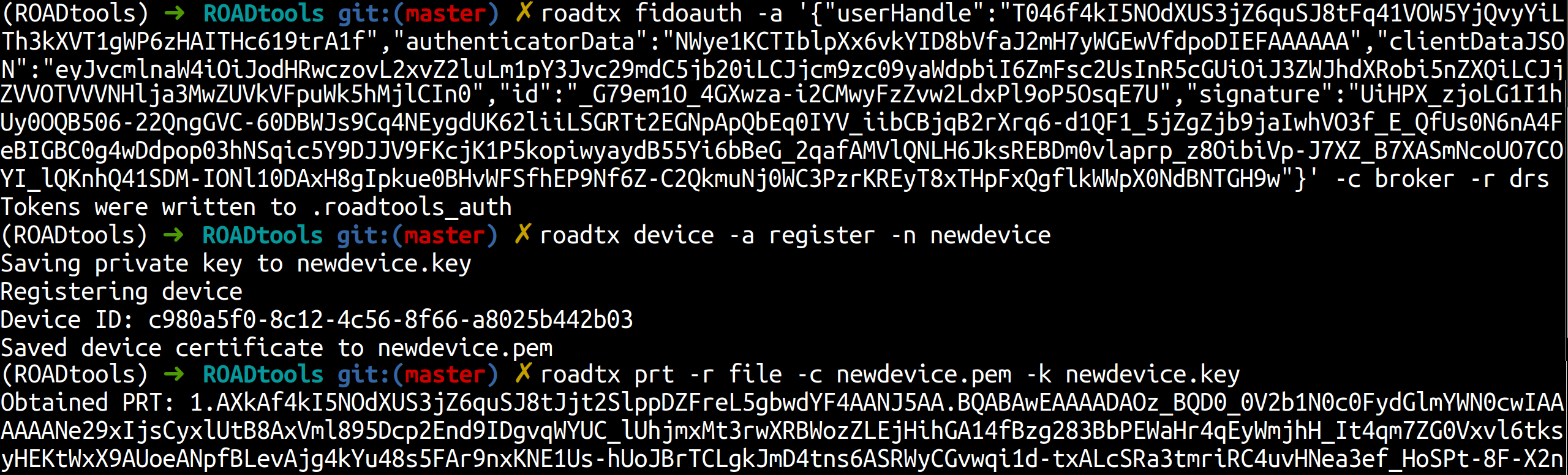
Alternatives exist: register a device with the WebAuthn-based token and then run the PowerShell script from the previous section to get the PRT assertion, or request a deviceless PRT and work with that. Strict device-state policies would of course impose extra hurdles for an attacker, but those are usually not insurmountable.
To summarize, from a compromised user session an attacker can:
- Use the victim’s WHFB key — with no PIN, biometrics, or other proof of presence — to sign in with WebAuthn from anywhere.
- Request tokens suitable for registering a new (fake) device.
- Request a PRT once a device is in place.
- Plant additional backdoor authentication material: because using the WHFB key counts as fresh MFA, other passkeys or WHFB keys can be added on the new device.
As Ceri noted in the DEF CON talk, the metadata for WHFB-based passkeys registered on other websites can also be accessed and reused to authenticate — but those metadata files are owned by SYSTEM, so this is not fully reachable from a low-privilege vantage point.
Detection and defenses
Fortunately there is a clean indicator for spotting this behavior: a WHFB key being used from an unmanaged device. This can happen legitimately — for example, using WHFB in an incognito window or in a browser without SSO support — but it should not be a frequent event. The following KQL query surfaces these unusual sign-ins:
SigninLogs
| where AuthenticationDetails has '"authenticationMethod":"Windows Hello for Business"'
| where DeviceDetail.deviceId == ""
If this proves noisy in a given environment, or if someone finds a way to sharpen it, the author welcomes feedback. More generally, monitoring for unexpected new device registrations — usually Windows devices being added by users — is worth considering, keeping in mind that users registering their own devices is a perfectly legitimate operation in most tenants.
Tools
The PowerShell scripts used throughout are available in the ROADtools repository on GitHub, in the winhello_assertion folder. Recent roadtx versions can authenticate with WHFB keys as passkeys — whether keys stored on disk, assertions captured on other hosts, or software-based passkeys you obtain. Those software passkeys can also be registered with roadtx registerpasskey, which lets you register passkeys for your own account, or for other accounts if you hold the appropriate Entra ID role. That requires a token with the correct delegated Microsoft Graph rights — for example UserAuthenticationMethod.ReadWrite, which is available on the Microsoft Authenticator app. When provisioning a passkey on your own account, the token also needs the ngcmfa claim, obtainable with most roadtx token commands via --force-ngcmfa.
The registerpasskey command does not work when attestation is enforced, since the script does not support it; in those cases a tool such as DSInternals.Passkeys paired with a real hardware FIDO2 key would be needed.
Key Takeaways
- “Hardware-bound” is not “presence-bound.” A TPM-backed WHFB key can be driven to sign arbitrary data from a low-privilege session using cached ticket data — no PIN, no biometric, no admin rights.
- RDP redirection is the design seam. Because WHFB must work across RDP under a different device identity, a key bound to device A can mint a PRT “on” device B — the property attackers reuse.
- WHFB can act as a software FIDO2 passkey. The RSA key behind WHFB can complete WebAuthn directly; the only non-obvious detail is deterministically reconstructing the
user_handlefrom tenant ID and user ID. - Deviceless tokens are a persistence primitive. WebAuthn sign-ins omit the device ID claim, and tokens without that claim can register new devices, bootstrap PRTs, and satisfy fresh-MFA requirements to plant more backdoor credentials.
- Challenges are unbound. The WebAuthn challenge is not tied to a session, user, or tenant, so it can be fetched on the attacker host and signed on the victim within a five-minute window.
- The signal is detectable. WHFB authentication with an empty
DeviceDetail.deviceIdis an anomaly you can hunt for in sign-in logs.
Defensive Recommendations
- Alert on WHFB from unmanaged devices. Deploy the KQL query above against
SigninLogsand triage sign-ins where the WHFB method is used with an empty device ID; baseline the legitimate incognito/no-SSO cases first to control false positives. - Watch device registration and join events. Monitor for unexpected new (usually Windows) devices being added, and correlate new registrations with immediately following PRT requests or passkey additions.
- Constrain who can register devices and passkeys. Tighten Entra ID roles and the delegated Graph scopes (for example
UserAuthenticationMethod.ReadWrite) that allow registering authentication methods on other accounts. - Require device state where it matters. Enforce Conditional Access policies that demand compliant/managed device state for sensitive resources, so deviceless FIDO tokens cannot reach them — while recognizing determined attackers may still register a device.
- Enforce attestation for passkey registration. Attestation enforcement blocks software-passkey registration paths like
roadtx registerpasskeyand pushes attackers toward real hardware authenticators. - Treat endpoint compromise as identity compromise. Since a live user session is the only firm prerequisite, invest in EDR coverage, session monitoring, and rapid revocation (rotate/revoke refresh tokens and PRTs, reset affected credentials) when a host is suspected compromised.
- Audit newly added authentication methods. Periodically review passkeys and WHFB keys registered per user and flag additions that appear right after anomalous sign-ins.
Conclusion
None of this breaks WHFB’s cryptography — the private key never leaves the TPM. What it exploits is the gap between “the key is hardware-bound” and “the key can only be used with proof of user presence on one physical machine.” RDP redirection already required WHFB keys to work under other device identities, and the WebAuthn path shows the same key can authenticate with no device state at all, yielding deviceless tokens that are ideal for registering fresh devices and building durable persistence. For defenders, the reassuring part is that the abuse leaves a distinctive footprint: WHFB sign-ins from unmanaged devices and unexpected device registrations are both observable. Hunting for those, tightening who can register devices and passkeys, and treating endpoint compromise as identity compromise are the practical mitigations.
Original text: “Borrowing Windows Hello keys for authentication and persistence” by Dirk-jan Mollema at dirkjanm.io, published under a Creative Commons BY 4.0 license.