Original text by Sp1d3rM
NTRODUCTION
One of the most famous file formats in computer history probably is the Portable Executable, popularly known as .exe. There is more to it than just being the binary file format of choice for Windows systems. In this chapter, we will deep-dive into what are portable executables? Where they live? What they eat?
We will start by defining portable executables, following to their respective structure. It is fundamental to understand how they work so we can understand reflective loaders and some static analysis evasion techniques.

DEFINING THE FILES
Portable Executable
Portable Executable (PE) is a file format for native executable code on 32-bit and 64-bit Windows operating systems, as well as in UEFI environments. Although most people know them as .exe, portable executables are used for native executables (.exe, .com), dynamic link libraries (.dll, .ocx), system drivers (.sys, .drv) and many other types of files. The PE format supports storing the data required to load and start an operating system process – including references to dynamic link libraries, tables for importing and exporting application programming interface (API) functions, resource management data and thread-local storage (TLS) information.
All of this means that portable executables are pretty useful.
History
Microsoft first introduced the PE format with Windows NT 3.1, replacing the older 16-bit New Executable (NE) format. Soon after, Windows 95, 98, ME, and the Win32s extension for Windows 3.1x, all adopted the PE structure. Each PE file includes a DOS executable header, which generally displays the message “This program cannot be run in DOS mode”. However, this DOS section can be replaced by a fully functional DOS program, as demonstrated in the Windows 98 SE installer.
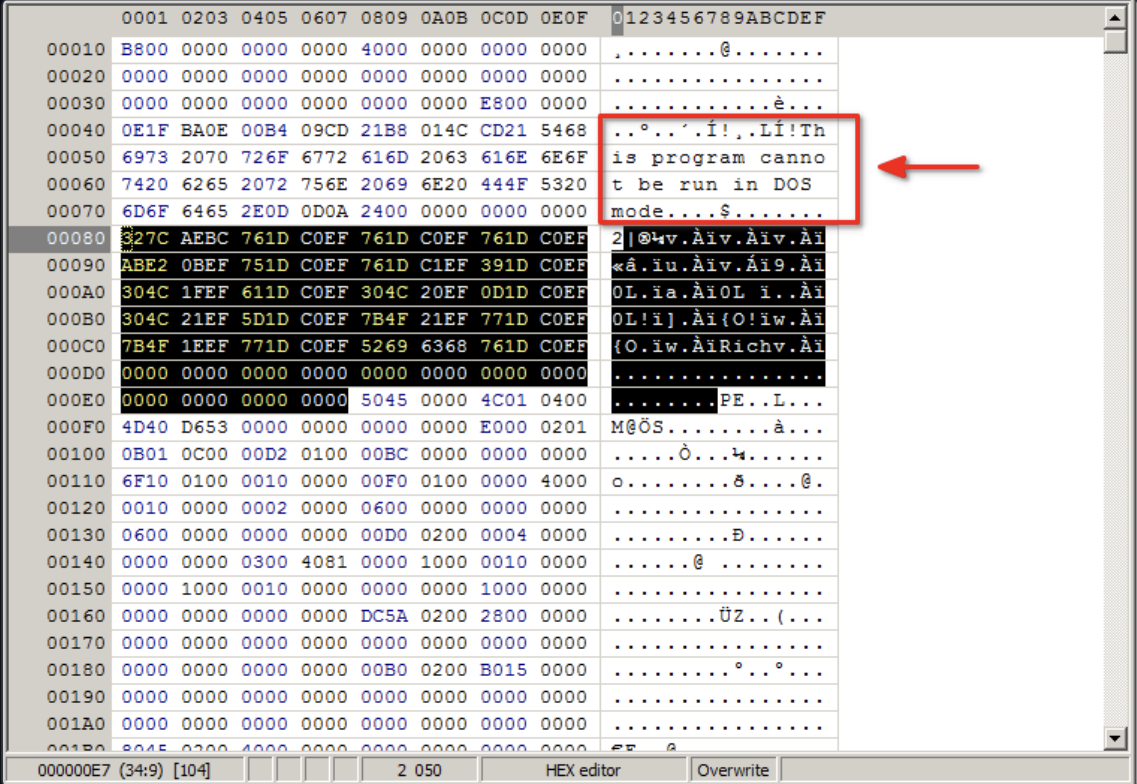
Over time, the PE format has grown with the Windows platform. Notable extensions include the .NET PE format for managed code, PE32+ for 64-bit address space support, and a specialized version for Windows CE.
File Structure
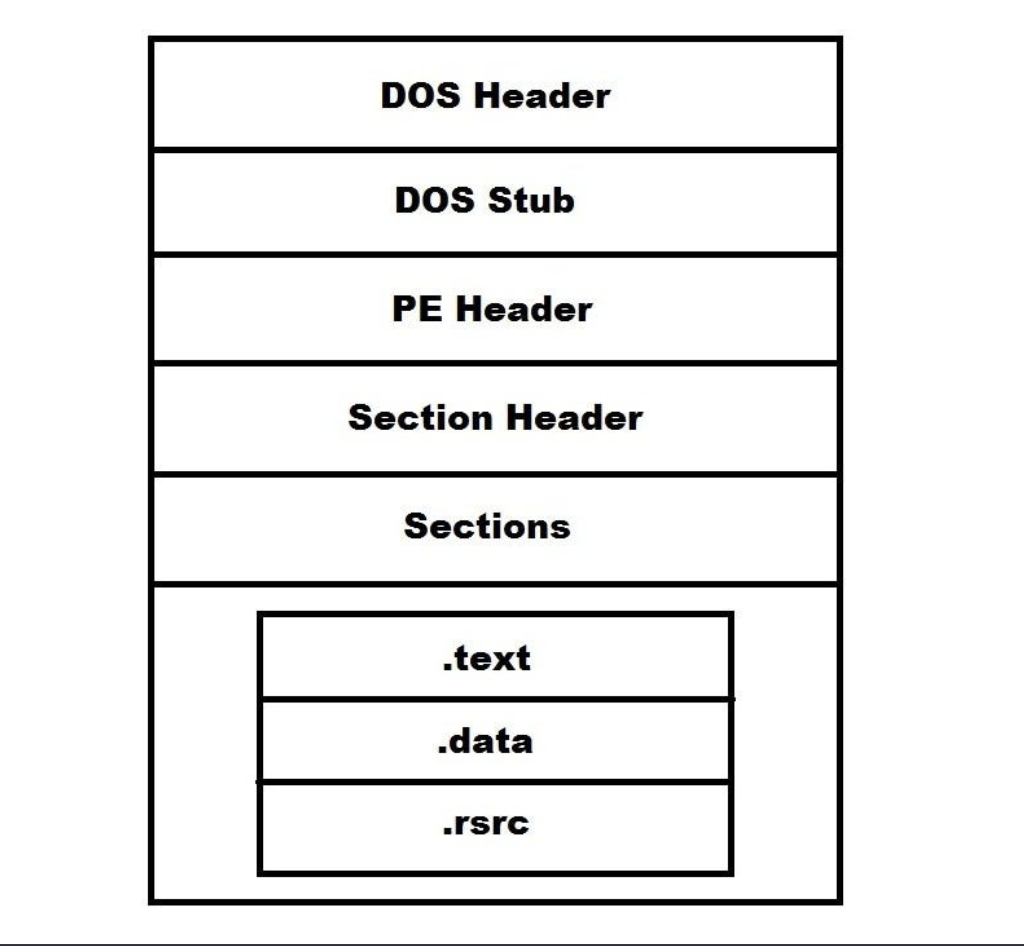
A PE file consists of a number of headers and sections that instruct the windows loader on how to map the file into memory. Below, a simplified example of such structure
DOS Header
We start with the DOS header (IMAGE_DOS_HEADER). It’s the foundational, 64-byte data structure located at the absolute beginning (offset 0x00) of every PE file. Its existence is a legacy artifact designed to provide backward compatibility with MS-DOS, but in modern Windows operating systems, it serves almost exclusively as a simple pointer to locate the actual PE headers. Inside IMAGE_DOS_HEADERstructure, the famous e_magic, known as the magic byte, is stored.
DOS Stub
Next is the DOS stub, which is a small, legitimate 16-bit MS-DOS executable embedded within the PE format. It is positioned immediately after the 64-byte DOS Header (IMAGE_DOS_HEADER) and before the NT Headers (IMAGE_NT_HEADERS). This is where the previously mentioned DOS executable code would be if there were any.
- Start: The stub begins at file offset
0x40(64 bytes in), immediately following theIMAGE_DOS_HEADER. - End: The boundary of the DOS Stub is dynamically defined by the
e_lfanewmember of theIMAGE_DOS_HEADER. - The Pointer:
e_lfanewis located at offset0x3C. It contains the 32-bit relative file offset to the beginning of theIMAGE_NT_HEADERS(specifically, thePE\0\0signature). This is how Windows can locate the actual executable file even though it would be possible that a MS-DOS stub is present.
At the risk of repeating myself, the DOS Stub is mostly used to point at the NT headers.
PE Header (or Signature)
The PE Header (IMAGE_NT_HEADERS) is the core data structure of the Portable Executable format. Located at the offset specified by the e_lfanew field of the DOS Header, it contains the essential architectural, memory layout, and execution parameters required by the Windows OS loader to map the file into memory and start the process.
Depending on the target architecture, this structure is defined as either IMAGE_NT_HEADERS32 or IMAGE_NT_HEADERS64. Defined in winnt.h, the structure consists of a 4-byte signature followed by two nested structures:
typedef struct _IMAGE_NT_HEADERS {
    DWORD                   Signature;
    IMAGE_FILE_HEADER       FileHeader;
    IMAGE_OPTIONAL_HEADER32 OptionalHeader; // Or IMAGE_OPTIONAL_HEADER64
} IMAGE_NT_HEADERS32, *PIMAGE_NT_HEADERS32;
The first 4 bytes (DWORD) must contain the value 0x00004550, which corresponds to the ASCII string PE\0\0 that we’ve seen at the DOS Stub section. The Windows loader validates this signature immediately after following the e_lfanew pointer. If it is missing or modified, the file will not execute.
IMAGE_FILE_HEADER is a 20-byte structure that defines the basic physical layout and characteristics of the file on disk.
Critical fields include:
Machine: Identifies the target CPU architecture (e.g.,0x014Cfor x86,0x8664for x64).NumberOfSections: Indicates the size of the Section Table, which immediately follows theIMAGE_NT_HEADERS. The loader uses this to iterate through and map sections like.textand.data.TimeDateStamp: A 32-bit timestamp indicating when the file was compiled.Characteristics: A bitmask composed of flags indicating attributes such as whether the file is an executable (IMAGE_FILE_EXECUTABLE_IMAGE), a DLL (IMAGE_FILE_DLL), or if it can handle addresses larger than 2GB (IMAGE_FILE_LARGE_ADDRESS_AWARE).
Despite its name, the OptionalHeader is mandatory for executable files. It is the largest component of the PE Header and dictates how the loader maps the file into virtual memory. Its size varies depending on whether the binary is 32-bit or 64-bit.
Critical fields include:
Magic: Identifies the state of the image (0x010Bfor PE32,0x020Bfor PE32+ / 64-bit).AddressOfEntryPoint: The Relative Virtual Address (RVA) where execution begins. For an executable, this is the starting address of the code (Original Entry Point). For a DLL, this points toDllMain.ImageBase: The preferred virtual memory address where the first byte of the file should be loaded (commonly0x00400000for applications and0x10000000for DLLs). If this address is occupied, the OS will relocate the image using the relocation table.SectionAlignment&FileAlignment: Dictate how sections are aligned in memory (typically 4096 bytes /0x1000) and on disk (typically 512 bytes /0x200), respectively.SizeOfImage: The total contiguous virtual memory size required to load the image, calculated as a multiple ofSectionAlignment.DataDirectory: An array of 16IMAGE_DATA_DIRECTORYstructures at the end of the Optional Header. These are crucial pointers to specific data structures within the PE’s sections, such as the Export Directory, Import Directory (IAT/INT), Resource Directory, and Base Relocation Table.
For instance:
To determine whether a PE file is intended for 32-bit or 64-bit architectures, one can examine the Machine field in the IMAGE_FILE_HEADER. 0x014c is for 32-bit Intel processors and 0x8664 for x64 processors. Additionally, the Magic field in the IMAGE_OPTIONAL_HEADER reveals whether addresses are 32-bit or 64-bit. A value of 0x10B indicates a 32-bit (PE32) file, while 0x20B indicates a 64-bit (PE32+) file. Below is the image of the PE Header information of the default AdaptixC2 SMB beacon seen through PE Bear:

We can see that the Machine field at offset 0x84 holds the hex value for AMD64 0x8664. If we inspect the IMAGE_OPTIONAL_HEADER of the file, we can confirm this architecture with the Magic field
Section Header
The Section Header (IMAGE_SECTION_HEADER), collectively forming the Section Table, immediately follows the IMAGE_OPTIONAL_HEADER within the PE format. It acts as a directory, describing the layout, attributes, and locations of the actual data payload sections (e.g., .text, .data, .rdata, .rsrc) both as they reside on disk and how they must be mapped into virtual memory.
The number of these headers is dictated by the NumberOfSections field located in the IMAGE_FILE_HEADER. Defined in winnt.h, each header is a 40-byte structure:
#define IMAGE_SIZEOF_SHORT_NAME 8

typedef struct _IMAGE_SECTION_HEADER {
    BYTE  Name[IMAGE_SIZEOF_SHORT_NAME];
    union {
        DWORD PhysicalAddress;
        DWORD VirtualSize;
    } Misc;
    DWORD VirtualAddress;
    DWORD SizeOfRawData;
    DWORD PointerToRawData;
    DWORD PointerToRelocations;
    DWORD PointerToLinenumbers;
    WORD  NumberOfRelocations;
    WORD  NumberOfLinenumbers;
    DWORD Characteristics;
} IMAGE_SECTION_HEADER, *PIMAGE_SECTION_HEADER;
The Windows loader relies on specific fields to correctly allocate memory and apply protection mechanisms (like DEP/NX):
Name: An 8-byte ASCII array identifying the section. If the name is exactly 8 bytes, it is not null-terminated. Common names include.text(executable code),.data(initialized data), and.bss(uninitialized data), though these names are purely conventional and can be arbitrary.VirtualSize: The actual size of the section’s data when loaded into virtual memory.VirtualAddress: The Relative Virtual Address (RVA) indicating where the section should be mapped in memory, relative to theImageBase.SizeOfRawData: The size of the section’s data on disk. This must be a multiple of theFileAlignmentspecified in the Optional Header.PointerToRawData: The raw file offset (on disk) pointing to the first page of the section. The loader readsSizeOfRawDatabytes starting from this offset to map into memory atVirtualAddress.Characteristics: A 32-bit bitmask determining the memory protections and state of the section once loaded. Critical flags include:0x20000000(IMAGE_SCN_MEM_EXECUTE)0x40000000(IMAGE_SCN_MEM_READ)0x80000000(IMAGE_SCN_MEM_WRITE)
Sections
The sections of a PE file contain the actual payload of the binary: the compiled CPU instructions, variables, resources, and linking information.
While the names of these sections (stored in the IMAGE_SECTION_HEADER) are standard conventions established by Microsoft tooling, they are fundamentally arbitrary. The Windows OS loader does not dictate behavior based on the section’s name; instead, it relies on the Characteristics bitmask in the header to set memory page protections (Read, Write, Execute) and the DataDirectory in the Optional Header to locate specific data structures.
.text
This section contains the executable instructions generated by the compiler.
- Content: Opcode sequences (x86, x64, ARM) that dictate the program’s logic.
- Characteristics: Marked as Read and Execute (
IMAGE_SCN_MEM_READ | IMAGE_SCN_MEM_EXECUTE). It is intentionally not marked as Writable to prevent accidental memory corruption and mitigate code injection attacks. - Aliases: Sometimes named
CODEor.orpc(in COM binaries).
.data
This section contains global and static variables that have been explicitly initialized with a value in the source code prior to compilation.
- Content: Values like
int g_Status = 1;or mutable string buffers. - Characteristics: Marked as Read and Write (
IMAGE_SCN_MEM_READ | IMAGE_SCN_MEM_WRITE).
.rdata (or .rodata)
The Read-Only Data section. This section holds data that must not be modified during execution. Modern linkers frequently merge several specialized directories into .rdata to optimize memory layout.
- Content: Constant variables, literal string definitions, and C++ Virtual Function Tables (VFTables).
- Merged Directories: It typically hosts the Import Directory (
.idata), Export Directory (.edata), and Debug Directory. - Characteristics: Marked as Read-only (
IMAGE_SCN_MEM_READ).
.bss (Uninitialized data)
The Block Started by Symbol (BSS) section is used for global and static variables that are declared but not assigned a value in the source code.
- Content: Variables like
char g_Buffer[4096];. - Storage Architecture: To conserve disk space, the
.bsssection has aSizeOfRawDataof 0 in the PE file. The loader uses theVirtualSizefield to allocate zeroed-out memory pages for this section at runtime. - Characteristics: Marked as Read and Write (
IMAGE_SCN_MEM_READ | IMAGE_SCN_MEM_WRITE).
.rsrc
The resource data section. This section houses external assets required by the application, organized in a hierarchical tree structure within the section.
- Content: Application icons, cursors, string tables, dialog box templates, embedded fonts, and the Application Manifest (which dictates execution privilege levels like
requireAdministrator). - Characteristics: Marked as Read-only (
IMAGE_SCN_MEM_READ).
.reloc
The base relocations section. This section is critical for Address Space Layout Randomization (ASLR). If the PE cannot be loaded at its preferred ImageBase(defined in the Optional Header), the OS must load it at a different memory address.
- Content: A table of delta values. The loader uses this table to iterate through the loaded image and patch hardcoded, absolute memory addresses so they point to the newly randomized memory space.
- Characteristics: Marked as Read-only (
IMAGE_SCN_MEM_READ). Once the loader applies the relocations, this memory page is often discarded or paged out.
.pdata (Exception Data)
Standard in 64-bit Windows executables (x64, ARM64), this section facilitates table-based exception handling.
- Content: An array of
RUNTIME_FUNCTIONstructures. Each entry defines the start address, end address, and unwind information for every non-leaf function in the.textsection. - Characteristics: Marked as Read-only (
IMAGE_SCN_MEM_READ).
.idata and .edata (Import and Export Data)
If the linker does not merge these into .rdata, they exist as standalone sections.
.idata: Contains the Import Address Table (IAT) and Import Name Table(INT), which the loader uses to resolve and bind external API dependenciesfrom DLLs..edata: Contains the Export Directory, exposing functions within the current binary (typically a DLL) so they can be called by other executables.- Characteristics: Typically Read-only (
IMAGE_SCN_MEM_READ), though the OS loader temporarily applies Write permissions to the.idatamemory space to populate the IAT with resolved function pointers during initialization.
A more aligned with Microsoft’s oficial documentation on PE headers and their structure version of our previous image would be the following one:
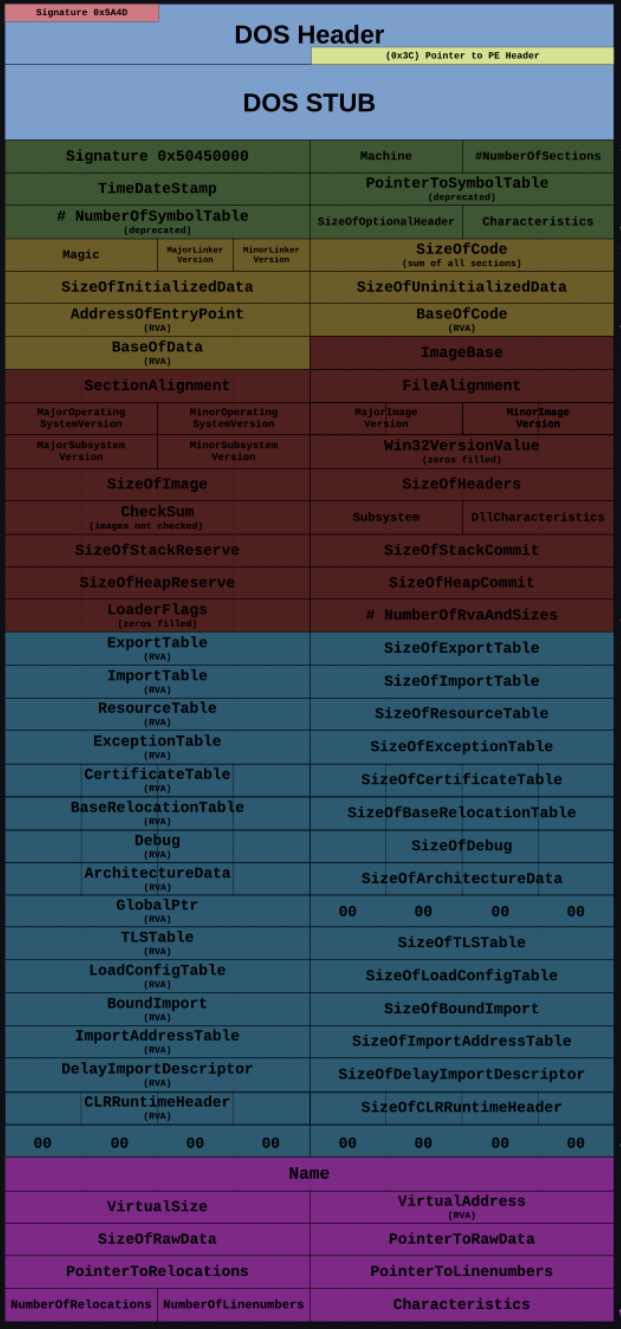
I hope that, by seeing it, you can image why I chose to first present you a much more simplified version of it.
DETECTION OPPORTUNITIES
We’ve seen that a PE file is much more complex than one might imagine. And we didn’t even dived too deep into every single aspect of it. What matters is that by understanding it, we can start drawing what are the detection opportunitiessecurity products might utilize to detect your malware before it even executes.
Security products, ranging from static analysis engines and traditional AV to modern EDR sensors, parse the PE format to extract telemetry before dynamic execution or user land hooking occurs. They prioritize finding anomalies that indicate packing, obfuscation, or malicious intent.
Before deep structural parsing, security pipelines evaluate the file holistically:
- Cryptographic Hashes & Imphash: The file’s MD5/SHA256 is checked against threat intelligence feeds. More importantly, the Imphash (a hash of the Import Address Table) is calculated to correlate the binary with known malware families or threat actors, regardless of minor code changes.
- Section-Level Entropy: The Shannon entropy (scale of 0 to 8.0) of the file and its individual sections is calculated. High entropy (typically > 7.0) strongly indicates packed, compressed, or encrypted payloads.
- Authenticode Signatures: The digital signature is validated. Unsigned binaries, or binaries signed with stolen/revoked certificates, immediately receive a higher risk score.
Crucial Headers
The structural headers are scrutinized for discrepancies that deviate from standard compiler behavior (like MSVC or MinGW).
1. IMAGE_FILE_HEADER
TimeDateStamp: Analyzed for time stomping, a technique where a malicious actor spoofs original time stamps. A compile date in the future, or one that has been cloned to exactly match a legitimate Windows binary (likeexplorer.exe), is flagged as anomalous.NumberOfSections: Binaries with an unusually low (1 or 2) or high number of sections deviate from standard compiler outputs and warrant closer inspection.
2. IMAGE_OPTIONAL_HEADER
AddressOfEntryPoint(OEP): Products verify where execution begins. If the entry point points to a non-standard section (e.g., outside.text, or into a newly appended section at the end of the file), it is a classic indicator of a packer, crypter, or file infector executing a stub before jumping to the real payload.SizeOfImagevs. File Size: The loader’s expected memory footprint (SizeOfImage) is compared to the actual file size on disk. Significant discrepancies, particularly extra data at the end of the file (overlays), indicate droppers hiding payloads outside the defined PE structure.Subsystem: Malware often utilizes the Windows GUI subsystem (IMAGE_SUBSYSTEM_WINDOWS_GUI) but fails to create a visible window, allowing it to run stealthily in the background.
3. IMAGE_SECTION_HEADER (The Section Table)
- Memory Permissions: This is highly scrutinized. Sections marked as
RWX(IMAGE_SCN_MEM_READ | IMAGE_SCN_MEM_WRITE | IMAGE_SCN_MEM_EXECUTE) are rare in modern legitimate software due to DEP/NX.RWXsections heavily imply self-modifying code, in-memory unpacking routines, or hollowed processes. - VirtualSize vs. SizeOfRawData: A significant discrepancy between the size on disk (
SizeOfRawData) and the size in memory (Misc.VirtualSize) is a primary packer indicator. A section with a raw size of zero but a massive virtual size indicates that memory will be allocated for a payload unpacked dynamically at runtime. - Section Names: Non-standard or randomized section names (e.g.,
.upx0,.vmp0, or alphanumeric gibberish) immediately signature the binary as packed or protected by commercial/custom software.
Crucial Data Directories and Sections
Security products rely on the Data Directories (pointed to by the Optional Header) to understand how the binary interacts with the operating system.
1. The Import Directory (.idata / IAT) The Import Address Table dictates the binary’s external dependencies and is the most vital source of behavioral telemetry during static analysis.
- Suspicious API Combinations: Engines search for groupings of APIs used for specific attack vectors, such as process injection (
VirtualAllocEx,WriteProcessMemory,CreateRemoteThread) or keylogging (SetWindowsHookEx). - Sparse Imports: A highly sparse IAT that only imports
LoadLibraryandGetProcAddressis a critical red flag. This indicates the binary is using dynamic API resolution (API hashing) to resolve its imports at runtime, deliberately blinding static analysis tools. The use of such APIs are not malicious per-se and dynamic API resolution is also not necessarily an indicator of malicious activity, but relying exclusively on dynamic API resolution is.
2. The Resource Directory (.rsrc) Because it is designed to hold arbitrary data, the resource section is a prime target for hiding malicious configurations or secondary payloads.
- Embedded Payloads: Engines parse resources to find nested PE files, PowerShell scripts, or encrypted shellcode blobs.
- High Entropy Resources: Individual resource items are checked for high entropy, indicating encryption.
- Manifest Anomalies: The application manifest is checked for privilege escalation attempts (e.g.,
requireAdministrator).
3. The Export Directory (.edata) For DLLs, the export names are analyzed. Malware often exports functions with suspicious names, random strings, or relies entirely on ordinals without names to hinder analysis. Products also check if the exported functions match known malicious ordinal structures used by specific threat groups.
CONCLUSION
We successfully uncovered what is Portable Executables, what is its structure, what known file extensions are portable executables (more commonly .exe, .dll and .com) and what are the detection opportunities security products leverage to detect malware even before it executes, known as static analysis.
This is crucial for offensive development because it allows us to understand what might be a static signature and what can be abused by actors for weaponization. We are still not covering weaponization itself because I want us all to understand what the things are before bonking them with really large sticks. Up next, we will be learning about process and threads, which is fundamental for modern malware development. It will set the stage for process injection techniques (legacy and modern ones).
Stay tuned and as always,
Keep Hacking,
Sp1d3rM_*^!