

Executive Summary
OnlyShells is a chain of five vulnerabilities discovered in ONLYOFFICE Desktop Editors during a fall 2025 security assessment. Chained together, these flaws allow an attacker to obtain a shell running as NT AUTHORITY\SYSTEM the moment a victim opens a specially crafted document—no further interaction required. The chain stitches together three distinct problem classes: a zero-click cross-site scripting (XSS) flaw that executes JavaScript on document open, a critical remote code execution (RCE) bug in the outdated Chromium V8 engine bundled with the editor, and a local privilege escalation (LPE) in the application’s SYSTEM-level update service.
The core weakness is architectural: ONLYOFFICE Desktop Editors is a Chromium-based application built on the Chromium Embedded Framework, ships an engine version that went out of support in 2023, runs without browser sandboxing, and installs a helper service with the highest privileges on the system. This article walks through each link of the chain—the three XSS vulnerabilities that establish a JavaScript foothold, the V8 type-confusion bug that turns that foothold into native code execution, and the update-service file-deletion primitive that escalates to SYSTEM. The vendor has fixed the issues in ONLYOFFICE Desktop Editors 9.3.0.
Overview
In the fall of 2025, the BI.ZONE Vulnerability Research team assessed the security of ONLYOFFICE Desktop Editors and uncovered five vulnerabilities that together form what they named the OnlyShells chain. The chain lets an attacker land an NT AUTHORITY\SYSTEM shell after a victim simply opens a booby-trapped document. The sections below dig into the technical detail of each individual vulnerability.
Attack Surface
ONLYOFFICE Desktop Editors is built on the Chromium Embedded Framework (CEF), making it a Chromium-based application. Critically, it runs without browser sandboxing and ships Chromium 109.0.5414.120—a build that was already outdated back in 2023. The editor also bundles an update service that runs with NT AUTHORITY\SYSTEM privileges, presenting an attractive target for privilege escalation.
A second large attack surface exists in the parsers for various file formats, many of which are implemented in memory-unsafe languages. However, even a strong exploitation primitive there is usually held back by the one-shot nature of the attack: it cannot adapt on the fly to a victim’s system mitigations such as PIE and ASLR. With that constraint in mind, the researchers proposed the following three-step chain:
- XSS exploitation leading to arbitrary JavaScript code execution.
- Renderer flaw exploitation.
- Update service flaw exploitation for privilege escalation.
Let us examine the vulnerabilities that make up each step.
XSS Vulnerabilities
CVE-2025-68917
| Severity | Medium |
| CVSS score | 6.4 |
| CVSS vector string | CVSS:3.1/AV:N/AC:L/PR:L/UI:N/S:C/C:L/I:L/A:N |
| Privileges required | None |
Description. When a victim clicks the button to edit a comment, the page automatically builds an editing field roughly of the form <textarea>{{USER_INPUT}}</textarea>. The USER_INPUT portion is not escaped, so an attacker can smuggle a payload into a comment and execute arbitrary JavaScript the instant the victim clicks Edit comment.
Exploitation example:
- An attacker creates a malicious comment similar to
</textarea><script>{{JavaScript code}}</script><textarea>. - When the victim edits the comment, the malicious script executes.
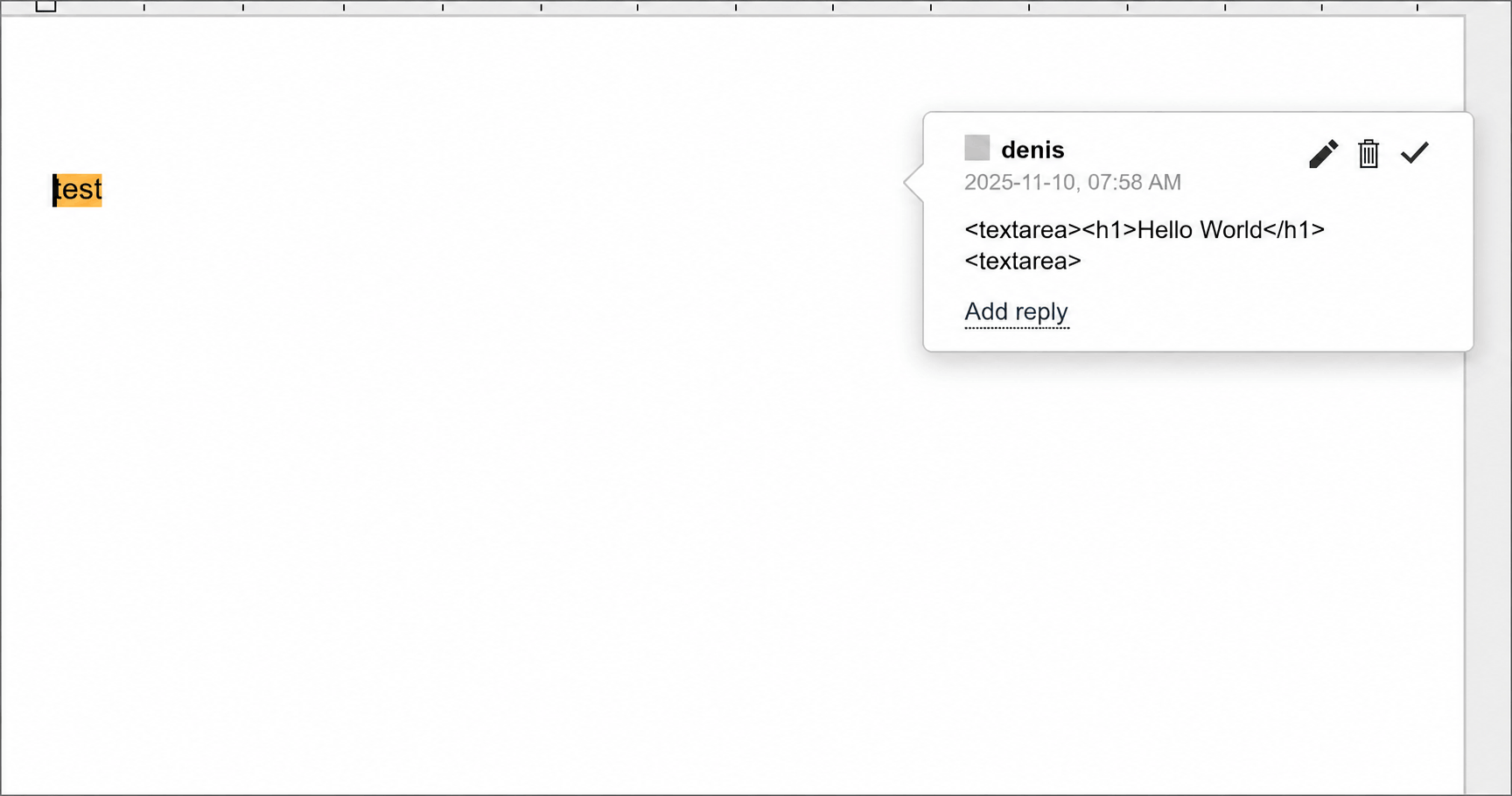
<h1>Hello World</h1> serves as PoC. Source: original article.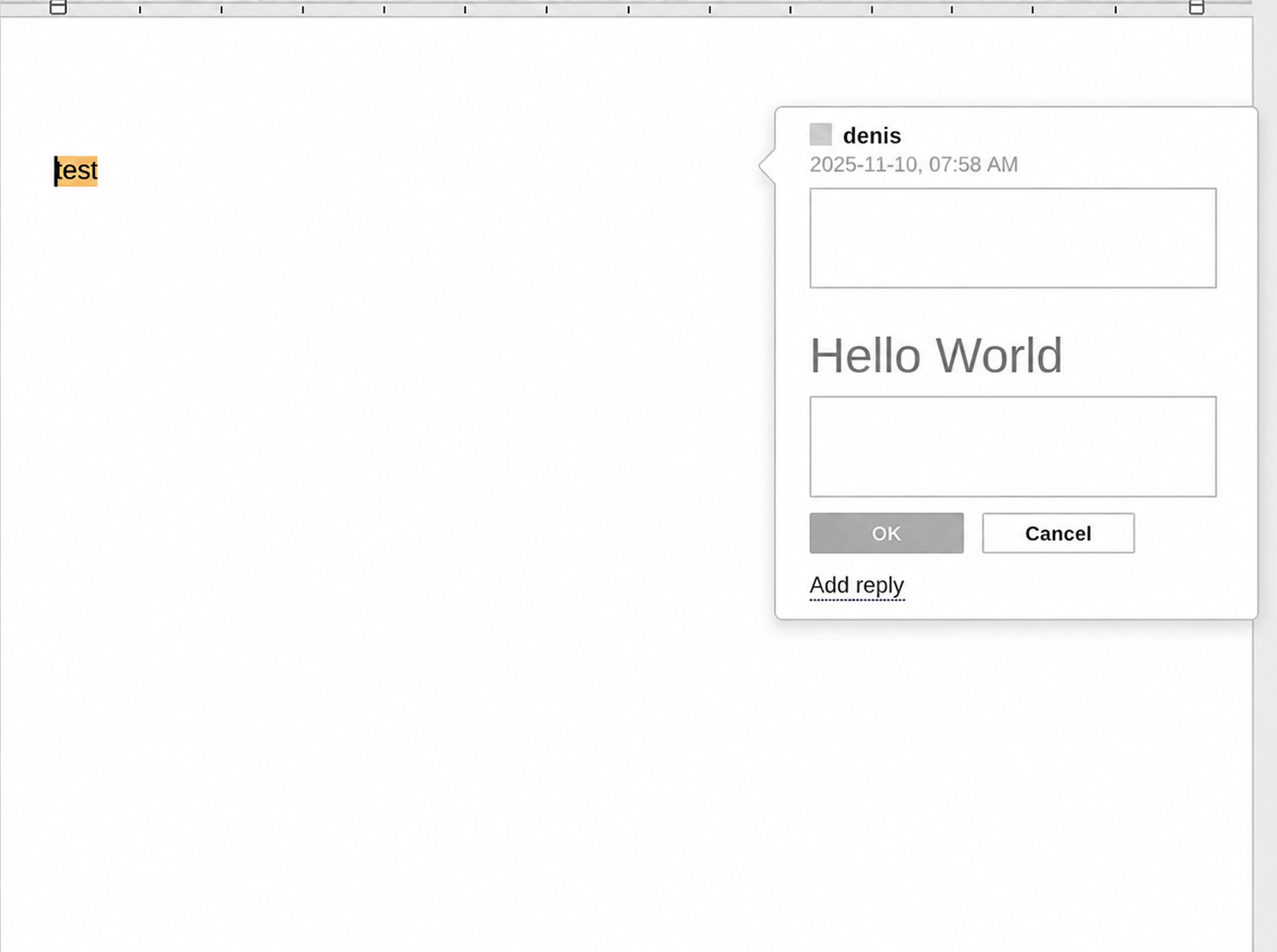
CVE-2025-68935
| Severity | Medium |
| CVSS score | 6.4 |
| CVSS vector string | CVSS:3.1/AV:N/AC:L/PR:L/UI:N/S:C/C:L/I:L/A:N |
| Privileges required | None |
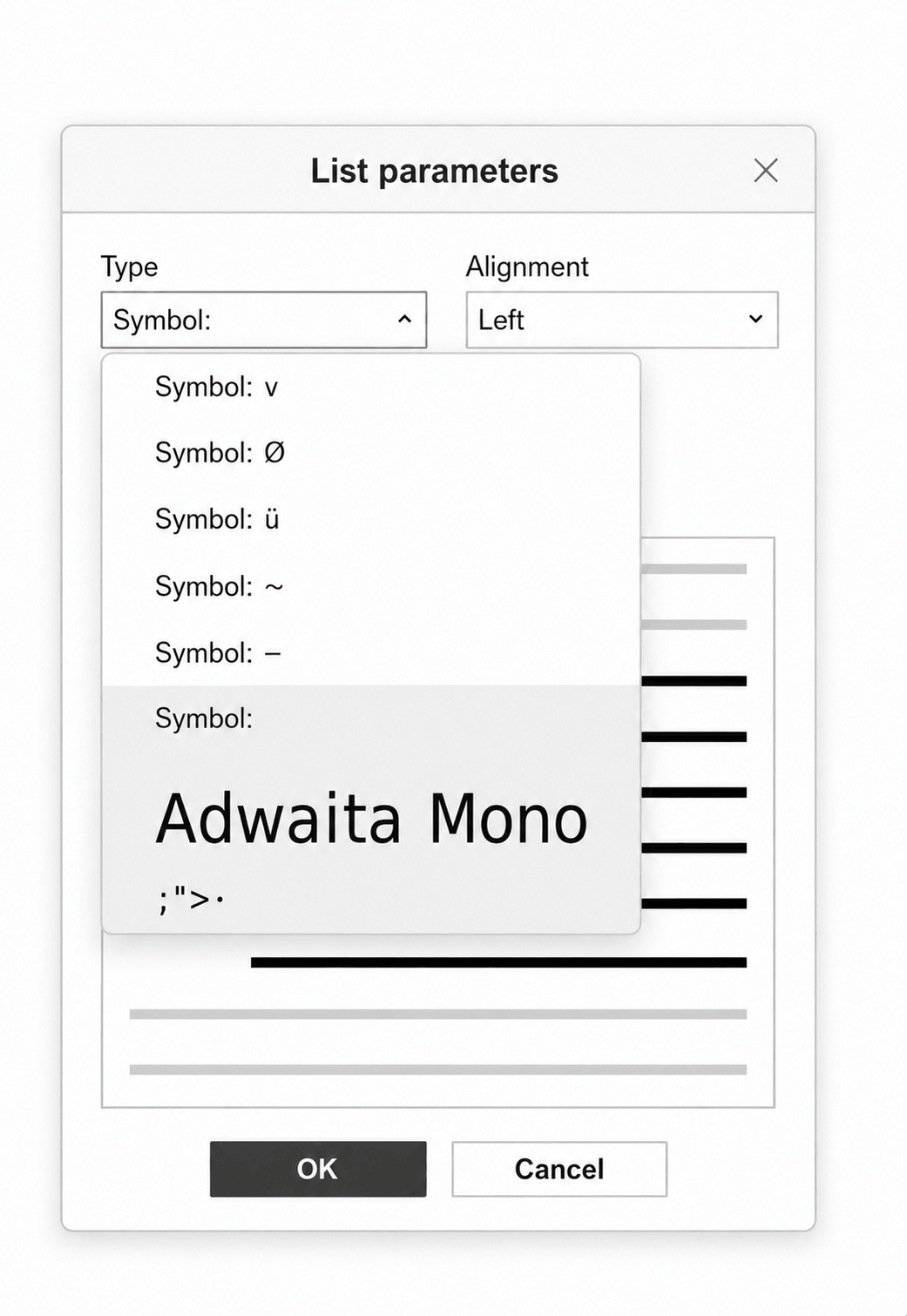
Description. Editing list parameters opens a modal window that offers a list-type selection option.
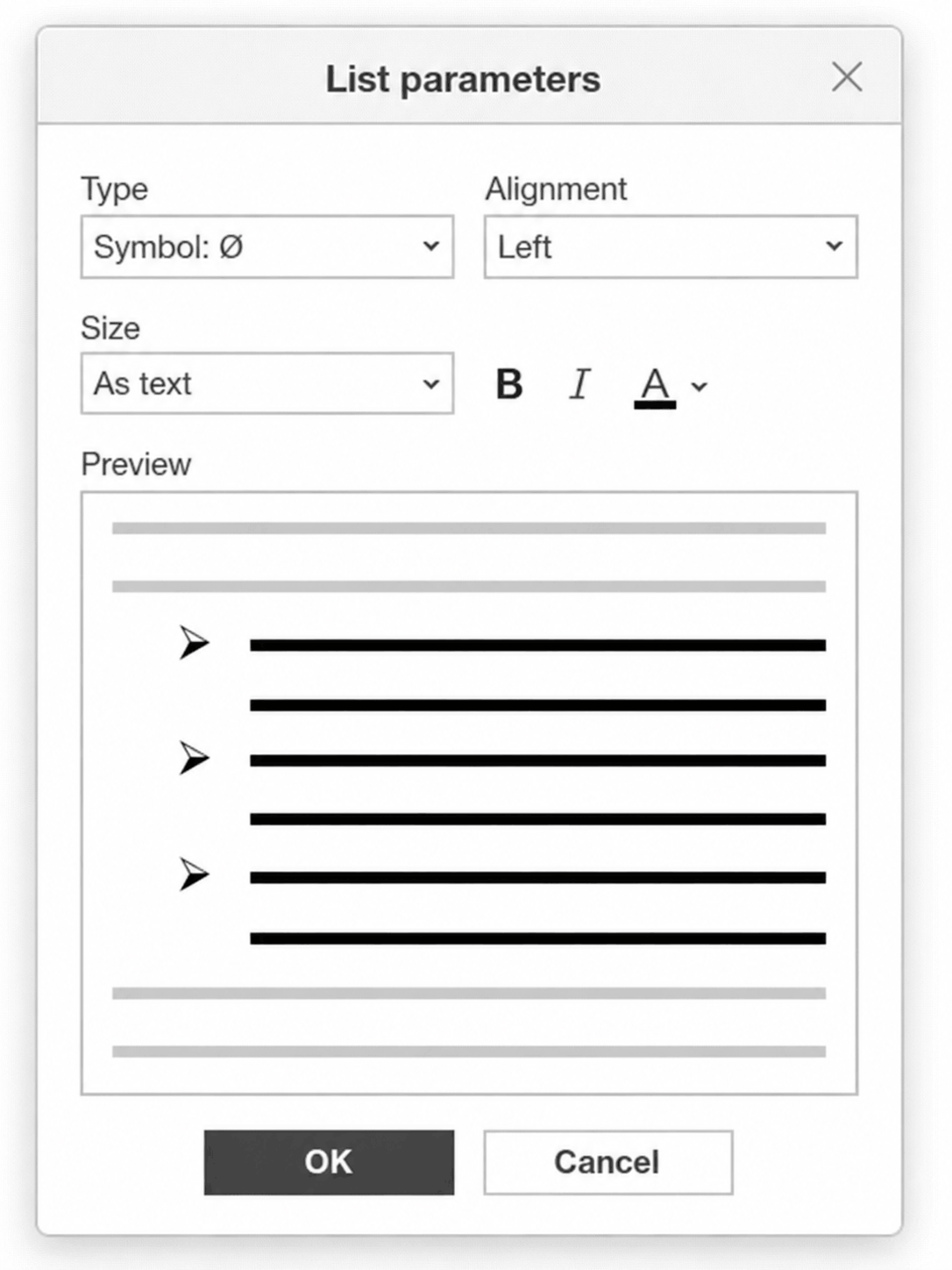
The available list types include fonts whose names are inserted into the style attribute without being escaped.
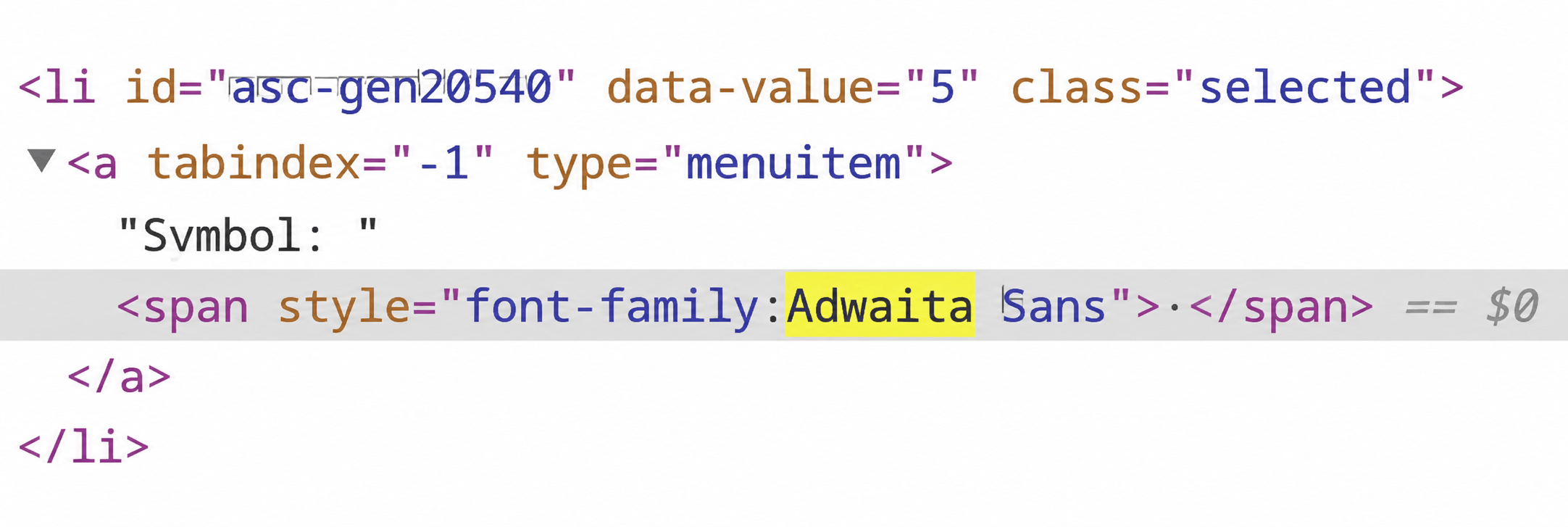
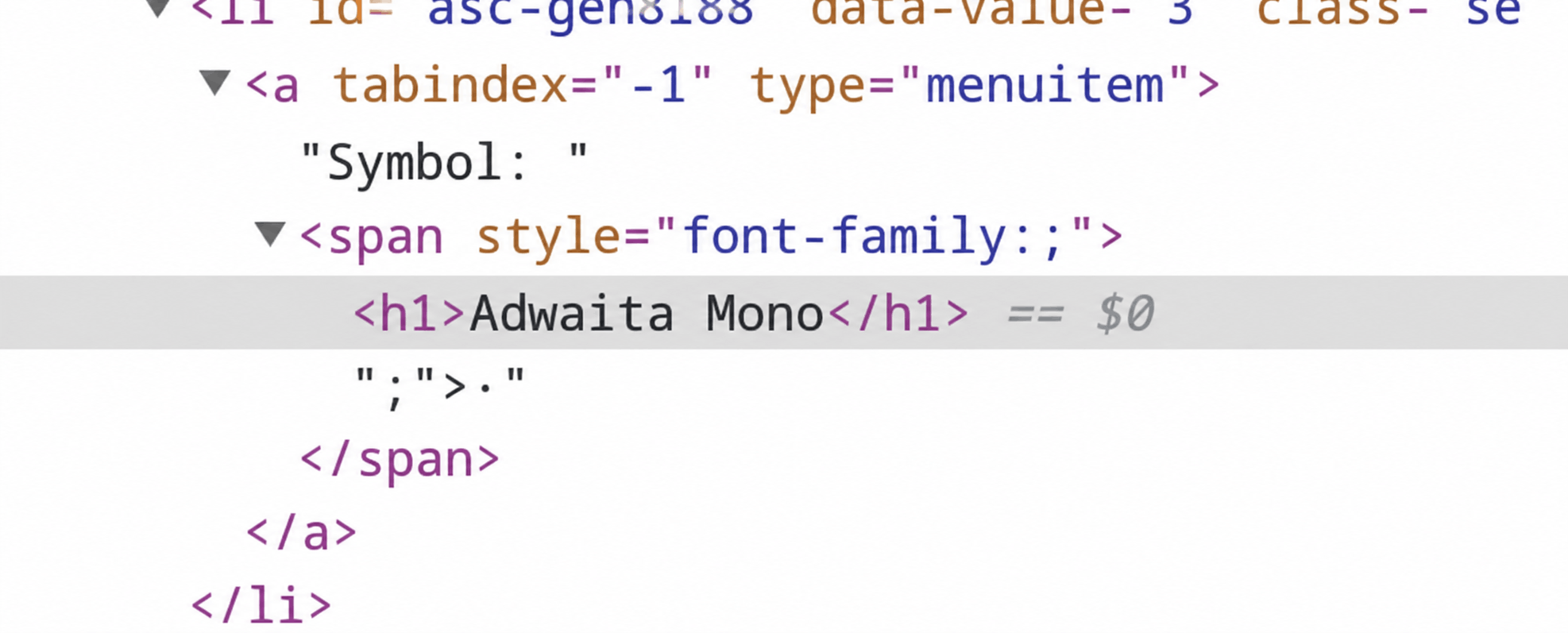
style. Source: original article.Malicious JavaScript embedded in a font name executes when the List parameters modal window opens.
Exploitation example:
- An attacker adds a custom list type to the document. The font name contains
;"><script>{{JavaScript code}}</script>. - When the victim opens the List parameters window, the script executes.
CVE-2025-68936
| Severity | Medium |
| CVSS score | 6.4 |
| CVSS vector string | CVSS:3.1/AV:N/AC:L/PR:L/UI:N/S:C/C:L/I:L/A:N |
| Privileges required | None |
This zero-click XSS vulnerability is the most dangerous of the three—it triggers on document opening.
Description. Document theme names in the drop-down list are not escaped. An attacker can craft a document with a theme whose name carries a payload. The vulnerable drop-down list is integrated into the page DOM when the file opens, so the XSS payload runs automatically on document open—without any user interaction.
Exploitation example:
- An attacker injects a theme with a payload similar to
<script><{{JavaScript code}}</script>. - JavaScript code executes automatically when the document is opened.
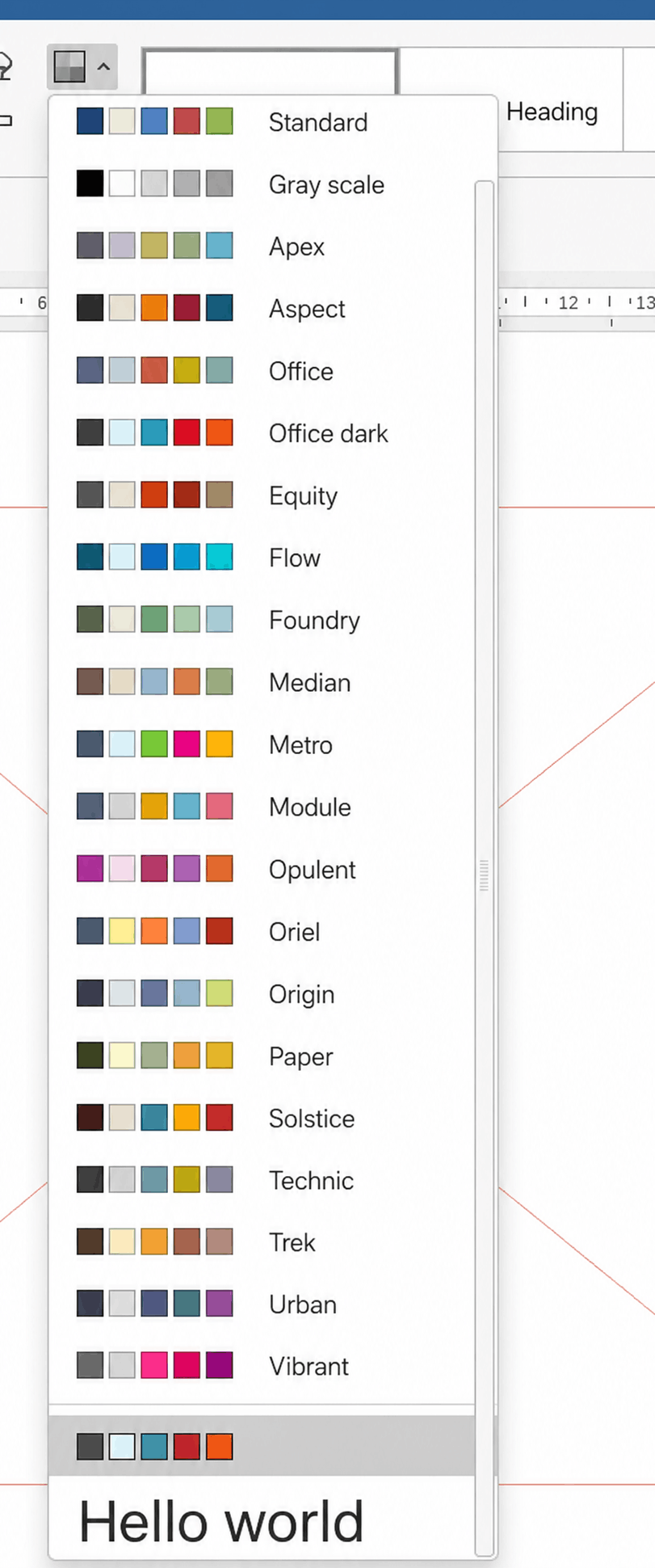
<h1>Hello World</h1> payload injected into page serves as PoC. Source: original article.Any of the three XSS vulnerabilities enables arbitrary JavaScript code execution. However, CVE-2025-68936 is the most dangerous—the malicious code runs upon document opening without any further user interaction.
RCE: Chromium Web Engine Compromise
CVE-2023-2033
| Severity | Critical |
| CVSS score | 9.3 |
| CVSS vector string | CVSS:3.1/AV:L/AC:L/PR:N/UI:N/S:C/C:H/I:H/A:H |
| Privileges required | None |
Description. ONLYOFFICE Desktop Editors uses Chromium Embedded Framework 109.0.5414.120, which contains a JavaScript V8 engine affected by CVE-2023-2033. Exploiting any one of the XSS vulnerabilities above turns arbitrary JavaScript into full remote code execution. Only the key aspects of CVE-2023-2033 are covered here, since the bug merits an article of its own.
The vulnerability lives in Turbofan, V8’s JIT compiler. A compilation error lets an attacker obtain the hole value—an internal representation of an empty slot in JavaScript arrays. Once this value is in hand, the attacker can abuse type confusion with array indexes to achieve RCE.
Exploitation example:
- Obtain the V8 internal
holevalue. - Abuse
type confusionto substituteholewith array indexes, enabling out-of-bound writes. - Retrieve the
addrof,fakeobj,sandbox_read, andsandbox_writeprimitives to read and write arbitrary values anywhere inside theV8 sandbox heap. - Generate intermediate shellcode via JIT spraying.
- Use the acquired primitives to replace a JavaScript function’s reference with the generated shellcode.
- Prepare a payload and transfer execution to it via the intermediate shellcode.
At this point arbitrary code can run on the machine whenever a specially crafted file is opened. That is already a serious impact—but the chain goes further and attempts privilege escalation.
LPE: Update Service Exploitation
CVE-2026-41030
| Severity | Medium |
| CVSS score | 6.2 |
| CVSS vector string | CVSS:3.1/AV:L/AC:L/PR:N/UI:N/S:U/C:N/I:N/A:H |
| Privileges required | Unprivileged Windows user |
Description. To carry out update tasks, the service exposes a local port for communication over UDP. One of those tasks clears the temporary directory by deleting every file whose name begins with a string supplied over the protocol, searching recursively through nested directories. Because the matched files are not validated before deletion, an attacker can point the routine at a symbolic link (a junction) and obtain an arbitrary-file-deletion primitive running as NT AUTHORITY\SYSTEM.
ONLYOFFICE vulnerable code segment:
// csvcmanager.cpp (project:desktop-apps)
void CSvcManager::clearTempFiles(const tstring &prefix, const tstring &except)
{
    m_future_clear = std::async(std::launch::async, [=]() {
#ifdef _WIN32
        if (NS_File::fileExists(NS_File::appPath() + RESTART_BATCH))
            NS_File::removeFile(NS_File::appPath() + RESTART_BATCH);
#endif
        tstring _error;
        list<tstring> filesList;
        if (!NS_File::GetFilesList(NS_File::tempPath(), &filesList, _error, true)) {
            NS_Logger::WriteLog(DEFAULT_ERROR_MESSAGE + _T(" ") + _error);
            return;
        } // returning files list to delete, big recursive cycle to find all files that matches pattern
        for (auto &filePath : filesList) {
#ifdef _WIN32
            if (PathMatchSpec(filePath.c_str(), L"*.json") || PathMatchSpec(filePath.c_str(), ARCHIVE_PATTERN)
                || PathMatchSpec(filePath.c_str(), L"*.msi") || PathMatchSpec(filePath.c_str(), L"*.exe")) {
#else
            if (fnmatch("*.json", filePath.c_str(), 0) == 0 || fnmatch(ARCHIVE_PATTERN, filePath.c_str(), 0) == 0) {
#endif
                tstring lcFilePath(filePath);
                std::transform(lcFilePath.begin(), lcFilePath.end(), lcFilePath.begin(), ::tolower);
                if (lcFilePath.find(prefix) != tstring::npos && filePath != except)
                    NS_File::removeFile(filePath); // deleting files
            }
        }
        tstring updPath = NS_File::parentPath(NS_File::appPath()) + UPDATE_PATH;
        if (except.empty() && NS_File::dirExists(updPath))
            NS_File::removeDirRecursively(updPath);
    });
}
Exploitation example:
- Start the installation of a specially crafted MSI package.
- Create
0000\prefix_filename.jsonand0001\prefix_filename.jsonin the temporary directory. - Protect
0000\prefix_filename.jsonfrom deletion. - Send a package with a command to clean up the temporary directory using the prefix argument. During request processing, the update service collects the list of files to delete—including
0000\prefix_filename.jsonand0001\prefix_filename.json. Once the list is gathered, the service tries to delete0000\prefix_filename.json, but the deletion protection makes theDeleteFileWinAPI call fail until the protection is lifted. - Replace
0001\prefix_filename.jsonwith a symbolic link toConfig.Msi:$INDEX_ALLOCATIONwhile the service is still waiting on the deletion of0000\prefix_filename.json. - Disable the
0000\prefix_filename.jsondeletion protection. The update service continues processing the list, which still contains0001\prefix_filename.json. Because of the symbolic-link substitution,Config.Msi:$INDEX_ALLOCATIONis deleted instead, which also removes theConfig.Msidirectory. - Create a
Config.Msidirectory, keep its handle, and subscribe to write operations for files inside it. - Restart the installation of the crafted MSI package. During installation, the directory permissions are overwritten back to the original ones (
NT AUTHORITY\SYSTEM). - Detect the rollback script record.
- Reclaim rights to modify
Config.Msias a non-privileged user. This is possible because we hold an open handle with rights to modify the DACL. - Replace the rollback script with a malicious one that, for example, establishes a reverse shell connection to an arbitrary server.
- Cancel the installation, which triggers the malicious rollback script to execute under
NT AUTHORITY\SYSTEM.
Full Exploitation Cycle
Key Takeaways
- OnlyShells chains five vulnerabilities in ONLYOFFICE Desktop Editors into a single document-open-to-SYSTEM attack, with CVE-2025-68936, CVE-2023-2033, and CVE-2026-41030 forming the minimal path.
- The most dangerous link is a zero-click XSS (CVE-2025-68936): an unescaped document theme name executes JavaScript automatically the moment the file is opened, requiring no victim interaction.
- The bundled Chromium Embedded Framework 109.0.5414.120 carries the critical V8 Turbofan type-confusion bug CVE-2023-2033, turning JavaScript execution into native RCE inside an unsandboxed process.
- The SYSTEM-privileged update service exposes a UDP-controlled temp-cleanup task that deletes unvalidated files, yielding an arbitrary-delete primitive that is escalated to code execution via a Config.Msi rollback-script hijack.
- Running an out-of-support Chromium build without sandboxing, combined with a high-privilege helper service, is the structural root cause that makes the whole chain viable.
- The vendor fixed the issues in ONLYOFFICE Desktop Editors 9.3.0.
Defensive Recommendations
- Update immediately: upgrade ONLYOFFICE Desktop Editors to version 9.3.0 or later, which remediates the full OnlyShells chain.
- Treat documents as untrusted input: open documents from unknown or external sources in isolated environments (disposable VMs, sandboxes) given the zero-click nature of CVE-2025-68936.
- Monitor the update service: alert on unexpected UDP traffic to the update service’s local port and on temp-directory file churn that resembles junction/symlink swapping.
- Watch Config.Msi tampering: detect deletion and recreation of the
Config.Msidirectory and rollback-script modification during MSI transactions—classic signals of this LPE technique. - Constrain the editor process: apply application allow-listing and restrict child-process spawning from the editor to limit post-exploitation, since the renderer runs unsandboxed.
- Deploy behavioural detection: endpoint detection and response tooling that flags SYSTEM-level shells and reverse-shell activity spawned from document workflows catches the post-exploitation stage even if the initial bug is unpatched.
- Inventory embedded engines: track the Chromium/CEF versions shipped inside desktop applications; out-of-support engines like 109.x re-expose long-patched browser CVEs.
Conclusion
CVE-2025-68936, CVE-2023-2033, and CVE-2026-41030 together comprise the OnlyShells chain, which enables arbitrary code execution with SYSTEM privileges when a specially crafted file is opened. To defend against OnlyShells, update ONLYOFFICE Desktop Editors to version 9.3.0. According to the original authors, BI.ZONE EDR correctly detects the post-exploitation activity that results from the chain. The case is a reminder that embedding an out-of-support browser engine and pairing it with a high-privilege update service can quietly reconstitute a full document-open-to-SYSTEM attack path.
Original text: “Breaking ONLYOFFICE in 3 steps: OnlyShells vulnerability chain” by the BI.ZONE Vulnerability Research team at BI.ZONE.