

Executive Summary
Every Windows installation receives a unique 64-bit Global Device Identifier (GDID) that serves as Microsoft’s canonical device-level tracking mechanism. The GDID originates as a plaintext registry value stored in the current user’s hive under HKCU\SOFTWARE\Microsoft\IdentityCRL\ExtendedProperties with read/write access requiring no administrative elevation. However, the genuine binding occurs server-side: Microsoft’s authentication infrastructure links the local registry value to permanent hardware fingerprints derived from SMBIOS UUID, TPM Endorsement Key, and disk/network serial numbers. The identifier has been used in criminal investigations for direct device-to-user attribution and is present in nearly every Microsoft telemetry event, Windows Store transaction, and authentication call. While local modifications are trivial, server-side hardware validation makes impersonation practically impossible without complete hardware replacement or TPM cryptographic relay.
GDID Basics
Every Windows installation receives a unique 64-bit identifier. Upon first internet connection, systems query login.live.com for this value, which Microsoft stores as 16 hexadecimal characters (example: 0018AAAABBBBCCCC). Internally at Microsoft, this identifier is called a PUID—Passport Unique Identifier—deriving its name from .NET Passport, the authentication platform that eventually evolved into Microsoft Account.
Namespace prefixes indicate identity category. The prefix 0x0018 denotes a device identifier, while 0x0003 indicates a user account identifier. Each Windows installation receives one device GDID, while each Microsoft Account on that installation receives its own user PUID. Reinstalling Windows generates a fresh number; yet Microsoft’s servers recognize the same physical machine through unchanged hardware characteristics.
Where Does It Live on Disk?
Layer 1: Primary Storage (IdentityCRL Extended Properties)
The plaintext registry entry resides at:
HKCU\SOFTWARE\Microsoft\IdentityCRL\ExtendedProperties
Value name: LID
Type: REG_SZ
Format: 16 hexadecimal characters
Example: 0018AAAABBBBCCCC
No administrator privileges are required to read or modify this value. Any unprivileged user process can access the current user’s registry hive.
Layer 2: Device Ticket (DPAPI-Encrypted Certificate)
A second storage location holds a DPAPI-wrapped X.509 certificate containing the PUID and an embedded private key:
HKCU\...\Immersive\production\Token\{AppContainerSID}\DeviceTicket
Type: REG_BINARY
Contents: DPAPI-encrypted X.509 certificate with PUID and private key
Header GUID: df9d8cd0-1115-11d1-8c7a-00c04fc297eb
Layer 3: User PUID Mapping (HKLM Negative Cache)
A third location maintains mappings between user PUIDs and local SIDs:
HKLM\SOFTWARE\Microsoft\IdentityCRL\NegativeCache\<UserPUID>_<UserSID>
Contains subkey names pairing user PUIDs to local SIDs
Useful for multi-user forensics
All three storage locations are managed by the service wlidsvc.dll (Microsoft Account Sign-in Assistant), which runs under svchost.exe with LocalSystem privileges. Debug strings recovered from the binary reveal internal architecture:
DeviceIdStore::LoadFromRegistry
DeviceIdStore::GetRegistryPath
DeviceIdStore::LogToRegistry
CDeviceIdentityBase::CreateNewDeviceIdentity
CDeviceIdentityBase::BindDeviceToHardware
CDeviceIdentityBase::GetDeviceCert
CAssociateDeviceRequest::ParseResponseBody
The binary’s embedded source path reveals: onecoreuap\ds\ext\live\identity\ntservice\lib\svccommon\deviceidstore.cpp
How Microsoft Issues It
Initial Registration Process
Upon first internet connectivity, wlidsvc sends a POST request to https://login.live.com/ppsecure/deviceaddcredential.srf containing a SOAP envelope with hardware descriptors extracted from the system.
Hardware Descriptors Transmitted
| Component Tag | Descriptor |
|---|---|
| 4097, 4098 | System manufacturer |
| 4099 | Product name |
| 4100 | Version |
| 4101 | SMBIOS system serial |
| 4102 | SMBIOS UUID |
| 4112, 4113 | Disk serial numbers |
| 4128 | MAC address |
| 4130 | Network adapter bus name |
| 4144 | 32-byte value (undocumented) |
| 8195, 8196, 8197 | Mystery values (undocumented as of 2026) |
Additionally, the TPM public key is transmitted to the server.
Server Response
Microsoft’s server processes these hardware descriptors and returns a SOAP response:
<DeviceAddResponse Success="true">
    <success>true</success>
    <puid>0018XXXXXXXXXXXX</puid>
    <DeviceTpmKeyState>0</DeviceTpmKeyState>
    <License>...</License>
    ...
</DeviceAddResponse>
The client does not compute this identifier; Microsoft’s server assigns it based on an undocumented algorithm operating on the hardware descriptors. Identical hardware always resolves to the same linkable identity server-side, regardless of local registry modifications.
How Microsoft Actually Uses It to Track
The GDID functions as a central indexing mechanism across Microsoft’s ecosystem:
- Microsoft Store: Purchases, licenses, and app installations indexed by device PUID
- Windows Activation: Digital licenses tied to MSA accounts indexed by device PUID
- Connected Devices Platform (CDP): The
cdp.dllcomponent callsGetStableDeviceIdFromProvider, retrieves the PUID, prependsg:, and publishes todds.microsoft.com - Windows Notification Service (WNS): Push channel URIs contain the PUID in the path
- Delivery Optimization:
dosvcreports the GDID asUCDOStatus.GlobalDeviceId - Telemetry: Nearly every
Microsoft.Windows.*ETW event includes aDevice.IDfield containing the GDID; optional diagnostics transmission includes crash reports and heartbeats - Microsoft Edge: With enhanced diagnostics enabled, Edge transmits URL-visit records tagged with the GDID
Legal Precedent
The case US v. Peter Stokes (N.D. Ill., July 2026) established legal precedent for GDID-based device attribution. A defendant’s ngrok account was tied to a specific Windows installation using only a Global Device Identifier retrieved from Microsoft’s records. Microsoft’s court-provided representative described GDID as “a persistent, device-level identifier designed to uniquely identify an installation” of Windows.
Pulling Your Own GDID Out
PowerShell Method
$lid  = (Get-ItemProperty -Path 'HKCU:\SOFTWARE\Microsoft\IdentityCRL\ExtendedProperties' -Name LID).LID
$puid = [Convert]::ToUInt64($lid, 16)
"LID  : $lid"
"PUID : $puid"
"GDID : g:$puid"
Tool Options
gdid.exe(Rust implementation)get_gdid.exe(C implementation)get_gdid.x64.o/get_gdid.x86.o(Cobalt Strike BOF)
Sample Output
[+] Windows GDID + hardware descriptor report
    wlidsvc.dll -> HKCU IdentityCRL\ExtendedProperties\LID

[*] Passport Unique ID  (HKCU\SOFTWARE\Microsoft\IdentityCRL\ExtendedProperties\LID)
    LID (hex)            : 0018AAAABBBBCCCC
    PUID (dec)           : 6943049711865036
    Namespace            : 0x0018 (device PUID)
    GDID                 : g:6943049711865036

[*] Neighbouring identifiers
    MachineGuid                  : 12345678-1234-1234-1234-123456789abc
    SQM MachineId                : {12345678-1234-1234-1234-123456789ABC}
    IDCRL version                : 8.0.26100.8521
    Login URL                    : https://login.live.com
    Device DNS suffix            : .devicedns.live.com

[*] User PUIDs  (HKLM\SOFTWARE\Microsoft\IdentityCRL\NegativeCache)
    0003DEADBEEF1234  dec=1089262744179252  sid=S-1-5-21-1111111111-2222222222-3333333333-1001

[*] SMBIOS  (GetSystemFirmwareTable 'RSMB')
    SMBIOS version       : 3.5
    Manufacturer  (4097) : <Your PC Manufacturer>
    Product       (4099) : <Your PC Model>
    Version       (4100) : 1.0
    Serial number (4101) : SN0123456789ABC
    UUID          (4102) : ABCDEF01-2345-6789-ABCD-EF0123456789
    SKU                  :
    Family               : <Your PC Family>

[*] TPM Endorsement Key  (Microsoft Platform Crypto Provider)
    EKPub blob size      : 283 bytes
    EKPub SHA-256        : deadbeefcafefeeddeadbeefcafefeeddeadbeefcafefeeddeadbeefcafefeed

[*] Physical disks  (IOCTL_STORAGE_QUERY_PROPERTY)
    PhysicalDrive0  serial=EXAMPLE_NVME_SERIAL_1234   model=<Sample NVMe SSD>
    PhysicalDrive1  serial=EXAMPLE_SATA_SERIAL_5678   model=<Sample SATA SSD>

[*] MAC addresses  (GetAdaptersAddresses)
    eth    00:00:5E:00:53:11  Ethernet
    wifi   00:00:5E:00:53:22  Wi-Fi
No administrative elevation is required. The tools use standard Windows APIs accessible to unprivileged processes.
Mitigations
Common mitigation strategies have varying effectiveness:
| Action | What Breaks | Stops Tracking? |
|---|---|---|
| Disable wlidsvc | Store, digital licenses, UWP apps, CDP, WNS | Yes, until MSA sign-in (then re-registers) |
| Firewall login.live.com | Same as above | Same as above |
| Delete LID, restart wlidsvc | Nothing | No—new PUID on disk, server links to same hardware |
| Reinstall Windows | Nothing (clean slate) | No—new cert/PUID, same hardware linked by server |
| Replace hardware (motherboard, disks, NIC) | Your wallet | Yes—new SMBIOS UUID, serials, MACs, TPM EK |
Virtual machines provide the best practical mitigation since they can isolate from persistent hardware identifiers.
Can We Patch a Different GDID?
Impersonating another device’s GDID fails at progressively deeper architectural layers. Four escalating attempts each encounter distinct barriers.
Attempt 1: LID Overwrite Only
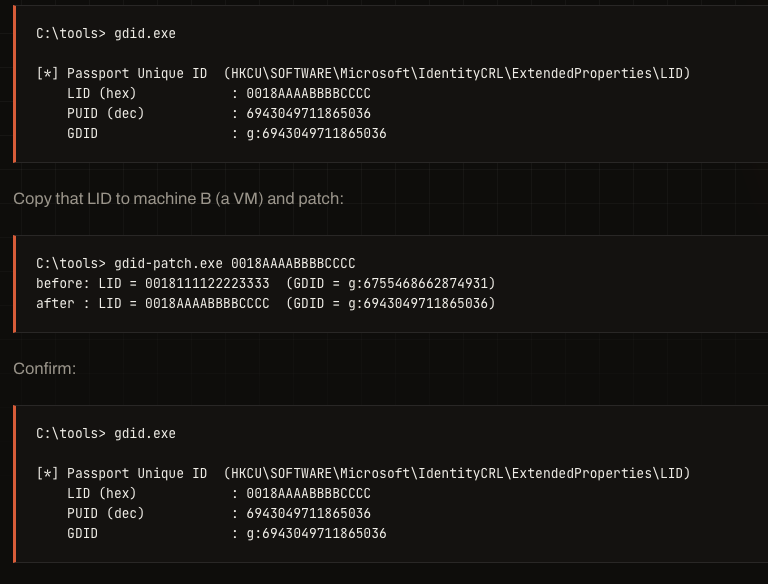
Extracting a GDID from a source machine and patching it into a target system:
gdid-patch.exe 0018AAAABBBBCCCCThe registry value updates locally, but the modification self-reverts within minutes. The DeviceTicket blob (Layer 2) retains the target machine’s real certificate with its original PUID. When wlidsvc contacts Microsoft’s servers, it sends the mismatched certificate. Microsoft’s server detects the mismatch and overwrites the LID back to the target machine’s original value via DeviceIdStore::LoadFromRegistry.
Attempt 2: Cert Import (LID + Device Certificate)
Extracting and re-encrypting the source machine’s DeviceTicket under the target machine’s DPAPI keys:
- Extract and decrypt DeviceTicket from source machine A (requires SYSTEM privileges or LSASS key extraction)
- Re-encrypt under target VM’s DPAPI keys
- Import to VM’s DeviceTicket registry path
- Set matching LID and restart
wlidsvc
The spoofed certificate survives until the next network authentication. The target VM now holds a valid Microsoft-signed certificate for the source machine’s PUID, preventing self-revert. However, the next wlidsvc network call sends the source machine’s certificate paired with the target machine’s actual hardware descriptors. Microsoft’s server detects the hardware mismatch and forces a fresh registration with a new PUID.
Attempt 3: Cert Import + Hardware Spoofing
Configuring the hypervisor to match the source machine’s hardware characteristics:
- SMBIOS UUID (tag 4102): VMware
.vmx→uuid.bios = "..."`; QEMU →-smbios type=1,uuid=...; Hyper-V →Set-VMFirmware - SMBIOS serial/manufacturer/model (tags 4097-4101): Hypervisor configuration files
- MAC addresses (tag 4128): Hypervisor NIC settings
- Disk serials (tags 4112-4113): VMware
.vmdkdescriptor; QEMU →-drive serial=...
This approach fails at TPM Endorsement Key cryptographic verification. The source machine has a physical TPM with a unique EK private key that never leaves the chip. Microsoft's authentication protocol follows this sequence:
- Server encrypts random nonce with EK public key, sends to device
- Device's TPM decrypts using EK private key (via
TPM2_ActivateCredential) - Device returns decrypted nonce as proof of possession
The target VM's vTPM has a different key pair and cannot decrypt challenges for the source machine's public key. Three options exist: remove the vTPM entirely (unknown server acceptance), use vTPM with its own EK (unknown if server validates against recorded EK), or relay the TPM challenge to the source machine's physical TPM using modified swtpm (engineering-intensive with no published tools).
Attempt 4: Nuke and Re-register
Complete removal and re-initialization:
Stop-Service wlidsvc
Remove-Item 'HKCU:\SOFTWARE\Microsoft\IdentityCRL' -Recurse -Force
Remove-Item 'HKLM:\SOFTWARE\Microsoft\IdentityCRL' -Recurse -Force
Start-Service wlidsvc
This generates a fresh PUID on the target machine. However, Microsoft's server-side record still maps the new PUID to the same hardware fingerprint. The local cache changes; the source of truth remains unchanged.
Summary of Patching Attempts
| Attempt | Layers Patched | Local Survival | Server Survival |
|---|---|---|---|
| 1 | Layer 1 only | Minutes (self-reverts) | No |
| 2 | Layers 1 + 2 | Until next wlidsvc call | No (hardware mismatch) |
| 3 | Layers 1 + 2 + 3 (partial) | Yes | Unknown (TPM EK blocker) |
| 4 | Resets 1 + 2 | Yes (fresh PUID) | Server links new PUID to same HW |
The TPM Endorsement Key represents the cryptographic barrier. Three open questions remain for further testing: (1) Does Microsoft accept a device that previously had a TPM now appearing without one? (2) Does the server validate the EK against its recorded value? (3) If both fail, can a TPM relay on QEMU with modified swtpm achieve full impersonation?
Where Does That Leave Us
The GDID's visibility and accessibility represent an unusual design choice compared to other operating systems. The identifier exists as plaintext in the current user's registry, readable by any unprivileged process, unchanged for over a decade, and attached to every telemetry event, Store transaction, activation call, and push channel. Prior to the Stokes criminal case, public awareness remained minimal.
Local tools can read and overwrite the registry value in seconds using standard Windows APIs. Neither tool changes what Microsoft knows about the device, since the server maintains the authoritative record tied to hardware characteristics. GDID never rotates and combines with SMBIOS UUID and TPM Endorsement Key to fingerprint hardware permanently. The warning stands: your real GDID is not something to share publicly due to law enforcement accessibility.
Key Takeaways
- GDID is a persistent device identifier functioning as Microsoft's "source of truth" on authentication servers, independent of local registry state
- Local registry modifications are cosmetic and do not survive server-side hardware validation using SMBIOS UUID, disk serials, MAC addresses, and TPM Endorsement Keys
- TPM EK cryptography represents the deepest technical barrier to device impersonation, making proof-of-possession impossible without access to the physical chip
- The identifier has been used in criminal investigations for direct device-to-user attribution, establishing legal precedent for GDID-based forensics
- No practical mitigation exists except complete hardware replacement or isolated virtual machines; even Windows reinstallation results in server-side hardware linking
- The GDID appears in virtually every Windows telemetry event, Store transaction, and authentication flow, making it a central tracking mechanism across Microsoft's ecosystem
- Tools for GDID extraction require no administrative privileges and function with standard Windows APIs, enabling instant device fingerprinting by any user process
Defensive Recommendations
- Audit local processes: Monitor registry queries to
HKCU\SOFTWARE\Microsoft\IdentityCRL\ExtendedPropertiesand log all read/write operations to theLIDvalue from non-system contexts - Forensic baseline: Document the GDID and associated hardware descriptors (SMBIOS UUID, TPM EK SHA-256, disk serials) on systems before suspicion of compromise; server-side linking makes baseline deviation meaningful
- Hardening VMs: If using virtual machines for sensitive operations, disable vTPM or configure it with isolated DPAPI keys to prevent certificate cloning from physical systems
- Telemetry controls: Recognize that telemetry disable only prevents transmission, not collection; the GDID field is included in all ETW events regardless of diagnostics settings
- MSA awareness: Educate users that connecting a MSA triggers device binding to hardware; for high-security contexts, require local accounts or airgapped systems
- Legal discovery: Prepare for the likelihood that law enforcement can and will request GDID records from Microsoft in future investigations; do not assume registry-only visibility
- Hardware tracking: Understand that hardware descriptors (SMBIOS, TPM EK, disk serials, MAC) are the source of truth; physical device changes are the only certain way to break server-side linking
Conclusion
The Windows Global Device Identifier represents a sophisticated but largely invisible tracking mechanism that binds local registry state to permanent hardware characteristics through server-side cryptographic validation. While the plaintext registry value appears trivial to modify, the underlying architecture makes device impersonation practically impossible without either complete hardware replacement or TPM-level cryptographic relay. The identifier's use in criminal proceedings demonstrates its forensic value and permanence. Organizations must treat GDID as a canonical device fingerprint linked to authentication logs, telemetry records, and Store transactions on Microsoft's servers, not as a cosmetic registry value subject to local manipulation.
Original text: "GDID: The Windows Global Device Identifier" by Smukx at ZeroTrace Lab.